

Presentation#1
computer architecture and organization
Topic: bios,boot,process,program
loader and stack
Group Members
Rabia rasheed
FA13-BSE-010
Areeba akbar
FA13-BSE-014
Ramsha kaif ul sehar
FA13-bse-012
Bios
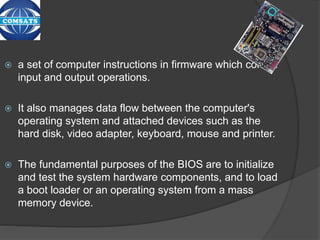
 a set of computer instructions in firmware which control
input and output operations.
 It also manages data flow between the computer's
operating system and attached devices such as the
hard disk, video adapter, keyboard, mouse and printer.
 The fundamental purposes of the BIOS are to initialize
and test the system hardware components, and to load
a boot loader or an operating system from a mass
memory device.
Bios
Boot
 To load the first piece of software that starts
a computer.
 A boot loader is a program whose task is to
load a bigger program, such as the operating
system.
 When the computer is powered on, it
typically does not have an operating system
or its loader in random access memory
(RAM)
Types of Booting
 There are two types of booting
1.Cold booting
when the computer is started after having been
switched off.
2.Warm booting
when the operating system alone is
restarted
(without being switched off) after a system
crash or 'freeze.'
Boot process
 There are two boot processes.
1. Boot priority
2. Boot failure
1. Boot priority
The boot priority is the order in which these
devices are search to find a valid bootable
operating system.
2.Boot failure
Boot failure means when you lose hard drive of
your computer.
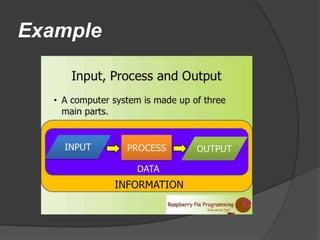
PROCESS
What is process?
 Process is an instance of a computer program
that is being executed. It contains the program
code and its current activity.
 In UNIX , a process is started when a program is
initiated.
 An application that is being shared by multiple
users will generally have one process at some
stage of execution for each user.
Example
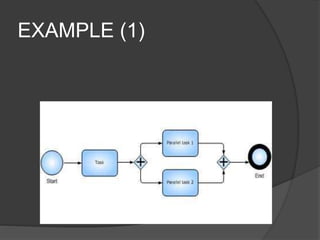
EXAMPLE (1)
SUBPROCESS
 Child process
A child process in computing is a proces created by
another process .
 Parent process:
A parent process is a process that has created one
or more child processes.
 Zombie process:
A zombie process is a process that has occurs for child
processes where the entry is still needed to allow the
parent process to read status once the exit status is
read via the wait system call, the zombie's entry is
removed from the process table and it is said to be
"reaped.
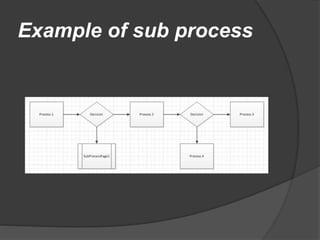
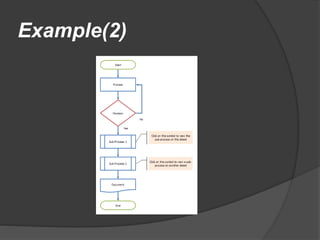
Example of sub process
Example(2)
PROCESS STATE
 In a multitasking computer system,
processes may occupy a variety of
states.
 They are a useful abstraction for the
understanding of processes.
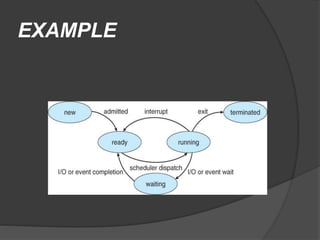
Process states
 New
 Ready
 Runing
 Waiting
 Terminated
EXAMPLE
Process and Threads
 Threads are used for small tasks,
whereas processes are used for more
'heavyweight' tasks – basically the
execution of applications.
Differences
Threads
 Will by default share memory
 Will share file descriptors
 Will share filesystem context
Processes
 Will by default not share memory
 Most file descriptors not shared
 Don't share filesystem context
TYPES OF PROCESS
 Real time process:
 Process data immediatly.
 Batch process:
 Process data automatically.
 Online process:
 In this user interact direct with computer
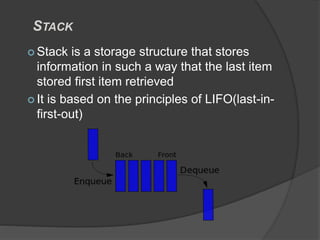
STACK
 Stack is a storage structure that stores
information in such a way that the last item
stored first item retrieved
 It is based on the principles of LIFO(last-in-
first-out)
 Register stack
 A stack can be organized as collection of
finite number of register that are used to
store temporary information during the
execution of a programm .
 Stack pointer
 Stack pointer is a register that hold the
address of top of element of the stack
Memory stack
A stack can be implemented in a
random access memory
(RAM)attached to a CPU
The starting memory location of the
stack is specified by the processor
register as stack pointer
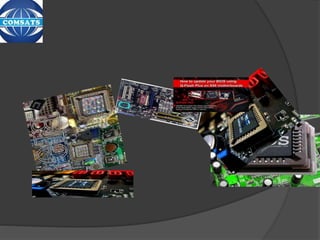
bios booting process

bios booting process

  • 1.
    Presentation#1 computer architecture andorganization Topic: bios,boot,process,program loader and stack
  • 2.
    Group Members Rabia rasheed FA13-BSE-010 Areebaakbar FA13-BSE-014 Ramsha kaif ul sehar FA13-bse-012
  • 3.
    Bios  a setof computer instructions in firmware which control input and output operations.  It also manages data flow between the computer's operating system and attached devices such as the hard disk, video adapter, keyboard, mouse and printer.  The fundamental purposes of the BIOS are to initialize and test the system hardware components, and to load a boot loader or an operating system from a mass memory device.
  • 4.
  • 5.
    Boot  To loadthe first piece of software that starts a computer.  A boot loader is a program whose task is to load a bigger program, such as the operating system.  When the computer is powered on, it typically does not have an operating system or its loader in random access memory (RAM)
  • 6.
    Types of Booting There are two types of booting 1.Cold booting when the computer is started after having been switched off. 2.Warm booting when the operating system alone is restarted (without being switched off) after a system crash or 'freeze.'
  • 7.
    Boot process  Thereare two boot processes. 1. Boot priority 2. Boot failure 1. Boot priority The boot priority is the order in which these devices are search to find a valid bootable operating system. 2.Boot failure Boot failure means when you lose hard drive of your computer.
  • 8.
  • 9.
    What is process? Process is an instance of a computer program that is being executed. It contains the program code and its current activity.  In UNIX , a process is started when a program is initiated.  An application that is being shared by multiple users will generally have one process at some stage of execution for each user.
  • 10.
  • 11.
  • 12.
    SUBPROCESS  Child process Achild process in computing is a proces created by another process .  Parent process: A parent process is a process that has created one or more child processes.  Zombie process: A zombie process is a process that has occurs for child processes where the entry is still needed to allow the parent process to read status once the exit status is read via the wait system call, the zombie's entry is removed from the process table and it is said to be "reaped.
  • 13.
  • 14.
  • 15.
    PROCESS STATE  Ina multitasking computer system, processes may occupy a variety of states.  They are a useful abstraction for the understanding of processes.
  • 16.
    Process states  New Ready  Runing  Waiting  Terminated
  • 17.
  • 18.
    Process and Threads Threads are used for small tasks, whereas processes are used for more 'heavyweight' tasks – basically the execution of applications.
  • 19.
    Differences Threads  Will bydefault share memory  Will share file descriptors  Will share filesystem context Processes  Will by default not share memory  Most file descriptors not shared  Don't share filesystem context
  • 20.
    TYPES OF PROCESS Real time process:  Process data immediatly.  Batch process:  Process data automatically.  Online process:  In this user interact direct with computer
  • 27.
    STACK  Stack isa storage structure that stores information in such a way that the last item stored first item retrieved  It is based on the principles of LIFO(last-in- first-out)
  • 28.
     Register stack A stack can be organized as collection of finite number of register that are used to store temporary information during the execution of a programm .  Stack pointer  Stack pointer is a register that hold the address of top of element of the stack
  • 29.
    Memory stack A stackcan be implemented in a random access memory (RAM)attached to a CPU The starting memory location of the stack is specified by the processor register as stack pointer