Process
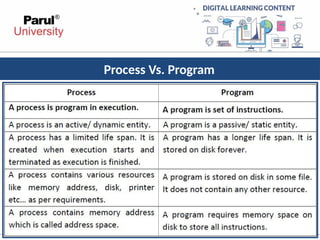
• A processis a program in execution.
• Process is not as same as program code but a lot more than it.
• A process is an 'active' entity as opposed to program which is
considered to be a 'passive' entity. Attributes held by process
include hardware state, memory, CPU etc.
5.
Main OS ProcessRelated Goals
• Interleave the execution of existing processes to maximize
processor utilization
• Provide reasonable response time
• Allocate resources to processes
• Support inter-process communication (and synchronization)
and user creation of processes
6.
How are thesegoals achieved ?
• Schedule and dispatch processes for execution by the processor
• Implement a safe and fair policy for resource allocation
to processes
• Respond to requests by user programs
• Construct and maintain tables for each process managed by
the operating system
7.
Process Creation
?When isa new process created
• System initialization (Daemons)
• Execution of a process creation system call by a running process
• A user request to create a process
• Initiation of a batch job
8.
Process Termination
?When doesa process terminate
• Normal exit (voluntary)
• Error exit (voluntary)
• Fatal error (involuntary)
• Killed by another process (involuntary)
9.
Contd…
•Programs are executable(.exe)files generally
stored in Secondary Memory.
•In order to execute program it must be loaded in
main memory.
•When a program is loaded into the memory and
it becomes process.
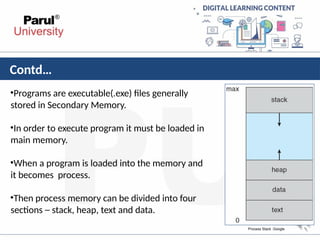
•Then process memory can be divided into four
sections ─ stack, heap, text and data.
Process Stack :Google
10.
Contd..
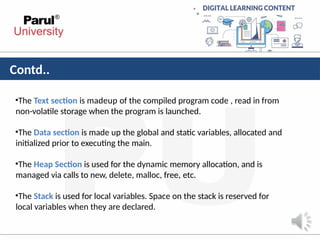
•The Text sectionis madeup of the compiled program code , read in from
non-volatile storage when the program is launched.
•The Data section is made up the global and static variables, allocated and
initialized prior to executing the main.
•The Heap Section is used for the dynamic memory allocation, and is
managed via calls to new, delete, malloc, free, etc.
•The Stack is used for local variables. Space on the stack is reserved for
local variables when they are declared.
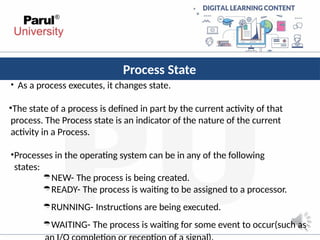
Process State
• Asa process executes, it changes state.
•The state of a process is defined in part by the current activity of that
process. The Process state is an indicator of the nature of the current
activity in a Process.
•Processes in the operating system can be in any of the following
states:
NEW- The process is being created.
READY- The process is waiting to be assigned to a processor.
RUNNING- Instructions are being executed.
WAITING- The process is waiting for some event to occur(such as
13.
Process State &Description
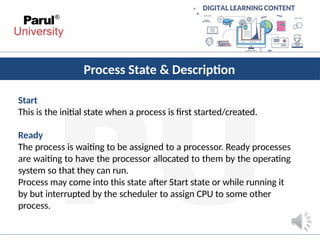
Start
This is the initial state when a process is first started/created.
Ready
The process is waiting to be assigned to a processor. Ready processes
are waiting to have the processor allocated to them by the operating
system so that they can run.
Process may come into this state after Start state or while running it
by but interrupted by the scheduler to assign CPU to some other
process.
14.
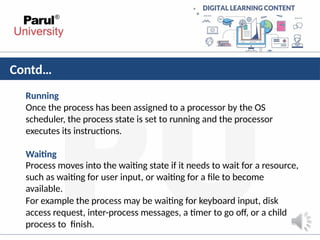
Contd…
Running
Once the processhas been assigned to a processor by the OS
scheduler, the process state is set to running and the processor
executes its instructions.
Waiting
Process moves into the waiting state if it needs to wait for a resource,
such as waiting for user input, or waiting for a file to become
available.
For example the process may be waiting for keyboard input, disk
access request, inter-process messages, a timer to go off, or a child
process to finish.
15.
Contd..
Terminated or Exit
Oncethe process finishes its execution, or it is terminated by the
operating system, it is moved to the terminated state where it waits
to be removed from main memory.
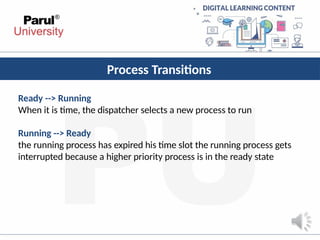
Process Transitions
Ready -->Running
When it is time, the dispatcher selects a new process to run
Running --> Ready
the running process has expired his time slot the running process gets
interrupted because a higher priority process is in the ready state
18.
Contd…
Running --> Blocked
Whena process requests something for which it must wait
a service that the OS is not ready to perform an access to a resource not yet
available initiates I/O and must wait for the result waiting for a process to
provide input (IPC).
Blocked --> Ready
When the event for which it was waiting occurs
19.
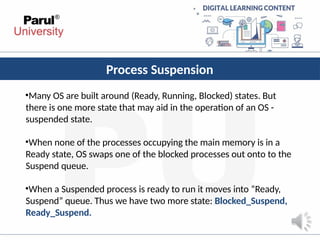
Process Suspension
•Many OSare built around (Ready, Running, Blocked) states. But
there is one more state that may aid in the operation of an OS -
suspended state.
•When none of the processes occupying the main memory is in a
Ready state, OS swaps one of the blocked processes out onto to the
Suspend queue.
•When a Suspended process is ready to run it moves into “Ready,
Suspend” queue. Thus we have two more state: Blocked_Suspend,
Ready_Suspend.
20.
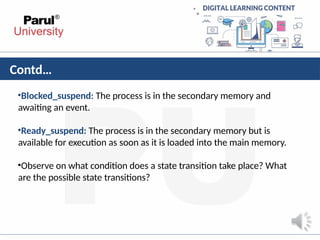
Contd…
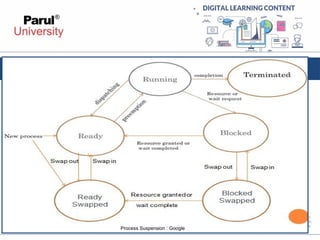
•Blocked_suspend: The processis in the secondary memory and
awaiting an event.
•Ready_suspend: The process is in the secondary memory but is
available for execution as soon as it is loaded into the main memory.
•Observe on what condition does a state transition take place? What
are the possible state transitions?
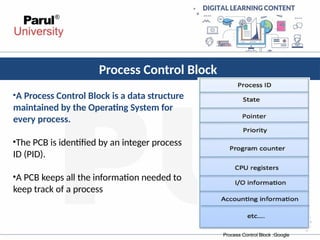
Process Control Block
•AProcess Control Block is a data structure
maintained by the Operating System for
every process.
•The PCB is identified by an integer process
ID (PID).
•A PCB keeps all the information needed to
keep track of a process
Process Control Block :Google
23.
Contd…
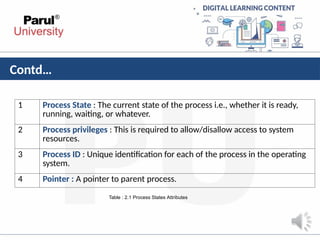
1 Process State: The current state of the process i.e., whether it is ready,
running, waiting, or whatever.
2 Process privileges : This is required to allow/disallow access to system
resources.
3 Process ID : Unique identification for each of the process in the operating
system.
4 Pointer : A pointer to parent process.
Table : 2.1 Process States Attributes
24.
Contd…
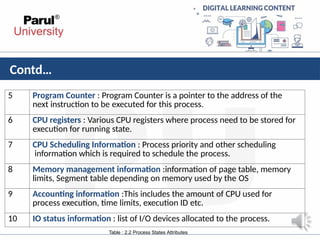
5 Program Counter: Program Counter is a pointer to the address of the
next instruction to be executed for this process.
6 CPU registers : Various CPU registers where process need to be stored for
execution for running state.
7 CPU Scheduling Information : Process priority and other scheduling
information which is required to schedule the process.
8 Memory management information :information of page table, memory
limits, Segment table depending on memory used by the OS
9 Accounting information :This includes the amount of CPU used for
process execution, time limits, execution ID etc.
10 IO status information : list of I/O devices allocated to the process.
Table : 2.2 Process States Attributes
25.
Contd…
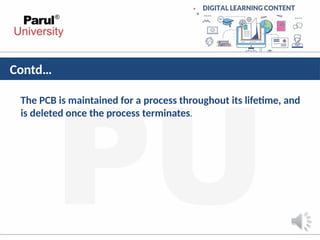
The PCB ismaintained for a process throughout its lifetime, and
is deleted once the process terminates.
26.
Context
Switching
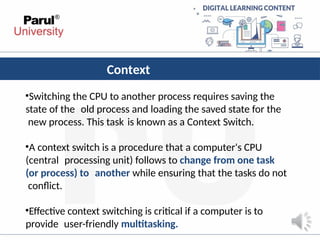
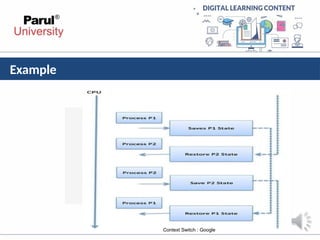
•Switching the CPUto another process requires saving the
state of the old process and loading the saved state for the
new process. This task is known as a Context Switch.
•A context switch is a procedure that a computer's CPU
(central processing unit) follows to change from one task
(or process) to another while ensuring that the tasks do not
conflict.
•Effective context switching is critical if a computer is to
provide user-friendly multitasking.
Contd…
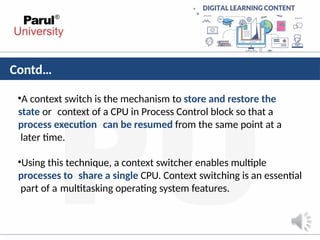
•A context switchis the mechanism to store and restore the
state or context of a CPU in Process Control block so that a
process execution can be resumed from the same point at a
later time.
•Using this technique, a context switcher enables multiple
processes to share a single CPU. Context switching is an essential
part of a multitasking operating system features.
30.
Contd…
Context switch timeis pure overhead, because the system does
no useful work while switching.
Context Switching has become such a performance bottleneck
that programmers are using new structures(threads) to avoid it
whenever and wherever possible.
31.
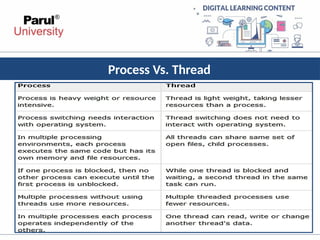
Thread
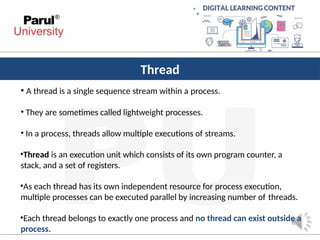
• A threadis a single sequence stream within a process.
• They are sometimes called lightweight processes.
• In a process, threads allow multiple executions of streams.
•Thread is an execution unit which consists of its own program counter, a
stack, and a set of registers.
•As each thread has its own independent resource for process execution,
multiple processes can be executed parallel by increasing number of threads.
•Each thread belongs to exactly one process and no thread can exist outside a
process.
Advantages of Thread
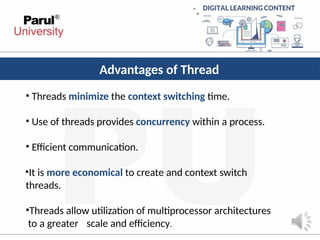
•Threads minimize the context switching time.
• Use of threads provides concurrency within a process.
• Efficient communication.
•It is more economical to create and context switch
threads.
•Threads allow utilization of multiprocessor architectures
to a greater scale and efficiency.
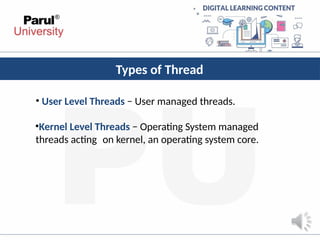
Types of Thread
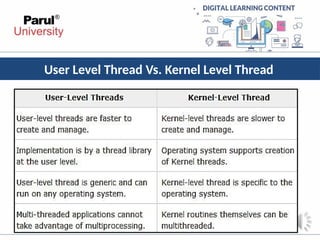
•User Level Threads − User managed threads.
•Kernel Level Threads − Operating System managed
threads acting on kernel, an operating system core.
36.
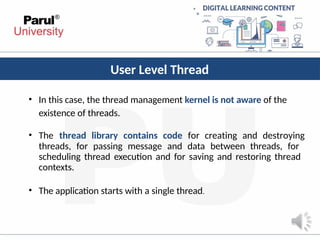
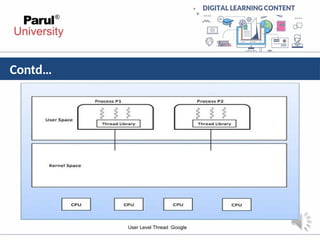
User Level Thread
•In this case, the thread management kernel is not aware of the
existence of threads.
• The thread library contains code for creating and destroying
threads, for passing message and data between threads, for
scheduling thread execution and for saving and restoring thread
contexts.
• The application starts with a single thread.
Advantages and Disadvantages
Advantages
•
•
•
•
Threadswitching does not require Kernel mode privileges.
User level thread can run on any operating system.
Scheduling can be application specific in the user level thread.
User level threads are fast to create and manage.
Disadvantages
• Multithreaded application cannot take advantage of
multiprocessing
39.
Kernel Level Thread
•In this case, thread management is done by the Kernel.
• There is no thread management code in the application area.
• Kernel threads are supported directly by the operating system.
•The Kernel performs thread creation, scheduling and management
in Kernel space.
40.
Advantages
•Kernel can simultaneouslyschedule multiple threads from the
same process on multiple processes.
•If one thread in a process is blocked, the Kernel can schedule
another thread of the same process.
41.
Disadvantages
•Kernel threads aregenerally slower to create and manage
than the user threads.
•Transfer of control from one thread to another within the
same process requires a mode switch to the Kernel.
42.
Multithreading
• Ability ofoperating system to execute multiple threads.
•Some operating system provide a combined user level thread
and Kernel level thread facility.
• Multithreading Models
1. Many to One Model
2. One to One Model
3. Many to Many Model
43.
Many to oneModel
•In the many to one model, many user-level threads are all
mapped onto a single kernel thread.
•Thread management is handled by the thread library in user
space, which is efficient in nature.
Many to One Model [1]
44.
One to OneModel
•The one to one model creates a separate kernel thread to handle each
and every user thread.
•Most implementations of this model place a limit on how many threads
can be created.
•Linux and Windows from 95 to XP implement the one-to-one model for
threads
One to One Model [1]
45.
Many to ManyModel
• The many to many model multiplexes any number of user threads onto an
equal or smaller number of kernel threads, combining the best features
of the one-to-one and many-to-one models.
• Users can create any number of the threads.
• Blocking the kernel system calls does not block the entire process.
• Processes can be split across multiple processors.
Many to Many Model[1]
46.
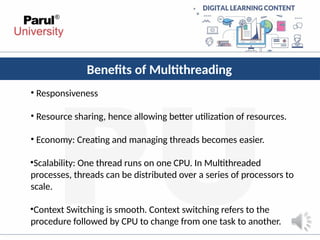
Benefits of Multithreading
•Responsiveness
• Resource sharing, hence allowing better utilization of resources.
• Economy: Creating and managing threads becomes easier.
•Scalability: One thread runs on one CPU. In Multithreaded
processes, threads can be distributed over a series of processors to
scale.
•Context Switching is smooth. Context switching refers to the
procedure followed by CPU to change from one task to another.
• The actof determining which process is in the ready state, and should be
moved to the running state is known as Process Scheduling”
What is process scheduling?
NEW
READY
RUNNIN
G
TERMINA
TED
WAITING
A
D
M
I
T
T
E
D
INTERRUPT
EXIT
I/O
OR
EVENT
CO
MPLETION
I
/
O
O
R
E
V
E
N
T
W
A
I
T
SCHEDULAR DISPATCH
Process Scheduling[1]
49.
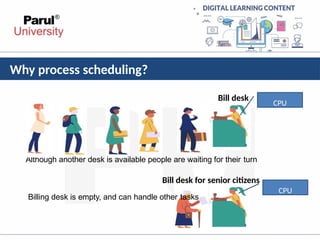
Why process scheduling?
Billdesk
CPU
CPU
Bill desk for senior citizens
Billing desk is empty, and can handle other tasks
Although another desk is available people are waiting for their turn
50.
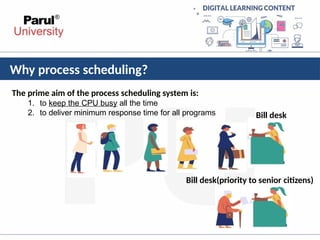
Why process scheduling?
Theprime aim of the process scheduling system is:
1. to keep the CPU busy all the time
2. to deliver minimum response time for all programs
Bill desk(priority to senior citizens)
Bill desk
51.
About process scheduling
1.The scheduler must apply appropriate rules for swapping processes IN and
OUT of CPU
2. Process scheduling is a process which allows one process to use the
CPU while the execution of another process is on hold(in waiting state)
due to unavailability of any resource like I/O etc, thereby making full use of
CPU
.
3. The aim of CPU scheduling is to make the system efficient, fast and fair.
52.
Types of Scheduling
•Scheduling can be of two types:
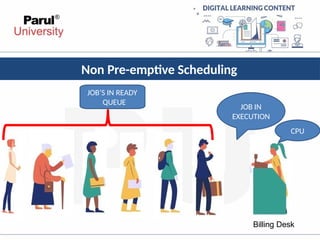
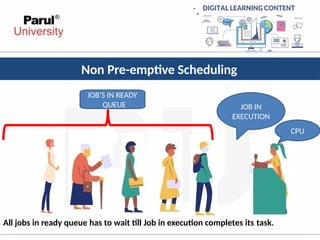
Non Pre-emptive Scheduling: When the currently executing process gives up the
CPU voluntarily.
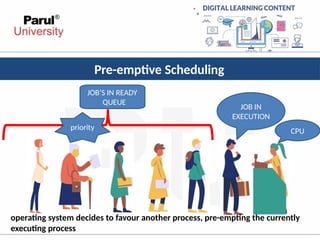
Pre-emptive Scheduling: When the operating system decides to favour another
process, pre-empting the currently executing process.
Pre-emptive Scheduling
CPU
JOB’S INREADY
QUEUE
JOB IN
EXECUTION
priority
operating system decides to favour another process, pre-empting the currently
executing process
57.
Scheduling Queues
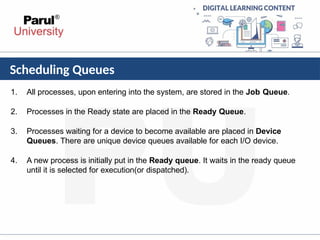
1. Allprocesses, upon entering into the system, are stored in the Job Queue.
2. Processes in the Ready state are placed in the Ready Queue.
3. Processes waiting for a device to become available are placed in Device
Queues. There are unique device queues available for each I/O device.
4. A new process is initially put in the Ready queue. It waits in the ready queue
until it is selected for execution(or dispatched).
Scheduling Queues
Once theprocess is assigned to the CPU and is executing, one of
the following several events can occur:
1.The process could issue an I/O request, and then be placed in the I/O queue.
2.The process could create a new sub process and wait for its termination.
3.The process could be removed forcibly from the CPU, as a result of an interrupt, and
be put back in the ready queue.
In the first two cases, the process eventually switches from the waiting state to the
ready state, and is then put back in the ready queue.
A process continues this cycle until it terminates, at which time it is removed from all
queues and has its PCB and resources deallocated.
Long Term Scheduler
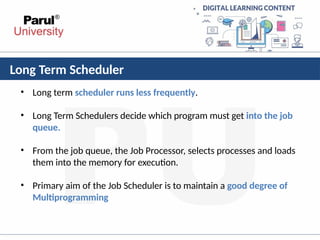
•Long term scheduler runs less frequently.
• Long Term Schedulers decide which program must get into the job
queue.
• From the job queue, the Job Processor, selects processes and loads
them into the memory for execution.
• Primary aim of the Job Scheduler is to maintain a good degree of
Multiprogramming
62.
Short Term Scheduler
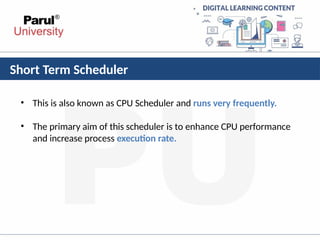
•This is also known as CPU Scheduler and runs very frequently.
• The primary aim of this scheduler is to enhance CPU performance
and increase process execution rate.
63.
Medium Term Scheduler
•During extra load, this scheduler picks out big processes from the
ready queue for some time, to allow smaller processes to execute,
thereby reducing the number of processes in the ready queue.
• At some later time, the process can be reintroduced into memory
and its execution can be continued where it left off. This scheme is
called swapping
Scheduling Criteria
•
•
1. CPUutilization
To make out the best use of CPU and not to waste any CPU cycle, CPU
would be working most of the time(Ideally 100% of the time).
Considering a real system, CPU usage should range from 40% (lightly
loaded) to 90% (heavily loaded.)
•
•
2. Throughput
It is the total number of processes completed per unit time or rather
say total amount of work done in a unit of time.
This may range from 10/second to 1/hour depending on the specific
processes.
66.
Scheduling Criteria
3. Turnaroundtime
It is the amount of time taken to execute a particular process, i.e. The
interval from time of submission of the process to the time of
completion of the process(Wall clock time).
4. Waiting time
The sum of the periods spent waiting in the ready queue amount of time
a process has been waiting in the ready queue to acquire get control on
the CPU.
67.
Scheduling Criteria
5. Loadaverage
•It is the average number of processes residing in the ready queue waiting
for their turn to get into the CPU.
6. Response time
•Amount of time it takes from when a request was submitted until the first
response is produced.
68.
Operation on Process
1.Process Creation:
The process which creates other process, is termed the parent of the
other process, while the created sub-process is termed its child.
Each process is given an integer identifier, termed as process identifier,
or PID.
The parent PID (PPID) is also stored for each process.
2. Process Termination:
By making the exit(system call), processes may request their own
termination.
69.
CPU Scheduling
•CPU schedulingis a process which allows one process to use the CPU while the
execution of another process is on hold(in waiting state) due to unavailability of any
resource like I/O etc, thereby making full use of CPU.
•The aim of CPU scheduling is to make the system efficient, fast and fair.
•Whenever the CPU becomes idle, the operating system must select one of the
processes in the ready queue to be executed.
•The selection process is carried out by the short-term scheduler (or CPU scheduler). The
scheduler selects from among the processes in memory that are ready to execute, and
allocates the CPU to one of them.
70.
Scheduling Algorithms
• Todecide which process to execute first and which process to
execute last to achieve maximum CPU utilization, computer
scientists have defined some algorithms, they are:
• First Come First Serve(FCFS) Scheduling
• Shortest-Job-First(SJF) Scheduling
• Priority Scheduling
• Round Robin(RR) Scheduling
• Multilevel Queue Scheduling
• Multilevel Feedback Queue Scheduling
71.
First Come FirstServe(FCFS) Scheduling
• In the "First come first serve" scheduling algorithm, as the
name suggests, the process which arrives first, gets
executed first, or we can say that the process which
requests the CPU first, gets the CPU allocated first.
• First Come First Serve, is just like FIFO(First in First out)
Queue data structure, where the data element which is
added to the queue first, is the one who leaves the queue
first.
• This is used in Batch Systems.
72.
First Come FirstServe(FCFS) Scheduling
• It's easy to understand and implement programmatically,
using a Queue data structure, where a new process enters
through the tail of the queue, and the scheduler selects
process from the head of the queue.
• A perfect real life example of FCFS scheduling is buying
tickets at ticket counter.
73.
First Come FirstServe(FCFS) Scheduling
Calculating Average Waiting Time
• For every scheduling algorithm, Average waiting time is a
crucial parameter to judge it's performance.
• AWT or Average waiting time is the average of the waiting
times of the processes in the queue, waiting for the
scheduler to pick them for execution.
Lower the Average Waiting Time, better
the scheduling algorithm
74.
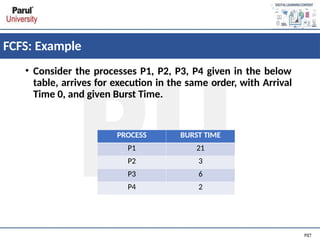
FCFS: Example
• Considerthe processes P1, P2, P3, P4 given in the below
table, arrives for execution in the same order, with Arrival
Time 0, and given Burst Time.
PROCESS BURST TIME
P1 21
P2 3
P3 6
P4 2
75.
FCFS: Example
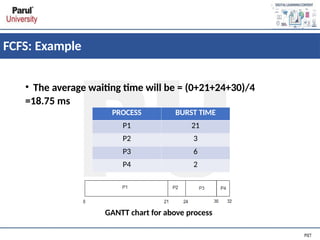
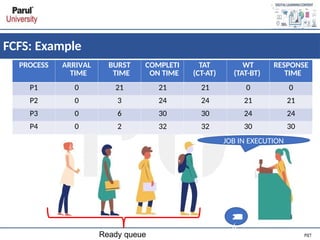
• Theaverage waiting time will be = (0+21+24+30)/4
=18.75 ms
GANTT chart for above process
PROCESS BURST TIME
P1 21
P2 3
P3 6
P4 2
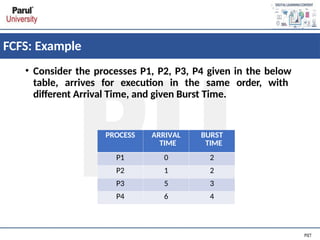
FCFS: Example
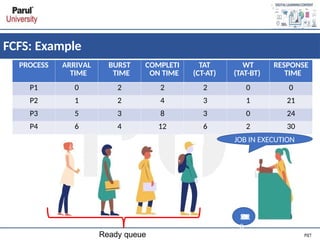
• Considerthe processes P1, P2, P3, P4 given in the below
table, arrives for execution in the same order, with
different Arrival Time, and given Burst Time.
PROCESS ARRIVAL
TIME
BURST
TIME
P1 0 2
P2 1 2
P3 5 3
P4 6 4
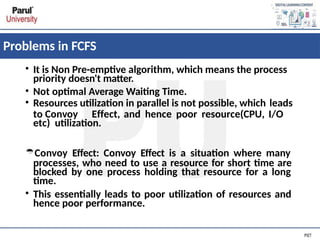
Problems in FCFS
•It is Non Pre-emptive algorithm, which means the process
priority doesn't matter.
• Not optimal Average Waiting Time.
• Resources utilization in parallel is not possible, which leads
to Convoy Effect, and hence poor resource(CPU, I/O
etc) utilization.
Convoy Effect: Convoy Effect is a situation where many
processes, who need to use a resource for short time are
blocked by one process holding that resource for a long
time.
• This essentially leads to poor utilization of resources and
hence poor performance.
80.
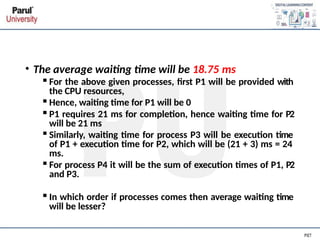
• The averagewaiting time will be 18.75 ms
▪For the above given processes, first P1 will be provided with
the CPU resources,
▪Hence, waiting time for P1 will be 0
▪P1 requires 21 ms for completion, hence waiting time for P2
will be 21 ms
▪Similarly, waiting time for process P3 will be execution time
of P1 + execution time for P2, which will be (21 + 3) ms = 24
ms.
▪For process P4 it will be the sum of execution times of P1, P2
and P3.
▪In which order if processes comes then average waiting time
will be lesser?
81.
Shortest Job First(SJF)Scheduling
• Shortest Job First scheduling works on the process
with the shortest burst time or duration first.
• It is of two types:
▪Non Pre-emptive
▪Pre-emptive
• To successfully implement it, the burst time/duration
time of the processes should be known to the
processor in advance, which is practically not feasible
all the time.
• This scheduling algorithm is optimal if all the
jobs/processes are available at the same time. (either
Arrival time is 0 for all, or Arrival time is same for all)
82.
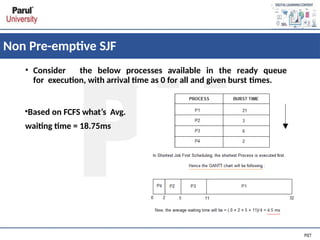
Non Pre-emptive SJF
•Consider the below processes available in the ready queue
for execution, with arrival time as 0 for all and given burst times.
•Based on FCFS what’s Avg.
waiting time = 18.75ms
83.
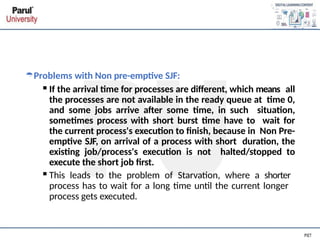
Problems with Nonpre-emptive SJF:
▪If the arrival time for processes are different, which means all
the processes are not available in the ready queue at time 0,
and some jobs arrive after some time, in such situation,
sometimes process with short burst time have to wait for
the current process's execution to finish, because in Non Pre-
emptive SJF, on arrival of a process with short duration, the
existing job/process's execution is not halted/stopped to
execute the short job first.
▪This leads to the problem of Starvation, where a shorter
process has to wait for a long time until the current longer
process gets executed.
84.
Pre-emptive SJF
• InPreemptive Shortest Job First Scheduling, jobs are put
into ready queue as they arrive, but as a process with short
burst time arrives, the existing process is preempted or
removed from execution, and the shorter job is executed
first.
86.
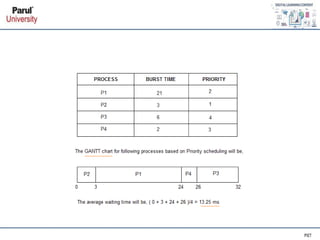
Priority Scheduling
• Priorityis assigned for each process.
• Process with highest priority is executed first and so on.
• Processes with same priority are executed in FCFS manner.
• Priority can be decided based on memory requirements,
time requirements or any other resource requirement.
• Pre-emptive: Preempt the CPU if the priority of newly
arrived process is higher than the priority of the currently
running process.
• Nonpreemptive: It will simply put the new process at the
head of the ready queue.
88.
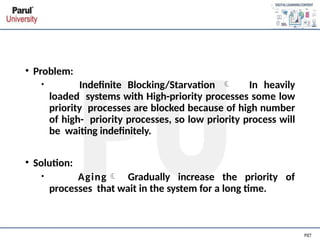
• Problem:
• IndefiniteBlocking/Starvation In heavily
loaded systems with High-priority processes some low
priority processes are blocked because of high number
of high- priority processes, so low priority process will
be waiting indefinitely.
• Solution:
• Aging Gradually increase the priority of
processes that wait in the system for a long time.
89.
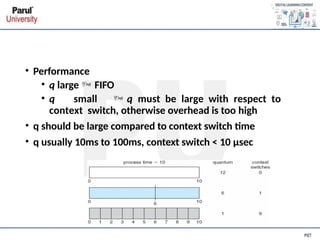
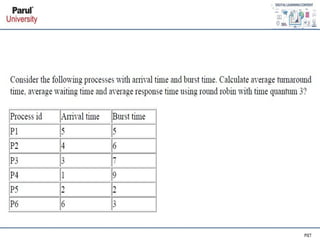
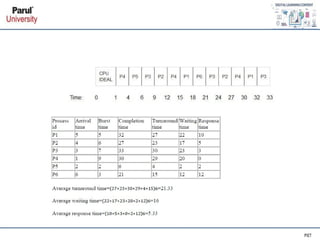
Round Robin Scheduling
•Each process gets a small unit of CPU time (time quantum q),
usually 10-100 milliseconds. After this time has elapsed, the
process is preempted and added to the end of the ready queue.
• Context switching is used to save states of preempted processes.
• If there are n processes in the ready queue and the time
quantum is q, then each process gets 1/n of the CPU time in
chunks of at most q time units at once. No process waits more
than (n-1)q time units.
• Timer interrupts every quantum to schedule next process
• Performance
• qlarge FIFO
• q small q must be large with respect to
context switch, otherwise overhead is too high
• q should be large compared to context switch time
• q usually 10ms to 100ms, context switch < 10 μsec
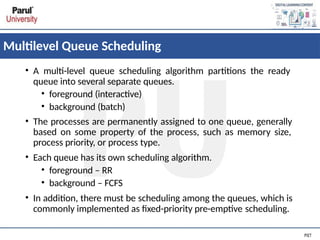
Multilevel Queue Scheduling
•A multi-level queue scheduling algorithm partitions the ready
queue into several separate queues.
• foreground (interactive)
• background (batch)
• The processes are permanently assigned to one queue, generally
based on some property of the process, such as memory size,
process priority, or process type.
• Each queue has its own scheduling algorithm.
• foreground – RR
• background – FCFS
• In addition, there must be scheduling among the queues, which is
commonly implemented as fixed-priority pre-emptive scheduling.
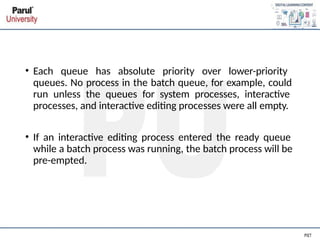
96.
• Each queuehas absolute priority over lower-priority
queues. No process in the batch queue, for example, could
run unless the queues for system processes, interactive
processes, and interactive editing processes were all empty.
• If an interactive editing process entered the ready queue
while a batch process was running, the batch process will be
pre-empted.
97.
Multilevel Feedback QueueScheduling
• This Scheduling is like Multilevel Queue(MLQ) Scheduling but in
this process can move between the queues. Multilevel Feedback
Queue Scheduling (MLFQ) keep analysing the behaviour (time of
execution) of processes and according to which it changes its
priority.
• Multilevel-feedback-queue scheduler defined by the following
parameters:
• number of queues
• scheduling algorithms for each queue
• method used to determine when to upgrade a process
• method used to determine when to demote a process
• method used to determine which queue a process will enter
when that process needs service
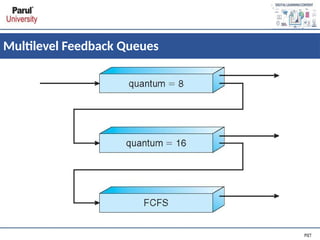
• Three queues:
•Q0 – RR with time quantum 8 milliseconds
• Q1 – RR time quantum 16 milliseconds
• Q2 – FCFS
• Scheduling
• A new job enters queue Q0 which is served FCFS
▪ When it gains CPU, job receives 8 milliseconds
▪ If it does not finish in 8 milliseconds, job is moved to queue Q1
• At Q1 job is again served FCFS and receives 16 additional
milliseconds
▪ If it still does not complete, it is preempted and moved to
queue Q2
100.
References
1Silberschatz, A., Galvin,P. B., & Gagne, G. (2005). Operating system concepts.
Hoboken, NJ: J. Wiley & Sons.
2 Stallings, W. (2018). Operating systems: Internals and design principles.
Prentice-Hall
3 Tanenbaum, A. (2014). Modern operating systems. Harlow: Pearson.
4Nutt, G. J. (2004). Operating systems: A modern perspective. Boston: Pearson/
Addison Wesley.
5Bower T. Operating System Structure. K–State Polytechnic.
http://faculty.salina.k-state.edu/tim/ossg/Introduction/struct.htm
l
6Bower T. Basic Operating System Concepts. K–State Polytechnic.
http://faculty.salina.k-state.edu/tim/ossg/Introduction/OSrole.htm
l

![Process State Transitions
Process State[ 1 ]](https://image.slidesharecdn.com/unit2os-250402165120-b13eb3b2/85/UNIT-2-OS-pptx-Introduction-of-Operating-System-16-320.jpg)

![Example
CPU Switch from Process to Process [1]](https://image.slidesharecdn.com/unit2os-250402165120-b13eb3b2/85/UNIT-2-OS-pptx-Introduction-of-Operating-System-28-320.jpg)

![Threads
Single and Multithreaded Processes [1]](https://image.slidesharecdn.com/unit2os-250402165120-b13eb3b2/85/UNIT-2-OS-pptx-Introduction-of-Operating-System-32-320.jpg)

![Many to one Model
•In the many to one model, many user-level threads are all
mapped onto a single kernel thread.
•Thread management is handled by the thread library in user
space, which is efficient in nature.
Many to One Model [1]](https://image.slidesharecdn.com/unit2os-250402165120-b13eb3b2/85/UNIT-2-OS-pptx-Introduction-of-Operating-System-43-320.jpg)
![One to One Model
•The one to one model creates a separate kernel thread to handle each
and every user thread.
•Most implementations of this model place a limit on how many threads
can be created.
•Linux and Windows from 95 to XP implement the one-to-one model for
threads
One to One Model [1]](https://image.slidesharecdn.com/unit2os-250402165120-b13eb3b2/85/UNIT-2-OS-pptx-Introduction-of-Operating-System-44-320.jpg)
![Many to Many Model
• The many to many model multiplexes any number of user threads onto an
equal or smaller number of kernel threads, combining the best features
of the one-to-one and many-to-one models.
• Users can create any number of the threads.
• Blocking the kernel system calls does not block the entire process.
• Processes can be split across multiple processors.
Many to Many Model[1]](https://image.slidesharecdn.com/unit2os-250402165120-b13eb3b2/85/UNIT-2-OS-pptx-Introduction-of-Operating-System-45-320.jpg)
![• The act of determining which process is in the ready state, and should be
moved to the running state is known as Process Scheduling”
What is process scheduling?
NEW
READY
RUNNIN
G
TERMINA
TED
WAITING
A
D
M
I
T
T
E
D
INTERRUPT
EXIT
I/O
OR
EVENT
CO
MPLETION
I
/
O
O
R
E
V
E
N
T
W
A
I
T
SCHEDULAR DISPATCH
Process Scheduling[1]](https://image.slidesharecdn.com/unit2os-250402165120-b13eb3b2/85/UNIT-2-OS-pptx-Introduction-of-Operating-System-48-320.jpg)

![Scheduling Queues
Scheduling Queues [1]](https://image.slidesharecdn.com/unit2os-250402165120-b13eb3b2/85/UNIT-2-OS-pptx-Introduction-of-Operating-System-58-320.jpg)


![Medium Term Scheduler
Medium Term Scheduler [1]](https://image.slidesharecdn.com/unit2os-250402165120-b13eb3b2/85/UNIT-2-OS-pptx-Introduction-of-Operating-System-64-320.jpg)