Biology 2011:
Environmental Issues
Kathleen Baril
Librarian
What we will cover:
Types

of scientific literature
How to evaluate websites
Main databases to use for
environmental topics
Science Research
Three Main Types:
 Tertiary
 Secondary
 Primary
Science Research - Tertiary
 Very

broad topics.

 Useful

place for finding background
information on a topic.

 Usually

contains well-established facts in
science.

 Examples:

encyclopedias, textbooks, handbooks.
Adapted from Marian Koshland Bioscience and Natural Resources
Library:
http://www.lib.berkeley.edu/BIOS/bio1bscholcomm.html
Science Research - Secondary
 Summaries
 Broader

of primary literature/research.

and less current.

 Helpful

because of long bibliographies on a
subject.

 Examples

include: books, literature review

articles.
Adapted from Marian Koshland Bioscience and Natural Resources
Library:
http://www.lib.berkeley.edu/BIOS/bio1bscholcomm.html
Science Research - Primary
 Write-ups

of results of research.
 Current and specialized.
 Often analyzes data collected in the field
or laboratory.
 Examples: articles in peer-reviewed
journals, dissertations, technical
reports, etc
Adapted from Marian Koshland Bioscience and Natural Resources
Library:
http://www.lib.berkeley.edu/BIOS/bio1bscholcomm.html
Evaluating Online Sources


What? is the page/site about



Who? created and maintains this site



Where? Is the information coming from



Why? Is the information presented on the web



When? Was the page created or last updated



How? Accurate or credible is the page

From the University of Wisconsin Library, worksheet for
evaluating web sites
Evaluating Online Sources
Use the domains from the URLs to determine whether the
web source will have useful and authoritative information.
.edu = educational institution
.org = organization or association

.gov = government site
.com = commercial site
.museum = museum

.net = personal or other site
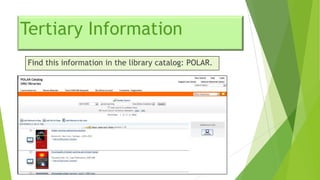
Tertiary Information
Find this information in the library catalog: POLAR.
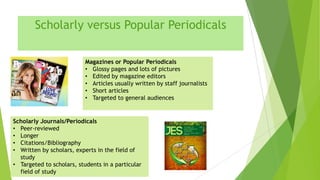
Scholarly versus Popular Periodicals
Magazines or Popular Periodicals
• Glossy pages and lots of pictures
• Edited by magazine editors
• Articles usually written by staff journalists
• Short articles
• Targeted to general audiences

Scholarly Journals/Periodicals
• Peer-reviewed
• Longer
• Citations/Bibliography
• Written by scholars, experts in the field of
study
• Targeted to scholars, students in a particular
field of study
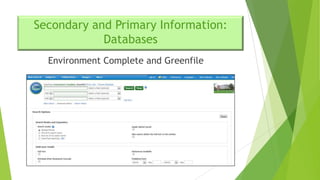
Secondary and Primary Information:
Databases
Environment Complete and Greenfile
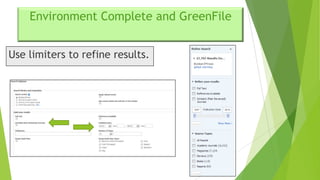
Environment Complete and GreenFile
Use limiters to refine results.
Environment Complete and GreenFile:
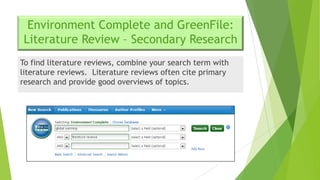
Literature Review – Secondary Research
To find literature reviews, combine your search term with
literature reviews. Literature reviews often cite primary
research and provide good overviews of topics.
Environment Complete and GreenFile:
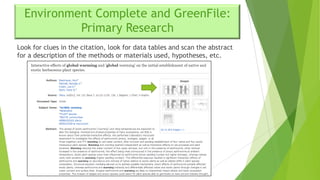
Primary Research
Look for clues in the citation, look for data tables and scan the abstract
for a description of the methods or materials used, hypotheses, etc.
Environment Complete and GreenFile:
Primary Research
When looking at the full –text article for primary
research look for components such as:


Methods or Materials and Methods



Results



Discussion



Conclusions



References
Environment Complete and GreenFile
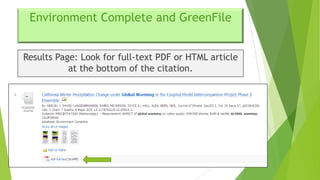
Results Page: Look for full-text PDF or HTML article
at the bottom of the citation.
Environment Complete and GreenFile
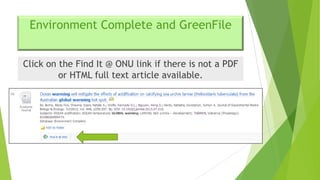
Click on the Find It @ ONU link if there is not a PDF
or HTML full text article available.
Environment Complete and GreenFile
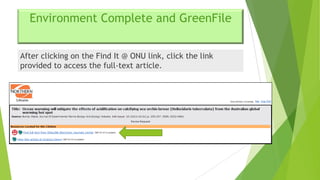
After clicking on the Find It @ ONU link, click the link
provided to access the full-text article.
Environment Complete and GreenFile
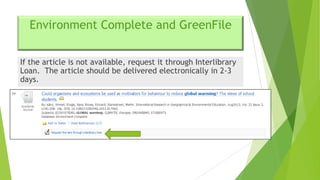
If the article is not available, request it through Interlibrary
Loan. The article should be delivered electronically in 2-3
days.
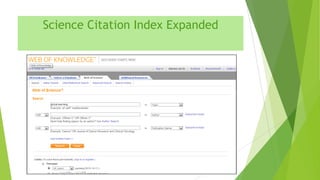
Science Citation Index Expanded
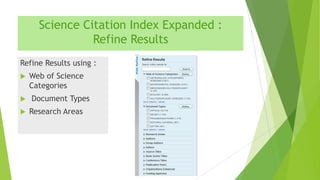
Science Citation Index Expanded :
Refine Results
Refine Results using :




Web of Science
Categories
Document Types
Research Areas
Science Citation Index Expanded
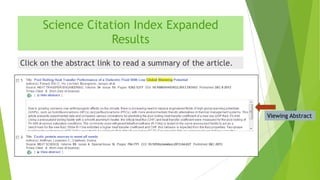
Results
Click on the abstract link to read a summary of the article.

Viewing Abstract
Science Citation Index Expanded
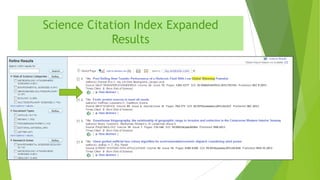
Results
Click on the LS icon to connect to full-text articles.
Citing Sources
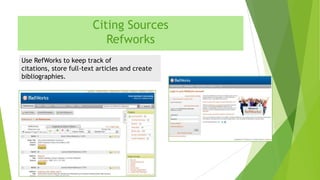
Refworks
Use RefWorks to keep track of
citations, store full-text articles and create
bibliographies.
Review


Use the library catalog and internet to find background
information.



Internet - - evaluate sources carefully.



Primary sources - - look for clues like data tables, article
laid out with methods/materials, results, discussion and
references.
Need Further Assistance?


Contact the Reference Desk at 419-772-2185.



Contact the Reference Desk via email at
reference@onu.edu.



Contact me directly k-baril@onu.edu or 419-772-2188 to
set up an appointment.



Reference Desk hours:
Monday-Thursday 8AM-12PM, 1PM-4:30PM, 6PM-9PM
Friday 8AM-4:30PM

Biology 2011 riley 2013

  • 1.
  • 2.
    What we willcover: Types of scientific literature How to evaluate websites Main databases to use for environmental topics
  • 3.
    Science Research Three MainTypes:  Tertiary  Secondary  Primary
  • 4.
    Science Research -Tertiary  Very broad topics.  Useful place for finding background information on a topic.  Usually contains well-established facts in science.  Examples: encyclopedias, textbooks, handbooks. Adapted from Marian Koshland Bioscience and Natural Resources Library: http://www.lib.berkeley.edu/BIOS/bio1bscholcomm.html
  • 5.
    Science Research -Secondary  Summaries  Broader of primary literature/research. and less current.  Helpful because of long bibliographies on a subject.  Examples include: books, literature review articles. Adapted from Marian Koshland Bioscience and Natural Resources Library: http://www.lib.berkeley.edu/BIOS/bio1bscholcomm.html
  • 6.
    Science Research -Primary  Write-ups of results of research.  Current and specialized.  Often analyzes data collected in the field or laboratory.  Examples: articles in peer-reviewed journals, dissertations, technical reports, etc Adapted from Marian Koshland Bioscience and Natural Resources Library: http://www.lib.berkeley.edu/BIOS/bio1bscholcomm.html
  • 7.
    Evaluating Online Sources  What?is the page/site about  Who? created and maintains this site  Where? Is the information coming from  Why? Is the information presented on the web  When? Was the page created or last updated  How? Accurate or credible is the page From the University of Wisconsin Library, worksheet for evaluating web sites
  • 8.
    Evaluating Online Sources Usethe domains from the URLs to determine whether the web source will have useful and authoritative information. .edu = educational institution .org = organization or association .gov = government site .com = commercial site .museum = museum .net = personal or other site
  • 9.
    Tertiary Information Find thisinformation in the library catalog: POLAR.
  • 10.
    Scholarly versus PopularPeriodicals Magazines or Popular Periodicals • Glossy pages and lots of pictures • Edited by magazine editors • Articles usually written by staff journalists • Short articles • Targeted to general audiences Scholarly Journals/Periodicals • Peer-reviewed • Longer • Citations/Bibliography • Written by scholars, experts in the field of study • Targeted to scholars, students in a particular field of study
  • 11.
    Secondary and PrimaryInformation: Databases Environment Complete and Greenfile
  • 12.
    Environment Complete andGreenFile Use limiters to refine results.
  • 13.
    Environment Complete andGreenFile: Literature Review – Secondary Research To find literature reviews, combine your search term with literature reviews. Literature reviews often cite primary research and provide good overviews of topics.
  • 14.
    Environment Complete andGreenFile: Primary Research Look for clues in the citation, look for data tables and scan the abstract for a description of the methods or materials used, hypotheses, etc.
  • 15.
    Environment Complete andGreenFile: Primary Research When looking at the full –text article for primary research look for components such as:  Methods or Materials and Methods  Results  Discussion  Conclusions  References
  • 16.
    Environment Complete andGreenFile Results Page: Look for full-text PDF or HTML article at the bottom of the citation.
  • 17.
    Environment Complete andGreenFile Click on the Find It @ ONU link if there is not a PDF or HTML full text article available.
  • 18.
    Environment Complete andGreenFile After clicking on the Find It @ ONU link, click the link provided to access the full-text article.
  • 19.
    Environment Complete andGreenFile If the article is not available, request it through Interlibrary Loan. The article should be delivered electronically in 2-3 days.
  • 20.
  • 21.
    Science Citation IndexExpanded : Refine Results Refine Results using :    Web of Science Categories Document Types Research Areas
  • 22.
    Science Citation IndexExpanded Results Click on the abstract link to read a summary of the article. Viewing Abstract
  • 23.
    Science Citation IndexExpanded Results Click on the LS icon to connect to full-text articles.
  • 24.
    Citing Sources Refworks Use RefWorksto keep track of citations, store full-text articles and create bibliographies.
  • 25.
    Review  Use the librarycatalog and internet to find background information.  Internet - - evaluate sources carefully.  Primary sources - - look for clues like data tables, article laid out with methods/materials, results, discussion and references.
  • 26.
    Need Further Assistance?  Contactthe Reference Desk at 419-772-2185.  Contact the Reference Desk via email at reference@onu.edu.  Contact me directly k-baril@onu.edu or 419-772-2188 to set up an appointment.  Reference Desk hours: Monday-Thursday 8AM-12PM, 1PM-4:30PM, 6PM-9PM Friday 8AM-4:30PM