BMS   Literature Searching Jamie Halstead
By The End Of The Session You Will Be Able To: Plan an effective search strategy Understand and use the electronic databases to find out what BMS literature has been published in the academic journals Identify and access the available journals
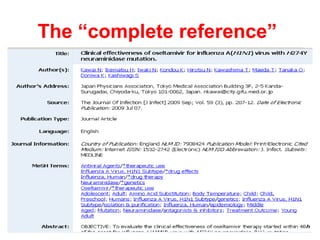
What is a Database? Most databases provide bibliographic details of data published in professional journals including.… -  The Author and Title of an article -  The Journal in which it is printed -  The Volume, Part and Page Numbers of the article -  The Abstract, a brief summary of the article -  Subject Keywords In some cases there will be a link providing access to the full text and/or information regarding the Library’s print holdings
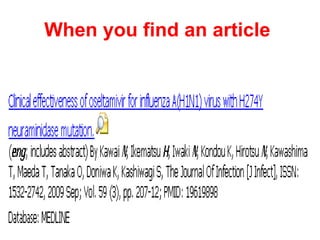
When you find an article   This is what the “citation” looks like
The “complete reference”
Evaluation  It is very important to evaluate your search results for relevance and quality  Is it what you need and is it trustworthy? Do  NOT  trust information if you have not considered the  following criteria:
C urrency  (How old is this information?  When was it last updated?) A uthority  (Who is the author, site creator, organisation, scholarly journal etc?) I ntent  (What is the purpose of the website / information? e.g. financial gain etc) R elevance  (Is this what I need? Will it answer my question?) O bjectivity  (Balanced view? Opposing views represented? etc) Evaluation
Peer Review  Peer review is a core part of academic research.  It is a formal procedure for checking the quality of research before it is published.   If a publication is peer reviewed it means it has been read, checked and authenticated (reviewed) by independent, third party academics (peers). Peer review has been the quality-control system of academic publishing for hundreds of years.
Key Databases For BMS Literature Medline The premier  biomedical database Science Citation   The leading science Index    and technical journals  Science Direct Elsevier’s excellent  online journal package
Useful Databases For Full Text Journal Articles Science Direct PubMed
Plan Your Database Search 1. Define your question Break it down into concepts  (databases work best if you break your question down into single subjects) 3. List the words or phrases that you could use for each concept (alternative terms, truncation using * etc)
Plan Your Database Search The following resources should help with this process: -  Examples of high quality systematic literature reviews (Cochrane Library) -  An example of a search strategy and a worksheet to create your own
Accessing The  Databases   Go to the  Library’s BMS Subject Guide  http://libguides.mdx.ac.uk/biomedicalsciences   Select  Journals Click on  Finding Journal Articles / Using Databases Choose a database (e.g. Medline)
A Quick Search Demonstration  Searching  Medline, Science Citation Index and Science Direct  for peer reviewed journal articles on:  ‘ The effectiveness of tamiflu for the treatment of swine flu’
But it’s not in the library Don’t worry…fill out an  Inter-Library Loan Form  ( http://www.lr.mdx.ac.uk/lib/services/docs/illform.pdf ) with the bibliographic details of the article you want A photocopy of the article will be ordered for you from the British Library This can take approximately a week (sent to your home address) There is a charge of £3 for this service
Other Libraries Sconul Access Scheme  http://www.sconul.ac.uk/using_other_libraries/access/   British Library  http://www.bl.uk/
Referencing It is vital that your work is properly referenced and you have full bibliographic details of all resources used For details of how to reference your work go to the Library’s BMS Subject Guide and Select  Getting Started Then click on  the link for the Help sheet for  Referencing and Citation   Style
  Useful Links Learning Resources Webpages  http://www.lr.mdx.ac.uk  Biomedical Sciences Library Subject Guide  http://libguides.mdx.ac.uk/biomedicalsciences   Please ask us at the Library Enquiry Desk (or ‘Ask A Librarian’ on the Library Subject Guides) if you need any help!

Bms Lit Searching

  • 1.
    BMS Literature Searching Jamie Halstead
  • 2.
    By The EndOf The Session You Will Be Able To: Plan an effective search strategy Understand and use the electronic databases to find out what BMS literature has been published in the academic journals Identify and access the available journals
  • 3.
    What is aDatabase? Most databases provide bibliographic details of data published in professional journals including.… - The Author and Title of an article - The Journal in which it is printed - The Volume, Part and Page Numbers of the article - The Abstract, a brief summary of the article - Subject Keywords In some cases there will be a link providing access to the full text and/or information regarding the Library’s print holdings
  • 4.
    When you findan article This is what the “citation” looks like
  • 5.
  • 6.
    Evaluation Itis very important to evaluate your search results for relevance and quality Is it what you need and is it trustworthy? Do NOT trust information if you have not considered the following criteria:
  • 7.
    C urrency (How old is this information? When was it last updated?) A uthority (Who is the author, site creator, organisation, scholarly journal etc?) I ntent (What is the purpose of the website / information? e.g. financial gain etc) R elevance (Is this what I need? Will it answer my question?) O bjectivity (Balanced view? Opposing views represented? etc) Evaluation
  • 8.
    Peer Review Peer review is a core part of academic research.  It is a formal procedure for checking the quality of research before it is published.   If a publication is peer reviewed it means it has been read, checked and authenticated (reviewed) by independent, third party academics (peers). Peer review has been the quality-control system of academic publishing for hundreds of years.
  • 9.
    Key Databases ForBMS Literature Medline The premier biomedical database Science Citation The leading science Index and technical journals Science Direct Elsevier’s excellent online journal package
  • 10.
    Useful Databases ForFull Text Journal Articles Science Direct PubMed
  • 11.
    Plan Your DatabaseSearch 1. Define your question Break it down into concepts (databases work best if you break your question down into single subjects) 3. List the words or phrases that you could use for each concept (alternative terms, truncation using * etc)
  • 12.
    Plan Your DatabaseSearch The following resources should help with this process: - Examples of high quality systematic literature reviews (Cochrane Library) - An example of a search strategy and a worksheet to create your own
  • 13.
    Accessing The Databases Go to the Library’s BMS Subject Guide http://libguides.mdx.ac.uk/biomedicalsciences Select Journals Click on Finding Journal Articles / Using Databases Choose a database (e.g. Medline)
  • 14.
    A Quick SearchDemonstration Searching Medline, Science Citation Index and Science Direct for peer reviewed journal articles on: ‘ The effectiveness of tamiflu for the treatment of swine flu’
  • 15.
    But it’s notin the library Don’t worry…fill out an Inter-Library Loan Form ( http://www.lr.mdx.ac.uk/lib/services/docs/illform.pdf ) with the bibliographic details of the article you want A photocopy of the article will be ordered for you from the British Library This can take approximately a week (sent to your home address) There is a charge of £3 for this service
  • 16.
    Other Libraries SconulAccess Scheme http://www.sconul.ac.uk/using_other_libraries/access/ British Library http://www.bl.uk/
  • 17.
    Referencing It isvital that your work is properly referenced and you have full bibliographic details of all resources used For details of how to reference your work go to the Library’s BMS Subject Guide and Select Getting Started Then click on the link for the Help sheet for Referencing and Citation Style
  • 18.
    UsefulLinks Learning Resources Webpages http://www.lr.mdx.ac.uk Biomedical Sciences Library Subject Guide http://libguides.mdx.ac.uk/biomedicalsciences Please ask us at the Library Enquiry Desk (or ‘Ask A Librarian’ on the Library Subject Guides) if you need any help!

Editor's Notes

  • #2 Session outline Discuss and develop your understanding of databases Demo how to use a healthcare database called CINAHL You have time to complete an on-line tutorial Then you retrieve your unique username and password from your email and carry out your own search