Binary
What Is Binary ?
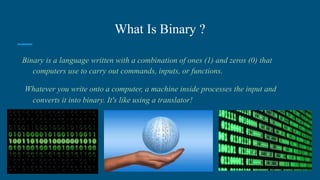
Binary is a language written with a combination of ones (1) and zeros (0) that
computers use to carry out commands, inputs, or functions.
Whatever you write onto a computer, a machine inside processes the input and
converts it into binary. It's like using a translator!
Bytes and Bits
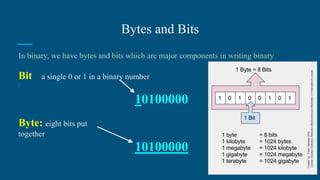
In binary, we have bytes and bits which are major components in writing binary.
Bit
:
a single 0 or 1 in a binary number
10100000
Byte: eight bits put
together
10100000
Converting Binary to
decimal
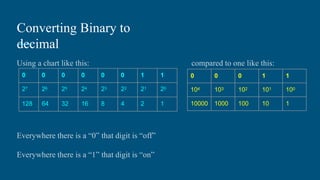
Using a chart like this: compared to one like this:
Everywhere there is a “0” that digit is “off”
Everywhere there is a “1” that digit is “on”
0 0 0 0 0 0 1 1
27 26 25 24 23 22 21 20
128 64 32 16 8 4 2 1
0 0 0 1 1
104 103 102 101 100
10000 1000 100 10 1
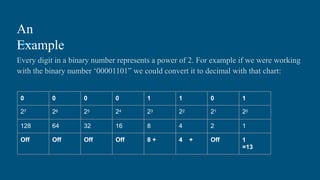
An
Example
Every digit in a binary number represents a power of 2. For example if we were working
with the binary number ‘00001101” we could convert it to decimal with that chart:
0 0 0 0 1 1 0 1
27 26 25 24 23 22 21 20
128 64 32 16 8 4 2 1
Off Off Off Off 8 + 4 + Off 1
=13
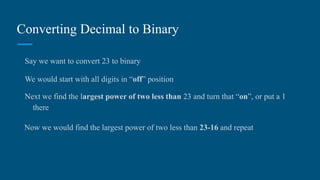
Converting Decimal to Binary
Say we want to convert 23 to binary
We would start with all digits in “off” position
Next we find the largest power of two less than 23 and turn that “on”, or put a 1
there
Now we would find the largest power of two less than 23-16 and repeat
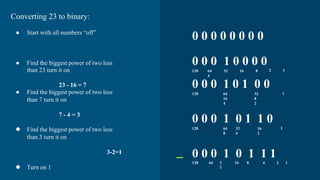
0 0 0 0 0 0 0 0
0 0 0 1 0 0 0 0
128 64 32 16 8
4
2 1
0 0 0 1 0 1 0 0
128 64 32
16 8
4 2
1
0 0 0 1 0 1 1 0
128 64 32 16
8 4 2
1
0 0 0 1 0 1 1 1
128 64 3
2
16 8 4 2 1
Converting 23 to binary:
● Start with all numbers “off”
● Find the biggest power of two less
than 23 turn it on
23 - 16 = 7
● Find the biggest power of two less
than 7 turn it on
7 - 4 = 3
 Find the biggest power of two less
than 3 turn it on
3-2=1
 Turn on 1
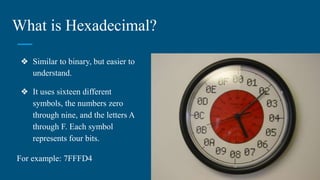
What is Hexadecimal?
❖ Similar to binary, but easier to
understand.
❖ It uses sixteen different
symbols, the numbers zero
through nine, and the letters A
through F. Each symbol
represents four bits.
For example: 7FFFD4
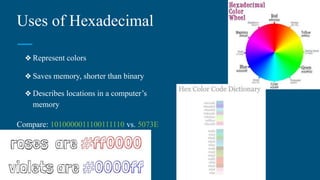
Uses of Hexadecimal
❖ Represent colors
❖ Saves memory, shorter than binary
❖ Describes locations in a computer’s
memory
Compare: 1010000011100111110 vs. 5073E
Click here for random color generator!
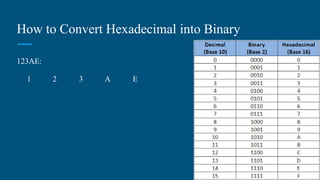
How to Convert Hexadecimal into Binary
123AE:
1 2 3 A E
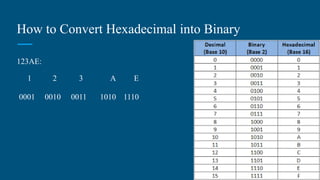
How to Convert Hexadecimal into Binary
123AE:
1 2 3 A E
0001 0010 0011 1010 1110
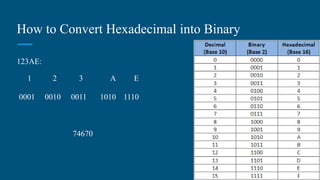
How to Convert Hexadecimal into Binary
123AE:
1 2 3 A E
0001 0010 0011 1010 1110
74670
Why Binary?
Binary itself was fun because it was quick and easy to learn.
Played Binary Bingo which was very competitive and challenging.
Most of all it was interesting!
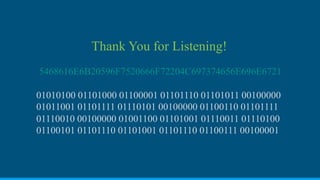
Thank You for Listening!
5468616E6B20596F7520666F72204C697374656E696E6721
01010100 01101000 01100001 01101110 01101011 00100000
01011001 01101111 01110101 00100000 01100110 01101111
01110010 00100000 01001100 01101001 01110011 01110100
01100101 01101110 01101001 01101110 01100111 00100001

Binary.ppt

  • 1.
  • 2.
    What Is Binary? Binary is a language written with a combination of ones (1) and zeros (0) that computers use to carry out commands, inputs, or functions. Whatever you write onto a computer, a machine inside processes the input and converts it into binary. It's like using a translator!
  • 3.
    Bytes and Bits Inbinary, we have bytes and bits which are major components in writing binary. Bit : a single 0 or 1 in a binary number 10100000 Byte: eight bits put together 10100000
  • 4.
    Converting Binary to decimal Usinga chart like this: compared to one like this: Everywhere there is a “0” that digit is “off” Everywhere there is a “1” that digit is “on” 0 0 0 0 0 0 1 1 27 26 25 24 23 22 21 20 128 64 32 16 8 4 2 1 0 0 0 1 1 104 103 102 101 100 10000 1000 100 10 1
  • 5.
    An Example Every digit ina binary number represents a power of 2. For example if we were working with the binary number ‘00001101” we could convert it to decimal with that chart: 0 0 0 0 1 1 0 1 27 26 25 24 23 22 21 20 128 64 32 16 8 4 2 1 Off Off Off Off 8 + 4 + Off 1 =13
  • 6.
    Converting Decimal toBinary Say we want to convert 23 to binary We would start with all digits in “off” position Next we find the largest power of two less than 23 and turn that “on”, or put a 1 there Now we would find the largest power of two less than 23-16 and repeat
  • 7.
    0 0 00 0 0 0 0 0 0 0 1 0 0 0 0 128 64 32 16 8 4 2 1 0 0 0 1 0 1 0 0 128 64 32 16 8 4 2 1 0 0 0 1 0 1 1 0 128 64 32 16 8 4 2 1 0 0 0 1 0 1 1 1 128 64 3 2 16 8 4 2 1 Converting 23 to binary: ● Start with all numbers “off” ● Find the biggest power of two less than 23 turn it on 23 - 16 = 7 ● Find the biggest power of two less than 7 turn it on 7 - 4 = 3  Find the biggest power of two less than 3 turn it on 3-2=1  Turn on 1
  • 8.
    What is Hexadecimal? ❖Similar to binary, but easier to understand. ❖ It uses sixteen different symbols, the numbers zero through nine, and the letters A through F. Each symbol represents four bits. For example: 7FFFD4
  • 9.
    Uses of Hexadecimal ❖Represent colors ❖ Saves memory, shorter than binary ❖ Describes locations in a computer’s memory Compare: 1010000011100111110 vs. 5073E Click here for random color generator!
  • 10.
    How to ConvertHexadecimal into Binary 123AE: 1 2 3 A E
  • 11.
    How to ConvertHexadecimal into Binary 123AE: 1 2 3 A E 0001 0010 0011 1010 1110
  • 12.
    How to ConvertHexadecimal into Binary 123AE: 1 2 3 A E 0001 0010 0011 1010 1110 74670
  • 13.
    Why Binary? Binary itselfwas fun because it was quick and easy to learn. Played Binary Bingo which was very competitive and challenging. Most of all it was interesting!
  • 14.
    Thank You forListening! 5468616E6B20596F7520666F72204C697374656E696E6721 01010100 01101000 01100001 01101110 01101011 00100000 01011001 01101111 01110101 00100000 01100110 01101111 01110010 00100000 01001100 01101001 01110011 01110100 01100101 01101110 01101001 01101110 01100111 00100001