Author : Ravindra SSK Medicharla
Affiliation : U.G. Student, Dept of civil engineering, Veltech
Rangarajan Dr. Sagunthala Instuite of Science and
Technology
BIM Usage in Construction Industry :
An Application of a Modal Integration and Clash Detection tool
in Building Design
Ref No :
ICGESCD/CEM/18
 Abstract - BIM (Building Information and Modeling) is one of the most popular
application in modern construction industries. BIM is used to manipulate and
facilitates coordination among project managers and stake holders, and also to
make better time efficient and economic of the projects. In this paper we mainly
focus on modal integration and clash detection of a residential building. Without
the integration of basic architecture plan, Structural plan, and MEP(Mechanical,
Electrical, Piping) planning it’s unable to find the clash detection here we are
going to explain how the clash detection occurs in planning before being
construction started, if there is no proper planning( like integration of
architecture plan ,Mechanical, Electrical, Piping (MEP) planning there may get
clashes, if we constructed without the integration of the plans in projects that
may leads to destruction at the clashes site or rearrange of the construction
parts and also time consuming process. The software’s that we use for BIM
application are Auto Cad 2019, Revit2017, Navisworks Manage 2018 (BIM 360).
 Keywords- BIM, Modal Integration, Clash Detection, Revit, Navisworks manage,
Auto Cad.
History of BIM
The idea of BIM was conceptualized in the 70s and was initially called
the Building Description System BDS (Eastman et al., 1974). The term “building
model” was first used in 1985 in an architectural design paper on computer-
aided drawing and computer-aided design (Ruffle, 1985). And in 1992, the term
“building information model” was first used in a paper discussing automation in
construction (van Nederveen et. al, 1992). It wasn’t until 10 years later, though,
when the terms building information modeling and building information
model (including the acronym BIM) became popularly used. It was in 2002
when Autodesk published a paper entitled “Building Information Modeling ” and
various software developers and vendors got involved in the field and the term
was standardized to mean as the common name for digital representation of the
building process ( Laiserin, 2008). Other terminologies of the similar format
have been used by different makers — they were “Virtual Building” by
Graphisoft and “Integrated Project Models” by Bentley Systems
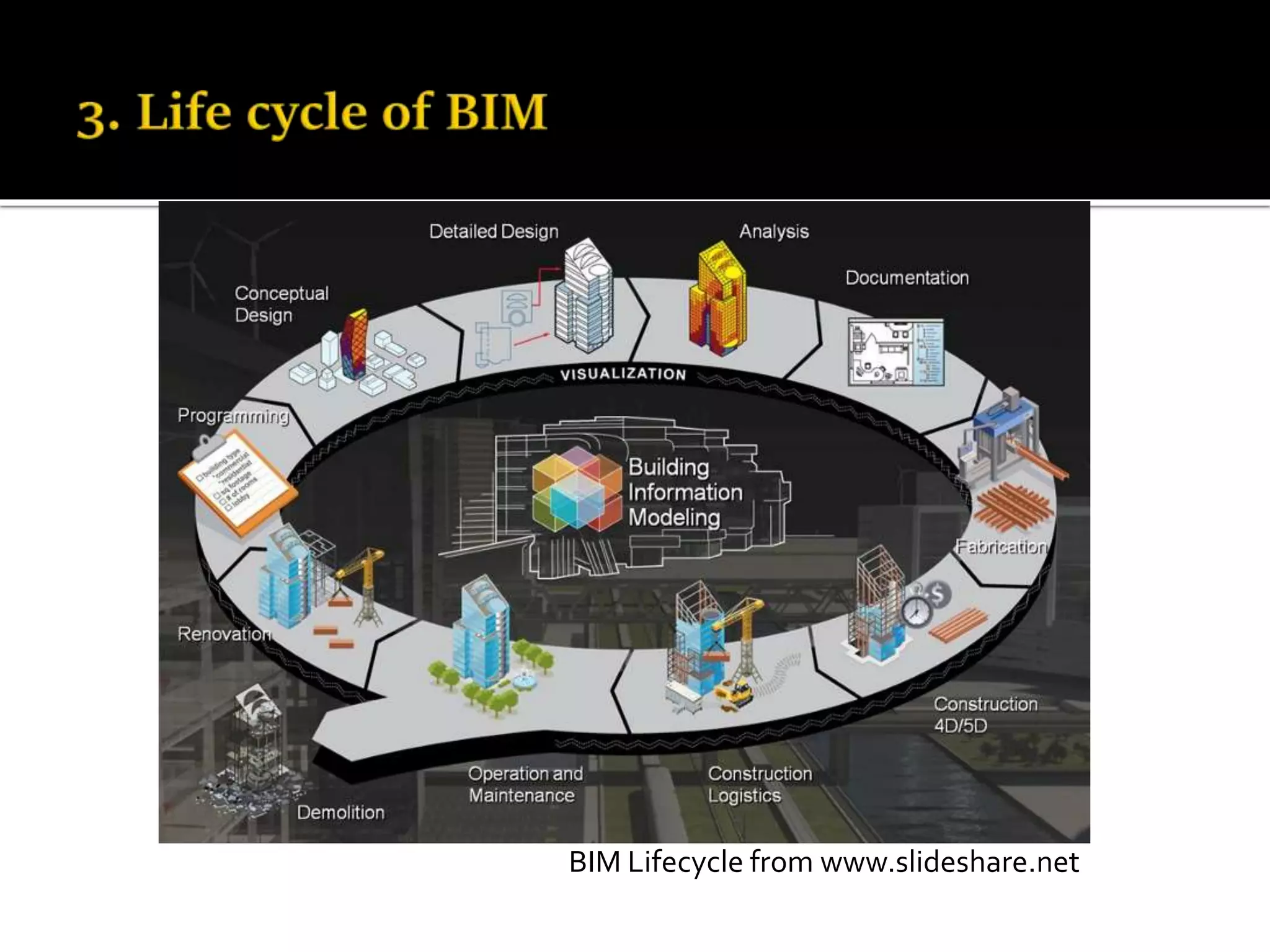
BIM Lifecycle from www.slideshare.net
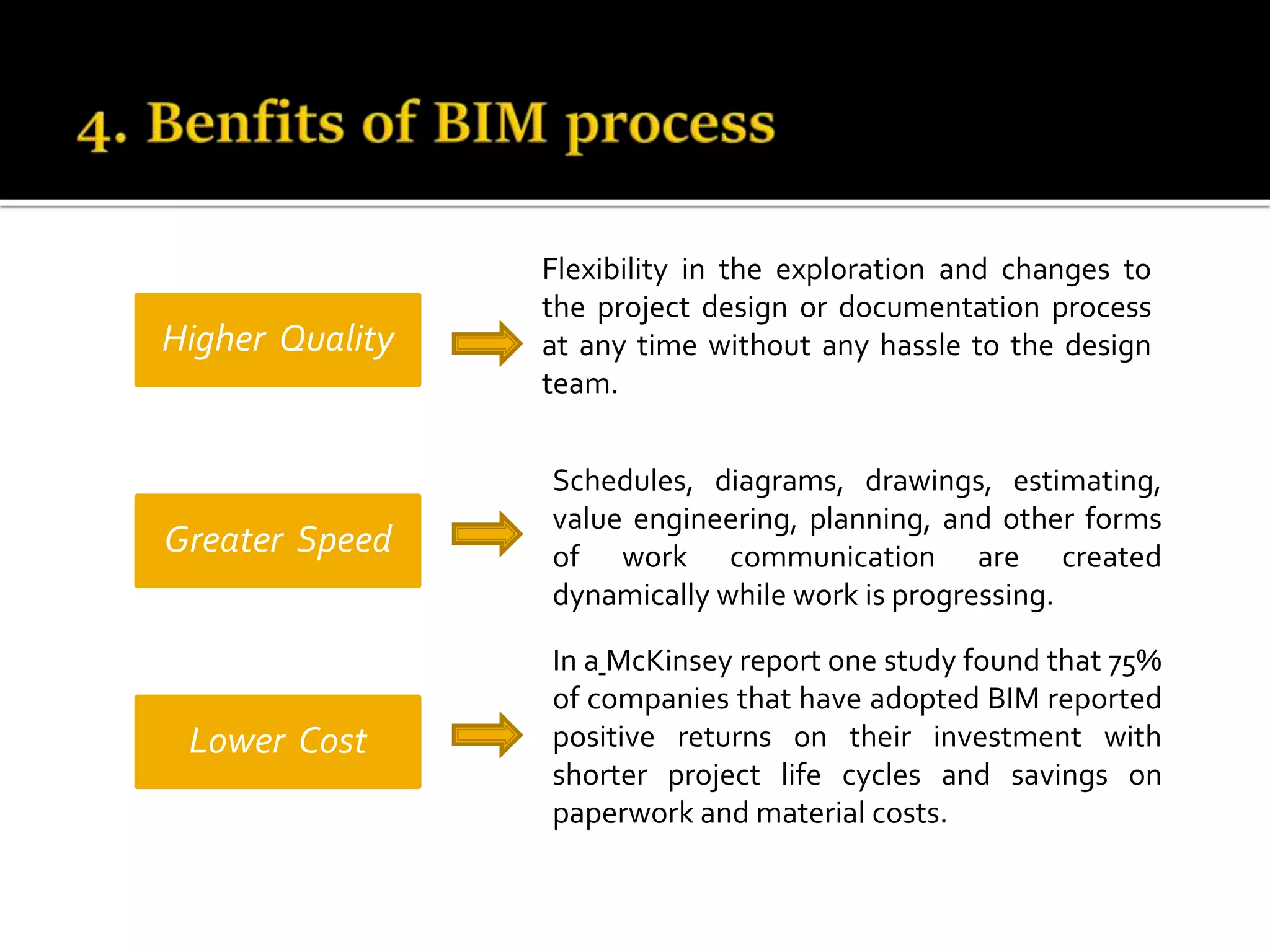
Higher Quality
Greater Speed
Lower Cost
In a McKinsey report one study found that 75%
of companies that have adopted BIM reported
positive returns on their investment with
shorter project life cycles and savings on
paperwork and material costs.
Schedules, diagrams, drawings, estimating,
value engineering, planning, and other forms
of work communication are created
dynamically while work is progressing.
Flexibility in the exploration and changes to
the project design or documentation process
at any time without any hassle to the design
team.
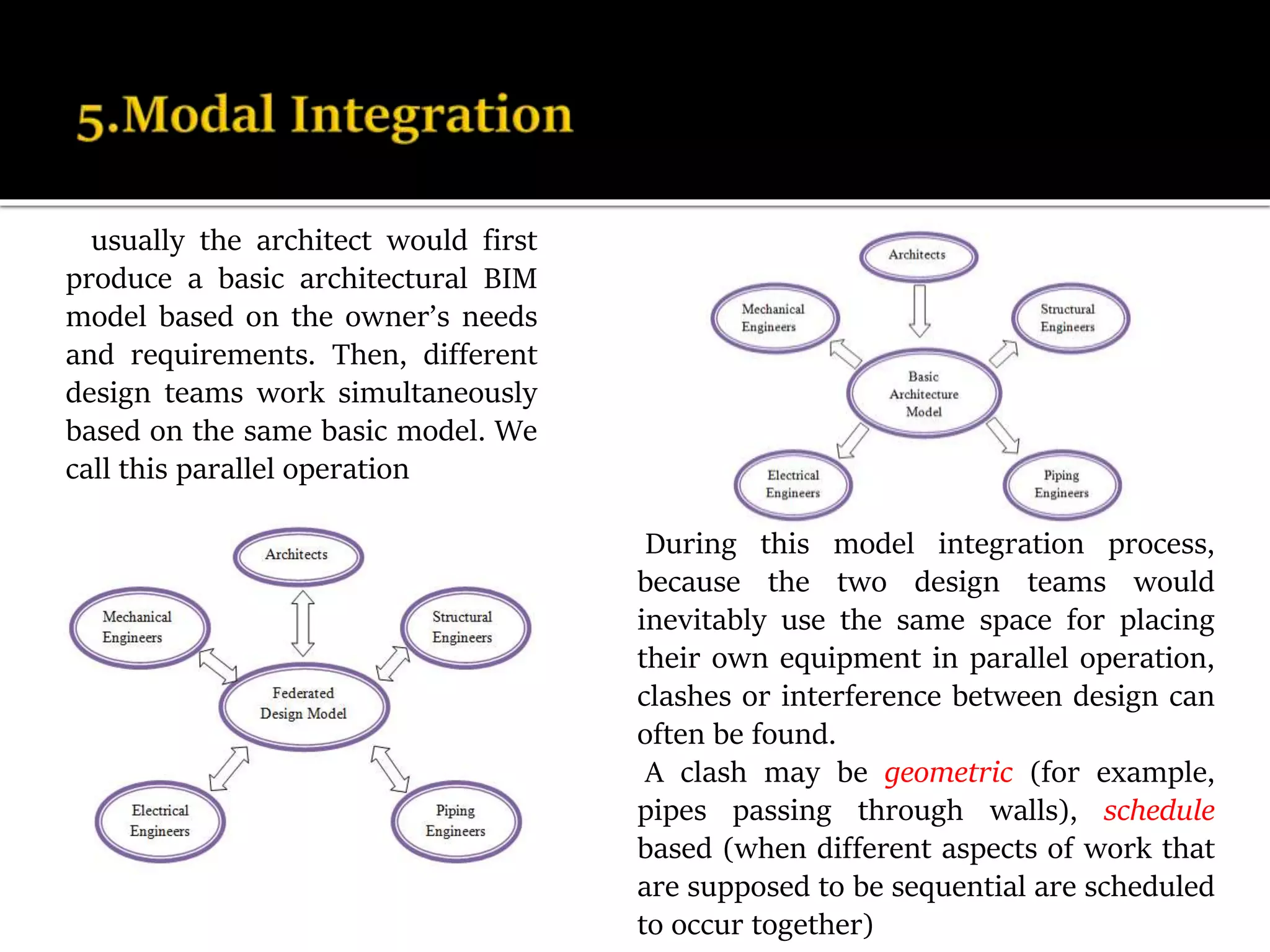
usually the architect would first
produce a basic architectural BIM
model based on the owner’s needs
and requirements. Then, different
design teams work simultaneously
based on the same basic model. We
call this parallel operation
During this model integration process,
because the two design teams would
inevitably use the same space for placing
their own equipment in parallel operation,
clashes or interference between design can
often be found.
A clash may be geometric (for example,
pipes passing through walls), schedule
based (when different aspects of work that
are supposed to be sequential are scheduled
to occur together)
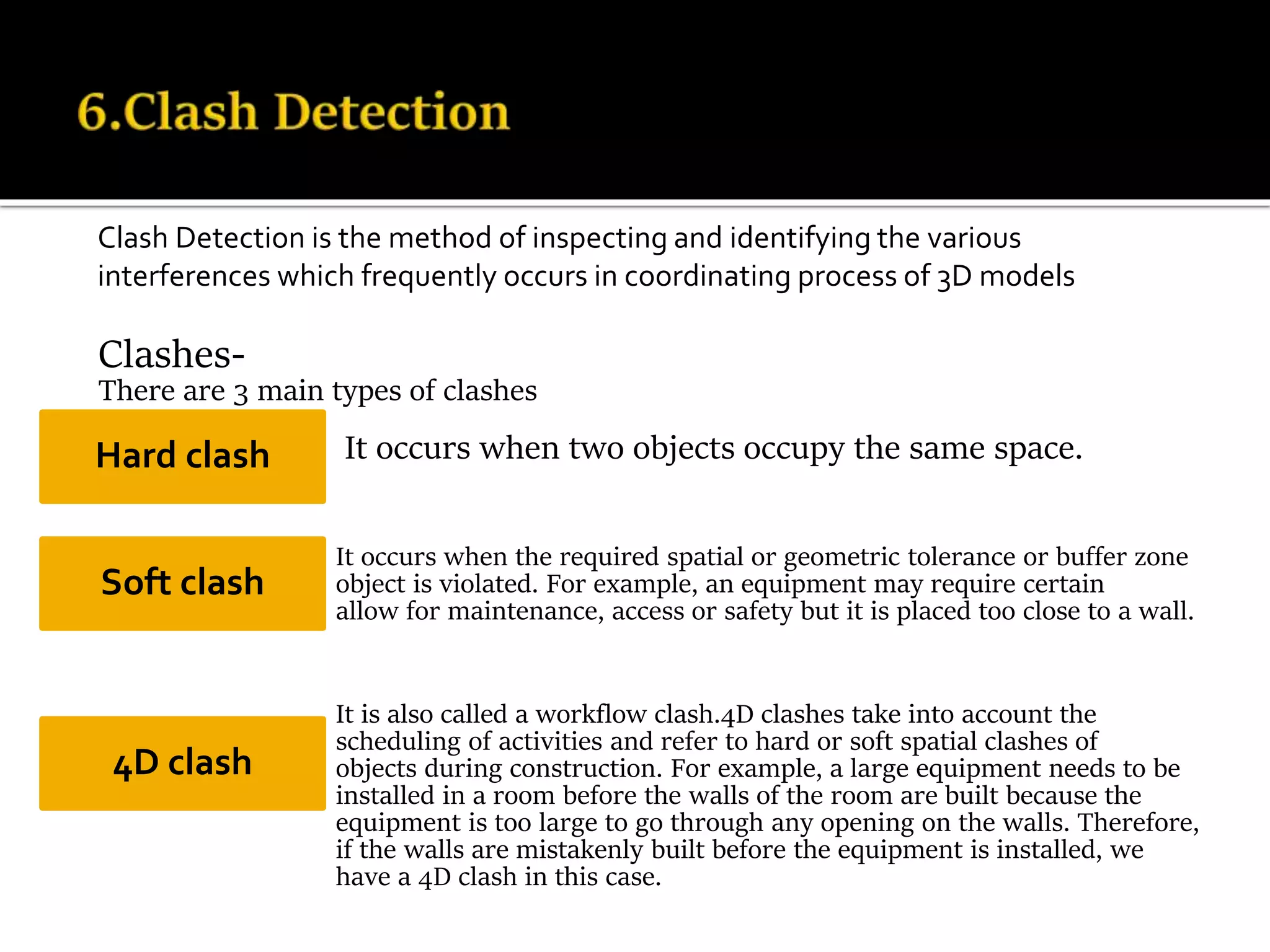
Clashes-
There are 3 main types of clashes
It occurs when two objects occupy the same space.
It occurs when the required spatial or geometric tolerance or buffer zone
of an object is violated. For example, an equipment may require certain
clearances to allow for maintenance, access or safety but it is placed too close to a wall.
It is also called a workflow clash.4D clashes take into account the
scheduling of activities and refer to hard or soft spatial clashes of
objects during construction. For example, a large equipment needs to be
installed in a room before the walls of the room are built because the
equipment is too large to go through any opening on the walls. Therefore,
if the walls are mistakenly built before the equipment is installed, we
have a 4D clash in this case.
Hard clash
Soft clash
4D clash
Clash Detection is the method of inspecting and identifying the various
interferences which frequently occurs in coordinating process of 3D models
6(a).Features of clash detection
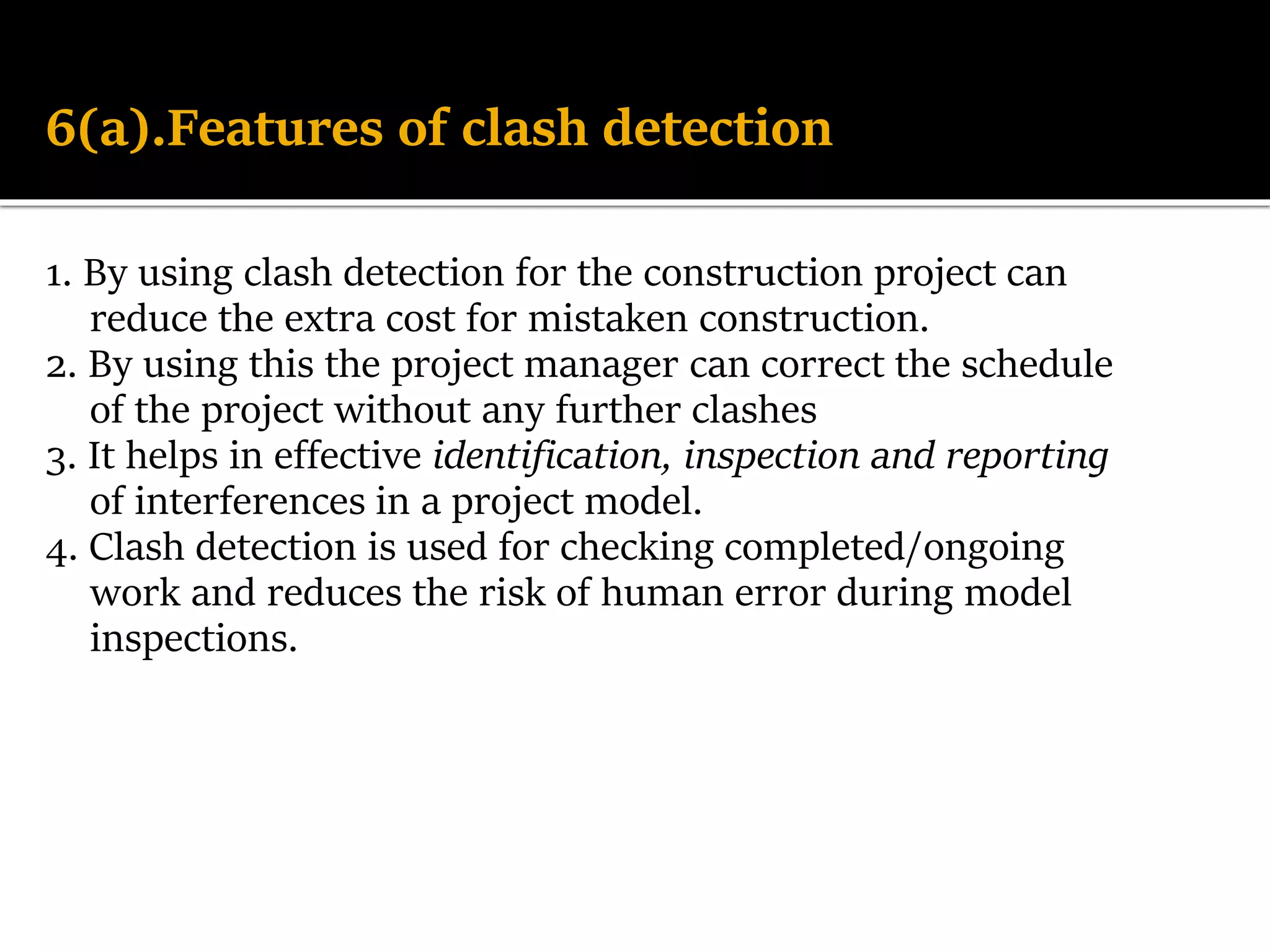
1. By using clash detection for the construction project can
reduce the extra cost for mistaken construction.
2. By using this the project manager can correct the schedule
of the project without any further clashes
3. It helps in effective identification, inspection and reporting
of interferences in a project model.
4. Clash detection is used for checking completed/ongoing
work and reduces the risk of human error during model
inspections.
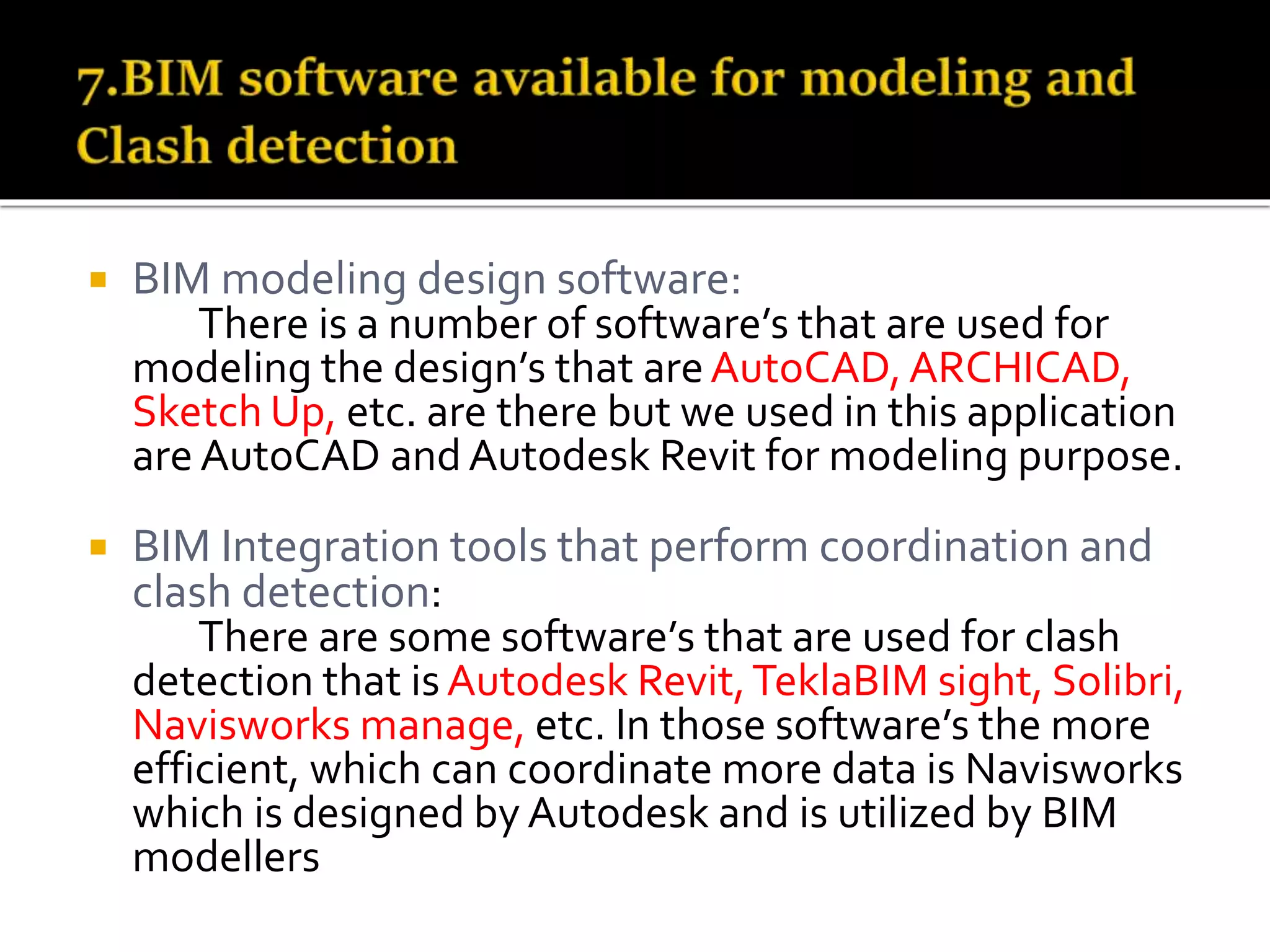
 BIM modeling design software:
There is a number of software’s that are used for
modeling the design’s that areAutoCAD, ARCHICAD,
Sketch Up, etc. are there but we used in this application
are AutoCAD and Autodesk Revit for modeling purpose.
 BIM Integration tools that perform coordination and
clash detection:
There are some software’s that are used for clash
detection that isAutodesk Revit,TeklaBIM sight, Solibri,
Navisworks manage, etc. In those software’s the more
efficient, which can coordinate more data is Navisworks
which is designed by Autodesk and is utilized by BIM
modellers
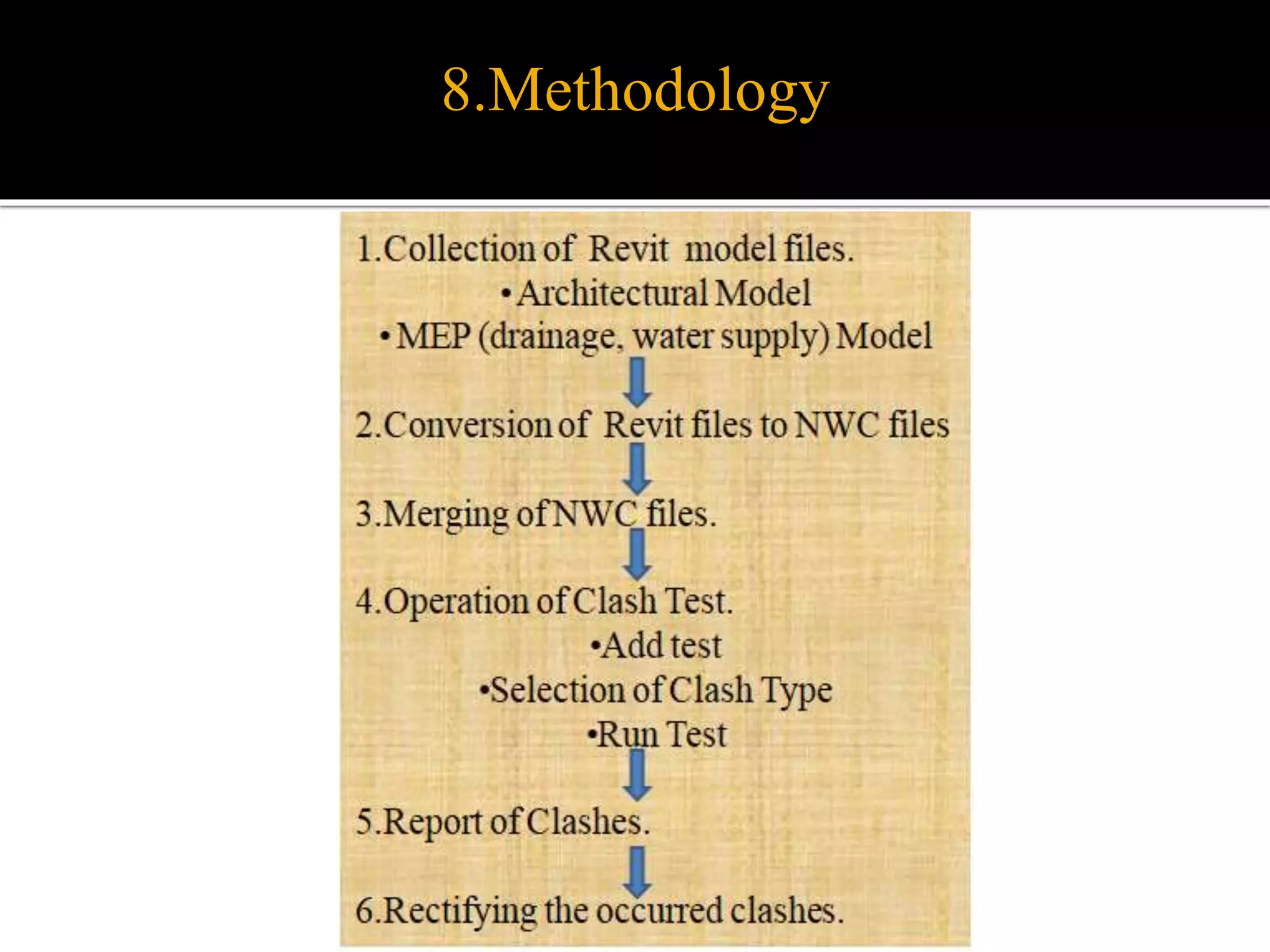
8.Methodology
 Collecting three model files of type “rvt”
(Autodesk Revit 2017) from the two models in
MEP (drainage, water supply) design and
other from architecture The clash tests on
Architectural Model versus MEP Model.
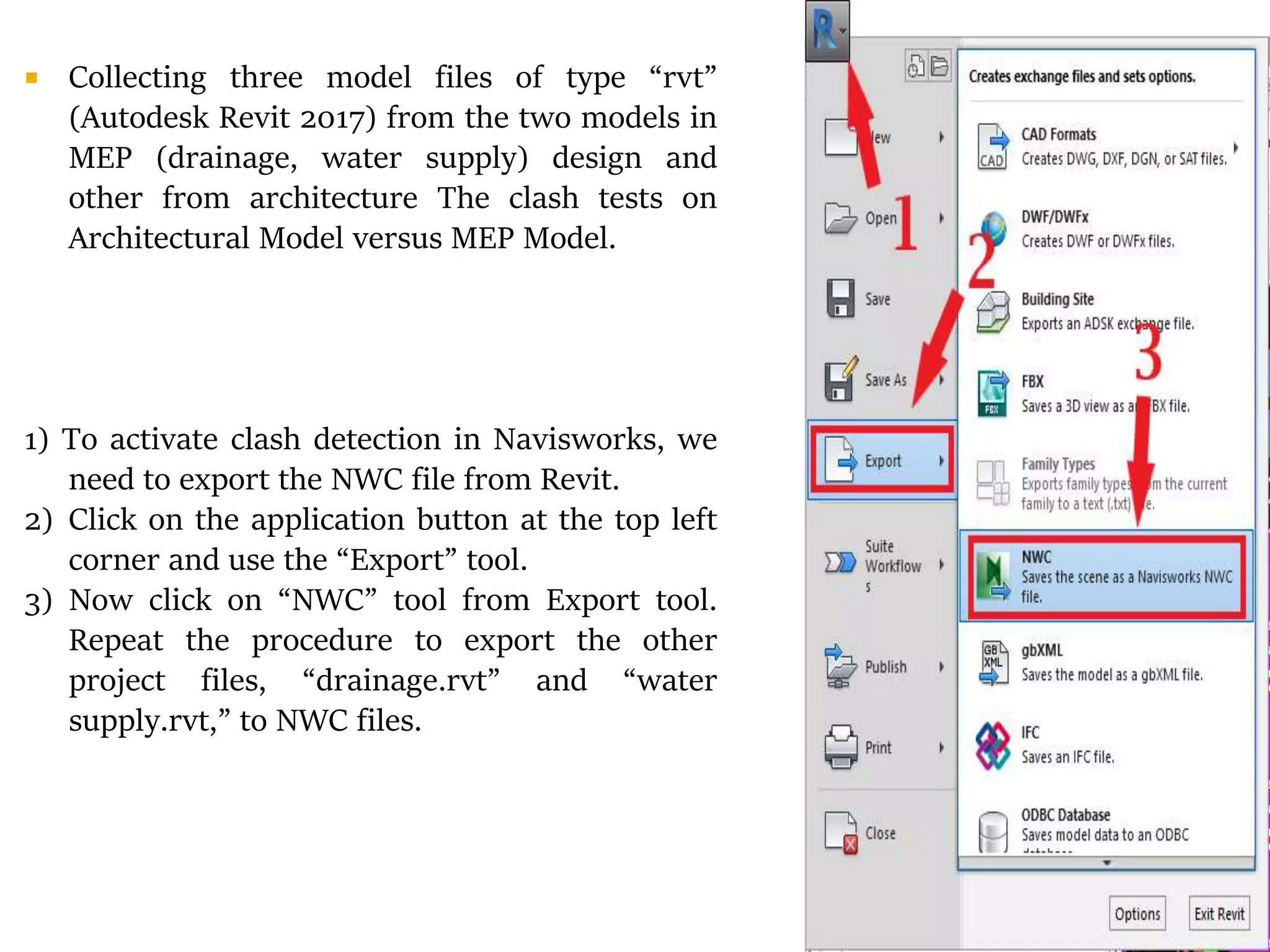
1) To activate clash detection in Navisworks, we
need to export the NWC file from Revit.
2) Click on the application button at the top left
corner and use the “Export” tool.
3) Now click on “NWC” tool from Export tool.
Repeat the procedure to export the other
project files, “drainage.rvt” and “water
supply.rvt,” to NWC files.
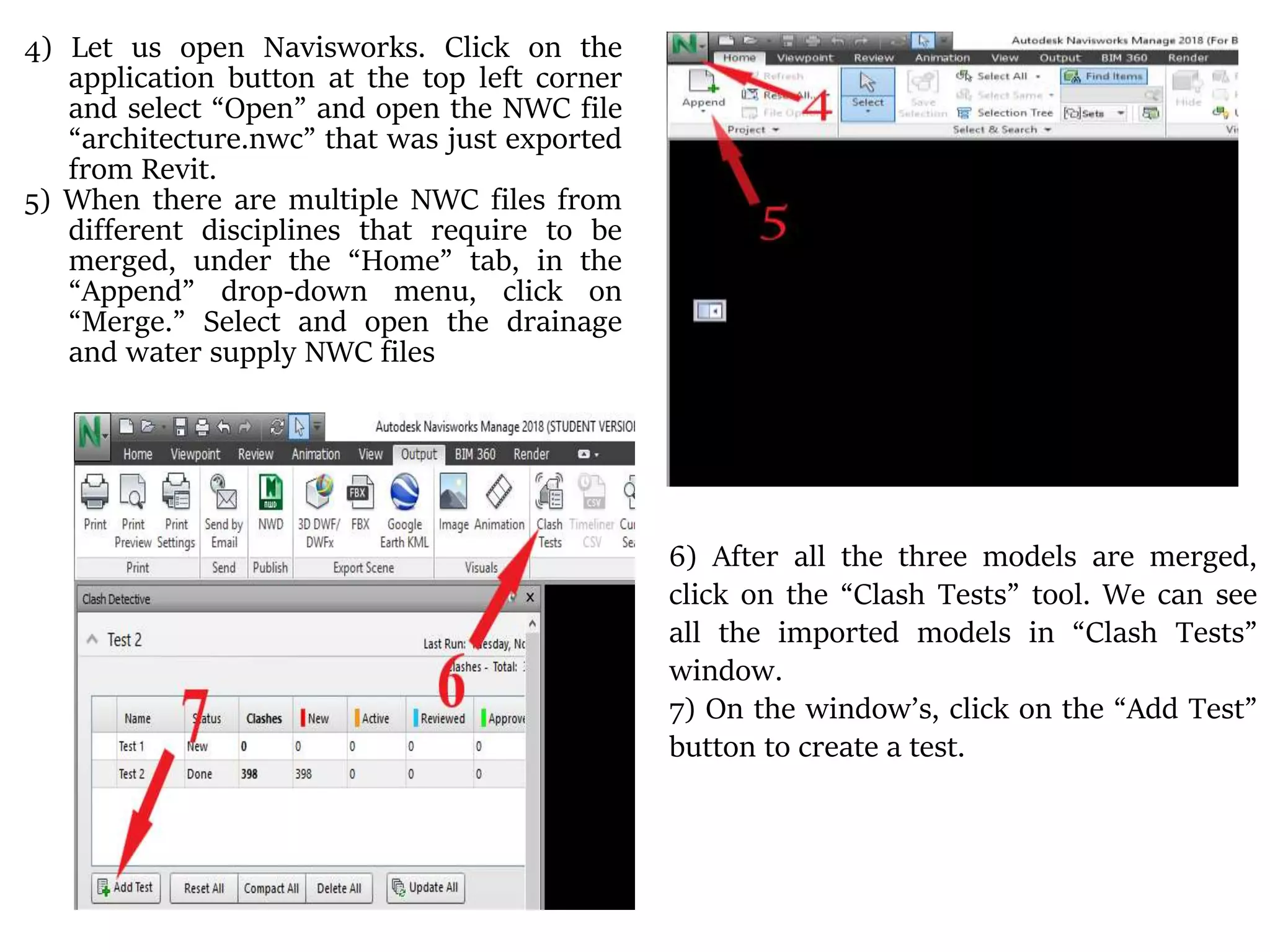
4) Let us open Navisworks. Click on the
application button at the top left corner
and select “Open” and open the NWC file
“architecture.nwc” that was just exported
from Revit.
5) When there are multiple NWC files from
different disciplines that require to be
merged, under the “Home” tab, in the
“Append” drop-down menu, click on
“Merge.” Select and open the drainage
and water supply NWC files
6) After all the three models are merged,
click on the “Clash Tests” tool. We can see
all the imported models in “Clash Tests”
window.
7) On the window’s, click on the “Add Test”
button to create a test.
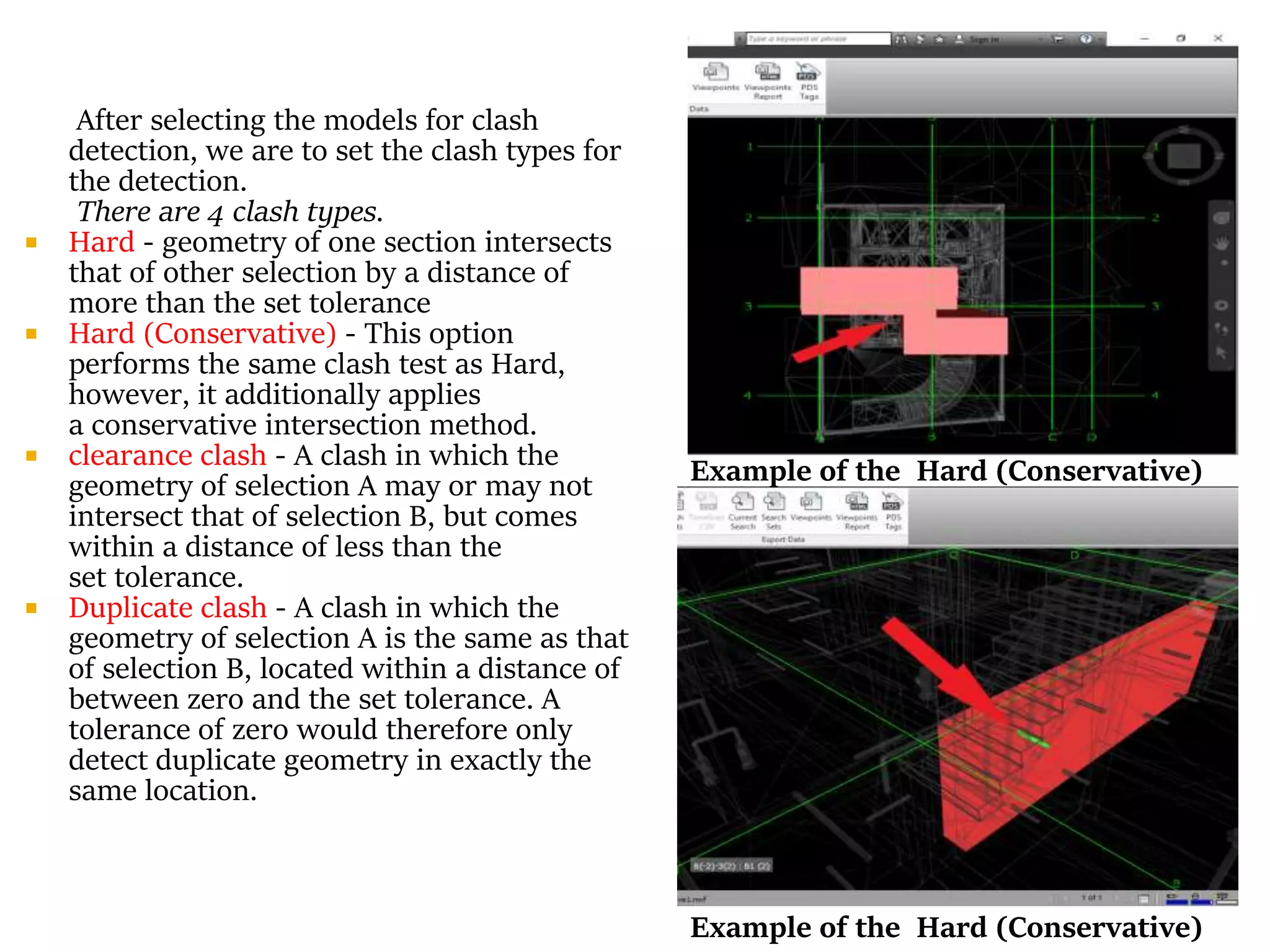
After selecting the models for clash
detection, we are to set the clash types for
the detection.
There are 4 clash types.
 Hard - geometry of one section intersects
that of other selection by a distance of
more than the set tolerance
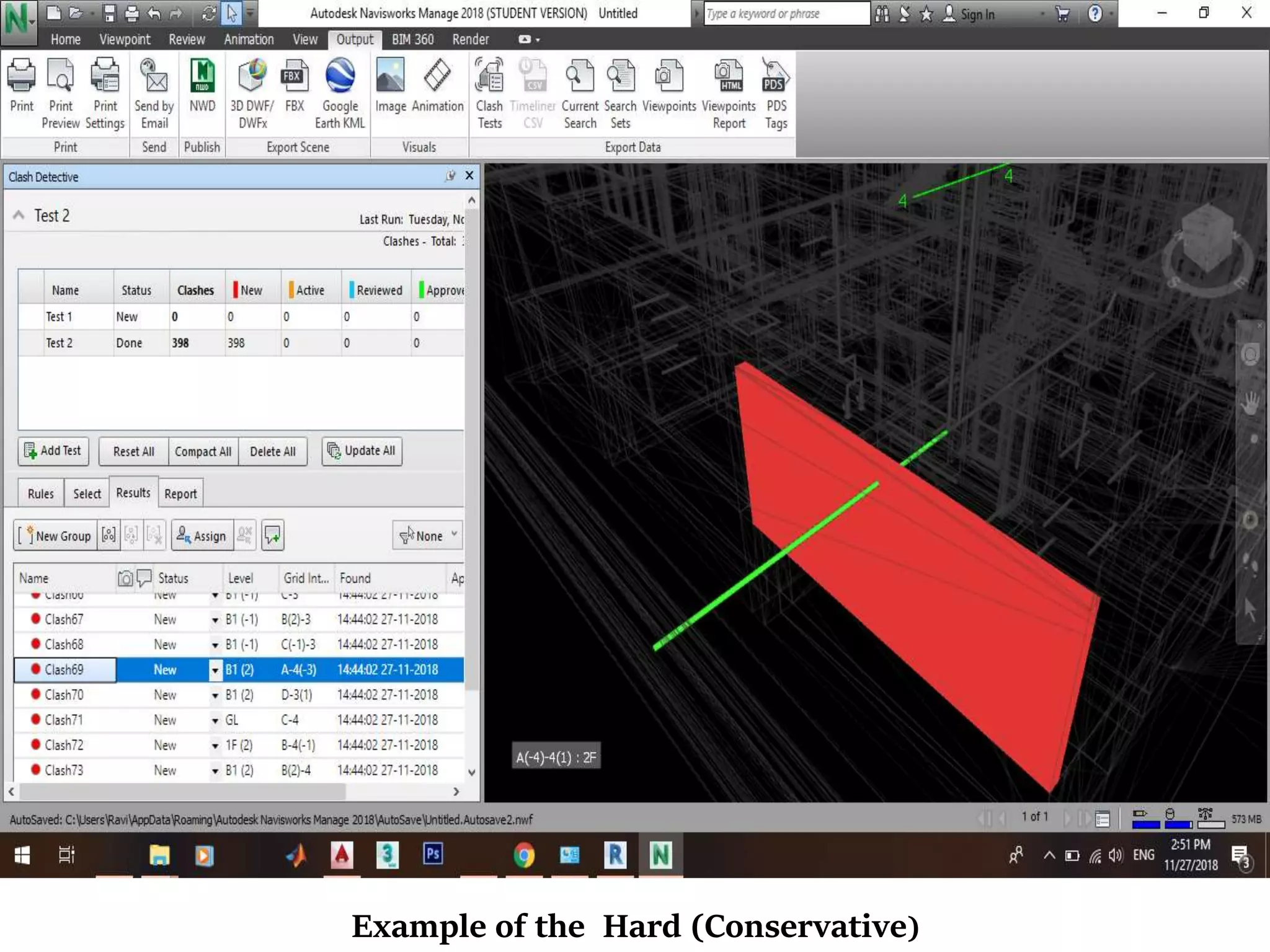
 Hard (Conservative) - This option
performs the same clash test as Hard,
however, it additionally applies
a conservative intersection method.
 clearance clash - A clash in which the
geometry of selection A may or may not
intersect that of selection B, but comes
within a distance of less than the
set tolerance.
 Duplicate clash - A clash in which the
geometry of selection A is the same as that
of selection B, located within a distance of
between zero and the set tolerance. A
tolerance of zero would therefore only
detect duplicate geometry in exactly the
same location.
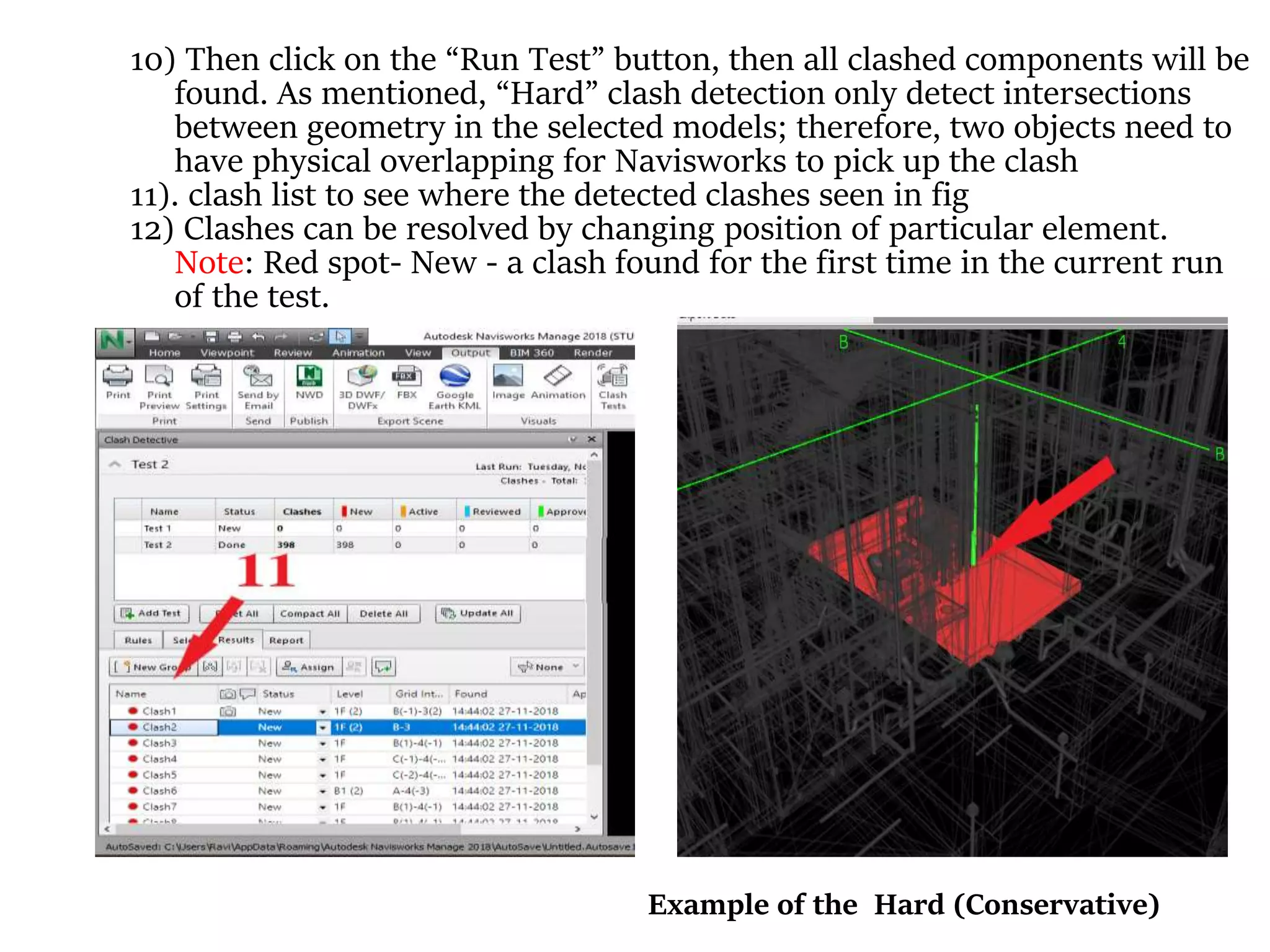
Example of the Hard (Conservative)
10) Then click on the “Run Test” button, then all clashed components will be
found. As mentioned, “Hard” clash detection only detect intersections
between geometry in the selected models; therefore, two objects need to
have physical overlapping for Navisworks to pick up the clash
11). clash list to see where the detected clashes seen in fig
12) Clashes can be resolved by changing position of particular element.
Note: Red spot- New - a clash found for the first time in the current run
of the test.
Example of the Hard (Conservative)
1) Building Information Modeling (BIM) shows great results
on projects in terms of performance, time and cost.
2) Implementing of modal integration and Clash detection
tools it is useful to decrease coordination errors, human
errors so that results in high level of accuracy of models.
So this will be avoiding re-construction.
3) By using Navisworks Manage for clash detection it results
more efficiency.
4) Usage of this tools is very important for error-free
construction project helps to optimize time in the
construction schedule and minimize the overall cost of
project at the construction stage without any further fault
construction.
[1] Bhamre Gaurav Shyamkant, Ashwini Patil, Smita Pataskar, “ Cost and Time Optimization for Construction of Residential
Building by Clash detection in Building Information Model(BIM)”, in International Research Journal of Engineering and
Technology., vol. 04-1, pp. 550-553, Jan. 2017.
[2] Mr. Swapnesh.P.Raut, Dr.S.S.Valunjkar, “ Improve the Productivity of Building Construction Project using Clash
detection Application in Building Information Modeling”, in International Research Journal of Engineering and
Technology., vol. 04-3, pp. 1784-1790, Mar. 2017.
[3] Debasis Sarkar1& Raj Modi2, “Applications of Building Information Modeling (BIM) to Real Estate Projects of
Ahmedabad”, in International Advanced Research Journal in Science, Engineering and Technology., vol.02-9, pp. 54-58,
Sep. 2015.
[4] Mehmet F. Hergunsel, “Benefits of Building Information Modeling for Construction Managers and BIM based
Scheduling,” M. Eng. thesis, Worcester Polytechnic Institute, United States, May. 2011.
[5] Lancine Doumbouya1, Chang Sheng Guan 1, Guoping Gao1, Yangshao Pan2, “Application of BIM Technology in Design
and Construction: A Case study of Pharmaceutical Industrial base of Amino acid Building Project”, in Engineering for
Rural Development., vol. 16, pp. 1495-1502, May. 2017.
[6] Qing Liu, Tao Gao, Jianping Wang, “Research on Application of BIM Technology in Construction Project” ,
[7] Thomas Goubau (Dec, 2016) aproplan blog. [Online]. Available: https://www.aproplan.com/blog/quality-management-
plan-construction/what-is-bim-what-are-its-benefits-to-the-construction-industry.
[8] Richard McPartland (July, 2017) thenbs editor website. [Online]. Available: https://www.thenbs.com/knowledge/bim-
dimensions-3d-4d-5d-6d-bim-explained
[9] Eastman, C., Teicholz, P., Sacks, R., Listo, K., 2008. BIM handbook: A guide to building information modeling for owners,
managers, designers, engineers, and contractors, Hoboken (New Jersey): Wiley, p. 490.
[10] Penn state College of Engineering website. [Online]. Available: https://www.bim.psu.edu/#bim_uses.
[11] Dr. Peter Smith, “BIM Implementation – Global Strategies” in creative construction conference., vol. 85,pp. 482-492,
2014.
[12] Autodesk website. [Online]. Available: https://knowledge.autodesk.com/support/navisworks-products/learn-
explore/caas/CloudHelp/cloudhelp/2017/ENU/Navisworks-Manage/files/GUID-27EA59E6-1A15-4372-9D7D-
90508936B512-htm.html
THANK YOU

BIM Usage in Construction Industry and An application of Clash Detection and Model integration

  • 1.
    Author : RavindraSSK Medicharla Affiliation : U.G. Student, Dept of civil engineering, Veltech Rangarajan Dr. Sagunthala Instuite of Science and Technology BIM Usage in Construction Industry : An Application of a Modal Integration and Clash Detection tool in Building Design Ref No : ICGESCD/CEM/18
  • 2.
     Abstract -BIM (Building Information and Modeling) is one of the most popular application in modern construction industries. BIM is used to manipulate and facilitates coordination among project managers and stake holders, and also to make better time efficient and economic of the projects. In this paper we mainly focus on modal integration and clash detection of a residential building. Without the integration of basic architecture plan, Structural plan, and MEP(Mechanical, Electrical, Piping) planning it’s unable to find the clash detection here we are going to explain how the clash detection occurs in planning before being construction started, if there is no proper planning( like integration of architecture plan ,Mechanical, Electrical, Piping (MEP) planning there may get clashes, if we constructed without the integration of the plans in projects that may leads to destruction at the clashes site or rearrange of the construction parts and also time consuming process. The software’s that we use for BIM application are Auto Cad 2019, Revit2017, Navisworks Manage 2018 (BIM 360).  Keywords- BIM, Modal Integration, Clash Detection, Revit, Navisworks manage, Auto Cad.
  • 3.
    History of BIM Theidea of BIM was conceptualized in the 70s and was initially called the Building Description System BDS (Eastman et al., 1974). The term “building model” was first used in 1985 in an architectural design paper on computer- aided drawing and computer-aided design (Ruffle, 1985). And in 1992, the term “building information model” was first used in a paper discussing automation in construction (van Nederveen et. al, 1992). It wasn’t until 10 years later, though, when the terms building information modeling and building information model (including the acronym BIM) became popularly used. It was in 2002 when Autodesk published a paper entitled “Building Information Modeling ” and various software developers and vendors got involved in the field and the term was standardized to mean as the common name for digital representation of the building process ( Laiserin, 2008). Other terminologies of the similar format have been used by different makers — they were “Virtual Building” by Graphisoft and “Integrated Project Models” by Bentley Systems
  • 4.
    BIM Lifecycle fromwww.slideshare.net
  • 5.
    Higher Quality Greater Speed LowerCost In a McKinsey report one study found that 75% of companies that have adopted BIM reported positive returns on their investment with shorter project life cycles and savings on paperwork and material costs. Schedules, diagrams, drawings, estimating, value engineering, planning, and other forms of work communication are created dynamically while work is progressing. Flexibility in the exploration and changes to the project design or documentation process at any time without any hassle to the design team.
  • 6.
    usually the architectwould first produce a basic architectural BIM model based on the owner’s needs and requirements. Then, different design teams work simultaneously based on the same basic model. We call this parallel operation During this model integration process, because the two design teams would inevitably use the same space for placing their own equipment in parallel operation, clashes or interference between design can often be found. A clash may be geometric (for example, pipes passing through walls), schedule based (when different aspects of work that are supposed to be sequential are scheduled to occur together)
  • 7.
    Clashes- There are 3main types of clashes It occurs when two objects occupy the same space. It occurs when the required spatial or geometric tolerance or buffer zone of an object is violated. For example, an equipment may require certain clearances to allow for maintenance, access or safety but it is placed too close to a wall. It is also called a workflow clash.4D clashes take into account the scheduling of activities and refer to hard or soft spatial clashes of objects during construction. For example, a large equipment needs to be installed in a room before the walls of the room are built because the equipment is too large to go through any opening on the walls. Therefore, if the walls are mistakenly built before the equipment is installed, we have a 4D clash in this case. Hard clash Soft clash 4D clash Clash Detection is the method of inspecting and identifying the various interferences which frequently occurs in coordinating process of 3D models
  • 8.
    6(a).Features of clashdetection 1. By using clash detection for the construction project can reduce the extra cost for mistaken construction. 2. By using this the project manager can correct the schedule of the project without any further clashes 3. It helps in effective identification, inspection and reporting of interferences in a project model. 4. Clash detection is used for checking completed/ongoing work and reduces the risk of human error during model inspections.
  • 9.
     BIM modelingdesign software: There is a number of software’s that are used for modeling the design’s that areAutoCAD, ARCHICAD, Sketch Up, etc. are there but we used in this application are AutoCAD and Autodesk Revit for modeling purpose.  BIM Integration tools that perform coordination and clash detection: There are some software’s that are used for clash detection that isAutodesk Revit,TeklaBIM sight, Solibri, Navisworks manage, etc. In those software’s the more efficient, which can coordinate more data is Navisworks which is designed by Autodesk and is utilized by BIM modellers
  • 10.
  • 11.
     Collecting threemodel files of type “rvt” (Autodesk Revit 2017) from the two models in MEP (drainage, water supply) design and other from architecture The clash tests on Architectural Model versus MEP Model. 1) To activate clash detection in Navisworks, we need to export the NWC file from Revit. 2) Click on the application button at the top left corner and use the “Export” tool. 3) Now click on “NWC” tool from Export tool. Repeat the procedure to export the other project files, “drainage.rvt” and “water supply.rvt,” to NWC files.
  • 12.
    4) Let usopen Navisworks. Click on the application button at the top left corner and select “Open” and open the NWC file “architecture.nwc” that was just exported from Revit. 5) When there are multiple NWC files from different disciplines that require to be merged, under the “Home” tab, in the “Append” drop-down menu, click on “Merge.” Select and open the drainage and water supply NWC files 6) After all the three models are merged, click on the “Clash Tests” tool. We can see all the imported models in “Clash Tests” window. 7) On the window’s, click on the “Add Test” button to create a test.
  • 13.
    After selecting themodels for clash detection, we are to set the clash types for the detection. There are 4 clash types.  Hard - geometry of one section intersects that of other selection by a distance of more than the set tolerance  Hard (Conservative) - This option performs the same clash test as Hard, however, it additionally applies a conservative intersection method.  clearance clash - A clash in which the geometry of selection A may or may not intersect that of selection B, but comes within a distance of less than the set tolerance.  Duplicate clash - A clash in which the geometry of selection A is the same as that of selection B, located within a distance of between zero and the set tolerance. A tolerance of zero would therefore only detect duplicate geometry in exactly the same location. Example of the Hard (Conservative) Example of the Hard (Conservative)
  • 14.
    10) Then clickon the “Run Test” button, then all clashed components will be found. As mentioned, “Hard” clash detection only detect intersections between geometry in the selected models; therefore, two objects need to have physical overlapping for Navisworks to pick up the clash 11). clash list to see where the detected clashes seen in fig 12) Clashes can be resolved by changing position of particular element. Note: Red spot- New - a clash found for the first time in the current run of the test. Example of the Hard (Conservative)
  • 15.
    Example of theHard (Conservative)
  • 16.
    1) Building InformationModeling (BIM) shows great results on projects in terms of performance, time and cost. 2) Implementing of modal integration and Clash detection tools it is useful to decrease coordination errors, human errors so that results in high level of accuracy of models. So this will be avoiding re-construction. 3) By using Navisworks Manage for clash detection it results more efficiency. 4) Usage of this tools is very important for error-free construction project helps to optimize time in the construction schedule and minimize the overall cost of project at the construction stage without any further fault construction.
  • 17.
    [1] Bhamre GauravShyamkant, Ashwini Patil, Smita Pataskar, “ Cost and Time Optimization for Construction of Residential Building by Clash detection in Building Information Model(BIM)”, in International Research Journal of Engineering and Technology., vol. 04-1, pp. 550-553, Jan. 2017. [2] Mr. Swapnesh.P.Raut, Dr.S.S.Valunjkar, “ Improve the Productivity of Building Construction Project using Clash detection Application in Building Information Modeling”, in International Research Journal of Engineering and Technology., vol. 04-3, pp. 1784-1790, Mar. 2017. [3] Debasis Sarkar1& Raj Modi2, “Applications of Building Information Modeling (BIM) to Real Estate Projects of Ahmedabad”, in International Advanced Research Journal in Science, Engineering and Technology., vol.02-9, pp. 54-58, Sep. 2015. [4] Mehmet F. Hergunsel, “Benefits of Building Information Modeling for Construction Managers and BIM based Scheduling,” M. Eng. thesis, Worcester Polytechnic Institute, United States, May. 2011. [5] Lancine Doumbouya1, Chang Sheng Guan 1, Guoping Gao1, Yangshao Pan2, “Application of BIM Technology in Design and Construction: A Case study of Pharmaceutical Industrial base of Amino acid Building Project”, in Engineering for Rural Development., vol. 16, pp. 1495-1502, May. 2017. [6] Qing Liu, Tao Gao, Jianping Wang, “Research on Application of BIM Technology in Construction Project” , [7] Thomas Goubau (Dec, 2016) aproplan blog. [Online]. Available: https://www.aproplan.com/blog/quality-management- plan-construction/what-is-bim-what-are-its-benefits-to-the-construction-industry. [8] Richard McPartland (July, 2017) thenbs editor website. [Online]. Available: https://www.thenbs.com/knowledge/bim- dimensions-3d-4d-5d-6d-bim-explained [9] Eastman, C., Teicholz, P., Sacks, R., Listo, K., 2008. BIM handbook: A guide to building information modeling for owners, managers, designers, engineers, and contractors, Hoboken (New Jersey): Wiley, p. 490. [10] Penn state College of Engineering website. [Online]. Available: https://www.bim.psu.edu/#bim_uses. [11] Dr. Peter Smith, “BIM Implementation – Global Strategies” in creative construction conference., vol. 85,pp. 482-492, 2014. [12] Autodesk website. [Online]. Available: https://knowledge.autodesk.com/support/navisworks-products/learn- explore/caas/CloudHelp/cloudhelp/2017/ENU/Navisworks-Manage/files/GUID-27EA59E6-1A15-4372-9D7D- 90508936B512-htm.html
  • 18.