Using R in financial modeling 
Perm State National Research 
University 
Арбузов Вячеслав 
arbuzov@prognoz.ru
Basic knowledgement 
about R
3 
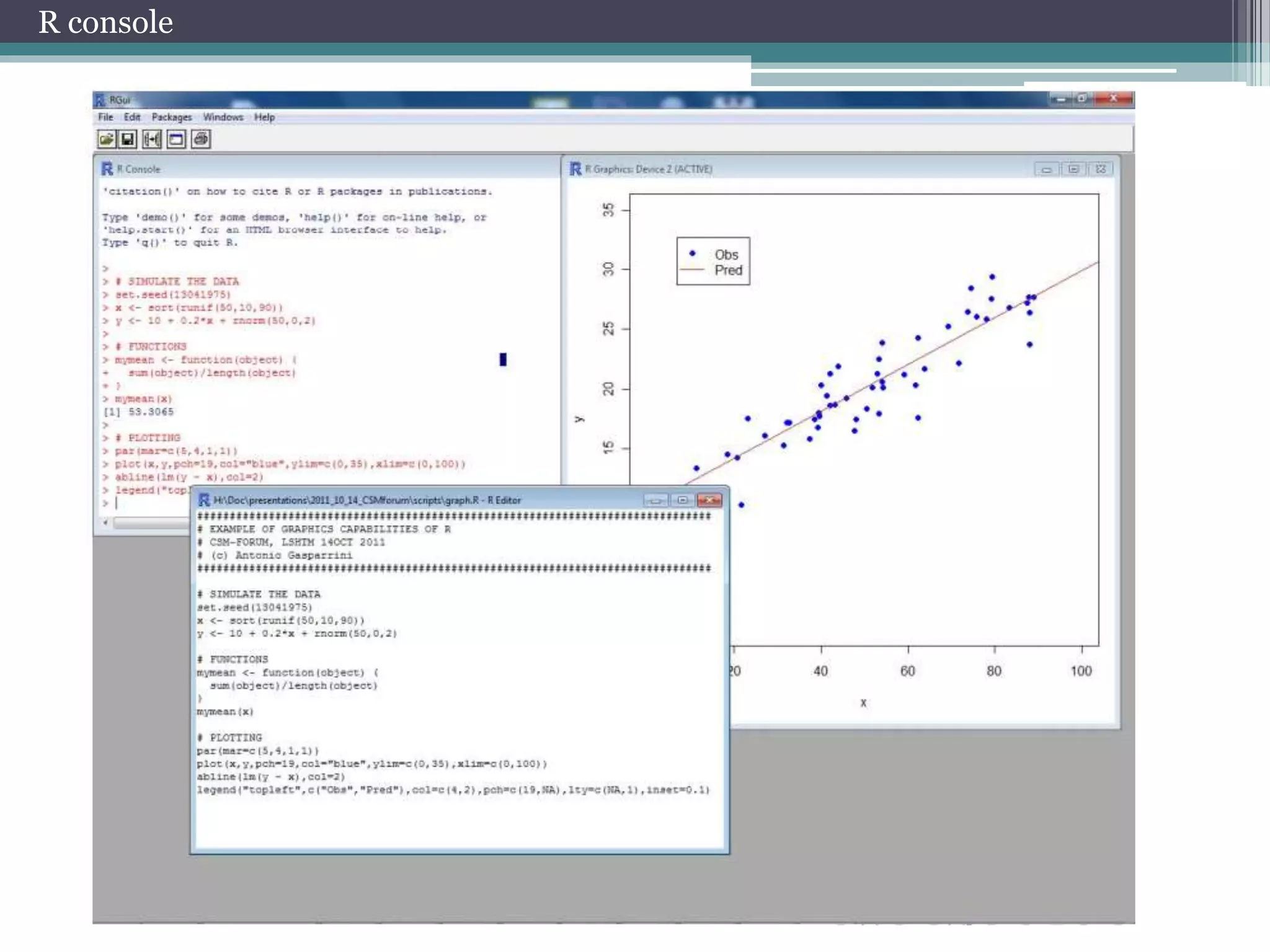
R console
Coding 
Simple 
calculation 
4+3 
5-1 
4*6 
10/2 
2^10 
9%%2 
9%/%2 
abs(-1) 
exp(1) 
sqrt(25) 
sin(1) 
pi 
cos(pi) 
sign(-106) 
log(1) 
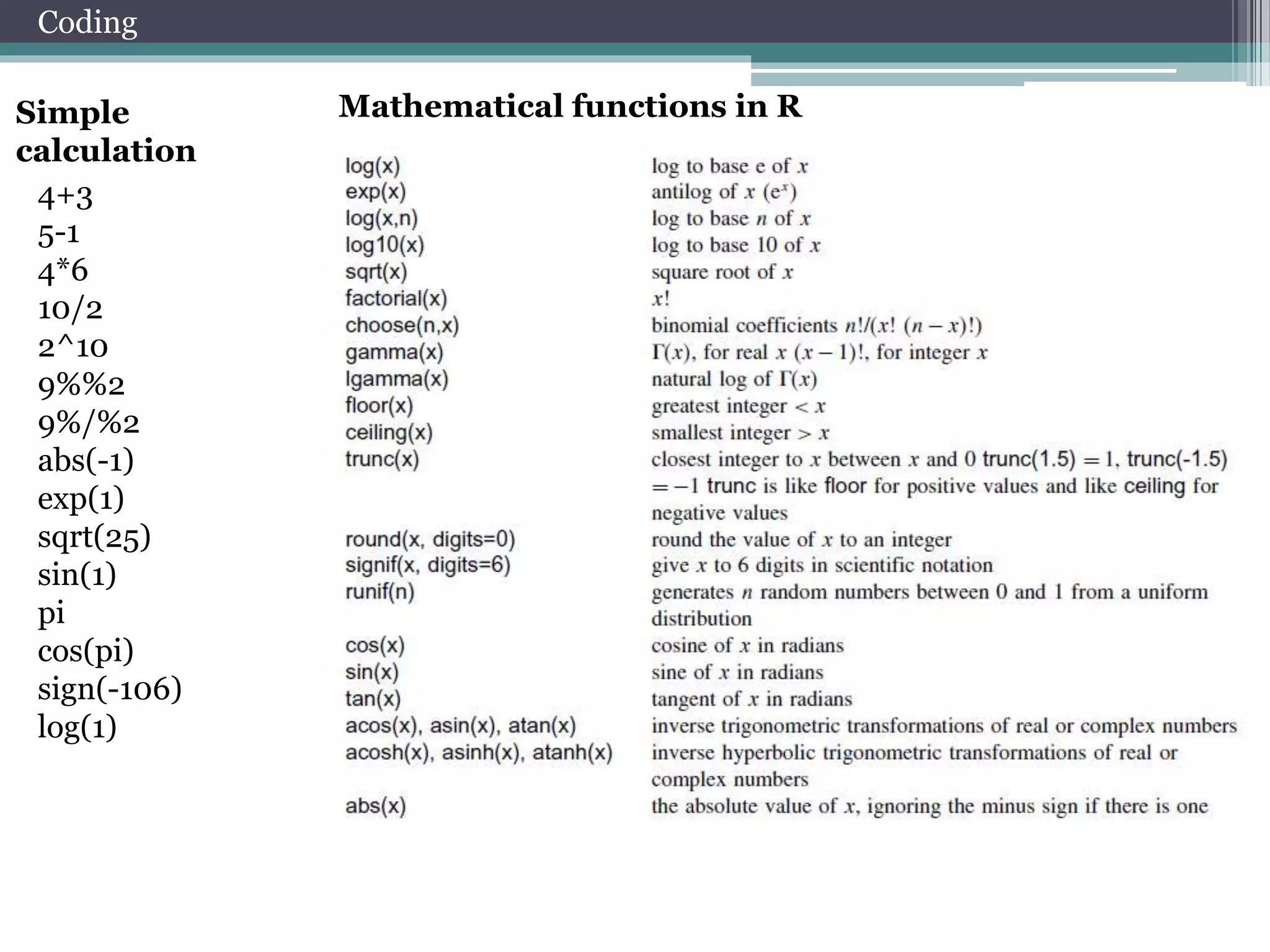
Mathematical functions in R
Coding 
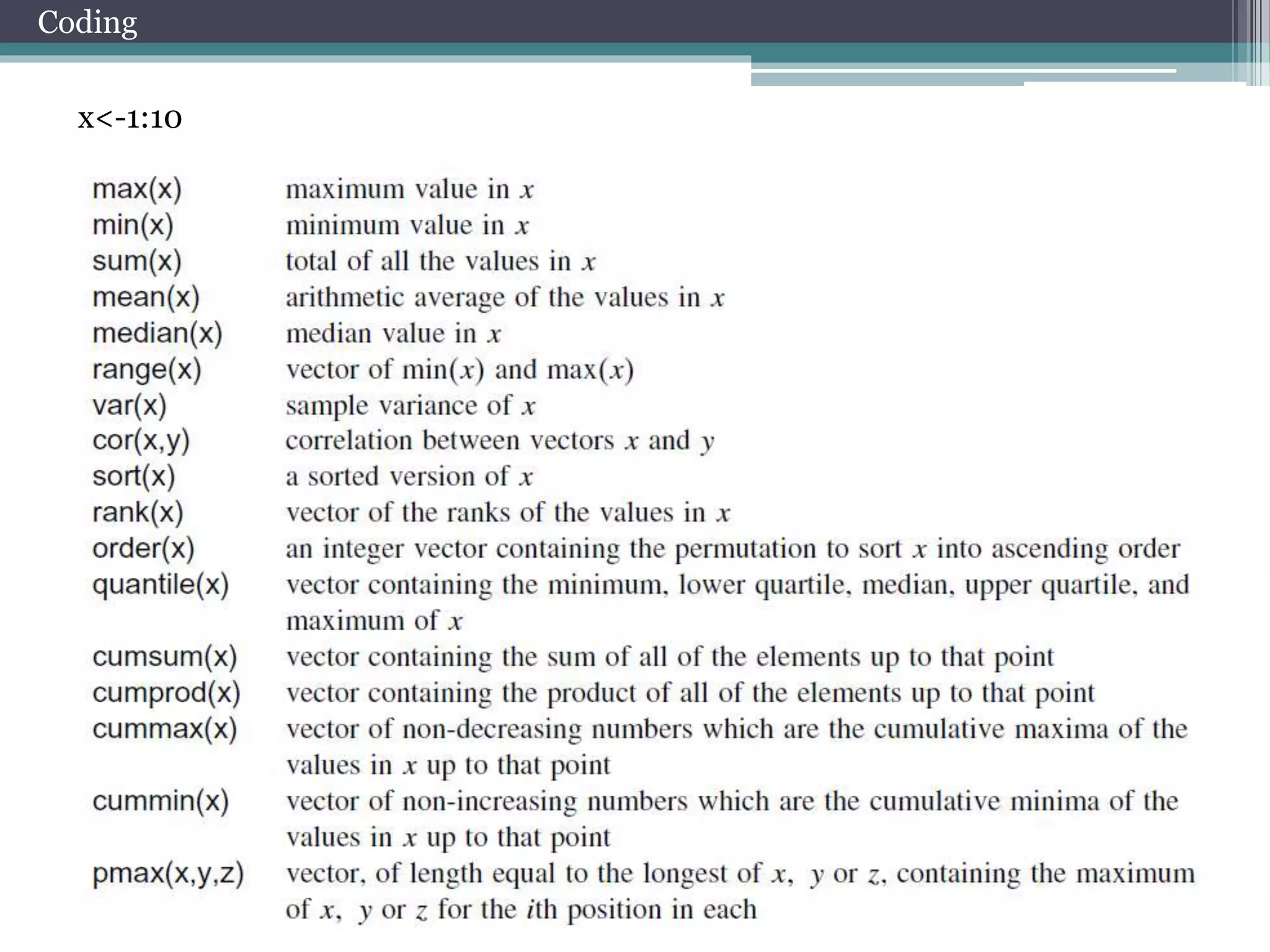
x<-1:10
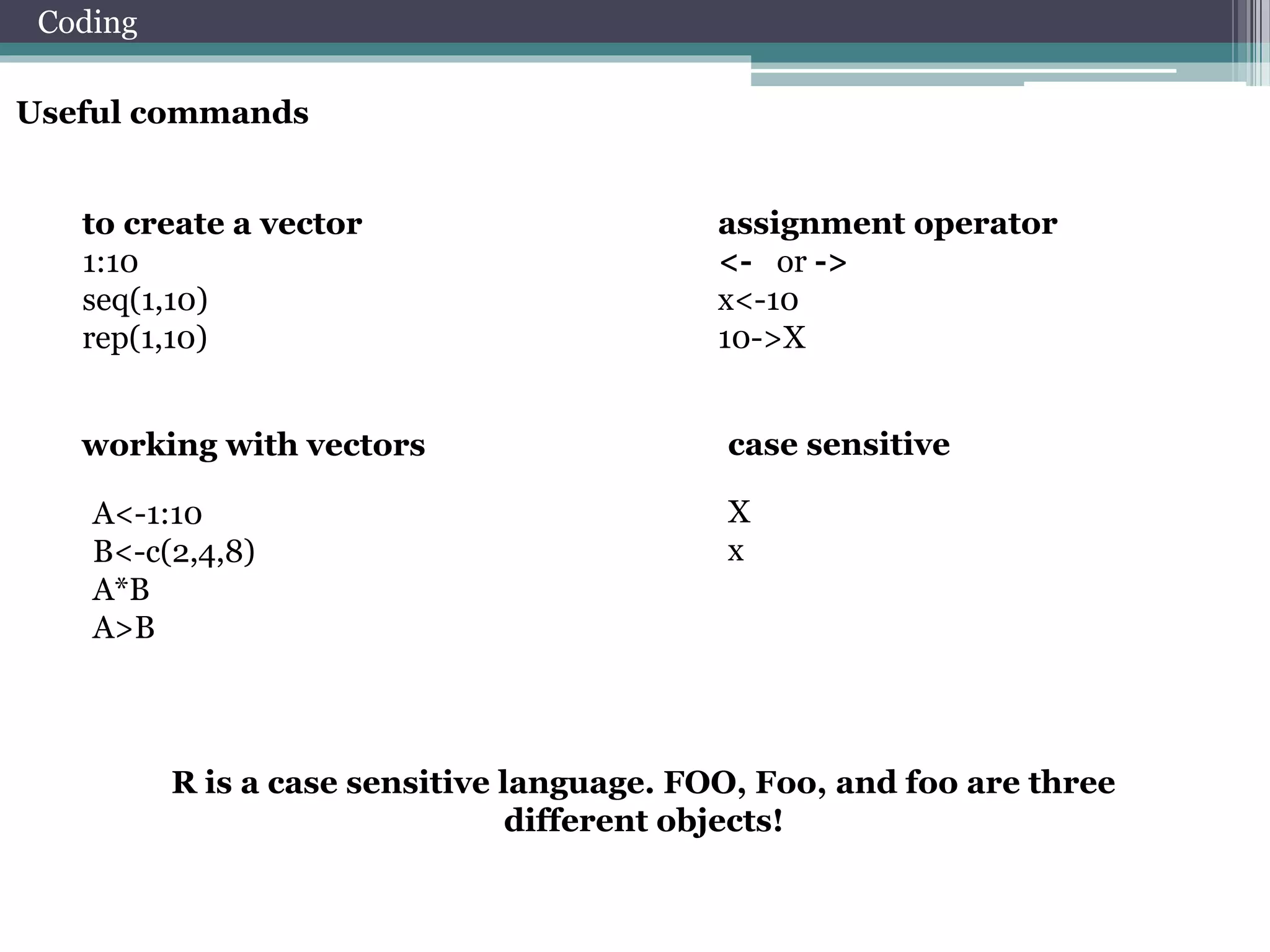
Useful commands 
working with vectors case sensitive 
R is a case sensitive language. FOO, Foo, and foo are three 
different objects! 
Coding 
to create a vector 
1:10 
seq(1,10) 
rep(1,10) 
assignment operator 
<- or -> 
x<-10 
10->X 
A<-1:10 
B<-c(2,4,8) 
A*B 
A>B 
X 
x
Matrix 
y <- matrix(nrow=2,ncol=2) 
y[1,1] <- 1 
y[2,1] <- 2 
y[1,2] <- 3 
y[2,2] <- 4 
x <- matrix(1:4, 2, 2) 
A matrix is a vector 
with two additional 
attributes: the 
number of rows and 
the 
number of columns 
Matrix Operations 
Coding 
x %*% y 
x* y 
3*y 
x+y 
x+3 
x[,2] 
x[1,] 
rbind(x,y)->z 
cbind(x,y) 
z[1:2,] 
z[z[,1]>1,] 
z[which(z[,1]>1),1]
List 
j <- list(name="Joe", salary=55000, union=T) 
j$salary 
j[["salary"]] 
j[[2]] 
j$name [2]<-”Poll” 
j$salary[2]<-10000 
j$union [2]<-”F” 
In contrast to a 
vector, in which all 
elements 
must be of the same 
mode, R’s list 
structure can 
combine objects of 
different 
types. 
Data Frame 
Coding 
kids <- c("Jack","Jill") 
ages <- c(12,10) 
d <- data.frame(kids,ages) 
d[1,] 
d[,1] 
d[[1]] 
Arrays 
my.array <- array(1:24, dim=c(3,4,2)) 
a data frame is like a 
matrix, with a two-dimensional rows-andcolumns 
structure. However, it differs from 
a matrix in that each column may have a 
different 
mode.
Coding 
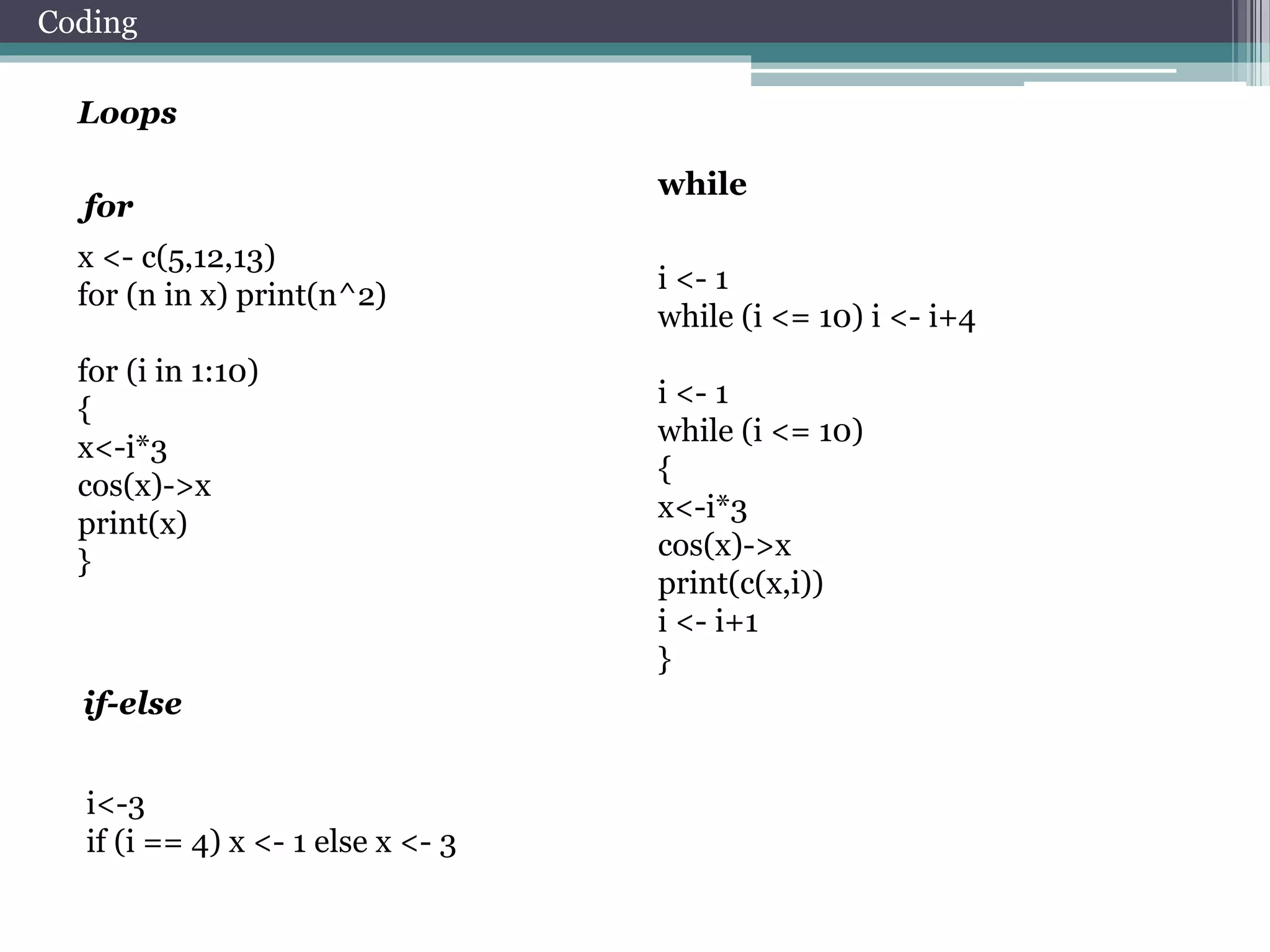
Loops 
x <- c(5,12,13) 
for (n in x) print(n^2) 
for (i in 1:10) 
{ 
x<-i*3 
cos(x)->x 
print(x) 
} 
i <- 1 
while (i <= 10) i <- i+4 
i <- 1 
while (i <= 10) 
{ 
x<-i*3 
cos(x)->x 
print(c(x,i)) 
i <- i+1 
} 
for 
while 
if-else 
i<-3 
if (i == 4) x <- 1 else x <- 3
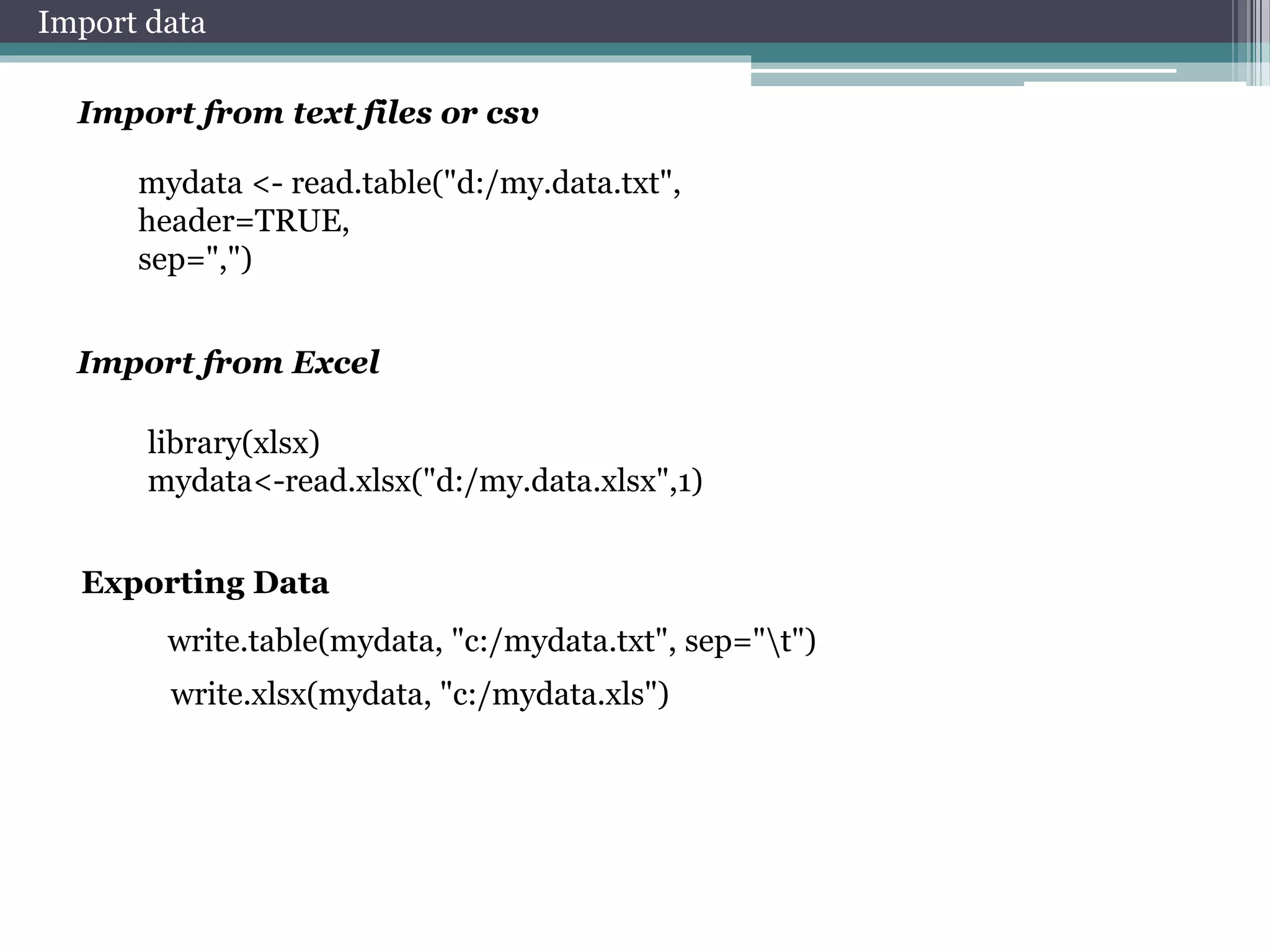
Import data 
Import from text files or csv 
mydata <- read.table("d:/my.data.txt", 
header=TRUE, 
sep=",") 
Import from Excel 
library(xlsx) 
mydata<-read.xlsx("d:/my.data.xlsx",1) 
Exporting Data 
write.table(mydata, "c:/mydata.txt", sep="t") 
write.xlsx(mydata, "c:/mydata.xls")
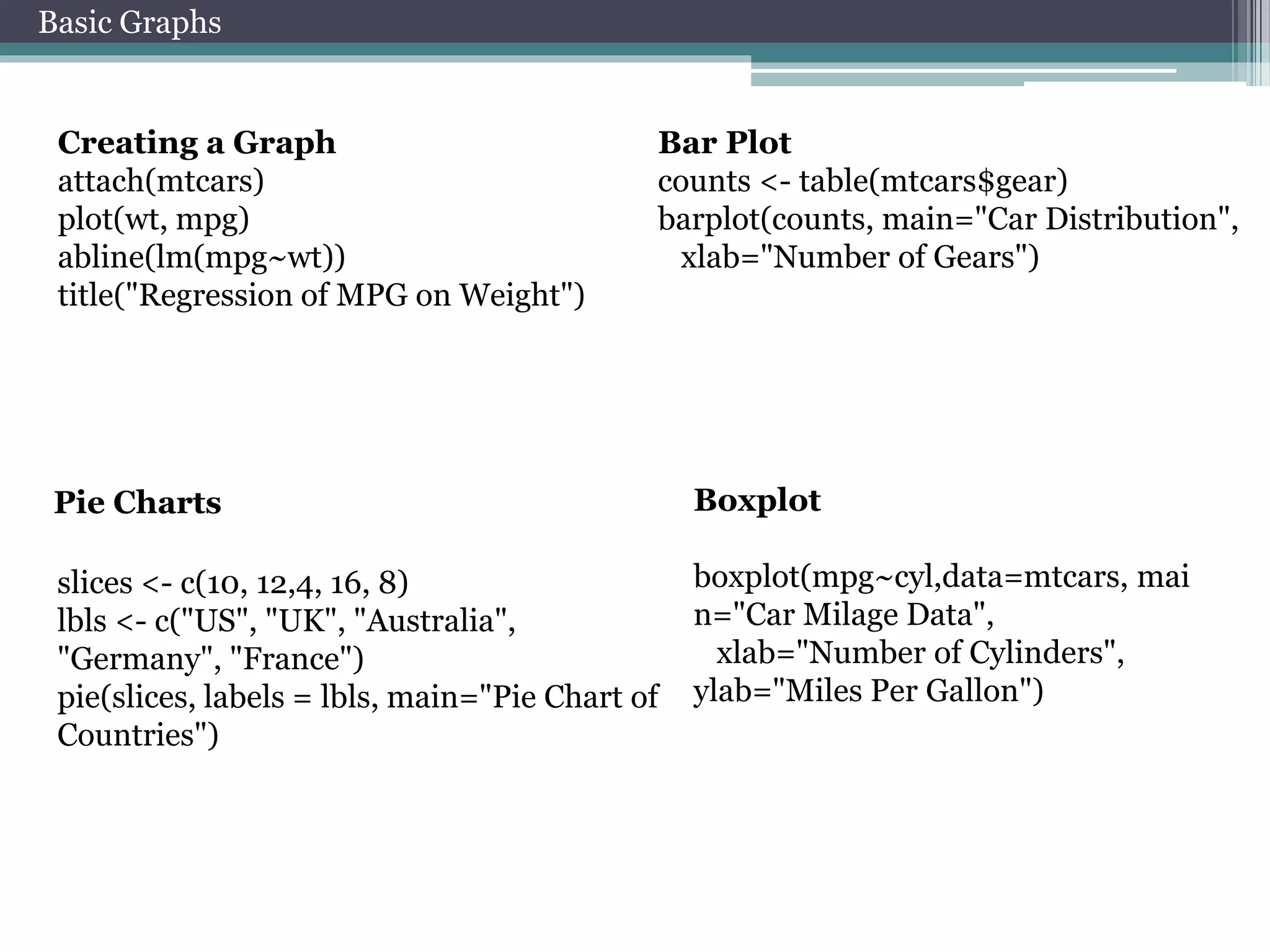
Basic Graphs 
Creating a Graph 
attach(mtcars) 
plot(wt, mpg) 
abline(lm(mpg~wt)) 
title("Regression of MPG on Weight") 
Bar Plot 
counts <- table(mtcars$gear) 
barplot(counts, main="Car Distribution", 
xlab="Number of Gears") 
Pie Charts Boxplot 
slices <- c(10, 12,4, 16, 8) 
lbls <- c("US", "UK", "Australia", 
"Germany", "France") 
pie(slices, labels = lbls, main="Pie Chart of 
Countries") 
boxplot(mpg~cyl,data=mtcars, mai 
n="Car Milage Data", 
xlab="Number of Cylinders", 
ylab="Miles Per Gallon")
Advanced 
knowledgement 
about R
Select data from matrix 
x <- matrix(0,50,2) 
x[,1] 
x[1,] 
x[,1]<-rnorm(50) 
x 
x[1,]<-rnorm(2) 
x 
x <- matrix(rnorm(100),50,2) 
x[which(x[,1]>0),] 
Operators 
and & 
or |
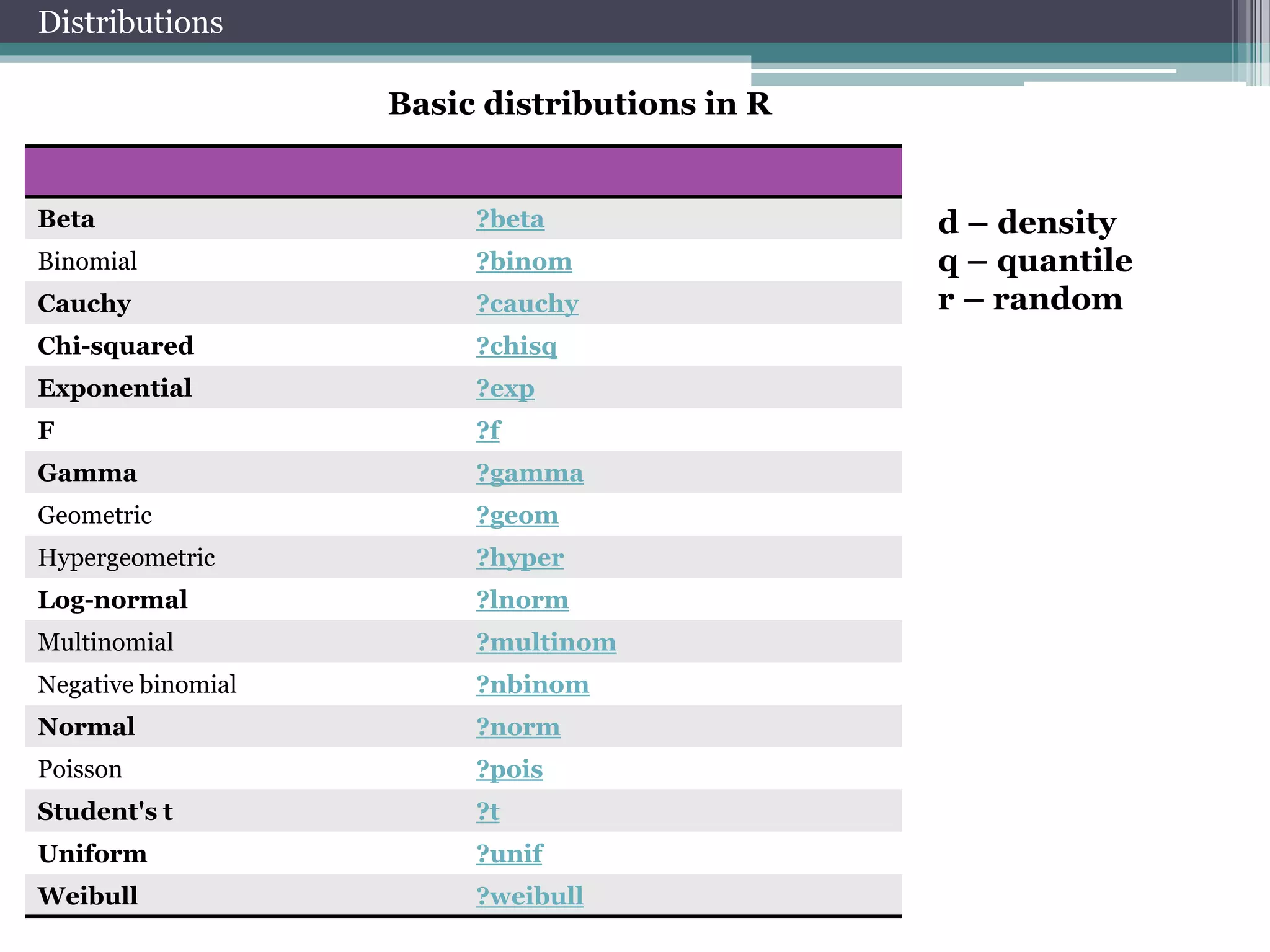
Basic distributions in R 
Distributions 
Beta ?beta 
Binomial ?binom 
Cauchy ?cauchy 
Chi-squared ?chisq 
Exponential ?exp 
F ?f 
Gamma ?gamma 
Geometric ?geom 
Hypergeometric ?hyper 
Log-normal ?lnorm 
Multinomial ?multinom 
Negative binomial ?nbinom 
Normal ?norm 
Poisson ?pois 
Student's t ?t 
Uniform ?unif 
Weibull ?weibull 
d – density 
q – quantile 
r – random
Distributions 
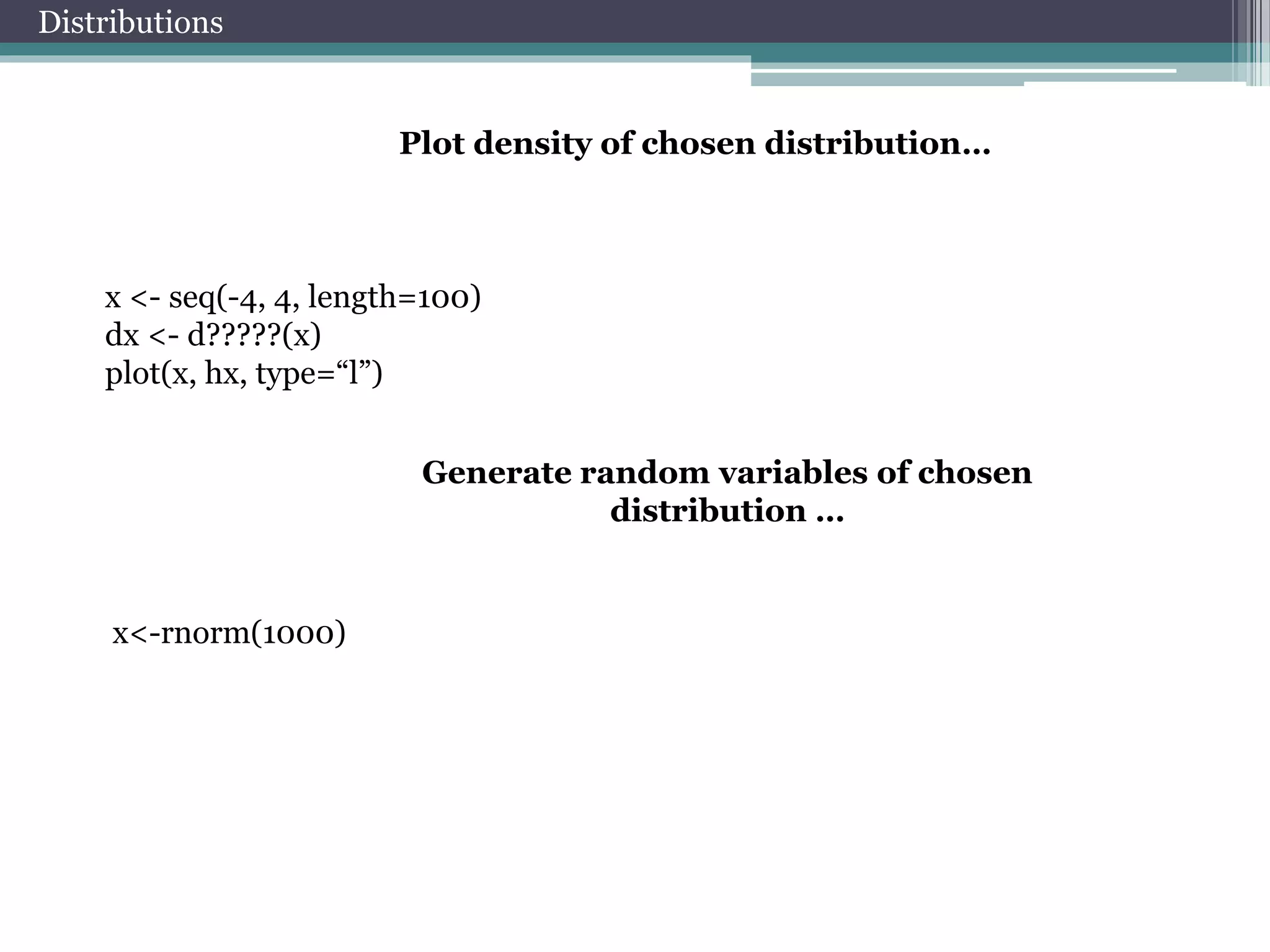
Plot density of chosen distribution… 
x <- seq(-4, 4, length=100) 
dx <- d?????(x) 
plot(x, hx, type=“l”) 
Generate random variables of chosen 
distribution … 
x<-rnorm(1000)
Distributions 
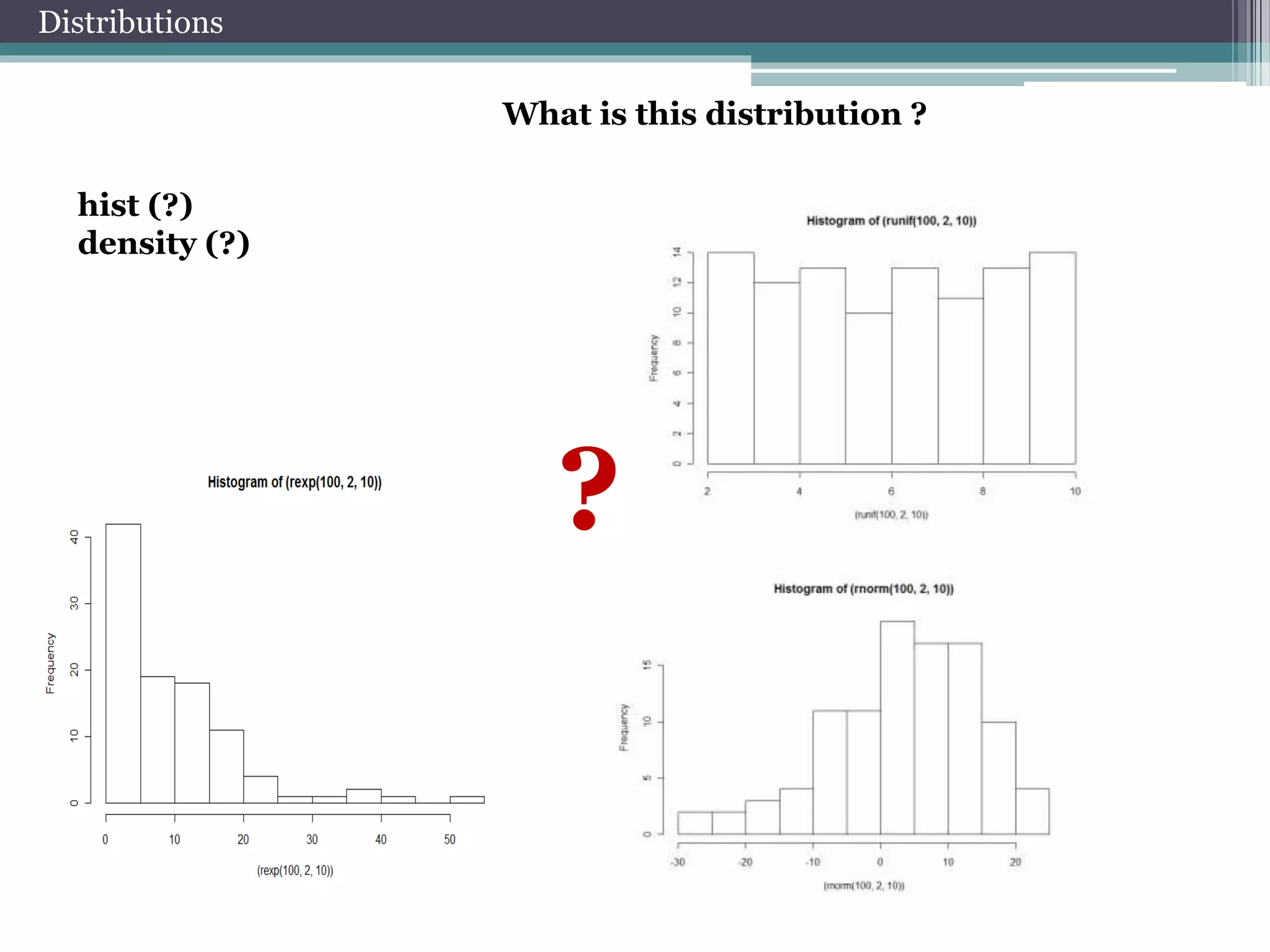
What is this distribution ? 
hist (?) 
density (?) 
?
Estimation of parameters 
Let’s estimate parameters of 
chosen distribution…. 
library(MASS) 
fitdistr(x,"normal") 
params<-fitdistr(x,"normal")$estimate 
Compare theoretical and empirical 
distributions… 
hist(x, freq = FALSE,ylim=c(0,0.4)) 
curve(dnorm(x, params[1], params[2]), col = 2, add = TRUE)
Correlations 
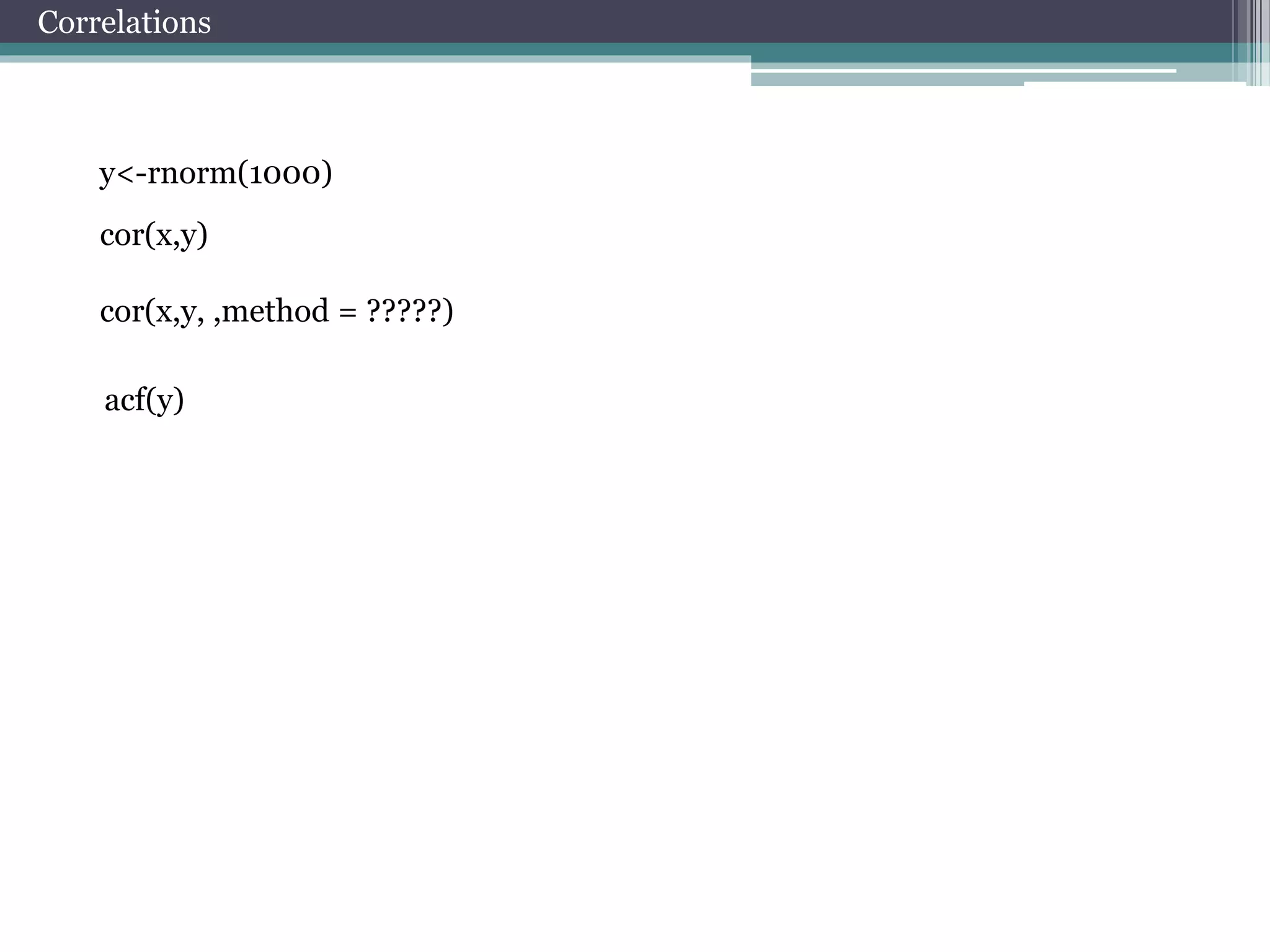
y<-rnorm(1000) 
cor(x,y) 
cor(x,y, ,method = ?????) 
acf(y)
Linear least-squares method 
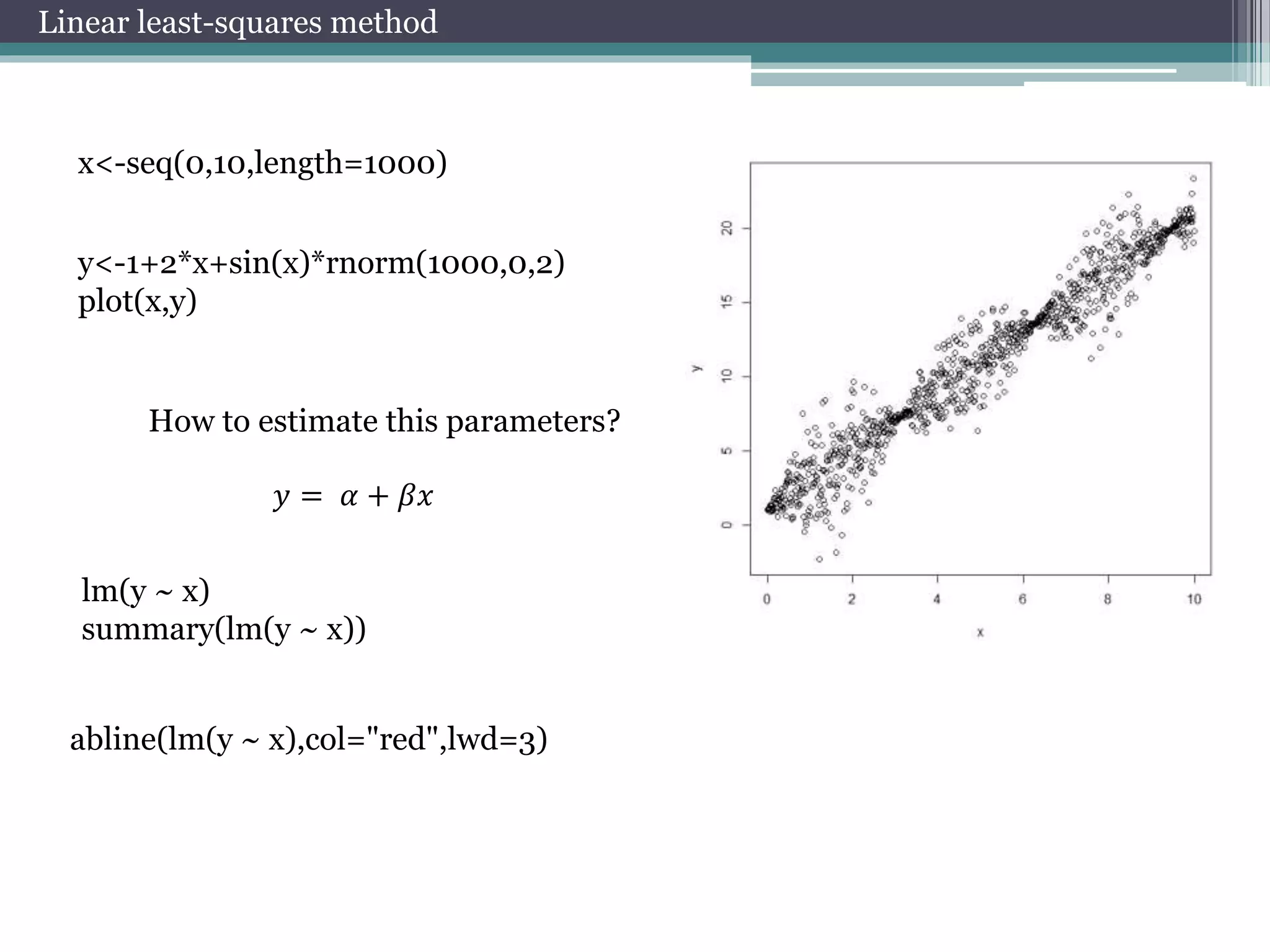
x<-seq(0,10,length=1000) 
y<-1+2*x+sin(x)*rnorm(1000,0,2) 
plot(x,y) 
How to estimate this parameters? 
푦 = 훼 + 훽푥 
lm(y ~ x) 
summary(lm(y ~ x)) 
abline(lm(y ~ x),col="red",lwd=3)
Nonlinear least-squares method 
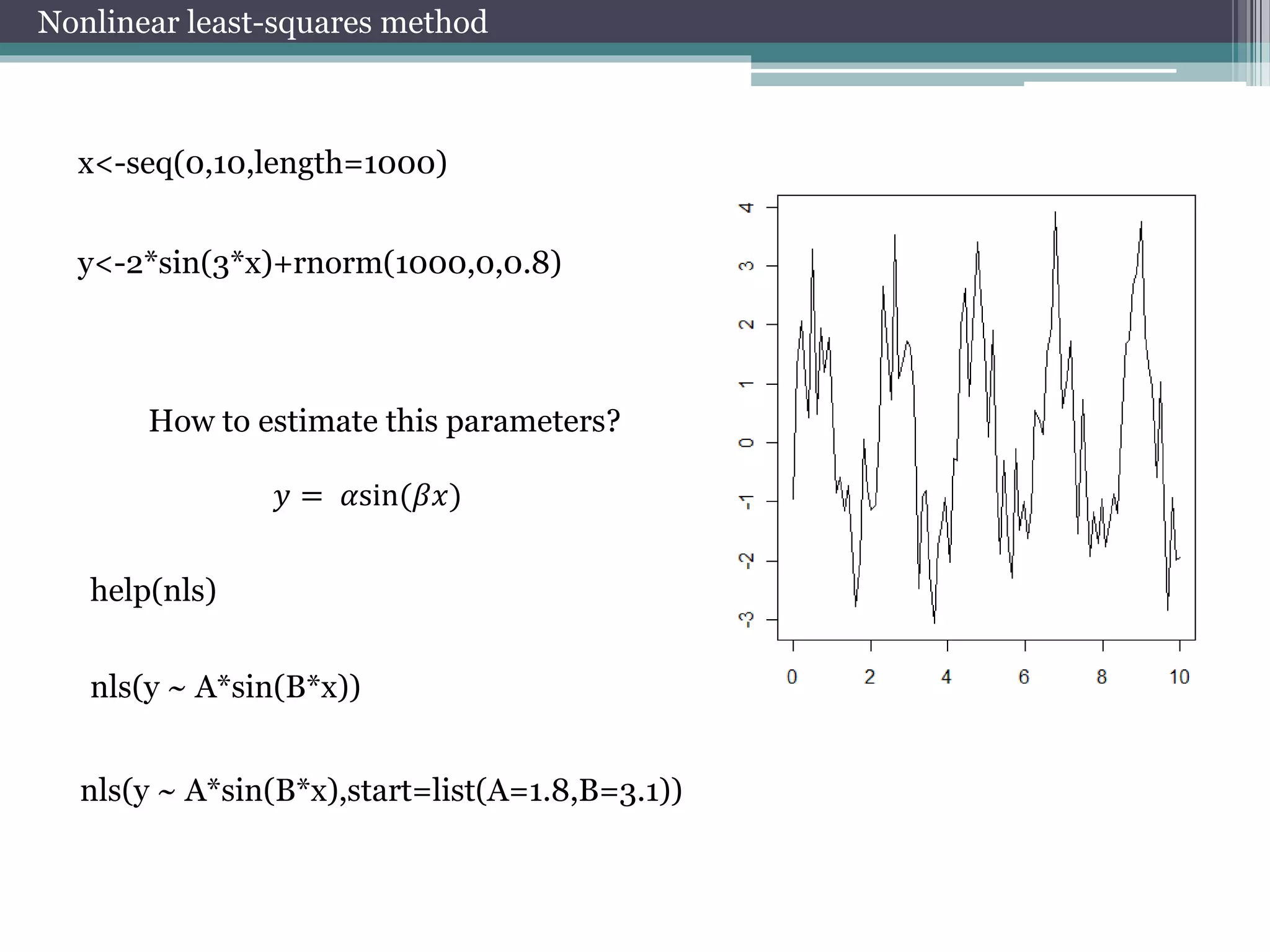
x<-seq(0,10,length=1000) 
y<-2*sin(3*x)+rnorm(1000,0,0.8) 
How to estimate this parameters? 
푦 = 훼sin(훽푥) 
help(nls) 
nls(y ~ A*sin(B*x)) 
nls(y ~ A*sin(B*x),start=list(A=1.8,B=3.1))
Advanced graphics 
Add few diagrams to graph 
par(mfrow=c(2,2)) 
plot(rnorm(100),rbeta(100,12,1)) 
Add legend to graph 
legend("topright", inset=.05, title="legend", 
c("4","6","8"), horiz=TRUE)
Package lattice 
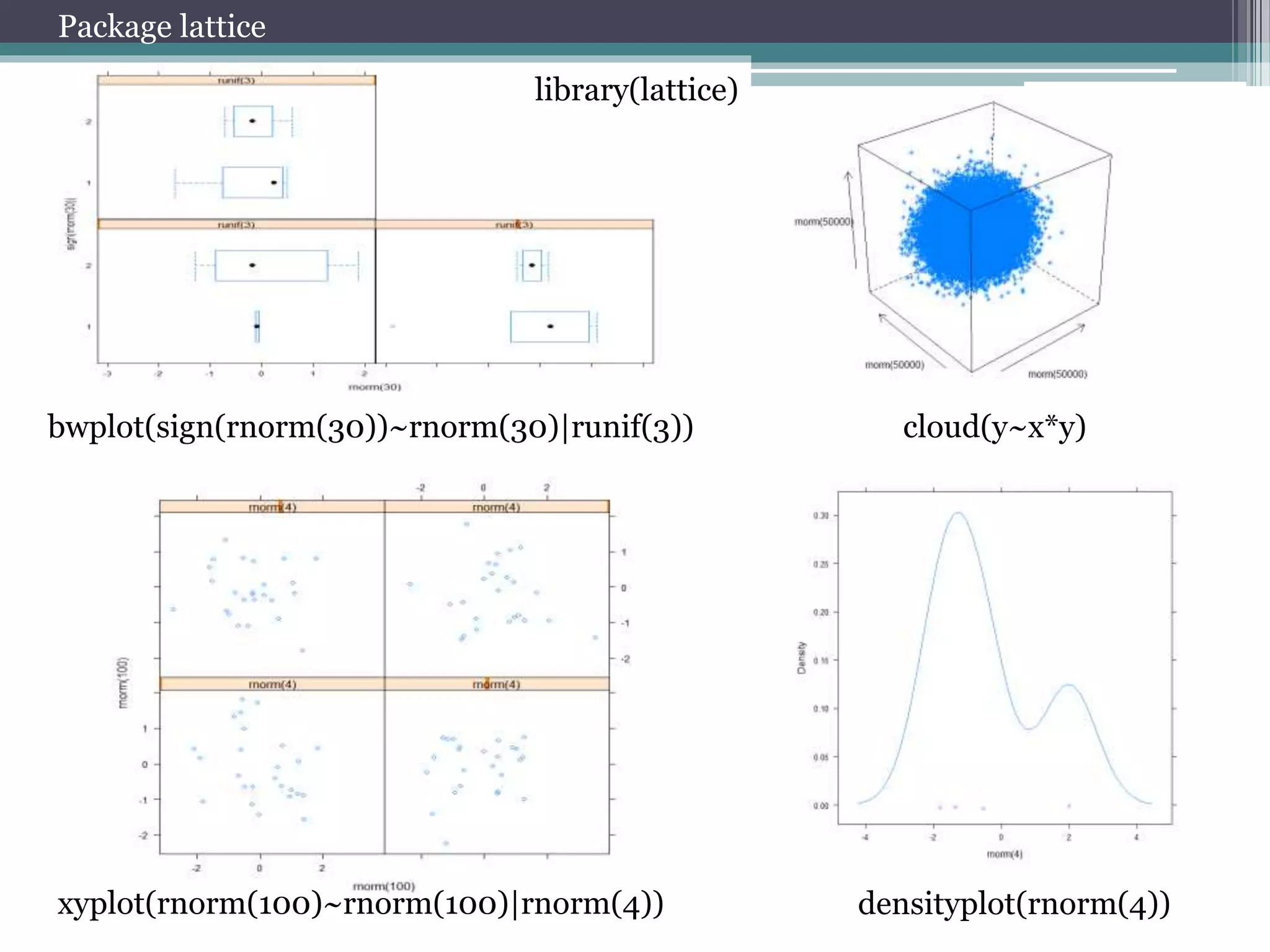
library(lattice) 
bwplot(sign(rnorm(30))~rnorm(30)|runif(3)) cloud(y~x*y) 
xyplot(rnorm(100)~rnorm(100)|rnorm(4)) densityplot(rnorm(4))
Package ggplot2 
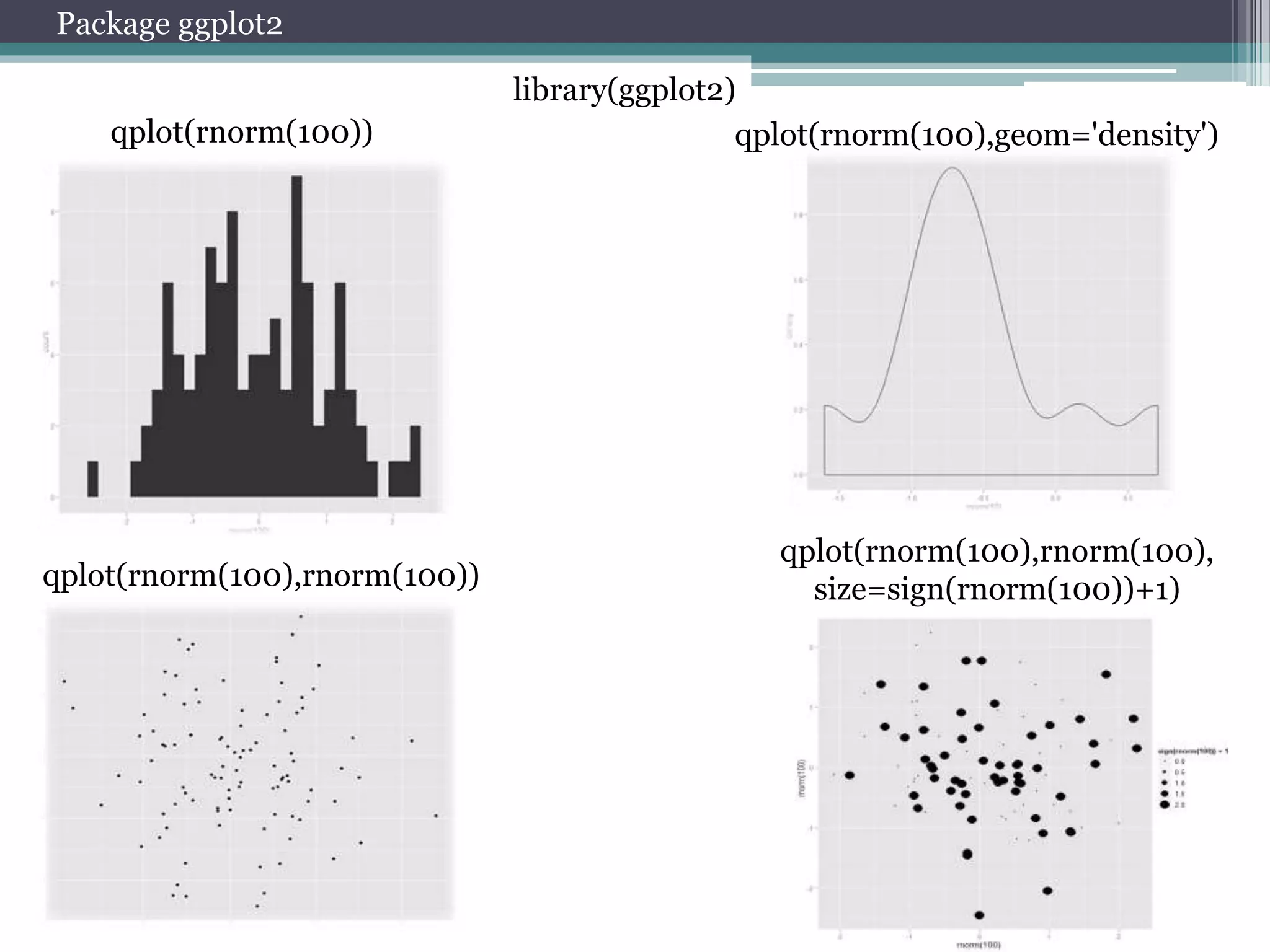
qplot(rnorm(100)) qplot(rnorm(100),geom='density') 
qplot(rnorm(100),rnorm(100)) 
qplot(rnorm(100),rnorm(100), 
size=sign(rnorm(100))+1) 
library(ggplot2)
Download Data 
Package quantmod 
getSymbols("GOOG",src="yahoo", 
from = "2007-01-01“, to = 
Sys.Date()) 
getSymbols("USD/EUR",src="oanda") 
Package rusquant 
getSymbols("SPFB.RTS", from="2011-01- 
01", src="Finam“, period="hour" , 
auto.assign=FALSE) 
1min, 5min, 10min, 15min, 
30min, hour, day, week, month
Working with package quantmod 
Data visualization 
barChart(AAPL) 
candleChart(AAPL,multi.col=TRUE,theme="white") 
chartSeries(AAPL,up.col='white',dn.col='blue') 
Add technical indicators 
addMACD() 
addBBands() 
Data management 
to.weekly(AAPL) 
to.monthly(AAPL) 
dailyReturn(AAPL) 
weeklyReturn(AAPL) 
monthlyReturn(AAPL) 
Select data 
AAPL['2007'] 
AAPL['2007-03/2007'] 
AAPL['/2007'] 
AAPL['2007-01-03']
Practice
Practice № 1. Working with data 
1. AFLT 
2. GAZP 
3. RTKM 
4. ROSN 
5. SBER 
6. SBERP 
7. HYDR 
8. LKOH 
9. VTBR 
10. GMKN 
11. SIBN 
12. PLZL 
13. MTSS 
14. CHMF 
15. SNGS 
TASK: 
a. Download Data of your instrument 
b. Plot price 
c. Add technical indicators 
d. Calculate price returns 
Commands to help : 
barChart(AAPL) 
chartSeries(AAPL,up.col='white',dn.col='blue') 
AAPL['2007-03/2007'] 
addMACD() 
dailyReturn(AAPL)
Practice № 2. Distribution of price returns 
1. AFLT 
2. GAZP 
3. RTKM 
4. ROSN 
5. SBER 
6. SBERP 
7. HYDR 
8. LKOH 
9. VTBR 
10. GMKN 
11. SIBN 
12. PLZL 
13. MTSS 
14. CHMF 
15. SNGS 
TASK : 
a. Download Data of your instrument 
b. Calculate returns of close prices 
c. Plot density of distribution 
d. Estimate parameters of distribution 
e. Plot in one graph empirical and theoretical 
distributions 
Commands to help : 
getSymbols("AFLT", 
src="Finam", period="day" , auto.assign=FALSE) 
library(MASS) 
fitdistr(x,"normal") 
hist(x) 
density(x) 
curve(dnorm(x, params[1], params[2]), col = 2, add = TRUE)
Practice № 3. Estimation of correlation 
1. AFLT 
2. GAZP 
3. RTKM 
4. ROSN 
5. SBER 
6. SBERP 
7. HYDR 
8. LKOH 
9. VTBR 
10. GMKN 
11. SIBN 
12. PLZL 
13. MTSS 
14. CHMF 
15. SNGS 
TASK : 
a. Download Index Data (ticker: “MICEX”) 
b. Download Data of your instrument 
c. Calculate returns of close prices 
d. Calculate correlation of returns 
e. Calculate correlation of returns in 2012 year 
f. Calculate correlation of returns in 2008 year 
g. Calculate autocorrelation function of returns 
Commands to help : 
getSymbols("MICEX ", 
src="Finam", period="day" , auto.assign=FALSE) 
AAPL['2007'] 
AAPL['2007-03/2007'] 
AAPL['/2007'] 
AAPL['2007-01-03']
Practice № 4. Volatility estimation 
1. AFLT 
2. GAZP 
3. RTKM 
4. ROSN 
5. SBER 
6. SBERP 
7. HYDR 
8. LKOH 
9. VTBR 
10. GMKN 
11. SIBN 
12. PLZL 
13. MTSS 
14. CHMF 
15. SNGS 
TASK : 
a. Download Data of your instrument 
b. Calculate returns of close prices 
c. Plot clusterization of volatility 
d. Calculate estimation of volatility 
e. Estimate model garch 
f. garchFit(data=x) @sigma.t 
Commands to help : 
fGarch
The practical task № 6. Calculation of VaR 
1. AFLT 
2. GAZP 
3. RTKM 
4. ROSN 
5. SBER 
6. SBERP 
7. HYDR 
8. LKOH 
9. VTBR 
10. GMKN 
11. SIBN 
12. PLZL 
13. MTSS 
14. CHMF 
15. SNGS 
TASK : 
a. Download Data of your instrument 
b. Calculate returns of close prices 
c. Calculate historical VaR 
d. Calculate parametric VaR 
e. library(PerformanceAnalytics) 
f. help(VaR) 
g. Calculate VaR of portfolio 
Commands to help : 
quantile(x,0.95, na.rm=TRUE) 
AAPL['2007'] 
AAPL['2007-03/2007'] 
AAPL['/2007'] 
AAPL['2007-01-03']
The practical task № 7. Estimate LPPL model 
TASK : 
a. Download Index Data(ticker: “MICEX”) from 2001 to 2009 
b. Estimate parameters of model LPPL 
MODEL LPPL: 
푙푛 푝 푡 = 퐴 + 퐵(푡푐 − 푡)푚+퐶(푡푐 − 푡)푚 푐표푠[휔 푙표푔 푡푐 − 푡 − 휑] 
Commands to help : 
help(nsl)
Вопросы? 
arbuzov@prognoz.ru

Seminar PSU 10.10.2014 mme

  • 1.
    Using R infinancial modeling Perm State National Research University Арбузов Вячеслав arbuzov@prognoz.ru
  • 2.
  • 3.
  • 4.
    Coding Simple calculation 4+3 5-1 4*6 10/2 2^10 9%%2 9%/%2 abs(-1) exp(1) sqrt(25) sin(1) pi cos(pi) sign(-106) log(1) Mathematical functions in R
  • 5.
  • 6.
    Useful commands workingwith vectors case sensitive R is a case sensitive language. FOO, Foo, and foo are three different objects! Coding to create a vector 1:10 seq(1,10) rep(1,10) assignment operator <- or -> x<-10 10->X A<-1:10 B<-c(2,4,8) A*B A>B X x
  • 7.
    Matrix y <-matrix(nrow=2,ncol=2) y[1,1] <- 1 y[2,1] <- 2 y[1,2] <- 3 y[2,2] <- 4 x <- matrix(1:4, 2, 2) A matrix is a vector with two additional attributes: the number of rows and the number of columns Matrix Operations Coding x %*% y x* y 3*y x+y x+3 x[,2] x[1,] rbind(x,y)->z cbind(x,y) z[1:2,] z[z[,1]>1,] z[which(z[,1]>1),1]
  • 8.
    List j <-list(name="Joe", salary=55000, union=T) j$salary j[["salary"]] j[[2]] j$name [2]<-”Poll” j$salary[2]<-10000 j$union [2]<-”F” In contrast to a vector, in which all elements must be of the same mode, R’s list structure can combine objects of different types. Data Frame Coding kids <- c("Jack","Jill") ages <- c(12,10) d <- data.frame(kids,ages) d[1,] d[,1] d[[1]] Arrays my.array <- array(1:24, dim=c(3,4,2)) a data frame is like a matrix, with a two-dimensional rows-andcolumns structure. However, it differs from a matrix in that each column may have a different mode.
  • 9.
    Coding Loops x<- c(5,12,13) for (n in x) print(n^2) for (i in 1:10) { x<-i*3 cos(x)->x print(x) } i <- 1 while (i <= 10) i <- i+4 i <- 1 while (i <= 10) { x<-i*3 cos(x)->x print(c(x,i)) i <- i+1 } for while if-else i<-3 if (i == 4) x <- 1 else x <- 3
  • 10.
    Import data Importfrom text files or csv mydata <- read.table("d:/my.data.txt", header=TRUE, sep=",") Import from Excel library(xlsx) mydata<-read.xlsx("d:/my.data.xlsx",1) Exporting Data write.table(mydata, "c:/mydata.txt", sep="t") write.xlsx(mydata, "c:/mydata.xls")
  • 11.
    Basic Graphs Creatinga Graph attach(mtcars) plot(wt, mpg) abline(lm(mpg~wt)) title("Regression of MPG on Weight") Bar Plot counts <- table(mtcars$gear) barplot(counts, main="Car Distribution", xlab="Number of Gears") Pie Charts Boxplot slices <- c(10, 12,4, 16, 8) lbls <- c("US", "UK", "Australia", "Germany", "France") pie(slices, labels = lbls, main="Pie Chart of Countries") boxplot(mpg~cyl,data=mtcars, mai n="Car Milage Data", xlab="Number of Cylinders", ylab="Miles Per Gallon")
  • 12.
  • 13.
    Select data frommatrix x <- matrix(0,50,2) x[,1] x[1,] x[,1]<-rnorm(50) x x[1,]<-rnorm(2) x x <- matrix(rnorm(100),50,2) x[which(x[,1]>0),] Operators and & or |
  • 14.
    Basic distributions inR Distributions Beta ?beta Binomial ?binom Cauchy ?cauchy Chi-squared ?chisq Exponential ?exp F ?f Gamma ?gamma Geometric ?geom Hypergeometric ?hyper Log-normal ?lnorm Multinomial ?multinom Negative binomial ?nbinom Normal ?norm Poisson ?pois Student's t ?t Uniform ?unif Weibull ?weibull d – density q – quantile r – random
  • 15.
    Distributions Plot densityof chosen distribution… x <- seq(-4, 4, length=100) dx <- d?????(x) plot(x, hx, type=“l”) Generate random variables of chosen distribution … x<-rnorm(1000)
  • 16.
    Distributions What isthis distribution ? hist (?) density (?) ?
  • 17.
    Estimation of parameters Let’s estimate parameters of chosen distribution…. library(MASS) fitdistr(x,"normal") params<-fitdistr(x,"normal")$estimate Compare theoretical and empirical distributions… hist(x, freq = FALSE,ylim=c(0,0.4)) curve(dnorm(x, params[1], params[2]), col = 2, add = TRUE)
  • 18.
    Correlations y<-rnorm(1000) cor(x,y) cor(x,y, ,method = ?????) acf(y)
  • 19.
    Linear least-squares method x<-seq(0,10,length=1000) y<-1+2*x+sin(x)*rnorm(1000,0,2) plot(x,y) How to estimate this parameters? 푦 = 훼 + 훽푥 lm(y ~ x) summary(lm(y ~ x)) abline(lm(y ~ x),col="red",lwd=3)
  • 20.
    Nonlinear least-squares method x<-seq(0,10,length=1000) y<-2*sin(3*x)+rnorm(1000,0,0.8) How to estimate this parameters? 푦 = 훼sin(훽푥) help(nls) nls(y ~ A*sin(B*x)) nls(y ~ A*sin(B*x),start=list(A=1.8,B=3.1))
  • 21.
    Advanced graphics Addfew diagrams to graph par(mfrow=c(2,2)) plot(rnorm(100),rbeta(100,12,1)) Add legend to graph legend("topright", inset=.05, title="legend", c("4","6","8"), horiz=TRUE)
  • 22.
    Package lattice library(lattice) bwplot(sign(rnorm(30))~rnorm(30)|runif(3)) cloud(y~x*y) xyplot(rnorm(100)~rnorm(100)|rnorm(4)) densityplot(rnorm(4))
  • 23.
    Package ggplot2 qplot(rnorm(100))qplot(rnorm(100),geom='density') qplot(rnorm(100),rnorm(100)) qplot(rnorm(100),rnorm(100), size=sign(rnorm(100))+1) library(ggplot2)
  • 24.
    Download Data Packagequantmod getSymbols("GOOG",src="yahoo", from = "2007-01-01“, to = Sys.Date()) getSymbols("USD/EUR",src="oanda") Package rusquant getSymbols("SPFB.RTS", from="2011-01- 01", src="Finam“, period="hour" , auto.assign=FALSE) 1min, 5min, 10min, 15min, 30min, hour, day, week, month
  • 25.
    Working with packagequantmod Data visualization barChart(AAPL) candleChart(AAPL,multi.col=TRUE,theme="white") chartSeries(AAPL,up.col='white',dn.col='blue') Add technical indicators addMACD() addBBands() Data management to.weekly(AAPL) to.monthly(AAPL) dailyReturn(AAPL) weeklyReturn(AAPL) monthlyReturn(AAPL) Select data AAPL['2007'] AAPL['2007-03/2007'] AAPL['/2007'] AAPL['2007-01-03']
  • 26.
  • 27.
    Practice № 1.Working with data 1. AFLT 2. GAZP 3. RTKM 4. ROSN 5. SBER 6. SBERP 7. HYDR 8. LKOH 9. VTBR 10. GMKN 11. SIBN 12. PLZL 13. MTSS 14. CHMF 15. SNGS TASK: a. Download Data of your instrument b. Plot price c. Add technical indicators d. Calculate price returns Commands to help : barChart(AAPL) chartSeries(AAPL,up.col='white',dn.col='blue') AAPL['2007-03/2007'] addMACD() dailyReturn(AAPL)
  • 28.
    Practice № 2.Distribution of price returns 1. AFLT 2. GAZP 3. RTKM 4. ROSN 5. SBER 6. SBERP 7. HYDR 8. LKOH 9. VTBR 10. GMKN 11. SIBN 12. PLZL 13. MTSS 14. CHMF 15. SNGS TASK : a. Download Data of your instrument b. Calculate returns of close prices c. Plot density of distribution d. Estimate parameters of distribution e. Plot in one graph empirical and theoretical distributions Commands to help : getSymbols("AFLT", src="Finam", period="day" , auto.assign=FALSE) library(MASS) fitdistr(x,"normal") hist(x) density(x) curve(dnorm(x, params[1], params[2]), col = 2, add = TRUE)
  • 29.
    Practice № 3.Estimation of correlation 1. AFLT 2. GAZP 3. RTKM 4. ROSN 5. SBER 6. SBERP 7. HYDR 8. LKOH 9. VTBR 10. GMKN 11. SIBN 12. PLZL 13. MTSS 14. CHMF 15. SNGS TASK : a. Download Index Data (ticker: “MICEX”) b. Download Data of your instrument c. Calculate returns of close prices d. Calculate correlation of returns e. Calculate correlation of returns in 2012 year f. Calculate correlation of returns in 2008 year g. Calculate autocorrelation function of returns Commands to help : getSymbols("MICEX ", src="Finam", period="day" , auto.assign=FALSE) AAPL['2007'] AAPL['2007-03/2007'] AAPL['/2007'] AAPL['2007-01-03']
  • 30.
    Practice № 4.Volatility estimation 1. AFLT 2. GAZP 3. RTKM 4. ROSN 5. SBER 6. SBERP 7. HYDR 8. LKOH 9. VTBR 10. GMKN 11. SIBN 12. PLZL 13. MTSS 14. CHMF 15. SNGS TASK : a. Download Data of your instrument b. Calculate returns of close prices c. Plot clusterization of volatility d. Calculate estimation of volatility e. Estimate model garch f. garchFit(data=x) @sigma.t Commands to help : fGarch
  • 31.
    The practical task№ 6. Calculation of VaR 1. AFLT 2. GAZP 3. RTKM 4. ROSN 5. SBER 6. SBERP 7. HYDR 8. LKOH 9. VTBR 10. GMKN 11. SIBN 12. PLZL 13. MTSS 14. CHMF 15. SNGS TASK : a. Download Data of your instrument b. Calculate returns of close prices c. Calculate historical VaR d. Calculate parametric VaR e. library(PerformanceAnalytics) f. help(VaR) g. Calculate VaR of portfolio Commands to help : quantile(x,0.95, na.rm=TRUE) AAPL['2007'] AAPL['2007-03/2007'] AAPL['/2007'] AAPL['2007-01-03']
  • 32.
    The practical task№ 7. Estimate LPPL model TASK : a. Download Index Data(ticker: “MICEX”) from 2001 to 2009 b. Estimate parameters of model LPPL MODEL LPPL: 푙푛 푝 푡 = 퐴 + 퐵(푡푐 − 푡)푚+퐶(푡푐 − 푡)푚 푐표푠[휔 푙표푔 푡푐 − 푡 − 휑] Commands to help : help(nsl)
  • 33.