A Brief Introduction to R

   Boyce Thompson Institute for Plant
               Research
              Tower Road
     Ithaca, New York 14853-1801
                U.S.A.

                by
    Aureliano Bombarely Gomez
A Brief Introduction to R:
   1. What is R ?
   2. Software and documentation.
   3. First steps, from R to q()
   4. R objects and objects types.
          4.1 Vectors.
          4.2 Arrays and Matrices.
          4.3 Lists and Data frames.
    5. Functions.
          5.1 Basic objects functions.
          5.2 General use of functions
          5.3 More information, using help
    6. Packages.
A Brief Introduction to R:
   1. What is R ?
   2. Software and documentation.
   3. First steps, from R to q()
   4. R objects and objects types.
          4.1 Vectors.
          4.2 Arrays and Matrices.
          4.3 Lists and Data frames.
    5. Functions.
          5.1 Basic objects functions.
          5.2 General use of functions
          5.3 More information, using help
    6. Packages.
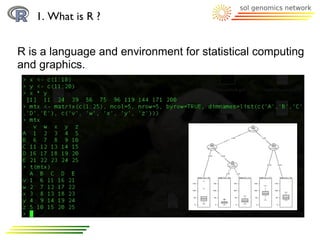
1. What is R ?


R is a language and environment for statistical computing
and graphics..
A Brief Introduction to R:
   1. What is R ?
   2. Software and documentation.
   3. First steps, from R to q()
   4. R objects and objects types.
          4.1 Vectors.
          4.2 Arrays and Matrices.
          4.3 Lists and Data frames.
    5. Functions.
          5.1 Basic objects functions.
          5.2 General use of functions
          5.3 More information, using help
    6. Packages.
2. Software and documentation.


WEB:
   OFICIAL WEB: http://www.r-project.org/index.html
   QUICK-R:
http://www.statmethods.net/index.html


BOOKS:
   Introductory Statistics with R (Statistics and Computing), P. Dalgaard
  [available as manual at R project web]

   The R Book, MJ. Crawley


R itself:                        help() and example()
A Brief Introduction to R:
   1. What is R ?
   2. Software and documentation.
   3. First steps, from R to q()
   4. R objects and objects types.
          4.1 Vectors.
          4.2 Arrays and Matrices.
          4.3 Lists and Data frames.
    5. Functions.
          5.1 Basic objects functions.
          5.2 General use of functions
          5.3 More information, using help
    6. Packages.
3. First steps, from R to q().


Two ways to run R:
  1) Interactively:                                                     q()

         $R
         >                 “any R command, as functions, objects ...”
         > q()             “to exit”


  2) Command line
         $ R [options] [< infile] [> outfile]
           or: R CMD command [arguments]

         $ R –vanilla < myRcommands.txt > myRresults.txt
3. First steps, from R to q().


Basic Grammar with R console:

  7 Rules
           1- Object names
              2- Assigments
                  3- Case sensitive
                     4- Commands
                         5- Grouping
                             6- Comment
                               7- Arguments
3. First steps, from R to q().


Basic Grammar with R console:
  1) Objects are defined with names.
     This names can be composed by alphanumeric
     characters, [a-z,0-9], dots '.' and underlines '-'.
     Names should start with [a-z] or '.' plus [a-z]
          >x
          > x_23.test


  2) '=' or '<-' signs are used to assign a value to an object
          > x <- 100
          > y <- 25
3. First steps, from R to q().


Basic Grammar with R console:
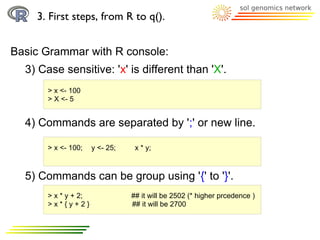
  3) Case sensitive: 'x' is different than 'X'.
       > x <- 100
       > X <- 5


  4) Commands are separated by ';' or new line.

       > x <- 100;    y <- 25;    x * y;


  5) Commands can be group using '{' to '}'.
       > x * y + 2;              ## it will be 2502 (* higher prcedence )
       >x*{y+2}                  ## it will be 2700
3. First steps, from R to q().


Basic Grammar with R console:
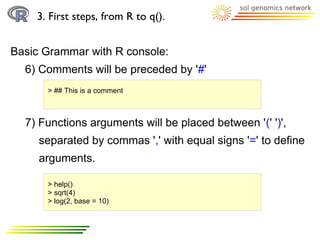
  6) Comments will be preceded by '#'
      > ## This is a comment


  7) Functions arguments will be placed between '(' ')',
     separated by commas ',' with equal signs '=' to define
     arguments.

      > help()
      > sqrt(4)
      > log(2, base = 10)
3. First steps, from R to q().


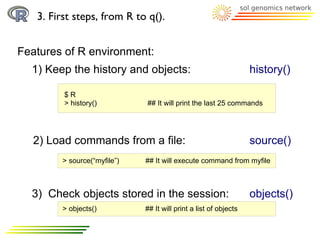
Features of R environment:
  1) Keep the history and objects:                                history()

         $R
         > history()         ## It will print the last 25 commands


  2) Load commands from a file:                                   source()
        > source(“myfile”)   ## It will execute command from myfile


  3) Check objects stored in the session:                         objects()
        > objects()          ## It will print a list of objects
A Brief Introduction to R:
   1. What is R ?
   2. Software and documentation.
   3. First steps, from R to q()
   4. R objects and objects types.
          4.1 Vectors.
          4.2 Arrays and Matrices.
          4.3 Lists and Data frames.
    5. Functions.
          5.1 Basic objects functions.
          5.2 General use of functions
          5.3 More information, using help
    6. Packages.
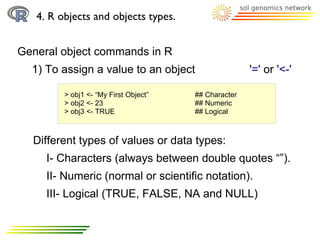
4. R objects and objects types.


General object commands in R
  1) To assign a value to an object                   '=' or '<-'

         > obj1 <- “My First Object”   ## Character
         > obj2 <- 23                  ## Numeric
         > obj3 <- TRUE                ## Logical


  Different types of values or data types:
     I- Characters (always between double quotes “”).
     II- Numeric (normal or scientific notation).
     III- Logical (TRUE, FALSE, NA and NULL)
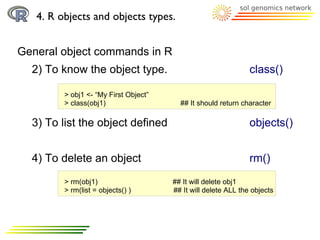
4. R objects and objects types.


General object commands in R
  2) To know the object type.                                   class()

         > obj1 <- “My First Object”
         > class(obj1)                   ## It should return character

  3) To list the object defined                                 objects()


  4) To delete an object                                        rm()
         > rm(obj1)                    ## It will delete obj1
         > rm(list = objects() )       ## It will delete ALL the objects
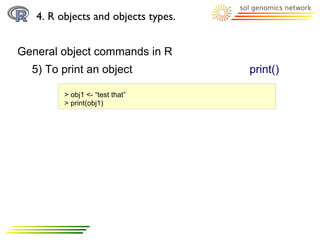
4. R objects and objects types.


General object commands in R
  5) To print an object              print()

         > obj1 <- “test that”
         > print(obj1)
A Brief Introduction to R:
   1. What is R ?
   2. Software and documentation.
   3. First steps, from R to q()
   4. R objects and objects types.
          4.1 Vectors.
          4.2 Arrays and Matrices.
          4.3 Lists and Data frames.
    5. Functions.
          5.1 Basic objects functions.
          5.2 General use of functions
          5.3 More information, using help
    6. Packages.
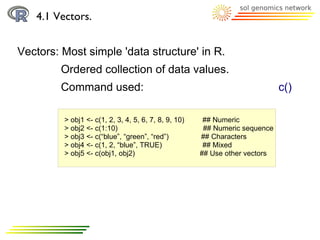
4.1 Vectors.


Vectors: Most simple 'data structure' in R.
         Ordered collection of data values.
         Command used:                                                       c()

         > obj1 <- c(1, 2, 3, 4, 5, 6, 7, 8, 9, 10)    ## Numeric
         > obj2 <- c(1:10)                             ## Numeric sequence
         > obj3 <- c(“blue”, “green”, “red”)          ## Characters
         > obj4 <- c(1, 2, “blue”, TRUE)               ## Mixed
         > obj5 <- c(obj1, obj2)                      ## Use other vectors
4.1 Vectors.


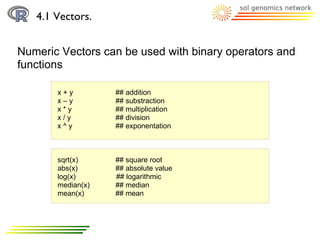
Numeric Vectors can be used with binary operators and
functions

       x+y         ## addition
       x–y         ## substraction
       x*y         ## multiplication
       x/y         ## division
       x^y         ## exponentation


       sqrt(x)     ## square root
       abs(x)      ## absolute value
       log(x)      ## logarithmic
       median(x)   ## median
       mean(x)     ## mean
4.1 Vectors.


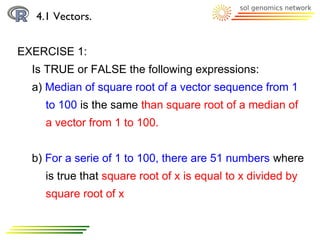
EXERCISE 1:
  Is TRUE or FALSE the following expressions:
  a) Median of square root of a vector sequence from 1
    to 100 is the same than square root of a median of
    a vector from 1 to 100.


  b) For a serie of 1 to 100, there are 51 numbers where
    is true that square root of x is equal to x divided by
    square root of x
A Brief Introduction to R:
   1. What is R ?
   2. Software and documentation.
   3. First steps, from R to q()
   4. R objects and objects types.
          4.1 Vectors.
          4.2 Arrays and Matrices.
          4.3 Lists and Data frames.
    5. Functions.
          5.1 Basic objects functions.
          5.2 General use of functions
          5.3 More information, using help
    6. Packages.
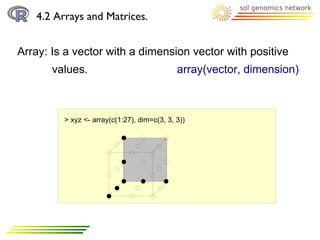
4.2 Arrays and Matrices.


Array: Is a vector with a dimension vector with positive
       values.                               array(vector, dimension)


         > xyz <- array(c(1:27), dim=c(3, 3, 3))
4.2 Arrays and Matrices.


Array: Arrays are indexed
         > xyz <- array(c(1:27), dim=c(3, 3, 3))
         > xyz
         ,,1                                               First dimension
                [,1] [,2] [,3]          Second dimension
         [1,]      1 4 7
         [2,]      2 5 8
         [3,]      3 6 9

         ,,2

             [,1] [,2] [,3]
         [1,] 10 13 16
         [2,] 11 14 17
         [3,] 12 15 18

         ,,3

             [,1] [,2] [,3]
         [1,] 19 22 25
         [2,] 20 23 26
         [3,] 21 24 27

          Third dimension
4.2 Arrays and Matrices.


Array: Arrays are indexed, so each element is accessible
      throught these indexes
         > xyz <- array(c(1:27), dim=c(3, 3, 3))
         > xyz
         > xyz[2,2,2]                    ## a single numeric element

         > xyz[2,2, ]                   ## a vector (1 dimension array)

         > xyz[2, , ]                   ## a 2 dimension array
4.2 Arrays and Matrices.


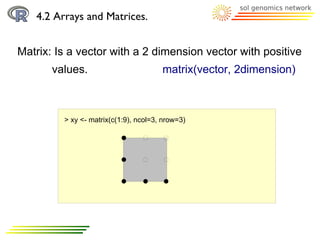
Matrix: Is a vector with a 2 dimension vector with positive
       values.                         matrix(vector, 2dimension)


         > xy <- matrix(c(1:9), ncol=3, nrow=3)
4.2 Arrays and Matrices.


Matrix: It has indexes too

         > xy <- matrix(c(1:9), ncol=3, nrow=3)
         > xy
         > xy[2,2]                   ## a single numeric element

         > xy[2, ]                    ## a vector (1 dimension array)


Matrix: Indexes can be replaced by names
         > xy <- matrix(c(1:9), ncol=3, nrow=3,
                        dimnames=list(c(“A”,”B”,”C”), c(“x”, “y”, “z”)))
          xyz
         A147
         B258
         C369
4.2 Arrays and Matrices.


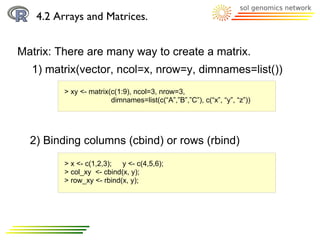
Matrix: There are many way to create a matrix.
  1) matrix(vector, ncol=x, nrow=y, dimnames=list())
         > xy <- matrix(c(1:9), ncol=3, nrow=3,
                        dimnames=list(c(“A”,”B”,”C”), c(“x”, “y”, “z”))


  2) Binding columns (cbind) or rows (rbind)
         > x <- c(1,2,3); y <- c(4,5,6);
         > col_xy <- cbind(x, y);
         > row_xy <- rbind(x, y);
4.2 Arrays and Matrices.


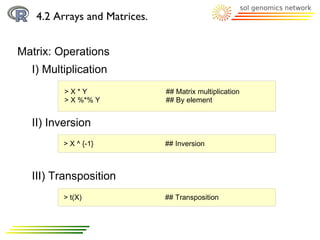
Matrix: Operations
  I) Multiplication
         >X*Y                 ## Matrix multiplication
         > X %*% Y            ## By element


  II) Inversion
         > X ^ {-1}           ## Inversion


  III) Transposition
         > t(X)               ## Transposition
4.2 Arrays and Matrices.


Matrix: Operations
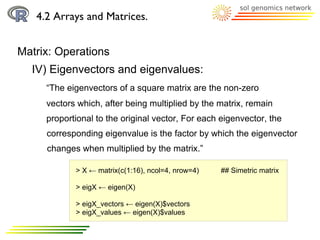
  IV) Eigenvectors and eigenvalues:
     “The eigenvectors of a square matrix are the non-zero
     vectors which, after being multiplied by the matrix, remain
     proportional to the original vector, For each eigenvector, the
     corresponding eigenvalue is the factor by which the eigenvector
     changes when multiplied by the matrix.”

            > X ← matrix(c(1:16), ncol=4, nrow=4)   ## Simetric matrix

            > eigX ← eigen(X)

            > eigX_vectors ← eigen(X)$vectors
            > eigX_values ← eigen(X)$values
4.2 Arrays and Matrices.


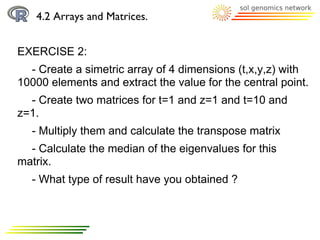
EXERCISE 2:
  - Create a simetric array of 4 dimensions (t,x,y,z) with
10000 elements and extract the value for the central point.
  - Create two matrices for t=1 and z=1 and t=10 and
z=1.
  - Multiply them and calculate the transpose matrix
  - Calculate the median of the eigenvalues for this
matrix.
  - What type of result have you obtained ?
A Brief Introduction to R:
   1. What is R ?
   2. Software and documentation.
   3. First steps, from R to q()
   4. R objects and objects types.
          4.1 Vectors.
          4.2 Arrays and Matrices.
          4.3 Lists and Data frames.
    5. Functions.
          5.1 Basic objects functions.
          5.2 General use of functions
          5.3 More information, using help
    6. Packages.
4.3 Lists and Data frames.


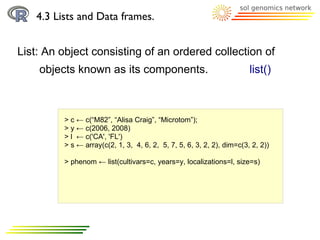
List: An object consisting of an ordered collection of
    objects known as its components.                                   list()


         > c ← c(“M82”, “Alisa Craig”, “Microtom”);
         > y ← c(2006, 2008)
         > l ← c('CA', 'FL')
         > s ← array(c(2, 1, 3, 4, 6, 2, 5, 7, 5, 6, 3, 2, 2), dim=c(3, 2, 2))

         > phenom ← list(cultivars=c, years=y, localizations=l, size=s)
4.3 Lists and Data frames.


List: Objects in the list are indexed and also can be
     accessible using their names

         > phenom ← list(cultivars=c, years=y, localizations=l, size=s)

         >phenom[ [ 1 ] ]
         >phenom$cultivars
4.3 Lists and Data frames.


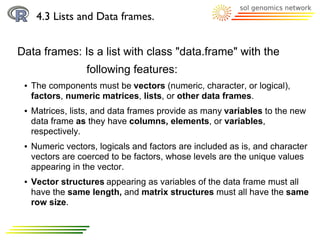
Data frames: Is a list with class "data.frame" with the
                   following features:
 ●   The components must be vectors (numeric, character, or logical),
     factors, numeric matrices, lists, or other data frames.
 ●   Matrices, lists, and data frames provide as many variables to the new
     data frame as they have columns, elements, or variables,
     respectively.
 ●   Numeric vectors, logicals and factors are included as is, and character
     vectors are coerced to be factors, whose levels are the unique values
     appearing in the vector.
 ●   Vector structures appearing as variables of the data frame must all
     have the same length, and matrix structures must all have the same
     row size.
4.3 Lists and Data frames.


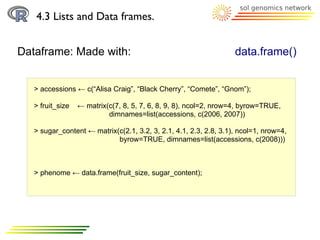
Dataframe: Made with:                                              data.frame()


   > accessions ← c(“Alisa Craig”, “Black Cherry”, “Comete”, “Gnom”);

   > fruit_size   ← matrix(c(7, 8, 5, 7, 6, 8, 9, 8), ncol=2, nrow=4, byrow=TRUE,
                           dimnames=list(accessions, c(2006, 2007))

   > sugar_content ← matrix(c(2.1, 3.2, 3, 2.1, 4.1, 2.3, 2.8, 3.1), ncol=1, nrow=4,
                            byrow=TRUE, dimnames=list(accessions, c(2008)))


   > phenome ← data.frame(fruit_size, sugar_content);
4.3 Lists and Data frames.


Dataframe: Accessing to the data                          attach()/detach()
                                                          summary()
   > phenome ← data.frame(fruit_size, sugar_content);

   ## As a matrix:
   > phenome[1,]                   ## for a row
   > phenome[,1]                   ## for a column
   > phenome[1,1]                  ## for a single data

   ## Based in the column names
   > phenome$X2007

   ## To divide/join the data.frame in its columns use attach/detach function
   >attach(phenome)
   > X2007

   >summary(phenome)               ## To know some stats about this dataframe
4.3 Lists and Data frames.


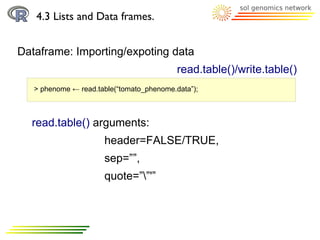
Dataframe: Importing/expoting data
                                           read.table()/write.table()
   > phenome ← read.table(“tomato_phenome.data”);


  read.table() arguments:
                      header=FALSE/TRUE,
                      sep=””,
                      quote=””'”
4.3 Lists and Data frames.


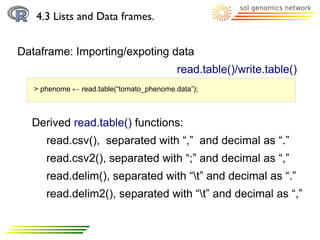
Dataframe: Importing/expoting data
                                           read.table()/write.table()
   > phenome ← read.table(“tomato_phenome.data”);


  Derived read.table() functions:
      read.csv(), separated with “,” and decimal as “.”
      read.csv2(), separated with “;” and decimal as “,”
      read.delim(), separated with “t” and decimal as “.”
      read.delim2(), separated with “t” and decimal as “,”
4.3 Lists and Data frames.


EXERCISE 3:
  - Load the file: “tomato_weight.tab” into R session
  - Create a vector with the accession names.
  - Calculate the weight media of each accession.
  - Calculate the weight media of each year.
  - Create a new matrix with two extra columns with the
   means and the standard desviation.
A Brief Introduction to R:
   1. What is R ?
   2. Software and documentation.
   3. First steps, from R to q()
   4. R objects and objects types.
          4.1 Vectors.
          4.2 Arrays and Matrices.
          4.3 Lists and Data frames.
    5. Functions.
          5.1 Basic objects functions.
          5.2 General use of functions
          5.3 More information, using help
    6. Packages.
5. Functions.


Functions: They are objects with a set of instructions to
            process some data object.

                   name(arguments)

                   read.table(“tomato_phenome.data”);
A Brief Introduction to R:
   1. What is R ?
   2. Software and documentation.
   3. First steps, from R to q()
   4. R objects and objects types.
          4.1 Vectors.
          4.2 Arrays and Matrices.
          4.3 Lists and Data frames.
    5. Functions.
          5.1 Basic objects functions.
          5.2 General use of functions
          5.3 More information, using help
    6. Packages.
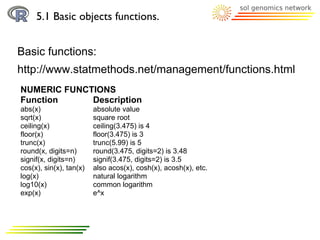
5.1 Basic objects functions.


Basic functions:
http://www.statmethods.net/management/functions.html
NUMERIC FUNCTIONS
Function     Description
abs(x)                   absolute value
sqrt(x)                  square root
ceiling(x)               ceiling(3.475) is 4
floor(x)                 floor(3.475) is 3
trunc(x)                 trunc(5.99) is 5
round(x, digits=n)       round(3.475, digits=2) is 3.48
signif(x, digits=n)      signif(3.475, digits=2) is 3.5
cos(x), sin(x), tan(x)   also acos(x), cosh(x), acosh(x), etc.
log(x)                   natural logarithm
log10(x)                 common logarithm
exp(x)                   e^x
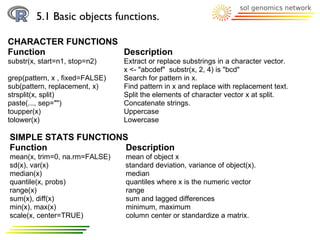
5.1 Basic objects functions.

CHARACTER FUNCTIONS
Function            Description
substr(x, start=n1, stop=n2)     Extract or replace substrings in a character vector.
                                 x <- "abcdef" substr(x, 2, 4) is "bcd"
grep(pattern, x , fixed=FALSE)   Search for pattern in x.
sub(pattern, replacement, x)     Find pattern in x and replace with replacement text.
strsplit(x, split)               Split the elements of character vector x at split.
paste(..., sep="")               Concatenate strings.
toupper(x)                       Uppercase
tolower(x)                       Lowercase

SIMPLE STATS FUNCTIONS
Function              Description
mean(x, trim=0, na.rm=FALSE)     mean of object x
sd(x), var(x)                    standard deviation, variance of object(x).
median(x)                        median
quantile(x, probs)               quantiles where x is the numeric vector
range(x)                         range
sum(x), diff(x)                  sum and lagged differences
min(x), max(x)                   minimum, maximum
scale(x, center=TRUE)            column center or standardize a matrix.
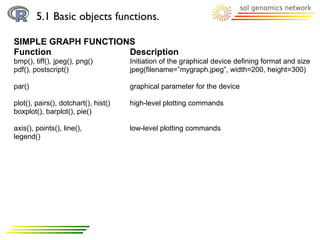
5.1 Basic objects functions.

SIMPLE GRAPH FUNCTIONS
Function             Description
bmp(), tiff(), jpeg(), png()          Initiation of the graphical device defining format and size
pdf(), postscript()                   jpeg(filename=”mygraph.jpeg”, width=200, height=300)

par()                                 graphical parameter for the device

plot(), pairs(), dotchart(), hist()   high-level plotting commands
boxplot(), barplot(), pie()

axis(), points(), line(),             low-level plotting commands
legend()
A Brief Introduction to R:
   1. What is R ?
   2. Software and documentation.
   3. First steps, from R to q()
   4. R objects and objects types.
          4.1 Vectors.
          4.2 Arrays and Matrices.
          4.3 Lists and Data frames.
    5. Functions.
          5.1 Basic objects functions.
          5.2 General use of functions
          5.3 More information, using help
    6. Packages.
5.2 General use of functions


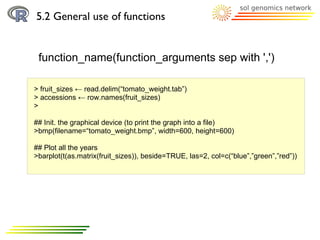
 function_name(function_arguments sep with ',')

> fruit_sizes ← read.delim(“tomato_weight.tab”)
> accessions ← row.names(fruit_sizes)
>

## Init. the graphical device (to print the graph into a file)
>bmp(filename=“tomato_weight.bmp”, width=600, height=600)

## Plot all the years
>barplot(t(as.matrix(fruit_sizes)), beside=TRUE, las=2, col=c(“blue”,”green”,”red”))
A Brief Introduction to R:
   1. What is R ?
   2. Software and documentation.
   3. First steps, from R to q()
   4. R objects and objects types.
          4.1 Vectors.
          4.2 Arrays and Matrices.
          4.3 Lists and Data frames.
    5. Functions.
          5.1 Basic objects functions.
          5.2 General use of functions
          5.3 More information, using help
    6. Packages.
5.3 More information, using help


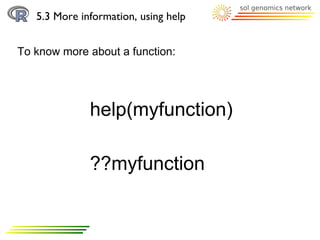
To know more about a function:


              help(myfunction)

              ??myfunction
4.3 Lists and Data frames.


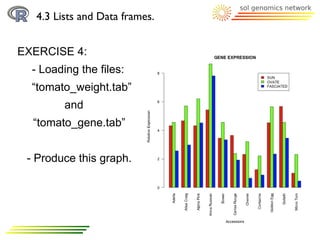
EXERCISE 4:
  - Loading the files:
  “tomato_weight.tab”
         and
  “tomato_gene.tab”


 - Produce this graph.
A Brief Introduction to R:
   1. What is R ?
   2. Software and documentation.
   3. First steps, from R to q()
   4. R objects and objects types.
          4.1 Vectors.
          4.2 Arrays and Matrices.
          4.3 Lists and Data frames.
    5. Functions.
          5.1 Basic objects functions.
          5.2 General use of functions
          5.3 More information, using help
    6. Packages.
6. Packages.


Packages: Set of functions and data that can be
           downloaded and installed from R repository
           CRAN.


Example: 'ade4', is a package of analysis of ecological
          Data.


Important Commands: > install.packages(“ade4”)
                       > library(“ade4”)
                       > packageDescription(“ade4”)

Introduction2R

  • 1.
    A Brief Introductionto R Boyce Thompson Institute for Plant Research Tower Road Ithaca, New York 14853-1801 U.S.A. by Aureliano Bombarely Gomez
  • 2.
    A Brief Introductionto R: 1. What is R ? 2. Software and documentation. 3. First steps, from R to q() 4. R objects and objects types. 4.1 Vectors. 4.2 Arrays and Matrices. 4.3 Lists and Data frames. 5. Functions. 5.1 Basic objects functions. 5.2 General use of functions 5.3 More information, using help 6. Packages.
  • 3.
    A Brief Introductionto R: 1. What is R ? 2. Software and documentation. 3. First steps, from R to q() 4. R objects and objects types. 4.1 Vectors. 4.2 Arrays and Matrices. 4.3 Lists and Data frames. 5. Functions. 5.1 Basic objects functions. 5.2 General use of functions 5.3 More information, using help 6. Packages.
  • 4.
    1. What isR ? R is a language and environment for statistical computing and graphics..
  • 5.
    A Brief Introductionto R: 1. What is R ? 2. Software and documentation. 3. First steps, from R to q() 4. R objects and objects types. 4.1 Vectors. 4.2 Arrays and Matrices. 4.3 Lists and Data frames. 5. Functions. 5.1 Basic objects functions. 5.2 General use of functions 5.3 More information, using help 6. Packages.
  • 6.
    2. Software anddocumentation. WEB: OFICIAL WEB: http://www.r-project.org/index.html QUICK-R: http://www.statmethods.net/index.html BOOKS: Introductory Statistics with R (Statistics and Computing), P. Dalgaard [available as manual at R project web] The R Book, MJ. Crawley R itself: help() and example()
  • 7.
    A Brief Introductionto R: 1. What is R ? 2. Software and documentation. 3. First steps, from R to q() 4. R objects and objects types. 4.1 Vectors. 4.2 Arrays and Matrices. 4.3 Lists and Data frames. 5. Functions. 5.1 Basic objects functions. 5.2 General use of functions 5.3 More information, using help 6. Packages.
  • 8.
    3. First steps,from R to q(). Two ways to run R: 1) Interactively: q() $R > “any R command, as functions, objects ...” > q() “to exit” 2) Command line $ R [options] [< infile] [> outfile] or: R CMD command [arguments] $ R –vanilla < myRcommands.txt > myRresults.txt
  • 9.
    3. First steps,from R to q(). Basic Grammar with R console: 7 Rules 1- Object names 2- Assigments 3- Case sensitive 4- Commands 5- Grouping 6- Comment 7- Arguments
  • 10.
    3. First steps,from R to q(). Basic Grammar with R console: 1) Objects are defined with names. This names can be composed by alphanumeric characters, [a-z,0-9], dots '.' and underlines '-'. Names should start with [a-z] or '.' plus [a-z] >x > x_23.test 2) '=' or '<-' signs are used to assign a value to an object > x <- 100 > y <- 25
  • 11.
    3. First steps,from R to q(). Basic Grammar with R console: 3) Case sensitive: 'x' is different than 'X'. > x <- 100 > X <- 5 4) Commands are separated by ';' or new line. > x <- 100; y <- 25; x * y; 5) Commands can be group using '{' to '}'. > x * y + 2; ## it will be 2502 (* higher prcedence ) >x*{y+2} ## it will be 2700
  • 12.
    3. First steps,from R to q(). Basic Grammar with R console: 6) Comments will be preceded by '#' > ## This is a comment 7) Functions arguments will be placed between '(' ')', separated by commas ',' with equal signs '=' to define arguments. > help() > sqrt(4) > log(2, base = 10)
  • 13.
    3. First steps,from R to q(). Features of R environment: 1) Keep the history and objects: history() $R > history() ## It will print the last 25 commands 2) Load commands from a file: source() > source(“myfile”) ## It will execute command from myfile 3) Check objects stored in the session: objects() > objects() ## It will print a list of objects
  • 14.
    A Brief Introductionto R: 1. What is R ? 2. Software and documentation. 3. First steps, from R to q() 4. R objects and objects types. 4.1 Vectors. 4.2 Arrays and Matrices. 4.3 Lists and Data frames. 5. Functions. 5.1 Basic objects functions. 5.2 General use of functions 5.3 More information, using help 6. Packages.
  • 15.
    4. R objectsand objects types. General object commands in R 1) To assign a value to an object '=' or '<-' > obj1 <- “My First Object” ## Character > obj2 <- 23 ## Numeric > obj3 <- TRUE ## Logical Different types of values or data types: I- Characters (always between double quotes “”). II- Numeric (normal or scientific notation). III- Logical (TRUE, FALSE, NA and NULL)
  • 16.
    4. R objectsand objects types. General object commands in R 2) To know the object type. class() > obj1 <- “My First Object” > class(obj1) ## It should return character 3) To list the object defined objects() 4) To delete an object rm() > rm(obj1) ## It will delete obj1 > rm(list = objects() ) ## It will delete ALL the objects
  • 17.
    4. R objectsand objects types. General object commands in R 5) To print an object print() > obj1 <- “test that” > print(obj1)
  • 18.
    A Brief Introductionto R: 1. What is R ? 2. Software and documentation. 3. First steps, from R to q() 4. R objects and objects types. 4.1 Vectors. 4.2 Arrays and Matrices. 4.3 Lists and Data frames. 5. Functions. 5.1 Basic objects functions. 5.2 General use of functions 5.3 More information, using help 6. Packages.
  • 19.
    4.1 Vectors. Vectors: Mostsimple 'data structure' in R. Ordered collection of data values. Command used: c() > obj1 <- c(1, 2, 3, 4, 5, 6, 7, 8, 9, 10) ## Numeric > obj2 <- c(1:10) ## Numeric sequence > obj3 <- c(“blue”, “green”, “red”) ## Characters > obj4 <- c(1, 2, “blue”, TRUE) ## Mixed > obj5 <- c(obj1, obj2) ## Use other vectors
  • 20.
    4.1 Vectors. Numeric Vectorscan be used with binary operators and functions x+y ## addition x–y ## substraction x*y ## multiplication x/y ## division x^y ## exponentation sqrt(x) ## square root abs(x) ## absolute value log(x) ## logarithmic median(x) ## median mean(x) ## mean
  • 21.
    4.1 Vectors. EXERCISE 1: Is TRUE or FALSE the following expressions: a) Median of square root of a vector sequence from 1 to 100 is the same than square root of a median of a vector from 1 to 100. b) For a serie of 1 to 100, there are 51 numbers where is true that square root of x is equal to x divided by square root of x
  • 22.
    A Brief Introductionto R: 1. What is R ? 2. Software and documentation. 3. First steps, from R to q() 4. R objects and objects types. 4.1 Vectors. 4.2 Arrays and Matrices. 4.3 Lists and Data frames. 5. Functions. 5.1 Basic objects functions. 5.2 General use of functions 5.3 More information, using help 6. Packages.
  • 23.
    4.2 Arrays andMatrices. Array: Is a vector with a dimension vector with positive values. array(vector, dimension) > xyz <- array(c(1:27), dim=c(3, 3, 3))
  • 24.
    4.2 Arrays andMatrices. Array: Arrays are indexed > xyz <- array(c(1:27), dim=c(3, 3, 3)) > xyz ,,1 First dimension [,1] [,2] [,3] Second dimension [1,] 1 4 7 [2,] 2 5 8 [3,] 3 6 9 ,,2 [,1] [,2] [,3] [1,] 10 13 16 [2,] 11 14 17 [3,] 12 15 18 ,,3 [,1] [,2] [,3] [1,] 19 22 25 [2,] 20 23 26 [3,] 21 24 27 Third dimension
  • 25.
    4.2 Arrays andMatrices. Array: Arrays are indexed, so each element is accessible throught these indexes > xyz <- array(c(1:27), dim=c(3, 3, 3)) > xyz > xyz[2,2,2] ## a single numeric element > xyz[2,2, ] ## a vector (1 dimension array) > xyz[2, , ] ## a 2 dimension array
  • 26.
    4.2 Arrays andMatrices. Matrix: Is a vector with a 2 dimension vector with positive values. matrix(vector, 2dimension) > xy <- matrix(c(1:9), ncol=3, nrow=3)
  • 27.
    4.2 Arrays andMatrices. Matrix: It has indexes too > xy <- matrix(c(1:9), ncol=3, nrow=3) > xy > xy[2,2] ## a single numeric element > xy[2, ] ## a vector (1 dimension array) Matrix: Indexes can be replaced by names > xy <- matrix(c(1:9), ncol=3, nrow=3, dimnames=list(c(“A”,”B”,”C”), c(“x”, “y”, “z”))) xyz A147 B258 C369
  • 28.
    4.2 Arrays andMatrices. Matrix: There are many way to create a matrix. 1) matrix(vector, ncol=x, nrow=y, dimnames=list()) > xy <- matrix(c(1:9), ncol=3, nrow=3, dimnames=list(c(“A”,”B”,”C”), c(“x”, “y”, “z”)) 2) Binding columns (cbind) or rows (rbind) > x <- c(1,2,3); y <- c(4,5,6); > col_xy <- cbind(x, y); > row_xy <- rbind(x, y);
  • 29.
    4.2 Arrays andMatrices. Matrix: Operations I) Multiplication >X*Y ## Matrix multiplication > X %*% Y ## By element II) Inversion > X ^ {-1} ## Inversion III) Transposition > t(X) ## Transposition
  • 30.
    4.2 Arrays andMatrices. Matrix: Operations IV) Eigenvectors and eigenvalues: “The eigenvectors of a square matrix are the non-zero vectors which, after being multiplied by the matrix, remain proportional to the original vector, For each eigenvector, the corresponding eigenvalue is the factor by which the eigenvector changes when multiplied by the matrix.” > X ← matrix(c(1:16), ncol=4, nrow=4) ## Simetric matrix > eigX ← eigen(X) > eigX_vectors ← eigen(X)$vectors > eigX_values ← eigen(X)$values
  • 31.
    4.2 Arrays andMatrices. EXERCISE 2: - Create a simetric array of 4 dimensions (t,x,y,z) with 10000 elements and extract the value for the central point. - Create two matrices for t=1 and z=1 and t=10 and z=1. - Multiply them and calculate the transpose matrix - Calculate the median of the eigenvalues for this matrix. - What type of result have you obtained ?
  • 32.
    A Brief Introductionto R: 1. What is R ? 2. Software and documentation. 3. First steps, from R to q() 4. R objects and objects types. 4.1 Vectors. 4.2 Arrays and Matrices. 4.3 Lists and Data frames. 5. Functions. 5.1 Basic objects functions. 5.2 General use of functions 5.3 More information, using help 6. Packages.
  • 33.
    4.3 Lists andData frames. List: An object consisting of an ordered collection of objects known as its components. list() > c ← c(“M82”, “Alisa Craig”, “Microtom”); > y ← c(2006, 2008) > l ← c('CA', 'FL') > s ← array(c(2, 1, 3, 4, 6, 2, 5, 7, 5, 6, 3, 2, 2), dim=c(3, 2, 2)) > phenom ← list(cultivars=c, years=y, localizations=l, size=s)
  • 34.
    4.3 Lists andData frames. List: Objects in the list are indexed and also can be accessible using their names > phenom ← list(cultivars=c, years=y, localizations=l, size=s) >phenom[ [ 1 ] ] >phenom$cultivars
  • 35.
    4.3 Lists andData frames. Data frames: Is a list with class "data.frame" with the following features: ● The components must be vectors (numeric, character, or logical), factors, numeric matrices, lists, or other data frames. ● Matrices, lists, and data frames provide as many variables to the new data frame as they have columns, elements, or variables, respectively. ● Numeric vectors, logicals and factors are included as is, and character vectors are coerced to be factors, whose levels are the unique values appearing in the vector. ● Vector structures appearing as variables of the data frame must all have the same length, and matrix structures must all have the same row size.
  • 36.
    4.3 Lists andData frames. Dataframe: Made with: data.frame() > accessions ← c(“Alisa Craig”, “Black Cherry”, “Comete”, “Gnom”); > fruit_size ← matrix(c(7, 8, 5, 7, 6, 8, 9, 8), ncol=2, nrow=4, byrow=TRUE, dimnames=list(accessions, c(2006, 2007)) > sugar_content ← matrix(c(2.1, 3.2, 3, 2.1, 4.1, 2.3, 2.8, 3.1), ncol=1, nrow=4, byrow=TRUE, dimnames=list(accessions, c(2008))) > phenome ← data.frame(fruit_size, sugar_content);
  • 37.
    4.3 Lists andData frames. Dataframe: Accessing to the data attach()/detach() summary() > phenome ← data.frame(fruit_size, sugar_content); ## As a matrix: > phenome[1,] ## for a row > phenome[,1] ## for a column > phenome[1,1] ## for a single data ## Based in the column names > phenome$X2007 ## To divide/join the data.frame in its columns use attach/detach function >attach(phenome) > X2007 >summary(phenome) ## To know some stats about this dataframe
  • 38.
    4.3 Lists andData frames. Dataframe: Importing/expoting data read.table()/write.table() > phenome ← read.table(“tomato_phenome.data”); read.table() arguments: header=FALSE/TRUE, sep=””, quote=””'”
  • 39.
    4.3 Lists andData frames. Dataframe: Importing/expoting data read.table()/write.table() > phenome ← read.table(“tomato_phenome.data”); Derived read.table() functions: read.csv(), separated with “,” and decimal as “.” read.csv2(), separated with “;” and decimal as “,” read.delim(), separated with “t” and decimal as “.” read.delim2(), separated with “t” and decimal as “,”
  • 40.
    4.3 Lists andData frames. EXERCISE 3: - Load the file: “tomato_weight.tab” into R session - Create a vector with the accession names. - Calculate the weight media of each accession. - Calculate the weight media of each year. - Create a new matrix with two extra columns with the means and the standard desviation.
  • 41.
    A Brief Introductionto R: 1. What is R ? 2. Software and documentation. 3. First steps, from R to q() 4. R objects and objects types. 4.1 Vectors. 4.2 Arrays and Matrices. 4.3 Lists and Data frames. 5. Functions. 5.1 Basic objects functions. 5.2 General use of functions 5.3 More information, using help 6. Packages.
  • 42.
    5. Functions. Functions: Theyare objects with a set of instructions to process some data object. name(arguments) read.table(“tomato_phenome.data”);
  • 43.
    A Brief Introductionto R: 1. What is R ? 2. Software and documentation. 3. First steps, from R to q() 4. R objects and objects types. 4.1 Vectors. 4.2 Arrays and Matrices. 4.3 Lists and Data frames. 5. Functions. 5.1 Basic objects functions. 5.2 General use of functions 5.3 More information, using help 6. Packages.
  • 44.
    5.1 Basic objectsfunctions. Basic functions: http://www.statmethods.net/management/functions.html NUMERIC FUNCTIONS Function Description abs(x) absolute value sqrt(x) square root ceiling(x) ceiling(3.475) is 4 floor(x) floor(3.475) is 3 trunc(x) trunc(5.99) is 5 round(x, digits=n) round(3.475, digits=2) is 3.48 signif(x, digits=n) signif(3.475, digits=2) is 3.5 cos(x), sin(x), tan(x) also acos(x), cosh(x), acosh(x), etc. log(x) natural logarithm log10(x) common logarithm exp(x) e^x
  • 45.
    5.1 Basic objectsfunctions. CHARACTER FUNCTIONS Function Description substr(x, start=n1, stop=n2) Extract or replace substrings in a character vector. x <- "abcdef" substr(x, 2, 4) is "bcd" grep(pattern, x , fixed=FALSE) Search for pattern in x. sub(pattern, replacement, x) Find pattern in x and replace with replacement text. strsplit(x, split) Split the elements of character vector x at split. paste(..., sep="") Concatenate strings. toupper(x) Uppercase tolower(x) Lowercase SIMPLE STATS FUNCTIONS Function Description mean(x, trim=0, na.rm=FALSE) mean of object x sd(x), var(x) standard deviation, variance of object(x). median(x) median quantile(x, probs) quantiles where x is the numeric vector range(x) range sum(x), diff(x) sum and lagged differences min(x), max(x) minimum, maximum scale(x, center=TRUE) column center or standardize a matrix.
  • 46.
    5.1 Basic objectsfunctions. SIMPLE GRAPH FUNCTIONS Function Description bmp(), tiff(), jpeg(), png() Initiation of the graphical device defining format and size pdf(), postscript() jpeg(filename=”mygraph.jpeg”, width=200, height=300) par() graphical parameter for the device plot(), pairs(), dotchart(), hist() high-level plotting commands boxplot(), barplot(), pie() axis(), points(), line(), low-level plotting commands legend()
  • 47.
    A Brief Introductionto R: 1. What is R ? 2. Software and documentation. 3. First steps, from R to q() 4. R objects and objects types. 4.1 Vectors. 4.2 Arrays and Matrices. 4.3 Lists and Data frames. 5. Functions. 5.1 Basic objects functions. 5.2 General use of functions 5.3 More information, using help 6. Packages.
  • 48.
    5.2 General useof functions function_name(function_arguments sep with ',') > fruit_sizes ← read.delim(“tomato_weight.tab”) > accessions ← row.names(fruit_sizes) > ## Init. the graphical device (to print the graph into a file) >bmp(filename=“tomato_weight.bmp”, width=600, height=600) ## Plot all the years >barplot(t(as.matrix(fruit_sizes)), beside=TRUE, las=2, col=c(“blue”,”green”,”red”))
  • 49.
    A Brief Introductionto R: 1. What is R ? 2. Software and documentation. 3. First steps, from R to q() 4. R objects and objects types. 4.1 Vectors. 4.2 Arrays and Matrices. 4.3 Lists and Data frames. 5. Functions. 5.1 Basic objects functions. 5.2 General use of functions 5.3 More information, using help 6. Packages.
  • 50.
    5.3 More information,using help To know more about a function: help(myfunction) ??myfunction
  • 51.
    4.3 Lists andData frames. EXERCISE 4: - Loading the files: “tomato_weight.tab” and “tomato_gene.tab” - Produce this graph.
  • 52.
    A Brief Introductionto R: 1. What is R ? 2. Software and documentation. 3. First steps, from R to q() 4. R objects and objects types. 4.1 Vectors. 4.2 Arrays and Matrices. 4.3 Lists and Data frames. 5. Functions. 5.1 Basic objects functions. 5.2 General use of functions 5.3 More information, using help 6. Packages.
  • 53.
    6. Packages. Packages: Setof functions and data that can be downloaded and installed from R repository CRAN. Example: 'ade4', is a package of analysis of ecological Data. Important Commands: > install.packages(“ade4”) > library(“ade4”) > packageDescription(“ade4”)