KEYSTONE.JS 101 
ALEXANDER ROCHE
WHAT IS KEYSTONE.JS? 
• NodeJS based CMS 
! 
• MVC Framework 
! 
• Creates an admin panel by 
default 
! 
• Javascript. Javascript 
everywhere.
INCLUDES 
• ExpressJS 
! 
! 
! 
• MongoDB
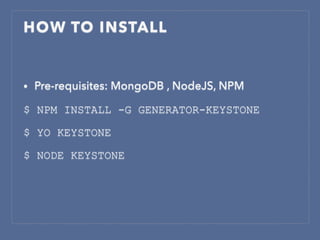
HOW TO INSTALL 
• Pre-requisites: MongoDB , NodeJS, NPM 
$ NPM INSTALL -G GENERATOR-KEYSTONE 
$ YO KEYSTONE 
$ NODE KEYSTONE
INCLUDES 
• ExpressJS 
• MongoDB 
• Cloudinary 
• Mandrill 
• Gulp/Grunt 
• Handlebars/Jade/Swig/ 
Nunjucks
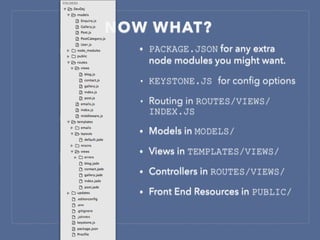
NOW WHAT? 
• PACKAGE.JSON for any extra 
node modules you might want. 
• KEYSTONE.JS for config options 
• Routing in ROUTES/VIEWS/ 
INDEX.JS 
• Models in MODELS/ 
• Views in TEMPLATES/VIEWS/ 
• Controllers in ROUTES/VIEWS/ 
• Front End Resources in PUBLIC/
PACKAGE.JSON 
• Manages dependencies in 
node 
• Anything in npmjs.org can 
be referenced here 
• NPM INSTALL will 
retrieve dependencies 
and install them to 
NODE_MODULES 
• Never commit 
NODE_MODULES
KEYSTONE.JS 
• Main config and boot file 
• Email 
• Routes 
• Local Variables 
• Emailing Rules 
• Nav Elements in Admin 
• Custom templating 
engines can be used 
• Here’s where you set your 
database up as well
ROUTING 
• ExpressJS style routing, 
hence familiar syntax 
! 
• Error pages can be 
defined 
! 
• Most anything you can 
do in Laravel, you can 
do here.
MODELS
MODELS 
• Created as a keystone.List 
• .add method enables you 
to add keys to the model 
• Changes to models are 
incorporated in to the 
database on restart 
• Config options for which 
columns to show in admin 
Types: Boolean, Text, Textarea, Email, Url, Html, Color, Date, Datetime, Key, 
Number, Money, Select, Markdown, Name, Password, Location, CloudinaryImage, 
CloudinaryImages, LocalFile, S3 File, Embedly
VIEWS 
• Any tempting 
language you want, 
just set it up in 
keystone.js 
• Data is passed by 
setting it the 
controller as a 
locals parameter on 
the response.
CONTROLLERS 
• Contain all the logic from the 
request to the view being 
rendered. 
• Parameters passed to the view 
through the response 
argument of keystone.View 
• External files can be included 
and external functionality used 
• Views are rendered with 
the .render function 
• Additional parameters can be 
passed in to render
‘FUN’ STUFF
NRG NEWS 
A BLOGGING PLATFORM WRITTEN IN 
KEYSTONE.JS
THANK YOU FOR LISTENING!

Keystone.js 101

  • 1.
  • 2.
    WHAT IS KEYSTONE.JS? • NodeJS based CMS ! • MVC Framework ! • Creates an admin panel by default ! • Javascript. Javascript everywhere.
  • 3.
    INCLUDES • ExpressJS ! ! ! • MongoDB
  • 4.
    HOW TO INSTALL • Pre-requisites: MongoDB , NodeJS, NPM $ NPM INSTALL -G GENERATOR-KEYSTONE $ YO KEYSTONE $ NODE KEYSTONE
  • 6.
    INCLUDES • ExpressJS • MongoDB • Cloudinary • Mandrill • Gulp/Grunt • Handlebars/Jade/Swig/ Nunjucks
  • 7.
    NOW WHAT? •PACKAGE.JSON for any extra node modules you might want. • KEYSTONE.JS for config options • Routing in ROUTES/VIEWS/ INDEX.JS • Models in MODELS/ • Views in TEMPLATES/VIEWS/ • Controllers in ROUTES/VIEWS/ • Front End Resources in PUBLIC/
  • 8.
    PACKAGE.JSON • Managesdependencies in node • Anything in npmjs.org can be referenced here • NPM INSTALL will retrieve dependencies and install them to NODE_MODULES • Never commit NODE_MODULES
  • 9.
    KEYSTONE.JS • Mainconfig and boot file • Email • Routes • Local Variables • Emailing Rules • Nav Elements in Admin • Custom templating engines can be used • Here’s where you set your database up as well
  • 10.
    ROUTING • ExpressJSstyle routing, hence familiar syntax ! • Error pages can be defined ! • Most anything you can do in Laravel, you can do here.
  • 11.
  • 12.
    MODELS • Createdas a keystone.List • .add method enables you to add keys to the model • Changes to models are incorporated in to the database on restart • Config options for which columns to show in admin Types: Boolean, Text, Textarea, Email, Url, Html, Color, Date, Datetime, Key, Number, Money, Select, Markdown, Name, Password, Location, CloudinaryImage, CloudinaryImages, LocalFile, S3 File, Embedly
  • 13.
    VIEWS • Anytempting language you want, just set it up in keystone.js • Data is passed by setting it the controller as a locals parameter on the response.
  • 14.
    CONTROLLERS • Containall the logic from the request to the view being rendered. • Parameters passed to the view through the response argument of keystone.View • External files can be included and external functionality used • Views are rendered with the .render function • Additional parameters can be passed in to render
  • 15.
  • 16.
    NRG NEWS ABLOGGING PLATFORM WRITTEN IN KEYSTONE.JS
  • 17.
    THANK YOU FORLISTENING!