Best Practices for Application
Development with Box
Jonathan LeBlanc
Director of Developer Advocacy, Box
Twitter: @jcleblanc
Github: https://github.com/jcleblanc
2Best Practices for Application Development with Box
1. How do you ensure data integrity, compliance, and retention?
2. How do you manage token calls and security properly?
3. How do you control program access and permissioning?
4. How can you build program flow around common error responses?
What problems are we looking at today?
3Best Practices for Application Development with Box
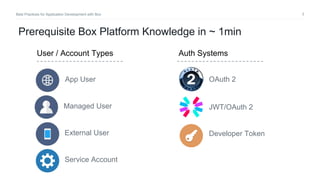
Prerequisite Box Platform Knowledge in ~ 1min
Managed User
App User
External User
User / Account Types
Service Account
Auth Systems
JWT/OAuth 2
OAuth 2
Developer Token
4Best Practices for Application Development with Box
How do you ensure data integrity,
compliance, and retention?
5Best Practices for Application Development with Box
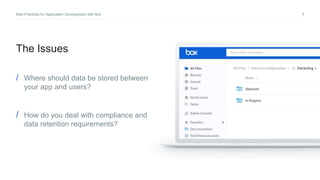
/ Where should data be stored between
your app and users?
/ How do you deal with compliance and
data retention requirements?
The Issues
6Best Practices for Application Development with Box
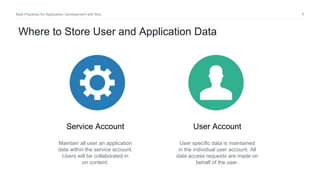
Service Account User Account
Maintain all user an application
data within the service account.
Users will be collaborated in
on content.
User specific data is maintained
in the individual user account. All
data access requests are made on
behalf of the user.
Where to Store User and Application Data
7Best Practices for Application Development with Box
Storing Data in the Service Account (Overview)
• Improved data security due to tight controls
over data location and sharing
• Data retention and migration improves
following customer deletion, as the user
collaboration is simply removed.
Benefits
• Architecture complexity increases as a
separate user folder structure needs to be
maintained in the service account.
• Single point of failure.
Concerns
8Best Practices for Application Development with Box
Storing Data in the User Account (Overview)
• Data is retained and owned by each user.
• Simple repeatable architecture on each
user account.
Benefits
• Data retention after customer deletion
requires data migration or loss.
• App has no control over data integrity.
Concerns
9Best Practices for Application Development with Box
How do you manage token calls and
security properly?
10Best Practices for Application Development with Box
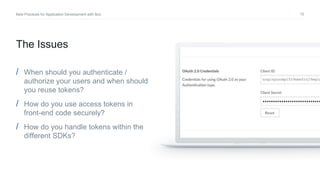
/ When should you authenticate /
authorize your users and when should
you reuse tokens?
/ How do you use access tokens in
front-end code securely?
/ How do you handle tokens within the
different SDKs?
The Issues
11Best Practices for Application Development with Box
Reducing auth calls by
storing access tokens
12Best Practices for Application Development with Box
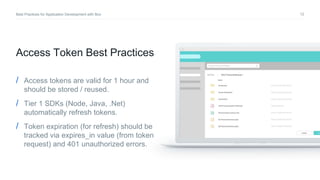
Access Token Best Practices
/ Access tokens are valid for 1 hour and
should be stored / reused.
/ Tier 1 SDKs (Node, Java, .Net)
automatically refresh tokens.
/ Token expiration (for refresh) should be
tracked via expires_in value (from token
request) and 401 unauthorized errors.
13Best Practices for Application Development with Box
Exposing access tokens
within front-end code
14Best Practices for Application Development with Box
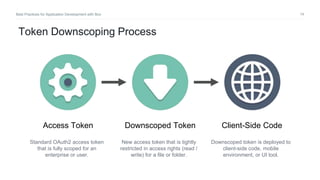
Downscoped TokenAccess Token Client-Side Code
Downscoped token is deployed to
client-side code, mobile
environment, or UI tool.
New access token that is tightly
restricted in access rights (read /
write) for a file or folder.
Standard OAuth2 access token
that is fully scoped for an
enterprise or user.
Token Downscoping Process
15Best Practices for Application Development with Box
client.exchangeToken(appConfig.tokenScopes[service]).then((tokenInfo) => {
// token available in tokenInfo.accessToken
}).catch((err) => {
console.error(err);
});
Downscoping a Token (Node SDK)
16Best Practices for Application Development with Box
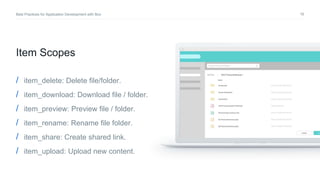
Item Scopes
/ item_delete: Delete file/folder.
/ item_download: Download file / folder.
/ item_preview: Preview file / folder.
/ item_rename: Rename file folder.
/ item_share: Create shared link.
/ item_upload: Upload new content.
17Best Practices for Application Development with Box
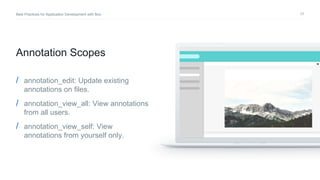
Annotation Scopes
/ annotation_edit: Update existing
annotations on files.
/ annotation_view_all: View annotations
from all users.
/ annotation_view_self: View
annotations from yourself only.
18Best Practices for Application Development with Box
Working with SDK differences
19Best Practices for Application Development with Box
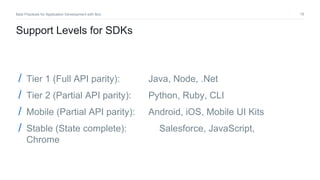
Support Levels for SDKs
/ Tier 1 (Full API parity): Java, Node, .Net
/ Tier 2 (Partial API parity): Python, Ruby, CLI
/ Mobile (Partial API parity): Android, iOS, Mobile UI Kits
/ Stable (State complete): Salesforce, JavaScript,
Chrome
20Best Practices for Application Development with Box
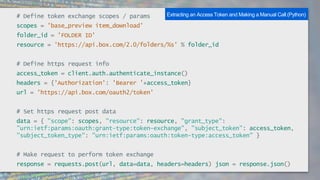
# Define token exchange scopes / params
scopes = 'base_preview item_download'
folder_id = 'FOLDER ID'
resource = 'https://api.box.com/2.0/folders/%s' % folder_id
# Define https request info
access_token = client.auth.authenticate_instance()
headers = {'Authorization': 'Bearer '+access_token}
url = 'https://api.box.com/oauth2/token'
# Set https request post data
data = { "scope": scopes, "resource": resource, "grant_type":
"urn:ietf:params:oauth:grant-type:token-exchange", "subject_token": access_token,
"subject_token_type": "urn:ietf:params:oauth:token-type:access_token" }
# Make request to perform token exchange
response = requests.post(url, data=data, headers=headers) json = response.json()
Extracting an Access Token and Making a Manual Call (Python)
21Best Practices for Application Development with Box
How do you control program access and
permissioning?
22Best Practices for Application Development with Box
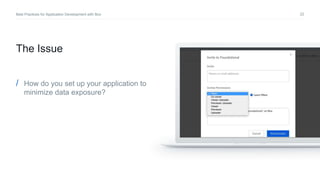
/ How do you set up your application to
minimize data exposure?
The Issue
23Best Practices for Application Development with Box
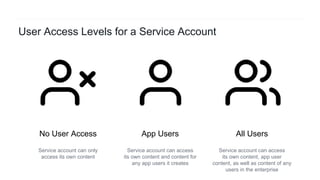
App UsersNo User Access All Users
Service account can access
its own content, app user
content, as well as content of any
users in the enterprise
Service account can access
its own content and content for
any app users it creates
Service account can only
access its own content
User Access Levels for a Service Account
24Best Practices for Application Development with Box
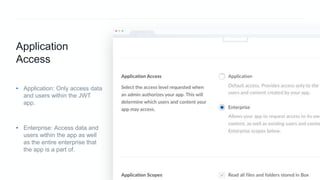
Application
Access
• Application: Only access data
and users within the JWT
app.
• Enterprise: Access data and
users within the app as well
as the entire enterprise that
the app is a part of.
25Best Practices for Application Development with Box
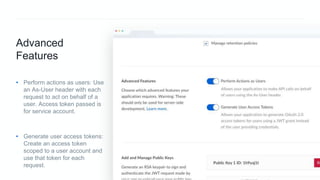
Advanced
Features
• Perform actions as users: Use
an As-User header with each
request to act on behalf of a
user. Access token passed is
for service account.
• Generate user access tokens:
Create an access token
scoped to a user account and
use that token for each
request.
26Best Practices for Application Development with Box
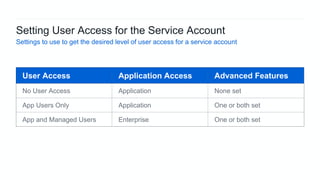
User Access Application Access Advanced Features
No User Access Application None set
App Users Only Application One or both set
App and Managed Users Enterprise One or both set
Setting User Access for the Service Account
Settings to use to get the desired level of user access for a service account
27Best Practices for Application Development with Box
How can you build program flow around
common error responses?
28Best Practices for Application Development with Box
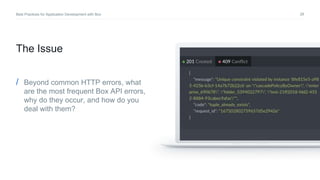
/ Beyond common HTTP errors, what
are the most frequent Box API errors,
why do they occur, and how do you
deal with them?
The Issue
29Best Practices for Application Development with Box
Access Token Errors
(401: unauthorized)
30Best Practices for Application Development with Box
Causes of Unauthorized Errors
Access token maintenance
/ Access tokens expire after 1 hour. At that point they must be refreshed using
the refresh token.
/ The .Net, Java, and Node SDKs handle this refresh action automatically. For
any other SDK or direct API integration token expiration responses (401:
unauthorized) will need to be handled through the app.
31Best Practices for Application Development with Box
Scoping Errors
(403: access_denied_insufficient_permissions)
32Best Practices for Application Development with Box
Causes of Insufficient Permissions Errors
User and application scoping
/ There are typically two causes of a 403:
access_denied_insufficient_permissions error, either the user an access
token is scoped for doesn’t have permission to perform an action, or the
application doesn’t.
/ For user permissions, try logging in as the user via the “Log in as this User”
option in the admin console. Attempt to access the content manually.
/ For an application, ensure that the application has the correct scopes defined
for the action that it is trying to perform.
33Best Practices for Application Development with Box
Item Location Errors
(404: not_found)
34Best Practices for Application Development with Box
Causes of Not Found Errors
Access Token Scoping
/ This may be encountered when trying to work with files and folders within Box when
using a JWT / OAuth 2 based application with a service account. If the ID of the file /
folder that is being accessed has been verified as present, this error will typically be
caused by the account that the client is pointing to. For instance, if a file exists on a
user account but the access token client is scoped for the service account, then a
404 error may be produced.
/ In cases of an access token that is scoped to the wrong account, use the As-User
header or user scoped access token for user access, or a service account scoped
access token for service account files.
35Best Practices for Application Development with Box
Name Conflicts
(409: item_name_in_use)
36Best Practices for Application Development with Box
Causes of Name Conflicts
Checking name uniqueness
/ File / folder names within a given folder must be uniquely named. When there is an
attempt to create a new file / folder with a name that already exists, a 409:
item_name_in_use, or a standard 409: conflict may be produced.
/ In case of a duplicate user login information being used when creating new
managed users, a 409: user_login_already_used error would be produced.
/ These errors should be handled. Possible next steps in the program flow would be
to attempt the same API request / login with revised information.
37Best Practices for Application Development with Box
Metadata Conflicts
(409: tuple_already_exists)
38Best Practices for Application Development with Box
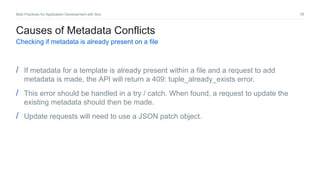
Causes of Metadata Conflicts
Checking if metadata is already present on a file
/ If metadata for a template is already present within a file and a request to add
metadata is made, the API will return a 409: tuple_already_exists error.
/ This error should be handled in a try / catch. When found, a request to update the
existing metadata should then be made.
/ Update requests will need to use a JSON patch object.
39Best Practices for Application Development with Box
Rate Limits
(429: rate_limit_exceeded)
40Best Practices for Application Development with Box
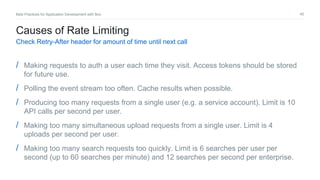
Causes of Rate Limiting
Check Retry-After header for amount of time until next call
/ Making requests to auth a user each time they visit. Access tokens should be stored
for future use.
/ Polling the event stream too often. Cache results when possible.
/ Producing too many requests from a single user (e.g. a service account). Limit is 10
API calls per second per user.
/ Making too many simultaneous upload requests from a single user. Limit is 4
uploads per second per user.
/ Making too many search requests too quickly. Limit is 6 searches per user per
second (up to 60 searches per minute) and 12 searches per second per enterprise.
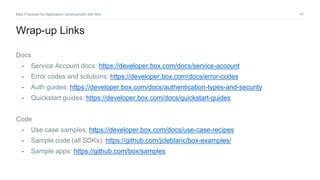
41Best Practices for Application Development with Box
Docs
• Service Account docs: https://developer.box.com/docs/service-account
• Error codes and solutions: https://developer.box.com/docs/error-codes
• Auth guides: https://developer.box.com/docs/authentication-types-and-security
• Quickstart guides: https://developer.box.com/docs/quickstart-guides
Code
• Use case samples: https://developer.box.com/docs/use-case-recipes
• Sample code (all SDKs): https://github.com/jcleblanc/box-examples/
• Sample apps: https://github.com/box/samples
Wrap-up Links
Thank You!
http://bit.ly/bwbestpractices
Jonathan LeBlanc
Director of Developer Advocacy, Box
Twitter: @jcleblanc
Github: https://github.com/jcleblanc

Best Practices for Application Development with Box

  • 1.
    Best Practices forApplication Development with Box Jonathan LeBlanc Director of Developer Advocacy, Box Twitter: @jcleblanc Github: https://github.com/jcleblanc
  • 2.
    2Best Practices forApplication Development with Box 1. How do you ensure data integrity, compliance, and retention? 2. How do you manage token calls and security properly? 3. How do you control program access and permissioning? 4. How can you build program flow around common error responses? What problems are we looking at today?
  • 3.
    3Best Practices forApplication Development with Box Prerequisite Box Platform Knowledge in ~ 1min Managed User App User External User User / Account Types Service Account Auth Systems JWT/OAuth 2 OAuth 2 Developer Token
  • 4.
    4Best Practices forApplication Development with Box How do you ensure data integrity, compliance, and retention?
  • 5.
    5Best Practices forApplication Development with Box / Where should data be stored between your app and users? / How do you deal with compliance and data retention requirements? The Issues
  • 6.
    6Best Practices forApplication Development with Box Service Account User Account Maintain all user an application data within the service account. Users will be collaborated in on content. User specific data is maintained in the individual user account. All data access requests are made on behalf of the user. Where to Store User and Application Data
  • 7.
    7Best Practices forApplication Development with Box Storing Data in the Service Account (Overview) • Improved data security due to tight controls over data location and sharing • Data retention and migration improves following customer deletion, as the user collaboration is simply removed. Benefits • Architecture complexity increases as a separate user folder structure needs to be maintained in the service account. • Single point of failure. Concerns
  • 8.
    8Best Practices forApplication Development with Box Storing Data in the User Account (Overview) • Data is retained and owned by each user. • Simple repeatable architecture on each user account. Benefits • Data retention after customer deletion requires data migration or loss. • App has no control over data integrity. Concerns
  • 9.
    9Best Practices forApplication Development with Box How do you manage token calls and security properly?
  • 10.
    10Best Practices forApplication Development with Box / When should you authenticate / authorize your users and when should you reuse tokens? / How do you use access tokens in front-end code securely? / How do you handle tokens within the different SDKs? The Issues
  • 11.
    11Best Practices forApplication Development with Box Reducing auth calls by storing access tokens
  • 12.
    12Best Practices forApplication Development with Box Access Token Best Practices / Access tokens are valid for 1 hour and should be stored / reused. / Tier 1 SDKs (Node, Java, .Net) automatically refresh tokens. / Token expiration (for refresh) should be tracked via expires_in value (from token request) and 401 unauthorized errors.
  • 13.
    13Best Practices forApplication Development with Box Exposing access tokens within front-end code
  • 14.
    14Best Practices forApplication Development with Box Downscoped TokenAccess Token Client-Side Code Downscoped token is deployed to client-side code, mobile environment, or UI tool. New access token that is tightly restricted in access rights (read / write) for a file or folder. Standard OAuth2 access token that is fully scoped for an enterprise or user. Token Downscoping Process
  • 15.
    15Best Practices forApplication Development with Box client.exchangeToken(appConfig.tokenScopes[service]).then((tokenInfo) => { // token available in tokenInfo.accessToken }).catch((err) => { console.error(err); }); Downscoping a Token (Node SDK)
  • 16.
    16Best Practices forApplication Development with Box Item Scopes / item_delete: Delete file/folder. / item_download: Download file / folder. / item_preview: Preview file / folder. / item_rename: Rename file folder. / item_share: Create shared link. / item_upload: Upload new content.
  • 17.
    17Best Practices forApplication Development with Box Annotation Scopes / annotation_edit: Update existing annotations on files. / annotation_view_all: View annotations from all users. / annotation_view_self: View annotations from yourself only.
  • 18.
    18Best Practices forApplication Development with Box Working with SDK differences
  • 19.
    19Best Practices forApplication Development with Box Support Levels for SDKs / Tier 1 (Full API parity): Java, Node, .Net / Tier 2 (Partial API parity): Python, Ruby, CLI / Mobile (Partial API parity): Android, iOS, Mobile UI Kits / Stable (State complete): Salesforce, JavaScript, Chrome
  • 20.
    20Best Practices forApplication Development with Box # Define token exchange scopes / params scopes = 'base_preview item_download' folder_id = 'FOLDER ID' resource = 'https://api.box.com/2.0/folders/%s' % folder_id # Define https request info access_token = client.auth.authenticate_instance() headers = {'Authorization': 'Bearer '+access_token} url = 'https://api.box.com/oauth2/token' # Set https request post data data = { "scope": scopes, "resource": resource, "grant_type": "urn:ietf:params:oauth:grant-type:token-exchange", "subject_token": access_token, "subject_token_type": "urn:ietf:params:oauth:token-type:access_token" } # Make request to perform token exchange response = requests.post(url, data=data, headers=headers) json = response.json() Extracting an Access Token and Making a Manual Call (Python)
  • 21.
    21Best Practices forApplication Development with Box How do you control program access and permissioning?
  • 22.
    22Best Practices forApplication Development with Box / How do you set up your application to minimize data exposure? The Issue
  • 23.
    23Best Practices forApplication Development with Box App UsersNo User Access All Users Service account can access its own content, app user content, as well as content of any users in the enterprise Service account can access its own content and content for any app users it creates Service account can only access its own content User Access Levels for a Service Account
  • 24.
    24Best Practices forApplication Development with Box Application Access • Application: Only access data and users within the JWT app. • Enterprise: Access data and users within the app as well as the entire enterprise that the app is a part of.
  • 25.
    25Best Practices forApplication Development with Box Advanced Features • Perform actions as users: Use an As-User header with each request to act on behalf of a user. Access token passed is for service account. • Generate user access tokens: Create an access token scoped to a user account and use that token for each request.
  • 26.
    26Best Practices forApplication Development with Box User Access Application Access Advanced Features No User Access Application None set App Users Only Application One or both set App and Managed Users Enterprise One or both set Setting User Access for the Service Account Settings to use to get the desired level of user access for a service account
  • 27.
    27Best Practices forApplication Development with Box How can you build program flow around common error responses?
  • 28.
    28Best Practices forApplication Development with Box / Beyond common HTTP errors, what are the most frequent Box API errors, why do they occur, and how do you deal with them? The Issue
  • 29.
    29Best Practices forApplication Development with Box Access Token Errors (401: unauthorized)
  • 30.
    30Best Practices forApplication Development with Box Causes of Unauthorized Errors Access token maintenance / Access tokens expire after 1 hour. At that point they must be refreshed using the refresh token. / The .Net, Java, and Node SDKs handle this refresh action automatically. For any other SDK or direct API integration token expiration responses (401: unauthorized) will need to be handled through the app.
  • 31.
    31Best Practices forApplication Development with Box Scoping Errors (403: access_denied_insufficient_permissions)
  • 32.
    32Best Practices forApplication Development with Box Causes of Insufficient Permissions Errors User and application scoping / There are typically two causes of a 403: access_denied_insufficient_permissions error, either the user an access token is scoped for doesn’t have permission to perform an action, or the application doesn’t. / For user permissions, try logging in as the user via the “Log in as this User” option in the admin console. Attempt to access the content manually. / For an application, ensure that the application has the correct scopes defined for the action that it is trying to perform.
  • 33.
    33Best Practices forApplication Development with Box Item Location Errors (404: not_found)
  • 34.
    34Best Practices forApplication Development with Box Causes of Not Found Errors Access Token Scoping / This may be encountered when trying to work with files and folders within Box when using a JWT / OAuth 2 based application with a service account. If the ID of the file / folder that is being accessed has been verified as present, this error will typically be caused by the account that the client is pointing to. For instance, if a file exists on a user account but the access token client is scoped for the service account, then a 404 error may be produced. / In cases of an access token that is scoped to the wrong account, use the As-User header or user scoped access token for user access, or a service account scoped access token for service account files.
  • 35.
    35Best Practices forApplication Development with Box Name Conflicts (409: item_name_in_use)
  • 36.
    36Best Practices forApplication Development with Box Causes of Name Conflicts Checking name uniqueness / File / folder names within a given folder must be uniquely named. When there is an attempt to create a new file / folder with a name that already exists, a 409: item_name_in_use, or a standard 409: conflict may be produced. / In case of a duplicate user login information being used when creating new managed users, a 409: user_login_already_used error would be produced. / These errors should be handled. Possible next steps in the program flow would be to attempt the same API request / login with revised information.
  • 37.
    37Best Practices forApplication Development with Box Metadata Conflicts (409: tuple_already_exists)
  • 38.
    38Best Practices forApplication Development with Box Causes of Metadata Conflicts Checking if metadata is already present on a file / If metadata for a template is already present within a file and a request to add metadata is made, the API will return a 409: tuple_already_exists error. / This error should be handled in a try / catch. When found, a request to update the existing metadata should then be made. / Update requests will need to use a JSON patch object.
  • 39.
    39Best Practices forApplication Development with Box Rate Limits (429: rate_limit_exceeded)
  • 40.
    40Best Practices forApplication Development with Box Causes of Rate Limiting Check Retry-After header for amount of time until next call / Making requests to auth a user each time they visit. Access tokens should be stored for future use. / Polling the event stream too often. Cache results when possible. / Producing too many requests from a single user (e.g. a service account). Limit is 10 API calls per second per user. / Making too many simultaneous upload requests from a single user. Limit is 4 uploads per second per user. / Making too many search requests too quickly. Limit is 6 searches per user per second (up to 60 searches per minute) and 12 searches per second per enterprise.
  • 41.
    41Best Practices forApplication Development with Box Docs • Service Account docs: https://developer.box.com/docs/service-account • Error codes and solutions: https://developer.box.com/docs/error-codes • Auth guides: https://developer.box.com/docs/authentication-types-and-security • Quickstart guides: https://developer.box.com/docs/quickstart-guides Code • Use case samples: https://developer.box.com/docs/use-case-recipes • Sample code (all SDKs): https://github.com/jcleblanc/box-examples/ • Sample apps: https://github.com/box/samples Wrap-up Links
  • 42.
    Thank You! http://bit.ly/bwbestpractices Jonathan LeBlanc Directorof Developer Advocacy, Box Twitter: @jcleblanc Github: https://github.com/jcleblanc

Editor's Notes

  • #16 Be careful about load order of the .js file – placing before the div will cause a react-modal error
  • #21 Be careful about load order of the .js file – placing before the div will cause a react-modal error
  • #41 10 API calls per second per user. 4 uploads per second per user. 6 searches per second per user, up to 60 searches per minute. 12 searches per second per enterprise.