Picking an Auth Method
Long lived access token (30 days, 60 days,
no expiry).
Restricted to upload and preview API
functionality.
4
Users with existing Box accounts.
Use when you don’t want to manage the
user content in the app.
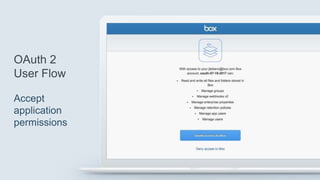
Contains an interstitial permission screen.
5
Users with or without existing Box accounts
Use when there is an existing identity
infrastructure.
Use when the app should manage content
for app users.
7
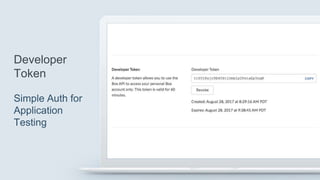
Built for ease of development.
Bypasses JWT or OAuth 2 authentication.
Tokens need to be manually refreshed after
1 hour.
9
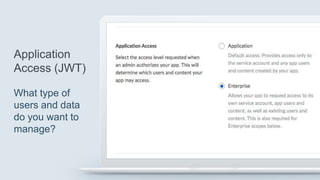
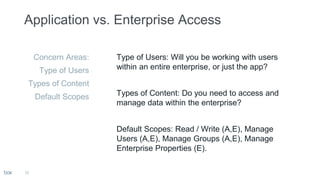
Application Access
12
Concern Areas:
Type of Users
Types of Content
Default Scopes
Type of Users: Will you be working with users
within an entire enterprise, or just the app?
Types of Content: Do you need to access and
manage data within the enterprise?
Default Scopes: Read / Write (A,E), Manage
Users (A,E), Manage Groups (A,E), Manage
Enterprise Properties (E).
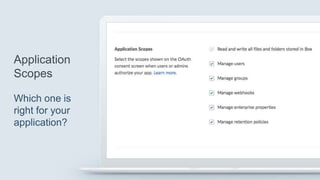
Application Scopes
Advanced Application Features (JWT)
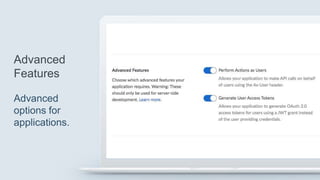
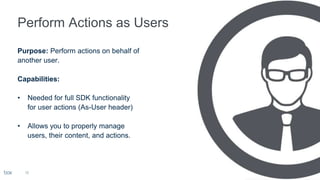
Purpose: Perform actions on behalf of
another user.
Capabilities:
• Needed for full SDK functionality
for user actions (As-User header)
• Allows you to properly manage
users, their content, and actions.
18
19
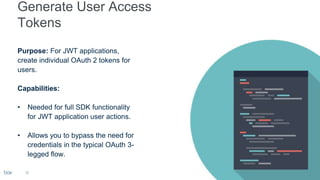
Purpose: For JWT applications,
create individual OAuth 2 tokens for
users.
Capabilities:
• Needed for full SDK functionality
for JWT application user actions.
• Allows you to bypass the need for
credentials in the typical OAuth 3-
legged flow.
OAuth 2 Example
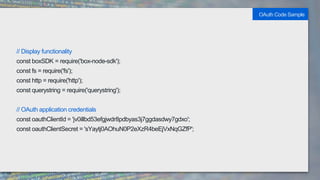
// Display functionality
const boxSDK = require('box-node-sdk');
const fs = require('fs');
const http = require('http');
const querystring = require('querystring');
// OAuth application credentials
const oauthClientId = 'jv0illbd53efgjwdr8pdbyas3j7ggdasdwy7gdxo';
const oauthClientSecret = 'sYaytj0AOhuN0P2eXzR4beEjVxNqGZfP';
OAuth Code Sample
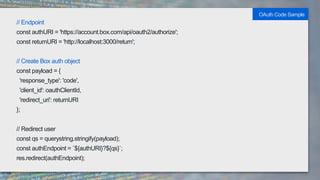
// Endpoint
const authURI = 'https://account.box.com/api/oauth2/authorize';
const returnURI = 'http://localhost:3000/return';
// Create Box auth object
const payload = {
'response_type': 'code',
'client_id': oauthClientId,
'redirect_uri': returnURI
};
// Redirect user
const qs = querystring.stringify(payload);
const authEndpoint = `${authURI}?${qs}`;
res.redirect(authEndpoint);
OAuth Code Sample
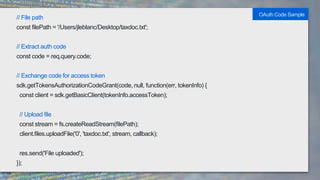
// File path
const filePath = '/Users/jleblanc/Desktop/taxdoc.txt';
// Extract auth code
const code = req.query.code;
// Exchange code for access token
sdk.getTokensAuthorizationCodeGrant(code, null, function(err, tokenInfo) {
const client = sdk.getBasicClient(tokenInfo.accessToken);
// Upload file
const stream = fs.createReadStream(filePath);
client.files.uploadFile('0', 'taxdoc.txt', stream, callback);
res.send('File uploaded');
});
OAuth Code Sample
JWT / OAuth 2 Example
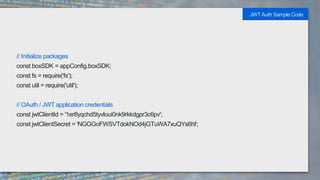
// Initialize packages
const boxSDK = appConfig.boxSDK;
const fs = require('fs');
const util = require('util');
// OAuth / JWT application credentials
const jwtClientId = '1er8yqchd5tyvloui0nk9rkkdgpr3c6pv';
const jwtClientSecret = 'NGGGoFWSVTdokNOd4jGTuWA7xuQYs6hl';
JWT Auth Sample Code
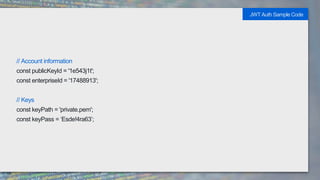
// Account information
const publicKeyId = '1e543j1t';
const enterpriseId = '17488913';
// Keys
const keyPath = 'private.pem';
const keyPass = ‘Esde!4ra63’;
JWT Auth Sample Code
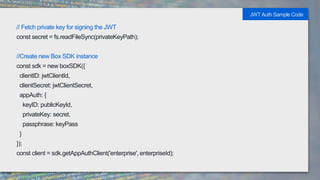
// Fetch private key for signing the JWT
const secret = fs.readFileSync(privateKeyPath);
//Create new Box SDK instance
const sdk = new boxSDK({
clientID: jwtClientId,
clientSecret: jwtClientSecret,
appAuth: {
keyID: publicKeyId,
privateKey: secret,
passphrase: keyPass
}
});
const client = sdk.getAppAuthClient('enterprise', enterpriseId);
JWT Auth Sample Code
// Create new Box user
client.enterprise.addUser(
'sefsdfdsfs@box.com',
'This guy', {
role: client.enterprise.userRoles.COADMIN,
address: '555 Box Lane',
status: client.enterprise.userStatuses.CANNOT_DELETE_OR_EDIT
},
callback
);
JWT Auth Sample Code
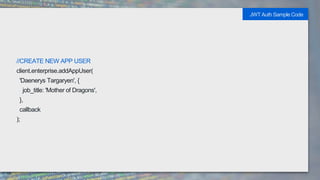
//CREATE NEW APP USER
client.enterprise.addAppUser(
'Daenerys Targaryen', {
job_title: 'Mother of Dragons',
},
callback
);
JWT Auth Sample Code
Application Authorization and
Reauthorization (JWT)
Box Authentication Types

Box Authentication Types

  • 3.
  • 4.
    Long lived accesstoken (30 days, 60 days, no expiry). Restricted to upload and preview API functionality. 4
  • 5.
    Users with existingBox accounts. Use when you don’t want to manage the user content in the app. Contains an interstitial permission screen. 5
  • 7.
    Users with orwithout existing Box accounts Use when there is an existing identity infrastructure. Use when the app should manage content for app users. 7
  • 9.
    Built for easeof development. Bypasses JWT or OAuth 2 authentication. Tokens need to be manually refreshed after 1 hour. 9
  • 10.
  • 12.
    12 Concern Areas: Type ofUsers Types of Content Default Scopes Type of Users: Will you be working with users within an entire enterprise, or just the app? Types of Content: Do you need to access and manage data within the enterprise? Default Scopes: Read / Write (A,E), Manage Users (A,E), Manage Groups (A,E), Manage Enterprise Properties (E).
  • 14.
  • 16.
  • 18.
    Purpose: Perform actionson behalf of another user. Capabilities: • Needed for full SDK functionality for user actions (As-User header) • Allows you to properly manage users, their content, and actions. 18
  • 19.
    19 Purpose: For JWTapplications, create individual OAuth 2 tokens for users. Capabilities: • Needed for full SDK functionality for JWT application user actions. • Allows you to bypass the need for credentials in the typical OAuth 3- legged flow.
  • 20.
  • 21.
    // Display functionality constboxSDK = require('box-node-sdk'); const fs = require('fs'); const http = require('http'); const querystring = require('querystring'); // OAuth application credentials const oauthClientId = 'jv0illbd53efgjwdr8pdbyas3j7ggdasdwy7gdxo'; const oauthClientSecret = 'sYaytj0AOhuN0P2eXzR4beEjVxNqGZfP'; OAuth Code Sample
  • 22.
    // Endpoint const authURI= 'https://account.box.com/api/oauth2/authorize'; const returnURI = 'http://localhost:3000/return'; // Create Box auth object const payload = { 'response_type': 'code', 'client_id': oauthClientId, 'redirect_uri': returnURI }; // Redirect user const qs = querystring.stringify(payload); const authEndpoint = `${authURI}?${qs}`; res.redirect(authEndpoint); OAuth Code Sample
  • 23.
    // File path constfilePath = '/Users/jleblanc/Desktop/taxdoc.txt'; // Extract auth code const code = req.query.code; // Exchange code for access token sdk.getTokensAuthorizationCodeGrant(code, null, function(err, tokenInfo) { const client = sdk.getBasicClient(tokenInfo.accessToken); // Upload file const stream = fs.createReadStream(filePath); client.files.uploadFile('0', 'taxdoc.txt', stream, callback); res.send('File uploaded'); }); OAuth Code Sample
  • 24.
    JWT / OAuth2 Example
  • 25.
    // Initialize packages constboxSDK = appConfig.boxSDK; const fs = require('fs'); const util = require('util'); // OAuth / JWT application credentials const jwtClientId = '1er8yqchd5tyvloui0nk9rkkdgpr3c6pv'; const jwtClientSecret = 'NGGGoFWSVTdokNOd4jGTuWA7xuQYs6hl'; JWT Auth Sample Code
  • 26.
    // Account information constpublicKeyId = '1e543j1t'; const enterpriseId = '17488913'; // Keys const keyPath = 'private.pem'; const keyPass = ‘Esde!4ra63’; JWT Auth Sample Code
  • 27.
    // Fetch privatekey for signing the JWT const secret = fs.readFileSync(privateKeyPath); //Create new Box SDK instance const sdk = new boxSDK({ clientID: jwtClientId, clientSecret: jwtClientSecret, appAuth: { keyID: publicKeyId, privateKey: secret, passphrase: keyPass } }); const client = sdk.getAppAuthClient('enterprise', enterpriseId); JWT Auth Sample Code
  • 28.
    // Create newBox user client.enterprise.addUser( 'sefsdfdsfs@box.com', 'This guy', { role: client.enterprise.userRoles.COADMIN, address: '555 Box Lane', status: client.enterprise.userStatuses.CANNOT_DELETE_OR_EDIT }, callback ); JWT Auth Sample Code
  • 29.
    //CREATE NEW APPUSER client.enterprise.addAppUser( 'Daenerys Targaryen', { job_title: 'Mother of Dragons', }, callback ); JWT Auth Sample Code
  • 30.

Editor's Notes

  • #5 Server authentication