


Become a Social SuperheroEstablishing Yourself in Social Media Without  Wasting Time (or Losing Your Mind)Week 3: Sock-it-to-em with Facebook
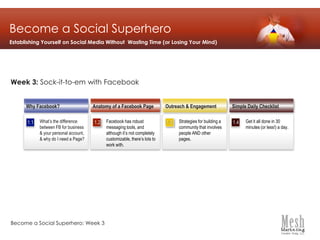
Become a Social SuperheroEstablishing Yourself on Social Media Without  Wasting Time (or Losing Your Mind)Week 3: Sock-it-to-em with Facebook1.21.31.11.4Why Facebook?Simple Daily ChecklistAnatomy of a Facebook PageOutreach & EngagementFacebook has robust messaging tools, and although it’s not completely customizable, there’s lots to work with.Strategies for building a community that involves people AND other pages.What’s the difference between FB for business & your personal account, & why do I need a Page?Get it all done in 30 minutes (or less!) a day.Become a Social Superhero: Week 3
Facebook is the #1 fastest growing social network.  If your customers are there, you might want to be too!Great way to ENGAGE with your customersRobust messagingSearchable contentEasy to update/useWhy Do I Need A Facebook Page?We’re assuming you already know this…but just in case…
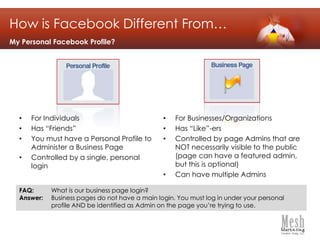
How is Facebook Different From…My Personal Facebook Profile?For IndividualsHas “Friends”You must have a Personal Profile to Administer a Business PageControlled by a single, personal loginFor Businesses/Organizations
Has “Like”-ers
Controlled by page Admins that are NOT necessarily visible to the public (page can have a featured admin, but this is optional)
Can have multiple AdminsFAQ: 	What is our business page login?Answer: 	Business pages do not have a main login. You must log in under your personal 	profile AND be identified as Admin on the page you’re trying to use.
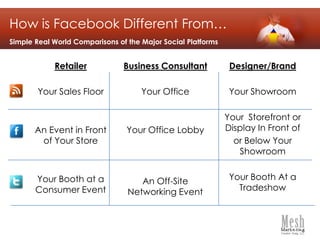
How is Facebook Different From…Simple Real World Comparisons of the Major Social PlatformsDesigner/BrandYour ShowroomYour  Storefront or Display In Front of or Below Your ShowroomYour Booth At a TradeshowBusiness ConsultantYour OfficeYour Office LobbyAn Off-Site Networking EventRetailerYour Sales FloorAn Event in Front of Your StoreYour Booth at a Consumer Event
The Anatomy of a Facebook PageAs of May 5, 2011…remember, this platform evolves frequently!Page NameProfile ImagePhoto StripWallNavigationAbout BoxFan CountFavorites
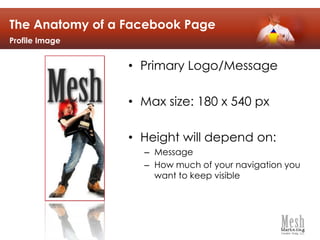
The Anatomy of a Facebook PageProfile ImagePrimary Logo/MessageMax size: 180 x 540 pxHeight will depend on:MessageHow much of your navigation you want to keep visible
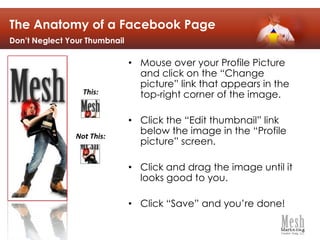
The Anatomy of a Facebook PageDon’t Neglect Your ThumbnailMouse over your Profile Picture and click on the “Change picture” link that appears in the top-right corner of the image. Click the “Edit thumbnail” link below the image in the “Profile picture” screen. Click and drag the image until it looks good to you. Click “Save” and you’re done! This:Not This:
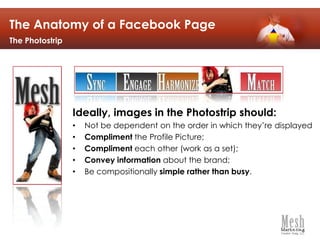
The Anatomy of a Facebook PageThe PhotostripIdeally, images in the Photostrip should:Not be dependent on the order in which they’re displayedCompliment the Profile Picture;Compliment each other (work as a set);Convey information about the brand;Be compositionally simple rather than busy.
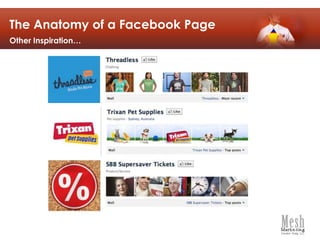
The Anatomy of a Facebook PageOther Inspiration…
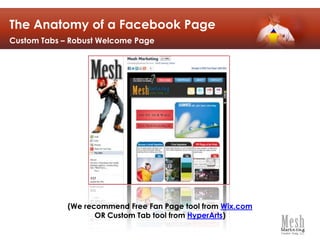
The Anatomy of a Facebook PageCustom Tabs – Robust Welcome Page(We recommend Free Fan Page tool from Wix.comOR Custom Tab tool from HyperArts)
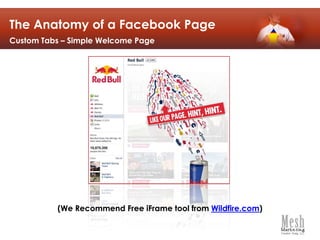
The Anatomy of a Facebook PageCustom Tabs – Simple Welcome Page(We Recommend Free iFrame tool from Wildfire.com)
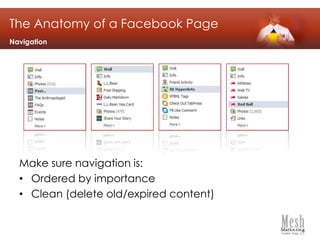
Make sure navigation is:Ordered by importanceClean (delete old/expired content)The Anatomy of a Facebook PageNavigation
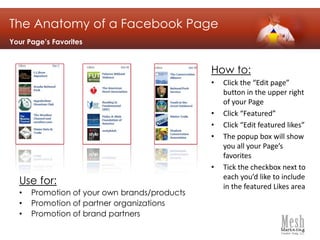
Use for:Promotion of your own brands/productsPromotion of partner organizationsPromotion of brand partnersThe Anatomy of a Facebook PageYour Page’s FavoritesHow to:Click the “Edit page” button in the upper right of your Page
Click “Featured”
Click “Edit featured likes”
The popup box will show you all your Page’s favorites
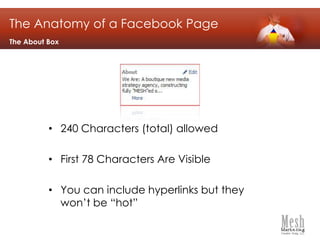
Tick the checkbox next to each you’d like to include in the featured Likes areaThe Anatomy of a Facebook PageThe About Box240 Characters (total) allowedFirst 78 Characters Are VisibleYou can include hyperlinks but they won’t be “hot”
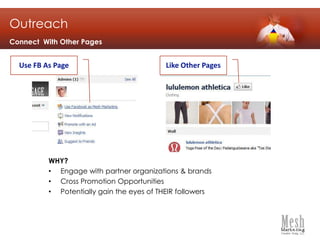
OutreachConnect  With Other PagesUse FB As PageLike Other PagesWHY?Engage with partner organizations & brandsCross Promotion OpportunitiesPotentially gain the eyes of THEIR followers
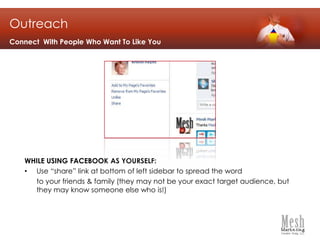
OutreachConnect  With People Who Want To Like YouWHILE USING FACEBOOK AS YOURSELF:Use “share” link at bottom of left sidebar to spread the word 	to your friends & family (they may not be your exact target audience, but they may know someone else who is!)
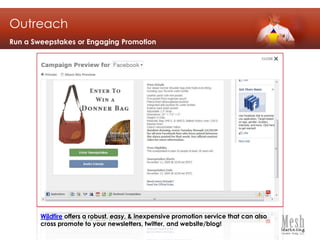
OutreachRun a Sweepstakes or Engaging PromotionWildfire offers a robust, easy, & inexpensive promotion service that can also cross promote to your newsletters, twitter, and website/blog!
Keeping Content Flowing“How The Heck Am I Supposed To Keep Coming Up With Content?”Initiate Conversations by posting a question or thought that might provoke commentsShare links to new Blog Posts, or even old ones if they were good onesShare/promote links from other pages that your page “Likes”Share links to other really great blog posts/online links that your followers may find useful/valuable AND correspond with your own brand messageBecome a Social Superhero: Week 3
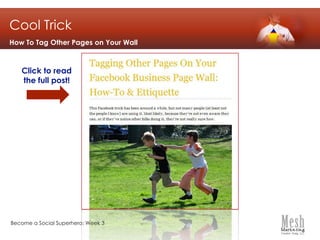
Cool TrickHow To Tag Other Pages on Your WallClick to read the full post!Become a Social Superhero: Week 3

Become a Social Superhero (Wk 3): Sock-it-to-em With Facebook

  • 1.
    Become a SocialSuperheroEstablishing Yourself in Social Media Without Wasting Time (or Losing Your Mind)Week 3: Sock-it-to-em with Facebook
  • 2.
    Become a SocialSuperheroEstablishing Yourself on Social Media Without Wasting Time (or Losing Your Mind)Week 3: Sock-it-to-em with Facebook1.21.31.11.4Why Facebook?Simple Daily ChecklistAnatomy of a Facebook PageOutreach & EngagementFacebook has robust messaging tools, and although it’s not completely customizable, there’s lots to work with.Strategies for building a community that involves people AND other pages.What’s the difference between FB for business & your personal account, & why do I need a Page?Get it all done in 30 minutes (or less!) a day.Become a Social Superhero: Week 3
  • 3.
    Facebook is the#1 fastest growing social network. If your customers are there, you might want to be too!Great way to ENGAGE with your customersRobust messagingSearchable contentEasy to update/useWhy Do I Need A Facebook Page?We’re assuming you already know this…but just in case…
  • 4.
    How is FacebookDifferent From…My Personal Facebook Profile?For IndividualsHas “Friends”You must have a Personal Profile to Administer a Business PageControlled by a single, personal loginFor Businesses/Organizations
  • 5.
  • 6.
    Controlled by pageAdmins that are NOT necessarily visible to the public (page can have a featured admin, but this is optional)
  • 7.
    Can have multipleAdminsFAQ: What is our business page login?Answer: Business pages do not have a main login. You must log in under your personal profile AND be identified as Admin on the page you’re trying to use.
  • 8.
    How is FacebookDifferent From…Simple Real World Comparisons of the Major Social PlatformsDesigner/BrandYour ShowroomYour Storefront or Display In Front of or Below Your ShowroomYour Booth At a TradeshowBusiness ConsultantYour OfficeYour Office LobbyAn Off-Site Networking EventRetailerYour Sales FloorAn Event in Front of Your StoreYour Booth at a Consumer Event
  • 9.
    The Anatomy ofa Facebook PageAs of May 5, 2011…remember, this platform evolves frequently!Page NameProfile ImagePhoto StripWallNavigationAbout BoxFan CountFavorites
  • 10.
    The Anatomy ofa Facebook PageProfile ImagePrimary Logo/MessageMax size: 180 x 540 pxHeight will depend on:MessageHow much of your navigation you want to keep visible
  • 11.
    The Anatomy ofa Facebook PageDon’t Neglect Your ThumbnailMouse over your Profile Picture and click on the “Change picture” link that appears in the top-right corner of the image. Click the “Edit thumbnail” link below the image in the “Profile picture” screen. Click and drag the image until it looks good to you. Click “Save” and you’re done! This:Not This:
  • 12.
    The Anatomy ofa Facebook PageThe PhotostripIdeally, images in the Photostrip should:Not be dependent on the order in which they’re displayedCompliment the Profile Picture;Compliment each other (work as a set);Convey information about the brand;Be compositionally simple rather than busy.
  • 13.
    The Anatomy ofa Facebook PageOther Inspiration…
  • 14.
    The Anatomy ofa Facebook PageCustom Tabs – Robust Welcome Page(We recommend Free Fan Page tool from Wix.comOR Custom Tab tool from HyperArts)
  • 15.
    The Anatomy ofa Facebook PageCustom Tabs – Simple Welcome Page(We Recommend Free iFrame tool from Wildfire.com)
  • 16.
    Make sure navigationis:Ordered by importanceClean (delete old/expired content)The Anatomy of a Facebook PageNavigation
  • 17.
    Use for:Promotion ofyour own brands/productsPromotion of partner organizationsPromotion of brand partnersThe Anatomy of a Facebook PageYour Page’s FavoritesHow to:Click the “Edit page” button in the upper right of your Page
  • 18.
  • 19.
  • 20.
    The popup boxwill show you all your Page’s favorites
  • 21.
    Tick the checkboxnext to each you’d like to include in the featured Likes areaThe Anatomy of a Facebook PageThe About Box240 Characters (total) allowedFirst 78 Characters Are VisibleYou can include hyperlinks but they won’t be “hot”
  • 22.
    OutreachConnect WithOther PagesUse FB As PageLike Other PagesWHY?Engage with partner organizations & brandsCross Promotion OpportunitiesPotentially gain the eyes of THEIR followers
  • 23.
    OutreachConnect WithPeople Who Want To Like YouWHILE USING FACEBOOK AS YOURSELF:Use “share” link at bottom of left sidebar to spread the word to your friends & family (they may not be your exact target audience, but they may know someone else who is!)
  • 24.
    OutreachRun a Sweepstakesor Engaging PromotionWildfire offers a robust, easy, & inexpensive promotion service that can also cross promote to your newsletters, twitter, and website/blog!
  • 25.
    Keeping Content Flowing“HowThe Heck Am I Supposed To Keep Coming Up With Content?”Initiate Conversations by posting a question or thought that might provoke commentsShare links to new Blog Posts, or even old ones if they were good onesShare/promote links from other pages that your page “Likes”Share links to other really great blog posts/online links that your followers may find useful/valuable AND correspond with your own brand messageBecome a Social Superhero: Week 3
  • 26.
    Cool TrickHow ToTag Other Pages on Your WallClick to read the full post!Become a Social Superhero: Week 3