
Presented by Angela Frizell Facebook Marketing 101
Agenda What is Facebook? Profiles, Groups & Fan Pages Getting Started Facebook and Privacy Facebook and Marketing Q & A
What is Facebook More than 750 million active users worldwide 50% of all active users log on to Facebook in any given day  People spend more than 700 billion minutes on Facebook per month The average user has 130 friends and is connected to 80 pages, groups and events Every month, more than 250 people engage with Facebook from websites outside Facebook. 250 million users access Facebook from their mobile device Mobile Facebook users are twice as active as desktop users
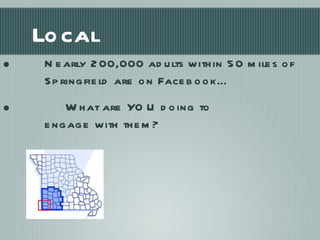
Local Nearly 200,000 adults within 50 miles of Springfield are on Facebook… What are YOU doing to  engage with them?
Website or Facebook Page People prefer to visit fan pages over websites People expect responses from brands Case Study 2010:  500 million FB visits 4 million website visits Integrate, Integrate, Integrate
Groups, Profiles, Pages Facebook Glossary Overview Terminology  Guidelines http://www.facebook.com/terms.php   http://socialmediagovernance.com/policies.php
Groups From Facebook: With Facebook Groups, you can join and create up to 200 groups. Groups can be based around shared interests, activities, or anything you like. They are for members of groups to connect, share and even collaborate on a given topic or idea.
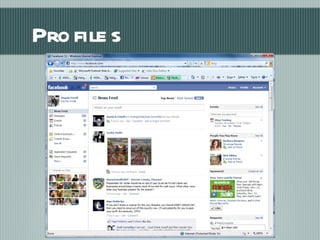
Profiles A profile is personal page on Facebook.  It can include: Name School information Hometown information Employment information Personal information such as age, marital status, etc. Information about groups and pages you’re a member or fan  of It’s against Facebook policy to create a profile for a business.
Profiles
What do you want out of your Facebook? New clients Build relationships with existing clients Promote new products/services Create buzz for your business Getting Started
Social Networking and Business Objectives Online communities of people who share interests and /or activities The naturally viral nature of these online social networks can be used promote your organization. Objectives can include: Developing promoters Product research Public Relations Finding collaborators Developing awareness Positioning  your organization
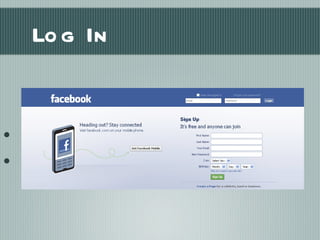
Log In Log in to your personal Facebook account www.facebook.com
Why Pages? Designate multiple administrators Public and will start ranking in Facebook and search results Anyone can fan your page  Let’s get started:  http://www.facebook.com/page
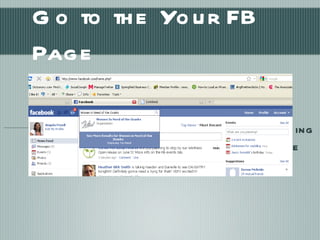
Go to the Your FB Page After creating your page, access it by typing your organization in the search box at the top of the page
Admin To make updates your organization, you must be an administrator of the page Admins can edit the page, upload photos and delete posts Admins can also send updates to FANS, add events and update posts You can even mention other organizations or people you are connected with You can speak on other pages as the organization
Mention People and Businesses Type @ and follow with the name of a person or organization you are connected to A self-populated area will pop up – choose who to mention Now, your post will show on their page or profile, too Sometimes, their page may be set up to not allow outside posts. In this case, it will be in another location
What to Say? Updates keep fans interested and up-to-date and wanting to share Ideas for Periodic posts  Repurpose content who you’ve helped Photographs of events, current campaigns and client interactions  MAKE A CONNECTION Don’t scare people or Push Product You know you need sales, but people don’t want to be sold…they want to buy playful communications lighten the mood and encourage participation
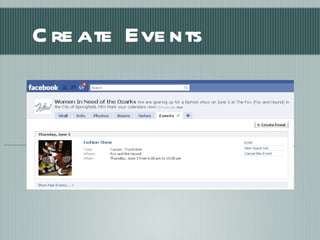
Create Events Go to the Events tab and create an event
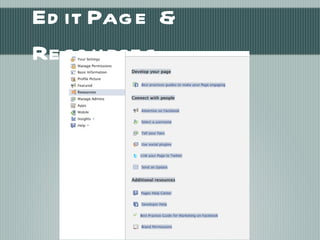
Edit Page & Resources
Update Fans Posts get lost in the feed – send personal correspondence Go to Edit Page > (scroll) > Send an Update to Fans Email events invitations directly to fans  Copy and paste to make it easy Communicate clearly your call to action
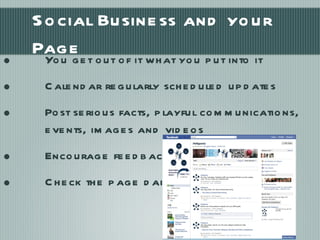
Social Business and your Page You get out of it what you put into it Calendar regularly scheduled updates Post serious facts, playful communications, events, images and videos Encourage feedback Check the page daily for communications
How To Use: Have a Strategy Define your audience, locate your potential customers, build a social relationship  Do Not overtly promote brand or website Think listen and share “ help” with “how to”, “why”, examples, opinions on business topics Try to make connections between something new and something   readers may know Be yourself, be human, be humble
 
Grow your Audience:  Ads Facebook Ads help grow your audience Facebook ads can be developed to target your audience and are viewed in the side-bar of the individual’s profile Remember to set a start and end date for your ads Use your analytics to see how the ad is working Use third party apps for campaigns WildFire, Constant Contact
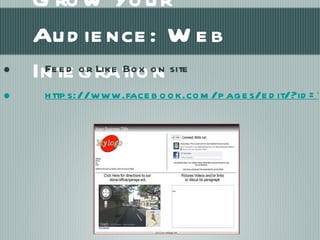
Grow Your Audience: Web Integration Feed or Like Box on site https://www.facebook.com/pages/edit/?id=114058608081&sk=market
Share your page with your friends Create a URL You can create a URL once you have more that 25 fans.  Go here to do so:  http://www.facebook.com/username Pick a good one – you can’t change it once you set it Post your URL on your website, in your e-newsletter, and promotional pieces Post a “like” box on your website Facebook >pages >edit> marketing Advertise on Facebook Grow Your Page Source: Facebook.com
Interconnectivity Your blog can be fed into your notes section using Networked Blogs Other platforms can link to your Facebook page ( http://www.facebook.com/twitter/  ) Third party applications offer a platform to view all platforms at once – more later
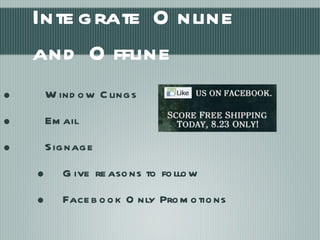
Integrate Online and Offline Window Clings Email Signage Give reasons to follow Facebook Only Promotions
Just Do It To understand it, use it Don’t get overwhelmed Have fun with it! Listen, talk, improvise Maintain your presence Maintain your voice Maintain your brand Positive, Positive, Positive
Important things to consider Understand Safety, Security and Appropriateness Have a plan, guidelines and designate TRAINED users  An abandoned presence is worse than no presence Be aware of the unspoken rules & ethics Social media is fluid and constantly changing - Use it or lose it Learn about and use the tools most suited for YOU. Social media monitoring can become a full-time job. Set a timer, limit yourself
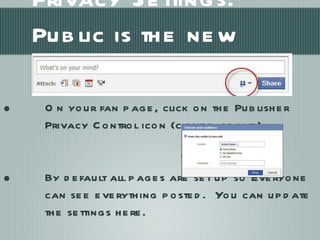
Privacy Settings:  Public is the new default On your fan page, click on the Publisher Privacy Control icon (circled above). By default all pages are set up so Everyone can see everything posted.  You can update the settings here.
That was relatively painless. At FB 2, we’ll discuss Advanced Campaigns!

Facebook Marketing 101

  • 1.
    Presented by AngelaFrizell Facebook Marketing 101
  • 2.
    Agenda What isFacebook? Profiles, Groups & Fan Pages Getting Started Facebook and Privacy Facebook and Marketing Q & A
  • 3.
    What is FacebookMore than 750 million active users worldwide 50% of all active users log on to Facebook in any given day People spend more than 700 billion minutes on Facebook per month The average user has 130 friends and is connected to 80 pages, groups and events Every month, more than 250 people engage with Facebook from websites outside Facebook. 250 million users access Facebook from their mobile device Mobile Facebook users are twice as active as desktop users
  • 4.
    Local Nearly 200,000adults within 50 miles of Springfield are on Facebook… What are YOU doing to engage with them?
  • 5.
    Website or FacebookPage People prefer to visit fan pages over websites People expect responses from brands Case Study 2010: 500 million FB visits 4 million website visits Integrate, Integrate, Integrate
  • 6.
    Groups, Profiles, PagesFacebook Glossary Overview Terminology Guidelines http://www.facebook.com/terms.php http://socialmediagovernance.com/policies.php
  • 7.
    Groups From Facebook:With Facebook Groups, you can join and create up to 200 groups. Groups can be based around shared interests, activities, or anything you like. They are for members of groups to connect, share and even collaborate on a given topic or idea.
  • 8.
    Profiles A profileis personal page on Facebook. It can include: Name School information Hometown information Employment information Personal information such as age, marital status, etc. Information about groups and pages you’re a member or fan of It’s against Facebook policy to create a profile for a business.
  • 9.
  • 10.
    What do youwant out of your Facebook? New clients Build relationships with existing clients Promote new products/services Create buzz for your business Getting Started
  • 11.
    Social Networking andBusiness Objectives Online communities of people who share interests and /or activities The naturally viral nature of these online social networks can be used promote your organization. Objectives can include: Developing promoters Product research Public Relations Finding collaborators Developing awareness Positioning your organization
  • 12.
    Log In Login to your personal Facebook account www.facebook.com
  • 13.
    Why Pages? Designatemultiple administrators Public and will start ranking in Facebook and search results Anyone can fan your page Let’s get started: http://www.facebook.com/page
  • 14.
    Go to theYour FB Page After creating your page, access it by typing your organization in the search box at the top of the page
  • 15.
    Admin To makeupdates your organization, you must be an administrator of the page Admins can edit the page, upload photos and delete posts Admins can also send updates to FANS, add events and update posts You can even mention other organizations or people you are connected with You can speak on other pages as the organization
  • 16.
    Mention People andBusinesses Type @ and follow with the name of a person or organization you are connected to A self-populated area will pop up – choose who to mention Now, your post will show on their page or profile, too Sometimes, their page may be set up to not allow outside posts. In this case, it will be in another location
  • 17.
    What to Say?Updates keep fans interested and up-to-date and wanting to share Ideas for Periodic posts Repurpose content who you’ve helped Photographs of events, current campaigns and client interactions MAKE A CONNECTION Don’t scare people or Push Product You know you need sales, but people don’t want to be sold…they want to buy playful communications lighten the mood and encourage participation
  • 18.
    Create Events Goto the Events tab and create an event
  • 19.
    Edit Page &Resources
  • 20.
    Update Fans Postsget lost in the feed – send personal correspondence Go to Edit Page > (scroll) > Send an Update to Fans Email events invitations directly to fans Copy and paste to make it easy Communicate clearly your call to action
  • 21.
    Social Business andyour Page You get out of it what you put into it Calendar regularly scheduled updates Post serious facts, playful communications, events, images and videos Encourage feedback Check the page daily for communications
  • 22.
    How To Use:Have a Strategy Define your audience, locate your potential customers, build a social relationship Do Not overtly promote brand or website Think listen and share “ help” with “how to”, “why”, examples, opinions on business topics Try to make connections between something new and something readers may know Be yourself, be human, be humble
  • 23.
  • 24.
    Grow your Audience: Ads Facebook Ads help grow your audience Facebook ads can be developed to target your audience and are viewed in the side-bar of the individual’s profile Remember to set a start and end date for your ads Use your analytics to see how the ad is working Use third party apps for campaigns WildFire, Constant Contact
  • 25.
    Grow Your Audience:Web Integration Feed or Like Box on site https://www.facebook.com/pages/edit/?id=114058608081&sk=market
  • 26.
    Share your pagewith your friends Create a URL You can create a URL once you have more that 25 fans. Go here to do so: http://www.facebook.com/username Pick a good one – you can’t change it once you set it Post your URL on your website, in your e-newsletter, and promotional pieces Post a “like” box on your website Facebook >pages >edit> marketing Advertise on Facebook Grow Your Page Source: Facebook.com
  • 27.
    Interconnectivity Your blogcan be fed into your notes section using Networked Blogs Other platforms can link to your Facebook page ( http://www.facebook.com/twitter/ ) Third party applications offer a platform to view all platforms at once – more later
  • 28.
    Integrate Online andOffline Window Clings Email Signage Give reasons to follow Facebook Only Promotions
  • 29.
    Just Do ItTo understand it, use it Don’t get overwhelmed Have fun with it! Listen, talk, improvise Maintain your presence Maintain your voice Maintain your brand Positive, Positive, Positive
  • 30.
    Important things toconsider Understand Safety, Security and Appropriateness Have a plan, guidelines and designate TRAINED users An abandoned presence is worse than no presence Be aware of the unspoken rules & ethics Social media is fluid and constantly changing - Use it or lose it Learn about and use the tools most suited for YOU. Social media monitoring can become a full-time job. Set a timer, limit yourself
  • 31.
    Privacy Settings: Public is the new default On your fan page, click on the Publisher Privacy Control icon (circled above). By default all pages are set up so Everyone can see everything posted. You can update the settings here.
  • 32.
    That was relativelypainless. At FB 2, we’ll discuss Advanced Campaigns!