An
Introduction
to
Computer Graphics
Mohit Raj Panday
By
Introduction
• Computer graphics is an art of drawing pictures on computer
screens with the help of programming or through any software.
• It involves computations, creation, and manipulation of data.
• In other words, we can say that computer graphics is a rendering
tool for the generation and manipulation of images.
• The primary output device in a graphical system is the video
monitor. The main element of a video monitor is the Cathode
Ray Tube (CRT).
• There are two ways (Random scan and Raster scan) by which
we can display an object on the screen.
Applications
of
Computer
Graphics
Computer graphics
user interfaces (GUIs)
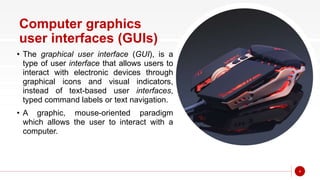
• The graphical user interface (GUI), is a
type of user interface that allows users to
interact with electronic devices through
graphical icons and visual indicators,
instead of text-based user interfaces,
typed command labels or text navigation.
• A graphic, mouse-oriented paradigm
which allows the user to interact with a
computer.
4
5
Weather Maps
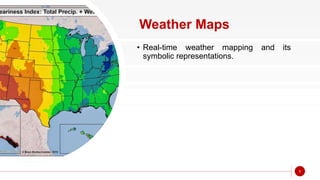
• Real-time weather mapping and its
symbolic representations.
6
Cartography
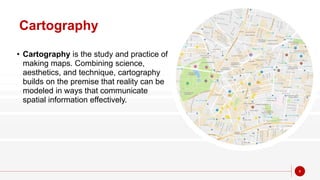
• Cartography is the study and practice of
making maps. Combining science,
aesthetics, and technique, cartography
builds on the premise that reality can be
modeled in ways that communicate
spatial information effectively.
7
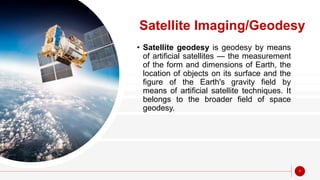
Satellite Imaging/Geodesy
• Satellite geodesy is geodesy by means
of artificial satellites — the measurement
of the form and dimensions of Earth, the
location of objects on its surface and the
figure of the Earth's gravity field by
means of artificial satellite techniques. It
belongs to the broader field of space
geodesy.
Photo Enhancement
• Sharpening blurred photos.
• Changing Effects on photos.
• Converting B/W photos into Colored.
• Image manipulation.
8
9
Medical imaging
• MRI scans : Magnetic Resonance Imaging
• CAT scans: Computerized axial tomography
scans
• Ultrasound Scan
• Other Non-invasive internal examination.
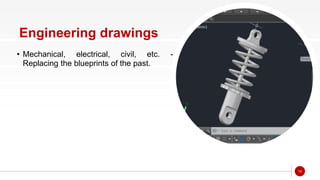
Engineering drawings
• Mechanical, electrical, civil, etc. -
Replacing the blueprints of the past.
10
11
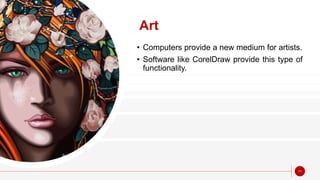
Art
• Computers provide a new medium for artists.
• Software like CorelDraw provide this type of
functionality.
Training
• Flight simulators, computer aided
instruction, etc.
12
13
Entertainment
• Movies and games.
Simulation and modeling
• Replacing physical modeling and
enactments
14
“Thanks
For your Time
and Patience
15

Basics of Computer Graphics

  • 1.
  • 2.
    Introduction • Computer graphicsis an art of drawing pictures on computer screens with the help of programming or through any software. • It involves computations, creation, and manipulation of data. • In other words, we can say that computer graphics is a rendering tool for the generation and manipulation of images. • The primary output device in a graphical system is the video monitor. The main element of a video monitor is the Cathode Ray Tube (CRT). • There are two ways (Random scan and Raster scan) by which we can display an object on the screen.
  • 3.
  • 4.
    Computer graphics user interfaces(GUIs) • The graphical user interface (GUI), is a type of user interface that allows users to interact with electronic devices through graphical icons and visual indicators, instead of text-based user interfaces, typed command labels or text navigation. • A graphic, mouse-oriented paradigm which allows the user to interact with a computer. 4
  • 5.
    5 Weather Maps • Real-timeweather mapping and its symbolic representations.
  • 6.
    6 Cartography • Cartography isthe study and practice of making maps. Combining science, aesthetics, and technique, cartography builds on the premise that reality can be modeled in ways that communicate spatial information effectively.
  • 7.
    7 Satellite Imaging/Geodesy • Satellitegeodesy is geodesy by means of artificial satellites — the measurement of the form and dimensions of Earth, the location of objects on its surface and the figure of the Earth's gravity field by means of artificial satellite techniques. It belongs to the broader field of space geodesy.
  • 8.
    Photo Enhancement • Sharpeningblurred photos. • Changing Effects on photos. • Converting B/W photos into Colored. • Image manipulation. 8
  • 9.
    9 Medical imaging • MRIscans : Magnetic Resonance Imaging • CAT scans: Computerized axial tomography scans • Ultrasound Scan • Other Non-invasive internal examination.
  • 10.
    Engineering drawings • Mechanical,electrical, civil, etc. - Replacing the blueprints of the past. 10
  • 11.
    11 Art • Computers providea new medium for artists. • Software like CorelDraw provide this type of functionality.
  • 12.
    Training • Flight simulators,computer aided instruction, etc. 12
  • 13.
  • 14.
    Simulation and modeling •Replacing physical modeling and enactments 14
  • 15.