COMPUTER
HARDWARE
What is
Hardware?
All of the
electronic and
mechanical
equipment in a
computer is
Examples:
• Motherboard
• RAM
• Power supply
• Processor
• Case
• Keyboard
Software
The term
software is
used to
describe
computer
programs that
perform a task
Can be
grouped into:
• System
Software
• Utility
Programs
• Device
System Software
• Control the
operation of the
computer system.
• The Operating
System starts the
computer, manages
the computer
memory, manages
storage, etc.
Window
s OS
Mac
OS
Software
Utility programs
• Perform
maintenance tasks
on the computer
system.
• File management
programs, uninstall
programs, backup
utilities, antivirus etc.
Diskeep
er
Kaspers
ky
Antiviru
s
Software
s
Software
Device drivers
• Programs that
control particular
hardware devices.
Can be classified into:
• Application
software
• Productivity Suites
Device drivers
Software
Application software Productivity Suites
• Software is used to do
non-system based
tasks.
• Business software,
engineering software,
games etc.
• Grouped application
software packages
Autocad MS Adobe
Solidwo
Pc components
Pc components
A computer system is a collection of electronic
and mechanical devices operating as a unit.
Main Device categories:
• Input device - These devices are used to get data
into the computer system
• Processing devices - These manipulate the data
using to a set of instructions called a program
• Output devices - These are used to get data out of a
computer system
• Storage devices - The can store the data for use at a
later stage
Pc components
1
2
3 4
5
1. System
Unit
2. Monitor
3. Keyboard
4. Mouse
5. Speakers
Pc components
System units and
peripherals
• The system unit
is the main
container for
system devices
• Protects the
delicate
electronic and
mechanical
Pc components
System units and
peripherals
• Peripherals are
devices that
connect to the
system unit
using cables or
wireless
technologies.
mechanical
devices
Pc components
System units
• Is an integrated
circuit on a single
silicon chip that
controls a
computer system
by executing
instructions from a
program.
• Can perform:
• Arithmetic
Instruction
PROCESSOR (CPU)
Pc components
System units
• Processor speed,
measured in MHz
or GHz, refers to
the system clock's
frequency, with 1
MHz equal to one
million ticks per
second and 1 GHz
equal to one billion
ticks per second.
• Latest trend is
PROCESSOR (CPU)
Pc components
System units
mechanical
devices
• Known as primary
storage
• Main working
memory of the
computer system.
• Random access
because data can
be accessed in any
order.
• Volatile
RANDOM ACCESS
MEMORY (RAM)
Pc components
System units
• The most common
RAM technology is
dynamic random
access memory
(DRAM).
• DIMM’s (dual inline
memory module)
for desktop
computers
• SODIMM’s (small
outline dual inline
RANDOM ACCESS
MEMORY (RAM)
Pc components
System units
• Is a small, high-
speed memory
located close to the
processor that
stores frequently
accessed data and
instructions.
• It helps reduce the
time needed to
access data from
the main memory
(RAM)
CACHE MEMORY
Pc components
System units
• Is the main circuit
board for the
computer system.
MOTHERBOARD
Pc components
System units
MOTHERBOARD
• It has a lot of
ports
Pc components
System units
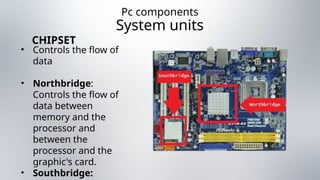
• Controls the flow of
data
• Northbridge:
Controls the flow of
data between
memory and the
processor and
between the
processor and the
graphic's card.
• Southbridge:
CHIPSET
Pc components
System units
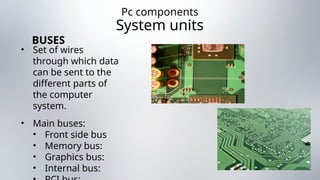
• Set of wires
through which data
can be sent to the
different parts of
the computer
system.
• Main buses:
• Front side bus
• Memory bus:
• Graphics bus:
• Internal bus:
BUSES
Pc components
System units
• Numerous
functions
• converts AC to DC,
adjusts voltage for
various
components,
supports power
management, and
may switch
between 240V and
110V supplies.
POWER SUPPLY
(PSU)
Pc components
System units
• Main connectors:
• Main
connectors
• Molex
connectors
• Berg connectors
• SATA
connectors
POWER SUPPLY
(PSU)
Pc components
System units
• Interfaces between
peripheral devices
and the computer
system.
PORTS
Pc components
System units
PORTS
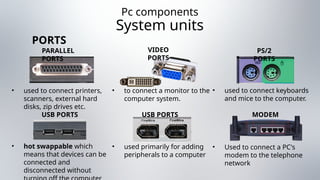
• used to connect printers,
scanners, external hard
disks, zip drives etc.
PARALLEL
PORTS
• to connect a monitor to the
computer system.
VIDEO
PORTS
• used to connect keyboards
and mice to the computer.
PS/2
PORTS
USB PORTS
• hot swappable which
means that devices can be
connected and
disconnected without
USB PORTS
• used primarily for adding
peripherals to a computer
MODEM
PORTS
• Used to connect a PC's
modem to the telephone
network
Pc components
System units
PORTS
• used to connect to a
network.
ETHERNETP
ORTS
• are used to input and
output audio from the
computer system.
AUDIO
PORTS
Pc components
System units
• Monitors are made
up of dots called
pixels
• The graphics card
determines how to
handle each pixel to
create the image.
GRAPHICS CARD
• responsible for
generating and
recording audio.
SOUND CARD
Pc components
System units
• designed to allow
computers
participate in a
computer network.
• Stand in networks
is Ethernet
• Fast Ethernet
(100mbps)
• Gigabyte
Ethernet
(1000mbps)
NETWORK CARD
Pc components
System units
• Necessary to access
the internet using a
standard telephone
line.
• Name from:
• MOdulation
• DEModulation,
MODEM
Pc components
System units
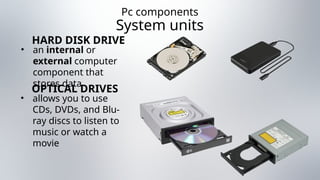
• an internal or
external computer
component that
stores data
HARD DISK DRIVE
• allows you to use
CDs, DVDs, and Blu-
ray discs to listen to
music or watch a
movie
OPTICAL DRIVES
Pc components
System units
• Can read media
cards from most
digital cameras
• Compact flash
• Microdrive
• Smartmedia
• SD memory
card
• Memory
stick/Duo/Pro
• xD picture card
CARD READER
DRIVE
Pc components
pERIPHERALS
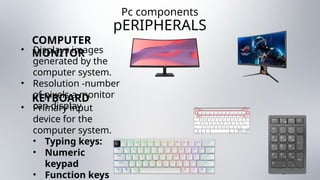
• Displays images
generated by the
computer system.
• Resolution -number
of pixels a monitor
can display.
COMPUTER
MONITOR
• Primary input
device for the
computer system.
• Typing keys:
• Numeric
keypad
• Function keys
KEYBOARD
Pc components
pERIPHERALS
• An input device that
uses point and click
technology to
interact with
software
applications.
• Ball mouse
• Optical Mouse
MOUSE
• are output devices
which provide a
hardcopy of
computer data.
• Inkjet
PRINTERS
VON NEUMANN
MODEL
John von Neumann
introduced the concept
of the stored program,
where both instructions
and data are stored in a
single memory space.
This design
eliminates the
distinction between
instructions and data,
simplifying memory and
VON NEUMANN
MODEL
The architecture
uses a unified memory
and a single path for
both data and
instructions, which can
lead to the von
Neumann bottleneck—
a limitation where the
CPU's performance is
constrained as it must
wait for memory
operations to complete
Harvard architecture
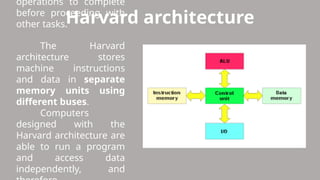
The Harvard
architecture stores
machine instructions
and data in separate
memory units using
different buses.
Computers
designed with the
Harvard architecture are
able to run a program
and access data
independently, and
operations to complete
before proceeding with
other tasks.
Modified Harvard architecture
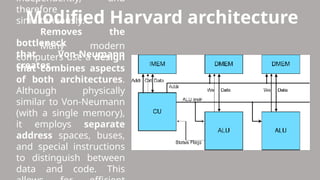
Many modern
computers use a design
that combines aspects
of both architectures.
Although physically
similar to Von-Neumann
(with a single memory),
it employs separate
address spaces, buses,
and special instructions
to distinguish between
data and code. This
independently, and
therefore
simultaneously.
Removes the
bottleneck
that Von-Neumann
creates.
allows for efficient
access and
management of both
types of information
without mixing them.
THAT’S ALL!

COMPUTER HARDWARE AND ITS PARTS AND FUNCTION

  • 2.
  • 3.
    What is Hardware? All ofthe electronic and mechanical equipment in a computer is
  • 4.
    Examples: • Motherboard • RAM •Power supply • Processor • Case • Keyboard
  • 5.
    Software The term software is usedto describe computer programs that perform a task Can be grouped into: • System Software • Utility Programs • Device
  • 6.
    System Software • Controlthe operation of the computer system. • The Operating System starts the computer, manages the computer memory, manages storage, etc. Window s OS Mac OS Software
  • 7.
    Utility programs • Perform maintenancetasks on the computer system. • File management programs, uninstall programs, backup utilities, antivirus etc. Diskeep er Kaspers ky Antiviru s Software s
  • 8.
    Software Device drivers • Programsthat control particular hardware devices. Can be classified into: • Application software • Productivity Suites
  • 9.
    Device drivers Software Application softwareProductivity Suites • Software is used to do non-system based tasks. • Business software, engineering software, games etc. • Grouped application software packages Autocad MS Adobe Solidwo
  • 10.
  • 11.
    Pc components A computersystem is a collection of electronic and mechanical devices operating as a unit. Main Device categories: • Input device - These devices are used to get data into the computer system • Processing devices - These manipulate the data using to a set of instructions called a program • Output devices - These are used to get data out of a computer system • Storage devices - The can store the data for use at a later stage
  • 12.
    Pc components 1 2 3 4 5 1.System Unit 2. Monitor 3. Keyboard 4. Mouse 5. Speakers
  • 13.
    Pc components System unitsand peripherals • The system unit is the main container for system devices • Protects the delicate electronic and mechanical
  • 14.
    Pc components System unitsand peripherals • Peripherals are devices that connect to the system unit using cables or wireless technologies. mechanical devices
  • 15.
    Pc components System units •Is an integrated circuit on a single silicon chip that controls a computer system by executing instructions from a program. • Can perform: • Arithmetic Instruction PROCESSOR (CPU)
  • 16.
    Pc components System units •Processor speed, measured in MHz or GHz, refers to the system clock's frequency, with 1 MHz equal to one million ticks per second and 1 GHz equal to one billion ticks per second. • Latest trend is PROCESSOR (CPU)
  • 17.
    Pc components System units mechanical devices •Known as primary storage • Main working memory of the computer system. • Random access because data can be accessed in any order. • Volatile RANDOM ACCESS MEMORY (RAM)
  • 18.
    Pc components System units •The most common RAM technology is dynamic random access memory (DRAM). • DIMM’s (dual inline memory module) for desktop computers • SODIMM’s (small outline dual inline RANDOM ACCESS MEMORY (RAM)
  • 19.
    Pc components System units •Is a small, high- speed memory located close to the processor that stores frequently accessed data and instructions. • It helps reduce the time needed to access data from the main memory (RAM) CACHE MEMORY
  • 20.
    Pc components System units •Is the main circuit board for the computer system. MOTHERBOARD
  • 21.
  • 22.
    Pc components System units •Controls the flow of data • Northbridge: Controls the flow of data between memory and the processor and between the processor and the graphic's card. • Southbridge: CHIPSET
  • 23.
    Pc components System units •Set of wires through which data can be sent to the different parts of the computer system. • Main buses: • Front side bus • Memory bus: • Graphics bus: • Internal bus: BUSES
  • 24.
    Pc components System units •Numerous functions • converts AC to DC, adjusts voltage for various components, supports power management, and may switch between 240V and 110V supplies. POWER SUPPLY (PSU)
  • 25.
    Pc components System units •Main connectors: • Main connectors • Molex connectors • Berg connectors • SATA connectors POWER SUPPLY (PSU)
  • 26.
    Pc components System units •Interfaces between peripheral devices and the computer system. PORTS
  • 27.
    Pc components System units PORTS •used to connect printers, scanners, external hard disks, zip drives etc. PARALLEL PORTS • to connect a monitor to the computer system. VIDEO PORTS • used to connect keyboards and mice to the computer. PS/2 PORTS USB PORTS • hot swappable which means that devices can be connected and disconnected without USB PORTS • used primarily for adding peripherals to a computer MODEM PORTS • Used to connect a PC's modem to the telephone network
  • 28.
    Pc components System units PORTS •used to connect to a network. ETHERNETP ORTS • are used to input and output audio from the computer system. AUDIO PORTS
  • 29.
    Pc components System units •Monitors are made up of dots called pixels • The graphics card determines how to handle each pixel to create the image. GRAPHICS CARD • responsible for generating and recording audio. SOUND CARD
  • 30.
    Pc components System units •designed to allow computers participate in a computer network. • Stand in networks is Ethernet • Fast Ethernet (100mbps) • Gigabyte Ethernet (1000mbps) NETWORK CARD
  • 31.
    Pc components System units •Necessary to access the internet using a standard telephone line. • Name from: • MOdulation • DEModulation, MODEM
  • 32.
    Pc components System units •an internal or external computer component that stores data HARD DISK DRIVE • allows you to use CDs, DVDs, and Blu- ray discs to listen to music or watch a movie OPTICAL DRIVES
  • 33.
    Pc components System units •Can read media cards from most digital cameras • Compact flash • Microdrive • Smartmedia • SD memory card • Memory stick/Duo/Pro • xD picture card CARD READER DRIVE
  • 34.
    Pc components pERIPHERALS • Displaysimages generated by the computer system. • Resolution -number of pixels a monitor can display. COMPUTER MONITOR • Primary input device for the computer system. • Typing keys: • Numeric keypad • Function keys KEYBOARD
  • 35.
    Pc components pERIPHERALS • Aninput device that uses point and click technology to interact with software applications. • Ball mouse • Optical Mouse MOUSE • are output devices which provide a hardcopy of computer data. • Inkjet PRINTERS
  • 39.
    VON NEUMANN MODEL John vonNeumann introduced the concept of the stored program, where both instructions and data are stored in a single memory space. This design eliminates the distinction between instructions and data, simplifying memory and
  • 40.
    VON NEUMANN MODEL The architecture usesa unified memory and a single path for both data and instructions, which can lead to the von Neumann bottleneck— a limitation where the CPU's performance is constrained as it must wait for memory operations to complete
  • 41.
    Harvard architecture The Harvard architecturestores machine instructions and data in separate memory units using different buses. Computers designed with the Harvard architecture are able to run a program and access data independently, and operations to complete before proceeding with other tasks.
  • 42.
    Modified Harvard architecture Manymodern computers use a design that combines aspects of both architectures. Although physically similar to Von-Neumann (with a single memory), it employs separate address spaces, buses, and special instructions to distinguish between data and code. This independently, and therefore simultaneously. Removes the bottleneck that Von-Neumann creates.
  • 43.
    allows for efficient accessand management of both types of information without mixing them. THAT’S ALL!