CHAPTER-TWO
COMPUTER HARDWARE
03/12/2025 2
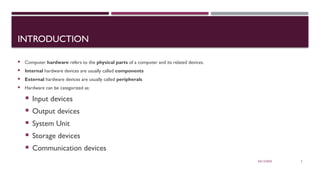
INTRODUCTION
 Computer hardware refers to the physical parts of a computer and its related devices.
 Internal hardware devices are usually called components
 External hardware devices are usually called peripherals
 Hardware can be categorized as:
 Input devices
 Output devices
 System Unit
 Storage devices
 Communication devices
03/12/2025 3
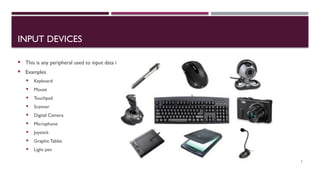
INPUT DEVICES
 This is any peripheral used to input data into the computer.
 Examples
 Keyboard
 Mouse
 Touchpad
 Scanner
 Digital Camera
 Microphone
 Joystick
 Graphic Tablet
 Light pen
03/12/2025 4
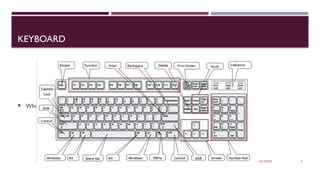
KEYBOARD
 What is the name of the area where the numbers 1-9 and letters A-Z are located?
03/12/2025 5
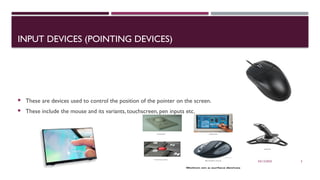
INPUT DEVICES (POINTING DEVICES)
 These are devices used to control the position of the pointer on the screen.
 These include the mouse and its variants, touchscreen, pen inputs etc.
03/12/2025 6
OUTPUT DEVICES
 These are devices used to communicate results of the data processing carried out by an information
processing system such as a computer to a user.
 Output is data that has been processed into a useful from called information.
 Output can be in the form of text, graphics, audio, and video.
03/12/2025 7
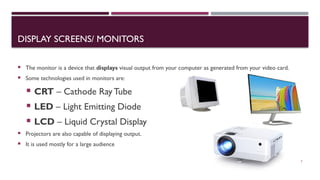
DISPLAY SCREENS/ MONITORS
 The monitor is a device that displays visual output from your computer as generated from your video card.
 Some technologies used in monitors are:
 CRT – Cathode Ray Tube
 LED – Light Emitting Diode
 LCD – Liquid Crystal Display
 Projectors are also capable of displaying output.
 It is used mostly for a large audience
03/12/2025 8
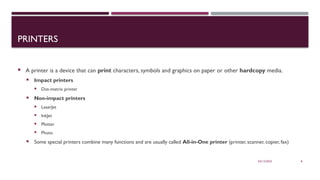
PRINTERS
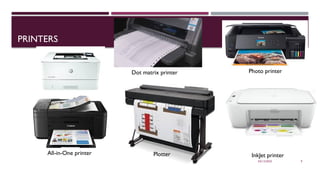
 A printer is a device that can print characters, symbols and graphics on paper or other hardcopy media.
 Impact printers
 Dot-matrix printer
 Non-impact printers
 LaserJet
 InkJet
 Plotter
 Photo
 Some special printers combine many functions and are usually called All-in-One printer (printer, scanner, copier, fax)
03/12/2025 9
PRINTERS
Plotter
Dot matrix printer Photo printer
LaserJet printer
InkJet printer
All-in-One printer
03/12/2025 10
SYSTEM UNIT
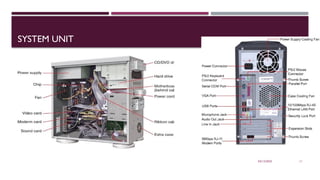
 The system unit is the case that houses all the components in the computer system.
 Some of these components are:
 Motherboard
 Processor
 Power Supply Unit (PSU)
 Random Access Memory (RAM)
 Read Only Memory (ROM)
03/12/2025 11
SYSTEM UNIT
03/12/2025 12
SYSTEM UNIT - MOTHERBOARD
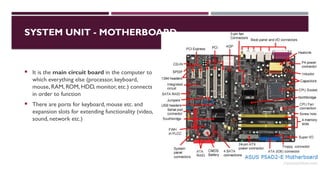
 It is the main circuit board in the computer to
which everything else (processor, keyboard,
mouse, RAM, ROM, HDD, monitor, etc.) connects
in order to function
 There are ports for keyboard, mouse etc. and
expansion slots for extending functionality (video,
sound, network etc.)
03/12/2025 13
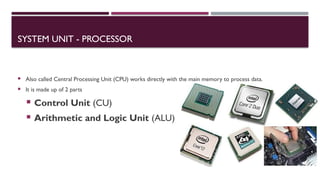
SYSTEM UNIT - PROCESSOR
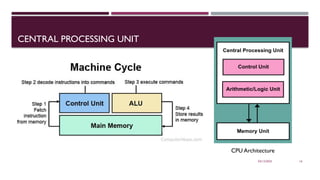
 Also called Central Processing Unit (CPU) works directly with the main memory to process data.
 It is made up of 2 parts
 Control Unit (CU)
 Arithmetic and Logic Unit (ALU)
03/12/2025 14
CONTROL UNIT (CU)
 It is a component of a computer's central processing unit (CPU) that directs the operation of the processor.
 It tells the computer's memory, arithmetic and logic unit and input and output devices how to respond to the
instructions that have been sent to the processor.
 It regulates and integrates the operations of the computer.
03/12/2025 15
ARITHMETIC AND LOGIC UNIT (ALU)
 ALU is the part of a CPU that carries out arithmetic and logic operations.
 Arithmetic operations include addition, subtraction, multiplication, and division
 Logic operations include AND, OR, and NOT operations.
03/12/2025 16
CENTRAL PROCESSING UNIT
CPU Architecture
03/12/2025 17
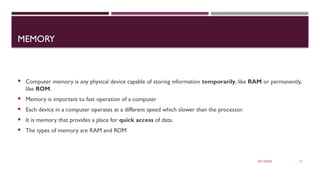
MEMORY
 Computer memory is any physical device capable of storing information temporarily, like RAM or permanently,
like ROM.
 Memory is important to fast operation of a computer
 Each device in a computer operates at a different speed which slower than the processor.
 It is memory that provides a place for quick access of data.
 The types of memory are RAM and ROM
03/12/2025 18
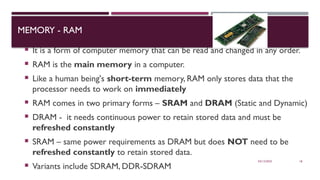
MEMORY - RAM
 It is a form of computer memory that can be read and changed in any order.
 RAM is the main memory in a computer.
 Like a human being's short-term memory, RAM only stores data that the
processor needs to work on immediately
 RAM comes in two primary forms – SRAM and DRAM (Static and Dynamic)
 DRAM - it needs continuous power to retain stored data and must be
refreshed constantly
 SRAM – same power requirements as DRAM but does NOT need to be
refreshed constantly to retain stored data.
 Variants include SDRAM, DDR-SDRAM
03/12/2025 19
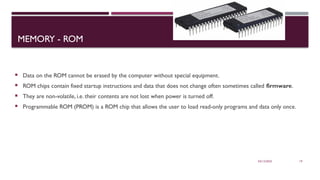
MEMORY - ROM
 Data on the ROM cannot be erased by the computer without special equipment.
 ROM chips contain fixed startup instructions and data that does not change often sometimes called firmware.
 They are non-volatile, i.e. their contents are not lost when power is turned off.
 Programmable ROM (PROM) is a ROM chip that allows the user to load read-only programs and data only once.
03/12/2025 20
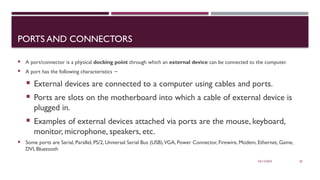
PORTS AND CONNECTORS
 A port/connector is a physical docking point through which an external device can be connected to the computer.
 A port has the following characteristics −
 External devices are connected to a computer using cables and ports.
 Ports are slots on the motherboard into which a cable of external device is
plugged in.
 Examples of external devices attached via ports are the mouse, keyboard,
monitor, microphone, speakers, etc.
 Some ports are Serial, Parallel, PS/2, Universal Serial Bus (USB),VGA, Power Connector, Firewire, Modem, Ethernet, Game,
DVI, Bluetooth
03/12/2025 21
EXPANSION SLOTS
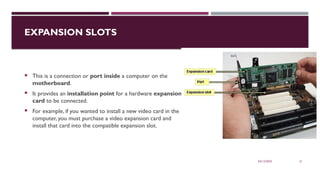
 This is a connection or port inside a computer on the
motherboard.
 It provides an installation point for a hardware expansion
card to be connected.
 For example, if you wanted to install a new video card in the
computer, you must purchase a video expansion card and
install that card into the compatible expansion slot.
03/12/2025 22
STORAGE DEVICES
 This is any hardware that stores data.
 There are 2 types of storage devices namely Primary & Secondary
 Primary or main storage is the one directly accessible by the CPU
 Secondary storage a.k.a external memory or auxiliary storage is NOT directly accessible by the CPU
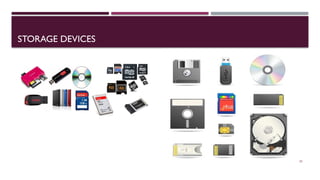
 Examples of secondary storage are HDD, Optical discs, Flash disks (pen drives), flash memory (memory cards)
etc.
 Optical discs include CD-R,CD-RW, DVD-R, DVD-RW, BluRay
03/12/2025 23
STORAGE DEVICES
03/12/2025 24
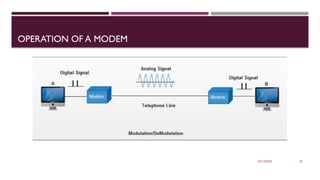
COMMUNICATION DEVICES
 These help the computer to transmit data or information using a
communication channel.
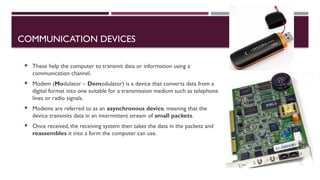
 Modem (Modulator – Demodulator) is a device that converts data from a
digital format into one suitable for a transmission medium such as telephone
lines or radio signals.
 Modems are referred to as an asynchronous device, meaning that the
device transmits data in an intermittent stream of small packets.
 Once received, the receiving system then takes the data in the packets and
reassembles it into a form the computer can use.
03/12/2025 25
OPERATION OF A MODEM
03/12/2025 26
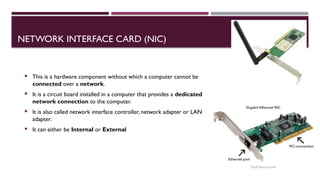
NETWORK INTERFACE CARD (NIC)
 This is a hardware component without which a computer cannot be
connected over a network.
 It is a circuit board installed in a computer that provides a dedicated
network connection to the computer.
 It is also called network interface controller, network adapter or LAN
adapter.
 It can either be Internal or External
03/12/2025 27
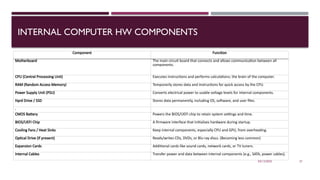
INTERNAL COMPUTER HW COMPONENTS
.
Component Function
Motherboard The main circuit board that connects and allows communication between all
components.
CPU (Central Processing Unit) Executes instructions and performs calculations; the brain of the computer.
RAM (Random Access Memory) Temporarily stores data and instructions for quick access by the CPU.
Power Supply Unit (PSU) Converts electrical power to usable voltage levels for internal components.
Hard Drive / SSD Stores data permanently, including OS, software, and user files.
.
CMOS Battery Powers the BIOS/UEFI chip to retain system settings and time.
BIOS/UEFI Chip A firmware interface that initializes hardware during startup.
Cooling Fans / Heat Sinks Keep internal components, especially CPU and GPU, from overheating.
Optical Drive (if present) Reads/writes CDs, DVDs, or Blu-ray discs. (Becoming less common)
Expansion Cards Additional cards like sound cards, network cards, or TV tuners.
Internal Cables Transfer power and data between internal components (e.g., SATA, power cables).
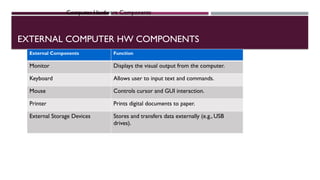
EXTERNAL COMPUTER HW COMPONENTS
Computer Hardware Components
External Components Function
Monitor Displays the visual output from the computer.
Keyboard Allows user to input text and commands.
Mouse Controls cursor and GUI interaction.
Printer Prints digital documents to paper.
External Storage Devices Stores and transfers data externally (e.g., USB
drives).
03/12/2025 29

Computer Hardware234567890qwe- Ch 2.pptx

  • 1.
  • 2.
    03/12/2025 2 INTRODUCTION  Computerhardware refers to the physical parts of a computer and its related devices.  Internal hardware devices are usually called components  External hardware devices are usually called peripherals  Hardware can be categorized as:  Input devices  Output devices  System Unit  Storage devices  Communication devices
  • 3.
    03/12/2025 3 INPUT DEVICES This is any peripheral used to input data into the computer.  Examples  Keyboard  Mouse  Touchpad  Scanner  Digital Camera  Microphone  Joystick  Graphic Tablet  Light pen
  • 4.
    03/12/2025 4 KEYBOARD  Whatis the name of the area where the numbers 1-9 and letters A-Z are located?
  • 5.
    03/12/2025 5 INPUT DEVICES(POINTING DEVICES)  These are devices used to control the position of the pointer on the screen.  These include the mouse and its variants, touchscreen, pen inputs etc.
  • 6.
    03/12/2025 6 OUTPUT DEVICES These are devices used to communicate results of the data processing carried out by an information processing system such as a computer to a user.  Output is data that has been processed into a useful from called information.  Output can be in the form of text, graphics, audio, and video.
  • 7.
    03/12/2025 7 DISPLAY SCREENS/MONITORS  The monitor is a device that displays visual output from your computer as generated from your video card.  Some technologies used in monitors are:  CRT – Cathode Ray Tube  LED – Light Emitting Diode  LCD – Liquid Crystal Display  Projectors are also capable of displaying output.  It is used mostly for a large audience
  • 8.
    03/12/2025 8 PRINTERS  Aprinter is a device that can print characters, symbols and graphics on paper or other hardcopy media.  Impact printers  Dot-matrix printer  Non-impact printers  LaserJet  InkJet  Plotter  Photo  Some special printers combine many functions and are usually called All-in-One printer (printer, scanner, copier, fax)
  • 9.
    03/12/2025 9 PRINTERS Plotter Dot matrixprinter Photo printer LaserJet printer InkJet printer All-in-One printer
  • 10.
    03/12/2025 10 SYSTEM UNIT The system unit is the case that houses all the components in the computer system.  Some of these components are:  Motherboard  Processor  Power Supply Unit (PSU)  Random Access Memory (RAM)  Read Only Memory (ROM)
  • 11.
  • 12.
    03/12/2025 12 SYSTEM UNIT- MOTHERBOARD  It is the main circuit board in the computer to which everything else (processor, keyboard, mouse, RAM, ROM, HDD, monitor, etc.) connects in order to function  There are ports for keyboard, mouse etc. and expansion slots for extending functionality (video, sound, network etc.)
  • 13.
    03/12/2025 13 SYSTEM UNIT- PROCESSOR  Also called Central Processing Unit (CPU) works directly with the main memory to process data.  It is made up of 2 parts  Control Unit (CU)  Arithmetic and Logic Unit (ALU)
  • 14.
    03/12/2025 14 CONTROL UNIT(CU)  It is a component of a computer's central processing unit (CPU) that directs the operation of the processor.  It tells the computer's memory, arithmetic and logic unit and input and output devices how to respond to the instructions that have been sent to the processor.  It regulates and integrates the operations of the computer.
  • 15.
    03/12/2025 15 ARITHMETIC ANDLOGIC UNIT (ALU)  ALU is the part of a CPU that carries out arithmetic and logic operations.  Arithmetic operations include addition, subtraction, multiplication, and division  Logic operations include AND, OR, and NOT operations.
  • 16.
    03/12/2025 16 CENTRAL PROCESSINGUNIT CPU Architecture
  • 17.
    03/12/2025 17 MEMORY  Computermemory is any physical device capable of storing information temporarily, like RAM or permanently, like ROM.  Memory is important to fast operation of a computer  Each device in a computer operates at a different speed which slower than the processor.  It is memory that provides a place for quick access of data.  The types of memory are RAM and ROM
  • 18.
    03/12/2025 18 MEMORY -RAM  It is a form of computer memory that can be read and changed in any order.  RAM is the main memory in a computer.  Like a human being's short-term memory, RAM only stores data that the processor needs to work on immediately  RAM comes in two primary forms – SRAM and DRAM (Static and Dynamic)  DRAM - it needs continuous power to retain stored data and must be refreshed constantly  SRAM – same power requirements as DRAM but does NOT need to be refreshed constantly to retain stored data.  Variants include SDRAM, DDR-SDRAM
  • 19.
    03/12/2025 19 MEMORY -ROM  Data on the ROM cannot be erased by the computer without special equipment.  ROM chips contain fixed startup instructions and data that does not change often sometimes called firmware.  They are non-volatile, i.e. their contents are not lost when power is turned off.  Programmable ROM (PROM) is a ROM chip that allows the user to load read-only programs and data only once.
  • 20.
    03/12/2025 20 PORTS ANDCONNECTORS  A port/connector is a physical docking point through which an external device can be connected to the computer.  A port has the following characteristics −  External devices are connected to a computer using cables and ports.  Ports are slots on the motherboard into which a cable of external device is plugged in.  Examples of external devices attached via ports are the mouse, keyboard, monitor, microphone, speakers, etc.  Some ports are Serial, Parallel, PS/2, Universal Serial Bus (USB),VGA, Power Connector, Firewire, Modem, Ethernet, Game, DVI, Bluetooth
  • 21.
    03/12/2025 21 EXPANSION SLOTS This is a connection or port inside a computer on the motherboard.  It provides an installation point for a hardware expansion card to be connected.  For example, if you wanted to install a new video card in the computer, you must purchase a video expansion card and install that card into the compatible expansion slot.
  • 22.
    03/12/2025 22 STORAGE DEVICES This is any hardware that stores data.  There are 2 types of storage devices namely Primary & Secondary  Primary or main storage is the one directly accessible by the CPU  Secondary storage a.k.a external memory or auxiliary storage is NOT directly accessible by the CPU  Examples of secondary storage are HDD, Optical discs, Flash disks (pen drives), flash memory (memory cards) etc.  Optical discs include CD-R,CD-RW, DVD-R, DVD-RW, BluRay
  • 23.
  • 24.
    03/12/2025 24 COMMUNICATION DEVICES These help the computer to transmit data or information using a communication channel.  Modem (Modulator – Demodulator) is a device that converts data from a digital format into one suitable for a transmission medium such as telephone lines or radio signals.  Modems are referred to as an asynchronous device, meaning that the device transmits data in an intermittent stream of small packets.  Once received, the receiving system then takes the data in the packets and reassembles it into a form the computer can use.
  • 25.
  • 26.
    03/12/2025 26 NETWORK INTERFACECARD (NIC)  This is a hardware component without which a computer cannot be connected over a network.  It is a circuit board installed in a computer that provides a dedicated network connection to the computer.  It is also called network interface controller, network adapter or LAN adapter.  It can either be Internal or External
  • 27.
    03/12/2025 27 INTERNAL COMPUTERHW COMPONENTS . Component Function Motherboard The main circuit board that connects and allows communication between all components. CPU (Central Processing Unit) Executes instructions and performs calculations; the brain of the computer. RAM (Random Access Memory) Temporarily stores data and instructions for quick access by the CPU. Power Supply Unit (PSU) Converts electrical power to usable voltage levels for internal components. Hard Drive / SSD Stores data permanently, including OS, software, and user files. . CMOS Battery Powers the BIOS/UEFI chip to retain system settings and time. BIOS/UEFI Chip A firmware interface that initializes hardware during startup. Cooling Fans / Heat Sinks Keep internal components, especially CPU and GPU, from overheating. Optical Drive (if present) Reads/writes CDs, DVDs, or Blu-ray discs. (Becoming less common) Expansion Cards Additional cards like sound cards, network cards, or TV tuners. Internal Cables Transfer power and data between internal components (e.g., SATA, power cables).
  • 28.
    EXTERNAL COMPUTER HWCOMPONENTS Computer Hardware Components External Components Function Monitor Displays the visual output from the computer. Keyboard Allows user to input text and commands. Mouse Controls cursor and GUI interaction. Printer Prints digital documents to paper. External Storage Devices Stores and transfers data externally (e.g., USB drives).
  • 29.