Software
Developers
Loaded By
Satyajeet
Malla
The bank management system is an
application for maintaining a person’s
account in a bank .
http://www.bankingmanegementsystem.com/
Go
The system provides the access to the
customer to create an account,
deposit/withdraw the cash from his account,
also to view reports of all accounts present
Go
http://www.bankingmanegementsystem.com/
To develop a software for solving
financial applications of a customer in
banking environment in order to
nurture the needs of an end banking user
by providing various ways to perform
banking tasks.
Also to enable the user’s workspace to have
additional functionalities which are not
provided under a conventional banking
software.
A i m1
REQUIREMENTS
System requirements
Hardware requirements
Search
0 7 - 1 1 - 2 0 1 8 1 0 : 5 2
S Y S T E M R E Q U I R E M E N T S
Software requirements
Turbo C++ 4.5
SYSTEM REQUIREMENTS
HARDWARE REQUIREMENTS
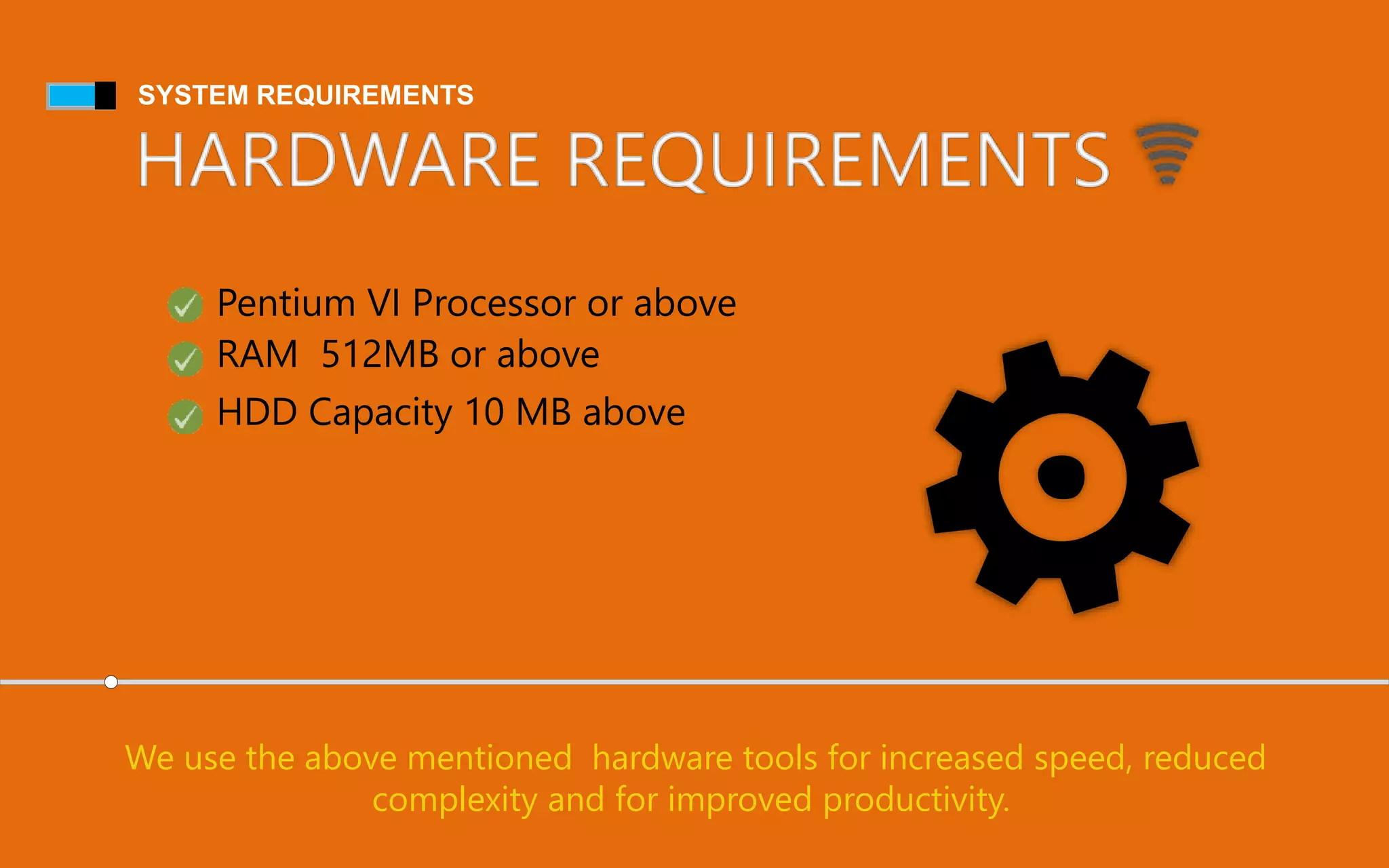
We use the above mentioned hardware tools for increased speed, reduced
complexity and for improved productivity.
Pentium VI Processor or above
HDD Capacity 10 MB above
RAM 512MB or above
Module Description
| This module gives user the briefings of this software.Introduction
Create a new customer Account
This module asks the user to enter account details to
bank database for future transaction.
Deposit Amount to customer account
This module adds transaction as deposit to
customer account.
Withdraw Amount to customer account
This module deducts a desired amount from
customer account.
Balance enquiry
It gives the user balance details of customer.
Bank customer database
This gives user all customers’ details in bank.
Terminate a account
Delete customer record from bank database.
Modify an account
This give user to modify existing customer details.
Exit | This module terminates program and exit from program.
E R Diagram
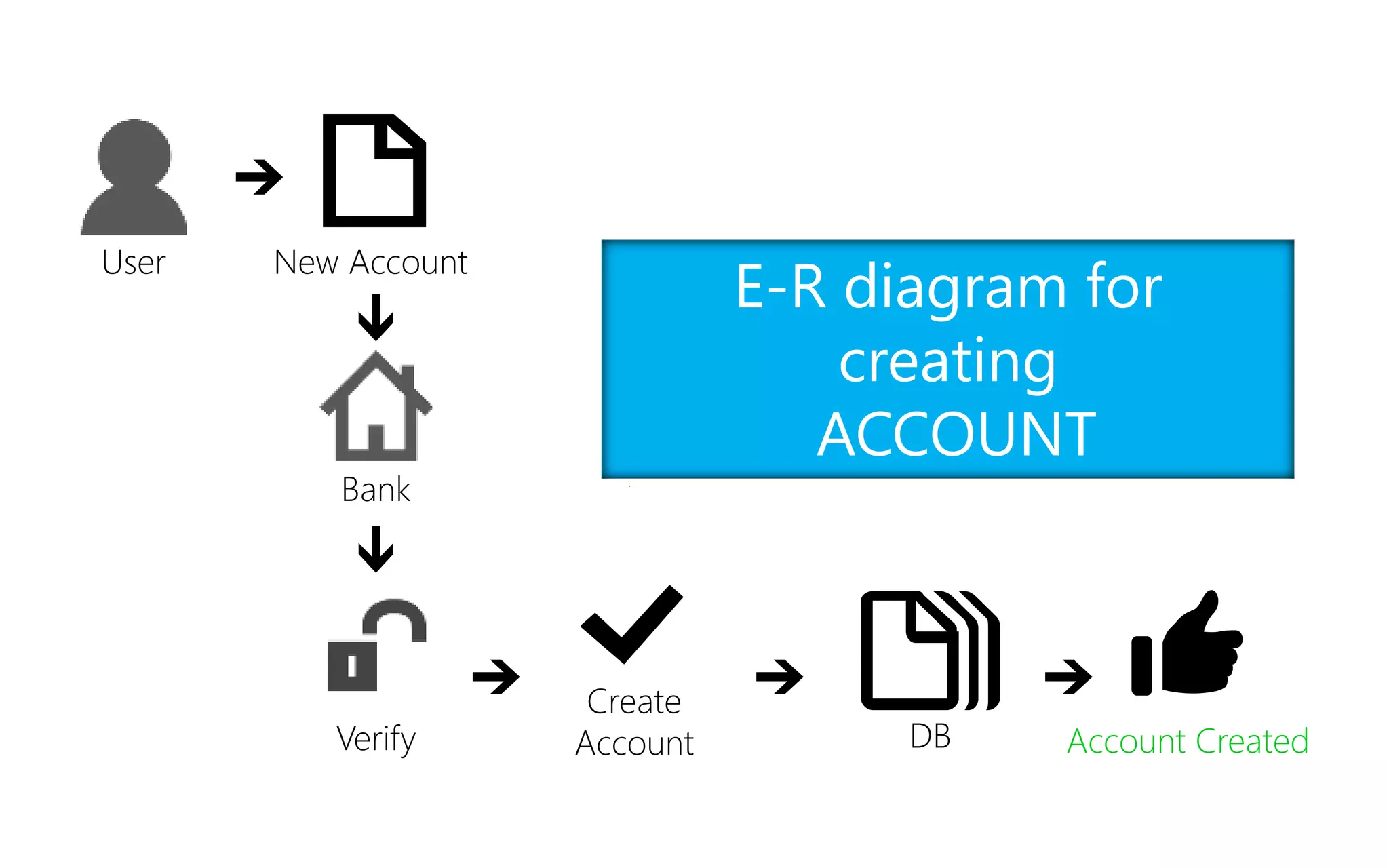
E-R diagram for
creating
ACCOUNT
User New Account
Bank
Verify
Create
Account DB Account Created
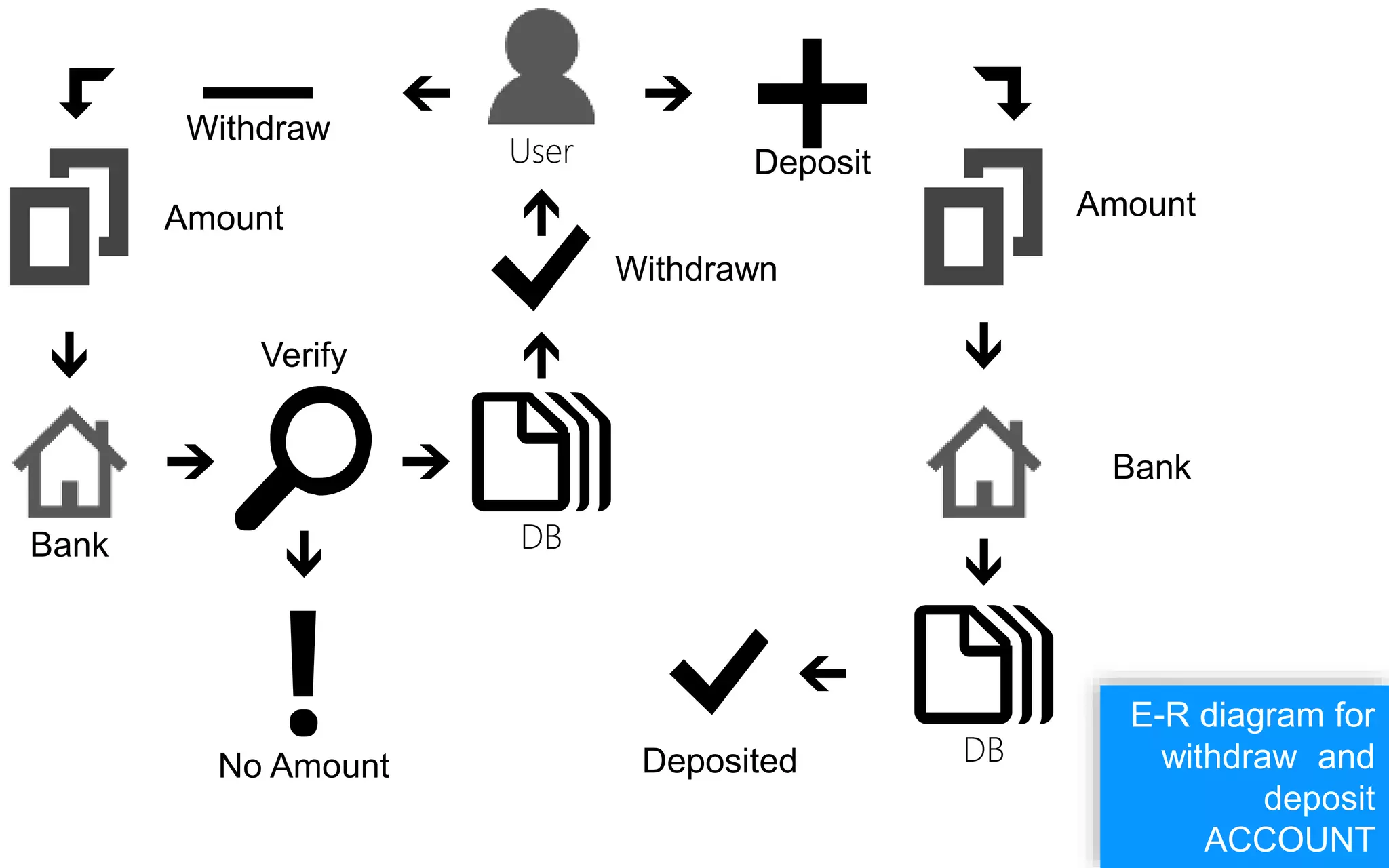
E-R diagram for
withdraw and
deposit
ACCOUNT
User
DB
DB
No Amount
Bank
Amount
Deposit
Withdraw
Amount
Bank
Deposited
Withdrawn
Verify
E-R diagram for
modifying
ACCOUNT
User
Modify Bank
Details
Incorrect
DBAccount
Modified
Verify
Edit the
Form
User Delete Bank DB Account Deleted.
E-R diagram for
deleting an
ACCOUNT
CONCLUSION
Future version of this software will still be much enhanced than the
current version 1.0.Thus the Bank Management System it is
developed and executed successfully.
PThis project is developed to nurture the needs of a user in a
banking sector by embedding all the tasks of transactions
taking place in a bank.
B
SNAPSHOTS
07-11-2018
10:52
Search programs and files
All Programs
Shut Down
credit cooperative bank
Documents
Pictures
Music
Games
Computer
Control Panel
Devices and Printers
Default Programs
Help and Support
Pinned Application
Pinned Application
Application
Application
Application
Application
Application
Banking Management
System
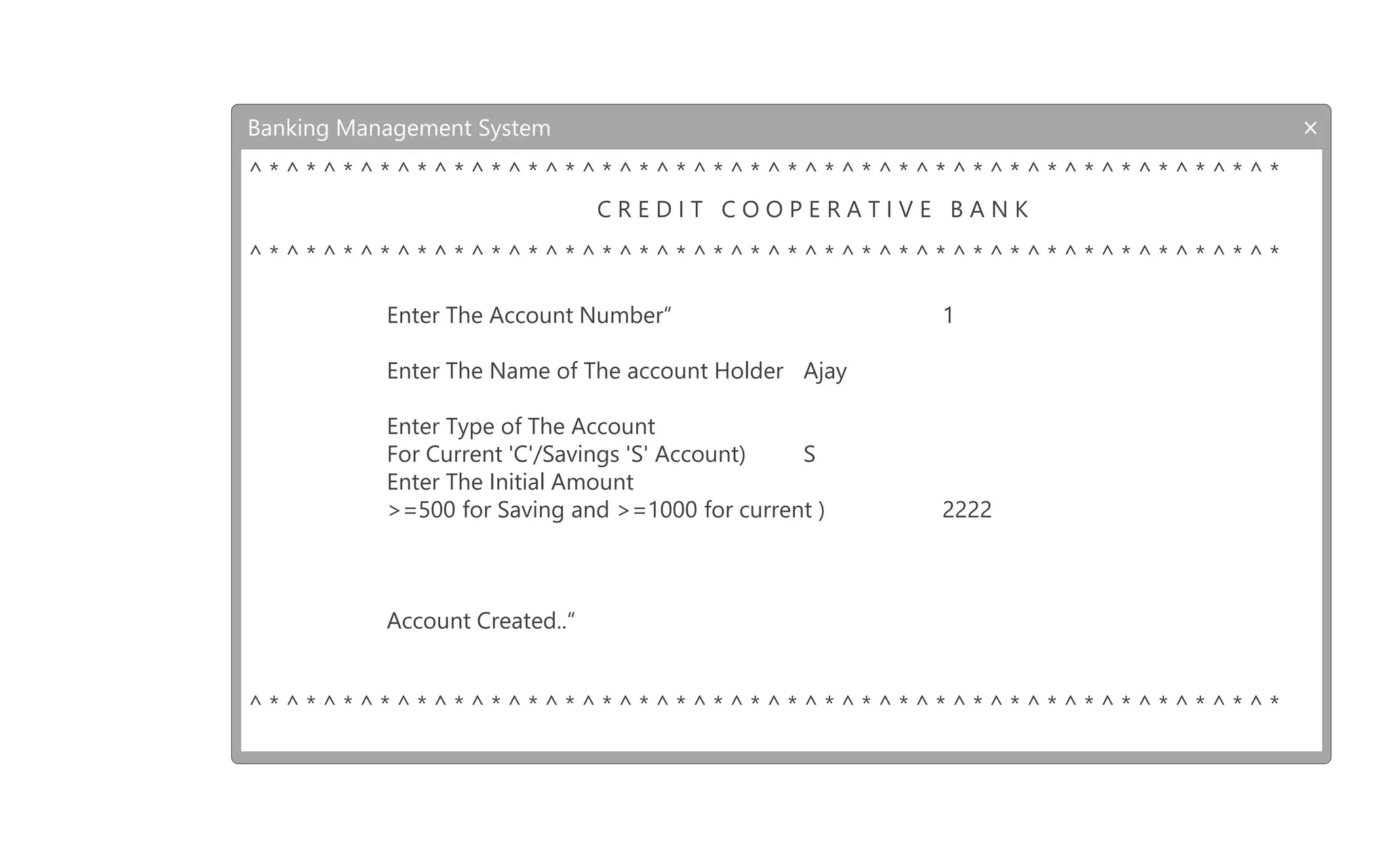
Banking Management System
^ * ^ * ^ * ^ * ^ * ^ * ^ * ^ * ^ * ^ * ^ * ^ * ^ * ^ * ^ * ^ * ^ * ^ * ^ * ^ * ^ * ^ * ^ * ^ * ^ * ^ * ^ * ^ *
C R E D I T C O O P E R A T I V E B A N K
^ * ^ * ^ * ^ * ^ * ^ * ^ * ^ * ^ * ^ * ^ * ^ * ^ * ^ * ^ * ^ * ^ * ^ * ^ * ^ * ^ * ^ * ^ * ^ * ^ * ^ * ^ * ^ *
Select Your Task
|[-] * 1. Create A New Customer Account |*
|[-] * 2. Deposit Amount to Customer Account |*
|[-] * 3. Withdrawal Amount from Customer Account |*
|[-] * 4. Balance Enquiry for Customer |*
|[-] * 5. Bank Customers Database |*
|[-] * 6. Terminate a Account |*
|[-] * 7. Modify a Account |*
…................
|(! 8. EXIT |
‘’’’’’'''''''''''''
Select Your Option (1-8 )
^ * ^ * ^ * ^ * ^ * ^ * ^ * ^ * ^ * ^ * ^ * ^ * ^ * ^ * ^ * ^ * ^ * ^ * ^ * ^ * ^ * ^ * ^ * ^ * ^ * ^ * ^ * ^ *
B
1
Banking Management System
^ * ^ * ^ * ^ * ^ * ^ * ^ * ^ * ^ * ^ * ^ * ^ * ^ * ^ * ^ * ^ * ^ * ^ * ^ * ^ * ^ * ^ * ^ * ^ * ^ * ^ * ^ * ^ *
C R E D I T C O O P E R A T I V E B A N K
^ * ^ * ^ * ^ * ^ * ^ * ^ * ^ * ^ * ^ * ^ * ^ * ^ * ^ * ^ * ^ * ^ * ^ * ^ * ^ * ^ * ^ * ^ * ^ * ^ * ^ * ^ * ^ *
Enter The Account Number“ 1
Enter The Name of The account Holder Ajay
Enter Type of The Account
For Current 'C'/Savings 'S' Account) S
Enter The Initial Amount
>=500 for Saving and >=1000 for current ) 2222
Account Created..“
^ * ^ * ^ * ^ * ^ * ^ * ^ * ^ * ^ * ^ * ^ * ^ * ^ * ^ * ^ * ^ * ^ * ^ * ^ * ^ * ^ * ^ * ^ * ^ * ^ * ^ * ^ * ^ *
Thank you

Banking management system

  • 2.
  • 3.
    The bank managementsystem is an application for maintaining a person’s account in a bank . http://www.bankingmanegementsystem.com/ Go
  • 4.
    The system providesthe access to the customer to create an account, deposit/withdraw the cash from his account, also to view reports of all accounts present Go http://www.bankingmanegementsystem.com/
  • 5.
    To develop asoftware for solving financial applications of a customer in banking environment in order to nurture the needs of an end banking user by providing various ways to perform banking tasks. Also to enable the user’s workspace to have additional functionalities which are not provided under a conventional banking software. A i m1
  • 6.
  • 7.
    S Y ST E M R E Q U I R E M E N T S Software requirements Turbo C++ 4.5
  • 8.
    SYSTEM REQUIREMENTS HARDWARE REQUIREMENTS Weuse the above mentioned hardware tools for increased speed, reduced complexity and for improved productivity. Pentium VI Processor or above HDD Capacity 10 MB above RAM 512MB or above
  • 9.
    Module Description | Thismodule gives user the briefings of this software.Introduction Create a new customer Account This module asks the user to enter account details to bank database for future transaction. Deposit Amount to customer account This module adds transaction as deposit to customer account. Withdraw Amount to customer account This module deducts a desired amount from customer account.
  • 10.
    Balance enquiry It givesthe user balance details of customer. Bank customer database This gives user all customers’ details in bank. Terminate a account Delete customer record from bank database. Modify an account This give user to modify existing customer details. Exit | This module terminates program and exit from program.
  • 11.
  • 12.
    E-R diagram for creating ACCOUNT UserNew Account Bank Verify Create Account DB Account Created
  • 13.
    E-R diagram for withdrawand deposit ACCOUNT User DB DB No Amount Bank Amount Deposit Withdraw Amount Bank Deposited Withdrawn Verify
  • 14.
    E-R diagram for modifying ACCOUNT User ModifyBank Details Incorrect DBAccount Modified Verify Edit the Form
  • 15.
    User Delete BankDB Account Deleted. E-R diagram for deleting an ACCOUNT
  • 16.
    CONCLUSION Future version ofthis software will still be much enhanced than the current version 1.0.Thus the Bank Management System it is developed and executed successfully. PThis project is developed to nurture the needs of a user in a banking sector by embedding all the tasks of transactions taking place in a bank. B
  • 17.
  • 18.
    07-11-2018 10:52 Search programs andfiles All Programs Shut Down credit cooperative bank Documents Pictures Music Games Computer Control Panel Devices and Printers Default Programs Help and Support Pinned Application Pinned Application Application Application Application Application Application Banking Management System Banking Management System ^ * ^ * ^ * ^ * ^ * ^ * ^ * ^ * ^ * ^ * ^ * ^ * ^ * ^ * ^ * ^ * ^ * ^ * ^ * ^ * ^ * ^ * ^ * ^ * ^ * ^ * ^ * ^ * C R E D I T C O O P E R A T I V E B A N K ^ * ^ * ^ * ^ * ^ * ^ * ^ * ^ * ^ * ^ * ^ * ^ * ^ * ^ * ^ * ^ * ^ * ^ * ^ * ^ * ^ * ^ * ^ * ^ * ^ * ^ * ^ * ^ * Select Your Task |[-] * 1. Create A New Customer Account |* |[-] * 2. Deposit Amount to Customer Account |* |[-] * 3. Withdrawal Amount from Customer Account |* |[-] * 4. Balance Enquiry for Customer |* |[-] * 5. Bank Customers Database |* |[-] * 6. Terminate a Account |* |[-] * 7. Modify a Account |* …................ |(! 8. EXIT | ‘’’’’’''''''''''''' Select Your Option (1-8 ) ^ * ^ * ^ * ^ * ^ * ^ * ^ * ^ * ^ * ^ * ^ * ^ * ^ * ^ * ^ * ^ * ^ * ^ * ^ * ^ * ^ * ^ * ^ * ^ * ^ * ^ * ^ * ^ * B 1
  • 19.
    Banking Management System ^* ^ * ^ * ^ * ^ * ^ * ^ * ^ * ^ * ^ * ^ * ^ * ^ * ^ * ^ * ^ * ^ * ^ * ^ * ^ * ^ * ^ * ^ * ^ * ^ * ^ * ^ * ^ * C R E D I T C O O P E R A T I V E B A N K ^ * ^ * ^ * ^ * ^ * ^ * ^ * ^ * ^ * ^ * ^ * ^ * ^ * ^ * ^ * ^ * ^ * ^ * ^ * ^ * ^ * ^ * ^ * ^ * ^ * ^ * ^ * ^ * Enter The Account Number“ 1 Enter The Name of The account Holder Ajay Enter Type of The Account For Current 'C'/Savings 'S' Account) S Enter The Initial Amount >=500 for Saving and >=1000 for current ) 2222 Account Created..“ ^ * ^ * ^ * ^ * ^ * ^ * ^ * ^ * ^ * ^ * ^ * ^ * ^ * ^ * ^ * ^ * ^ * ^ * ^ * ^ * ^ * ^ * ^ * ^ * ^ * ^ * ^ * ^ *
  • 20.