SQL Server PortfolioDenise Browndsbrown6@msn.com (215) 760-8625
Table of ContentsIntroduction						 3Piggy Bank Project					 4Mini Adventure Works Project			10BlockFlix Project				17
Introduction    This portfolio contains a sample of my development skills in MS SQL Server 2008 which was a result of hands-on experience from the SETFOCUS Masters Program. The Master’s Program curriculum is based on Microsoft Official Curriculum which includes:RDBMS
Querying using Transact SQL
Advanced Querying and Programming using SQL Server
SQL Server Integration Services
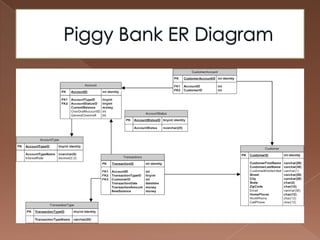
SQL Server Reporting ServicesPiggy Bank Project   The PiggyBank Project simulates back-end banking processes. Key functionalities were:Maintain customer information
Maintain Account information
Process transactions utilizing Overdraft facilities
Maintain Data Integrity
Extract & Upload old Data from XML file    This was accomplished via the use of views, stored procedures and triggers
Piggy Bank ER Diagram
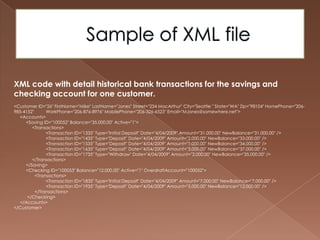
Sample of XML fileXML code with detail historical bank transactions for the savings and checking account for one customer.<Customer ID="26" FirstName="Mike" LastName="Jones" Street="234 MacArthur" City="Seattle " State="WA" Zip="98104" HomePhone="206-985-4152"        	WorkPhone="206-876-8976" MobilePhone="206-326-6523" Email="MJones@somewhere.net">     <Accounts>          <Saving ID="100052" Balance="35,000.00" Active="1">               <Transactions>	<Transaction ID="1335" Type="Initial Deposit" Date="4/04/2009" Amount="31,000.00" NewBalance="31,000.00" /><Transaction ID="1435" Type="Deposit" Date="4/04/2009" Amount="2,000.00" NewBalance="33,000.00" /><Transaction ID="1535" Type="Deposit" Date="4/04/2009" Amount="1,000.00" NewBalance="34,000.00" /><Transaction ID="1635" Type="Deposit" Date="4/04/2009" Amount="3,000.00" NewBalance="37,000.00" /><Transaction ID="1735" Type="Withdraw" Date="4/04/2009" Amount="2,000.00" NewBalance="35,000.00" />               </Transactions>          </Saving>          <Checking ID="100053" Balance="12,000.00" Active="1" OverdraftAccount="100052">                 <Transactions><Transaction ID="1835" Type="Initial Deposit" Date="4/04/2009" Amount="7,000.00" NewBalance="7,000.00" /><Transaction ID="1935" Type="Deposit" Date="4/04/2009" Amount="5,000.00" NewBalance="12,000.00" />                 </Transactions>           </Checking>     </Accounts></Customer>
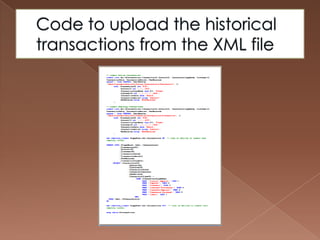
Code to upload the historical transactions from the XML file
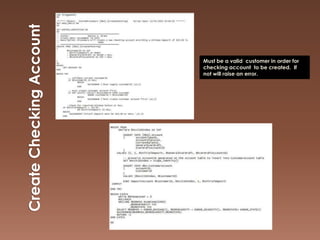
Create Checking AccountMust be a valid  customer in order for checking account  to be created.  If not will raise an error.
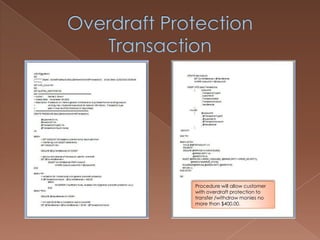
Overdraft Protection TransactionProcedure will allow customer with overdraft protection to transfer /withdraw monies no more than $400.00.
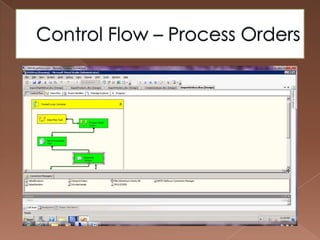
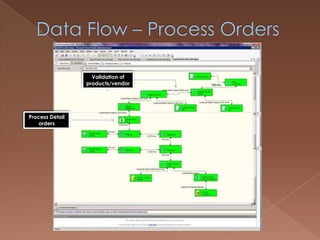
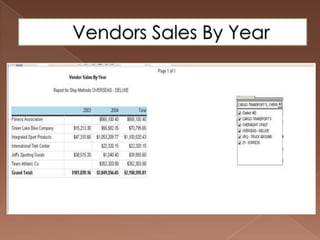
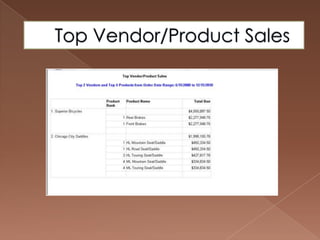
Mini Adventure Works ProjectIn this project  a new Database, MiniAdventureWorks was created and  historical spreadsheets (CSV) data for products listing, vendors, and purchase order history, were loaded into this SQL Server database utilizing SSIS.The load process must work on a go-forward basis, so that new/modified products/vendors/orders can be loaded in SQL Server as wellThe  orders load process should validate that any incoming orders with product numbers or vendor numbers that do not match an existing product/vendor number should NOT be written to the SQL Server database.  Instead, this data should be written to an exception file and emailed.Two reports were developed using SSRS: one for top vendor and product sales, and the second for sales by vendor and ship method across years.
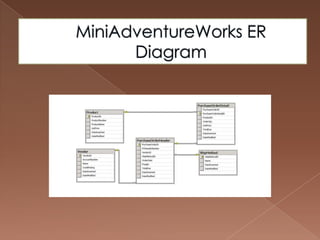
MiniAdventureWorks ER Diagram
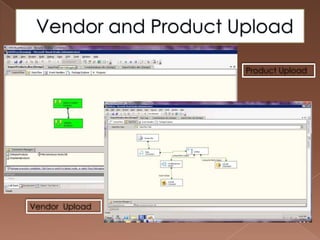
Vendor and Product UploadProductUploadVendor Upload
Control Flow – Process Orders
Data Flow – Process OrdersValidation of products/vendorsProcess Detail orders
Vendors Sales By Year
Top Vendor/Product Sales
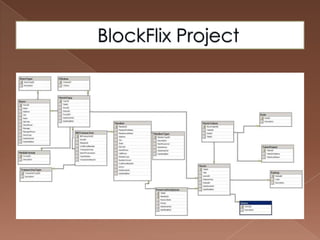
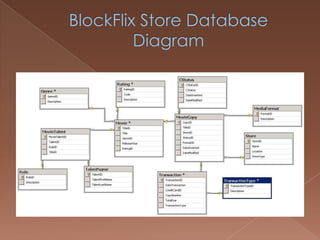
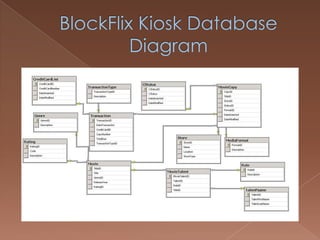
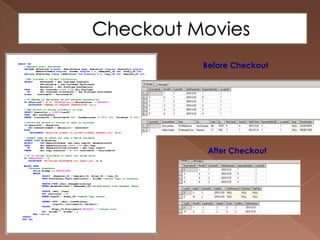
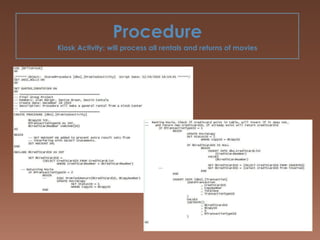
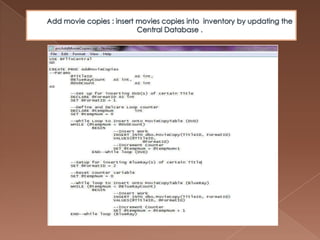
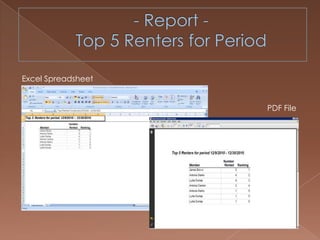
BlockFlix Project    BlockFlix  was  the final group project. We were employed to design and implement a RDBMS system for a on-line movie rental chain.     Key factures includes: Design and implemented databaseCreate Stored ProceduresSSRS Reports
BlockFlix Project

Denise Brown Sql Porfolio

  • 1.
    SQL Server PortfolioDeniseBrowndsbrown6@msn.com (215) 760-8625
  • 2.
    Table of ContentsIntroduction 3Piggy Bank Project 4Mini Adventure Works Project 10BlockFlix Project 17
  • 3.
    Introduction This portfolio contains a sample of my development skills in MS SQL Server 2008 which was a result of hands-on experience from the SETFOCUS Masters Program. The Master’s Program curriculum is based on Microsoft Official Curriculum which includes:RDBMS
  • 4.
  • 5.
    Advanced Querying andProgramming using SQL Server
  • 6.
  • 7.
    SQL Server ReportingServicesPiggy Bank Project The PiggyBank Project simulates back-end banking processes. Key functionalities were:Maintain customer information
  • 8.
  • 9.
    Process transactions utilizingOverdraft facilities
  • 10.
  • 11.
    Extract & Uploadold Data from XML file This was accomplished via the use of views, stored procedures and triggers
  • 12.
  • 13.
    Sample of XMLfileXML code with detail historical bank transactions for the savings and checking account for one customer.<Customer ID="26" FirstName="Mike" LastName="Jones" Street="234 MacArthur" City="Seattle " State="WA" Zip="98104" HomePhone="206-985-4152" WorkPhone="206-876-8976" MobilePhone="206-326-6523" Email="MJones@somewhere.net"> <Accounts> <Saving ID="100052" Balance="35,000.00" Active="1"> <Transactions> <Transaction ID="1335" Type="Initial Deposit" Date="4/04/2009" Amount="31,000.00" NewBalance="31,000.00" /><Transaction ID="1435" Type="Deposit" Date="4/04/2009" Amount="2,000.00" NewBalance="33,000.00" /><Transaction ID="1535" Type="Deposit" Date="4/04/2009" Amount="1,000.00" NewBalance="34,000.00" /><Transaction ID="1635" Type="Deposit" Date="4/04/2009" Amount="3,000.00" NewBalance="37,000.00" /><Transaction ID="1735" Type="Withdraw" Date="4/04/2009" Amount="2,000.00" NewBalance="35,000.00" /> </Transactions> </Saving> <Checking ID="100053" Balance="12,000.00" Active="1" OverdraftAccount="100052"> <Transactions><Transaction ID="1835" Type="Initial Deposit" Date="4/04/2009" Amount="7,000.00" NewBalance="7,000.00" /><Transaction ID="1935" Type="Deposit" Date="4/04/2009" Amount="5,000.00" NewBalance="12,000.00" /> </Transactions> </Checking> </Accounts></Customer>
  • 14.
    Code to uploadthe historical transactions from the XML file
  • 15.
    Create Checking AccountMustbe a valid customer in order for checking account to be created. If not will raise an error.
  • 16.
    Overdraft Protection TransactionProcedurewill allow customer with overdraft protection to transfer /withdraw monies no more than $400.00.
  • 17.
    Mini Adventure WorksProjectIn this project a new Database, MiniAdventureWorks was created and historical spreadsheets (CSV) data for products listing, vendors, and purchase order history, were loaded into this SQL Server database utilizing SSIS.The load process must work on a go-forward basis, so that new/modified products/vendors/orders can be loaded in SQL Server as wellThe orders load process should validate that any incoming orders with product numbers or vendor numbers that do not match an existing product/vendor number should NOT be written to the SQL Server database. Instead, this data should be written to an exception file and emailed.Two reports were developed using SSRS: one for top vendor and product sales, and the second for sales by vendor and ship method across years.
  • 18.
  • 19.
    Vendor and ProductUploadProductUploadVendor Upload
  • 20.
    Control Flow –Process Orders
  • 21.
    Data Flow –Process OrdersValidation of products/vendorsProcess Detail orders
  • 22.
  • 23.
  • 24.
    BlockFlix Project BlockFlix was the final group project. We were employed to design and implement a RDBMS system for a on-line movie rental chain. Key factures includes: Design and implemented databaseCreate Stored ProceduresSSRS Reports
  • 25.