1
BANK MANAGEMENT SYSTEM
Submitted in partial fulfillment of the requirements
For the award of the degree of
Bachelor of Business Administration
(Computer Aided Management)
To
Guru Gobind Singh Indraprastha University, Delhi
Guide: Submitted by:
Mrs. Santha Devi 1. Piyush Goel 06124401910
2. Sourabh Tyagi 04324401910
Institute of Innovation in Technology & Management,
New Delhi – 1100 58
Batch (2010 – 2013)
2
Certificate
We, (Piyush Goel 06124401910) & (Sourabh Tyagi 04324401910) certify that the Minor
Project Report (BCAM-306) entitled “BANK MANAGEMENT SYSTEM” is done by us and
it is an authentic work carried out by us at INSTITTUTE OF INNOVATION IN
TECHNOLOGY AND MANAGEMENT. The matter embodied in this project work has not
been submitted earlier for the award of any degree or diploma to the best of my knowledge
and belief.
1. Signature of the Student 2. Signature of the Student
Date:
Certified that the Project Report (BCAM-306) entitled “BANK MANAGEMENT SYSTEM”
done by the above students is completed under my guidance
Signature of the Guide
Date:
Name of the Guide:
Designation:
Countersigned
Director
3
ACKNOWLEDGEMENT
We are thankful to GURU GOBIND SINGH INDRAPRASTHA University who provided us
with the opportunity for carrying out the study.
We are extremely grateful and remain indebted to our guide Mrs. Santha Devi for being a
source of inspiration and for her constant support in the Design, Implementation and
Evaluation of the project. We are thankful to her for the constant valuable suggestions, which
benefited us a lot while developing the project on “Bank Management System”. She has
been a constant source of inspiration and motivation for hard work. She has been very co-
operative throughout this project work. Through this column, it would be our utmost pleasure
to express our warm thanks to her for the encouragement, co-operation and consent without
which we might not be able to accomplish this project.
4
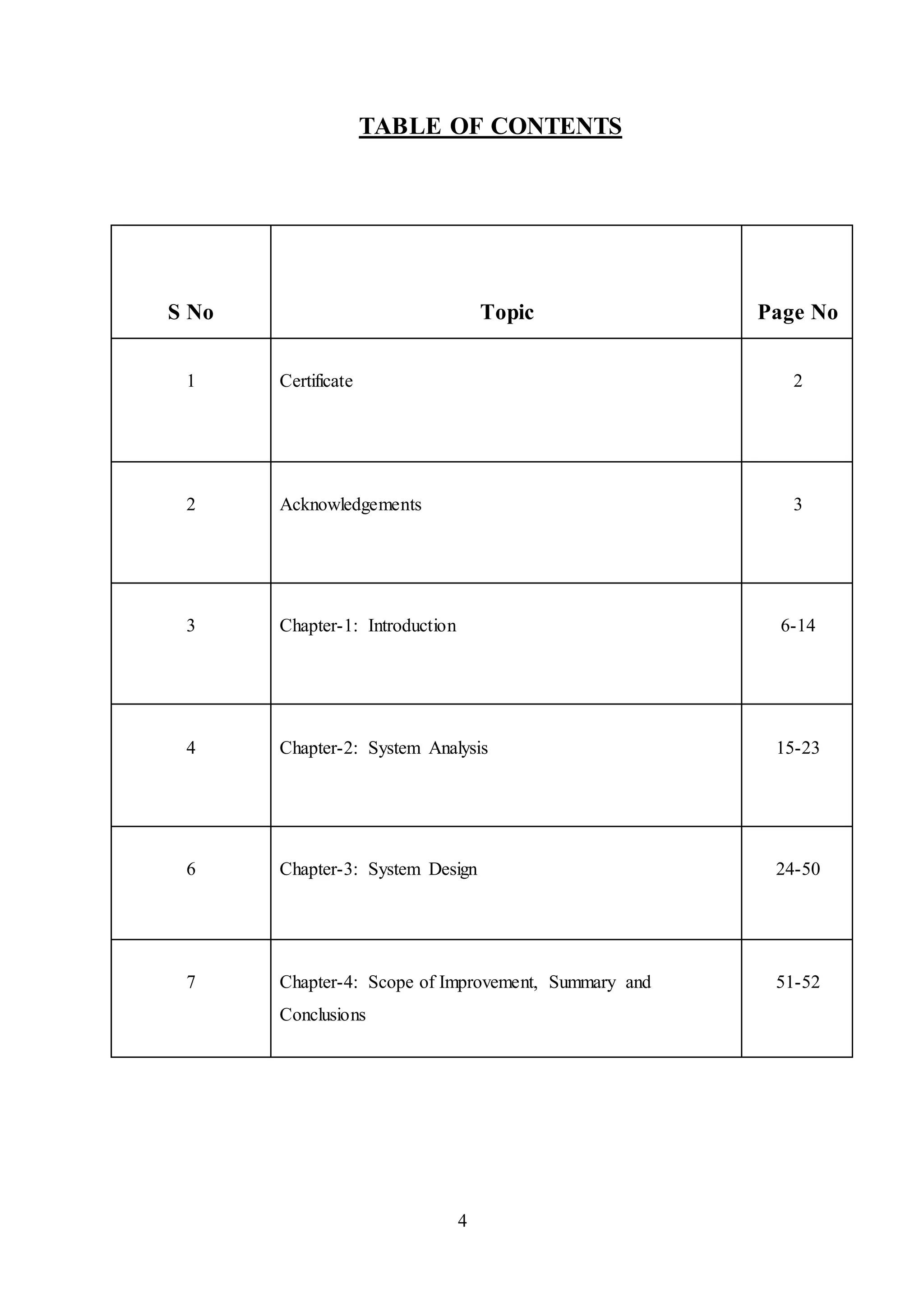
TABLE OF CONTENTS
S No Topic Page No
1 Certificate 2
2 Acknowledgements 3
3 Chapter-1: Introduction 6-14
4 Chapter-2: System Analysis 15-23
6 Chapter-3: System Design 24-50
7 Chapter-4: Scope of Improvement, Summary and
Conclusions
51-52
5
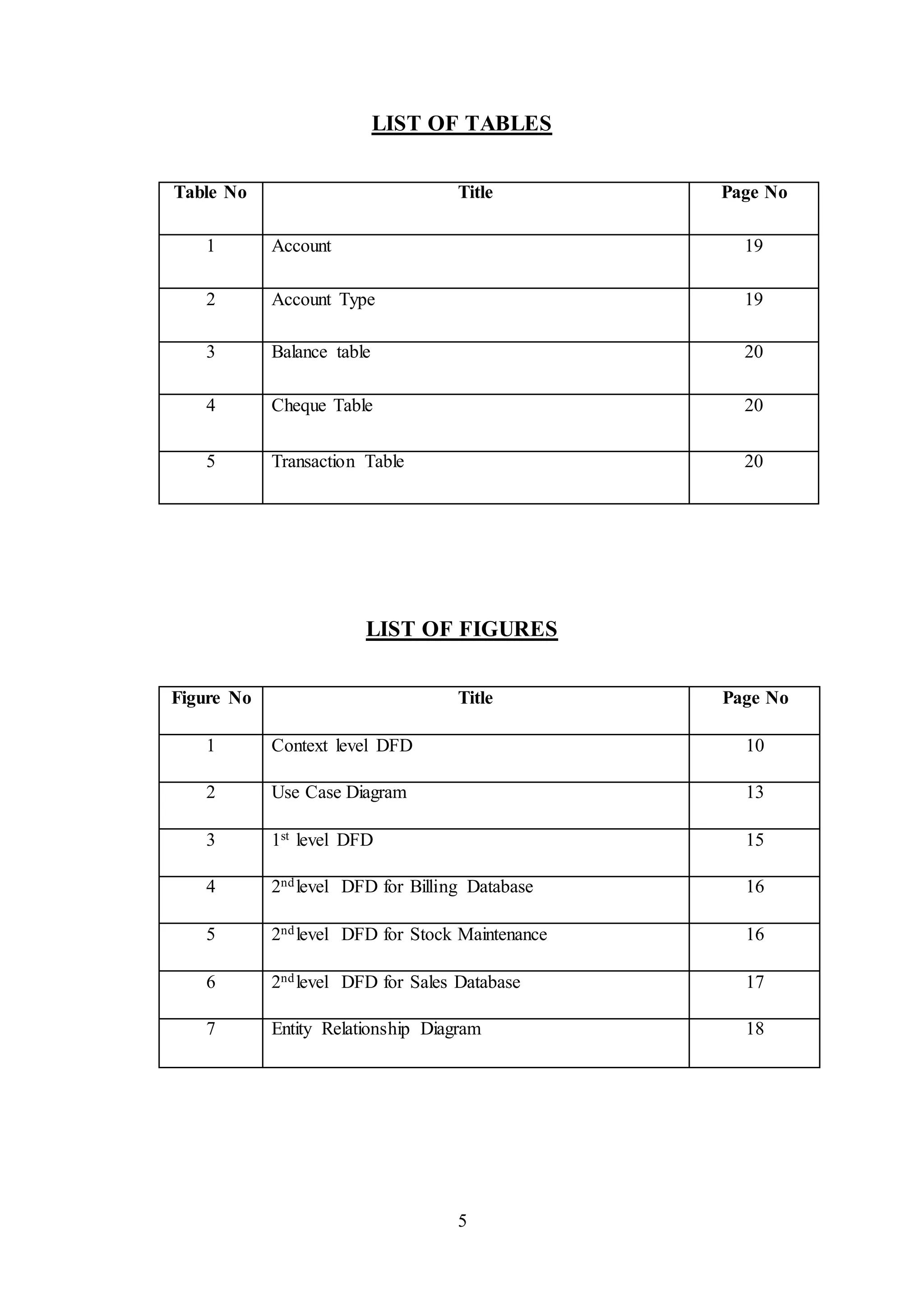
LIST OF TABLES
Table No Title Page No
1 Account 19
2 Account Type 19
3 Balance table 20
4 Cheque Table 20
5 Transaction Table 20
LIST OF FIGURES
Figure No Title Page No
1 Context level DFD 10
2 Use Case Diagram 13
3 1st level DFD 15
4 2ndlevel DFD for Billing Database 16
5 2ndlevel DFD for Stock Maintenance 16
6 2ndlevel DFD for Sales Database 17
7 Entity Relationship Diagram 18
6
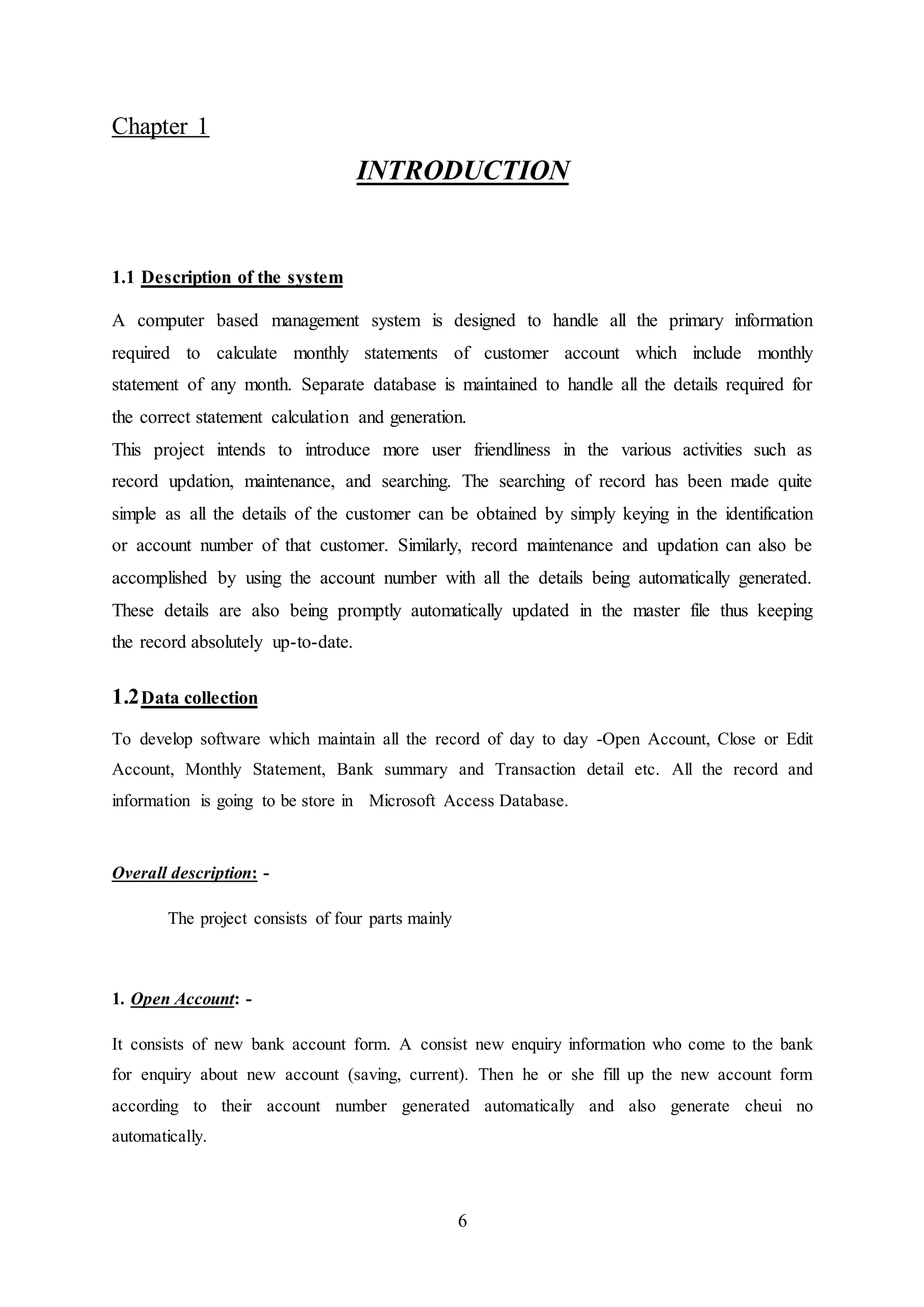
Chapter 1
INTRODUCTION
1.1 Description of the system
A computer based management system is designed to handle all the primary information
required to calculate monthly statements of customer account which include monthly
statement of any month. Separate database is maintained to handle all the details required for
the correct statement calculation and generation.
This project intends to introduce more user friendliness in the various activities such as
record updation, maintenance, and searching. The searching of record has been made quite
simple as all the details of the customer can be obtained by simply keying in the identification
or account number of that customer. Similarly, record maintenance and updation can also be
accomplished by using the account number with all the details being automatically generated.
These details are also being promptly automatically updated in the master file thus keeping
the record absolutely up-to-date.
1.2Data collection
To develop software which maintain all the record of day to day -Open Account, Close or Edit
Account, Monthly Statement, Bank summary and Transaction detail etc. All the record and
information is going to be store in Microsoft Access Database.
Overall description: -
The project consists of four parts mainly
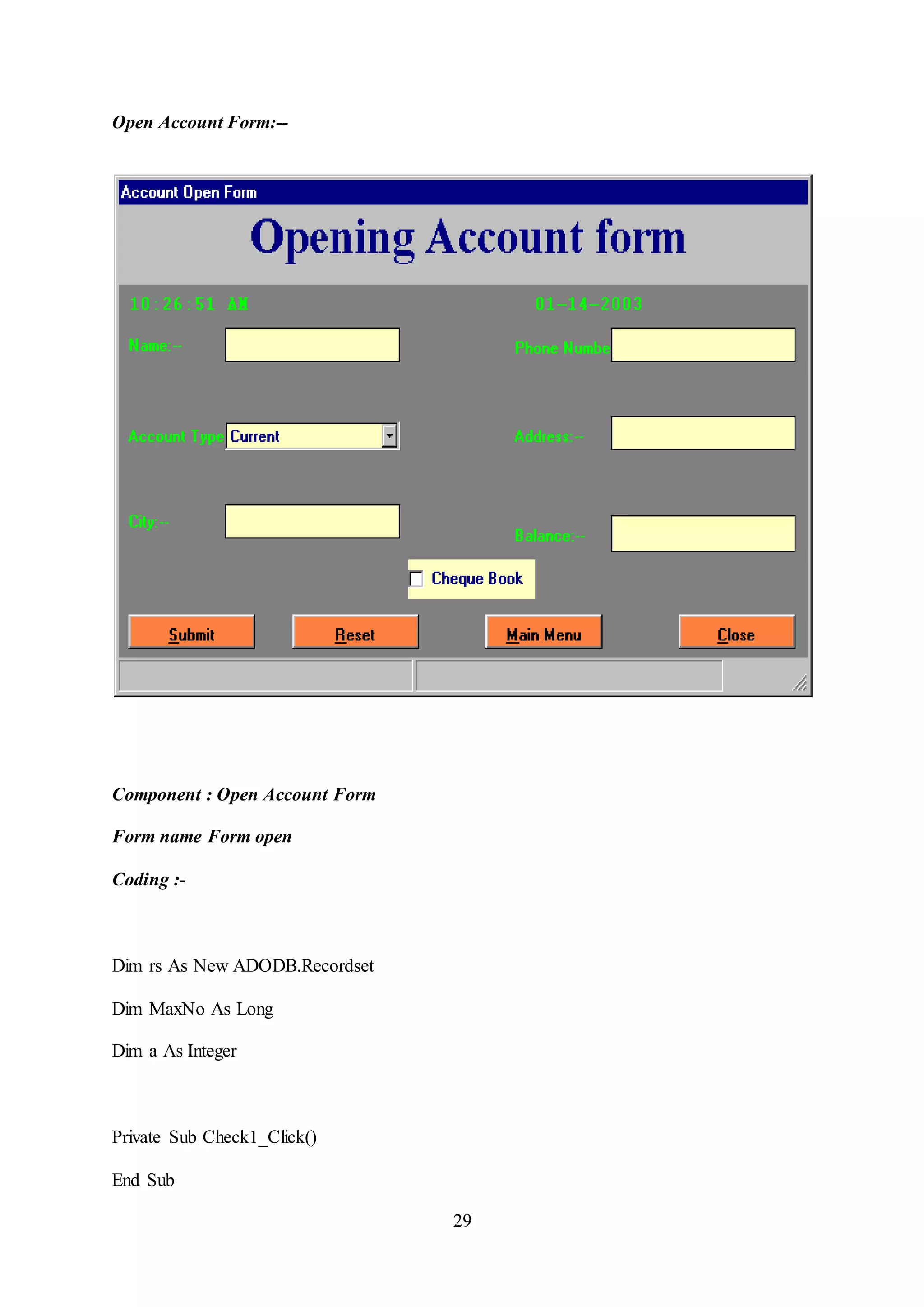
1. Open Account: -
It consists of new bank account form. A consist new enquiry information who come to the bank
for enquiry about new account (saving, current). Then he or she fill up the new account form
according to their account number generated automatically and also generate cheui no
automatically.
7
2. Close or Edit Account:-
It consists or provides editing and closing account form and also such particular account
information.
3. Monthly Statement: -
It consists of two sided form monthly statement of bank employee and monthly statement of
saving and current account employee.
4. Bank Summary: -
It consists of all information detail of bank employee account transaction detail summary, recode
of all branches and also record of draft and chewy.
Functional Module: -
The whole project divided in to six main modules. They are following: -
i. Login module.
ii. Account open module.
iii. Edit or close module.
iv. Transaction module.
v. Summary module.
vi. Account statement module.
8
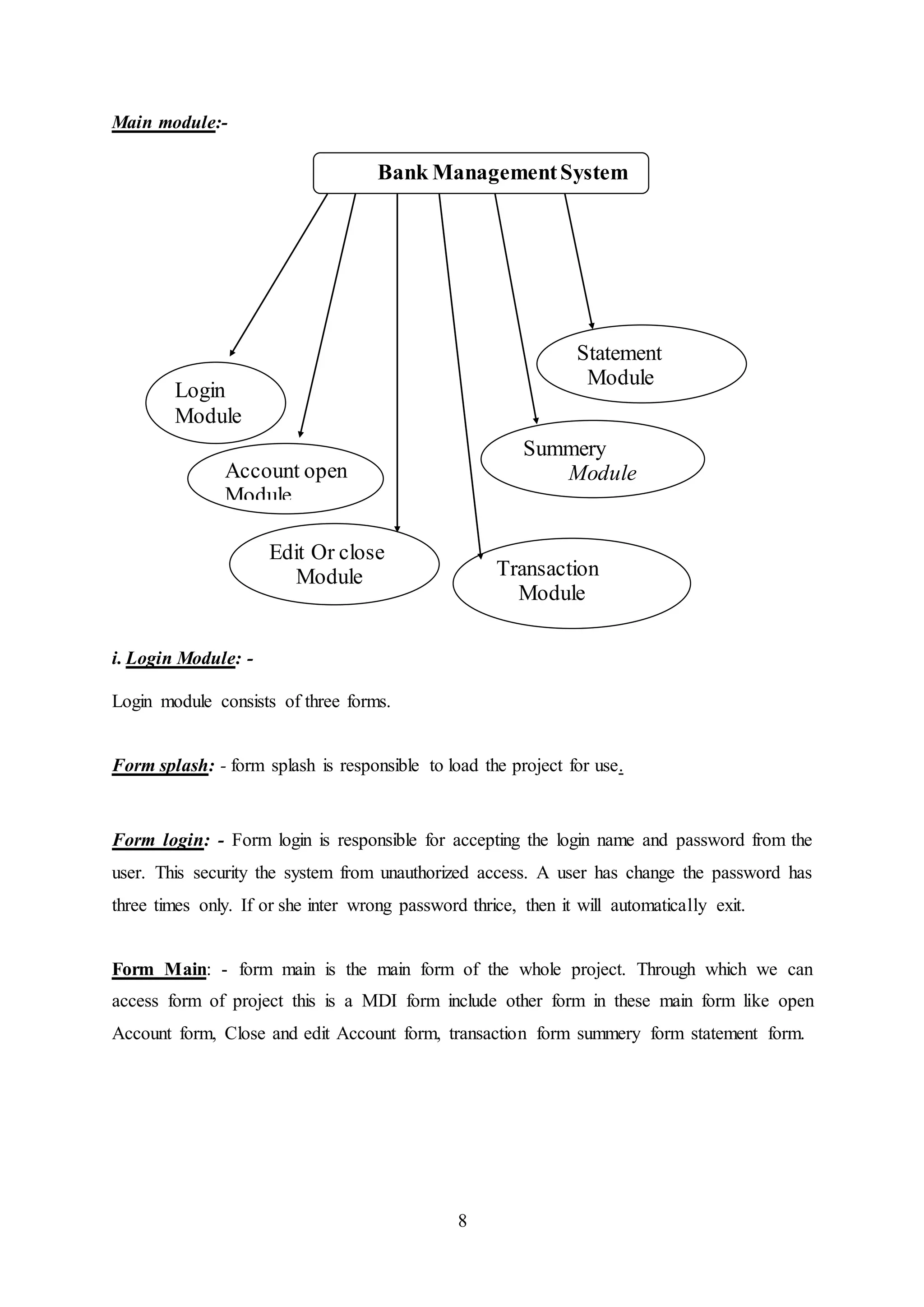
Main module:-
i. Login Module: -
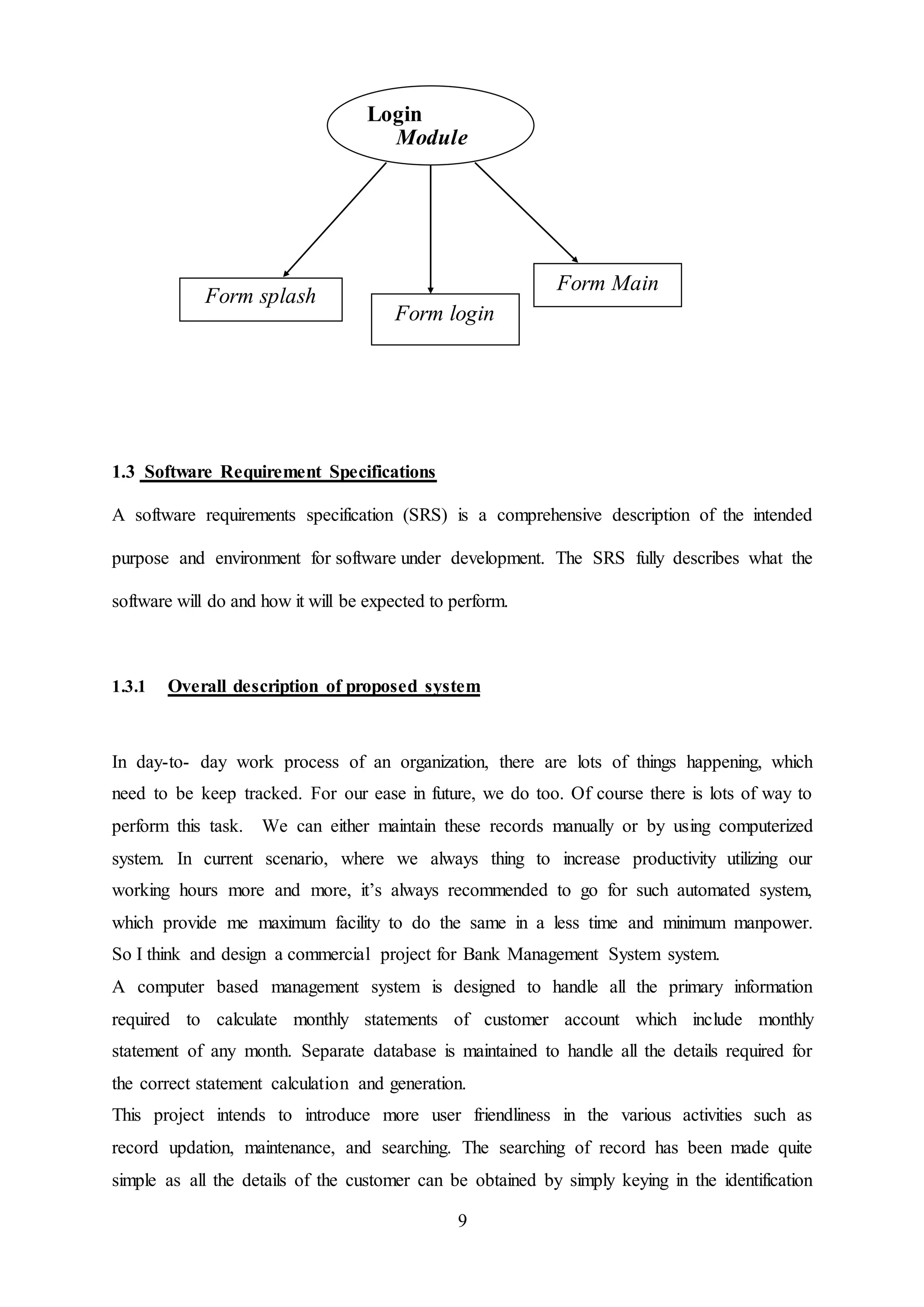
Login module consists of three forms.
Form splash: - form splash is responsible to load the project for use.
Form login: - Form login is responsible for accepting the login name and password from the
user. This security the system from unauthorized access. A user has change the password has
three times only. If or she inter wrong password thrice, then it will automatically exit.
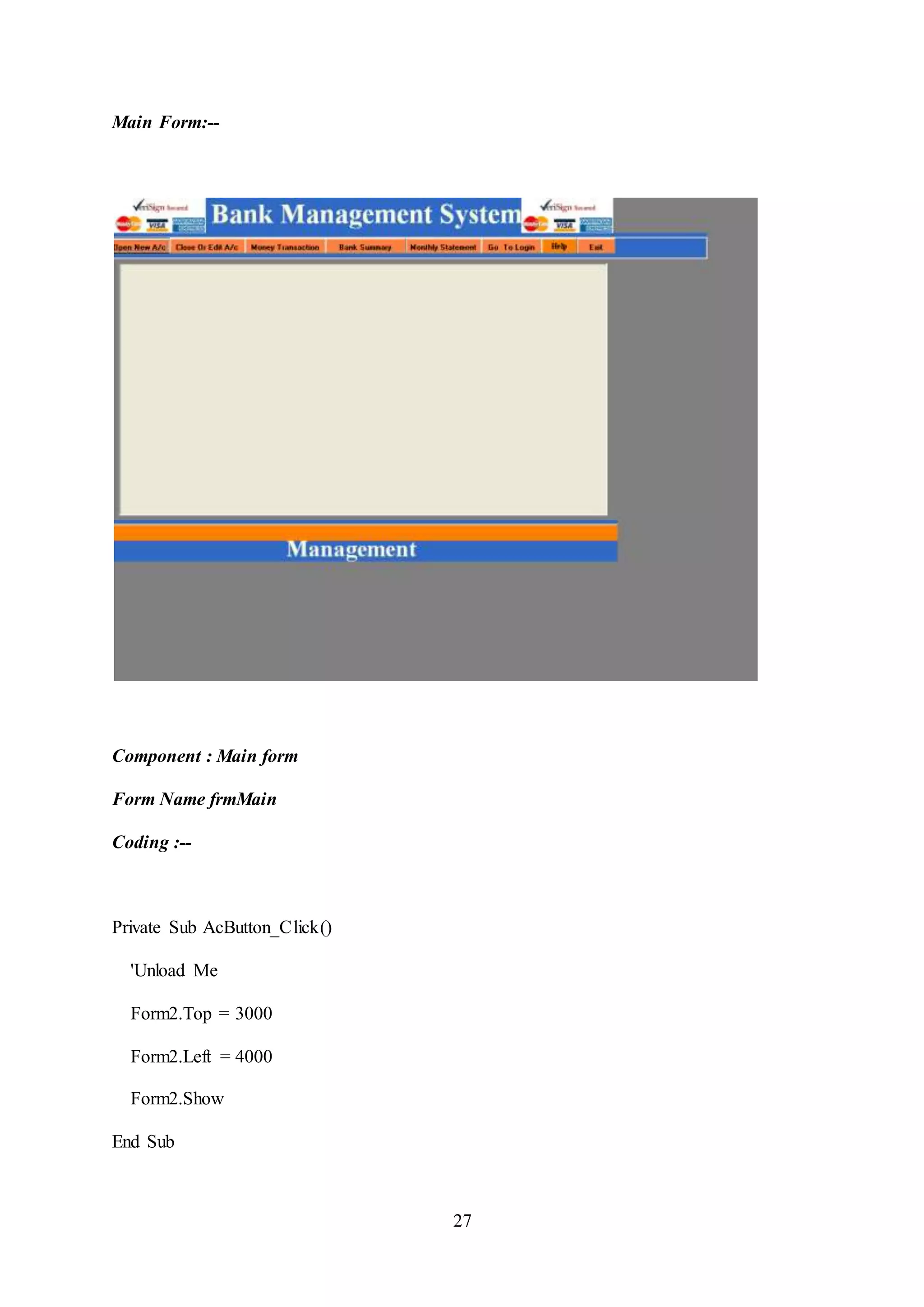
Form Main: - form main is the main form of the whole project. Through which we can
access form of project this is a MDI form include other form in these main form like open
Account form, Close and edit Account form, transaction form summery form statement form.
Bank ManagementSystem
Account open
Module
Edit Or close
Module Transaction
Module
Summery
Module
Statement
Module
Login
Module
9
1.3 Software Requirement Specifications
A software requirements specification (SRS) is a comprehensive description of the intended
purpose and environment for software under development. The SRS fully describes what the
software will do and how it will be expected to perform.
1.3.1 Overall description of proposed system
In day-to- day work process of an organization, there are lots of things happening, which
need to be keep tracked. For our ease in future, we do too. Of course there is lots of way to
perform this task. We can either maintain these records manually or by using computerized
system. In current scenario, where we always thing to increase productivity utilizing our
working hours more and more, it’s always recommended to go for such automated system,
which provide me maximum facility to do the same in a less time and minimum manpower.
So I think and design a commercial project for Bank Management System system.
A computer based management system is designed to handle all the primary information
required to calculate monthly statements of customer account which include monthly
statement of any month. Separate database is maintained to handle all the details required for
the correct statement calculation and generation.
This project intends to introduce more user friendliness in the various activities such as
record updation, maintenance, and searching. The searching of record has been made quite
simple as all the details of the customer can be obtained by simply keying in the identification
Login
Module
Form splash
Form login
Form Main
10
or account number of that customer. Similarly, record maintenance and updation can also be
accomplished by using the account number with all the details being automatically generated.
These details are also being promptly automatically updated in the master file thus keeping
the record absolutely up-to-date.
For processing the data we have chosen Access as back end and Visual Basic as front end,
which can manage database for a very large class of the possible application.
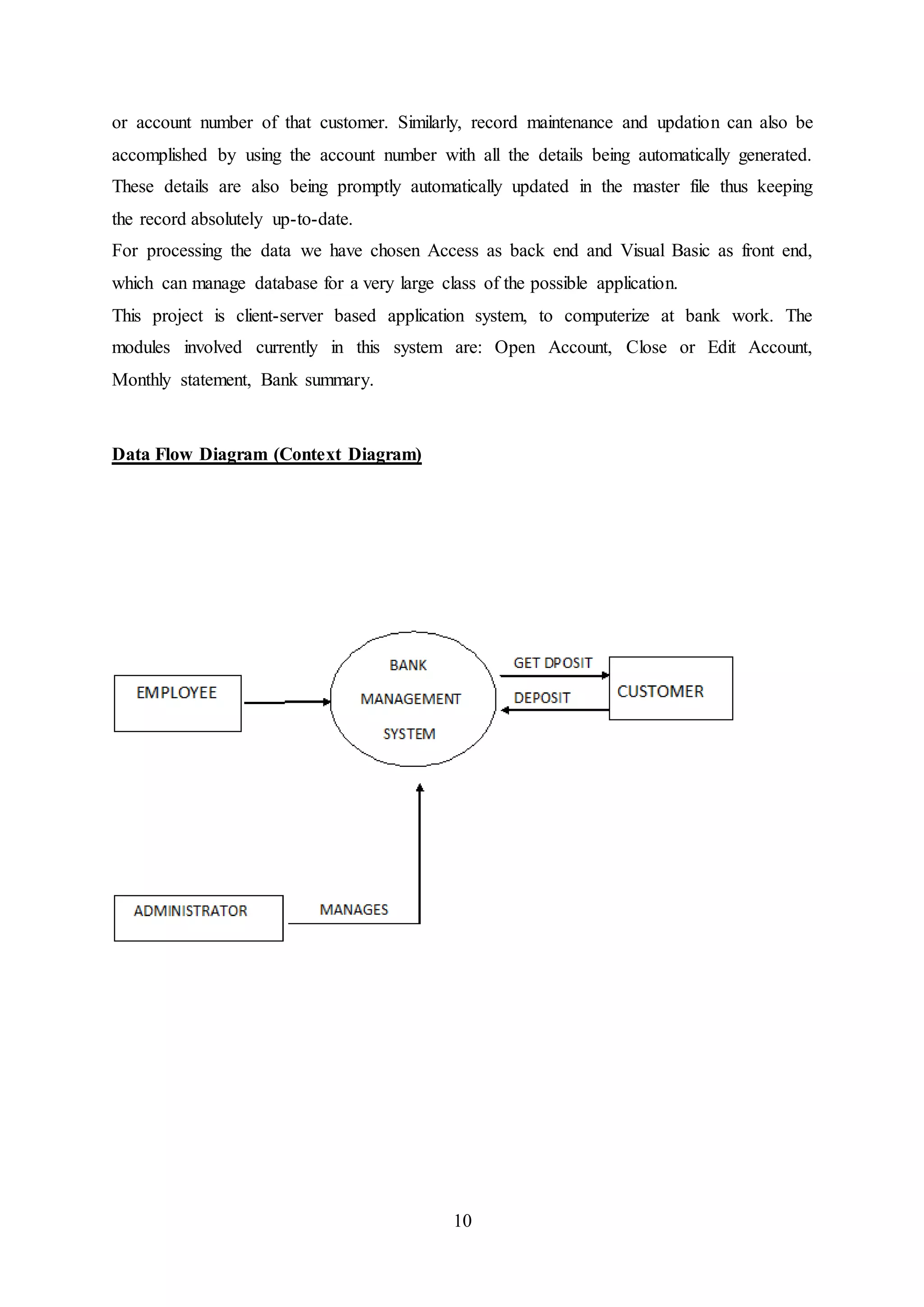
This project is client-server based application system, to computerize at bank work. The
modules involved currently in this system are: Open Account, Close or Edit Account,
Monthly statement, Bank summary.
Data Flow Diagram (Context Diagram)
11
Objective:-
During the past several decades personnel function has been transformed from a relatively
obscure record keeping staff to central and top level management function. There are many
factors that have influenced this transformation like technological advances, professionalism,
and general recognition of human beings as most important resources.
A computer based management system is designed to handle all the primary information
required to calculate monthly statements of customer account which include monthly
statement of any month. Separate database is maintained to handle all the details required for
the correct statement calculation and generation.
A computer based management system is designed to handle all the primary information
required to calculate monthly statements of customer account which include monthly
statement of any month. Separate database is maintained to handle all the details required for
the correct statement calculation and generation.
The main objective of our project is provide the different typed of customers facility , the
main objective of this system is to find out the actual customer service . Etc.
It should increase the productivity of bank by utilizing the working hours more and more,
with minimum manpower.
This project includes the entire upgraded feature required for the computerization banking
system. This system is very easy to use, so that any user can use without getting pre-
knowledge about this. It is very much user friendly and meet almost all daily working process
requirements. This system is completely GUI based and can be use by mouse and as well as
keyboard. This system is melded in such a way that has got all features to upgrade without
making much change in existing components.
12
1.3.2 User Characteristics
Educational Level: At least graduate and should be comfortable with English language.
Technical Expertise: Should be a high or middle level employee of the organization
comfortable with using general purpose applications on a computer.
Constraints
The system required minimum 128mb RAM and 2 GB minimum hard disk space.
Specific Requirements
 This section contains the software requirements to a level of detail sufficient to enable
designers to design the system, and testers to test the system.
1.3.3 External Interfaces
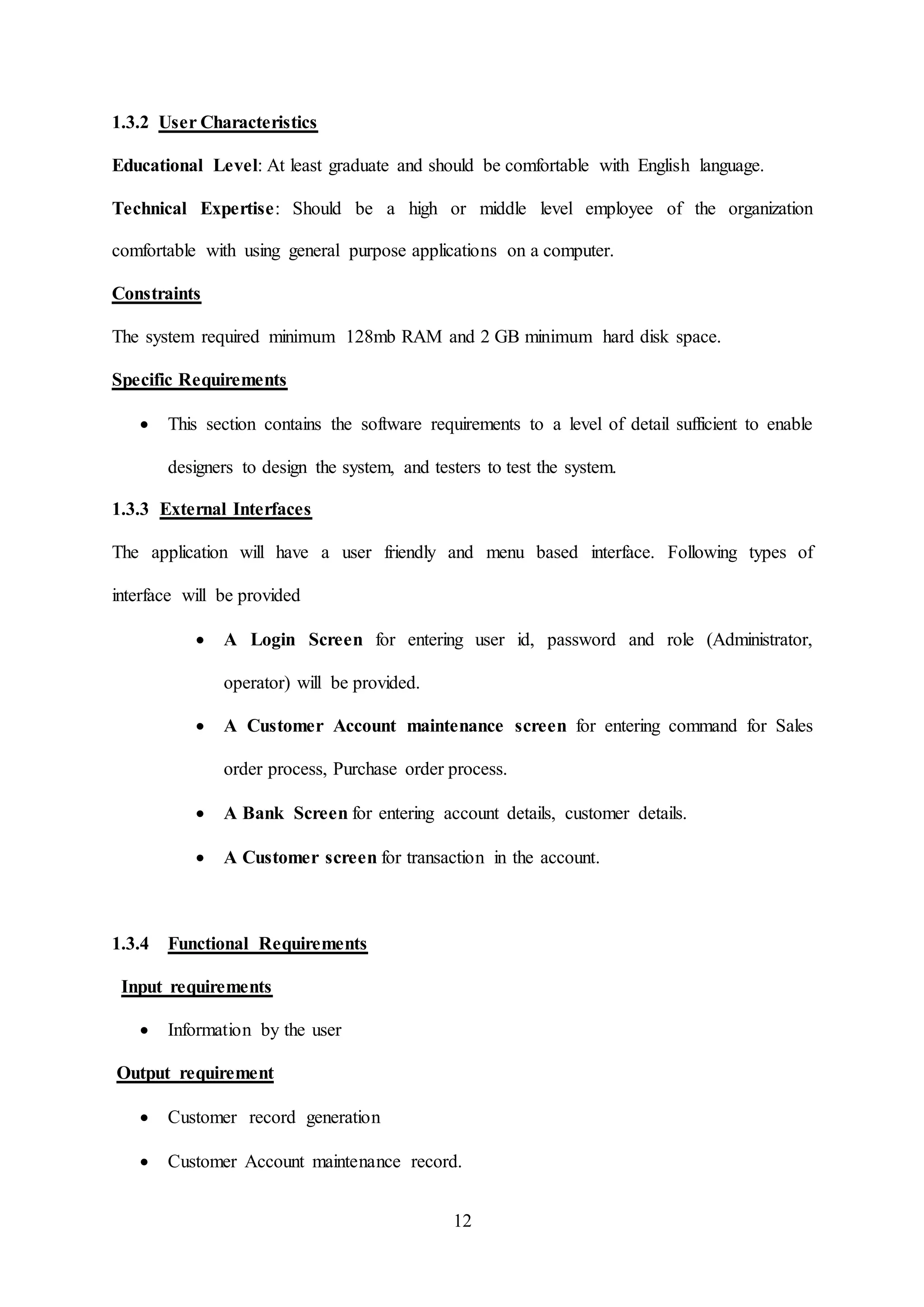
The application will have a user friendly and menu based interface. Following types of
interface will be provided
 A Login Screen for entering user id, password and role (Administrator,
operator) will be provided.
 A Customer Account maintenance screen for entering command for Sales
order process, Purchase order process.
 A Bank Screen for entering account details, customer details.
 A Customer screen for transaction in the account.
1.3.4 Functional Requirements
Input requirements
 Information by the user
Output requirement
 Customer record generation
 Customer Account maintenance record.
13
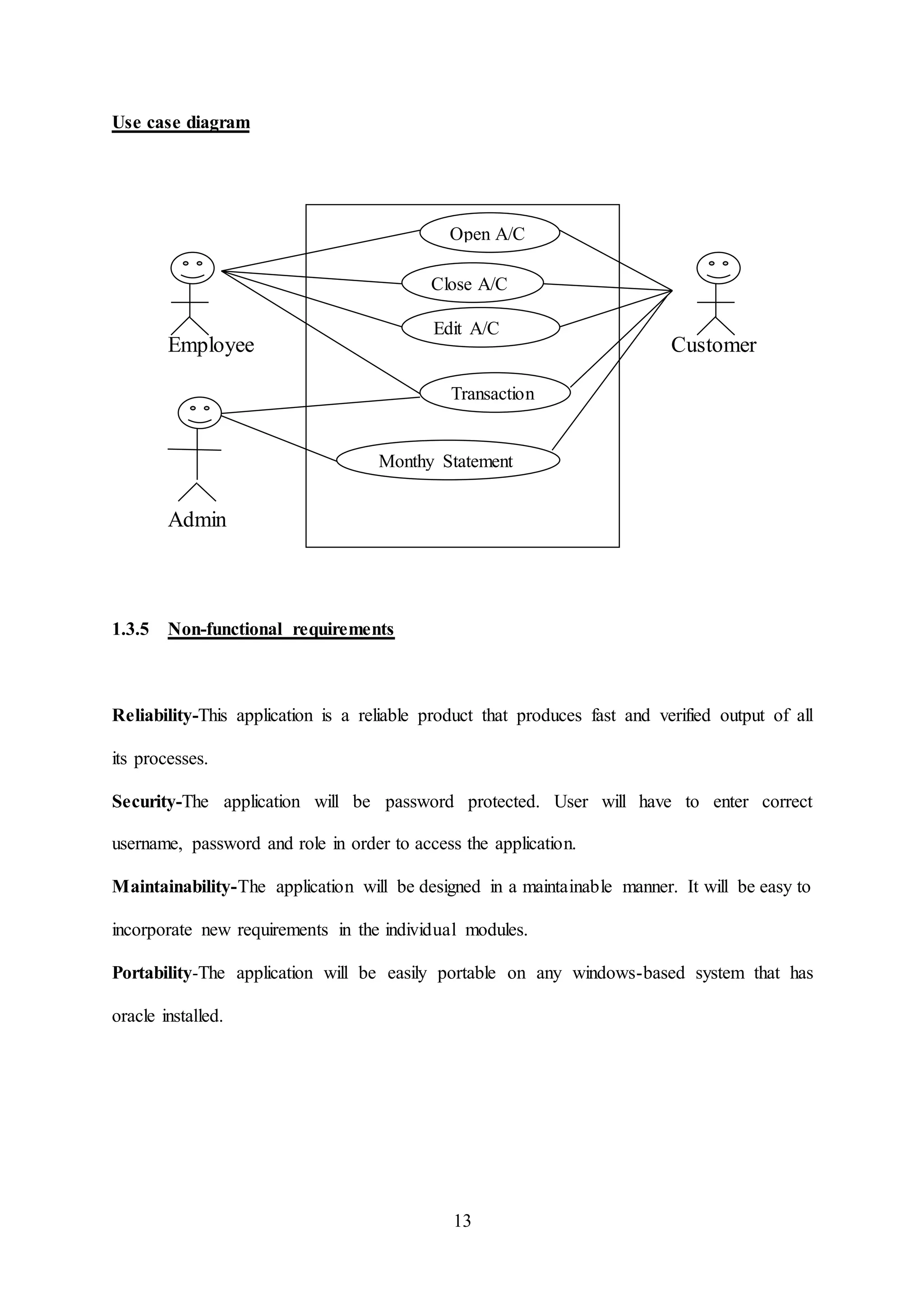
Use case diagram
Employee Customer
Admin
1.3.5 Non-functional requirements
Reliability-This application is a reliable product that produces fast and verified output of all
its processes.
Security-The application will be password protected. User will have to enter correct
username, password and role in order to access the application.
Maintainability-The application will be designed in a maintainable manner. It will be easy to
incorporate new requirements in the individual modules.
Portability-The application will be easily portable on any windows-based system that has
oracle installed.
Transaction
Open A/C
Close A/C
Monthy Statement
Edit A/C
14
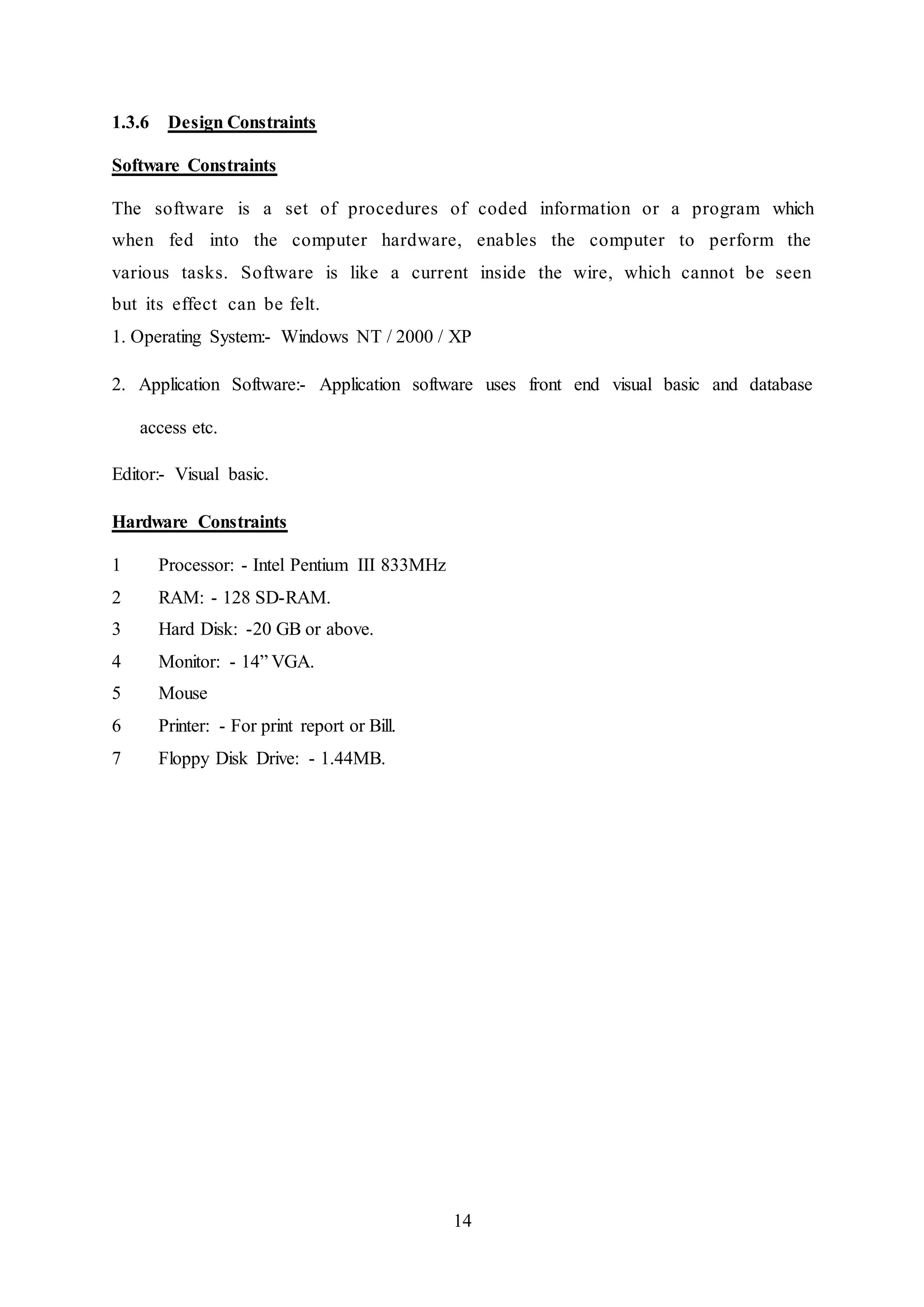
1.3.6 Design Constraints
Software Constraints
The software is a set of procedures of coded information or a program which
when fed into the computer hardware, enables the computer to perform the
various tasks. Software is like a current inside the wire, which cannot be seen
but its effect can be felt.
1. Operating System:- Windows NT / 2000 / XP
2. Application Software:- Application software uses front end visual basic and database
access etc.
Editor:- Visual basic.
Hardware Constraints
1 Processor: - Intel Pentium III 833MHz
2 RAM: - 128 SD-RAM.
3 Hard Disk: -20 GB or above.
4 Monitor: - 14” VGA.
5 Mouse
6 Printer: - For print report or Bill.
7 Floppy Disk Drive: - 1.44MB.
15
Chapter 2:
SYSTEM DESIGN
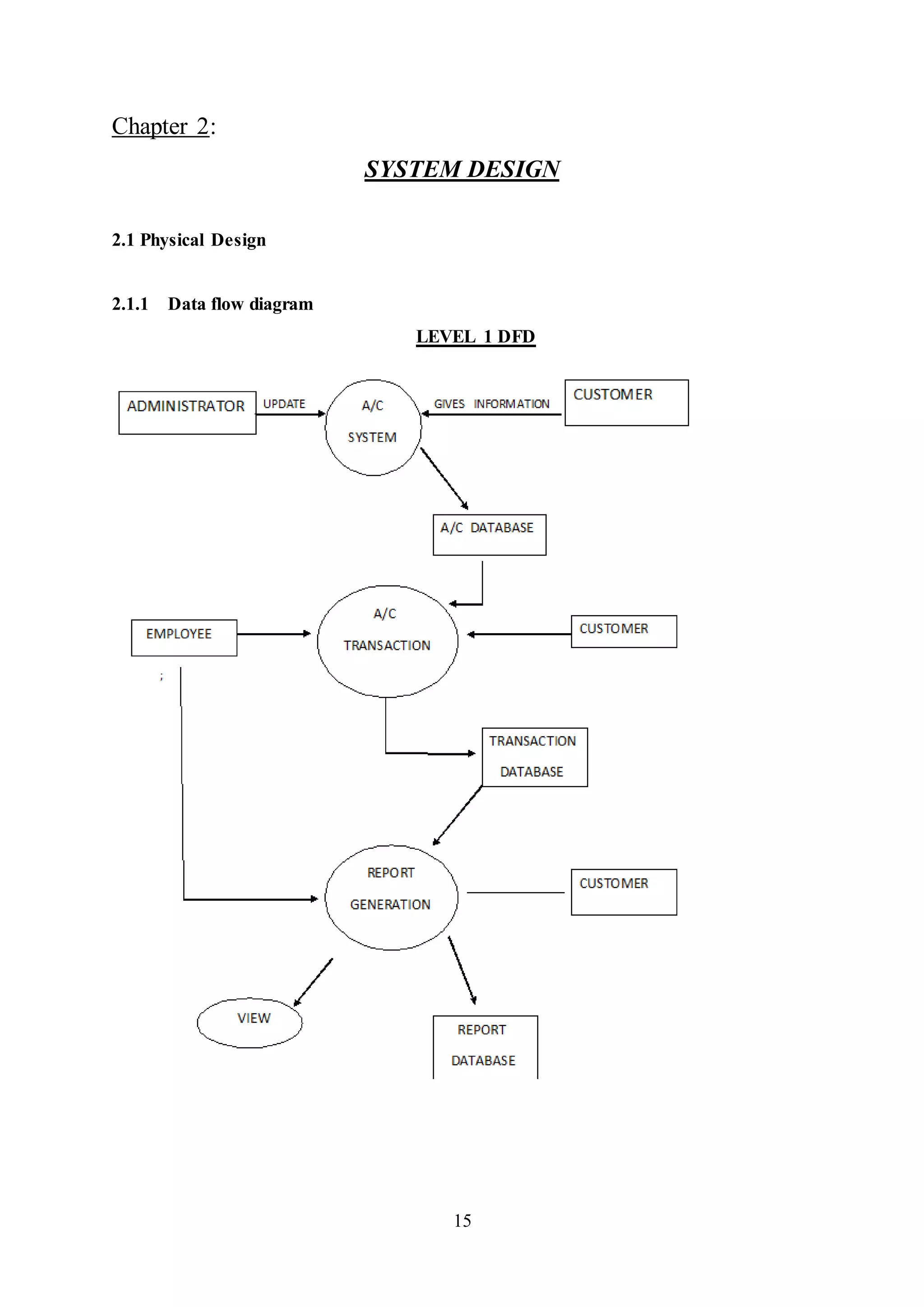
2.1 Physical Design
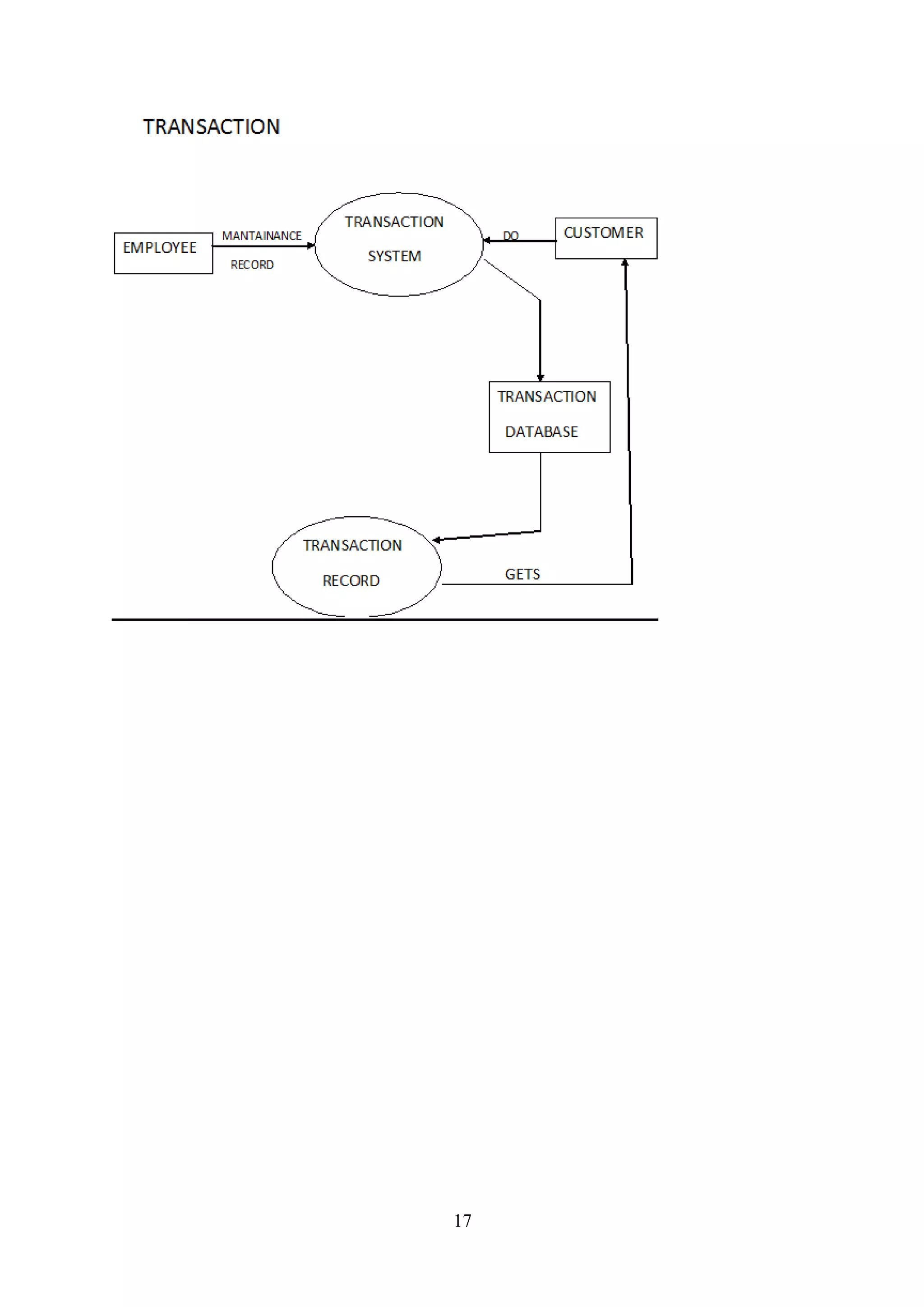
2.1.1 Data flow diagram
LEVEL 1 DFD
16
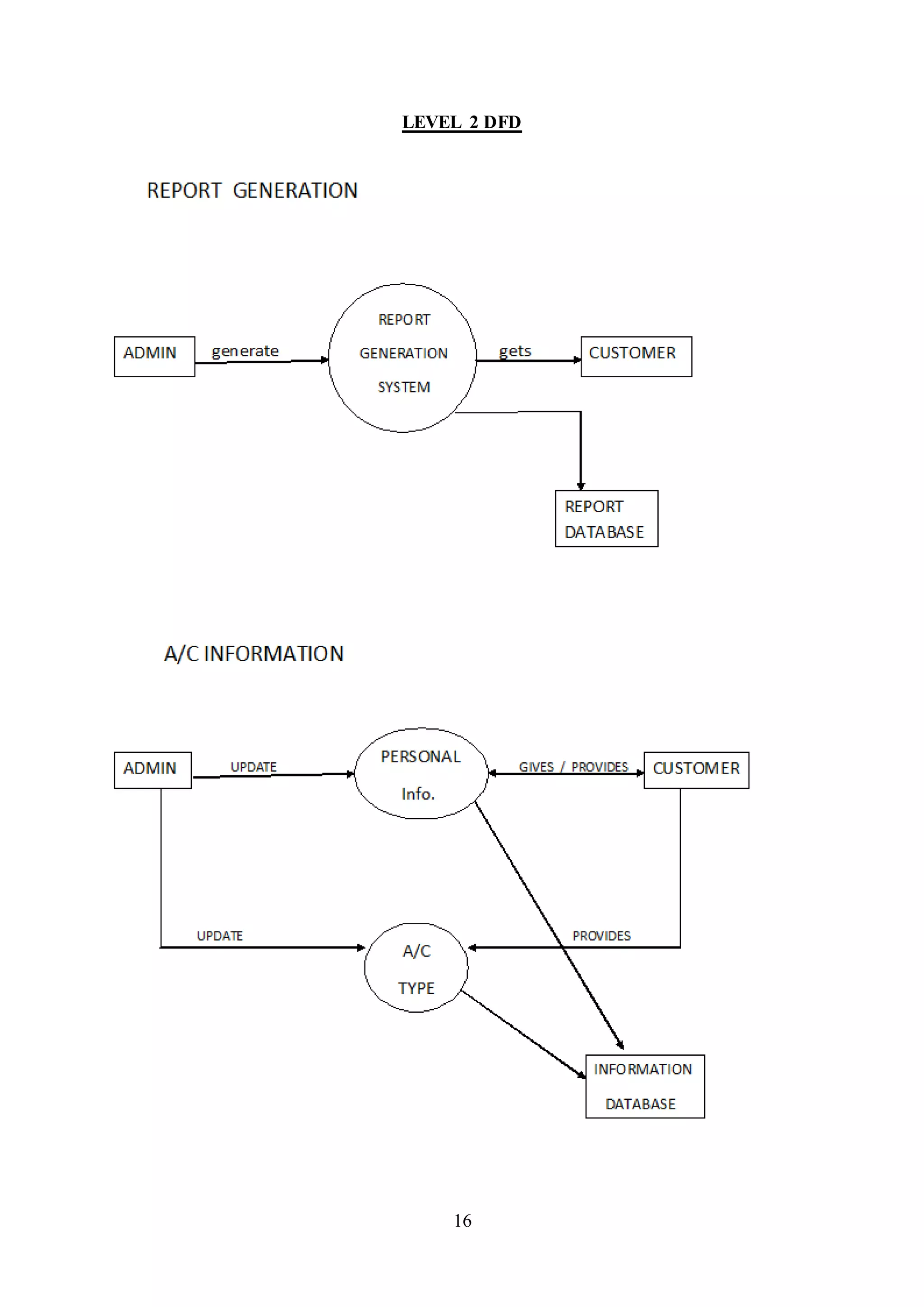
LEVEL 2 DFD
17
18
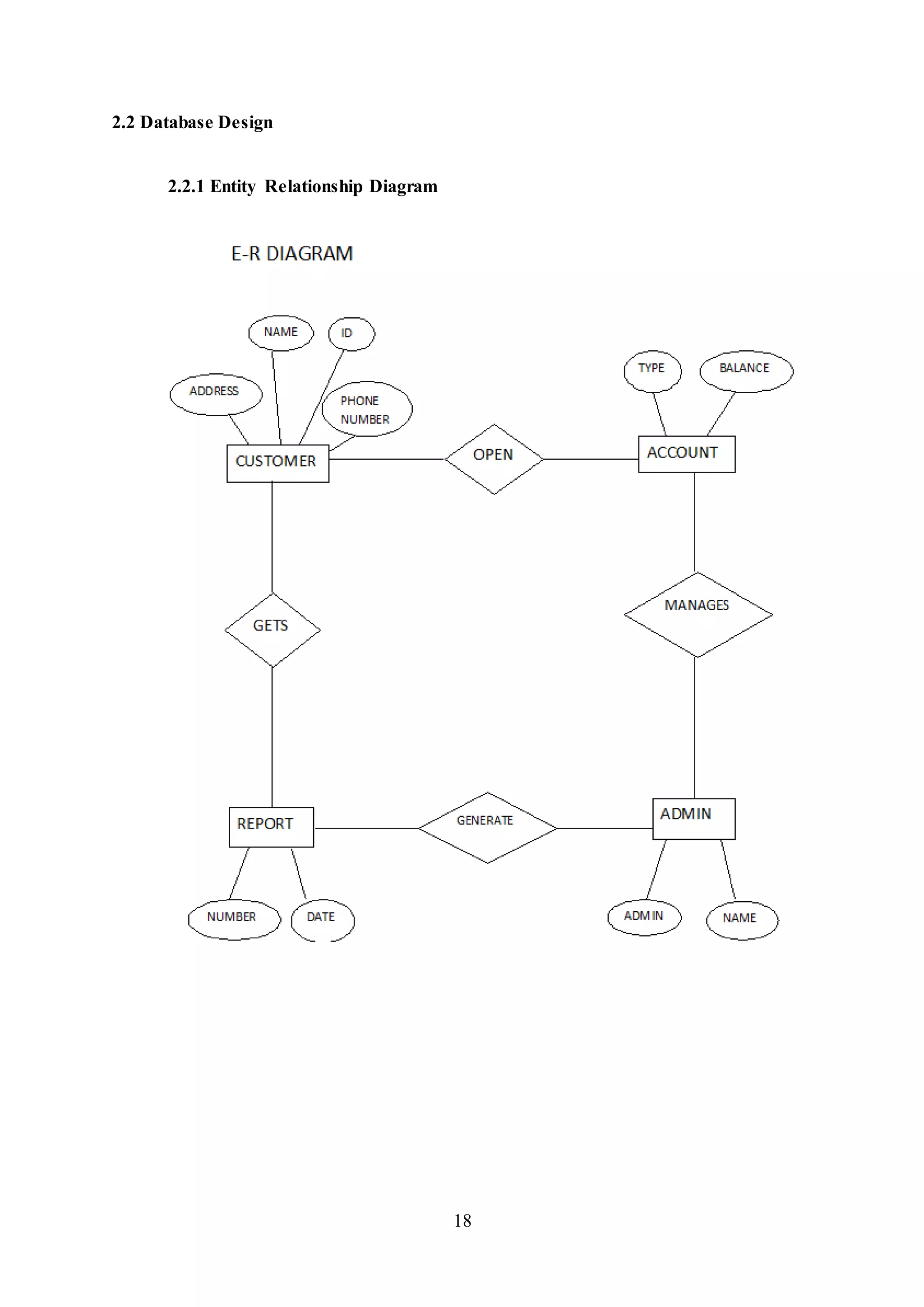
2.2 Database Design
2.2.1 Entity Relationship Diagram
19
Database description
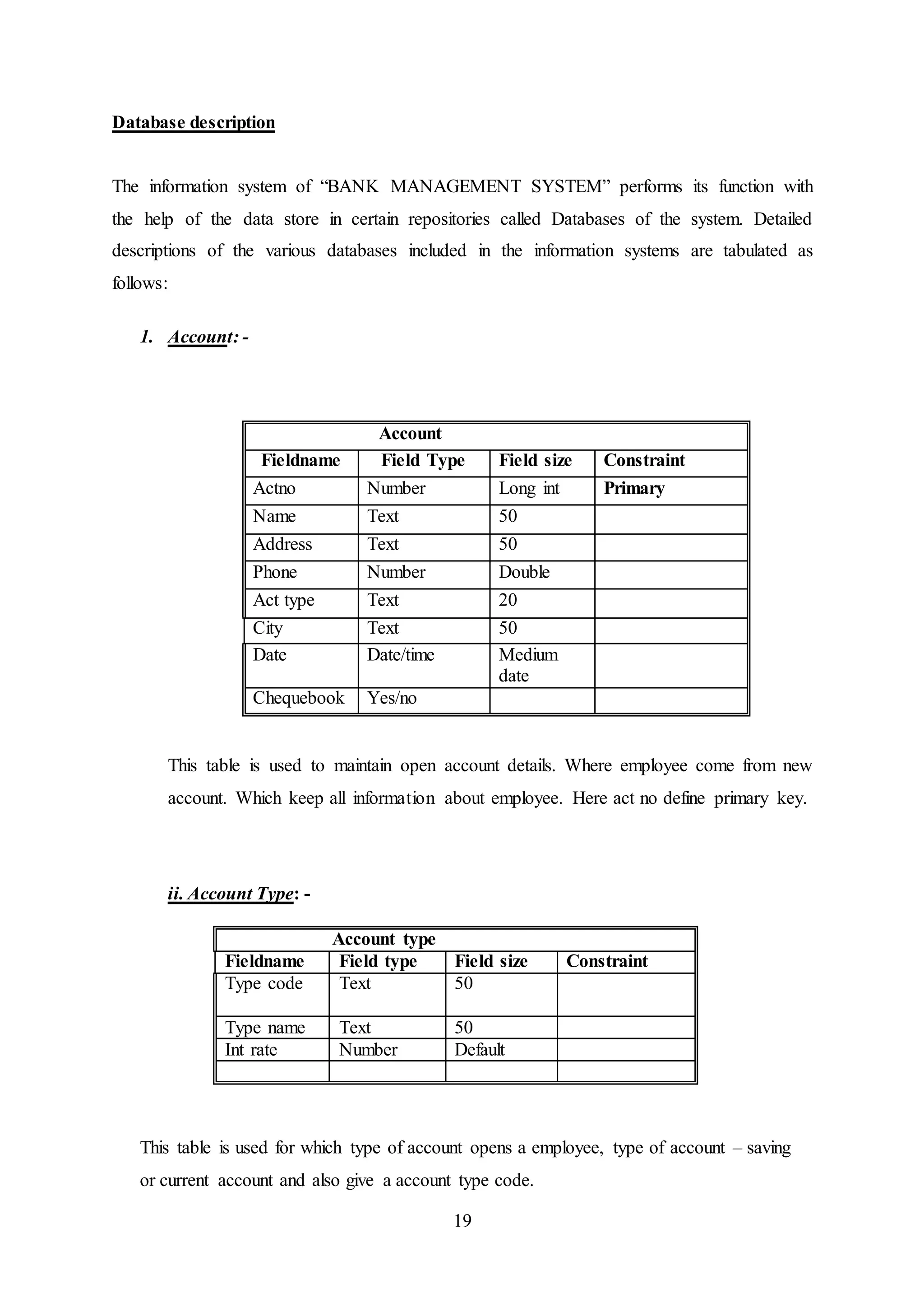
The information system of “BANK MANAGEMENT SYSTEM” performs its function with
the help of the data store in certain repositories called Databases of the system. Detailed
descriptions of the various databases included in the information systems are tabulated as
follows:
1. Account: -
This table is used to maintain open account details. Where employee come from new
account. Which keep all information about employee. Here act no define primary key.
ii. Account Type: -
Account type
Fieldname Field type Field size Constraint
Type code Text 50
Type name Text 50
Int rate Number Default
This table is used for which type of account opens a employee, type of account – saving
or current account and also give a account type code.
Account
Fieldname Field Type Field size Constraint
Actno Number Long int Primary
Name Text 50
Address Text 50
Phone Number Double
Act type Text 20
City Text 50
Date Date/time Medium
date
Chequebook Yes/no
20
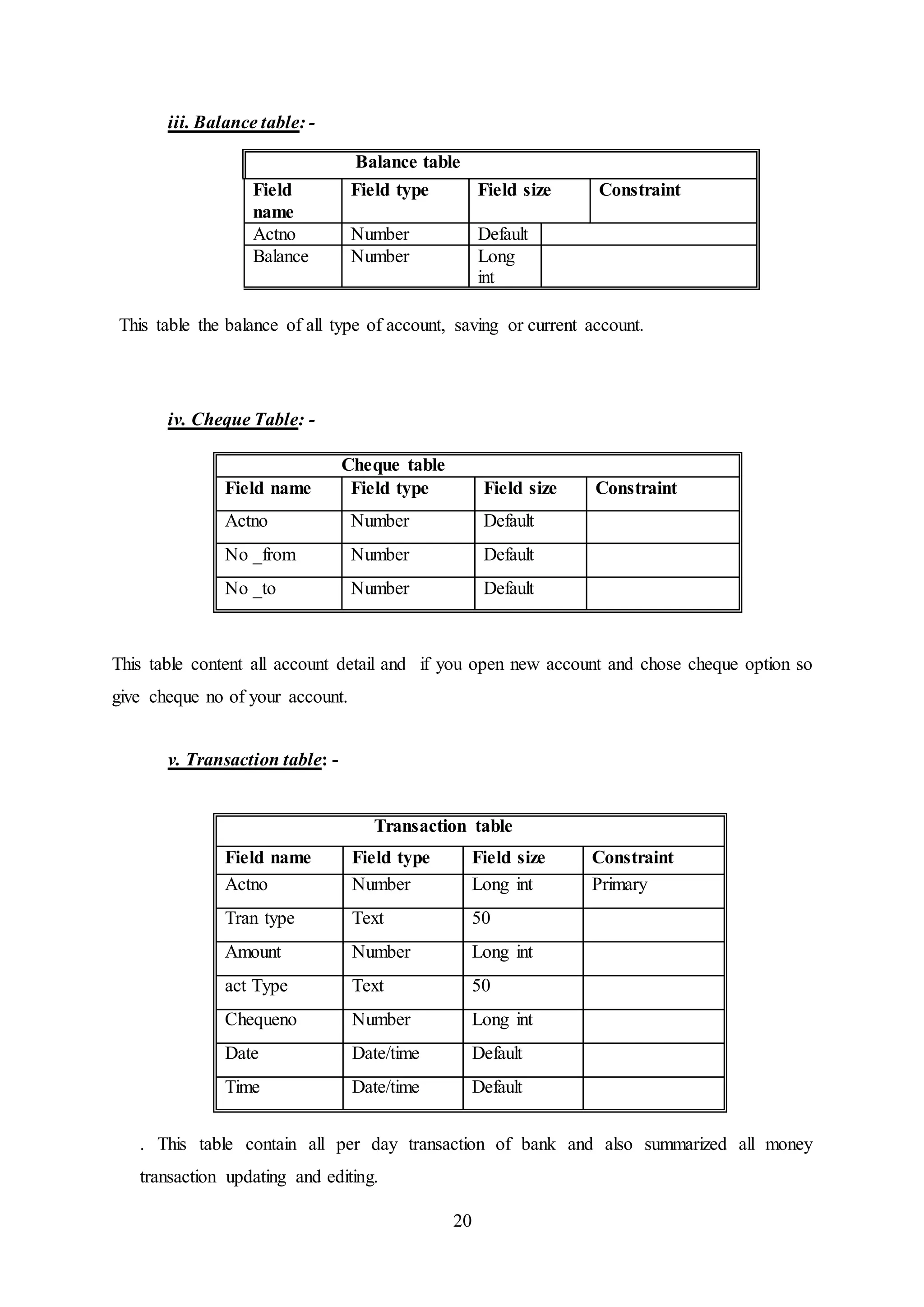
iii. Balance table: -
This table the balance of all type of account, saving or current account.
iv. Cheque Table: -
Cheque table
Field name Field type Field size Constraint
Actno Number Default
No _from Number Default
No _to Number Default
This table content all account detail and if you open new account and chose cheque option so
give cheque no of your account.
v. Transaction table: -
Transaction table
Field name Field type Field size Constraint
Actno Number Long int Primary
Tran type Text 50
Amount Number Long int
act Type Text 50
Chequeno Number Long int
Date Date/time Default
Time Date/time Default
. This table contain all per day transaction of bank and also summarized all money
transaction updating and editing.
Balance table
Field
name
Field type Field size Constraint
Actno Number Default
Balance Number Long
int
21
2.3. Interface Design
The interface design consists of the input and output source layouts. I.e. the input forms and
screens and the report layouts that form as a source of outcome and income in the design and
implementation of the information system under study
2.3.1. Output Design
BANK MANAGEMENT SYSTEM
22
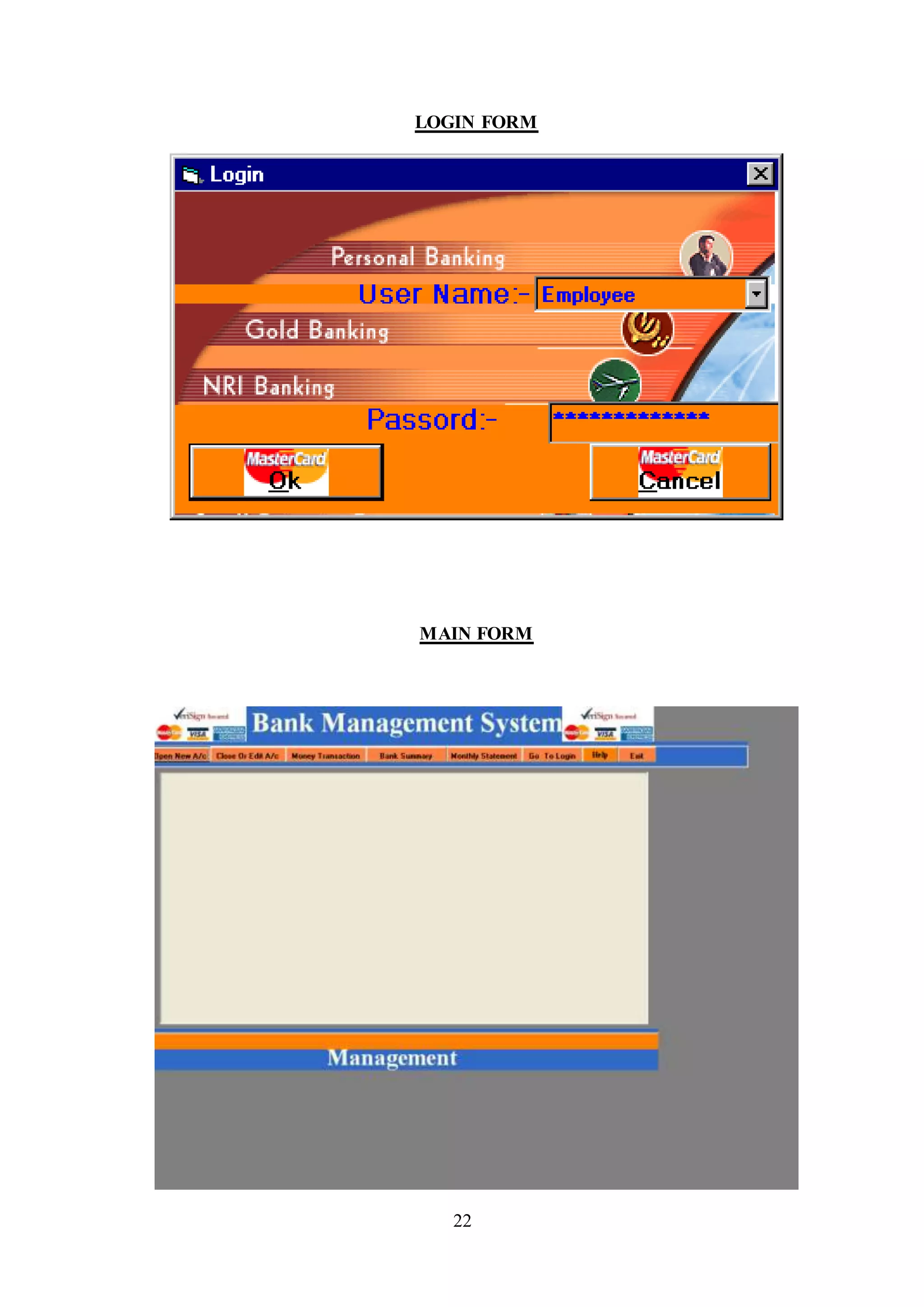
LOGIN FORM
MAIN FORM
23
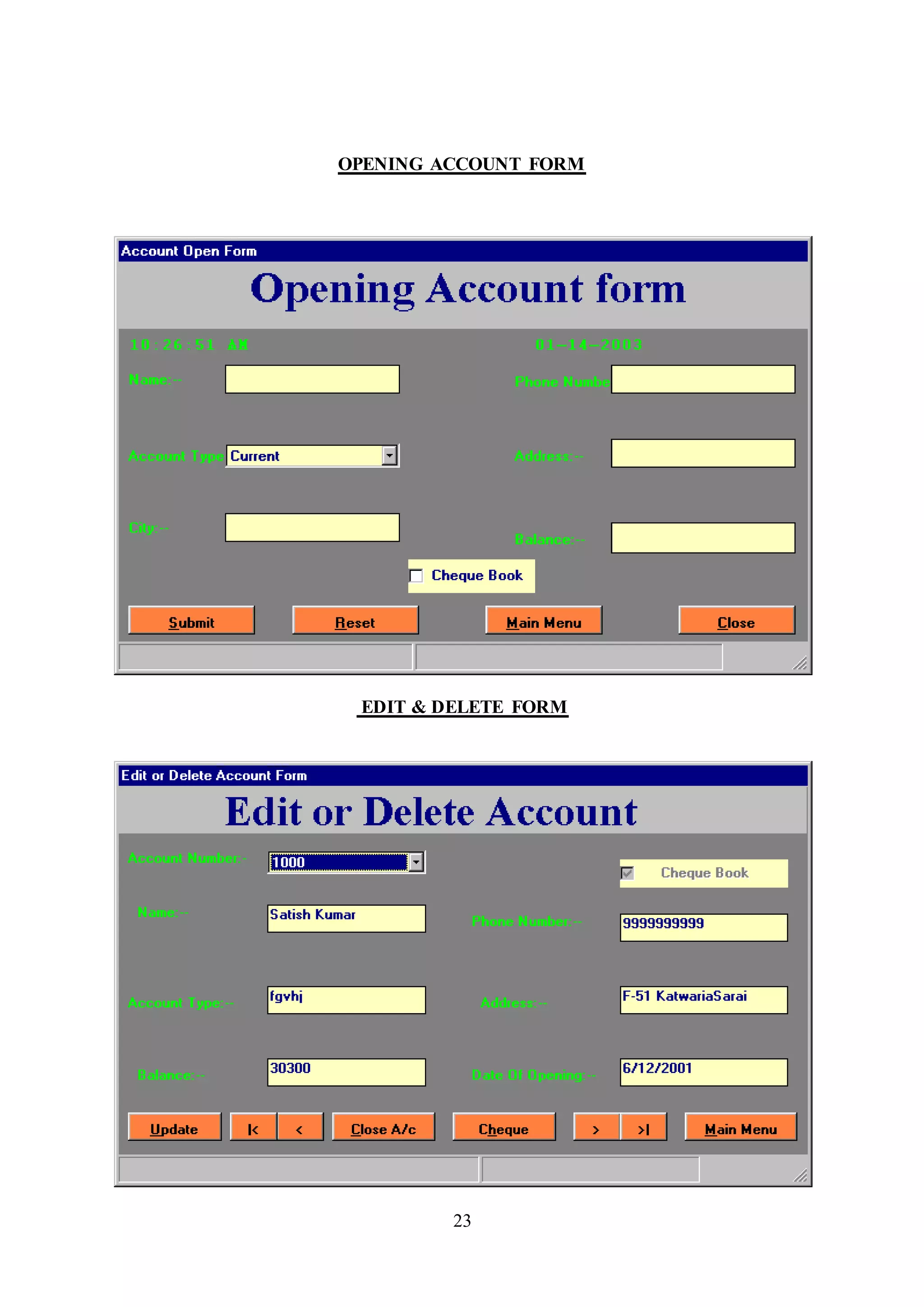
OPENING ACCOUNT FORM
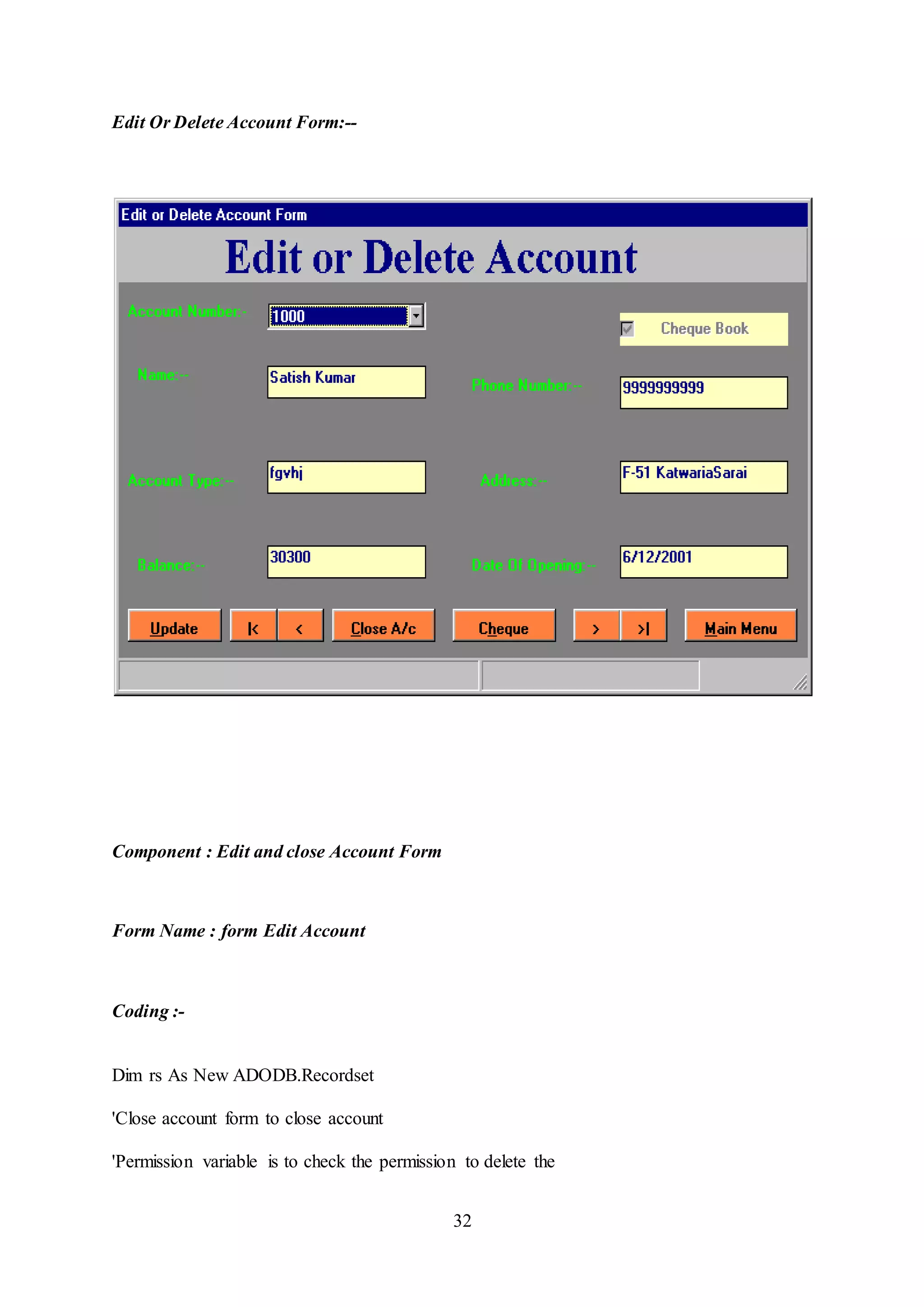
EDIT & DELETE FORM
24
Chapter 3:
SYSTEM DESIGN
3.1 Program Development
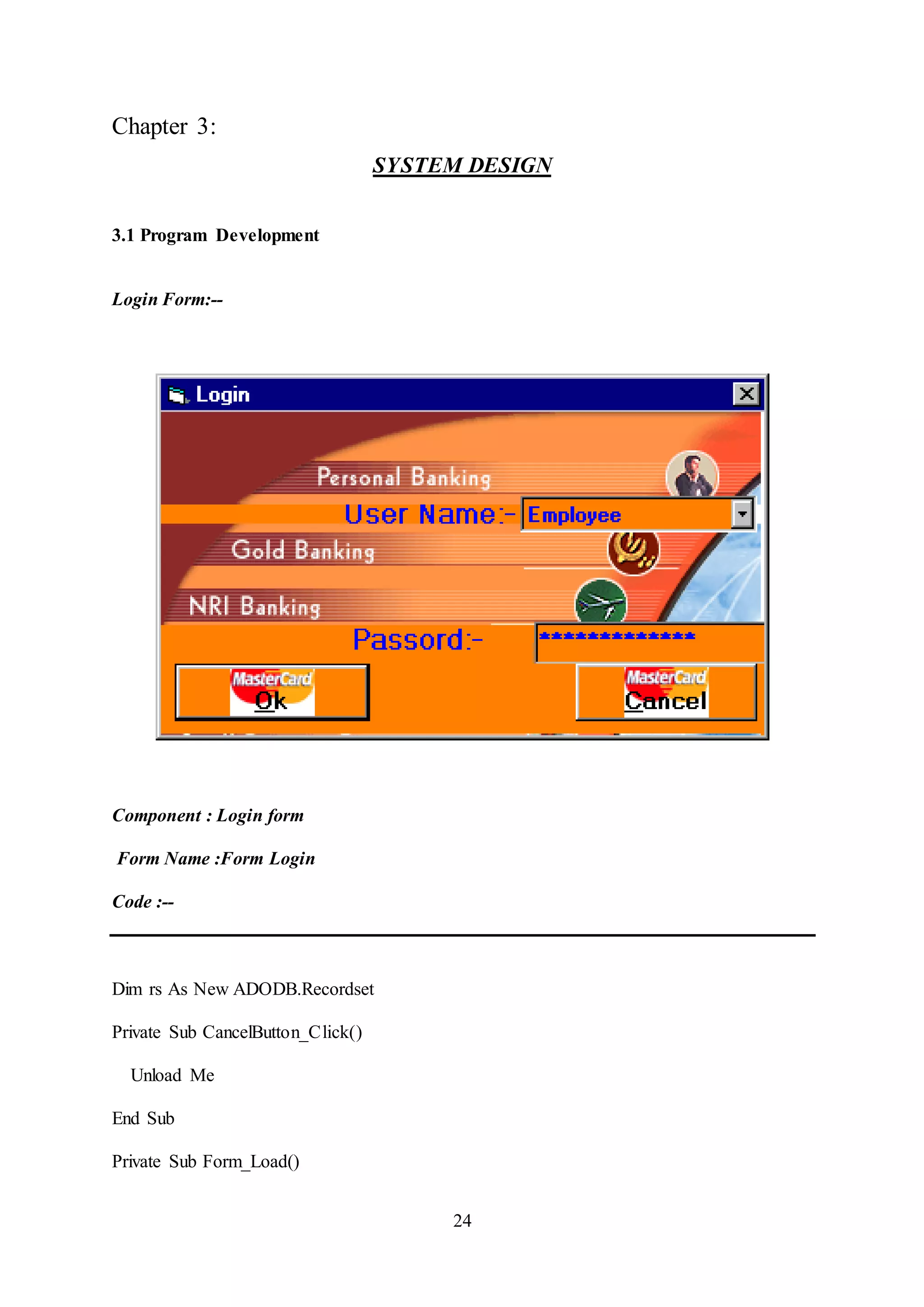
Login Form:--
Component : Login form
Form Name :Form Login
Code :--
Dim rs As New ADODB.Recordset
Private Sub CancelButton_Click()
Unload Me
End Sub
Private Sub Form_Load()
25
rs.ActiveConnection = cn
If rs.State = 1 Then rs.Close
rs.CursorLocation = adUseClient
rs.CursorType = adOpenKeyset
rs.LockType = adLockOptimistic
rs.Open "select * from Pass"
rs.MoveFirst
While Not rs.EOF = True
Combo1.AddItem rs(0)
rs.MoveNext
Wend
Combo1.ListIndex = 0
End Sub
Private Sub Frame1_DragDrop(Source As Control, X As Single, Y As Single)
End Sub
Private Sub OkButton_Click()
If rs.State = 1 Then rs.Close
rs.Open "select pswd from pass where name = '" & Combo1.Text & "'"
If rs!pswd = Text1.Text Then
Me.Caption = "Password Success"
GoTo 1
26
Else
Me.Caption = "Invalid Password"
Text1.Text = " "
Text1.SetFocus
Exit Sub
End If
1:
Call ShowForm
End Sub
27
Main Form:--
Component : Main form
Form Name frmMain
Coding :--
Private Sub AcButton_Click()
'Unload Me
Form2.Top = 3000
Form2.Left = 4000
Form2.Show
End Sub
28
Private Sub AcClButton_Click()
'Unload Me
Form3.Top = 3000
Form3.Left = 4000
Form3.Show
End Sub
Private Sub BackButton_Click()
'Unload Me
LoginForm.Top = 3000
LoginForm.Left = 4000
LoginForm.Show
End Sub
Private Sub BnkButton_Click()
'Unload Me
Form5.Top = 3000
Form5.Left = 4000
Form5.Show
End Sub
Private Sub ExButton_Click()
Unload Me
End Sub
29
Open Account Form:--
Component : Open Account Form
Form name Form open
Coding :-
Dim rs As New ADODB.Recordset
Dim MaxNo As Long
Dim a As Integer
Private Sub Check1_Click()
End Sub
30
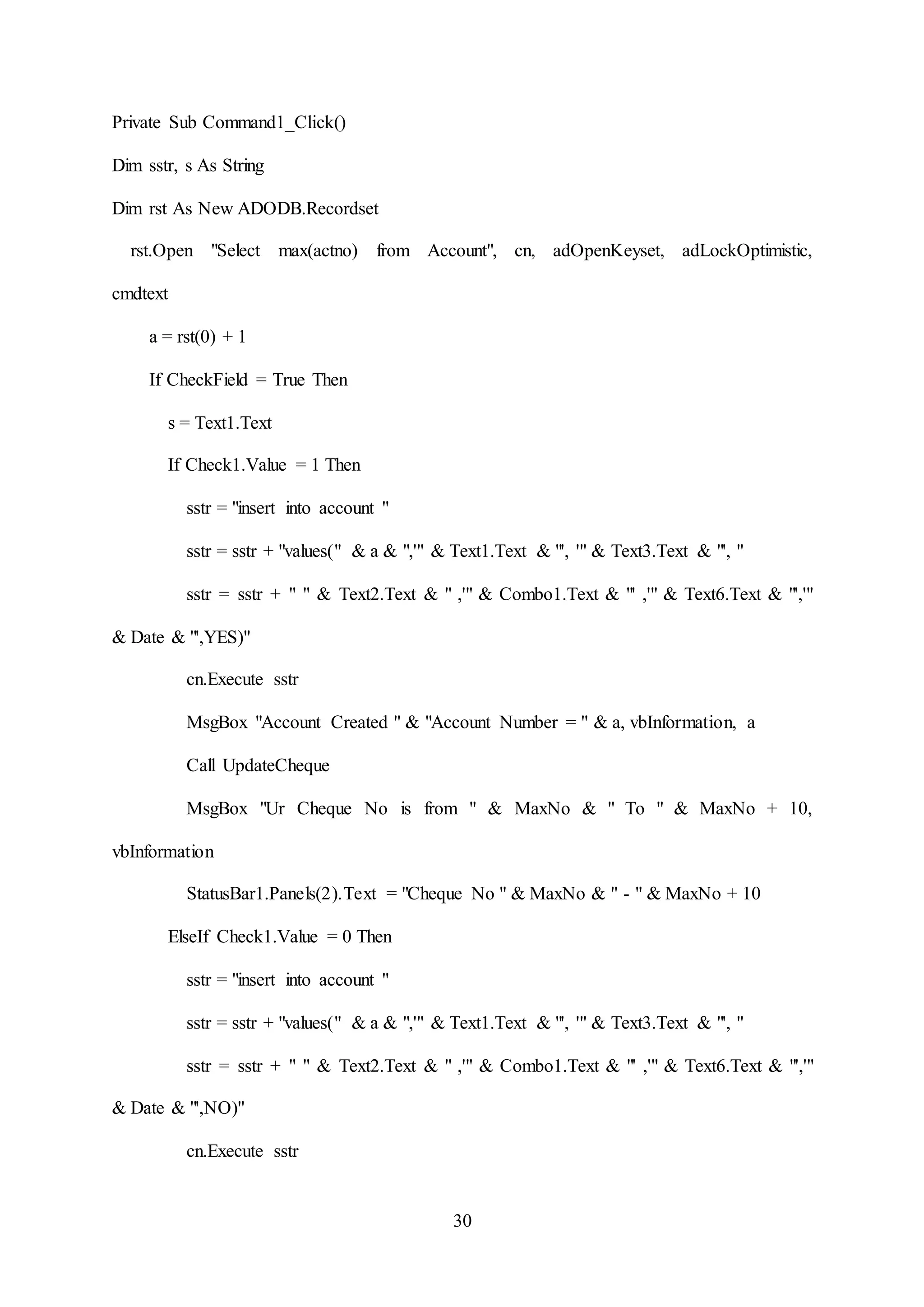
Private Sub Command1_Click()
Dim sstr, s As String
Dim rst As New ADODB.Recordset
rst.Open "Select max(actno) from Account", cn, adOpenKeyset, adLockOptimistic,
cmdtext
a = rst(0) + 1
If CheckField = True Then
s = Text1.Text
If Check1.Value = 1 Then
sstr = "insert into account "
sstr = sstr + "values(" & a & ",'" & Text1.Text & "', '" & Text3.Text & "', "
sstr = sstr + " " & Text2.Text & " ,'" & Combo1.Text & "' ,'" & Text6.Text & "','"
& Date & "',YES)"
cn.Execute sstr
MsgBox "Account Created " & "Account Number = " & a, vbInformation, a
Call UpdateCheque
MsgBox "Ur Cheque No is from " & MaxNo & " To " & MaxNo + 10,
vbInformation
StatusBar1.Panels(2).Text = "Cheque No " & MaxNo & " - " & MaxNo + 10
ElseIf Check1.Value = 0 Then
sstr = "insert into account "
sstr = sstr + "values(" & a & ",'" & Text1.Text & "', '" & Text3.Text & "', "
sstr = sstr + " " & Text2.Text & " ,'" & Combo1.Text & "' ,'" & Text6.Text & "','"
& Date & "',NO)"
cn.Execute sstr
31
MsgBox "Account Created " & "Account Number = " & a, vbInformation, a
StatusBar1.Panels(2).Text = "Cheque Book Not Issued"
End If
Call AddDeposite
StatusBar1.Panels(1).Text = "Hello " & s & " " & a
Call ClearField
End If
rst.Close
End Sub
32
Edit Or Delete Account Form:--
Component : Edit and close Account Form
Form Name : form Edit Account
Coding :-
Dim rs As New ADODB.Recordset
'Close account form to close account
'Permission variable is to check the permission to delete the
33
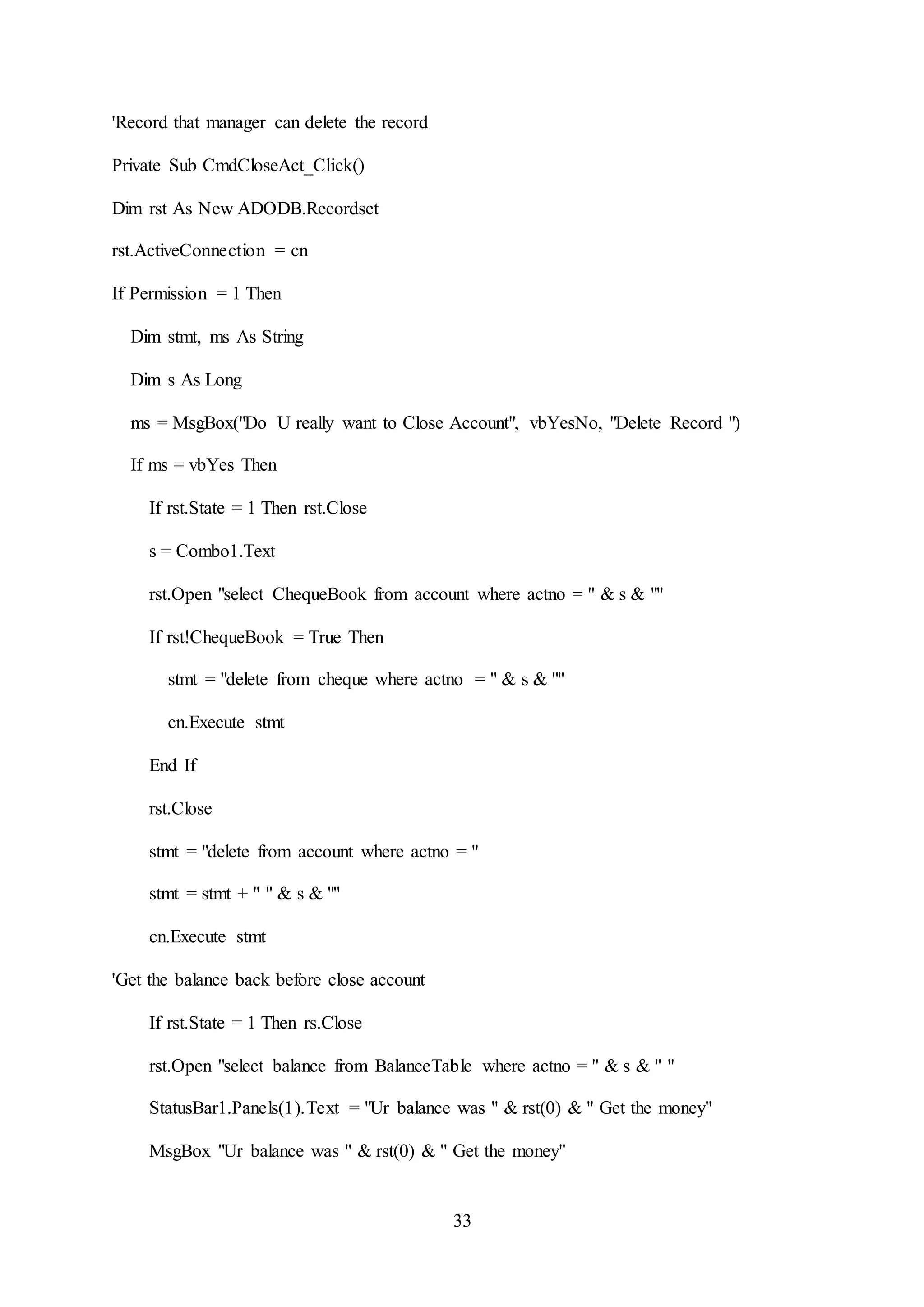
'Record that manager can delete the record
Private Sub CmdCloseAct_Click()
Dim rst As New ADODB.Recordset
rst.ActiveConnection = cn
If Permission = 1 Then
Dim stmt, ms As String
Dim s As Long
ms = MsgBox("Do U really want to Close Account", vbYesNo, "Delete Record ")
If ms = vbYes Then
If rst.State = 1 Then rst.Close
s = Combo1.Text
rst.Open "select ChequeBook from account where actno = " & s & ""
If rst!ChequeBook = True Then
stmt = "delete from cheque where actno = " & s & ""
cn.Execute stmt
End If
rst.Close
stmt = "delete from account where actno = "
stmt = stmt + " " & s & ""
cn.Execute stmt
'Get the balance back before close account
If rst.State = 1 Then rs.Close
rst.Open "select balance from BalanceTable where actno = " & s & " "
StatusBar1.Panels(1).Text = "Ur balance was " & rst(0) & " Get the money"
MsgBox "Ur balance was " & rst(0) & " Get the money"
34
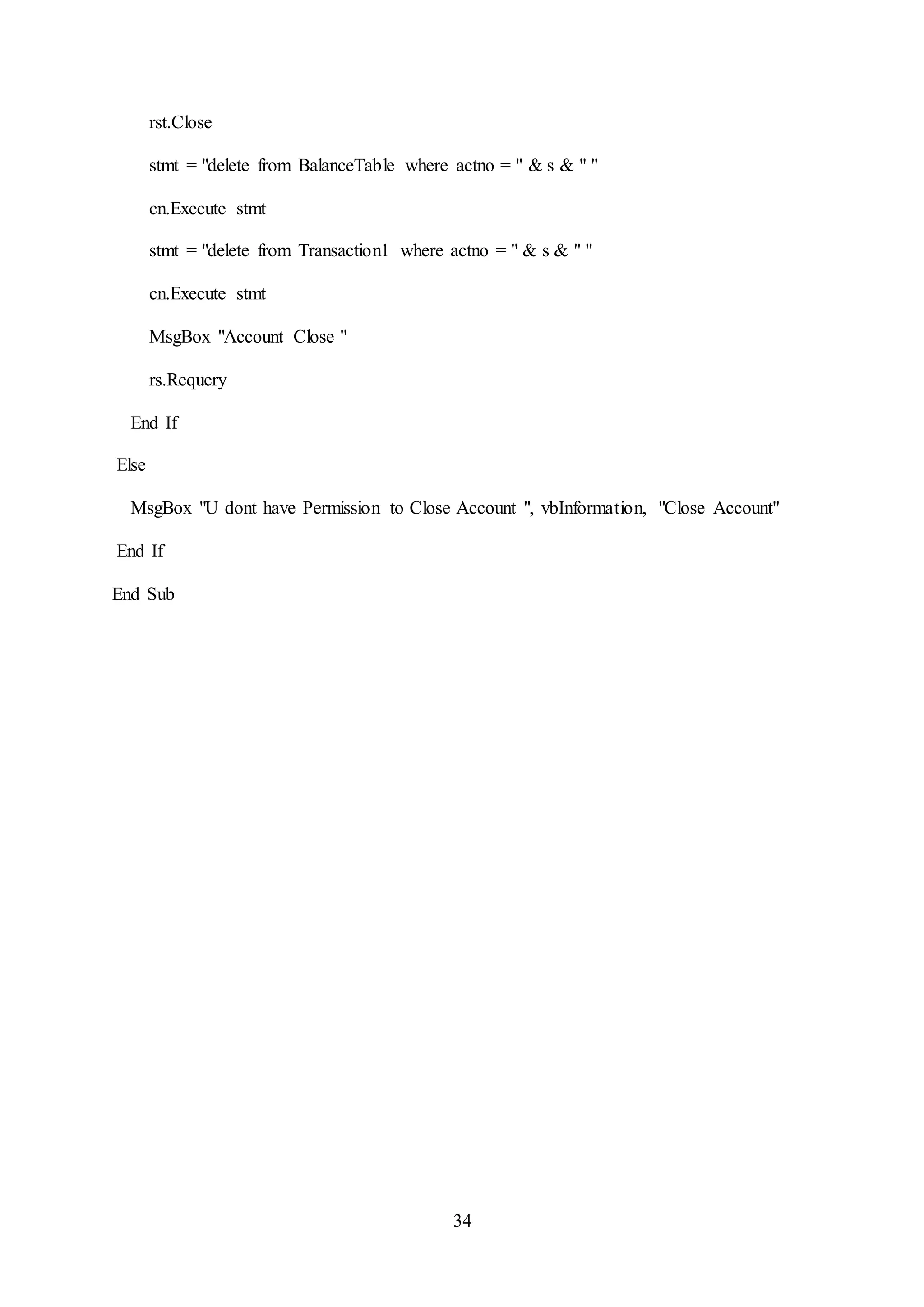
rst.Close
stmt = "delete from BalanceTable where actno = " & s & " "
cn.Execute stmt
stmt = "delete from Transaction1 where actno = " & s & " "
cn.Execute stmt
MsgBox "Account Close "
rs.Requery
End If
Else
MsgBox "U dont have Permission to Close Account ", vbInformation, "Close Account"
End If
End Sub
35
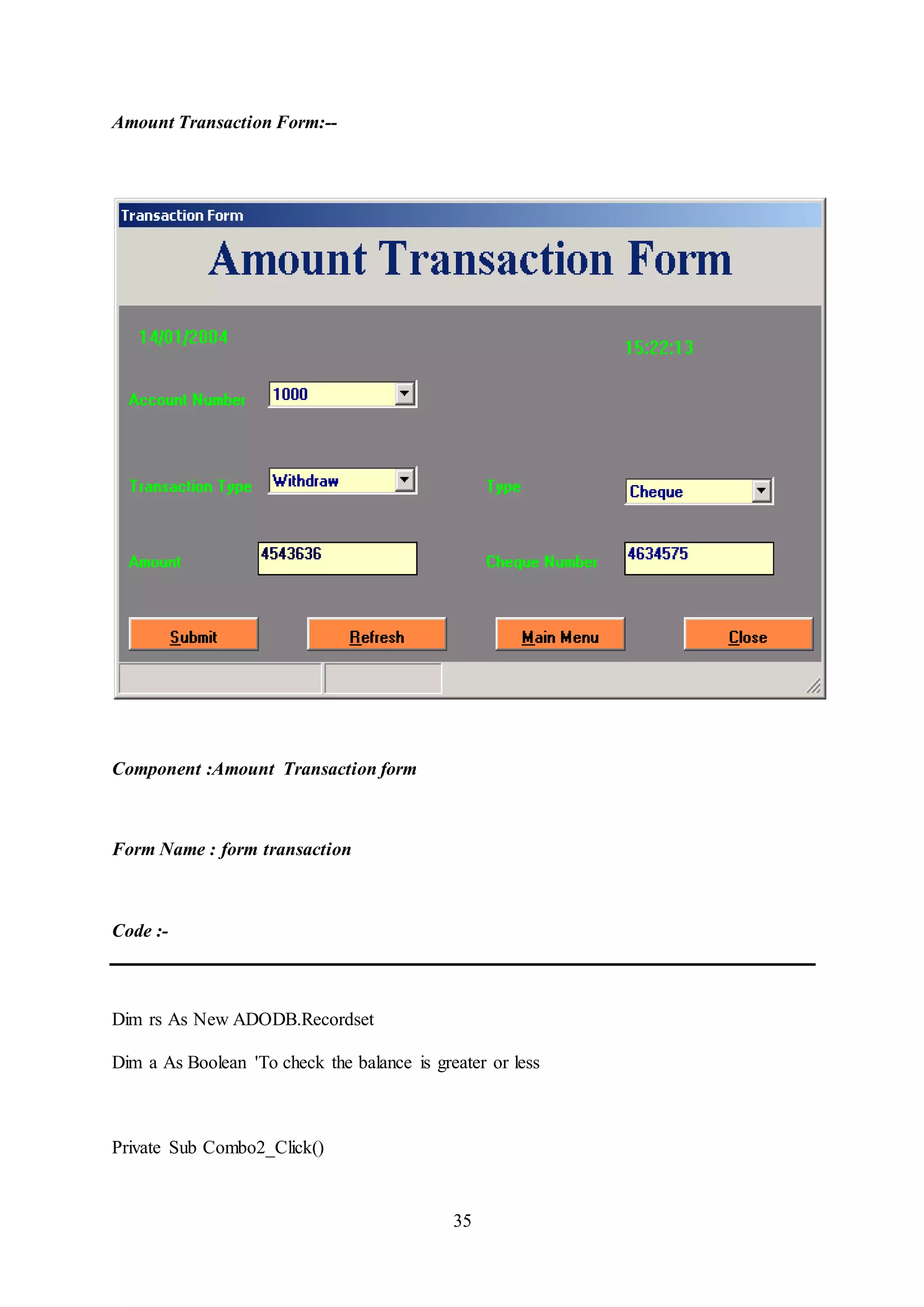
Amount Transaction Form:--
Component :Amount Transaction form
Form Name : form transaction
Code :-
Dim rs As New ADODB.Recordset
Dim a As Boolean 'To check the balance is greater or less
Private Sub Combo2_Click()
36
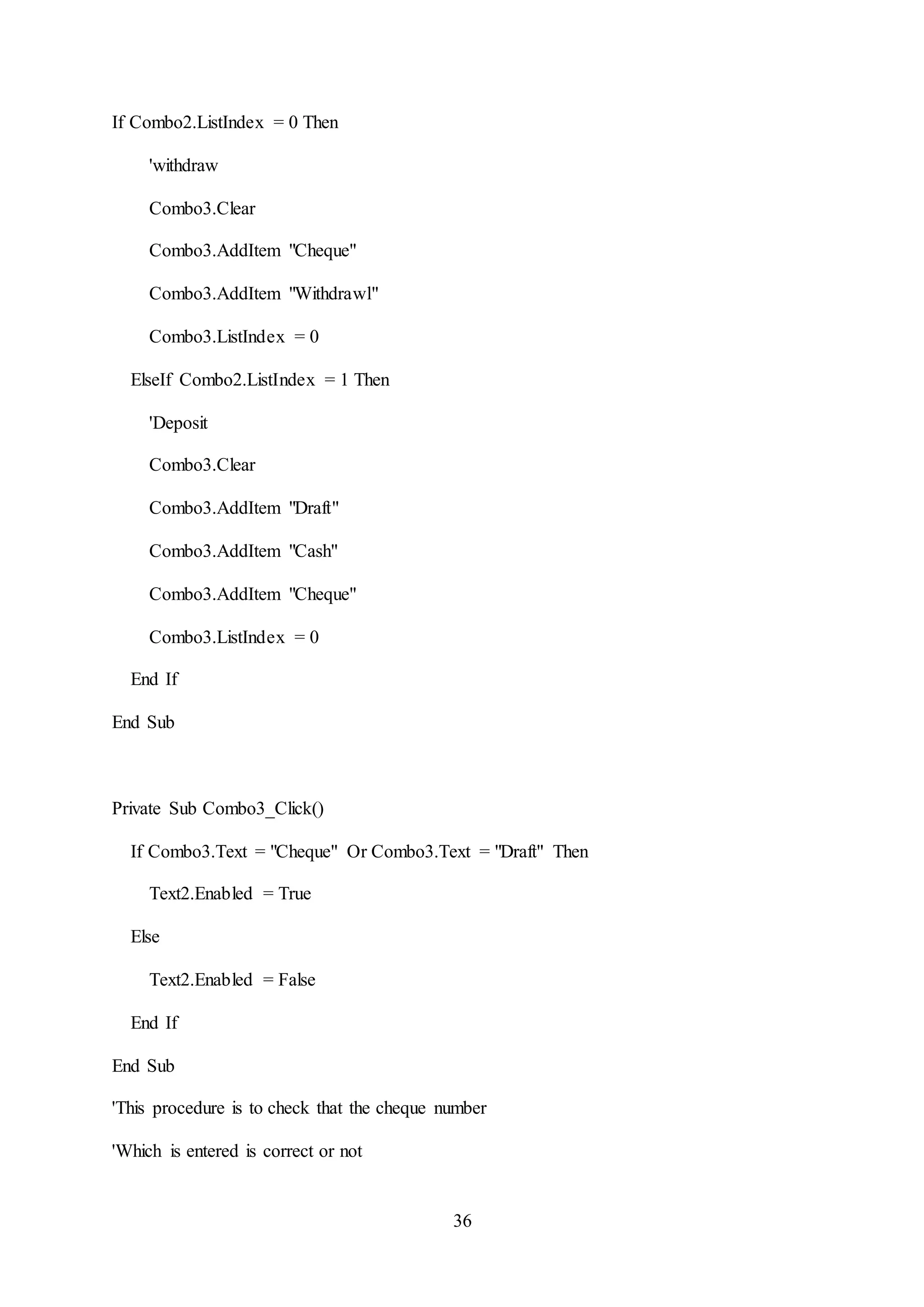
If Combo2.ListIndex = 0 Then
'withdraw
Combo3.Clear
Combo3.AddItem "Cheque"
Combo3.AddItem "Withdrawl"
Combo3.ListIndex = 0
ElseIf Combo2.ListIndex = 1 Then
'Deposit
Combo3.Clear
Combo3.AddItem "Draft"
Combo3.AddItem "Cash"
Combo3.AddItem "Cheque"
Combo3.ListIndex = 0
End If
End Sub
Private Sub Combo3_Click()
If Combo3.Text = "Cheque" Or Combo3.Text = "Draft" Then
Text2.Enabled = True
Else
Text2.Enabled = False
End If
End Sub
'This procedure is to check that the cheque number
'Which is entered is correct or not
37
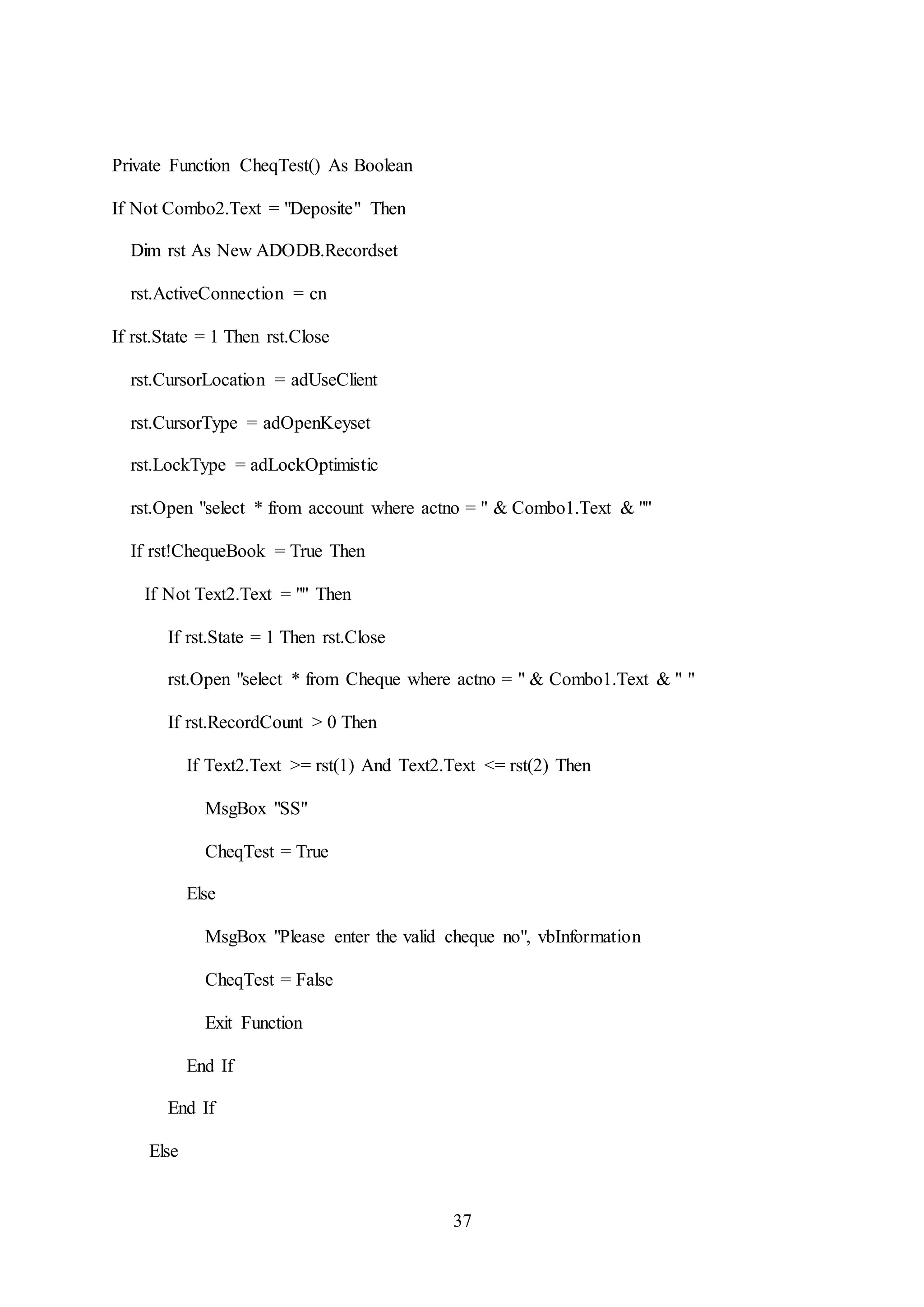
Private Function CheqTest() As Boolean
If Not Combo2.Text = "Deposite" Then
Dim rst As New ADODB.Recordset
rst.ActiveConnection = cn
If rst.State = 1 Then rst.Close
rst.CursorLocation = adUseClient
rst.CursorType = adOpenKeyset
rst.LockType = adLockOptimistic
rst.Open "select * from account where actno = " & Combo1.Text & ""
If rst!ChequeBook = True Then
If Not Text2.Text = "" Then
If rst.State = 1 Then rst.Close
rst.Open "select * from Cheque where actno = " & Combo1.Text & " "
If rst.RecordCount > 0 Then
If Text2.Text >= rst(1) And Text2.Text <= rst(2) Then
MsgBox "SS"
CheqTest = True
Else
MsgBox "Please enter the valid cheque no", vbInformation
CheqTest = False
Exit Function
End If
End If
Else
38
MsgBox "U will have to select Cheque and enter cheque number ", vbInformation
CheqTest = False
Exit Function
End If
Else
CheqTest = True
End If
Else
CheqTest = True
End If
End Function
'This is the submit button command button that is
'To submit the transaction in the transaction table
'After checking the appropriate field
Private Sub Command1_Click()
Dim sstr As String
If Not Text1.Text = "" Or Val(Text1.Text) < 100 Then
If Text2.Text = "" Then
Text2.Text = 0
End If
sstr = "Insert into Transaction1 values("
sstr = sstr + " " & Combo1.Text & ",'" & Combo2.Text & "',"
sstr = sstr + "" & Text1.Text & ",'" & Combo3.Text & "'"
sstr = sstr + "," & Text2.Text & ",'" & Date & "','" & Time & "')"
39
If CheqTest = True Then
Call UpdateMoney
If a = True Then
cn.Execute sstr
StatusBar1.Panels(1).Text = "Money " & Combo2.Text & " Success"
MsgBox "Money " & Combo2.Text & " Success"
End If
a = False
End If
Call ClearField
Else
MsgBox "please Enter Lease 100 Transaction Amount ", vbInformation
End If
End Sub
'This is to Update the balance in database
Private Sub UpdateMoney()
Dim rst As New ADODB.Recordset
Dim stmt As String
Dim d As Long
If rst.State = 1 Then rst.Close
rst.Open "select * from BalanceTable where actno = " & Combo1.Text & "", cn,
adOpenKeyset, adLockOptimistic, cmdtext
If Combo2.Text = "Deposite" Then
d = rst!balance + Val(Text1.Text)
40
stmt = "update BalanceTable set balance = " & d & ""
stmt = stmt + " where actno = " & Combo1.Text & ""
cn.Execute stmt
a = True
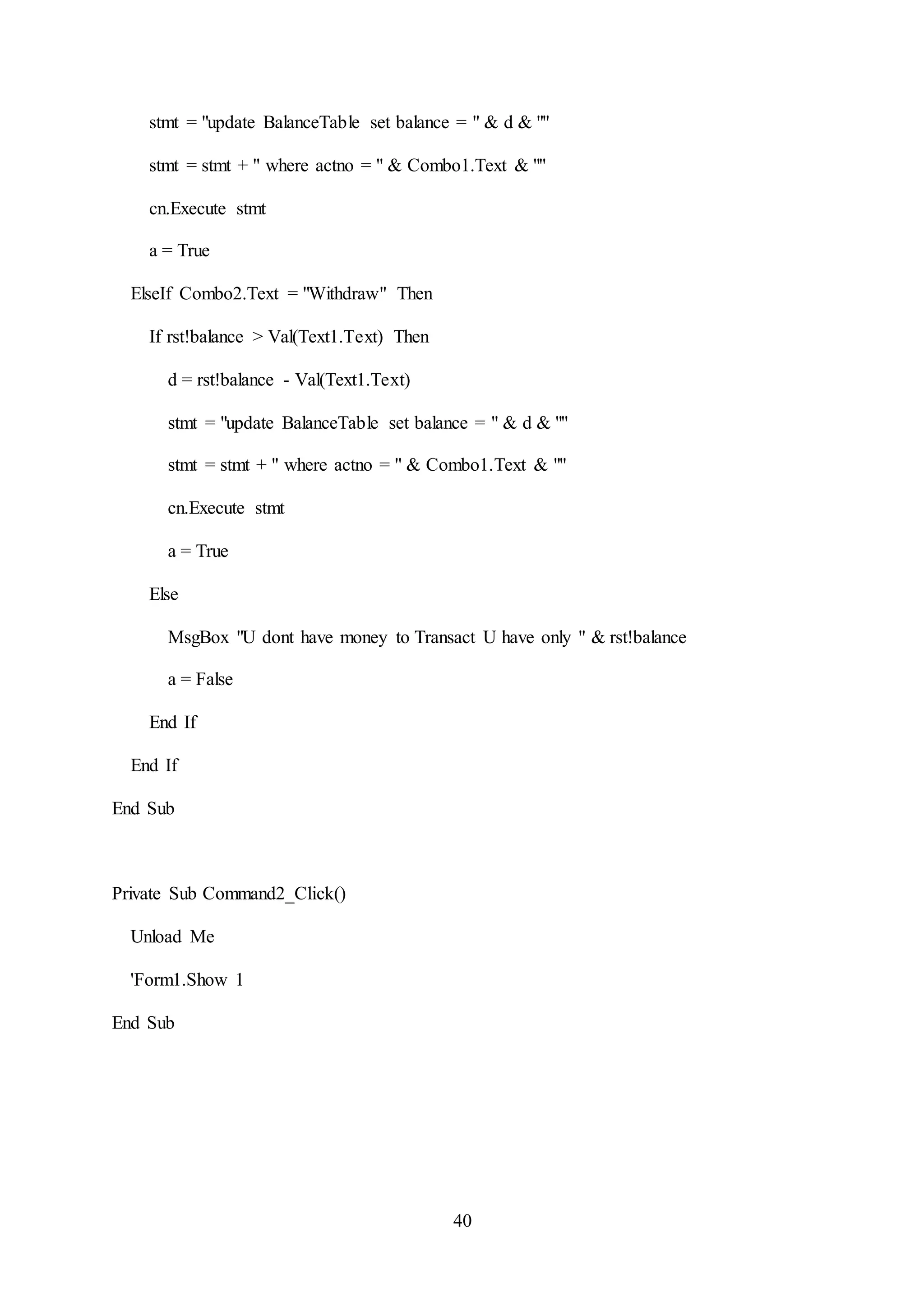
ElseIf Combo2.Text = "Withdraw" Then
If rst!balance > Val(Text1.Text) Then
d = rst!balance - Val(Text1.Text)
stmt = "update BalanceTable set balance = " & d & ""
stmt = stmt + " where actno = " & Combo1.Text & ""
cn.Execute stmt
a = True
Else
MsgBox "U dont have money to Transact U have only " & rst!balance
a = False
End If
End If
End Sub
Private Sub Command2_Click()
Unload Me
'Form1.Show 1
End Sub
41
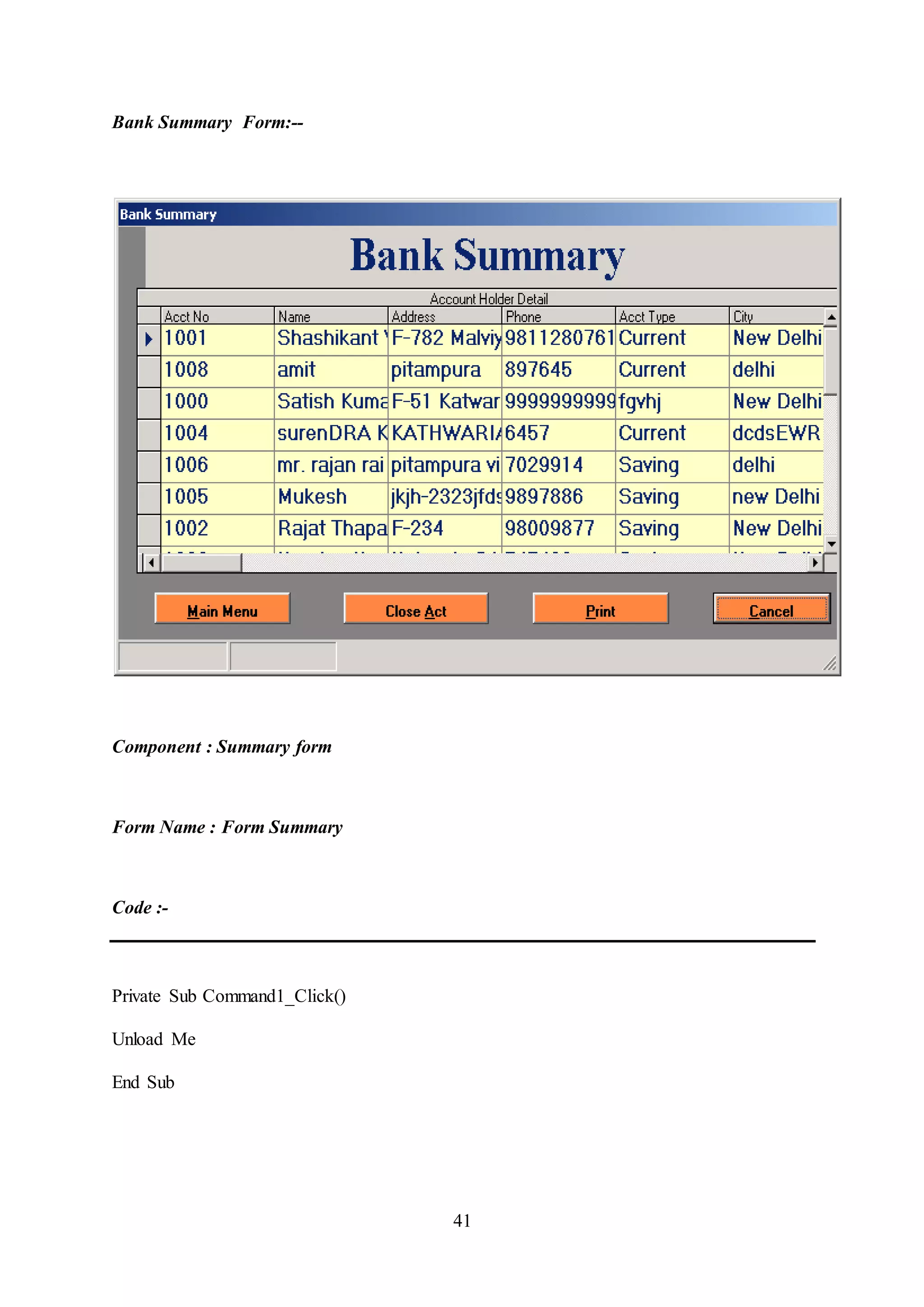
Bank Summary Form:--
Component : Summary form
Form Name : Form Summary
Code :-
Private Sub Command1_Click()
Unload Me
End Sub
42
Private Sub Command2_Click()
Unload Me
Form1.Show 1
End Sub
Private Sub Command3_Click()
SummaryRept.Refresh
DataEnvironment1.rsCommand2.Requery
SummaryRept.Show
End Sub
Private Sub DataGrid1_Click()
End Sub
Private Sub Form_Load()
Adodc1.Refresh
End Sub
43
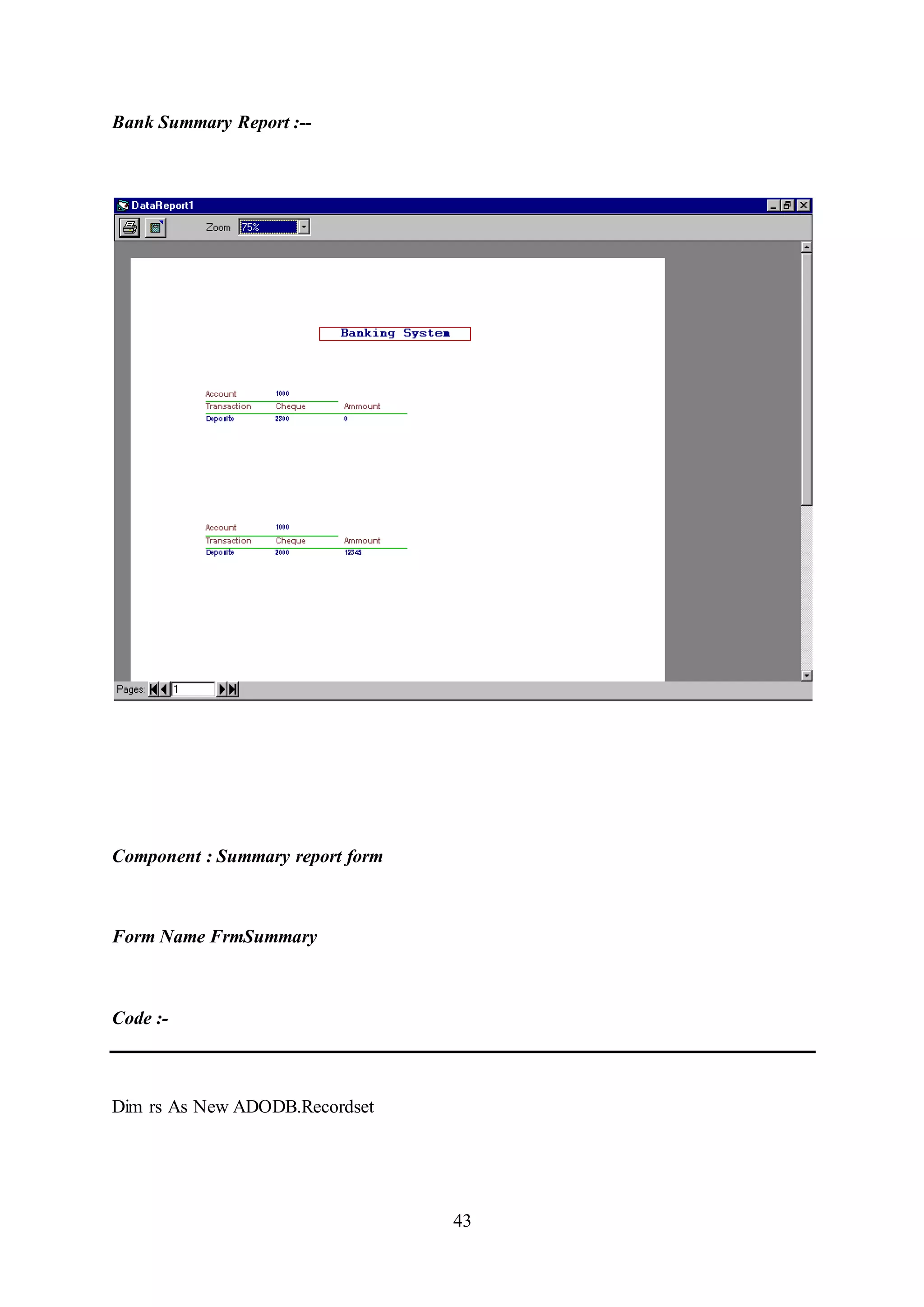
Bank Summary Report :--
Component : Summary report form
Form Name FrmSummary
Code :-
Dim rs As New ADODB.Recordset
44
Private Sub DataReport_Activate()
'rs.Open "select Balance from BalanceTable where actno = " & txtActno & "", cn,
adOpenKeyset, adLockOptimistic, cmdtext
'Text1 = rs(0)
'rs.Close
End Sub
Private Sub DataReport_Error(ByVal JobType As MSDataReportLib.AsyncTypeConstants,
ByVal Cookie As Long, ByVal ErrObj As MSDataReportLib.RptError, ShowError As
Boolean)
On Error Resume Next
End Sub
45
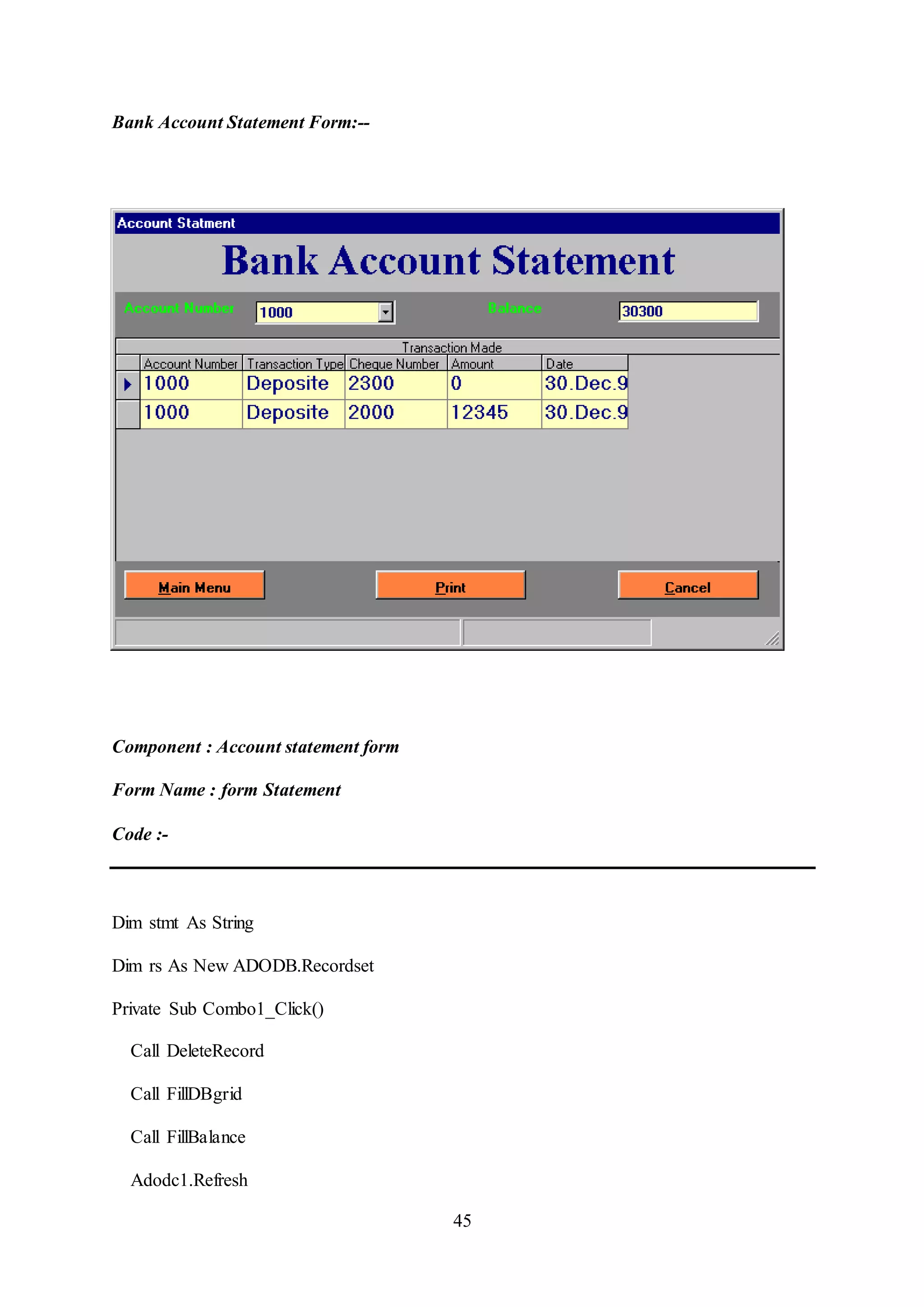
Bank Account Statement Form:--
Component : Account statement form
Form Name : form Statement
Code :-
Dim stmt As String
Dim rs As New ADODB.Recordset
Private Sub Combo1_Click()
Call DeleteRecord
Call FillDBgrid
Call FillBalance
Adodc1.Refresh
46
DataGrid1.Refresh
End Sub
Private Sub Command1_Click()
Unload Me
'Form1.Show 1
End Sub
Private Sub Command2_Click()
Unload Me
End Sub
Private Sub Command3_Click()
If DataEnvironment1.rsCommand1.State = 1 Then DataEnvironment1.rsCommand1.Close
DataEnvironment1.rsCommand1.Open "select * from Temptable", cn, adOpenKeyset,
adLockOptimistic, cmdtext
DataEnvironment1.rsCommand1.Requery
StatmentRept.Refresh
StatmentRept.Show
End Sub
Private Sub DataGrid1_Click()
End Sub
47
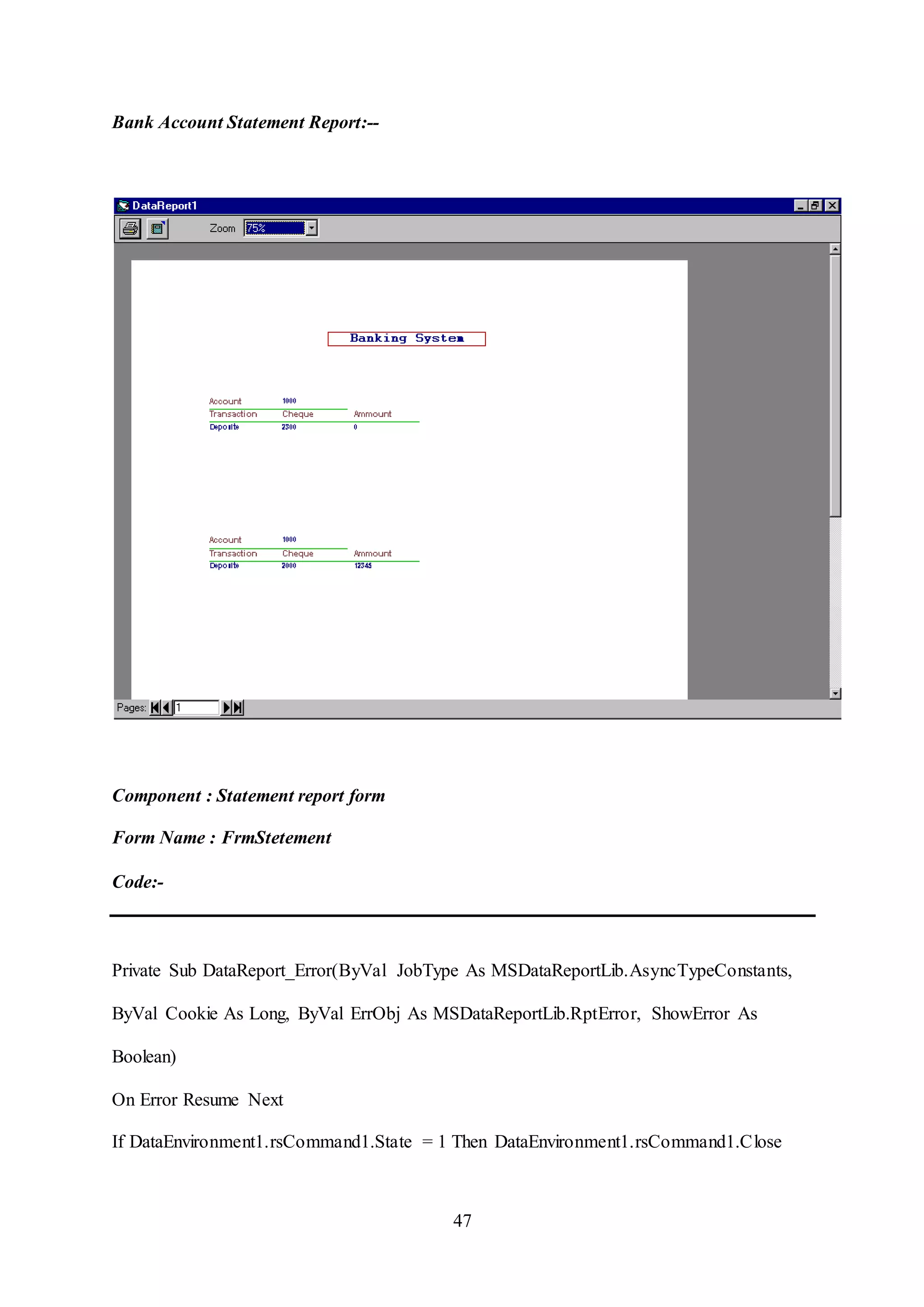
Bank Account Statement Report:--
Component : Statement report form
Form Name : FrmStetement
Code:-
Private Sub DataReport_Error(ByVal JobType As MSDataReportLib.AsyncTypeConstants,
ByVal Cookie As Long, ByVal ErrObj As MSDataReportLib.RptError, ShowError As
Boolean)
On Error Resume Next
If DataEnvironment1.rsCommand1.State = 1 Then DataEnvironment1.rsCommand1.Close
48
'DataEnvironment1.rsCommand1.Open "select * from Temptable", cn, adOpenKeyset,
adLockOptimistic, cmdtext
DataEnvironment1.rsCommand1.Requery
StatmentRept.Refresh
End Sub
Private Sub DataReport_Initialize()
On Error Resume Next
If DataEnvironment1.rsCommand1.State = 1 Then DataEnvironment1.rsCommand1.Close
DataEnvironment1.rsCommand1.Open "select * from Temptable", cn, adOpenKeyset,
adLockOptimistic, cmdtext
DataEnvironment1.rsCommand1.Requery
StatmentRept.Refresh
End Sub
49
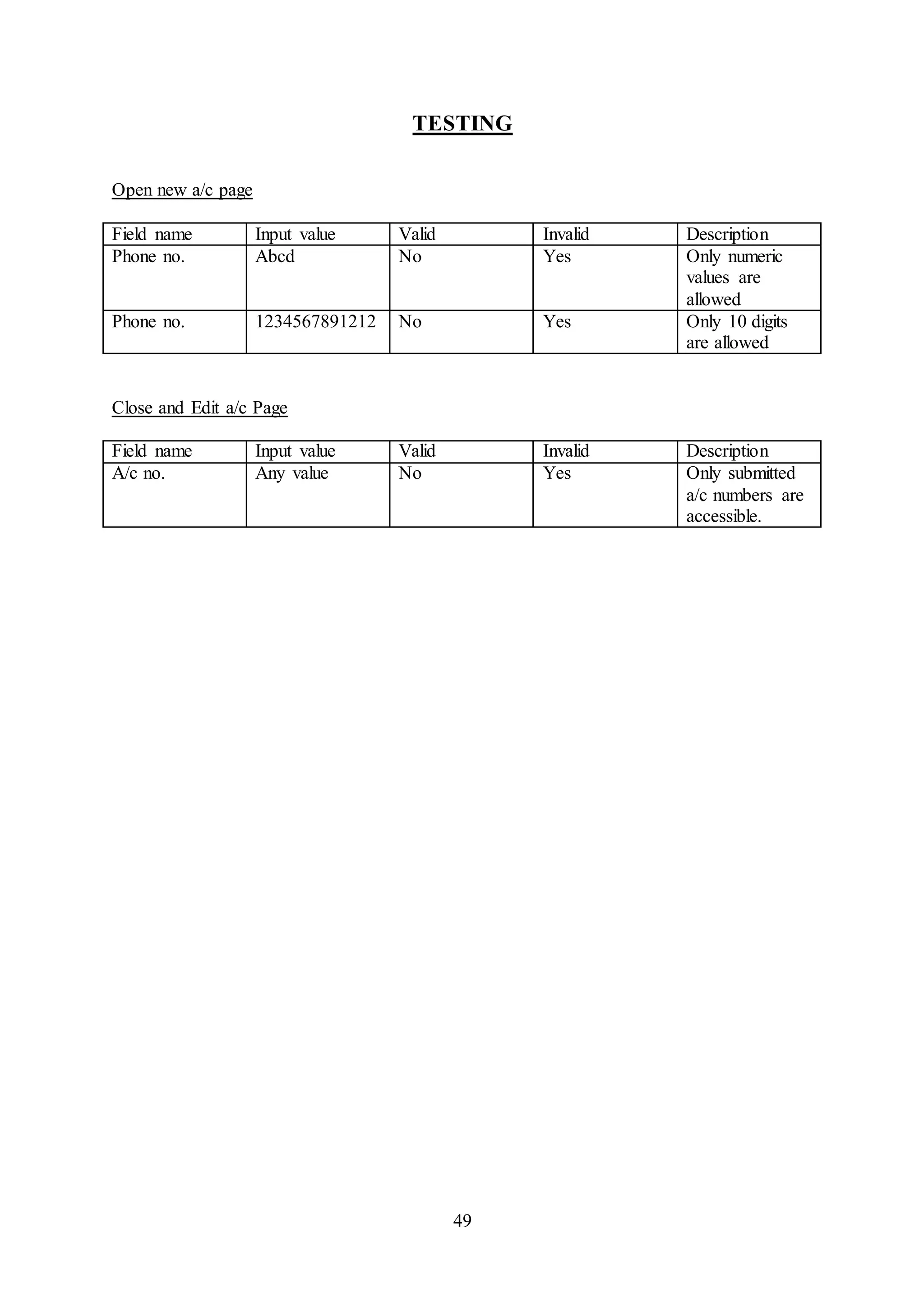
TESTING
Open new a/c page
Field name Input value Valid Invalid Description
Phone no. Abcd No Yes Only numeric
values are
allowed
Phone no. 1234567891212 No Yes Only 10 digits
are allowed
Close and Edit a/c Page
Field name Input value Valid Invalid Description
A/c no. Any value No Yes Only submitted
a/c numbers are
accessible.
50
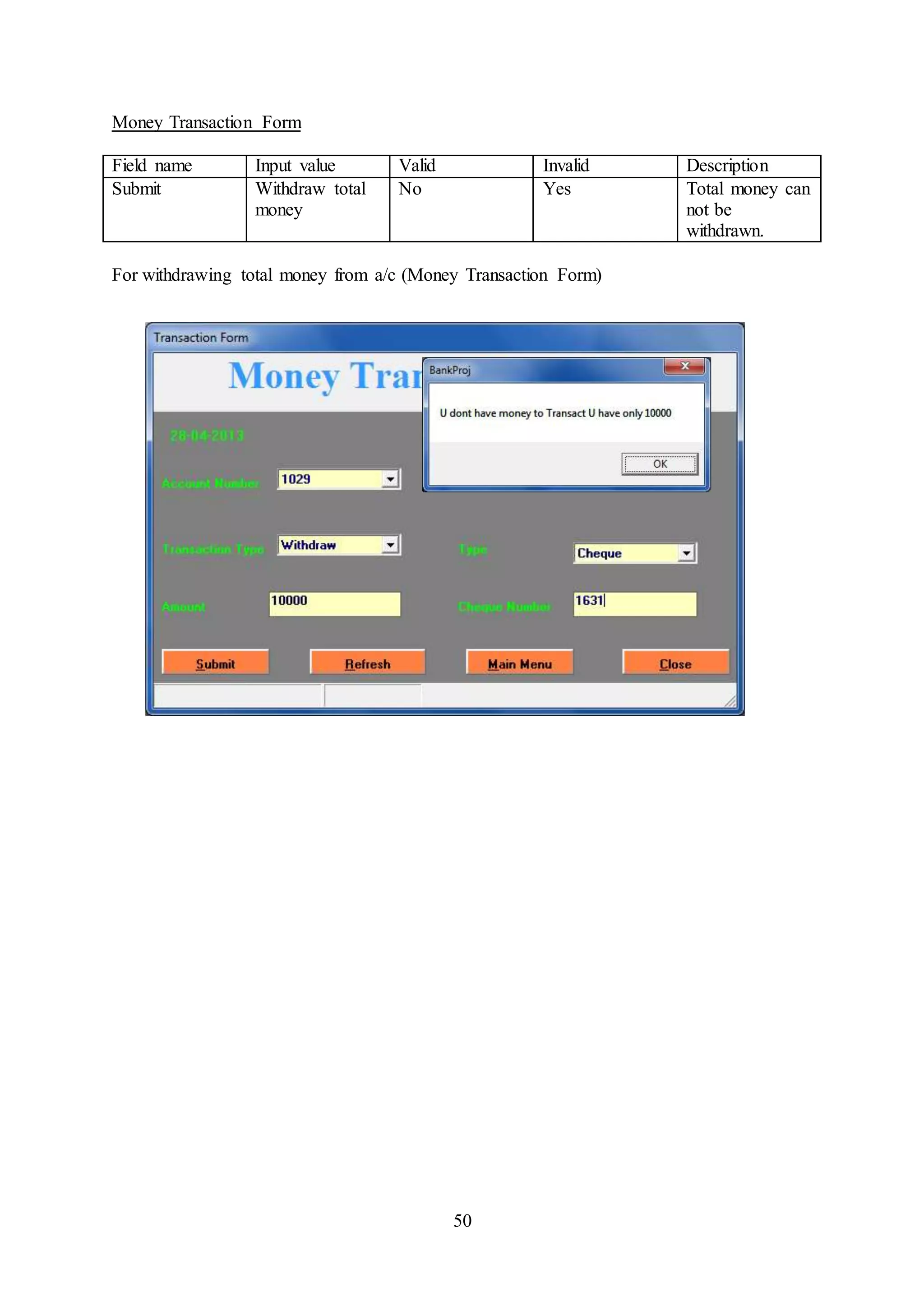
Money Transaction Form
Field name Input value Valid Invalid Description
Submit Withdraw total
money
No Yes Total money can
not be
withdrawn.
For withdrawing total money from a/c (Money Transaction Form)
51
Chapter 4:
Scope of Improvement, Summary and Conclusions
Scope of the Improvement:-
This project can be used in the bank after adding some more useful modules in the project for
which banks are providing services, like – opening saving or current account, giving loans,
providing credit or debit card services, ATM services, services like payment of electricity
bills, telephone bills.
Utmost care and back-up procedures must be established to ensure 100% successful
implementation of the computerized banking system. In case of system failure, the
organization should be in a position to process the transaction with another organization or if
the worst comes to the worst, it should be in a position to complete it manually.
Summary:-
This project intends to introduce more user friendliness in the various activities such as
record updation, maintenance, and searching. The searching of record has been made quite
simple as all the details of the customer can be obtained by simply keying in the identification
or account number of that customer. Similarly, record maintenance and updation can also be
accomplished by using the account number with all the details being automatically generated.
These details are also being promptly automatically updated in the master file thus keeping
the record absolutely up-to-date.
For processing the data we have chosen Access as back end and Visual Basic as front end,
which can manage database for a very large class of the possible application.
This project is client-server based application system, to computerize at bank work. The
modules involved currently in this system are: Open Account, Close or Edit Account,
Monthly statement, Bank summary.
52
Conclusion:-
This project is designed to meet the requirements of a Banking System. It has been developed
in Visual Basic, keeping in mind the specifications of the system.
For designing the system we have used simple data flow diagrams.
Overall the project teaches us the essential skills like:
 Using system analysis and design techniques like data flow diagram in designing the
system.
 Understanding the database handling.

Final project (1)

  • 1.
    1 BANK MANAGEMENT SYSTEM Submittedin partial fulfillment of the requirements For the award of the degree of Bachelor of Business Administration (Computer Aided Management) To Guru Gobind Singh Indraprastha University, Delhi Guide: Submitted by: Mrs. Santha Devi 1. Piyush Goel 06124401910 2. Sourabh Tyagi 04324401910 Institute of Innovation in Technology & Management, New Delhi – 1100 58 Batch (2010 – 2013)
  • 2.
    2 Certificate We, (Piyush Goel06124401910) & (Sourabh Tyagi 04324401910) certify that the Minor Project Report (BCAM-306) entitled “BANK MANAGEMENT SYSTEM” is done by us and it is an authentic work carried out by us at INSTITTUTE OF INNOVATION IN TECHNOLOGY AND MANAGEMENT. The matter embodied in this project work has not been submitted earlier for the award of any degree or diploma to the best of my knowledge and belief. 1. Signature of the Student 2. Signature of the Student Date: Certified that the Project Report (BCAM-306) entitled “BANK MANAGEMENT SYSTEM” done by the above students is completed under my guidance Signature of the Guide Date: Name of the Guide: Designation: Countersigned Director
  • 3.
    3 ACKNOWLEDGEMENT We are thankfulto GURU GOBIND SINGH INDRAPRASTHA University who provided us with the opportunity for carrying out the study. We are extremely grateful and remain indebted to our guide Mrs. Santha Devi for being a source of inspiration and for her constant support in the Design, Implementation and Evaluation of the project. We are thankful to her for the constant valuable suggestions, which benefited us a lot while developing the project on “Bank Management System”. She has been a constant source of inspiration and motivation for hard work. She has been very co- operative throughout this project work. Through this column, it would be our utmost pleasure to express our warm thanks to her for the encouragement, co-operation and consent without which we might not be able to accomplish this project.
  • 4.
    4 TABLE OF CONTENTS SNo Topic Page No 1 Certificate 2 2 Acknowledgements 3 3 Chapter-1: Introduction 6-14 4 Chapter-2: System Analysis 15-23 6 Chapter-3: System Design 24-50 7 Chapter-4: Scope of Improvement, Summary and Conclusions 51-52
  • 5.
    5 LIST OF TABLES TableNo Title Page No 1 Account 19 2 Account Type 19 3 Balance table 20 4 Cheque Table 20 5 Transaction Table 20 LIST OF FIGURES Figure No Title Page No 1 Context level DFD 10 2 Use Case Diagram 13 3 1st level DFD 15 4 2ndlevel DFD for Billing Database 16 5 2ndlevel DFD for Stock Maintenance 16 6 2ndlevel DFD for Sales Database 17 7 Entity Relationship Diagram 18
  • 6.
    6 Chapter 1 INTRODUCTION 1.1 Descriptionof the system A computer based management system is designed to handle all the primary information required to calculate monthly statements of customer account which include monthly statement of any month. Separate database is maintained to handle all the details required for the correct statement calculation and generation. This project intends to introduce more user friendliness in the various activities such as record updation, maintenance, and searching. The searching of record has been made quite simple as all the details of the customer can be obtained by simply keying in the identification or account number of that customer. Similarly, record maintenance and updation can also be accomplished by using the account number with all the details being automatically generated. These details are also being promptly automatically updated in the master file thus keeping the record absolutely up-to-date. 1.2Data collection To develop software which maintain all the record of day to day -Open Account, Close or Edit Account, Monthly Statement, Bank summary and Transaction detail etc. All the record and information is going to be store in Microsoft Access Database. Overall description: - The project consists of four parts mainly 1. Open Account: - It consists of new bank account form. A consist new enquiry information who come to the bank for enquiry about new account (saving, current). Then he or she fill up the new account form according to their account number generated automatically and also generate cheui no automatically.
  • 7.
    7 2. Close orEdit Account:- It consists or provides editing and closing account form and also such particular account information. 3. Monthly Statement: - It consists of two sided form monthly statement of bank employee and monthly statement of saving and current account employee. 4. Bank Summary: - It consists of all information detail of bank employee account transaction detail summary, recode of all branches and also record of draft and chewy. Functional Module: - The whole project divided in to six main modules. They are following: - i. Login module. ii. Account open module. iii. Edit or close module. iv. Transaction module. v. Summary module. vi. Account statement module.
  • 8.
    8 Main module:- i. LoginModule: - Login module consists of three forms. Form splash: - form splash is responsible to load the project for use. Form login: - Form login is responsible for accepting the login name and password from the user. This security the system from unauthorized access. A user has change the password has three times only. If or she inter wrong password thrice, then it will automatically exit. Form Main: - form main is the main form of the whole project. Through which we can access form of project this is a MDI form include other form in these main form like open Account form, Close and edit Account form, transaction form summery form statement form. Bank ManagementSystem Account open Module Edit Or close Module Transaction Module Summery Module Statement Module Login Module
  • 9.
    9 1.3 Software RequirementSpecifications A software requirements specification (SRS) is a comprehensive description of the intended purpose and environment for software under development. The SRS fully describes what the software will do and how it will be expected to perform. 1.3.1 Overall description of proposed system In day-to- day work process of an organization, there are lots of things happening, which need to be keep tracked. For our ease in future, we do too. Of course there is lots of way to perform this task. We can either maintain these records manually or by using computerized system. In current scenario, where we always thing to increase productivity utilizing our working hours more and more, it’s always recommended to go for such automated system, which provide me maximum facility to do the same in a less time and minimum manpower. So I think and design a commercial project for Bank Management System system. A computer based management system is designed to handle all the primary information required to calculate monthly statements of customer account which include monthly statement of any month. Separate database is maintained to handle all the details required for the correct statement calculation and generation. This project intends to introduce more user friendliness in the various activities such as record updation, maintenance, and searching. The searching of record has been made quite simple as all the details of the customer can be obtained by simply keying in the identification Login Module Form splash Form login Form Main
  • 10.
    10 or account numberof that customer. Similarly, record maintenance and updation can also be accomplished by using the account number with all the details being automatically generated. These details are also being promptly automatically updated in the master file thus keeping the record absolutely up-to-date. For processing the data we have chosen Access as back end and Visual Basic as front end, which can manage database for a very large class of the possible application. This project is client-server based application system, to computerize at bank work. The modules involved currently in this system are: Open Account, Close or Edit Account, Monthly statement, Bank summary. Data Flow Diagram (Context Diagram)
  • 11.
    11 Objective:- During the pastseveral decades personnel function has been transformed from a relatively obscure record keeping staff to central and top level management function. There are many factors that have influenced this transformation like technological advances, professionalism, and general recognition of human beings as most important resources. A computer based management system is designed to handle all the primary information required to calculate monthly statements of customer account which include monthly statement of any month. Separate database is maintained to handle all the details required for the correct statement calculation and generation. A computer based management system is designed to handle all the primary information required to calculate monthly statements of customer account which include monthly statement of any month. Separate database is maintained to handle all the details required for the correct statement calculation and generation. The main objective of our project is provide the different typed of customers facility , the main objective of this system is to find out the actual customer service . Etc. It should increase the productivity of bank by utilizing the working hours more and more, with minimum manpower. This project includes the entire upgraded feature required for the computerization banking system. This system is very easy to use, so that any user can use without getting pre- knowledge about this. It is very much user friendly and meet almost all daily working process requirements. This system is completely GUI based and can be use by mouse and as well as keyboard. This system is melded in such a way that has got all features to upgrade without making much change in existing components.
  • 12.
    12 1.3.2 User Characteristics EducationalLevel: At least graduate and should be comfortable with English language. Technical Expertise: Should be a high or middle level employee of the organization comfortable with using general purpose applications on a computer. Constraints The system required minimum 128mb RAM and 2 GB minimum hard disk space. Specific Requirements  This section contains the software requirements to a level of detail sufficient to enable designers to design the system, and testers to test the system. 1.3.3 External Interfaces The application will have a user friendly and menu based interface. Following types of interface will be provided  A Login Screen for entering user id, password and role (Administrator, operator) will be provided.  A Customer Account maintenance screen for entering command for Sales order process, Purchase order process.  A Bank Screen for entering account details, customer details.  A Customer screen for transaction in the account. 1.3.4 Functional Requirements Input requirements  Information by the user Output requirement  Customer record generation  Customer Account maintenance record.
  • 13.
    13 Use case diagram EmployeeCustomer Admin 1.3.5 Non-functional requirements Reliability-This application is a reliable product that produces fast and verified output of all its processes. Security-The application will be password protected. User will have to enter correct username, password and role in order to access the application. Maintainability-The application will be designed in a maintainable manner. It will be easy to incorporate new requirements in the individual modules. Portability-The application will be easily portable on any windows-based system that has oracle installed. Transaction Open A/C Close A/C Monthy Statement Edit A/C
  • 14.
    14 1.3.6 Design Constraints SoftwareConstraints The software is a set of procedures of coded information or a program which when fed into the computer hardware, enables the computer to perform the various tasks. Software is like a current inside the wire, which cannot be seen but its effect can be felt. 1. Operating System:- Windows NT / 2000 / XP 2. Application Software:- Application software uses front end visual basic and database access etc. Editor:- Visual basic. Hardware Constraints 1 Processor: - Intel Pentium III 833MHz 2 RAM: - 128 SD-RAM. 3 Hard Disk: -20 GB or above. 4 Monitor: - 14” VGA. 5 Mouse 6 Printer: - For print report or Bill. 7 Floppy Disk Drive: - 1.44MB.
  • 15.
    15 Chapter 2: SYSTEM DESIGN 2.1Physical Design 2.1.1 Data flow diagram LEVEL 1 DFD
  • 16.
  • 17.
  • 18.
    18 2.2 Database Design 2.2.1Entity Relationship Diagram
  • 19.
    19 Database description The informationsystem of “BANK MANAGEMENT SYSTEM” performs its function with the help of the data store in certain repositories called Databases of the system. Detailed descriptions of the various databases included in the information systems are tabulated as follows: 1. Account: - This table is used to maintain open account details. Where employee come from new account. Which keep all information about employee. Here act no define primary key. ii. Account Type: - Account type Fieldname Field type Field size Constraint Type code Text 50 Type name Text 50 Int rate Number Default This table is used for which type of account opens a employee, type of account – saving or current account and also give a account type code. Account Fieldname Field Type Field size Constraint Actno Number Long int Primary Name Text 50 Address Text 50 Phone Number Double Act type Text 20 City Text 50 Date Date/time Medium date Chequebook Yes/no
  • 20.
    20 iii. Balance table:- This table the balance of all type of account, saving or current account. iv. Cheque Table: - Cheque table Field name Field type Field size Constraint Actno Number Default No _from Number Default No _to Number Default This table content all account detail and if you open new account and chose cheque option so give cheque no of your account. v. Transaction table: - Transaction table Field name Field type Field size Constraint Actno Number Long int Primary Tran type Text 50 Amount Number Long int act Type Text 50 Chequeno Number Long int Date Date/time Default Time Date/time Default . This table contain all per day transaction of bank and also summarized all money transaction updating and editing. Balance table Field name Field type Field size Constraint Actno Number Default Balance Number Long int
  • 21.
    21 2.3. Interface Design Theinterface design consists of the input and output source layouts. I.e. the input forms and screens and the report layouts that form as a source of outcome and income in the design and implementation of the information system under study 2.3.1. Output Design BANK MANAGEMENT SYSTEM
  • 22.
  • 23.
  • 24.
    24 Chapter 3: SYSTEM DESIGN 3.1Program Development Login Form:-- Component : Login form Form Name :Form Login Code :-- Dim rs As New ADODB.Recordset Private Sub CancelButton_Click() Unload Me End Sub Private Sub Form_Load()
  • 25.
    25 rs.ActiveConnection = cn Ifrs.State = 1 Then rs.Close rs.CursorLocation = adUseClient rs.CursorType = adOpenKeyset rs.LockType = adLockOptimistic rs.Open "select * from Pass" rs.MoveFirst While Not rs.EOF = True Combo1.AddItem rs(0) rs.MoveNext Wend Combo1.ListIndex = 0 End Sub Private Sub Frame1_DragDrop(Source As Control, X As Single, Y As Single) End Sub Private Sub OkButton_Click() If rs.State = 1 Then rs.Close rs.Open "select pswd from pass where name = '" & Combo1.Text & "'" If rs!pswd = Text1.Text Then Me.Caption = "Password Success" GoTo 1
  • 26.
    26 Else Me.Caption = "InvalidPassword" Text1.Text = " " Text1.SetFocus Exit Sub End If 1: Call ShowForm End Sub
  • 27.
    27 Main Form:-- Component :Main form Form Name frmMain Coding :-- Private Sub AcButton_Click() 'Unload Me Form2.Top = 3000 Form2.Left = 4000 Form2.Show End Sub
  • 28.
    28 Private Sub AcClButton_Click() 'UnloadMe Form3.Top = 3000 Form3.Left = 4000 Form3.Show End Sub Private Sub BackButton_Click() 'Unload Me LoginForm.Top = 3000 LoginForm.Left = 4000 LoginForm.Show End Sub Private Sub BnkButton_Click() 'Unload Me Form5.Top = 3000 Form5.Left = 4000 Form5.Show End Sub Private Sub ExButton_Click() Unload Me End Sub
  • 29.
    29 Open Account Form:-- Component: Open Account Form Form name Form open Coding :- Dim rs As New ADODB.Recordset Dim MaxNo As Long Dim a As Integer Private Sub Check1_Click() End Sub
  • 30.
    30 Private Sub Command1_Click() Dimsstr, s As String Dim rst As New ADODB.Recordset rst.Open "Select max(actno) from Account", cn, adOpenKeyset, adLockOptimistic, cmdtext a = rst(0) + 1 If CheckField = True Then s = Text1.Text If Check1.Value = 1 Then sstr = "insert into account " sstr = sstr + "values(" & a & ",'" & Text1.Text & "', '" & Text3.Text & "', " sstr = sstr + " " & Text2.Text & " ,'" & Combo1.Text & "' ,'" & Text6.Text & "','" & Date & "',YES)" cn.Execute sstr MsgBox "Account Created " & "Account Number = " & a, vbInformation, a Call UpdateCheque MsgBox "Ur Cheque No is from " & MaxNo & " To " & MaxNo + 10, vbInformation StatusBar1.Panels(2).Text = "Cheque No " & MaxNo & " - " & MaxNo + 10 ElseIf Check1.Value = 0 Then sstr = "insert into account " sstr = sstr + "values(" & a & ",'" & Text1.Text & "', '" & Text3.Text & "', " sstr = sstr + " " & Text2.Text & " ,'" & Combo1.Text & "' ,'" & Text6.Text & "','" & Date & "',NO)" cn.Execute sstr
  • 31.
    31 MsgBox "Account Created" & "Account Number = " & a, vbInformation, a StatusBar1.Panels(2).Text = "Cheque Book Not Issued" End If Call AddDeposite StatusBar1.Panels(1).Text = "Hello " & s & " " & a Call ClearField End If rst.Close End Sub
  • 32.
    32 Edit Or DeleteAccount Form:-- Component : Edit and close Account Form Form Name : form Edit Account Coding :- Dim rs As New ADODB.Recordset 'Close account form to close account 'Permission variable is to check the permission to delete the
  • 33.
    33 'Record that managercan delete the record Private Sub CmdCloseAct_Click() Dim rst As New ADODB.Recordset rst.ActiveConnection = cn If Permission = 1 Then Dim stmt, ms As String Dim s As Long ms = MsgBox("Do U really want to Close Account", vbYesNo, "Delete Record ") If ms = vbYes Then If rst.State = 1 Then rst.Close s = Combo1.Text rst.Open "select ChequeBook from account where actno = " & s & "" If rst!ChequeBook = True Then stmt = "delete from cheque where actno = " & s & "" cn.Execute stmt End If rst.Close stmt = "delete from account where actno = " stmt = stmt + " " & s & "" cn.Execute stmt 'Get the balance back before close account If rst.State = 1 Then rs.Close rst.Open "select balance from BalanceTable where actno = " & s & " " StatusBar1.Panels(1).Text = "Ur balance was " & rst(0) & " Get the money" MsgBox "Ur balance was " & rst(0) & " Get the money"
  • 34.
    34 rst.Close stmt = "deletefrom BalanceTable where actno = " & s & " " cn.Execute stmt stmt = "delete from Transaction1 where actno = " & s & " " cn.Execute stmt MsgBox "Account Close " rs.Requery End If Else MsgBox "U dont have Permission to Close Account ", vbInformation, "Close Account" End If End Sub
  • 35.
    35 Amount Transaction Form:-- Component:Amount Transaction form Form Name : form transaction Code :- Dim rs As New ADODB.Recordset Dim a As Boolean 'To check the balance is greater or less Private Sub Combo2_Click()
  • 36.
    36 If Combo2.ListIndex =0 Then 'withdraw Combo3.Clear Combo3.AddItem "Cheque" Combo3.AddItem "Withdrawl" Combo3.ListIndex = 0 ElseIf Combo2.ListIndex = 1 Then 'Deposit Combo3.Clear Combo3.AddItem "Draft" Combo3.AddItem "Cash" Combo3.AddItem "Cheque" Combo3.ListIndex = 0 End If End Sub Private Sub Combo3_Click() If Combo3.Text = "Cheque" Or Combo3.Text = "Draft" Then Text2.Enabled = True Else Text2.Enabled = False End If End Sub 'This procedure is to check that the cheque number 'Which is entered is correct or not
  • 37.
    37 Private Function CheqTest()As Boolean If Not Combo2.Text = "Deposite" Then Dim rst As New ADODB.Recordset rst.ActiveConnection = cn If rst.State = 1 Then rst.Close rst.CursorLocation = adUseClient rst.CursorType = adOpenKeyset rst.LockType = adLockOptimistic rst.Open "select * from account where actno = " & Combo1.Text & "" If rst!ChequeBook = True Then If Not Text2.Text = "" Then If rst.State = 1 Then rst.Close rst.Open "select * from Cheque where actno = " & Combo1.Text & " " If rst.RecordCount > 0 Then If Text2.Text >= rst(1) And Text2.Text <= rst(2) Then MsgBox "SS" CheqTest = True Else MsgBox "Please enter the valid cheque no", vbInformation CheqTest = False Exit Function End If End If Else
  • 38.
    38 MsgBox "U willhave to select Cheque and enter cheque number ", vbInformation CheqTest = False Exit Function End If Else CheqTest = True End If Else CheqTest = True End If End Function 'This is the submit button command button that is 'To submit the transaction in the transaction table 'After checking the appropriate field Private Sub Command1_Click() Dim sstr As String If Not Text1.Text = "" Or Val(Text1.Text) < 100 Then If Text2.Text = "" Then Text2.Text = 0 End If sstr = "Insert into Transaction1 values(" sstr = sstr + " " & Combo1.Text & ",'" & Combo2.Text & "'," sstr = sstr + "" & Text1.Text & ",'" & Combo3.Text & "'" sstr = sstr + "," & Text2.Text & ",'" & Date & "','" & Time & "')"
  • 39.
    39 If CheqTest =True Then Call UpdateMoney If a = True Then cn.Execute sstr StatusBar1.Panels(1).Text = "Money " & Combo2.Text & " Success" MsgBox "Money " & Combo2.Text & " Success" End If a = False End If Call ClearField Else MsgBox "please Enter Lease 100 Transaction Amount ", vbInformation End If End Sub 'This is to Update the balance in database Private Sub UpdateMoney() Dim rst As New ADODB.Recordset Dim stmt As String Dim d As Long If rst.State = 1 Then rst.Close rst.Open "select * from BalanceTable where actno = " & Combo1.Text & "", cn, adOpenKeyset, adLockOptimistic, cmdtext If Combo2.Text = "Deposite" Then d = rst!balance + Val(Text1.Text)
  • 40.
    40 stmt = "updateBalanceTable set balance = " & d & "" stmt = stmt + " where actno = " & Combo1.Text & "" cn.Execute stmt a = True ElseIf Combo2.Text = "Withdraw" Then If rst!balance > Val(Text1.Text) Then d = rst!balance - Val(Text1.Text) stmt = "update BalanceTable set balance = " & d & "" stmt = stmt + " where actno = " & Combo1.Text & "" cn.Execute stmt a = True Else MsgBox "U dont have money to Transact U have only " & rst!balance a = False End If End If End Sub Private Sub Command2_Click() Unload Me 'Form1.Show 1 End Sub
  • 41.
    41 Bank Summary Form:-- Component: Summary form Form Name : Form Summary Code :- Private Sub Command1_Click() Unload Me End Sub
  • 42.
    42 Private Sub Command2_Click() UnloadMe Form1.Show 1 End Sub Private Sub Command3_Click() SummaryRept.Refresh DataEnvironment1.rsCommand2.Requery SummaryRept.Show End Sub Private Sub DataGrid1_Click() End Sub Private Sub Form_Load() Adodc1.Refresh End Sub
  • 43.
    43 Bank Summary Report:-- Component : Summary report form Form Name FrmSummary Code :- Dim rs As New ADODB.Recordset
  • 44.
    44 Private Sub DataReport_Activate() 'rs.Open"select Balance from BalanceTable where actno = " & txtActno & "", cn, adOpenKeyset, adLockOptimistic, cmdtext 'Text1 = rs(0) 'rs.Close End Sub Private Sub DataReport_Error(ByVal JobType As MSDataReportLib.AsyncTypeConstants, ByVal Cookie As Long, ByVal ErrObj As MSDataReportLib.RptError, ShowError As Boolean) On Error Resume Next End Sub
  • 45.
    45 Bank Account StatementForm:-- Component : Account statement form Form Name : form Statement Code :- Dim stmt As String Dim rs As New ADODB.Recordset Private Sub Combo1_Click() Call DeleteRecord Call FillDBgrid Call FillBalance Adodc1.Refresh
  • 46.
    46 DataGrid1.Refresh End Sub Private SubCommand1_Click() Unload Me 'Form1.Show 1 End Sub Private Sub Command2_Click() Unload Me End Sub Private Sub Command3_Click() If DataEnvironment1.rsCommand1.State = 1 Then DataEnvironment1.rsCommand1.Close DataEnvironment1.rsCommand1.Open "select * from Temptable", cn, adOpenKeyset, adLockOptimistic, cmdtext DataEnvironment1.rsCommand1.Requery StatmentRept.Refresh StatmentRept.Show End Sub Private Sub DataGrid1_Click() End Sub
  • 47.
    47 Bank Account StatementReport:-- Component : Statement report form Form Name : FrmStetement Code:- Private Sub DataReport_Error(ByVal JobType As MSDataReportLib.AsyncTypeConstants, ByVal Cookie As Long, ByVal ErrObj As MSDataReportLib.RptError, ShowError As Boolean) On Error Resume Next If DataEnvironment1.rsCommand1.State = 1 Then DataEnvironment1.rsCommand1.Close
  • 48.
    48 'DataEnvironment1.rsCommand1.Open "select *from Temptable", cn, adOpenKeyset, adLockOptimistic, cmdtext DataEnvironment1.rsCommand1.Requery StatmentRept.Refresh End Sub Private Sub DataReport_Initialize() On Error Resume Next If DataEnvironment1.rsCommand1.State = 1 Then DataEnvironment1.rsCommand1.Close DataEnvironment1.rsCommand1.Open "select * from Temptable", cn, adOpenKeyset, adLockOptimistic, cmdtext DataEnvironment1.rsCommand1.Requery StatmentRept.Refresh End Sub
  • 49.
    49 TESTING Open new a/cpage Field name Input value Valid Invalid Description Phone no. Abcd No Yes Only numeric values are allowed Phone no. 1234567891212 No Yes Only 10 digits are allowed Close and Edit a/c Page Field name Input value Valid Invalid Description A/c no. Any value No Yes Only submitted a/c numbers are accessible.
  • 50.
    50 Money Transaction Form Fieldname Input value Valid Invalid Description Submit Withdraw total money No Yes Total money can not be withdrawn. For withdrawing total money from a/c (Money Transaction Form)
  • 51.
    51 Chapter 4: Scope ofImprovement, Summary and Conclusions Scope of the Improvement:- This project can be used in the bank after adding some more useful modules in the project for which banks are providing services, like – opening saving or current account, giving loans, providing credit or debit card services, ATM services, services like payment of electricity bills, telephone bills. Utmost care and back-up procedures must be established to ensure 100% successful implementation of the computerized banking system. In case of system failure, the organization should be in a position to process the transaction with another organization or if the worst comes to the worst, it should be in a position to complete it manually. Summary:- This project intends to introduce more user friendliness in the various activities such as record updation, maintenance, and searching. The searching of record has been made quite simple as all the details of the customer can be obtained by simply keying in the identification or account number of that customer. Similarly, record maintenance and updation can also be accomplished by using the account number with all the details being automatically generated. These details are also being promptly automatically updated in the master file thus keeping the record absolutely up-to-date. For processing the data we have chosen Access as back end and Visual Basic as front end, which can manage database for a very large class of the possible application. This project is client-server based application system, to computerize at bank work. The modules involved currently in this system are: Open Account, Close or Edit Account, Monthly statement, Bank summary.
  • 52.
    52 Conclusion:- This project isdesigned to meet the requirements of a Banking System. It has been developed in Visual Basic, keeping in mind the specifications of the system. For designing the system we have used simple data flow diagrams. Overall the project teaches us the essential skills like:  Using system analysis and design techniques like data flow diagram in designing the system.  Understanding the database handling.