
Azure
Sentinel with
Office 365
By
Eng Soon Cheah
©Microsoft Corporation Azure
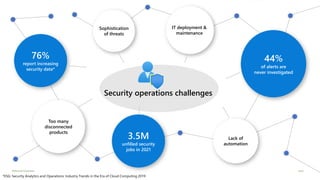
Security Operations Challenges
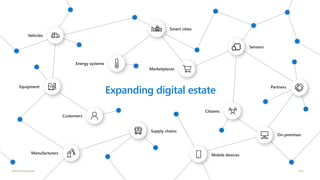
Expanding digital estate
©Microsoft Corporation Azure
Too many
disconnected
products
76%
report increasing
security data*
3.5M
unfilled security
jobs in 2021
Lack of
automation
44%
of alerts are
never investigated
IT deployment &
maintenance
Sophistication
of threats
Security operations challenges
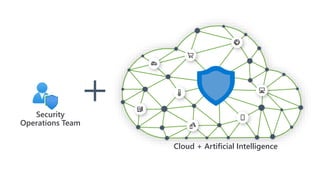
Cloud + Artificial Intelligence
Security
Operations Team
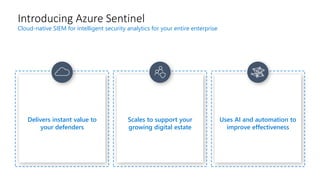
Uses AI and automation to
improve effectiveness
Scales to support your
growing digital estate
Introducing Azure Sentinel
Cloud-native SIEM for intelligent security analytics for your entire enterprise
Delivers instant value to
your defenders
©Microsoft Corporation Azure
Microsoft Security Advantage
$1B annual investment in cybersecurity
3500+ global security experts
Trillions of diverse signals for
unparalleled intelligence
Analytics
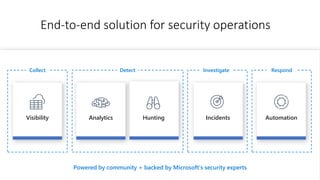
End-to-end solution for security operations
DetectCollect
Incidents AutomationVisibility Hunting
Investigate Respond
Powered by community + backed by Microsoft’s security experts
Visibility
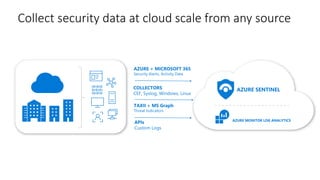
Collect security data at cloud scale from any source
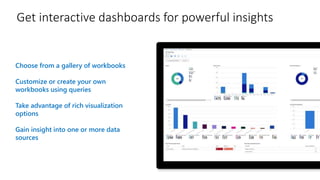
Choose from a gallery of workbooks
Customize or create your own
workbooks using queries
Take advantage of rich visualization
options
Gain insight into one or more data
sources
Get interactive dashboards for powerful insights
New data connectors and workbooks announced in November
Barracuda CloudGen Firewall
Citrix Analytics
ExtraHop Reveal(x)
F5 Firewall
One Identity Safeguard
TrendMicro Deep Security
Zscaler Internet Access
Threat Intelligence TAXII Servers (supporting STIX format)
Analytics
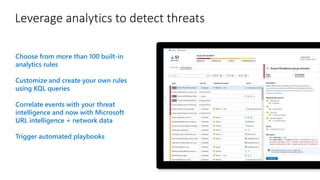
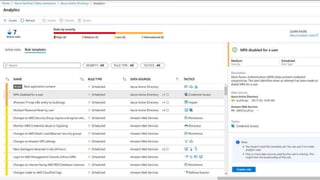
Leverage analytics to detect threats
Choose from more than 100 built-in
analytics rules
Customize and create your own rules
using KQL queries
Correlate events with your threat
intelligence and now with Microsoft
URL intelligence + network data
Trigger automated playbooks
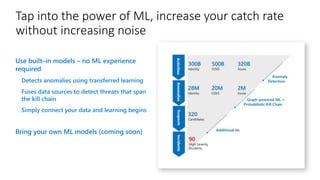
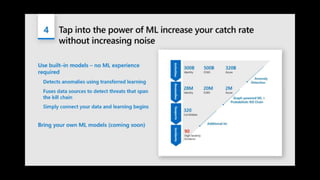
Tap into the power of ML, increase your catch rate
without increasing noise
Use built–in models – no ML experience
required
Detects anomalies using transferred learning
Fuses data sources to detect threats that span
the kill chain
Simply connect your data and learning begins
Bring your own ML models (coming soon)
Demo
Analytics
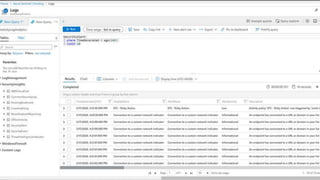
Hunting
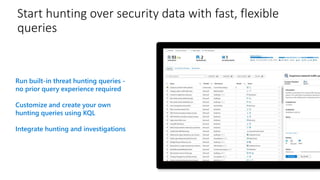
Start hunting over security data with fast, flexible
queries
Run built-in threat hunting queries -
no prior query experience required
Customize and create your own
hunting queries using KQL
Integrate hunting and investigations
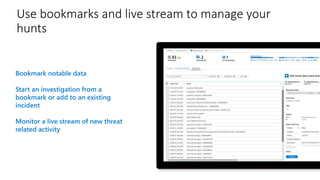
Use bookmarks and live stream to manage your
hunts
Bookmark notable data
Start an investigation from a
bookmark or add to an existing
incident
Monitor a live stream of new threat
related activity
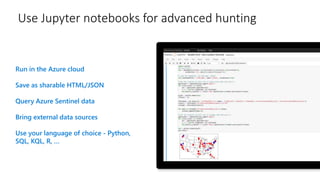
Use Jupyter notebooks for advanced hunting
Run in the Azure cloud
Save as sharable HTML/JSON
Query Azure Sentinel data
Bring external data sources
Use your language of choice - Python,
SQL, KQL, R, …
Demo
Hunting
Incidents
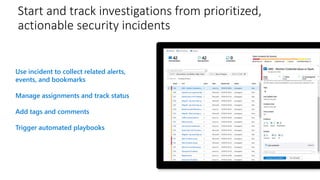
Start and track investigations from prioritized,
actionable security incidents
Use incident to collect related alerts,
events, and bookmarks
Manage assignments and track status
Add tags and comments
Trigger automated playbooks
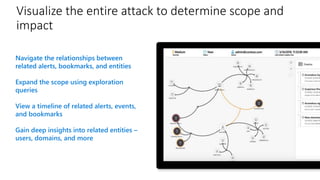
Visualize the entire attack to determine scope and
impact
Navigate the relationships between
related alerts, bookmarks, and entities
Expand the scope using exploration
queries
View a timeline of related alerts, events,
and bookmarks
Gain deep insights into related entities –
users, domains, and more
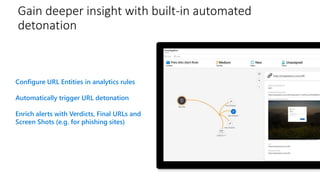
Gain deeper insight with built-in automated
detonation
Configure URL Entities in analytics rules
Automatically trigger URL detonation
Enrich alerts with Verdicts, Final URLs and
Screen Shots (e.g. for phishing sites)
Demo
Incidents
Automation
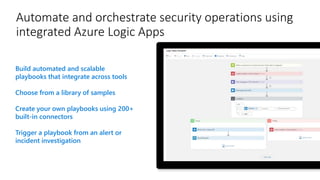
Automate and orchestrate security operations using
integrated Azure Logic Apps
Build automated and scalable
playbooks that integrate across tools
Choose from a library of samples
Create your own playbooks using 200+
built-in connectors
Trigger a playbook from an alert or
incident investigation
Demo
Playbooks
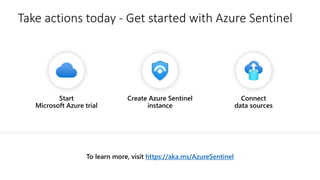
Take actions today - Get started with Azure Sentinel
To learn more, visit https://aka.ms/AzureSentinel
Create Azure Sentinel
instance
Connect
data sources
Start
Microsoft Azure trial
Demo
Get started with the Azure Sentinel using Office 365
Steps
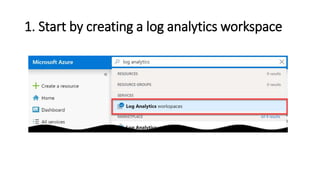
1. Start by creating a log analytics workspace
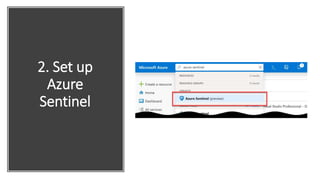
2. Set up Azure Sentinel
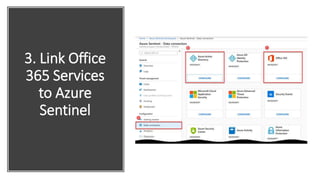
3. Link Office 365 Services to Azure Sentinel
4. Install Azure Sentinel Dashboards
5. Viewing collected data
1. Start by creating a log analytics workspace
2. Set up
Azure
Sentinel
3. Link Office
365 Services
to Azure
Sentinel
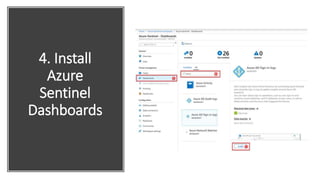
4. Install
Azure
Sentinel
Dashboards
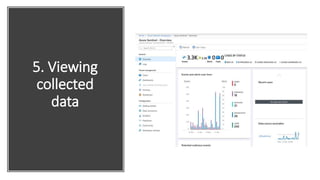
5. Viewing
collected
data
Resources
https://aka.ms/AzureSentinel
To learn more, visit:
https://docs.microsoft.com/en-us/azure/sentinel/
Azure Sentinel documentation:
https://techcommunity.microsoft.com/t5/Azure-Sentinel/bg-p/AzureSentinelBlog
Tech Community Blog
https://techcommunity.microsoft.com/t5/Azure-Sentinel/bd-p/AzureSentinel
Join our community
References
• Blogs:
https://dev.to/cheahengsoon
• YouTube:
https://www.youtube.com/c/engsooncheah

Azure Sentinel with Office 365

  • 1.
  • 2.
    ©Microsoft Corporation Azure SecurityOperations Challenges Expanding digital estate
  • 3.
    ©Microsoft Corporation Azure Toomany disconnected products 76% report increasing security data* 3.5M unfilled security jobs in 2021 Lack of automation 44% of alerts are never investigated IT deployment & maintenance Sophistication of threats Security operations challenges
  • 4.
    Cloud + ArtificialIntelligence Security Operations Team
  • 5.
    Uses AI andautomation to improve effectiveness Scales to support your growing digital estate Introducing Azure Sentinel Cloud-native SIEM for intelligent security analytics for your entire enterprise Delivers instant value to your defenders
  • 6.
    ©Microsoft Corporation Azure MicrosoftSecurity Advantage $1B annual investment in cybersecurity 3500+ global security experts Trillions of diverse signals for unparalleled intelligence
  • 7.
    Analytics End-to-end solution forsecurity operations DetectCollect Incidents AutomationVisibility Hunting Investigate Respond Powered by community + backed by Microsoft’s security experts
  • 8.
  • 9.
    Collect security dataat cloud scale from any source
  • 10.
    Choose from agallery of workbooks Customize or create your own workbooks using queries Take advantage of rich visualization options Gain insight into one or more data sources Get interactive dashboards for powerful insights
  • 11.
    New data connectorsand workbooks announced in November Barracuda CloudGen Firewall Citrix Analytics ExtraHop Reveal(x) F5 Firewall One Identity Safeguard TrendMicro Deep Security Zscaler Internet Access Threat Intelligence TAXII Servers (supporting STIX format)
  • 12.
  • 13.
    Leverage analytics todetect threats Choose from more than 100 built-in analytics rules Customize and create your own rules using KQL queries Correlate events with your threat intelligence and now with Microsoft URL intelligence + network data Trigger automated playbooks
  • 14.
    Tap into thepower of ML, increase your catch rate without increasing noise Use built–in models – no ML experience required Detects anomalies using transferred learning Fuses data sources to detect threats that span the kill chain Simply connect your data and learning begins Bring your own ML models (coming soon)
  • 16.
  • 21.
  • 22.
    Start hunting oversecurity data with fast, flexible queries Run built-in threat hunting queries - no prior query experience required Customize and create your own hunting queries using KQL Integrate hunting and investigations
  • 23.
    Use bookmarks andlive stream to manage your hunts Bookmark notable data Start an investigation from a bookmark or add to an existing incident Monitor a live stream of new threat related activity
  • 24.
    Use Jupyter notebooksfor advanced hunting Run in the Azure cloud Save as sharable HTML/JSON Query Azure Sentinel data Bring external data sources Use your language of choice - Python, SQL, KQL, R, …
  • 25.
  • 28.
  • 29.
    Start and trackinvestigations from prioritized, actionable security incidents Use incident to collect related alerts, events, and bookmarks Manage assignments and track status Add tags and comments Trigger automated playbooks
  • 30.
    Visualize the entireattack to determine scope and impact Navigate the relationships between related alerts, bookmarks, and entities Expand the scope using exploration queries View a timeline of related alerts, events, and bookmarks Gain deep insights into related entities – users, domains, and more
  • 31.
    Gain deeper insightwith built-in automated detonation Configure URL Entities in analytics rules Automatically trigger URL detonation Enrich alerts with Verdicts, Final URLs and Screen Shots (e.g. for phishing sites)
  • 32.
  • 35.
  • 36.
    Automate and orchestratesecurity operations using integrated Azure Logic Apps Build automated and scalable playbooks that integrate across tools Choose from a library of samples Create your own playbooks using 200+ built-in connectors Trigger a playbook from an alert or incident investigation
  • 37.
  • 39.
    Take actions today- Get started with Azure Sentinel To learn more, visit https://aka.ms/AzureSentinel Create Azure Sentinel instance Connect data sources Start Microsoft Azure trial
  • 40.
    Demo Get started withthe Azure Sentinel using Office 365
  • 41.
    Steps 1. Start bycreating a log analytics workspace 2. Set up Azure Sentinel 3. Link Office 365 Services to Azure Sentinel 4. Install Azure Sentinel Dashboards 5. Viewing collected data
  • 42.
    1. Start bycreating a log analytics workspace
  • 45.
  • 47.
    3. Link Office 365Services to Azure Sentinel
  • 50.
  • 51.
  • 55.
    Resources https://aka.ms/AzureSentinel To learn more,visit: https://docs.microsoft.com/en-us/azure/sentinel/ Azure Sentinel documentation: https://techcommunity.microsoft.com/t5/Azure-Sentinel/bg-p/AzureSentinelBlog Tech Community Blog https://techcommunity.microsoft.com/t5/Azure-Sentinel/bd-p/AzureSentinel Join our community
  • 56.

Editor's Notes

  • #4 Today, organizations are faced with the incredibly difficult task of trying to protect their expanded digital estate from increasing cyber threats. The move to the cloud and a mobile workforce have pushed the border of your estate beyond the boundary of your physical network. Your data and users and systems are everywhere. Meanwhile the frequency and sophistication of attacks are ever growing. Regardless of the size of your organization or the industry, you are a target.​ This is the challenge that we all struggle with in IT security. And it's a challenge we at Microsoft think that we can uniquely help with.
  • #5 This creates significant challenges for your security operations teams who are tasked with defending your extended estate.   Security data explosion As your digital estate grows, so does the volume of security data. In fact 76% of organizations report an increase. And much of it is coming from in the cloud. So pumping it into legacy, on-premises systems (with all the deployment and maintenance overhead that comes with that) just doesn’t make a ton of sense. And that volume is just going to keep growing. Data is the fuel for ML models that have become so critical to threat detection. The models need both more signals and more diverse signals. To shore up their defenses, enterprise have deployed dozens of security products, each producing a large volume of alerts. In isolation, these products may have high false positive rates and poor response prioritization, resulting in deafening alert noise. As a result, organizations report that nearly half of alerts (44%) are never investigated.   Part of the reason for these alerts to fall through the cracks is a massive shortage in security professionals. A recent report by CSO magazine showed that this global talent shortage will increase to 3.5 million unfilled security jobs by 2021.  
  • #6 The cloud can help manage that complexity of the expanding digital estate. It simplifies and makes security easy to manage. Harnessing the power of cloud will set your SecOps teams free of IT work and help them focus on security work with no limits. Next generation of AI and automation in the cloud helps to super-charge your work. It will leverage the large-scale intelligence available in the cloud and make it work for you.
  • #7 Introducing Azure Sentinel – our new intelligent, cloud-native SIEM. Meets your defenders where they are and delivers instant value Choose from hundreds of built-in dashboards, hunting queries, analytics, playbooks and more Guided hunting and investigation experiences help security analysts of all skill levels get their work done Of course, Azure Sentinel offers all the extensibility you need to customize and create your own dashboards, analytics, workbooks And even offers integration with professional-grade tools like Jupyter notebooks Enables you to collect, store and analyze all of your security data with cloud scale and economics Scale automatically as data volume and compute needs grows – incremental growth or bust during an incident No infrastructure costs or upfront commitment - only pay for what you use No infrastructure setup or maintenance Agility to add data as you need it Leverages AI and automation as force multipliers for your SOC Detect threats you may have otherwise missed Fuse alerts into actionable, prioritized incidents – to reduce alert fatigue Apply automation to reduce manual processes and speed response
  • #8 At Microsoft, we spend over a billion dollars every year on research and development to secure your organization and enable you to digitally transform - without compromising productivity. We try to keep it simple for our customers knowing you have limited resources and dollars. We do this through our operations, technology and partnerships. What makes Microsoft so different to other cloud providers and even security providers is that we have over 3,500 security professionals and Intelligence informed by trillions of sources so we can help you make smarter decisions and remediate faster. We provide a truly holistic approach to technology. Microsoft helps you protect identities, data, applications, and devices across on-premises, cloud, and mobile - end to-end. This protection is at global scale with enterprise –class technology. Benefit from the investment of security at global scale with built-in capabilities and resources.
  • #11 One-click integration with Microsoft solutions Data connectors for growing list of other technologies – on-premises and cross-cloud Support for standard log formats (CEF/Syslog and WEF) Specialized TAXII and Graph connectors for threat intelligence data REST API for connecting to cloud solutions Proven log analytics platform with more than 10Pb of daily data ingestion
  • #12 Interactive dashboards Combines multiple kinds of visualizations – including graphs and maps Provides deep insights into a single data source or combining multiple sources Powered by KQL queries, making workbooks easy to build and customize
  • #13 Barracuda - Barracuda CloudGen Web Application Firewall (WAF) already available. Workbook provides insights into top connections by destination IP and application usage data. TAXII 2.0 data sources to enable monitoring, alerting, and hunting using your threat intelligence. Use this connector to send threat indicators from TAXII 2.0 servers to Azure Sentinel. Threat indicators can include IP addresses, domains, URLs, and file hashes.
  • #15 More than 100 built-in alert rules were developed by Microsoft and community security experts A wizard enables you to create your own analytics rules using KQL queries Thresholds can be set to alert when activity levels exceed normal patterns Correlation events with your threat intelligence and now with Microsoft intel about malicious URLs. Microsoft has unparalleled view of evolving threat landscape Customers can now match Microsoft URL TI with network logs Matched MS indicators are added to the TI table for use like any other indicator Retrospective lookbacks that match TI against historical event data and more TI types will be coming soon. Alerts can be used to trigger automated playbooks
  • #16 Built–in models offer the benefits of ML without the complexity We apply proven off-the-shelf Machine Learning models for identifying suspicious logins across Microsoft identity services to discover malicious SSH accesses. By using transferred learning from existing Machine Learning models, Azure Sentinel can detect anomalies from a single dataset with accuracy. In addition, we use a Machine Learning technique called fusion to connect data from multiple sources, like Azure AD anomalous logins and suspicious Office 365 activities, to detect 35 different threats that span different points on the kill chain. The chart on the right-hand side is based on real life example that shows how Azure Sentinel ML models are able to analyze billions of signals to highlight small number of high severity threats. Simply connect your data and learning begins
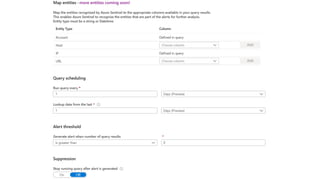
  • #19 Once you have a solid query created, you can create an analytic alert rule to perform additional actions on those results.  As with most other components of Azure Sentinel, Microsoft has also provided built-in analytic template rules with pre-created queries based on the data sources.  You simply need to select the template and click Create rule.
  • #20 During the creation of a template or custom analytic rule, you can configure specific settings to create an appropriate schedule and alert threshold.  You can specify how often to run the query and how far back to search.  In additional, alert threshold specifies how many results are required to issue an incident alert.
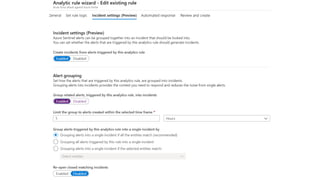
  • #21 On the next page, you define whether to create an incident alert from the results. Alert Grouping will allow you to group a minimum number of results together rather than potentially creating an incident alert for each result
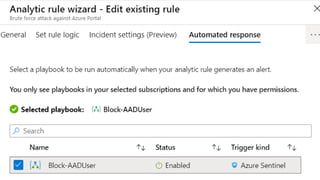
  • #22 Finally, you can assign a playbook for automated remediation or actions against the results.  More details about playbooks are below.
  • #24 Built-in threat hunting queries developed by Microsoft and community experts Run threat hunting queries and see the results without prior query experience Create your own threat hunting queries unique to your environment using KQL Start investigations directly from hunting queries
  • #25 Bookmarks enable you to flag notable data for further investigation Annotate and visualize bookmarked data in an investigation graph Add bookmarks to enrich existing incidents or create new ones Receive notifications of new threat related activity using live stream
  • #26 You can now launch Azure Notebooks directly from Azure Sentinel, making it easy to create and execute Jupyter notebooks to analyze your data. Notebooks combine live code, graphics, visualizations, and text, making them a valuable tool for threat hunters. Choose from a built-in gallery of notebooks developed by Microsoft security analysts or import others from GitHub to get started. These notebooks are the same professional-strength hunting solutions Microsoft’s own threat hunters use every day. Hosted in the Azure cloud so accessible anytime from anywhere Investigation workflow and data can be saved as sharable HTML/JSON document Query Azure Sentinel data directly in the notebook Bring external data sources such as threat Intelligence into your investigations Supports Python, SQL, KQL, R, and other languages
  • #28 For advanced Security Operators and IT Pros, hunting allows proactive assessments against specific risks. They allow manual, proactive investigations into possible security threats based on the ingested data.  Hunting is based off queries.  Microsoft provided several built-in queries and custom queries can also be created.  Once a query is created you can convert it into an analytic rule to run on a schedule. 
  • #29 Sample queries can also be obtained from each data connector page.
  • #31 Container for alerts, events, and bookmarks related to a particular security threat Automatically created from alerts or initiated by a security analyst when threat hunting Can be assigned to analysts for further investigation and status can be tracked Analysts can easily tag incidents and add comments Trigger automated playbooks from incidents
  • #32 Automatically correlate entities across different data sources and alerts Expand the scope of your investigation using built-in exploration queries View a timeline of related alerts, events, and bookmarks Click on any node to see detailed information Gain deep insights into related entities – users, domains, and more
  • #33 Automatically detonate URLs to speed investigation Azure Sentinel customers can now use the power of URL detonation to enrich alerts and quickly discover threats related to malicious URLs. When creating scheduled alerts, any URL data in the query results can be mapped to a new URL entity type. Whenever an alert containing a URL entity is generated, the mapped URL will be automatically detonated, and the investigation graph will be immediately enriched with the detonation results. A verdict, final URL and screen shot (especially useful for identifying phishing) can be used to quickly assess a potential threat. To use this feature, make sure you’ve enabled URL logging (e.g. threat logging) for your secure web gateways, web proxies, firewalls or legacy IDS/IPS. You can try this feature during the preview at no cost. Azure Sentinel is introducing URL Entities Use alert rules to automatically trigger URL detonation Enrich alerts with Verdicts, Final URLs and Screen Shots (e.g. for phishing sites)
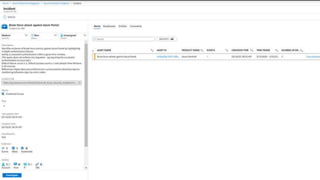
  • #35 Incidents are only created when specified by an analytic alert rule. In the Azure Sentinel Portal, click on Incidents to view a list of all incidents created. Clicking on View full details provides additional information on the incident. You can change the severity, if applicable, set the Status, and assign the incident to the responsible individual to investigate further. You can also manually submit the results of this incident against any playbook created for Azure Sentinel.
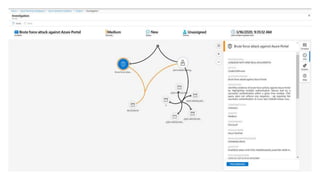
  • #36 Currently in preview, clicking on Investigate provides the Investigation Graph.  This provides an interactive overview of all entities involved in the incident.  This will assist to understand the scope and impact of the incident, determine a root cause, and stop any potential threats that may be occurring elsewhere.
  • #38 Powered by Azure Logic Apps and fully integrated with Azure Sentinel Build automated and scalable playbooks that integrate across tools Choose from a library of samples or create your own using more than 200+ built-in connectors plus generic connectors like HTTPS Trigger a playbook from an alert or incident investigation
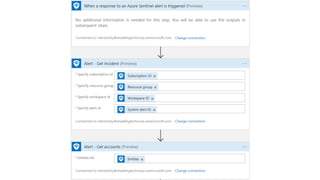
  • #40 Playbooks are Azure Logic Apps, but specific for Azure Sentinel by adding an API connection to Azure Sentinel alerts.  The example playbook below sets and Azure AD user account to disabled when an alert is triggered and puts a comment into the Incident.  Additional actions can be added, such as a simple email notification.  Anything that Logic Apps can connect to, you can tie it into an Azure Sentinel Playbook and Analytic Rule to automate that action. 
  • #41 In Conclusion Azure Sentinel is a key service from Microsoft that bridges a gap in security related to the cloud. It is the SIEM that provides a single pane of glass into the different aspects of security related to all of your environment, by not only bringing different Microsoft services together but also data from various third party providers as well. The Machine Learning and Automation capabilities make it the tool of choice for not just reactive but also proactive security measures for your whole environment.
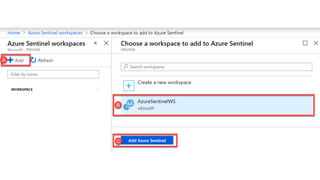
  • #46 Login to the Azure Portal. Search at the top for Azure Sentinel.  Click Add to setup the Azure Sentinel workspace.
  • #47 Click Create a new workspace.  (You could also add to an existing one if desired.)
  • #48 Name your new workspace and place in the proper Resource Group.  NOTE:  The Azure Sentinel Preview is currently Free.  Microsoft states they will release pricing information at a later date.  Be aware that you can still accrue charges with storage, throughput, and Machine Learning automation responses.
  • #49 On the next page click the new workspace you created and click Add Azure Sentinel.
  • #50 Click on the new workspace. Click the Getting Started tab and you will see the overview of the setup.
  • #52 Click on the Connect for step 1 we will need to setup Sentinel to collect data from on-prem and cloud locations. Out of the box it looks like Sentinel can integrate with many data collectors including: Azure Active Directory, Azure Ad Identity Protection, Office 365, Microsoft Cloud Application Security, Azure Advanced Threat Protection, Security Events, Azure Security Center, Azure Activity, Azure Information Protection, WAF, Windows Firewall, AWS, Common Event Format, Palo Alto Networks, Cisco ASA, Check Point, Fortinet, FS, Barracuda, Syslog, DNS.
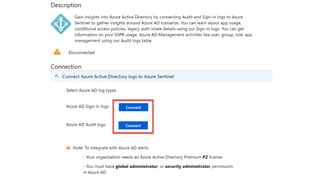
  • #53 Click through any you wish to setup… each Data Collection plugin has step by step instructions.   For example the Azure Active Directory was just 2 easy clicks to connect the logs.  Some will be more involved and need you to point your current Syslog files or a client install.
  • #55 Once you have Data Collection setup go to Dashboards, select the pre-made dashboards for your Collectors and click Install on the bottom right. 
  • #57 Select Analytics and then Add.
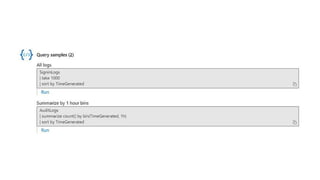
  • #58 Admins will have to create their own alert rules using the query system.  The example from Microsoft is shown here. 
  • #59 Click Create.
  • #61 Next Select the Community tab under configuration and select Go to Azure Sentinel community.
  • #62 From this community GitHub you can find many useful alerts to setup in you Azure Sentinel Preview. Conclusion From here we have Sentinel setup to collect data, view the dashboards, and trigger alerts.
  • #64 Configuring dashboards in Azure Sentinel is as easy as opening the Dashboards blade, clicking on the data connector solution that we just setup, and clicking install.
  • #65 Once your dashboards are installed, you can start using them for threat hunting. Another helpful resource to identify threats is the Hunting blade, which includes a number of built-in log queries.
  • #66 The last item that you’ll want to take a look at is importing Microsoft’s Azure Sentinel Notebooks from GitHub for some guided-hunting patterns. Click on the Notebooks blade and then Clone Azure Sentinel Notebooks. This will guide you through importing the notebooks from GitHub.
  • #68 Azure Sentinel uses Log Analytics. You might be familiar with Log Analytics if you’ve used services like Windows Analytics for upgrade readiness. You might also be familiar with it under its former name – Operations Management Suite, or OMS. We’ll start by creating a Log Analytics workspace. To do this, visit the Azure Portal at portal.azure.com and from the search bar, type Log analytics and choose it under the Services heading:
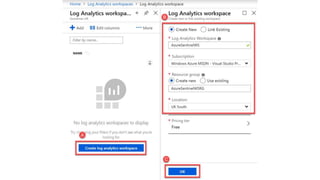
  • #69 We’ll then choose to Create a log analytics workspace and then, as shown in B, create a new workspace with a relevant name and resource group. In my example, I’ve chosen the name AzureSentinelWS, and created a new Resource Group dedicated to this. I’ve chosen to store the data within the UK and selected the Free pricing tier. Finally, I’ve chosen OK to commence creation of the new workspace:
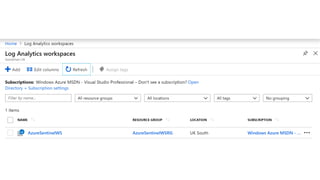
  • #70 After a few moments, we’ll now see the new AzureSentinelWS within the list, on the Log Analytics workspaces homepage in the Azure Portal:
  • #71 With our new Log Analytics workspace created, we’ll now search within the Azure Portal for Azure Sentinel and select it within the Services section:
  • #72 To create our new Azure Sentinel workspace, we’ll choose Add and then, as shown in B, select our AzureSentinelWS instance of Log Analytics. This will be where the collected data is stored. Finally, we’ll choose to Add Azure Sentinel: As with Log Analytics, we’ll wait a few minutes for the service to be configured.
  • #73 Once Azure Sentinel is configured, we’ll see a large menu of options. These include an Overview of the environment, access to Logs, a section dedicated to Threat Management, including case management, dashboards, threat hunting and notebooks, and a Configuration section. Within the Configuration section, we’ll select Data Connectors, as shown in A, to configure connections. You’ll immediately see we have built-in options to collect data from a variety of sources – including ATP, AIP and Microsoft Cloud App security. For the moment, we’ll initially choose to configure Azure Active Directory before configuring Office 365.
  • #74 Configuration for Azure AD is extremely straightforward. Assuming you are logged into Azure AD as a global administrator, choose Connect for both Audit logs and Sign-in logs to collect data:
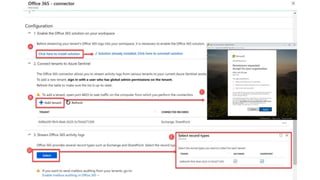
  • #75 After connecting Azure AD, return to the Data Collectors configuration section, and choose Office 365. Office 365 configuration is slightly more complex, but still simple. First, as shown in A below, enable the Office 365 solution for Azure Sentinel. To do this, choose Click here to install solution. This link should immediately change to say Solution already installed. Secondly, as shown in B below, choose Add tenant. You’ll then see a sign-in page as a pop-up browser window, which will ask for consent to read the logs into Azure Sentinel, as shown in C. Assuming you are happy to agree to this, you will see the tenant ID listed in a table below. Finally, you will need to choose to Stream Office 365 activity logs. To do this, choose Select, as shown in D to choose the supported log types Exchange and SharePoint. ­­
  • #76 Our final setup task is to install relevant Dashboards. To accomplish this, navigate to the Threat Management section and choose Dashboards. For both Azure AD Sign-in logs, Azure AD Audit logs, Office 365, Exchange and SharePoint data, first search for the available dashboard, as shown in B, and then choose the Install option.
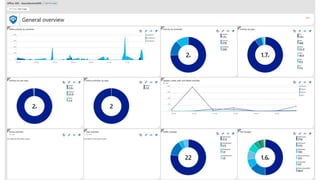
  • #77 Naturally, before we can act upon any data we need to wait for it to be completed. To product a reasonable amount of data, I’ve waited just over a week – however data immediately appeared within a few hours. On our Overview page we see events and alerts based upon the raw data stored within the Log Analytics instance. This gives us a breakdown of the data sources and the volume of data. We’ve also got an overview of cases we’ve created, potentially malicious events and anomalies:
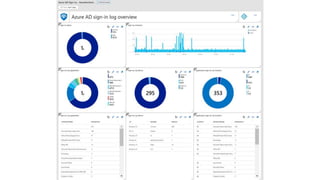
  • #78 For each Dashboard, we see a detailed break down of the data collected. The Sign-in log overview provides an excellent insight into sign-in activities across all Azure AD services, including details on the devices signing in, applications and even locations:
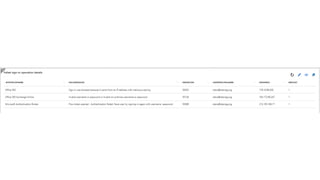
  • #79 Further down on the Azure AD sign-ins dashboard, we even see more detail on failed login reasons. For example, Sign-in was blocked because it came form an IP address with malicious activity:
  • #80 Our Office 365 dashboard provides a similar level of detail, with further breakdowns available by selecting per-service dashboards for Exchange and SharePoint. Useful information on this dashboard provides insights into not just sign-in activity, but also the type of activity whilst logged in. We can see information on changes to files, commands executed against Office 365, admin activities and cross-service creates, add, delete and update activities: