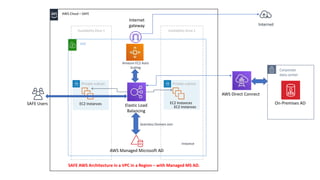
AWS – Managed Microsoft AD for SAFE to connect to On-Premises AD
VPC
AWS Cloud – SAFE
Availability Zone 1 Availability Zone 2
Seamless Domain Join
Instance
Amazon EC2 Auto
Scaling
SAFE Users
Private subnet
Corporate
data center
AWS Direct Connect
Elastic Load
Balancing
Private subnet
On-Premises ADEC2 InstancesEC2 Instances
EC2 Instances
Internet
gateway Internet
SAFE AWS Architecture in a VPC in a Region – with Managed MS AD.
AWS Managed Microsoft AD
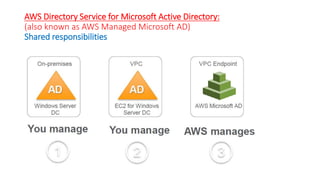
AWS Directory Service for Microsoft Active Directory:
(also known as AWS Managed Microsoft AD)
Shared responsibilities
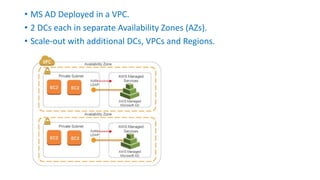
• MS AD Deployed in a VPC.
• 2 DCs each in separate Availability Zones (AZs).
• Scale-out with additional DCs, VPCs and Regions.
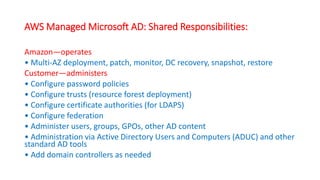
AWS Managed Microsoft AD: Shared Responsibilities:
Amazon—operates
• Multi-AZ deployment, patch, monitor, DC recovery, snapshot, restore
Customer—administers
• Configure password policies
• Configure trusts (resource forest deployment)
• Configure certificate authorities (for LDAPS)
• Configure federation
• Administer users, groups, GPOs, other AD content
• Administration via Active Directory Users and Computers (ADUC) and other
standard AD tools
• Add domain controllers as needed
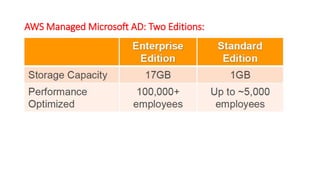
AWS Managed Microsoft AD: Two Editions:
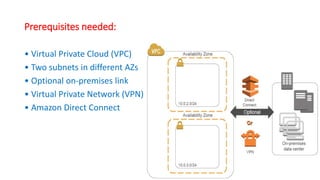
Prerequisites needed:
• Virtual Private Cloud (VPC)
• Two subnets in different AZs
• Optional on-premises link
• Virtual Private Network (VPN)
• Amazon Direct Connect
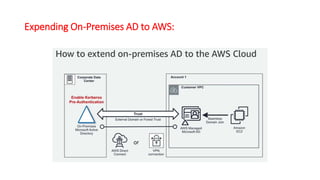
Expending On-Premises AD to AWS:
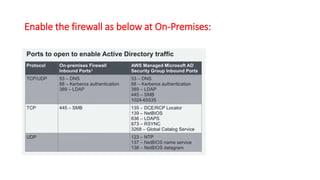
Enable the firewall as below at On-Premises:
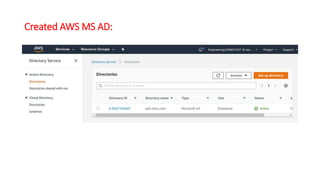
Created AWS MS AD:
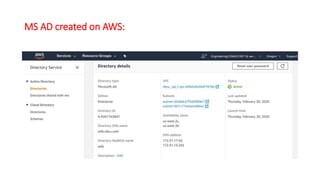
MS AD created on AWS:
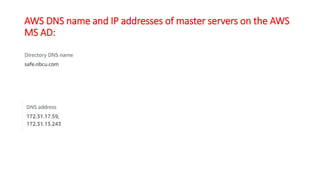
AWS DNS name and IP addresses of master servers on the AWS
MS AD:
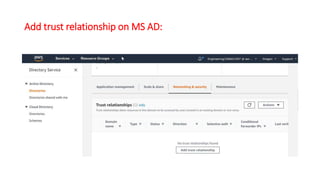
Add trust relationship on MS AD:
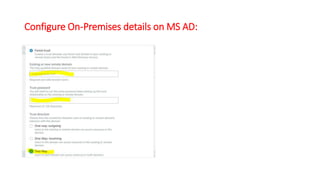
Configure On-Premises details on MS AD:
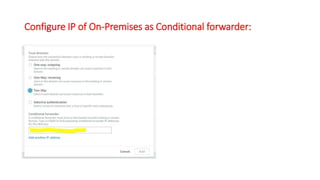
Configure IP of On-Premises as Conditional forwarder:
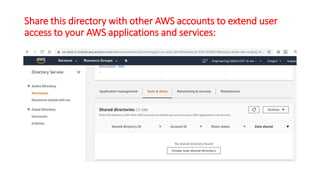
Share this directory with other AWS accounts to extend user
access to your AWS applications and services:
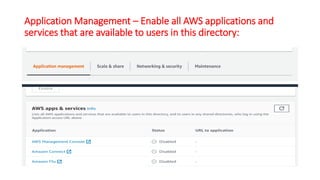
Application Management – Enable all AWS applications and
services that are available to users in this directory:
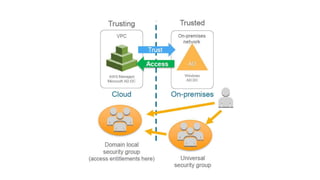
Trust - Forest trusts:
• Time tested, secure model
• The trusting forest has no admin control over the trusted forest
• Trusted users have cloud resource access, but only if entitled by
trusting admins (you control both sides)
• Cloud identities have no access to on-premises resources unless:
1.On-premises trusts the cloud AND
2.On-premises admins grant permissions to identities in the
cloud
Securing trusts:
• Leave SID (Security IDentifier) filtering on (Windows default).
(Sid (Statement ID) value is just a sub-ID of the policy document's ID)
• Use selective authentication (on-premises side of trust)
• Don’t grant AD groups from the cloud access to on premises
resources
• Open only ports for AD trust communications between DCs.
• Open ports for AD authentication from cloud to on-premises AD;
minimize all other ports from cloud to on premises.
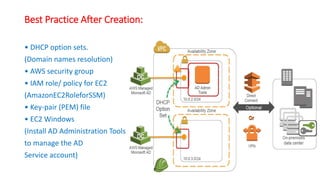
Best Practice After Creation:
• DHCP option sets.
(Domain names resolution)
• AWS security group
• IAM role/ policy for EC2
(AmazonEC2RoleforSSM)
• Key-pair (PEM) file
• EC2 Windows
(Install AD Administration Tools
to manage the AD
Service account)
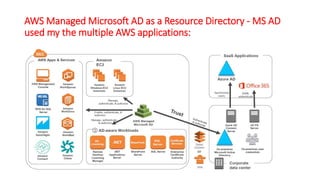
AWS Managed Microsoft AD as a Resource Directory - MS AD
used my the multiple AWS applications:
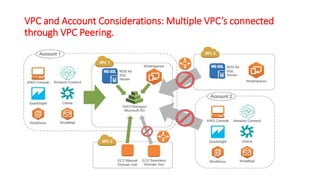
VPC and Account Considerations: Multiple VPC’s connected
through VPC Peering.
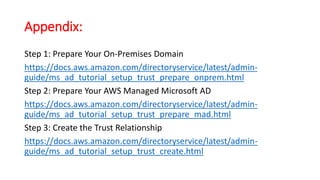
Appendix:
Step 1: Prepare Your On-Premises Domain
https://docs.aws.amazon.com/directoryservice/latest/admin-
guide/ms_ad_tutorial_setup_trust_prepare_onprem.html
Step 2: Prepare Your AWS Managed Microsoft AD
https://docs.aws.amazon.com/directoryservice/latest/admin-
guide/ms_ad_tutorial_setup_trust_prepare_mad.html
Step 3: Create the Trust Relationship
https://docs.aws.amazon.com/directoryservice/latest/admin-
guide/ms_ad_tutorial_setup_trust_create.html
Tutorial: Setting Up Your Base AWS Managed Microsoft AD Test
Lab in AWS:
https://docs.aws.amazon.com/directoryservice/latest/admin-
guide/ms_ad_tutorial_test_lab_base.html

Aws managed microsoft ad

  • 1.
    AWS – ManagedMicrosoft AD for SAFE to connect to On-Premises AD
  • 2.
    VPC AWS Cloud –SAFE Availability Zone 1 Availability Zone 2 Seamless Domain Join Instance Amazon EC2 Auto Scaling SAFE Users Private subnet Corporate data center AWS Direct Connect Elastic Load Balancing Private subnet On-Premises ADEC2 InstancesEC2 Instances EC2 Instances Internet gateway Internet SAFE AWS Architecture in a VPC in a Region – with Managed MS AD. AWS Managed Microsoft AD
  • 3.
    AWS Directory Servicefor Microsoft Active Directory: (also known as AWS Managed Microsoft AD) Shared responsibilities
  • 4.
    • MS ADDeployed in a VPC. • 2 DCs each in separate Availability Zones (AZs). • Scale-out with additional DCs, VPCs and Regions.
  • 5.
    AWS Managed MicrosoftAD: Shared Responsibilities: Amazon—operates • Multi-AZ deployment, patch, monitor, DC recovery, snapshot, restore Customer—administers • Configure password policies • Configure trusts (resource forest deployment) • Configure certificate authorities (for LDAPS) • Configure federation • Administer users, groups, GPOs, other AD content • Administration via Active Directory Users and Computers (ADUC) and other standard AD tools • Add domain controllers as needed
  • 6.
    AWS Managed MicrosoftAD: Two Editions:
  • 7.
    Prerequisites needed: • VirtualPrivate Cloud (VPC) • Two subnets in different AZs • Optional on-premises link • Virtual Private Network (VPN) • Amazon Direct Connect
  • 8.
  • 9.
    Enable the firewallas below at On-Premises:
  • 10.
  • 11.
  • 12.
    AWS DNS nameand IP addresses of master servers on the AWS MS AD:
  • 13.
  • 14.
  • 15.
    Configure IP ofOn-Premises as Conditional forwarder:
  • 16.
    Share this directorywith other AWS accounts to extend user access to your AWS applications and services:
  • 17.
    Application Management –Enable all AWS applications and services that are available to users in this directory:
  • 18.
    Trust - Foresttrusts: • Time tested, secure model • The trusting forest has no admin control over the trusted forest • Trusted users have cloud resource access, but only if entitled by trusting admins (you control both sides) • Cloud identities have no access to on-premises resources unless: 1.On-premises trusts the cloud AND 2.On-premises admins grant permissions to identities in the cloud
  • 20.
    Securing trusts: • LeaveSID (Security IDentifier) filtering on (Windows default). (Sid (Statement ID) value is just a sub-ID of the policy document's ID) • Use selective authentication (on-premises side of trust) • Don’t grant AD groups from the cloud access to on premises resources • Open only ports for AD trust communications between DCs. • Open ports for AD authentication from cloud to on-premises AD; minimize all other ports from cloud to on premises.
  • 21.
    Best Practice AfterCreation: • DHCP option sets. (Domain names resolution) • AWS security group • IAM role/ policy for EC2 (AmazonEC2RoleforSSM) • Key-pair (PEM) file • EC2 Windows (Install AD Administration Tools to manage the AD Service account)
  • 22.
    AWS Managed MicrosoftAD as a Resource Directory - MS AD used my the multiple AWS applications:
  • 23.
    VPC and AccountConsiderations: Multiple VPC’s connected through VPC Peering.
  • 24.
    Appendix: Step 1: PrepareYour On-Premises Domain https://docs.aws.amazon.com/directoryservice/latest/admin- guide/ms_ad_tutorial_setup_trust_prepare_onprem.html Step 2: Prepare Your AWS Managed Microsoft AD https://docs.aws.amazon.com/directoryservice/latest/admin- guide/ms_ad_tutorial_setup_trust_prepare_mad.html Step 3: Create the Trust Relationship https://docs.aws.amazon.com/directoryservice/latest/admin- guide/ms_ad_tutorial_setup_trust_create.html
  • 25.
    Tutorial: Setting UpYour Base AWS Managed Microsoft AD Test Lab in AWS: https://docs.aws.amazon.com/directoryservice/latest/admin- guide/ms_ad_tutorial_test_lab_base.html