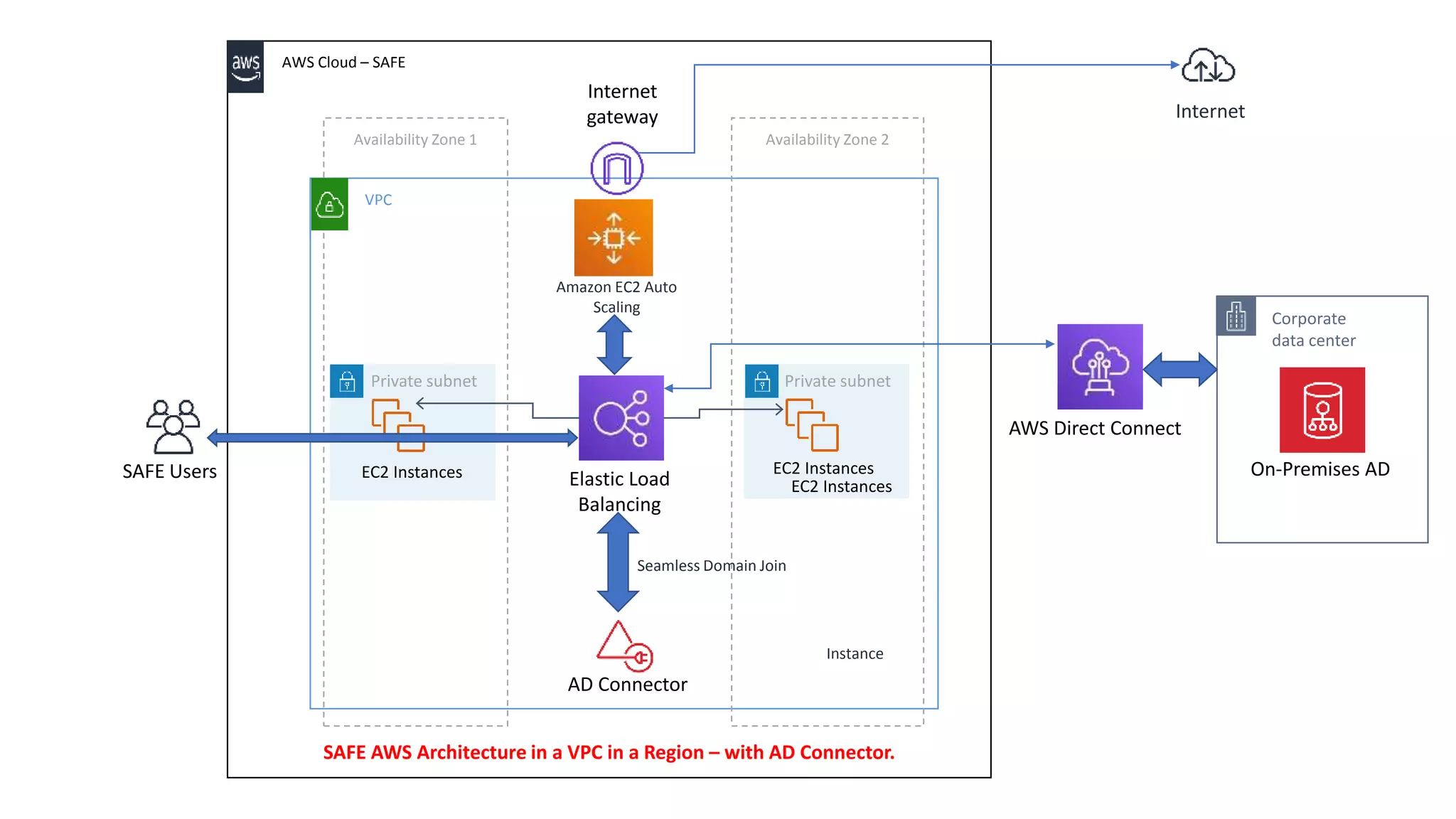
AWS – AD Connector for SAFE to connect to On-Premises AD
VPC
AWS Cloud – SAFE
Availability Zone 1 Availability Zone 2
Seamless Domain Join
Instance
Amazon EC2 Auto
Scaling
SAFE Users
Private subnet
Corporate
data center
AWS Direct Connect
Elastic Load
Balancing
AD Connector
Private subnet
On-Premises ADEC2 InstancesEC2 Instances
EC2 Instances
Internet
gateway Internet
SAFE AWS Architecture in a VPC in a Region – with AD Connector.
AD Connector:
With AD Connector you can connect AWS Directory Service to
your existing enterprise directory.
Security features with AD Connector:
1. When connected to your existing directory, all of your directory
data remains on your domain controllers.
2. AWS Directory Service does not replicate any of your directory
data.
3. AD Connector allows you to proxy directory requests from AWS
Enterprise IT applications to your on-premises Microsoft Active
Directory, without caching any information in the cloud.
4. You can consistently enforce existing security policies (such as
password expiration, password history, and account lockouts)
whether users or IT administrators are accessing resources in your
on-premises infrastructure or in the AWS Cloud.
Security features with AD Connector:
5. The VPC must be connected to your existing network through a
Virtual Private Network (VPN) connection or AWS Direct Connect.
6. By default VPC takes default hardware tenancy. (Multi-Tenant
Hardware (logically isolated))
We can opt for Single-tenant hardware/ dedicated hardware - The
dedicated model means that your EC2 instances will only run
on hardware with other instances that you've deployed, no other
customers will use the same piece of hardware as you.)AWS Directory
Service does not replicate any of your directory data.
7. Need to configure the IP’s of two DNS servers or domain
controllers of the AD Connector in the existing on-premises AD.
Security features with AD Connector:
8. The firewall for your existing network must have the following ports
open to the CIDRs for both subnets in your Amazon VPC.
1. TCP/UDP 53 - DNS
2. TCP/UDP 88 - Kerberos authentication
3. TCP/UDP 389 – LDAP
These are the minimum ports that are needed before AD Connector
can connect to your directory. Your specific configuration may require
additional ports be open.
9. User accounts must have Kerberos pre-authentication enabled.
10. Rotate Admin Credentials Regularly:
Change your AD Connector service account Admin password
regularly, and make sure that the password is consistent with your
existing Active Directory password policies.
Security features with AD Connector:
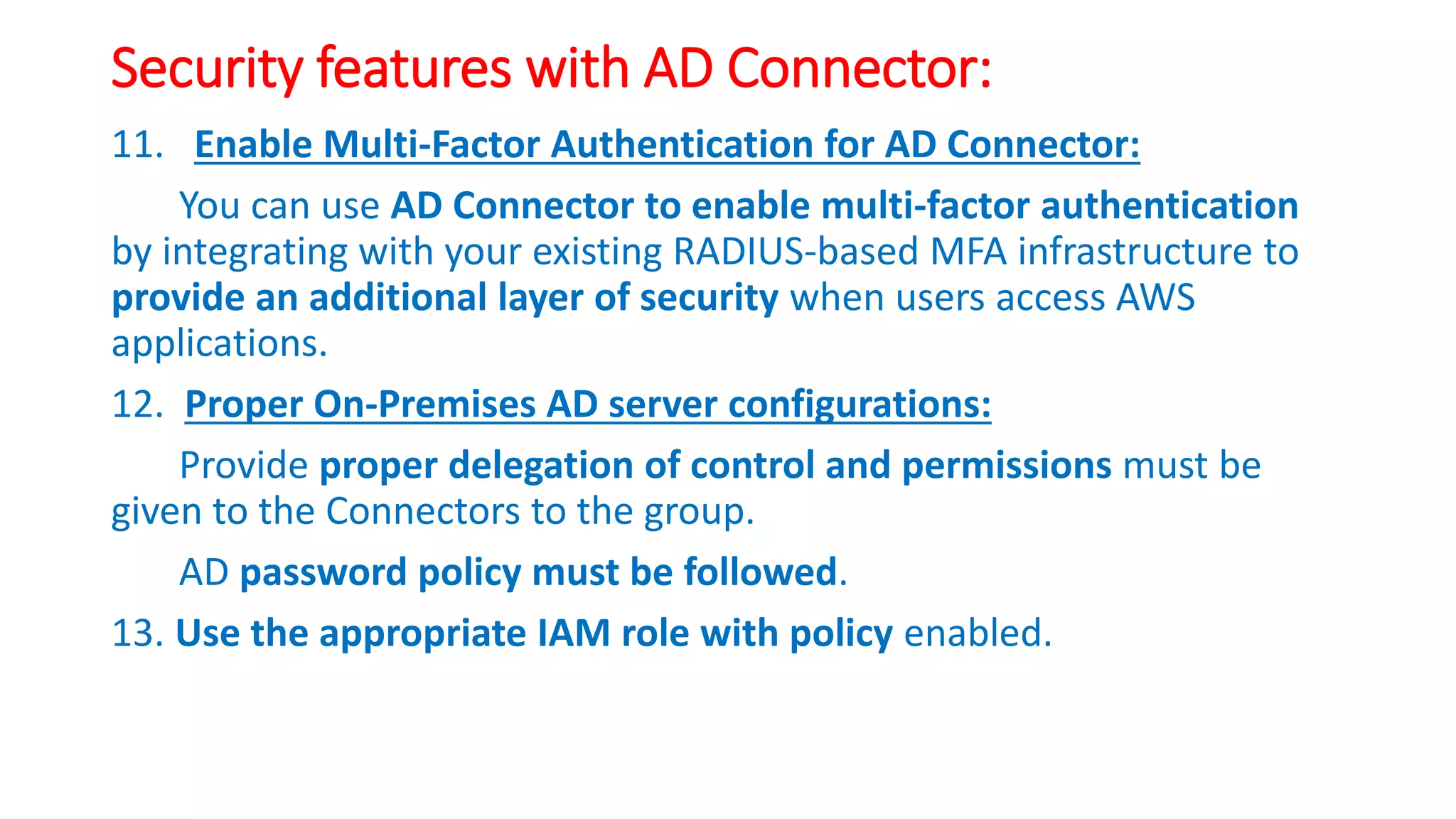
11. Enable Multi-Factor Authentication for AD Connector:
You can use AD Connector to enable multi-factor authentication
by integrating with your existing RADIUS-based MFA infrastructure to
provide an additional layer of security when users access AWS
applications.
12. Proper On-Premises AD server configurations:
Provide proper delegation of control and permissions must be
given to the Connectors to the group.
AD password policy must be followed.
13. Use the appropriate IAM role with policy enabled.
Security features with AD Connector:
14. AD Connector service account:
To connect to your existing directory, you must have the credentials
for your AD Connector service account configured in the existing
directory and that has been delegated with appropriate privileges as
per the need.
While members of the Domain Admins group of the AWS Service
account must have sufficient privileges to connect to the directory.
As a best practice, you should use a AWS service account that only
has the minimum privileges necessary to connect to the directory.
Security features with AD Connector:
15. Encryption types:
AD Connector supports the following encryption types when
authenticating to your Active Directory domain controllers.
• AES-256-HMAC
• AES-128-HMAC
• RC4-HMAC
Appendix:
Active Directory Connector:
https://docs.aws.amazon.com/directoryservice/latest/admin-
guide/directory_ad_connector.html
Prerequisites for AD Connector:
https://docs.aws.amazon.com/directoryservice/latest/admin-
guide/prereq_connector.html
Create AD Connector:
https://docs.aws.amazon.com/directoryservice/latest/admin-
guide/create_ad_connector.html
Appendix:
Securing your AD Connector:
https://docs.aws.amazon.com/directoryservice/latest/admin-
guide/ad_connector_security.html
MFA for AD Connector:
https://docs.aws.amazon.com/directoryservice/latest/admin-
guide/ad_connector_mfa.html
Seamlessly Join a Windows EC2 Instance:
https://docs.aws.amazon.com/directoryservice/latest/admin-
guide/ad_connector_launching_instance.html
Best Practices for AD Connector:
https://docs.aws.amazon.com/directoryservice/latest/admin-
guide/ad_connector_best_practices.html
Appendix:
Limits for AD Connector:
https://docs.aws.amazon.com/directoryservice/latest/admin-
guide/ad_connector_limits.html

AWS AD Connector - SSO - Directory Service - Cloud

  • 1.
    AWS – ADConnector for SAFE to connect to On-Premises AD
  • 2.
    VPC AWS Cloud –SAFE Availability Zone 1 Availability Zone 2 Seamless Domain Join Instance Amazon EC2 Auto Scaling SAFE Users Private subnet Corporate data center AWS Direct Connect Elastic Load Balancing AD Connector Private subnet On-Premises ADEC2 InstancesEC2 Instances EC2 Instances Internet gateway Internet SAFE AWS Architecture in a VPC in a Region – with AD Connector.
  • 3.
    AD Connector: With ADConnector you can connect AWS Directory Service to your existing enterprise directory.
  • 4.
    Security features withAD Connector: 1. When connected to your existing directory, all of your directory data remains on your domain controllers. 2. AWS Directory Service does not replicate any of your directory data. 3. AD Connector allows you to proxy directory requests from AWS Enterprise IT applications to your on-premises Microsoft Active Directory, without caching any information in the cloud. 4. You can consistently enforce existing security policies (such as password expiration, password history, and account lockouts) whether users or IT administrators are accessing resources in your on-premises infrastructure or in the AWS Cloud.
  • 5.
    Security features withAD Connector: 5. The VPC must be connected to your existing network through a Virtual Private Network (VPN) connection or AWS Direct Connect. 6. By default VPC takes default hardware tenancy. (Multi-Tenant Hardware (logically isolated)) We can opt for Single-tenant hardware/ dedicated hardware - The dedicated model means that your EC2 instances will only run on hardware with other instances that you've deployed, no other customers will use the same piece of hardware as you.)AWS Directory Service does not replicate any of your directory data. 7. Need to configure the IP’s of two DNS servers or domain controllers of the AD Connector in the existing on-premises AD.
  • 6.
    Security features withAD Connector: 8. The firewall for your existing network must have the following ports open to the CIDRs for both subnets in your Amazon VPC. 1. TCP/UDP 53 - DNS 2. TCP/UDP 88 - Kerberos authentication 3. TCP/UDP 389 – LDAP These are the minimum ports that are needed before AD Connector can connect to your directory. Your specific configuration may require additional ports be open. 9. User accounts must have Kerberos pre-authentication enabled. 10. Rotate Admin Credentials Regularly: Change your AD Connector service account Admin password regularly, and make sure that the password is consistent with your existing Active Directory password policies.
  • 7.
    Security features withAD Connector: 11. Enable Multi-Factor Authentication for AD Connector: You can use AD Connector to enable multi-factor authentication by integrating with your existing RADIUS-based MFA infrastructure to provide an additional layer of security when users access AWS applications. 12. Proper On-Premises AD server configurations: Provide proper delegation of control and permissions must be given to the Connectors to the group. AD password policy must be followed. 13. Use the appropriate IAM role with policy enabled.
  • 8.
    Security features withAD Connector: 14. AD Connector service account: To connect to your existing directory, you must have the credentials for your AD Connector service account configured in the existing directory and that has been delegated with appropriate privileges as per the need. While members of the Domain Admins group of the AWS Service account must have sufficient privileges to connect to the directory. As a best practice, you should use a AWS service account that only has the minimum privileges necessary to connect to the directory.
  • 9.
    Security features withAD Connector: 15. Encryption types: AD Connector supports the following encryption types when authenticating to your Active Directory domain controllers. • AES-256-HMAC • AES-128-HMAC • RC4-HMAC
  • 10.
    Appendix: Active Directory Connector: https://docs.aws.amazon.com/directoryservice/latest/admin- guide/directory_ad_connector.html Prerequisitesfor AD Connector: https://docs.aws.amazon.com/directoryservice/latest/admin- guide/prereq_connector.html Create AD Connector: https://docs.aws.amazon.com/directoryservice/latest/admin- guide/create_ad_connector.html
  • 11.
    Appendix: Securing your ADConnector: https://docs.aws.amazon.com/directoryservice/latest/admin- guide/ad_connector_security.html MFA for AD Connector: https://docs.aws.amazon.com/directoryservice/latest/admin- guide/ad_connector_mfa.html Seamlessly Join a Windows EC2 Instance: https://docs.aws.amazon.com/directoryservice/latest/admin- guide/ad_connector_launching_instance.html Best Practices for AD Connector: https://docs.aws.amazon.com/directoryservice/latest/admin- guide/ad_connector_best_practices.html
  • 12.
    Appendix: Limits for ADConnector: https://docs.aws.amazon.com/directoryservice/latest/admin- guide/ad_connector_limits.html