Message
I hope all of you are safe and well.
The world is grappling with an
issue of enormous scale and
human impact, and our hearts go
out to all who have been affected
by the outbreak of coronavirus
(COVID-19).
In this lockdown situation we
bounded to live in our home and
situation getting tough but our
fight against COVID 19 will bring
us to victory at the end.
Project Guide:- Er. Saurabh Kumar Jha
Presented by:-
Vibhav Yadav (1605220058)
Vineet Kumar (1605220059)
Vivek Patel (1605220060)
4th year, EE
Automatic Power Factor Correction Using
Arduino Uno
CONTENTS
• Introduction
• What is Power Factor?
• What is Automatic Power Factor Correction(APFC)?
• Why Power Factor Should be Corrected?
• How Power Factor Can be Corrected?
• Hardware Description of Project
• Software Description of Project
• How We Execute The Project?
• ADVANTAGES of APFC
• DISADVANTAGES
• TARGET ACHIEVEMENT ROUND-1 [95% achieved]- Slide 23
• TARGET ACHIEVEMENT ROUND-2 [80% achieved]- Slide 26
INTRODUCTION
• This project one of the most effective for automatic power factor improvement.
• Static capacitor will be controlled by microcontroller with very low cost.
• Power factor is set as standard value into the microcontroller.
• Potential transformer and Current transformer are used for power factor
measurement.
• Here one of the most popular microcontroller is used i.e. the Arduino ATMEGA
328P
What is Power Factor?
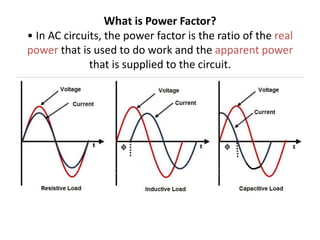
• In AC circuits, the power factor is the ratio of the real
power that is used to do work and the apparent power
that is supplied to the circuit.
What is Automatic
Power Factor
Correction(APFC)?
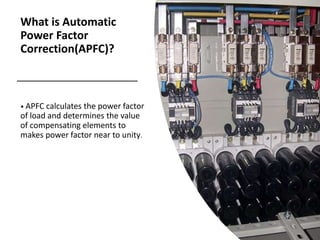
• APFC calculates the power factor
of load and determines the value
of compensating elements to
makes power factor near to unity.
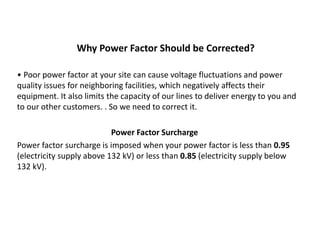
Why Power Factor Should be Corrected?
• Poor power factor at your site can cause voltage fluctuations and power
quality issues for neighboring facilities, which negatively affects their
equipment. It also limits the capacity of our lines to deliver energy to you and
to our other customers. . So we need to correct it.
Power Factor Surcharge
Power factor surcharge is imposed when your power factor is less than 0.95
(electricity supply above 132 kV) or less than 0.85 (electricity supply below
132 kV).
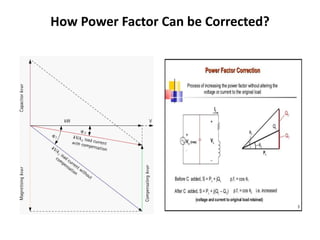
How Power Factor Can be Corrected?
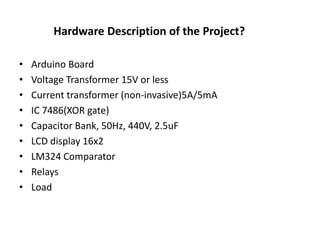
Hardware Description of the Project?
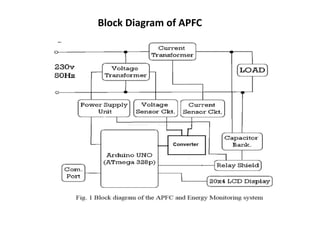
• Arduino Board
• Voltage Transformer 15V or less
• Current transformer (non-invasive)5A/5mA
• IC 7486(XOR gate)
• Capacitor Bank, 50Hz, 440V, 2.5uF
• LCD display 16x2
• LM324 Comparator
• Relays
• Load
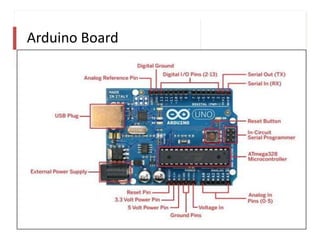
Arduino Board
An Introduction to Arduino Board
• Arduino is an open-source electronics platform based on easy-to-use hardware
and software.
• An Arduino is actually a microcontroller based kit which can be either used directly
by purchasing from the vendor or can be made at home using the components.
• It is basically used in communications and in controlling or operating many
devices.
• It was founded by Massimo Banzi and David Cuartielles in 2005.
• Over the years Arduino has been the brain of thousands of projects, from everyday
objects to complex scientific instruments.
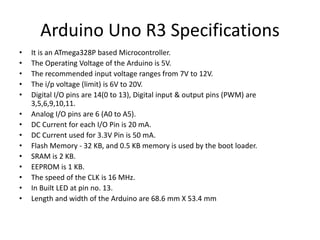
Arduino Uno R3 Specifications
• It is an ATmega328P based Microcontroller.
• The Operating Voltage of the Arduino is 5V.
• The recommended input voltage ranges from 7V to 12V.
• The i/p voltage (limit) is 6V to 20V.
• Digital I/O pins are 14(0 to 13), Digital input & output pins (PWM) are
3,5,6,9,10,11.
• Analog I/O pins are 6 (A0 to A5).
• DC Current for each I/O Pin is 20 mA.
• DC Current used for 3.3V Pin is 50 mA.
• Flash Memory - 32 KB, and 0.5 KB memory is used by the boot loader.
• SRAM is 2 KB.
• EEPROM is 1 KB.
• The speed of the CLK is 16 MHz.
• In Built LED at pin no. 13.
• Length and width of the Arduino are 68.6 mm X 53.4 mm
Block Diagram of APFC
Algorithm for APFC
Software Description
FUNCTIONS VARABLES
Code for APFC Algorithm
Continue…
Circuit of Converter
Continue….
ADVANTAGES:
• Avoid Power Factor Penalties
• Reduced Demand Charges
• Increased Load Carrying Capabilities In
Existing Circuits
• Improved Voltage
• Reduced Power System Losses
• Increase in efficiency of system and
devices
• Better usage of power system, lines
and generators etc.
Disadvantage
This APFC Project is based on Zero Crossing Detector(ZCD). In case of
Harmonics in the power supply, the calculated P.F. may have some error
which leads to improper correction in P.F.
Shunt Harmonic Passive Filter
ROUND-1 TARGET(95% Achieved)
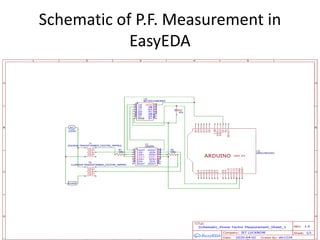
• Hardware implementation of Power Factor calculation along with testing
for best code to implement it will be done.
Fig: P.F. Measurement Circuit
Schematic of P.F. Measurement in
EasyEDA
Implemented Code
• int pin = 13;
• float degree = 360;
• float frequency = 50;
• const float pi = 3.14;
• float nano = 1 * pow (10,-6); // Multiplication factor to convert nano seconds into seconds
• // Define floats to contain calculations
• float power_factor;
• float angle;
• void setup()
• {
• pinMode(pin, INPUT);
• Serial.begin(9600);
• }
• void loop() {
• // put your main code here, to run repeatedly:
• angle = ((((pulseIn(pin, HIGH)) * nano)*2*pi)* frequency);
• power_factor = cos(angle);
• Serial.print("The Power factor is: ");
• Serial.println(power_factor);
• delay(500);
• }
An Introduction to Proteus Software
Target Achievement 85%
• Proteus is a simulation and design software tool developed by Labcenter
Electronics for Electrical and Electronic circuit design. It also possess 2D CAD
drawing feature.
• Proteus software suite containing schematic, simulation as well as PCB
designing.
• ISIS is the software used to draw schematics and simulate the
circuits in real time. The simulation allows human access during run time,
thus providing real time simulation.
• ARES is used for PCB designing. It has the feature of viewing
output in 3D view of the designed PCB along with components.
• The designer can also develop 2D drawings for the product.
P.F. Measurement in Proteus
• A Single phase 400V, 50Hz, motor takes a supply current of 50A at a P.F (Power
factor) of 0.6. The motor power factor has to be improved to 0.9 by connecting a
capacitor in parallel with it. Calculate the required capacity of Capacitor in both
kVAR and Farads.
Sol- Motor Input = P = V x I x Cosθ
= 400V x 50A x 0.6
= 12kW
Actual P.F = Cosθ1 = 0..6
Required P.F = Cosθ2 = 0.90
θ1 = Cos-1 = (0.60) = 53°.13; Tan θ1 = Tan (53°.13) = 1.3333
θ2 = Cos-1 = (0.90) = 25°.84; Tan θ2 = Tan (25°.50) = 0.4843
Required Capacitor kVAR to improve P.F from 0.60 to 0.90
Required Capacitor kVAR = P (Tan θ1 – Tan θ2)
= 5kW (1.3333– 0.4843)
= 10.188 kVAR
C = kVAR / (2 π f V2) in microfarad
Putting the Values in the above formula
= (10.188kVAR) / (2 x π x 50 x 4002)
= 2.0268 x 10-4
= 202.7 x 10-6
= 202.7μF
Schematic of APFC in EasyEDA
Code Implementation
• int pin = 13;
• int cap1 = 5;
• int cap2 = 6;
• int cap3 = 7;
• float degree = 360;
• float frequency = 50;
• const float pi = 3.14;
• float nano = 1 * pow (10,-6); // Multiplication factor to convert nano seconds into seconds
• // Define floats to contain calculations
• float power_factor;
• float angle;
• void setup()
• {
• pinMode(pin, INPUT);
• Serial.begin(9600);
• }
Continue…
• void loop() {
• // put your main code here, to run repeatedly:
• angle = ((((pulseIn(pin, HIGH)) * nano)*2*pi)* frequency);
• power_factor = cos(angle);
• if(power_factor < 0.98){
• digitalWrite(cap1, HIGH);
• if(power_factor >0.99){
• digitalWrite(cap1, LOW);
• }
• delay(500);
• Serial.print("tThe corrected Power factor is:ttt");
• Serial.println(power_factor);
• if(power_factor <0.98){
• digitalWrite(cap2, HIGH);
• if(power_factor >0.99){
• digitalWrite(cap2, LOW);
• }
• delay(500);
• Serial.print("tThe corrected Power factor is:ttt");
• Serial.println(power_factor);
• if(power_factor <0.98){
• digitalWrite(cap3, HIGH);
• if(power_factor >0.99){
• digitalWrite(cap3, LOW);
• }
• delay(500);
• Serial.print("tThe corrected Power factor is:ttt");
• Serial.println(power_factor);
• delay(500);
• }
• }}}
• Stay home
• Wash your hands frequently
• Maintain social distancing
• Avoid touching eyes, nose
and mouth
• Practice respiratory hygiene
• If you have fever, cough and
difficulty breathing, seek
medical care early
• Stay aware of the latest
information on the COVID-19
outbreak, available on the
WHO website and Ministry of
Health and Family Welfare
Automatic Power Factor Correction Using Arduino Uno

Automatic Power Factor Correction Using Arduino Uno

  • 1.
    Message I hope allof you are safe and well. The world is grappling with an issue of enormous scale and human impact, and our hearts go out to all who have been affected by the outbreak of coronavirus (COVID-19). In this lockdown situation we bounded to live in our home and situation getting tough but our fight against COVID 19 will bring us to victory at the end.
  • 2.
    Project Guide:- Er.Saurabh Kumar Jha Presented by:- Vibhav Yadav (1605220058) Vineet Kumar (1605220059) Vivek Patel (1605220060) 4th year, EE Automatic Power Factor Correction Using Arduino Uno
  • 3.
    CONTENTS • Introduction • Whatis Power Factor? • What is Automatic Power Factor Correction(APFC)? • Why Power Factor Should be Corrected? • How Power Factor Can be Corrected? • Hardware Description of Project • Software Description of Project • How We Execute The Project? • ADVANTAGES of APFC • DISADVANTAGES • TARGET ACHIEVEMENT ROUND-1 [95% achieved]- Slide 23 • TARGET ACHIEVEMENT ROUND-2 [80% achieved]- Slide 26
  • 4.
    INTRODUCTION • This projectone of the most effective for automatic power factor improvement. • Static capacitor will be controlled by microcontroller with very low cost. • Power factor is set as standard value into the microcontroller. • Potential transformer and Current transformer are used for power factor measurement. • Here one of the most popular microcontroller is used i.e. the Arduino ATMEGA 328P
  • 5.
    What is PowerFactor? • In AC circuits, the power factor is the ratio of the real power that is used to do work and the apparent power that is supplied to the circuit.
  • 6.
    What is Automatic PowerFactor Correction(APFC)? • APFC calculates the power factor of load and determines the value of compensating elements to makes power factor near to unity.
  • 7.
    Why Power FactorShould be Corrected? • Poor power factor at your site can cause voltage fluctuations and power quality issues for neighboring facilities, which negatively affects their equipment. It also limits the capacity of our lines to deliver energy to you and to our other customers. . So we need to correct it. Power Factor Surcharge Power factor surcharge is imposed when your power factor is less than 0.95 (electricity supply above 132 kV) or less than 0.85 (electricity supply below 132 kV).
  • 8.
    How Power FactorCan be Corrected?
  • 9.
    Hardware Description ofthe Project? • Arduino Board • Voltage Transformer 15V or less • Current transformer (non-invasive)5A/5mA • IC 7486(XOR gate) • Capacitor Bank, 50Hz, 440V, 2.5uF • LCD display 16x2 • LM324 Comparator • Relays • Load
  • 10.
  • 11.
    An Introduction toArduino Board • Arduino is an open-source electronics platform based on easy-to-use hardware and software. • An Arduino is actually a microcontroller based kit which can be either used directly by purchasing from the vendor or can be made at home using the components. • It is basically used in communications and in controlling or operating many devices. • It was founded by Massimo Banzi and David Cuartielles in 2005. • Over the years Arduino has been the brain of thousands of projects, from everyday objects to complex scientific instruments.
  • 12.
    Arduino Uno R3Specifications • It is an ATmega328P based Microcontroller. • The Operating Voltage of the Arduino is 5V. • The recommended input voltage ranges from 7V to 12V. • The i/p voltage (limit) is 6V to 20V. • Digital I/O pins are 14(0 to 13), Digital input & output pins (PWM) are 3,5,6,9,10,11. • Analog I/O pins are 6 (A0 to A5). • DC Current for each I/O Pin is 20 mA. • DC Current used for 3.3V Pin is 50 mA. • Flash Memory - 32 KB, and 0.5 KB memory is used by the boot loader. • SRAM is 2 KB. • EEPROM is 1 KB. • The speed of the CLK is 16 MHz. • In Built LED at pin no. 13. • Length and width of the Arduino are 68.6 mm X 53.4 mm
  • 13.
  • 14.
  • 15.
  • 16.
    Code for APFCAlgorithm
  • 17.
  • 18.
  • 19.
  • 20.
    ADVANTAGES: • Avoid PowerFactor Penalties • Reduced Demand Charges • Increased Load Carrying Capabilities In Existing Circuits • Improved Voltage • Reduced Power System Losses • Increase in efficiency of system and devices • Better usage of power system, lines and generators etc.
  • 21.
    Disadvantage This APFC Projectis based on Zero Crossing Detector(ZCD). In case of Harmonics in the power supply, the calculated P.F. may have some error which leads to improper correction in P.F.
  • 22.
  • 23.
    ROUND-1 TARGET(95% Achieved) •Hardware implementation of Power Factor calculation along with testing for best code to implement it will be done. Fig: P.F. Measurement Circuit
  • 24.
    Schematic of P.F.Measurement in EasyEDA
  • 25.
    Implemented Code • intpin = 13; • float degree = 360; • float frequency = 50; • const float pi = 3.14; • float nano = 1 * pow (10,-6); // Multiplication factor to convert nano seconds into seconds • // Define floats to contain calculations • float power_factor; • float angle; • void setup() • { • pinMode(pin, INPUT); • Serial.begin(9600); • } • void loop() { • // put your main code here, to run repeatedly: • angle = ((((pulseIn(pin, HIGH)) * nano)*2*pi)* frequency); • power_factor = cos(angle); • Serial.print("The Power factor is: "); • Serial.println(power_factor); • delay(500); • }
  • 26.
    An Introduction toProteus Software Target Achievement 85% • Proteus is a simulation and design software tool developed by Labcenter Electronics for Electrical and Electronic circuit design. It also possess 2D CAD drawing feature. • Proteus software suite containing schematic, simulation as well as PCB designing. • ISIS is the software used to draw schematics and simulate the circuits in real time. The simulation allows human access during run time, thus providing real time simulation. • ARES is used for PCB designing. It has the feature of viewing output in 3D view of the designed PCB along with components. • The designer can also develop 2D drawings for the product.
  • 27.
  • 28.
    • A Singlephase 400V, 50Hz, motor takes a supply current of 50A at a P.F (Power factor) of 0.6. The motor power factor has to be improved to 0.9 by connecting a capacitor in parallel with it. Calculate the required capacity of Capacitor in both kVAR and Farads. Sol- Motor Input = P = V x I x Cosθ = 400V x 50A x 0.6 = 12kW Actual P.F = Cosθ1 = 0..6 Required P.F = Cosθ2 = 0.90 θ1 = Cos-1 = (0.60) = 53°.13; Tan θ1 = Tan (53°.13) = 1.3333 θ2 = Cos-1 = (0.90) = 25°.84; Tan θ2 = Tan (25°.50) = 0.4843 Required Capacitor kVAR to improve P.F from 0.60 to 0.90 Required Capacitor kVAR = P (Tan θ1 – Tan θ2) = 5kW (1.3333– 0.4843) = 10.188 kVAR
  • 29.
    C = kVAR/ (2 π f V2) in microfarad Putting the Values in the above formula = (10.188kVAR) / (2 x π x 50 x 4002) = 2.0268 x 10-4 = 202.7 x 10-6 = 202.7μF
  • 30.
  • 31.
    Code Implementation • intpin = 13; • int cap1 = 5; • int cap2 = 6; • int cap3 = 7; • float degree = 360; • float frequency = 50; • const float pi = 3.14; • float nano = 1 * pow (10,-6); // Multiplication factor to convert nano seconds into seconds • // Define floats to contain calculations • float power_factor; • float angle; • void setup() • { • pinMode(pin, INPUT); • Serial.begin(9600); • }
  • 32.
    Continue… • void loop(){ • // put your main code here, to run repeatedly: • angle = ((((pulseIn(pin, HIGH)) * nano)*2*pi)* frequency); • power_factor = cos(angle); • if(power_factor < 0.98){ • digitalWrite(cap1, HIGH); • if(power_factor >0.99){ • digitalWrite(cap1, LOW); • } • delay(500); • Serial.print("tThe corrected Power factor is:ttt"); • Serial.println(power_factor); • if(power_factor <0.98){ • digitalWrite(cap2, HIGH); • if(power_factor >0.99){ • digitalWrite(cap2, LOW); • } • delay(500); • Serial.print("tThe corrected Power factor is:ttt"); • Serial.println(power_factor); • if(power_factor <0.98){ • digitalWrite(cap3, HIGH); • if(power_factor >0.99){ • digitalWrite(cap3, LOW); • } • delay(500); • Serial.print("tThe corrected Power factor is:ttt"); • Serial.println(power_factor); • delay(500); • } • }}}
  • 33.
    • Stay home •Wash your hands frequently • Maintain social distancing • Avoid touching eyes, nose and mouth • Practice respiratory hygiene • If you have fever, cough and difficulty breathing, seek medical care early • Stay aware of the latest information on the COVID-19 outbreak, available on the WHO website and Ministry of Health and Family Welfare