Assistive Technology 
Overview 
Linda Wallin 
Winter 2014
Using Technology 
to Help Students 
Learn 
• Simple things you can do in your classroom 
• Resources if you want to learn more 
• Moving from low-tech to high-tech
Definition 
Assistive Technology 
“any item, piece of equipment, or product system,” 
excluding a surgically implanted device, “whether 
acquired commercially off the shelf, modified, or 
customized, that is used to increase, maintain or 
improve functional capabilities of individuals with 
disabilities” (P.L. 108-446§602 (1)(B)). Taken from 
O”Bannon, Blanche & Puckett, Kathleen, _Preparing 
to Use Technology_, Allyn and Bacon, 2007.
Definition 
Web Accessibility 
The degree to which people with disabilities or 
unusual connection methods may use the Web 
Universal Design for Living 
NIMAS - The National Instructional Materials 
Accessibility Standard
Definition 
Universal Design for Living (UDL) 
The design of products and environments to be 
usable by all people, to the greatest extent 
possible, without the need for adaptation or 
specialized design. (Center for Universal Design)
Definition 
NIMAS 
2004 IDEA 
National Instructional Materials Accessibility 
Standards insure that the content of print 
material will be available to all, regardless of 
abilities.
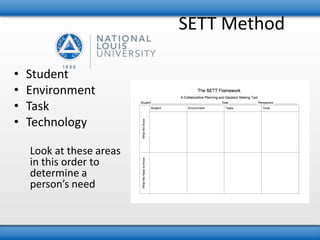
SETT Method 
• Student 
• Environment 
• Task 
• Technology 
Look at these areas 
in this order to 
determine a 
person’s need
Inexpensive or 
Free Materials 
• Paul Hami’s Blog 
• Matnonline, Maryland AT Wiki 
• Assistive Technology Wiki 
Assistive technology is frequently grouped into low- medium- and high-tech 
options. This course will introduce you to all three levels.
Some Low-Tech 
Options 
• Low-Tech means a device and/or equipment 
that doesn’t need much training, may be less 
expensive, and does not have complex or 
mechanical features. (Connecticut Tech Act Projects.) 
• Some Sample ideas… 
– Pencil grips, seat cushions, ramps, bookmarks
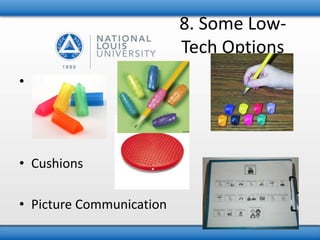
• Pencil grips 
• Cushions 
• Picture Communication 
8. Some Low- 
Tech Options
Some Low-Tech 
Options 
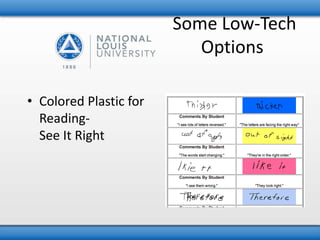
• Colored Plastic for 
Reading- 
See It Right
Some Low-Tech 
Options 
• Glue foam or erasers on pages for easy 
turning. 
• Fidgets 
• Tactile key covers for VI students
Mid-Tech 
Solutions 
• Touch Screen 
• Switches 
• Reading pen 
• Portable keyboards 
• Word-prediction software 
– Co-Writer
Use of Pictures 
and Video 
• Visual Learners (aren’t we all?) 
• Where can I find pictures? 
– Flickr Creative Commons 
– Boardmaker Achieve 
– Google search, both for web sites with pictures and images 
– Draw a picture on a blank background 
– Digital Camera and videocamera 
– Webcams 
• Software 
– Boardmaker 
– PixWriter / Kid Pix 
– Print Shop 
– Comic Life
Differentiation 
• What do we mean? 
– Differentiation is modifying or altering product, 
process and content to fit the different needs of 
the student. 
– Teachers can alter the content, process, product 
or environment according to a student’s profile. 
– Carol Ann Tomlinson has been the leader in this 
field.
Differentiation 
Products 
• Kidspiration, Inspiration 
• Presentation Software 
– PowerPoint, Keynote, many online presentation sites 
• Paint programs and web sites 
– Tux Paint, Pixie 
– Comic Life
High Tech 
Solutions 
• Text-to-speech capabilities 
– Write Out Loud 
– IntelliTalk 
– Universal Access Speech 
• Voice-recognition software 
– Dragon Naturally Speaking - Windows only 
– SpeechVibe - Windows only 
– MacSpeech Dictate - Macintosh
High-tech 
Solutions 
• Scan and Read 
– Kurzweiler 3000 
– Read & Write GOLD 
– WYNN 
– Caste Reader 
• Rebus (Picture) Based Programs 
– Pixwriter 
– Picture It 
– Writing with Symbols 
– News 2 You 
• Screen Readers 
– JAWS
Web 
Accessibility 
• How do people connect to the Web? 
• What types of disabilities do they have? 
• How can I design for access by all?
Universal Access 
Features 
• Apple Computers 
– System Preferences 
• Universal Access 
• PCs 
– Ease of Access Center 
• Change control of cursor/mouse, visual 
appearance, sound, and touch

AT Overview

  • 1.
    Assistive Technology Overview Linda Wallin Winter 2014
  • 2.
    Using Technology toHelp Students Learn • Simple things you can do in your classroom • Resources if you want to learn more • Moving from low-tech to high-tech
  • 3.
    Definition Assistive Technology “any item, piece of equipment, or product system,” excluding a surgically implanted device, “whether acquired commercially off the shelf, modified, or customized, that is used to increase, maintain or improve functional capabilities of individuals with disabilities” (P.L. 108-446§602 (1)(B)). Taken from O”Bannon, Blanche & Puckett, Kathleen, _Preparing to Use Technology_, Allyn and Bacon, 2007.
  • 4.
    Definition Web Accessibility The degree to which people with disabilities or unusual connection methods may use the Web Universal Design for Living NIMAS - The National Instructional Materials Accessibility Standard
  • 5.
    Definition Universal Designfor Living (UDL) The design of products and environments to be usable by all people, to the greatest extent possible, without the need for adaptation or specialized design. (Center for Universal Design)
  • 6.
    Definition NIMAS 2004IDEA National Instructional Materials Accessibility Standards insure that the content of print material will be available to all, regardless of abilities.
  • 7.
    SETT Method •Student • Environment • Task • Technology Look at these areas in this order to determine a person’s need
  • 8.
    Inexpensive or FreeMaterials • Paul Hami’s Blog • Matnonline, Maryland AT Wiki • Assistive Technology Wiki Assistive technology is frequently grouped into low- medium- and high-tech options. This course will introduce you to all three levels.
  • 9.
    Some Low-Tech Options • Low-Tech means a device and/or equipment that doesn’t need much training, may be less expensive, and does not have complex or mechanical features. (Connecticut Tech Act Projects.) • Some Sample ideas… – Pencil grips, seat cushions, ramps, bookmarks
  • 10.
    • Pencil grips • Cushions • Picture Communication 8. Some Low- Tech Options
  • 11.
    Some Low-Tech Options • Colored Plastic for Reading- See It Right
  • 12.
    Some Low-Tech Options • Glue foam or erasers on pages for easy turning. • Fidgets • Tactile key covers for VI students
  • 13.
    Mid-Tech Solutions •Touch Screen • Switches • Reading pen • Portable keyboards • Word-prediction software – Co-Writer
  • 14.
    Use of Pictures and Video • Visual Learners (aren’t we all?) • Where can I find pictures? – Flickr Creative Commons – Boardmaker Achieve – Google search, both for web sites with pictures and images – Draw a picture on a blank background – Digital Camera and videocamera – Webcams • Software – Boardmaker – PixWriter / Kid Pix – Print Shop – Comic Life
  • 15.
    Differentiation • Whatdo we mean? – Differentiation is modifying or altering product, process and content to fit the different needs of the student. – Teachers can alter the content, process, product or environment according to a student’s profile. – Carol Ann Tomlinson has been the leader in this field.
  • 16.
    Differentiation Products •Kidspiration, Inspiration • Presentation Software – PowerPoint, Keynote, many online presentation sites • Paint programs and web sites – Tux Paint, Pixie – Comic Life
  • 17.
    High Tech Solutions • Text-to-speech capabilities – Write Out Loud – IntelliTalk – Universal Access Speech • Voice-recognition software – Dragon Naturally Speaking - Windows only – SpeechVibe - Windows only – MacSpeech Dictate - Macintosh
  • 18.
    High-tech Solutions •Scan and Read – Kurzweiler 3000 – Read & Write GOLD – WYNN – Caste Reader • Rebus (Picture) Based Programs – Pixwriter – Picture It – Writing with Symbols – News 2 You • Screen Readers – JAWS
  • 19.
    Web Accessibility •How do people connect to the Web? • What types of disabilities do they have? • How can I design for access by all?
  • 20.
    Universal Access Features • Apple Computers – System Preferences • Universal Access • PCs – Ease of Access Center • Change control of cursor/mouse, visual appearance, sound, and touch