MySQL Tutorial
Introduction to Database
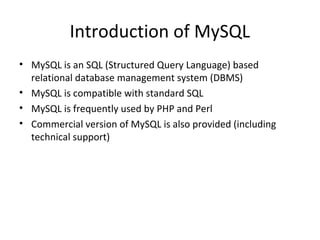
Introduction of MySQL
• MySQL is an SQL (Structured Query Language) based
relational database management system (DBMS)
• MySQL is compatible with standard SQL
• MySQL is frequently used by PHP and Perl
• Commercial version of MySQL is also provided (including
technical support)
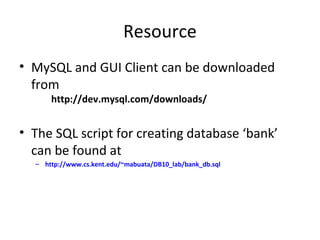
Resource
• MySQL and GUI Client can be downloaded
from
http://dev.mysql.com/downloads/

• The SQL script for creating database ‘bank’
can be found at
– http://www.cs.kent.edu/~mabuata/DB10_lab/bank_db.sql
Command for accessing MySQL
• Access from DB server
>ssh dbdev.cs.kent.edu
Start MySQL
>mysql –u [username] –p
>Enter password:[password]

• From a departmental machine
>mysql -u [username] -h dbdev.cs.kent.edu –p
>Enter password:[password]
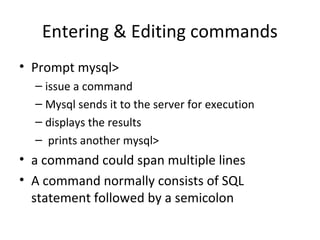
Entering & Editing commands
• Prompt mysql>
– issue a command
– Mysql sends it to the server for execution
– displays the results
– prints another mysql>

• a command could span multiple lines
• A command normally consists of SQL
statement followed by a semicolon
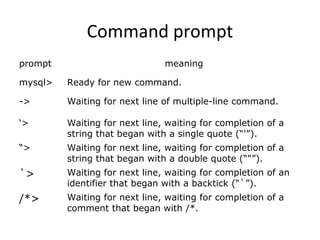
Command prompt
prompt

meaning

mysql>

Ready for new command.

->

Waiting for next line of multiple-line command.

‘>

Waiting for next line, waiting for completion of a
string that began with a single quote (“'”).

“>

Waiting for next line, waiting for completion of a
string that began with a double quote (“"”).

`>

Waiting for next line, waiting for completion of an
identifier that began with a backtick (“`”).

/*>

Waiting for next line, waiting for completion of a
comment that began with /*.
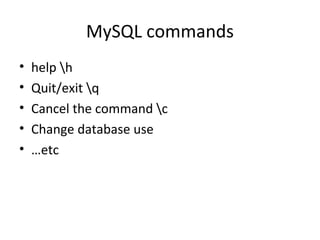
MySQL commands
•
•
•
•
•

help h
Quit/exit q
Cancel the command c
Change database use
…etc
Info about databases and tables
• Listing the databases on the MySQL server host
– >show databases;

• Access/change database
– >Use [database_name]

• Showing the current selected database
– > select database();

• Showing tables in the current database
– >show tables;

• Showing the structure of a table
– > describe [table_name];
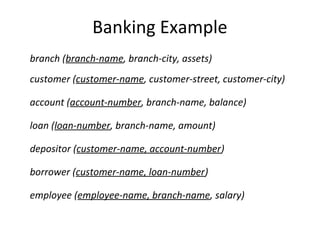
Banking Example
branch (branch-name, branch-city, assets)
customer (customer-name, customer-street, customer-city)
account (account-number, branch-name, balance)
loan (loan-number, branch-name, amount)
depositor (customer-name, account-number)
borrower (customer-name, loan-number)
employee (employee-name, branch-name, salary)
CREATE DATABASE
• An SQL relation is defined using the CREATE DATABASE
command:
– create database [database name]

• Example
– create database mydatabase
SQL Script for creating tables
• The SQL script for creating database ‘bank’
can be found at
http://www.cs.kent.edu/~mabuata/DB10_lab/bank_db.sql
http://www.cs.kent.edu/~mabuata/DB10_lab/bank_data.sql

Notice: we do not have permission to create database,
so you have to type command “use [your_account]” to
work on your database.
Query
•

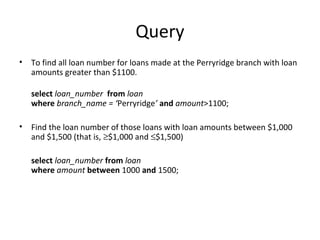
To find all loan number for loans made at the Perryridge branch with loan
amounts greater than $1100.
select loan_number from loan
where branch_name = ‘Perryridge’ and amount>1100;

•

Find the loan number of those loans with loan amounts between $1,000
and $1,500 (that is, ≥$1,000 and ≤$1,500)
select loan_number from loan
where amount between 1000 and 1500;
Query
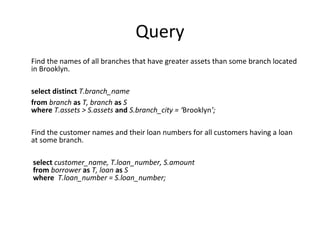
Find the names of all branches that have greater assets than some branch located
in Brooklyn.
select distinct T.branch_name
from branch as T, branch as S
where T.assets > S.assets and S.branch_city = ‘Brooklyn’;
Find the customer names and their loan numbers for all customers having a loan
at some branch.
select customer_name, T.loan_number, S.amount
from borrower as T, loan as S
where T.loan_number = S.loan_number;
Set Operation
•

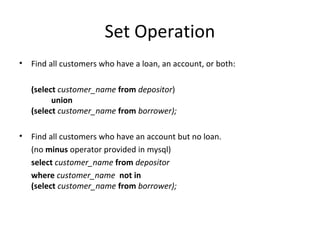
Find all customers who have a loan, an account, or both:
(select customer_name from depositor)
union
(select customer_name from borrower);

•

Find all customers who have an account but no loan.
(no minus operator provided in mysql)
select customer_name from depositor
where customer_name not in
(select customer_name from borrower);
Aggregate function
•

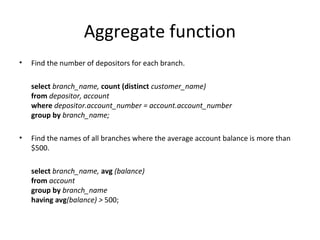
Find the number of depositors for each branch.
select branch_name, count (distinct customer_name)
from depositor, account
where depositor.account_number = account.account_number
group by branch_name;

•

Find the names of all branches where the average account balance is more than
$500.
select branch_name, avg (balance)
from account
group by branch_name
having avg(balance) > 500;
Nested Subqueries
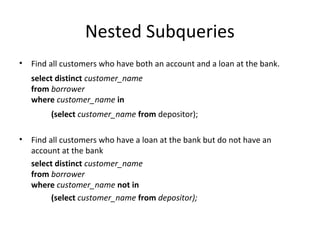
•

Find all customers who have both an account and a loan at the bank.
select distinct customer_name
from borrower
where customer_name in
(select customer_name from depositor);

•

Find all customers who have a loan at the bank but do not have an
account at the bank
select distinct customer_name
from borrower
where customer_name not in
(select customer_name from depositor);
Nested Subquery
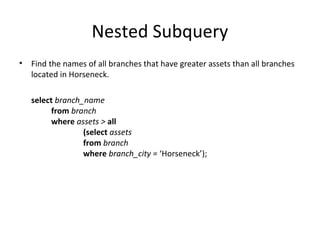
•

Find the names of all branches that have greater assets than all branches
located in Horseneck.
select branch_name
from branch
where assets > all
(select assets
from branch
where branch_city = ‘Horseneck’);
Create View (new feature in mysql 5.0)
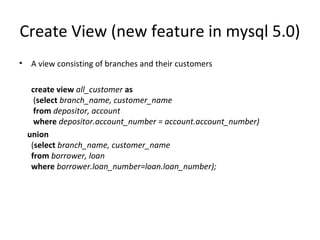
•

A view consisting of branches and their customers
create view all_customer as
(select branch_name, customer_name
from depositor, account
where depositor.account_number = account.account_number)
union
(select branch_name, customer_name
from borrower, loan
where borrower.loan_number=loan.loan_number);
Joined Relations
•
•
•
•

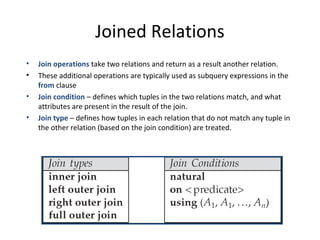
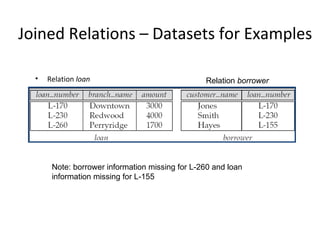
Join operations take two relations and return as a result another relation.
These additional operations are typically used as subquery expressions in the
from clause
Join condition – defines which tuples in the two relations match, and what
attributes are present in the result of the join.
Join type – defines how tuples in each relation that do not match any tuple in
the other relation (based on the join condition) are treated.
Joined Relations – Datasets for Examples
•

Relation loan

Relation borrower

Note: borrower information missing for L-260 and loan
information missing for L-155
Joined Relations – Examples

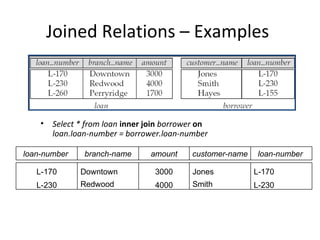
• Select * from loan inner join borrower on
loan.loan-number = borrower.loan-number
loan-number

branch-name

amount

customer-name

loan-number

L-170

Downtown

3000

Jones

L-170

L-230

Redwood

4000

Smith

L-230
Example

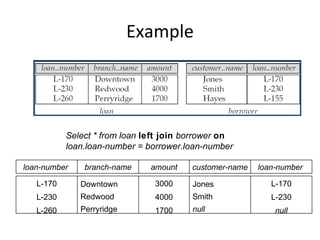
Select * from loan left join borrower on
loan.loan-number = borrower.loan-number
loan-number

branch-name

amount

customer-name

loan-number

L-170

Downtown

3000

Jones

L-170

L-230

Redwood

4000

Smith

L-230

L-260

Perryridge

1700

null

null
Modification of Database
•

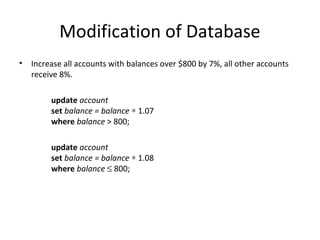
Increase all accounts with balances over $800 by 7%, all other accounts
receive 8%.
update account
set balance = balance ∗ 1.07
where balance > 800;
update account
set balance = balance ∗ 1.08
where balance ≤ 800;
Modification of Database
•

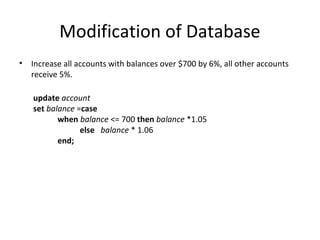
Increase all accounts with balances over $700 by 6%, all other accounts
receive 5%.
update account
set balance =case
when balance <= 700 then balance *1.05
else balance * 1.06
end;
Modification of Database
•

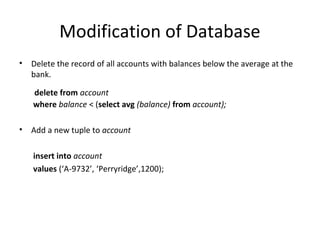
Delete the record of all accounts with balances below the average at the
bank.
delete from account
where balance < (select avg (balance) from account);

•

Add a new tuple to account
insert into account
values (‘A-9732’, ‘Perryridge’,1200);
Exercise

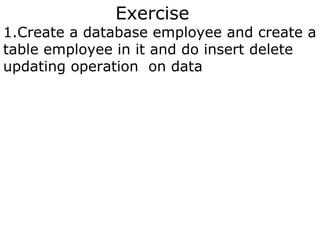
1.Create a database employee and create a
table employee in it and do insert delete
updating operation on data

Mysql classes in navi-mumbai,mysql course-provider-in-navi-mumbai

  • 1.
  • 2.
    Introduction of MySQL •MySQL is an SQL (Structured Query Language) based relational database management system (DBMS) • MySQL is compatible with standard SQL • MySQL is frequently used by PHP and Perl • Commercial version of MySQL is also provided (including technical support)
  • 3.
    Resource • MySQL andGUI Client can be downloaded from http://dev.mysql.com/downloads/ • The SQL script for creating database ‘bank’ can be found at – http://www.cs.kent.edu/~mabuata/DB10_lab/bank_db.sql
  • 4.
    Command for accessingMySQL • Access from DB server >ssh dbdev.cs.kent.edu Start MySQL >mysql –u [username] –p >Enter password:[password] • From a departmental machine >mysql -u [username] -h dbdev.cs.kent.edu –p >Enter password:[password]
  • 5.
    Entering & Editingcommands • Prompt mysql> – issue a command – Mysql sends it to the server for execution – displays the results – prints another mysql> • a command could span multiple lines • A command normally consists of SQL statement followed by a semicolon
  • 6.
    Command prompt prompt meaning mysql> Ready fornew command. -> Waiting for next line of multiple-line command. ‘> Waiting for next line, waiting for completion of a string that began with a single quote (“'”). “> Waiting for next line, waiting for completion of a string that began with a double quote (“"”). `> Waiting for next line, waiting for completion of an identifier that began with a backtick (“`”). /*> Waiting for next line, waiting for completion of a comment that began with /*.
  • 7.
    MySQL commands • • • • • help h Quit/exitq Cancel the command c Change database use …etc
  • 8.
    Info about databasesand tables • Listing the databases on the MySQL server host – >show databases; • Access/change database – >Use [database_name] • Showing the current selected database – > select database(); • Showing tables in the current database – >show tables; • Showing the structure of a table – > describe [table_name];
  • 9.
    Banking Example branch (branch-name,branch-city, assets) customer (customer-name, customer-street, customer-city) account (account-number, branch-name, balance) loan (loan-number, branch-name, amount) depositor (customer-name, account-number) borrower (customer-name, loan-number) employee (employee-name, branch-name, salary)
  • 10.
    CREATE DATABASE • AnSQL relation is defined using the CREATE DATABASE command: – create database [database name] • Example – create database mydatabase
  • 11.
    SQL Script forcreating tables • The SQL script for creating database ‘bank’ can be found at http://www.cs.kent.edu/~mabuata/DB10_lab/bank_db.sql http://www.cs.kent.edu/~mabuata/DB10_lab/bank_data.sql Notice: we do not have permission to create database, so you have to type command “use [your_account]” to work on your database.
  • 12.
    Query • To find allloan number for loans made at the Perryridge branch with loan amounts greater than $1100. select loan_number from loan where branch_name = ‘Perryridge’ and amount>1100; • Find the loan number of those loans with loan amounts between $1,000 and $1,500 (that is, ≥$1,000 and ≤$1,500) select loan_number from loan where amount between 1000 and 1500;
  • 13.
    Query Find the namesof all branches that have greater assets than some branch located in Brooklyn. select distinct T.branch_name from branch as T, branch as S where T.assets > S.assets and S.branch_city = ‘Brooklyn’; Find the customer names and their loan numbers for all customers having a loan at some branch. select customer_name, T.loan_number, S.amount from borrower as T, loan as S where T.loan_number = S.loan_number;
  • 14.
    Set Operation • Find allcustomers who have a loan, an account, or both: (select customer_name from depositor) union (select customer_name from borrower); • Find all customers who have an account but no loan. (no minus operator provided in mysql) select customer_name from depositor where customer_name not in (select customer_name from borrower);
  • 15.
    Aggregate function • Find thenumber of depositors for each branch. select branch_name, count (distinct customer_name) from depositor, account where depositor.account_number = account.account_number group by branch_name; • Find the names of all branches where the average account balance is more than $500. select branch_name, avg (balance) from account group by branch_name having avg(balance) > 500;
  • 16.
    Nested Subqueries • Find allcustomers who have both an account and a loan at the bank. select distinct customer_name from borrower where customer_name in (select customer_name from depositor); • Find all customers who have a loan at the bank but do not have an account at the bank select distinct customer_name from borrower where customer_name not in (select customer_name from depositor);
  • 17.
    Nested Subquery • Find thenames of all branches that have greater assets than all branches located in Horseneck. select branch_name from branch where assets > all (select assets from branch where branch_city = ‘Horseneck’);
  • 18.
    Create View (newfeature in mysql 5.0) • A view consisting of branches and their customers create view all_customer as (select branch_name, customer_name from depositor, account where depositor.account_number = account.account_number) union (select branch_name, customer_name from borrower, loan where borrower.loan_number=loan.loan_number);
  • 19.
    Joined Relations • • • • Join operationstake two relations and return as a result another relation. These additional operations are typically used as subquery expressions in the from clause Join condition – defines which tuples in the two relations match, and what attributes are present in the result of the join. Join type – defines how tuples in each relation that do not match any tuple in the other relation (based on the join condition) are treated.
  • 20.
    Joined Relations –Datasets for Examples • Relation loan Relation borrower Note: borrower information missing for L-260 and loan information missing for L-155
  • 21.
    Joined Relations –Examples • Select * from loan inner join borrower on loan.loan-number = borrower.loan-number loan-number branch-name amount customer-name loan-number L-170 Downtown 3000 Jones L-170 L-230 Redwood 4000 Smith L-230
  • 22.
    Example Select * fromloan left join borrower on loan.loan-number = borrower.loan-number loan-number branch-name amount customer-name loan-number L-170 Downtown 3000 Jones L-170 L-230 Redwood 4000 Smith L-230 L-260 Perryridge 1700 null null
  • 23.
    Modification of Database • Increaseall accounts with balances over $800 by 7%, all other accounts receive 8%. update account set balance = balance ∗ 1.07 where balance > 800; update account set balance = balance ∗ 1.08 where balance ≤ 800;
  • 24.
    Modification of Database • Increaseall accounts with balances over $700 by 6%, all other accounts receive 5%. update account set balance =case when balance <= 700 then balance *1.05 else balance * 1.06 end;
  • 25.
    Modification of Database • Deletethe record of all accounts with balances below the average at the bank. delete from account where balance < (select avg (balance) from account); • Add a new tuple to account insert into account values (‘A-9732’, ‘Perryridge’,1200);
  • 26.
    Exercise 1.Create a databaseemployee and create a table employee in it and do insert delete updating operation on data

Editor's Notes