http://www.tutorialspoint.com/assembly_prog ramming /assembly_macros.htm Copyright © tutorialspoint.com
ASSEMBLY - MACROS
Writing a macro is another way of ensuring modular programming inassembly language.
A macro is a sequence of instructions, assigned by a name and could be used anywhere inthe program.
InNASM, macros are defined with%macro and %endmacro directives.
The macro begins withthe %macro directive and ends withthe %endmacro directive.
The Syntax for macro definition:
%macro macro_name number_of_params
<macro body>
%endmacro
Where, number_of_params specifies the number parameters, macro_name specifies the name of the macro.
The macro is invoked by using the macro name along withthe necessary parameters. Whenyouneed to use
some sequence of instructions many times ina program, youcanput those instructions ina macro and use it
instead of writing the instructions allthe time.
For example, a very commonneed for programs is to write a string of characters inthe screen. For displaying a
string of characters, youneed the following sequence of instructions:
mov edx,len ;message length
mov ecx,msg ;message to write
mov ebx,1 ;file descriptor (stdout)
mov eax,4 ;system call number (sys_write)
int 0x80 ;call kernel
We have observed that, some instructions like IMUL, IDIV, INT, etc., need some of the informationto be stored
insome particular registers and evenreturns values insome specific register(s). If the programwas already
using those registers for keeping important data, thenthe existing data fromthese registers should be saved in
the stack and restored after the instructionis executed.
Inthe above example of displaying a character string also, the registers EAX, EBX, ECX and EDX have been
used by the INT 80H functioncall. So, eachtime youneed to display onscreen, youneed to save these registers
onthe stack, invoke INT 80H and thenrestore the originalvalue of the registers fromthe stack. So, it could be
usefulto write two macros for saving and restoring data.
Example:
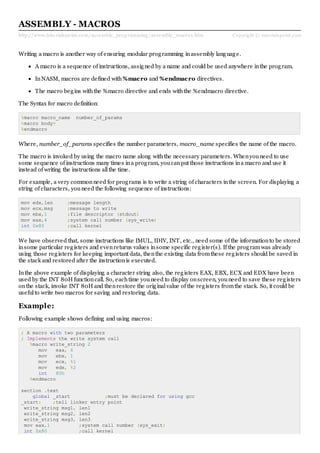
Following example shows defining and using macros:
; A macro with two parameters
; Implements the write system call
%macro write_string 2
mov eax, 4
mov ebx, 1
mov ecx, %1
mov edx, %2
int 80h
%endmacro
section .text
global _start ;must be declared for using gcc
_start: ;tell linker entry point
write_string msg1, len1
write_string msg2, len2
write_string msg3, len3
mov eax,1 ;system call number (sys_exit)
int 0x80 ;call kernel
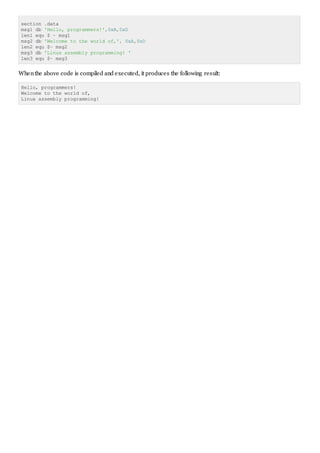
section .data
msg1 db 'Hello, programmers!',0xA,0xD
len1 equ $ - msg1
msg2 db 'Welcome to the world of,', 0xA,0xD
len2 equ $- msg2
msg3 db 'Linux assembly programming! '
len3 equ $- msg3
Whenthe above code is compiled and executed, it produces the following result:
Hello, programmers!
Welcome to the world of,
Linux assembly programming!

N_Asm Assembly macros (sol)

  • 1.
    http://www.tutorialspoint.com/assembly_prog ramming /assembly_macros.htmCopyright © tutorialspoint.com ASSEMBLY - MACROS Writing a macro is another way of ensuring modular programming inassembly language. A macro is a sequence of instructions, assigned by a name and could be used anywhere inthe program. InNASM, macros are defined with%macro and %endmacro directives. The macro begins withthe %macro directive and ends withthe %endmacro directive. The Syntax for macro definition: %macro macro_name number_of_params <macro body> %endmacro Where, number_of_params specifies the number parameters, macro_name specifies the name of the macro. The macro is invoked by using the macro name along withthe necessary parameters. Whenyouneed to use some sequence of instructions many times ina program, youcanput those instructions ina macro and use it instead of writing the instructions allthe time. For example, a very commonneed for programs is to write a string of characters inthe screen. For displaying a string of characters, youneed the following sequence of instructions: mov edx,len ;message length mov ecx,msg ;message to write mov ebx,1 ;file descriptor (stdout) mov eax,4 ;system call number (sys_write) int 0x80 ;call kernel We have observed that, some instructions like IMUL, IDIV, INT, etc., need some of the informationto be stored insome particular registers and evenreturns values insome specific register(s). If the programwas already using those registers for keeping important data, thenthe existing data fromthese registers should be saved in the stack and restored after the instructionis executed. Inthe above example of displaying a character string also, the registers EAX, EBX, ECX and EDX have been used by the INT 80H functioncall. So, eachtime youneed to display onscreen, youneed to save these registers onthe stack, invoke INT 80H and thenrestore the originalvalue of the registers fromthe stack. So, it could be usefulto write two macros for saving and restoring data. Example: Following example shows defining and using macros: ; A macro with two parameters ; Implements the write system call %macro write_string 2 mov eax, 4 mov ebx, 1 mov ecx, %1 mov edx, %2 int 80h %endmacro section .text global _start ;must be declared for using gcc _start: ;tell linker entry point write_string msg1, len1 write_string msg2, len2 write_string msg3, len3 mov eax,1 ;system call number (sys_exit) int 0x80 ;call kernel
  • 2.
    section .data msg1 db'Hello, programmers!',0xA,0xD len1 equ $ - msg1 msg2 db 'Welcome to the world of,', 0xA,0xD len2 equ $- msg2 msg3 db 'Linux assembly programming! ' len3 equ $- msg3 Whenthe above code is compiled and executed, it produces the following result: Hello, programmers! Welcome to the world of, Linux assembly programming!