General Concepts
CPU Design, Instruction execution cycle
IA‐32 Processor Architecture
Modes of operations, CPU Registers & Flags, Intel CPU
History
IA‐32 Memory Management
Real address mode, segmented memory, paging
Input‐Output System
Levels of input / output system
Assembly Language 2
Outcomes of Lecture 2
3.
Basic Elementsof Assembly Language
Example: Adding and Subtracting Integers
Assembling, Linking, and Running
Programs
Defining Data
Symbolic Constants
Real‐Address Mode Programming
Outline
Assembly Language 3
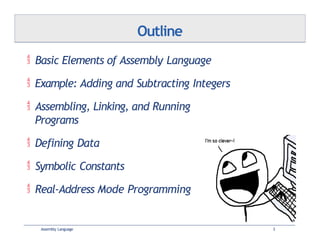
4.
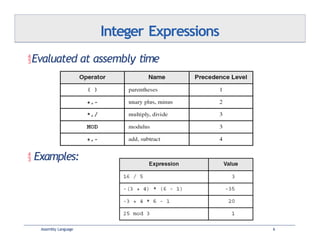
Integer constantsand
expressions
Character and string constants
Reserved words and identifiers
Directives and instructions
Labels
Mnemonics and Operands
Comments
Assembly Language 4
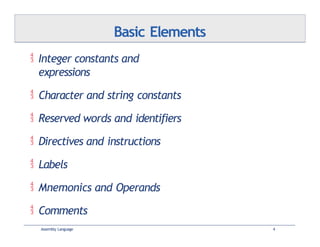
Basic Elements
5.
[{+|‐} digits
[radix]
Optionalleading + or – sign
Binary, decimal, hexadecimal
Common radix characters:
Assembly Language 5
h – hexadecimal
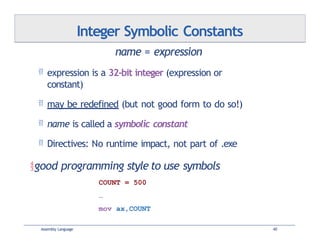
d – decimal
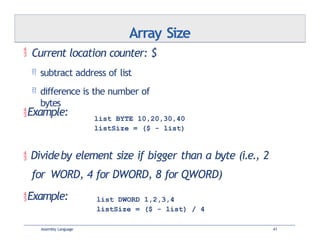
b – binary
r – encoded
real
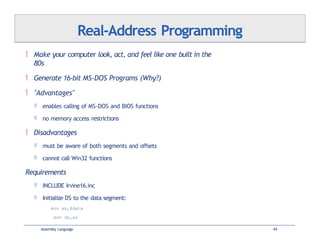
Use as much as possible
When hex makes no
sense For bitwise clarity
Real
Examples: 30d, 6Ah, 42, 1101b
Hexadecimal can't begin with a letter:
0A5h
Integer Constants
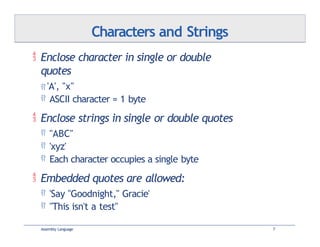
Enclose characterin single or double
quotes
'A', "x"
ASCII character = 1 byte
Enclose strings in single or double quotes
"ABC"
'xyz'
Each character occupies a single byte
Embedded quotes are allowed:
'Say "Goodnight," Gracie'
"This isn't a test"
Assembly Language 7
Characters and Strings
8.
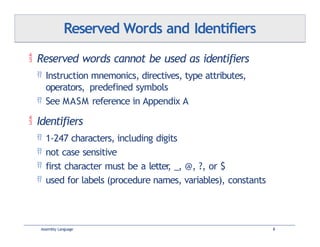
Reserved wordscannot be used as identifiers
Instruction mnemonics, directives, type attributes,
operators, predefined symbols
See MASM reference in Appendix A
Identifiers
1‐247 characters, including digits
not case sensitive
first character must be a letter
, _, @, ?, or $
used for labels (procedure names, variables), constants
Assembly Language 8
Reserved Words and Identifiers
9.
Instructions onhow to assemble (not @ runtime)
Commands that are recognizedand acted upon by
the assembler
not part of the Intel instruction set
used to declare code, data areas, select memory model, declare
procedures, variables etc.
not case sensitive (.data, .DATA, and .Data)
Different assemblers have different directives
GNU assembler, netwide assembler not the same as MASM
Assembly Language 9
Directives
10.
One important functionof assembler directives is to
define program sections, or segments
.data
.code
.stack 100h
Assembly Language 10
Directives: Defining Segments
11.
Assembled intomachine code by
assembler
Executed at runtime by the CPU
An instruction contains:
Assembly Language 11
Label
Mnemonic
Operand(s)
Comment
(optional)
(required
)
(depends on the
instruction) (optional) –
begins with ';'
loop1:
[label:] mnemonic [operands] [;comment]
mov eax,32 ;count of array
elements
Intel Instructions
12.
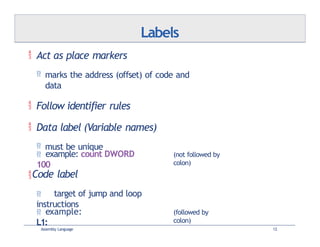
Act asplace markers
marks the address (offset) of code and
data
Follow identifier rules
Data label (Variable names)
must be unique
Assembly Language 12
example: count DWORD
100
(not followed by
colon)
Code label
target of jump and loop
instructions
example:
L1:
(followed by
colon)
Labels
13.
No operands
stc
One operand
inc eax
inc myByte
Two operands
add ebx,ecx
Assembly Language 13
; set Carry flag
; register
; memory
; register, register
sub myByte,25 ; memory, constant
add eax,36 * 25 ; reg, const-expr
Instruction Formats
14.
No Operation
The safest and most useless
instruction
Uses 1 byte of storage
CPU: Reads it, Decodes it, Ignores
it
Assembly Language 14
Usually used to align code to
even‐address (multiple of 4):
0000000066 8B C3 mov ax,bx 00000003
90 nop ; align next instruction
00000004 8B D1 mov edx,ecx
boundarie
s
x86 processors are designed to load code and data more
quickly from even doubleword addresses.
NOP Instruction
15.
(Yes/No): IsA5h a valid hexadecimal constant?
(Yes/No): Must string constants be enclosed in single
quotes?
What is the maximum length of an identifier?
(True/False): Assembler directives execute at runtime.
Review Questions
Assembly Language 15
16.
Basic Elementsof Assembly Language
Example: Adding and Subtracting
Integers
Assembling, Linking, and Running
Programs
Defining Data
Symbolic Constants
Real‐Address Mode Programming
Outline
Assembly Language 16
17.
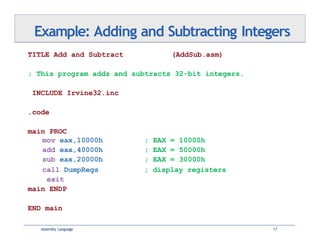
Example: Adding andSubtracting Integers
Assembly Language 17
TITLE Add and Subtract (AddSub.asm)
; This program adds and subtracts 32-bit integers.
INCLUDE Irvine32.inc
.code
main PROC
mov eax,10000h ; EAX = 10000h
add eax,40000h ; EAX = 50000h
sub eax,20000h ; EAX = 30000h
; display registers
call DumpRegs
exit
main ENDP
END main
18.
Example Output
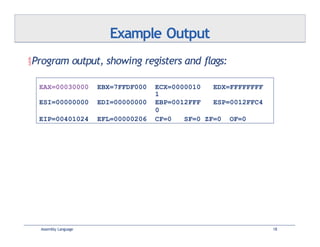
Program output,showing registers and flags:
EAX=00030000 EBX=7FFDF000 ECX=0000010
1
EDX=FFFFFFFF
ESI=00000000 EDI=00000000 EBP=0012FFF
0
ESP=0012FFC4
EIP=00401024 EFL=00000206 CF=0 SF=0 ZF=0 OF=0
Assembly Language 18
19.
Capitalization
Capitalizereserved words, including mnemonics and register
names
Capitalize nothing
Capitalize initial letters
Use descriptive identifier names
Indentation and spacing
code and data labels – no indentation
executable instructions – indent 4‐5 spaces (1 tab)
comments: right side of page, aligned vertically
1‐3 spaces between instruction and its operands ( 1 tab)
1‐2 blank lines between procedures
Assembly Language 19
Possible Coding Standards
20.
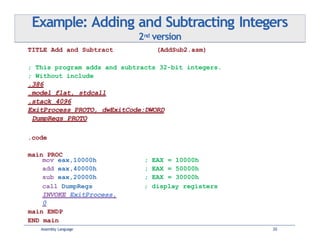
Example: Adding andSubtracting Integers
2nd version
Assembly Language 20
TITLE Add and Subtract (AddSub2.asm)
; This program adds and subtracts 32-bit integers.
; Without include
.386
.model flat, stdcall
.stack 4096
ExitProcess PROTO, dwExitCode:DWORD
DumpRegs PROTO
.code
main PROC
mov eax,10000h ; EAX = 10000h
add eax,40000h ; EAX = 50000h
sub eax,20000h ; EAX = 30000h
; display registers
call DumpRegs
INVOKE ExitProcess,
0
main ENDP
END main
21.
Program Template (Onbook website)
Assembly Language 21
TITLE Program Template (Template.asm)
;
;
;
Purpose:
Author:
Revisions:
Assignment 3 Solution
Group A
None – Original code
; Notes: Dev on Core i5, Win 7, VS2010
; Date: 6/11/2013
INCLUDE Irvine32.inc
.data
; (insert variables here)
.code
main PROC
; (insert executable instructions here)
exit
main ENDP
; (insert additional procedures here)
END main
22.
Basic Elementsof Assembly Language
Example: Adding and Subtracting Integers
Assembling, Linking, and Running
Programs
Defining Data
Symbolic Constants
Real‐Address Mode Programming
Outline
Assembly Language 22
23.
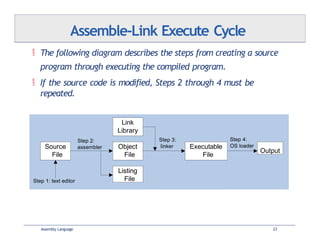
The followingdiagram describes the steps from creating a source
program through executing the compiled program.
If the source code is modified, Steps 2 through 4 must be
repeated.
Assemble‐Link Execute Cycle
Source
File
Object
File
Listing
File
Link
Library
Executable
File
Map
File
Output
Step 1: text editor
Step 2:
assembler
Step 3:
linker
Step 4:
OS loader
Assembly Language 23
24.
Use itto see how your program is compiled
Named after the project, e.g., project.lst
Suitable for printing
Contains:
source code
addresses
object code (machine language)
segment names
symbols (variables, procedures, and constants)
Example on pages 72‐74 with detailed explanation – PLEASE
READ!
Assembly Language 24
Listing File
25.
What typesof files are produced by the assembler?
(True/False): The linker extracts assembled procedures from the link
library and inserts them in the executable program.
Which operating system component reads and executes programs?
Review Questions
Assembly Language 25
26.
Basic Elementsof Assembly Language
Example: Adding and Subtracting Integers
Assembling, Linking, and Running
Programs
Defining Data
Symbolic Constants
Real‐Address Mode Programming
Outline
Assembly Language 26
27.
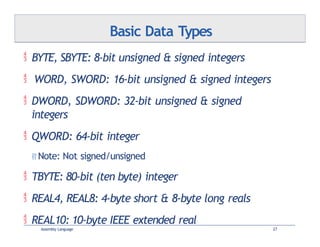
BYTE, SBYTE:8‐bit unsigned & signed integers
WORD, SWORD: 16‐bit unsigned & signed integers
DWORD, SDWORD: 32‐bit unsigned & signed
integers
QWORD: 64‐bit integer
Note: Not signed/unsigned
TBYTE: 80‐bit (ten byte) integer
REAL4, REAL8: 4‐byte short & 8‐byte long reals
REAL10: 10‐byte IEEE extended real
Assembly Language 27
Basic Data Types
28.
Legacy Data Directives
AssemblyLanguage 28
Directive Usage
DB 8‐bit integer
DW 16‐bit integer
DD 32‐bit integer or real
DQ 64‐bit integer or real
DT 80‐bit (10 bytes) integer
supported also by the Netwide Assembler (NASM)
and Turbo Assembler (TASM)
29.
A datadefinition statement sets aside storage in memory for a
variable.
May optionally assign a name (label) to the data
Syntax:
[name] directive initializer [,initializer] .. .
value1 BYTE 10
Use the ? Symbol for undefined variables
All initializers become binary data in memory
00110010b, 32h, and 50d all end up being having the same
binary value
Data Definition Statement
Assembly Language 29
30.
Defining BYTE, SBYTEData
Assembly Language 30
value1 BYTE 'A' ; character constant
value2 BYTE 0 ; smallest unsigned byte
value3 BYTE 255 ; largest unsigned byte
value4 SBYTE -128 ; smallest signed byte
value5 SBYTE +127 ; largest signed byte
value6 BYTE ? ; uninitialized byte
Each of the following defines a single byte of
storage:
The optional name is a label marking the variable’s offset from the
beginning
of its enclosing segment.
if value1 is located at offset 0000 in the data segment and consumes 1
byte of storage, value2 is automatically located at offset 0001
MASM allow you from initializing a BYTE with a negative value (poor
style)
If you declare a SBYTE variable, the Microsoft debugger will automatically
display its value in decimal with a leading sign.
31.
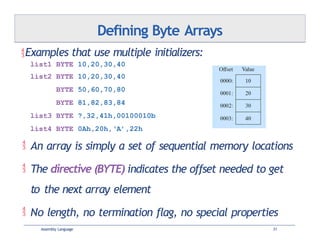
Defining Byte Arrays
list1BYTE 10,20,30,40
list2 BYTE 10,20,30,40
BYTE 50,60,70,80
BYTE 81,82,83,84
list3 BYTE ?,32,41h,00100010b
list4 BYTE 0Ah,20h,‘A’,22h
Examples that use multiple initializers:
An array is simply a set of sequential memory locations
The directive (BYTE) indicates the offset needed to get
to the next array element
No length, no termination flag, no special properties
Assembly Language 31
32.
A stringis implemented as a sequence of characters
For convenience, it is usually enclosed in quotation
marks
It is usually null terminated
Characters are bytes
Hex characters 0Dh (CR) and 0Ah (LF) are useful
Assembly Language 32
Examples:
Defining Strings
str1
str2
str3
BYTE "Enter your name: ",0
BYTE 'ERROR!',0Dh,0Ah,'Halting program‘,0Dh,0Ah,0
BYTE 'A','E','I','O','U'
newLine BYTE 0Dh,0Ah,0
greet BYTE "A string in"
BYTE " two parts.",0
BYTE "1. Create a new account",0dh,0ah,
"2. Open an existing account",0dh,0ah,
"3. Exit",0ah,0ah,
"Choice> ",0
menu
33.
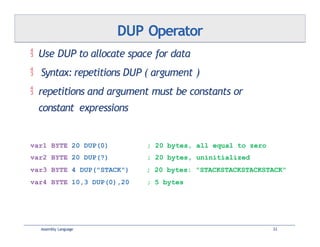
Use DUPto allocate space for data
Syntax: repetitions DUP ( argument )
repetitions and argument must be constants or
constant expressions
Assembly Language 33
DUP Operator
var1 BYTE 20 DUP(0) ; 20 bytes, all equal to zero
var2 BYTE 20 DUP(?) ; 20 bytes, uninitialized
var3 BYTE 4 DUP("STACK") ; 20 bytes: "STACKSTACKSTACKSTACK"
var4 BYTE 10,3 DUP(0),20 ; 5 bytes
34.
Defining Other Types
AssemblyLanguage 34
val1
val2
word3
WORD
SWORD
WORD
65535
–32768
?
;
;
;
largest unsigned value
smallest signed value
uninitialized, unsigned
word4 DWORD "ABCD" ; four characters
myList WORD 1,2,3,4,5 ; array of words
array WORD 5 DUP(?) ; uninitialized array
val5 DWORD 0FFFF0000h ; unsigned
val6 SDWORD –2147483648 ; signed
dwd7 SDWORD –2,–1,0,1,2 ; signed array
qwd8 QWORD 1234567812345678h
rVal1 REAL4 -2.1
rVal2 REAL8 3.2E-260
35.
All datatypes larger than a byte store their individual bytes
in reverse order
. The least significant byte occurs at the first
(lowest) memory address.
Example:
val1 DWORD 12345678h
Little Endian Order
Assembly Language 35
36.
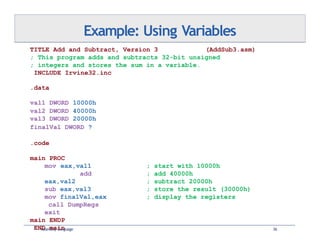
Example: Using Variables
AssemblyLanguage 36
TITLE Add and Subtract, Version 3 (AddSub3.asm)
; This program adds and subtracts 32-bit unsigned
; integers and stores the sum in a variable.
INCLUDE Irvine32.inc
.data
val1 DWORD 10000h
val2 DWORD 40000h
val3 DWORD 20000h
finalVal DWORD ?
.code
main PROC
mov eax,val1
add
eax,val2
sub eax,val3
mov finalVal,eax
call DumpRegs
exit
main ENDP
END main
; start with 10000h
; add 40000h
; subtract 20000h
; store the result (30000h)
; display the registers
37.
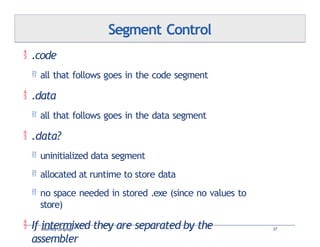
.code
allthat follows goes in the code segment
.data
all that follows goes in the data segment
.data?
uninitialized data segment
allocated at runtime to store data
no space needed in stored .exe (since no values to
store)
If intermixed they are separated by the
assembler
Assembly Language 37
Segment Control
38.
Use the.data? directive to declare an uninitialized data
segment
.DATA? directive reduces the size of a compiled program.
.data?
array1 DWORD 5000 DUP (?)
No space is allocated to array1 until the program is loaded
for execution (.exe is 20KB smaller)
.data
array2 DWORD 5000 DUP (?)
array2, even though empty, has 20KB saved in .exe to store
its non‐existent values
Assembly Language 38
Declaring Uninitialized Data
39.
Basic Elementsof Assembly Language
Example: Adding and Subtracting Integers
Assembling, Linking, and Running
Programs
Defining Data
Symbolic Constants
Real‐Address Mode Programming
Outline
Assembly Language 39
40.
name = expression
expression is a 32‐bit integer (expression or
constant)
may be redefined (but not good form to do so!)
name is called a symbolic constant
Directives: No runtime impact, not part of .exe
good programming style to use symbols
COUNT = 500
…
mov ax,COUNT
Assembly Language 40
Integer Symbolic Constants
41.
Current locationcounter: $
subtract address of list
difference is the number of
bytes
Assembly Language 41
Example:
Divideby element size if bigger than a byte (i.e., 2
for WORD, 4 for DWORD, 8 for QWORD)
Example:
Array Size
list BYTE 10,20,30,40
listSize = ($ - list)
list DWORD 1,2,3,4
listSize = ($ - list) / 4
42.
Define asymbol as either an integer or text
expression
= directive only permitted integers
Cannot be redefined
Example:
PI EQU <3.1416>
pressKey EQU <"Press any key to continue...",0>
.data
prompt BYTE pressKey
Assembly Language 42
EQU Directive
43.
Define atextual symbol as either an integer or text
expression
Called a text macro
Can be redefined
% turns an integer into text
;macros
msg TEXTEQU <"Do you wish to continue (Y/N)?">
rowSize = 5
count TEXTEQU %(rowSize * 2) ; eval &
store as text
Assembly Language 43
TEXTEQU Directive
setupAL TEXTEQU <mov al,count> ; macro for a mov instr
.data
prompt1 BYTE msg
.code
setupAL ; creates "mov al,10"
44.
Make yourcomputer look, act, and feel like one built in the
80s
Generate 16‐bit MS‐DOS Programs (Why?)
"Advantages"
enables calling of MS‐DOS and BIOS functions
no memory access restrictions
Disadvantages
must be aware of both segments and offsets
cannot call Win32 functions
Requirements
INCLUDE Irvine16.inc
Initialize DS to the data segment:
mov ax,@data
mov ds,ax
Assembly Language 44
Real‐Address Programming
45.
Integer expression,character constant
directive – interpreted by the assembler
instruction – executes at runtime
code, data, and stack segments
source, listing, object, map, executable files
Data definition directives:
BYTE, SBYTE, WORD, SWORD, DWORD, SDWORD, QWORD, REAL4,
REAL8
TBYTE, REAL10 – Obscure and rarely used instructions
(becoming obsolete)
DUP operator
, location counter ($)
Symbolic constants
=, EQU and TEXTEQU
Assembly Language 45
Summary
![[{+|‐} digits
[radix]
Optional leading + or – sign
Binary, decimal, hexadecimal
Common radix characters:
Assembly Language 5
h – hexadecimal
d – decimal
b – binary
r – encoded
real
Use as much as possible
When hex makes no
sense For bitwise clarity
Real
Examples: 30d, 6Ah, 42, 1101b
Hexadecimal can't begin with a letter:
0A5h
Integer Constants](https://image.slidesharecdn.com/assembly-2014-f-03-250314232421-a5cbb5ee/85/outline-basicc-elements-of-assembly-language-5-320.jpg)


![ Assembled into machine code by
assembler
Executed at runtime by the CPU
An instruction contains:
Assembly Language 11
Label
Mnemonic
Operand(s)
Comment
(optional)
(required
)
(depends on the
instruction) (optional) –
begins with ';'
loop1:
[label:] mnemonic [operands] [;comment]
mov eax,32 ;count of array
elements
Intel Instructions](https://image.slidesharecdn.com/assembly-2014-f-03-250314232421-a5cbb5ee/85/outline-basicc-elements-of-assembly-language-11-320.jpg)







![ A data definition statement sets aside storage in memory for a
variable.
May optionally assign a name (label) to the data
Syntax:
[name] directive initializer [,initializer] .. .
value1 BYTE 10
Use the ? Symbol for undefined variables
All initializers become binary data in memory
00110010b, 32h, and 50d all end up being having the same
binary value
Data Definition Statement
Assembly Language 29](https://image.slidesharecdn.com/assembly-2014-f-03-250314232421-a5cbb5ee/85/outline-basicc-elements-of-assembly-language-29-320.jpg)









![Chap03[1]](https://cdn.slidesharecdn.com/ss_thumbnails/chap031-140914002717-phpapp01-thumbnail.jpg?width=640&height=640&fit=bounds)


