Assembly Language for Intel-
Based Computers,
Assembly Language
Fundamentals
Web site Examples
 Basic Elements of Assembly Language
 Example: Adding and Subtracting Integers
 Assembling, Linking, and Running Programs
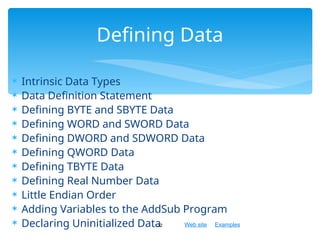
 Defining Data
 Symbolic Constants
 Real-Address Mode Programming
2
Chapter Overview
Web site Examples
 Integer constants
 Integer expressions
 Character and string constants
 Reserved words and identifiers
 Directives and instructions
 Labels
 Mnemonics and Operands
 Comments
 Examples
3
Basic Elements of Assembly
Language
Web site Examples
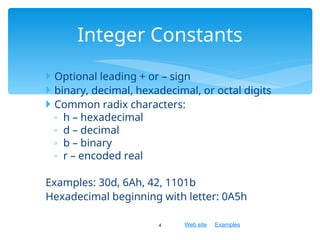
 Optional leading + or – sign
 binary, decimal, hexadecimal, or octal digits
 Common radix characters:
◦ h – hexadecimal
◦ d – decimal
◦ b – binary
◦ r – encoded real
Examples: 30d, 6Ah, 42, 1101b
Hexadecimal beginning with letter: 0A5h
4
Integer Constants
Web site Examples
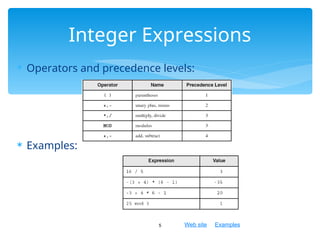
 Operators and precedence levels:
 Examples:
5
Integer Expressions
Web site Examples
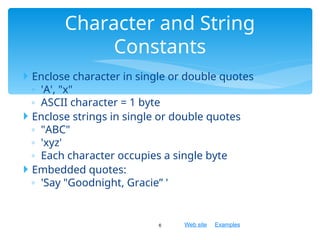
 Enclose character in single or double quotes
◦ 'A', "x"
◦ ASCII character = 1 byte
 Enclose strings in single or double quotes
◦ "ABC"
◦ 'xyz'
◦ Each character occupies a single byte
 Embedded quotes:
◦ 'Say "Goodnight, Gracie” '
6
Character and String
Constants
Web site Examples
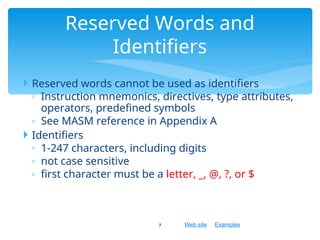
 Reserved words cannot be used as identifiers
◦ Instruction mnemonics, directives, type attributes,
operators, predefined symbols
◦ See MASM reference in Appendix A
 Identifiers
◦ 1-247 characters, including digits
◦ not case sensitive
◦ first character must be a letter, _, @, ?, or $
7
Reserved Words and
Identifiers
Web site Examples
 Commands that are recognized and acted upon by the
assembler
◦ Not part of the Intel instruction set
◦ Used to declare code, data areas, select memory
model, declare procedures, etc.
◦ not case sensitive
◦ For example: .data,.code,.stack, DWORD,BYTE
 Different assemblers have different directives
◦ NASM not the same as MASM
8
Directives
Web site Examples
 Assembled into machine code by assembler
 Executed at runtime by the CPU
 We use the Intel IA-32 instruction set
 An instruction contains:
 Label (optional)
 Mnemonic (required)
 Operand (depends on the instruction)
 Comment (optional)
9
Instructions
Web site Examples
 Act as place markers
◦ marks the address (offset) of code and data
 Follow identifier rules
 Data label
◦ must be unique
◦ example: myArray (not followed by colon)
 Code label
◦ target of jump and loop instructions
◦ example:mov ax,bx
jmp target
target: add cx,ax (followed by colon)
10
Labels
Web site Examples
 Instruction Mnemonics
◦ memory aid
◦ examples: MOV, ADD, SUB, MUL, INC, DEC
 Operands
◦ constant
◦ constant expression
◦ register
◦ memory (data label)
Constants and constant expressions are often called
immediate values
11
Mnemonics and Operands
Web site Examples
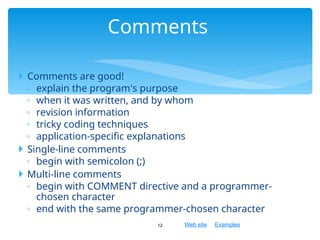
 Comments are good!
◦ explain the program's purpose
◦ when it was written, and by whom
◦ revision information
◦ tricky coding techniques
◦ application-specific explanations
 Single-line comments
◦ begin with semicolon (;)
 Multi-line comments
◦ begin with COMMENT directive and a programmer-
chosen character
◦ end with the same programmer-chosen character
12
Comments
Web site Examples
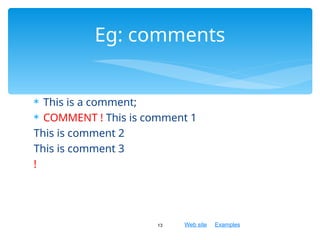
 This is a comment;
 COMMENT ! This is comment 1
This is comment 2
This is comment 3
!
13
Eg: comments
Web site Examples
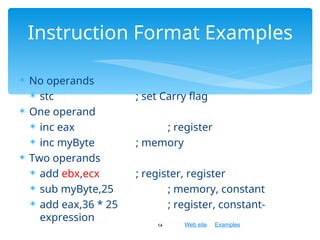
 No operands
 stc ; set Carry flag
 One operand
 inc eax ; register
 inc myByte ; memory
 Two operands
 add ebx,ecx ; register, register
 sub myByte,25 ; memory, constant
 add eax,36 * 25 ; register, constant-
expression
14
Instruction Format Examples
Web site Examples
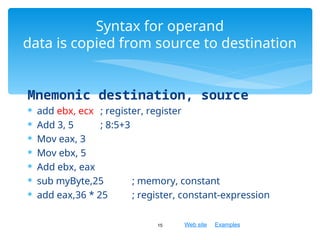
Mnemonic destination, source
 add ebx, ecx ; register, register
 Add 3, 5 ; 8:5+3
 Mov eax, 3
 Mov ebx, 5
 Add ebx, eax
 sub myByte,25 ; memory, constant
 add eax,36 * 25 ; register, constant-expression
15
Syntax for operand
data is copied from source to destination
Web site Examples
 Basic Elements of Assembly Language
 Example: Adding and Subtracting Integers
 Assembling, Linking, and Running Programs
 Defining Data
 Symbolic Constants
 Real-Address Mode Programming
16
What's Next
Web site Examples
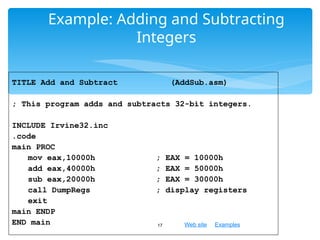
Example: Adding and Subtracting
Integers
17
TITLE Add and Subtract (AddSub.asm)
; This program adds and subtracts 32-bit integers.
INCLUDE Irvine32.inc
.code
main PROC
mov eax,10000h ; EAX = 10000h
add eax,40000h ; EAX = 50000h
sub eax,20000h ; EAX = 30000h
call DumpRegs ; display registers
exit
main ENDP
END main
Web site Examples
Program explanation
18
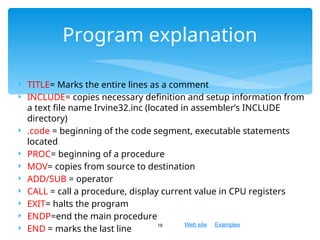
 TITLE= Marks the entire lines as a comment
 INCLUDE= copies necessary definition and setup information from
a text file name Irvine32.inc (located in assembler’s INCLUDE
directory)
 .code = beginning of the code segment, executable statements
located
 PROC= beginning of a procedure
 MOV= copies from source to destination
 ADD/SUB = operator
 CALL = call a procedure, display current value in CPU registers
 EXIT= halts the program
 ENDP=end the main procedure
 END = marks the last line
Web site Examples
Example Output
19
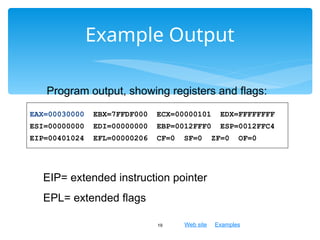
Program output, showing registers and flags:
EAX=00030000 EBX=7FFDF000 ECX=00000101 EDX=FFFFFFFF
ESI=00000000 EDI=00000000 EBP=0012FFF0 ESP=0012FFC4
EIP=00401024 EFL=00000206 CF=0 SF=0 ZF=0 OF=0
EIP= extended instruction pointer
EPL= extended flags
Web site Examples
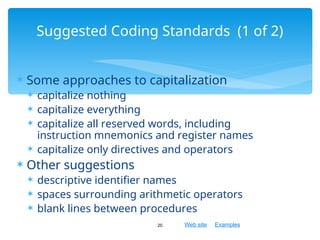
 Some approaches to capitalization
 capitalize nothing
 capitalize everything
 capitalize all reserved words, including
instruction mnemonics and register names
 capitalize only directives and operators
 Other suggestions
 descriptive identifier names
 spaces surrounding arithmetic operators
 blank lines between procedures
20
Suggested Coding Standards (1 of 2)
Web site Examples
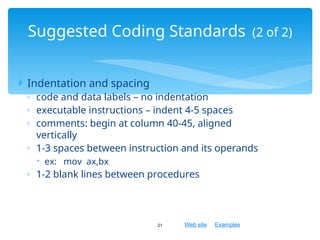
 Indentation and spacing
◦ code and data labels – no indentation
◦ executable instructions – indent 4-5 spaces
◦ comments: begin at column 40-45, aligned
vertically
◦ 1-3 spaces between instruction and its operands
 ex: mov ax,bx
◦ 1-2 blank lines between procedures
21
Suggested Coding Standards (2 of 2)
Web site Examples
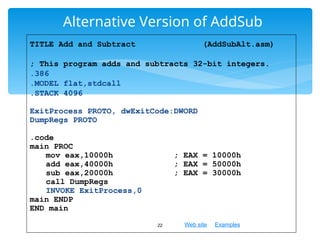
Alternative Version of AddSub
22
TITLE Add and Subtract (AddSubAlt.asm)
; This program adds and subtracts 32-bit integers.
.386
.MODEL flat,stdcall
.STACK 4096
ExitProcess PROTO, dwExitCode:DWORD
DumpRegs PROTO
.code
main PROC
mov eax,10000h ; EAX = 10000h
add eax,40000h ; EAX = 50000h
sub eax,20000h ; EAX = 30000h
call DumpRegs
INVOKE ExitProcess,0
main ENDP
END main
Web site Examples
23
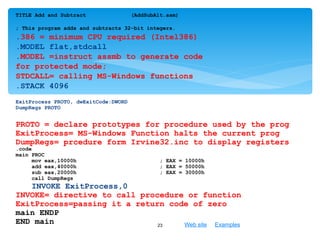
TITLE Add and Subtract (AddSubAlt.asm)
; This program adds and subtracts 32-bit integers.
.386 = minimum CPU required (Intel386)
.MODEL flat,stdcall
.MODEL =instruct assmb to generate code
for protected mode;
STDCALL= calling MS-Windows functions
.STACK 4096
ExitProcess PROTO, dwExitCode:DWORD
DumpRegs PROTO
PROTO = declare prototypes for procedure used by the prog
ExitProcess= MS-Windows Function halts the current prog
DumpRegs= prcedure form Irvine32.inc to display registers
.code
main PROC
mov eax,10000h ; EAX = 10000h
add eax,40000h ; EAX = 50000h
sub eax,20000h ; EAX = 30000h
call DumpRegs
INVOKE ExitProcess,0
INVOKE= directive to call procedure or function
ExitProcess=passing it a return code of zero
main ENDP
END main
Web site Examples
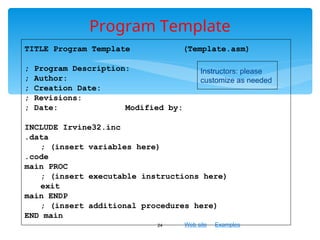
Program Template
24
TITLE Program Template (Template.asm)
; Program Description:
; Author:
; Creation Date:
; Revisions:
; Date: Modified by:
INCLUDE Irvine32.inc
.data
; (insert variables here)
.code
main PROC
; (insert executable instructions here)
exit
main ENDP
; (insert additional procedures here)
END main
Instructors: please
customize as needed
Web site Examples
 Basic Elements of Assembly Language
 Example: Adding and Subtracting Integers
 Assembling, Linking, and Running Programs
 Defining Data
 Symbolic Constants
 Real-Address Mode Programming
25
What's Next
Web site Examples
 Assemble-Link-Execute Cycle
 make32.bat
 Listing File
 Map File
26
Assembling, Linking, and Running
Programs
Web site Examples
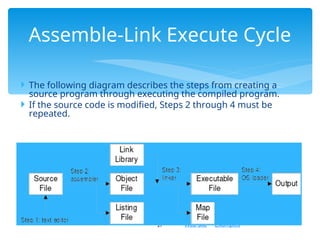
 The following diagram describes the steps from creating a
source program through executing the compiled program.
 If the source code is modified, Steps 2 through 4 must be
repeated.
27
Assemble-Link Execute Cycle
Web site Examples
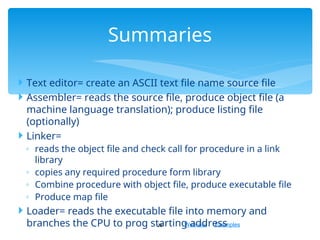
 Text editor= create an ASCII text file name source file
 Assembler= reads the source file, produce object file (a
machine language translation); produce listing file
(optionally)
 Linker=
◦ reads the object file and check call for procedure in a link
library
◦ copies any required procedure form library
◦ Combine procedure with object file, produce executable file
◦ Produce map file
 Loader= reads the executable file into memory and
branches the CPU to prog starting address
28
Summaries
Web site Examples
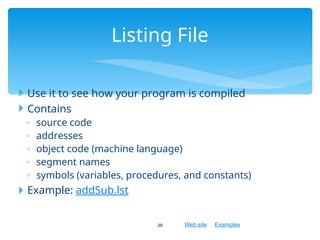
 Use it to see how your program is compiled
 Contains
◦ source code
◦ addresses
◦ object code (machine language)
◦ segment names
◦ symbols (variables, procedures, and constants)
 Example: addSub.lst
29
Listing File
Web site Examples
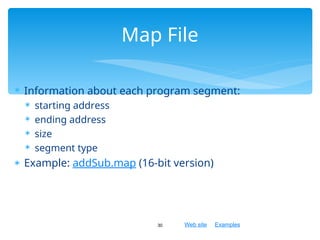
 Information about each program segment:
 starting address
 ending address
 size
 segment type
 Example: addSub.map (16-bit version)
30
Map File
Web site Examples
 Basic Elements of Assembly Language
 Example: Adding and Subtracting Integers
 Assembling, Linking, and Running Programs
 Defining Data
 Symbolic Constants
 Real-Address Mode Programming
31
What's Next
Web site Examples
 Intrinsic Data Types
 Data Definition Statement
 Defining BYTE and SBYTE Data
 Defining WORD and SWORD Data
 Defining DWORD and SDWORD Data
 Defining QWORD Data
 Defining TBYTE Data
 Defining Real Number Data
 Little Endian Order
 Adding Variables to the AddSub Program
 Declaring Uninitialized Data
32
Defining Data
Web site Examples
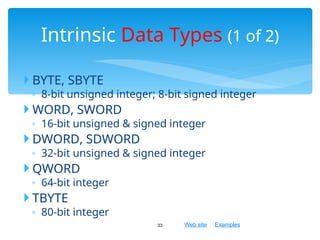
 BYTE, SBYTE
◦ 8-bit unsigned integer; 8-bit signed integer
 WORD, SWORD
◦ 16-bit unsigned & signed integer
 DWORD, SDWORD
◦ 32-bit unsigned & signed integer
 QWORD
◦ 64-bit integer
 TBYTE
◦ 80-bit integer
33
Intrinsic Data Types (1 of 2)
Web site Examples
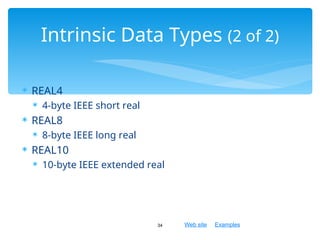
 REAL4
 4-byte IEEE short real
 REAL8
 8-byte IEEE long real
 REAL10
 10-byte IEEE extended real
34
Intrinsic Data Types (2 of 2)
Web site Examples
 A data definition statement sets aside storage in
memory for a variable.
 May optionally assign a name (label) to the data
 Syntax:
[name] directive initializer [,initializer] . . .
value1 BYTE 10
◦ All initializers become binary data in memory
35
Data Definition Statement
Web site Examples
Defining BYTE and SBYTE Data
36
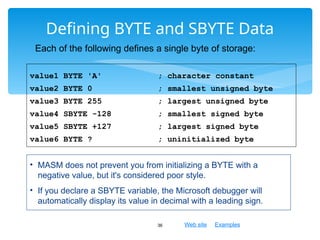
value1 BYTE 'A' ; character constant
value2 BYTE 0 ; smallest unsigned byte
value3 BYTE 255 ; largest unsigned byte
value4 SBYTE -128 ; smallest signed byte
value5 SBYTE +127 ; largest signed byte
value6 BYTE ? ; uninitialized byte
Each of the following defines a single byte of storage:
• MASM does not prevent you from initializing a BYTE with a
negative value, but it's considered poor style.
• If you declare a SBYTE variable, the Microsoft debugger will
automatically display its value in decimal with a leading sign.
Web site Examples
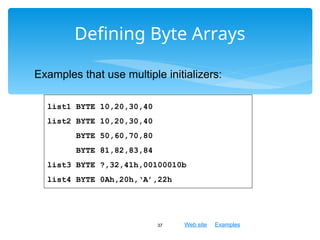
Defining Byte Arrays
37
list1 BYTE 10,20,30,40
list2 BYTE 10,20,30,40
BYTE 50,60,70,80
BYTE 81,82,83,84
list3 BYTE ?,32,41h,00100010b
list4 BYTE 0Ah,20h,‘A’,22h
Examples that use multiple initializers:
Web site Examples
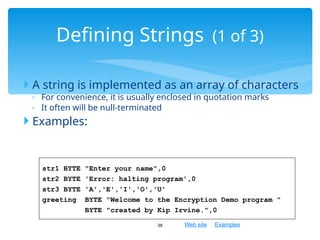
 A string is implemented as an array of characters
◦ For convenience, it is usually enclosed in quotation marks
◦ It often will be null-terminated
 Examples:
38
Defining Strings (1 of 3)
str1 BYTE "Enter your name",0
str2 BYTE 'Error: halting program',0
str3 BYTE 'A','E','I','O','U'
greeting BYTE "Welcome to the Encryption Demo program "
BYTE "created by Kip Irvine.",0
Web site Examples
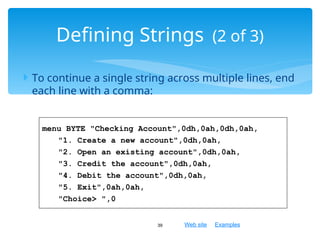
 To continue a single string across multiple lines, end
each line with a comma:
39
Defining Strings (2 of 3)
menu BYTE "Checking Account",0dh,0ah,0dh,0ah,
"1. Create a new account",0dh,0ah,
"2. Open an existing account",0dh,0ah,
"3. Credit the account",0dh,0ah,
"4. Debit the account",0dh,0ah,
"5. Exit",0ah,0ah,
"Choice> ",0
Web site Examples
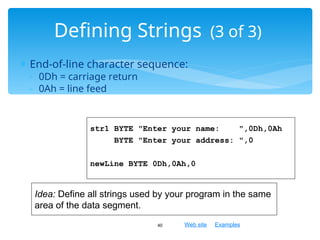
 End-of-line character sequence:
◦ 0Dh = carriage return
◦ 0Ah = line feed
40
Defining Strings (3 of 3)
str1 BYTE "Enter your name: ",0Dh,0Ah
BYTE "Enter your address: ",0
newLine BYTE 0Dh,0Ah,0
Idea: Define all strings used by your program in the same
area of the data segment.
Web site Examples
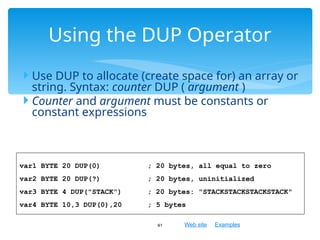
 Use DUP to allocate (create space for) an array or
string. Syntax: counter DUP ( argument )
 Counter and argument must be constants or
constant expressions
41
Using the DUP Operator
var1 BYTE 20 DUP(0) ; 20 bytes, all equal to zero
var2 BYTE 20 DUP(?) ; 20 bytes, uninitialized
var3 BYTE 4 DUP("STACK") ; 20 bytes: "STACKSTACKSTACKSTACK"
var4 BYTE 10,3 DUP(0),20 ; 5 bytes
Web site Examples
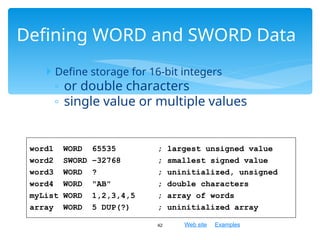
 Define storage for 16-bit integers
◦ or double characters
◦ single value or multiple values
42
Defining WORD and SWORD Data
word1 WORD 65535 ; largest unsigned value
word2 SWORD –32768 ; smallest signed value
word3 WORD ? ; uninitialized, unsigned
word4 WORD "AB" ; double characters
myList WORD 1,2,3,4,5 ; array of words
array WORD 5 DUP(?) ; uninitialized array
Web site Examples
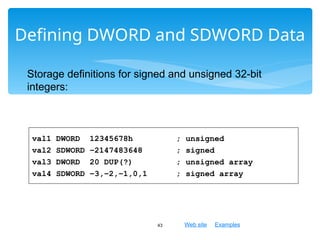
Defining DWORD and SDWORD Data
43
val1 DWORD 12345678h ; unsigned
val2 SDWORD –2147483648 ; signed
val3 DWORD 20 DUP(?) ; unsigned array
val4 SDWORD –3,–2,–1,0,1 ; signed array
Storage definitions for signed and unsigned 32-bit
integers:
Web site Examples
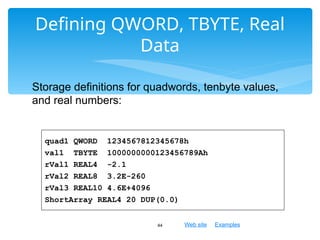
Defining QWORD, TBYTE, Real
Data
44
quad1 QWORD 1234567812345678h
val1 TBYTE 1000000000123456789Ah
rVal1 REAL4 -2.1
rVal2 REAL8 3.2E-260
rVal3 REAL10 4.6E+4096
ShortArray REAL4 20 DUP(0.0)
Storage definitions for quadwords, tenbyte values,
and real numbers:
Web site Examples
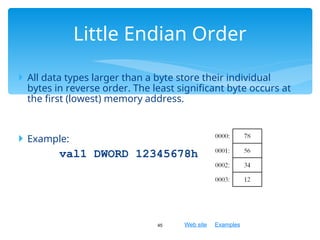
 All data types larger than a byte store their individual
bytes in reverse order. The least significant byte occurs at
the first (lowest) memory address.
 Example:
val1 DWORD 12345678h
45
Little Endian Order
Web site Examples
Adding Variables to AddSub
46
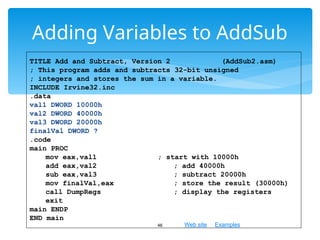
TITLE Add and Subtract, Version 2 (AddSub2.asm)
; This program adds and subtracts 32-bit unsigned
; integers and stores the sum in a variable.
INCLUDE Irvine32.inc
.data
val1 DWORD 10000h
val2 DWORD 40000h
val3 DWORD 20000h
finalVal DWORD ?
.code
main PROC
mov eax,val1 ; start with 10000h
add eax,val2 ; add 40000h
sub eax,val3 ; subtract 20000h
mov finalVal,eax ; store the result (30000h)
call DumpRegs ; display the registers
exit
main ENDP
END main
Web site Examples
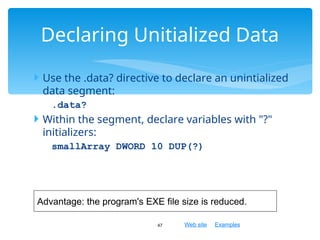
 Use the .data? directive to declare an unintialized
data segment:
.data?
 Within the segment, declare variables with "?"
initializers:
smallArray DWORD 10 DUP(?)
47
Declaring Unitialized Data
Advantage: the program's EXE file size is reduced.
Web site Examples
 Basic Elements of Assembly Language
 Example: Adding and Subtracting Integers
 Assembling, Linking, and Running Programs
 Defining Data
 Symbolic Constants
 Real-Address Mode Programming
48
What's Next
Web site Examples
 Equal-Sign Directive
 Calculating the Sizes of Arrays and Strings
 EQU Directive
 TEXTEQU Directive
49
Symbolic Constants
Web site Examples
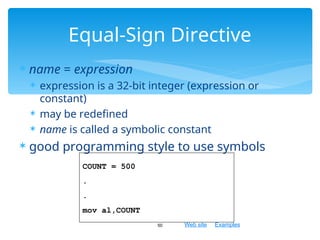
 name = expression
 expression is a 32-bit integer (expression or
constant)
 may be redefined
 name is called a symbolic constant
 good programming style to use symbols
50
Equal-Sign Directive
COUNT = 500
.
.
mov al,COUNT
Web site Examples
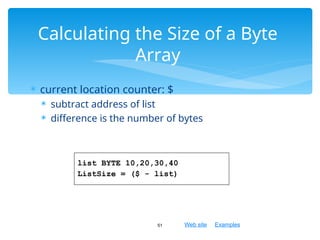
 current location counter: $
 subtract address of list
 difference is the number of bytes
51
Calculating the Size of a Byte
Array
list BYTE 10,20,30,40
ListSize = ($ - list)
Web site Examples
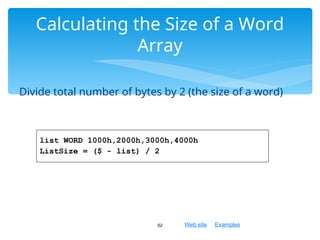
Divide total number of bytes by 2 (the size of a word)
52
Calculating the Size of a Word
Array
list WORD 1000h,2000h,3000h,4000h
ListSize = ($ - list) / 2
Web site Examples
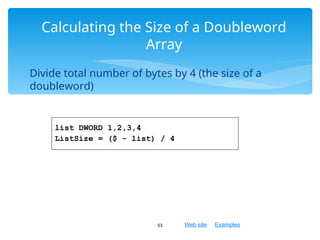
Divide total number of bytes by 4 (the size of a
doubleword)
53
Calculating the Size of a Doubleword
Array
list DWORD 1,2,3,4
ListSize = ($ - list) / 4
Web site Examples
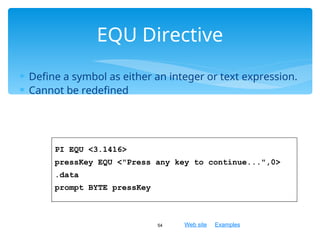
 Define a symbol as either an integer or text expression.
 Cannot be redefined
54
EQU Directive
PI EQU <3.1416>
pressKey EQU <"Press any key to continue...",0>
.data
prompt BYTE pressKey
Web site Examples
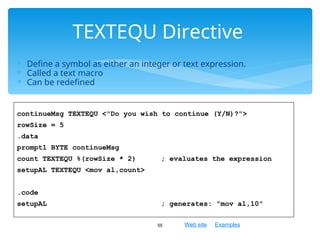
 Define a symbol as either an integer or text expression.
 Called a text macro
 Can be redefined
55
TEXTEQU Directive
continueMsg TEXTEQU <"Do you wish to continue (Y/N)?">
rowSize = 5
.data
prompt1 BYTE continueMsg
count TEXTEQU %(rowSize * 2) ; evaluates the expression
setupAL TEXTEQU <mov al,count>
.code
setupAL ; generates: "mov al,10"
Web site Examples
 Basic Elements of Assembly Language
 Example: Adding and Subtracting Integers
 Assembling, Linking, and Running Programs
 Defining Data
 Symbolic Constants
 Real-Address Mode Programming
56
What's Next
Web site Examples
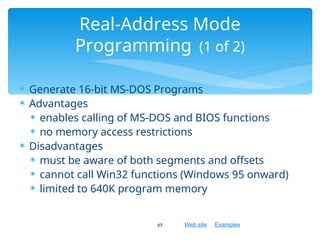
 Generate 16-bit MS-DOS Programs
 Advantages
 enables calling of MS-DOS and BIOS functions
 no memory access restrictions
 Disadvantages
 must be aware of both segments and offsets
 cannot call Win32 functions (Windows 95 onward)
 limited to 640K program memory
57
Real-Address Mode
Programming (1 of 2)
Web site Examples
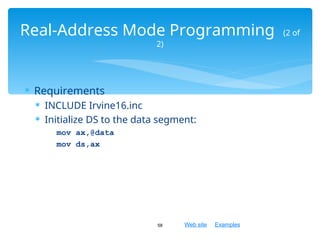
 Requirements
 INCLUDE Irvine16.inc
 Initialize DS to the data segment:
mov ax,@data
mov ds,ax
58
Real-Address Mode Programming (2 of
2)
Web site Examples
Add and Subtract, 16-Bit
Version
59
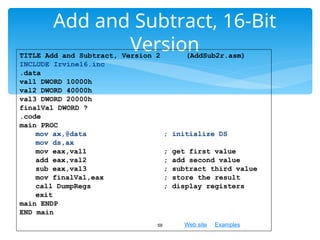
TITLE Add and Subtract, Version 2 (AddSub2r.asm)
INCLUDE Irvine16.inc
.data
val1 DWORD 10000h
val2 DWORD 40000h
val3 DWORD 20000h
finalVal DWORD ?
.code
main PROC
mov ax,@data ; initialize DS
mov ds,ax
mov eax,val1 ; get first value
add eax,val2 ; add second value
sub eax,val3 ; subtract third value
mov finalVal,eax ; store the result
call DumpRegs ; display registers
exit
main ENDP
END main
Web site Examples
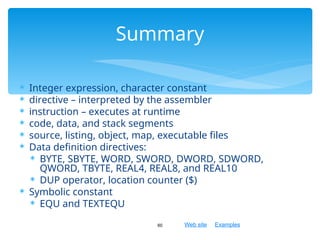
 Integer expression, character constant
 directive – interpreted by the assembler
 instruction – executes at runtime
 code, data, and stack segments
 source, listing, object, map, executable files
 Data definition directives:
 BYTE, SBYTE, WORD, SWORD, DWORD, SDWORD,
QWORD, TBYTE, REAL4, REAL8, and REAL10
 DUP operator, location counter ($)
 Symbolic constant
 EQU and TEXTEQU
60
Summary

Assembly Language Fundamental- Computer Organisation

  • 1.
    Assembly Language forIntel- Based Computers, Assembly Language Fundamentals
  • 2.
    Web site Examples Basic Elements of Assembly Language  Example: Adding and Subtracting Integers  Assembling, Linking, and Running Programs  Defining Data  Symbolic Constants  Real-Address Mode Programming 2 Chapter Overview
  • 3.
    Web site Examples Integer constants  Integer expressions  Character and string constants  Reserved words and identifiers  Directives and instructions  Labels  Mnemonics and Operands  Comments  Examples 3 Basic Elements of Assembly Language
  • 4.
    Web site Examples Optional leading + or – sign  binary, decimal, hexadecimal, or octal digits  Common radix characters: ◦ h – hexadecimal ◦ d – decimal ◦ b – binary ◦ r – encoded real Examples: 30d, 6Ah, 42, 1101b Hexadecimal beginning with letter: 0A5h 4 Integer Constants
  • 5.
    Web site Examples Operators and precedence levels:  Examples: 5 Integer Expressions
  • 6.
    Web site Examples Enclose character in single or double quotes ◦ 'A', "x" ◦ ASCII character = 1 byte  Enclose strings in single or double quotes ◦ "ABC" ◦ 'xyz' ◦ Each character occupies a single byte  Embedded quotes: ◦ 'Say "Goodnight, Gracie” ' 6 Character and String Constants
  • 7.
    Web site Examples Reserved words cannot be used as identifiers ◦ Instruction mnemonics, directives, type attributes, operators, predefined symbols ◦ See MASM reference in Appendix A  Identifiers ◦ 1-247 characters, including digits ◦ not case sensitive ◦ first character must be a letter, _, @, ?, or $ 7 Reserved Words and Identifiers
  • 8.
    Web site Examples Commands that are recognized and acted upon by the assembler ◦ Not part of the Intel instruction set ◦ Used to declare code, data areas, select memory model, declare procedures, etc. ◦ not case sensitive ◦ For example: .data,.code,.stack, DWORD,BYTE  Different assemblers have different directives ◦ NASM not the same as MASM 8 Directives
  • 9.
    Web site Examples Assembled into machine code by assembler  Executed at runtime by the CPU  We use the Intel IA-32 instruction set  An instruction contains:  Label (optional)  Mnemonic (required)  Operand (depends on the instruction)  Comment (optional) 9 Instructions
  • 10.
    Web site Examples Act as place markers ◦ marks the address (offset) of code and data  Follow identifier rules  Data label ◦ must be unique ◦ example: myArray (not followed by colon)  Code label ◦ target of jump and loop instructions ◦ example:mov ax,bx jmp target target: add cx,ax (followed by colon) 10 Labels
  • 11.
    Web site Examples Instruction Mnemonics ◦ memory aid ◦ examples: MOV, ADD, SUB, MUL, INC, DEC  Operands ◦ constant ◦ constant expression ◦ register ◦ memory (data label) Constants and constant expressions are often called immediate values 11 Mnemonics and Operands
  • 12.
    Web site Examples Comments are good! ◦ explain the program's purpose ◦ when it was written, and by whom ◦ revision information ◦ tricky coding techniques ◦ application-specific explanations  Single-line comments ◦ begin with semicolon (;)  Multi-line comments ◦ begin with COMMENT directive and a programmer- chosen character ◦ end with the same programmer-chosen character 12 Comments
  • 13.
    Web site Examples This is a comment;  COMMENT ! This is comment 1 This is comment 2 This is comment 3 ! 13 Eg: comments
  • 14.
    Web site Examples No operands  stc ; set Carry flag  One operand  inc eax ; register  inc myByte ; memory  Two operands  add ebx,ecx ; register, register  sub myByte,25 ; memory, constant  add eax,36 * 25 ; register, constant- expression 14 Instruction Format Examples
  • 15.
    Web site Examples Mnemonicdestination, source  add ebx, ecx ; register, register  Add 3, 5 ; 8:5+3  Mov eax, 3  Mov ebx, 5  Add ebx, eax  sub myByte,25 ; memory, constant  add eax,36 * 25 ; register, constant-expression 15 Syntax for operand data is copied from source to destination
  • 16.
    Web site Examples Basic Elements of Assembly Language  Example: Adding and Subtracting Integers  Assembling, Linking, and Running Programs  Defining Data  Symbolic Constants  Real-Address Mode Programming 16 What's Next
  • 17.
    Web site Examples Example:Adding and Subtracting Integers 17 TITLE Add and Subtract (AddSub.asm) ; This program adds and subtracts 32-bit integers. INCLUDE Irvine32.inc .code main PROC mov eax,10000h ; EAX = 10000h add eax,40000h ; EAX = 50000h sub eax,20000h ; EAX = 30000h call DumpRegs ; display registers exit main ENDP END main
  • 18.
    Web site Examples Programexplanation 18  TITLE= Marks the entire lines as a comment  INCLUDE= copies necessary definition and setup information from a text file name Irvine32.inc (located in assembler’s INCLUDE directory)  .code = beginning of the code segment, executable statements located  PROC= beginning of a procedure  MOV= copies from source to destination  ADD/SUB = operator  CALL = call a procedure, display current value in CPU registers  EXIT= halts the program  ENDP=end the main procedure  END = marks the last line
  • 19.
    Web site Examples ExampleOutput 19 Program output, showing registers and flags: EAX=00030000 EBX=7FFDF000 ECX=00000101 EDX=FFFFFFFF ESI=00000000 EDI=00000000 EBP=0012FFF0 ESP=0012FFC4 EIP=00401024 EFL=00000206 CF=0 SF=0 ZF=0 OF=0 EIP= extended instruction pointer EPL= extended flags
  • 20.
    Web site Examples Some approaches to capitalization  capitalize nothing  capitalize everything  capitalize all reserved words, including instruction mnemonics and register names  capitalize only directives and operators  Other suggestions  descriptive identifier names  spaces surrounding arithmetic operators  blank lines between procedures 20 Suggested Coding Standards (1 of 2)
  • 21.
    Web site Examples Indentation and spacing ◦ code and data labels – no indentation ◦ executable instructions – indent 4-5 spaces ◦ comments: begin at column 40-45, aligned vertically ◦ 1-3 spaces between instruction and its operands  ex: mov ax,bx ◦ 1-2 blank lines between procedures 21 Suggested Coding Standards (2 of 2)
  • 22.
    Web site Examples AlternativeVersion of AddSub 22 TITLE Add and Subtract (AddSubAlt.asm) ; This program adds and subtracts 32-bit integers. .386 .MODEL flat,stdcall .STACK 4096 ExitProcess PROTO, dwExitCode:DWORD DumpRegs PROTO .code main PROC mov eax,10000h ; EAX = 10000h add eax,40000h ; EAX = 50000h sub eax,20000h ; EAX = 30000h call DumpRegs INVOKE ExitProcess,0 main ENDP END main
  • 23.
    Web site Examples 23 TITLEAdd and Subtract (AddSubAlt.asm) ; This program adds and subtracts 32-bit integers. .386 = minimum CPU required (Intel386) .MODEL flat,stdcall .MODEL =instruct assmb to generate code for protected mode; STDCALL= calling MS-Windows functions .STACK 4096 ExitProcess PROTO, dwExitCode:DWORD DumpRegs PROTO PROTO = declare prototypes for procedure used by the prog ExitProcess= MS-Windows Function halts the current prog DumpRegs= prcedure form Irvine32.inc to display registers .code main PROC mov eax,10000h ; EAX = 10000h add eax,40000h ; EAX = 50000h sub eax,20000h ; EAX = 30000h call DumpRegs INVOKE ExitProcess,0 INVOKE= directive to call procedure or function ExitProcess=passing it a return code of zero main ENDP END main
  • 24.
    Web site Examples ProgramTemplate 24 TITLE Program Template (Template.asm) ; Program Description: ; Author: ; Creation Date: ; Revisions: ; Date: Modified by: INCLUDE Irvine32.inc .data ; (insert variables here) .code main PROC ; (insert executable instructions here) exit main ENDP ; (insert additional procedures here) END main Instructors: please customize as needed
  • 25.
    Web site Examples Basic Elements of Assembly Language  Example: Adding and Subtracting Integers  Assembling, Linking, and Running Programs  Defining Data  Symbolic Constants  Real-Address Mode Programming 25 What's Next
  • 26.
    Web site Examples Assemble-Link-Execute Cycle  make32.bat  Listing File  Map File 26 Assembling, Linking, and Running Programs
  • 27.
    Web site Examples The following diagram describes the steps from creating a source program through executing the compiled program.  If the source code is modified, Steps 2 through 4 must be repeated. 27 Assemble-Link Execute Cycle
  • 28.
    Web site Examples Text editor= create an ASCII text file name source file  Assembler= reads the source file, produce object file (a machine language translation); produce listing file (optionally)  Linker= ◦ reads the object file and check call for procedure in a link library ◦ copies any required procedure form library ◦ Combine procedure with object file, produce executable file ◦ Produce map file  Loader= reads the executable file into memory and branches the CPU to prog starting address 28 Summaries
  • 29.
    Web site Examples Use it to see how your program is compiled  Contains ◦ source code ◦ addresses ◦ object code (machine language) ◦ segment names ◦ symbols (variables, procedures, and constants)  Example: addSub.lst 29 Listing File
  • 30.
    Web site Examples Information about each program segment:  starting address  ending address  size  segment type  Example: addSub.map (16-bit version) 30 Map File
  • 31.
    Web site Examples Basic Elements of Assembly Language  Example: Adding and Subtracting Integers  Assembling, Linking, and Running Programs  Defining Data  Symbolic Constants  Real-Address Mode Programming 31 What's Next
  • 32.
    Web site Examples Intrinsic Data Types  Data Definition Statement  Defining BYTE and SBYTE Data  Defining WORD and SWORD Data  Defining DWORD and SDWORD Data  Defining QWORD Data  Defining TBYTE Data  Defining Real Number Data  Little Endian Order  Adding Variables to the AddSub Program  Declaring Uninitialized Data 32 Defining Data
  • 33.
    Web site Examples BYTE, SBYTE ◦ 8-bit unsigned integer; 8-bit signed integer  WORD, SWORD ◦ 16-bit unsigned & signed integer  DWORD, SDWORD ◦ 32-bit unsigned & signed integer  QWORD ◦ 64-bit integer  TBYTE ◦ 80-bit integer 33 Intrinsic Data Types (1 of 2)
  • 34.
    Web site Examples REAL4  4-byte IEEE short real  REAL8  8-byte IEEE long real  REAL10  10-byte IEEE extended real 34 Intrinsic Data Types (2 of 2)
  • 35.
    Web site Examples A data definition statement sets aside storage in memory for a variable.  May optionally assign a name (label) to the data  Syntax: [name] directive initializer [,initializer] . . . value1 BYTE 10 ◦ All initializers become binary data in memory 35 Data Definition Statement
  • 36.
    Web site Examples DefiningBYTE and SBYTE Data 36 value1 BYTE 'A' ; character constant value2 BYTE 0 ; smallest unsigned byte value3 BYTE 255 ; largest unsigned byte value4 SBYTE -128 ; smallest signed byte value5 SBYTE +127 ; largest signed byte value6 BYTE ? ; uninitialized byte Each of the following defines a single byte of storage: • MASM does not prevent you from initializing a BYTE with a negative value, but it's considered poor style. • If you declare a SBYTE variable, the Microsoft debugger will automatically display its value in decimal with a leading sign.
  • 37.
    Web site Examples DefiningByte Arrays 37 list1 BYTE 10,20,30,40 list2 BYTE 10,20,30,40 BYTE 50,60,70,80 BYTE 81,82,83,84 list3 BYTE ?,32,41h,00100010b list4 BYTE 0Ah,20h,‘A’,22h Examples that use multiple initializers:
  • 38.
    Web site Examples A string is implemented as an array of characters ◦ For convenience, it is usually enclosed in quotation marks ◦ It often will be null-terminated  Examples: 38 Defining Strings (1 of 3) str1 BYTE "Enter your name",0 str2 BYTE 'Error: halting program',0 str3 BYTE 'A','E','I','O','U' greeting BYTE "Welcome to the Encryption Demo program " BYTE "created by Kip Irvine.",0
  • 39.
    Web site Examples To continue a single string across multiple lines, end each line with a comma: 39 Defining Strings (2 of 3) menu BYTE "Checking Account",0dh,0ah,0dh,0ah, "1. Create a new account",0dh,0ah, "2. Open an existing account",0dh,0ah, "3. Credit the account",0dh,0ah, "4. Debit the account",0dh,0ah, "5. Exit",0ah,0ah, "Choice> ",0
  • 40.
    Web site Examples End-of-line character sequence: ◦ 0Dh = carriage return ◦ 0Ah = line feed 40 Defining Strings (3 of 3) str1 BYTE "Enter your name: ",0Dh,0Ah BYTE "Enter your address: ",0 newLine BYTE 0Dh,0Ah,0 Idea: Define all strings used by your program in the same area of the data segment.
  • 41.
    Web site Examples Use DUP to allocate (create space for) an array or string. Syntax: counter DUP ( argument )  Counter and argument must be constants or constant expressions 41 Using the DUP Operator var1 BYTE 20 DUP(0) ; 20 bytes, all equal to zero var2 BYTE 20 DUP(?) ; 20 bytes, uninitialized var3 BYTE 4 DUP("STACK") ; 20 bytes: "STACKSTACKSTACKSTACK" var4 BYTE 10,3 DUP(0),20 ; 5 bytes
  • 42.
    Web site Examples Define storage for 16-bit integers ◦ or double characters ◦ single value or multiple values 42 Defining WORD and SWORD Data word1 WORD 65535 ; largest unsigned value word2 SWORD –32768 ; smallest signed value word3 WORD ? ; uninitialized, unsigned word4 WORD "AB" ; double characters myList WORD 1,2,3,4,5 ; array of words array WORD 5 DUP(?) ; uninitialized array
  • 43.
    Web site Examples DefiningDWORD and SDWORD Data 43 val1 DWORD 12345678h ; unsigned val2 SDWORD –2147483648 ; signed val3 DWORD 20 DUP(?) ; unsigned array val4 SDWORD –3,–2,–1,0,1 ; signed array Storage definitions for signed and unsigned 32-bit integers:
  • 44.
    Web site Examples DefiningQWORD, TBYTE, Real Data 44 quad1 QWORD 1234567812345678h val1 TBYTE 1000000000123456789Ah rVal1 REAL4 -2.1 rVal2 REAL8 3.2E-260 rVal3 REAL10 4.6E+4096 ShortArray REAL4 20 DUP(0.0) Storage definitions for quadwords, tenbyte values, and real numbers:
  • 45.
    Web site Examples All data types larger than a byte store their individual bytes in reverse order. The least significant byte occurs at the first (lowest) memory address.  Example: val1 DWORD 12345678h 45 Little Endian Order
  • 46.
    Web site Examples AddingVariables to AddSub 46 TITLE Add and Subtract, Version 2 (AddSub2.asm) ; This program adds and subtracts 32-bit unsigned ; integers and stores the sum in a variable. INCLUDE Irvine32.inc .data val1 DWORD 10000h val2 DWORD 40000h val3 DWORD 20000h finalVal DWORD ? .code main PROC mov eax,val1 ; start with 10000h add eax,val2 ; add 40000h sub eax,val3 ; subtract 20000h mov finalVal,eax ; store the result (30000h) call DumpRegs ; display the registers exit main ENDP END main
  • 47.
    Web site Examples Use the .data? directive to declare an unintialized data segment: .data?  Within the segment, declare variables with "?" initializers: smallArray DWORD 10 DUP(?) 47 Declaring Unitialized Data Advantage: the program's EXE file size is reduced.
  • 48.
    Web site Examples Basic Elements of Assembly Language  Example: Adding and Subtracting Integers  Assembling, Linking, and Running Programs  Defining Data  Symbolic Constants  Real-Address Mode Programming 48 What's Next
  • 49.
    Web site Examples Equal-Sign Directive  Calculating the Sizes of Arrays and Strings  EQU Directive  TEXTEQU Directive 49 Symbolic Constants
  • 50.
    Web site Examples name = expression  expression is a 32-bit integer (expression or constant)  may be redefined  name is called a symbolic constant  good programming style to use symbols 50 Equal-Sign Directive COUNT = 500 . . mov al,COUNT
  • 51.
    Web site Examples current location counter: $  subtract address of list  difference is the number of bytes 51 Calculating the Size of a Byte Array list BYTE 10,20,30,40 ListSize = ($ - list)
  • 52.
    Web site Examples Dividetotal number of bytes by 2 (the size of a word) 52 Calculating the Size of a Word Array list WORD 1000h,2000h,3000h,4000h ListSize = ($ - list) / 2
  • 53.
    Web site Examples Dividetotal number of bytes by 4 (the size of a doubleword) 53 Calculating the Size of a Doubleword Array list DWORD 1,2,3,4 ListSize = ($ - list) / 4
  • 54.
    Web site Examples Define a symbol as either an integer or text expression.  Cannot be redefined 54 EQU Directive PI EQU <3.1416> pressKey EQU <"Press any key to continue...",0> .data prompt BYTE pressKey
  • 55.
    Web site Examples Define a symbol as either an integer or text expression.  Called a text macro  Can be redefined 55 TEXTEQU Directive continueMsg TEXTEQU <"Do you wish to continue (Y/N)?"> rowSize = 5 .data prompt1 BYTE continueMsg count TEXTEQU %(rowSize * 2) ; evaluates the expression setupAL TEXTEQU <mov al,count> .code setupAL ; generates: "mov al,10"
  • 56.
    Web site Examples Basic Elements of Assembly Language  Example: Adding and Subtracting Integers  Assembling, Linking, and Running Programs  Defining Data  Symbolic Constants  Real-Address Mode Programming 56 What's Next
  • 57.
    Web site Examples Generate 16-bit MS-DOS Programs  Advantages  enables calling of MS-DOS and BIOS functions  no memory access restrictions  Disadvantages  must be aware of both segments and offsets  cannot call Win32 functions (Windows 95 onward)  limited to 640K program memory 57 Real-Address Mode Programming (1 of 2)
  • 58.
    Web site Examples Requirements  INCLUDE Irvine16.inc  Initialize DS to the data segment: mov ax,@data mov ds,ax 58 Real-Address Mode Programming (2 of 2)
  • 59.
    Web site Examples Addand Subtract, 16-Bit Version 59 TITLE Add and Subtract, Version 2 (AddSub2r.asm) INCLUDE Irvine16.inc .data val1 DWORD 10000h val2 DWORD 40000h val3 DWORD 20000h finalVal DWORD ? .code main PROC mov ax,@data ; initialize DS mov ds,ax mov eax,val1 ; get first value add eax,val2 ; add second value sub eax,val3 ; subtract third value mov finalVal,eax ; store the result call DumpRegs ; display registers exit main ENDP END main
  • 60.
    Web site Examples Integer expression, character constant  directive – interpreted by the assembler  instruction – executes at runtime  code, data, and stack segments  source, listing, object, map, executable files  Data definition directives:  BYTE, SBYTE, WORD, SWORD, DWORD, SDWORD, QWORD, TBYTE, REAL4, REAL8, and REAL10  DUP operator, location counter ($)  Symbolic constant  EQU and TEXTEQU 60 Summary