Microprocessor Based Systems
Spring 2013
Department of Electrical Engineering
University of Gujrat
2
The Stack
• The stack segment of a program is used for temporary
storage of data and addresses
• A stack is a one-dimensional data structure
• Items are added to and removed from one end of the
structure using a "Last In - First Out" technique (LIFO)
• The top of the stack is the last addition to the stack
• The statement .STACK 100H in your program sets
aside a block of 256 bytes of memory to hold the stack
• The SS (Stack Segment Register) contains the segment
number of the stack segment
The Stack (cont’d)
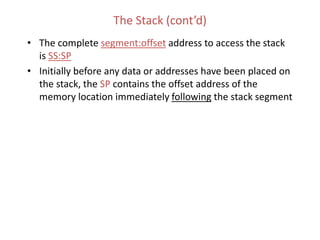
• The complete segment:offset address to access the stack
is SS:SP
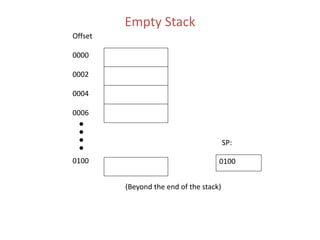
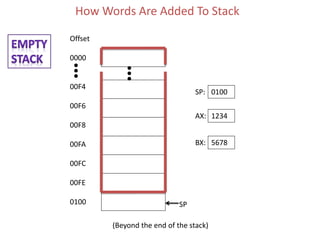
• Initially before any data or addresses have been placed on
the stack, the SP contains the offset address of the
memory location immediately following the stack segment
Empty Stack
Offset
0000
0002
0004
0006
0100 0100
SP:
(Beyond the end of the stack)
PUSH Instruction
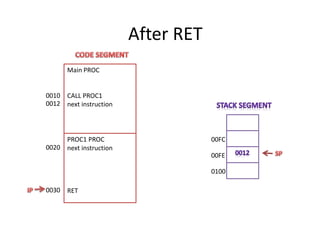
• PUSH instruction adds a new word to the stack
• SYNTAX: PUSH source
where source is a 16-bit register or memory
word
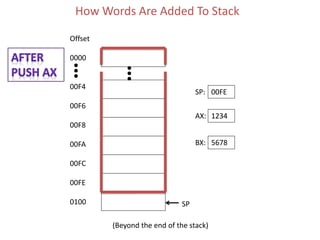
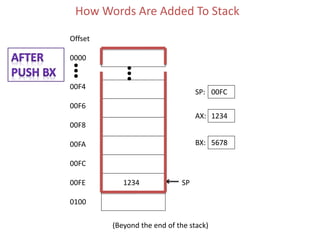
• PUSH instruction causes
– the stack pointer (SP) to be decreased by 2.
– Then a copy of the value in the source field is placed in
the address specified by SS:SP.
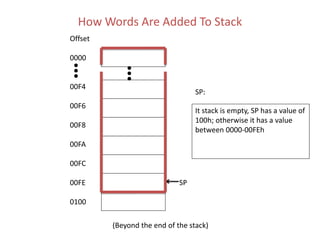
• Initially SP points to a location immediately
following the stack. The first push decreases
SP by 2, making it point to the last word in the
stack
• Because each PUSH decreases the SP, the
stack is filled a word at a time backwards from
the last available word in the stack toward the
beginning of the stack.
How Words Are Added To Stack
Offset
0000
00F4
00F6
00F8
00FA
00FC
00FE
0100
It stack is empty, SP has a value of
100h; otherwise it has a value
between 0000-00FEh
SP:
(Beyond the end of the stack)
SP
How Words Are Added To Stack
Offset
0000
00F4
00F6
00F8
00FA
00FC
00FE
0100
0100SP:
(Beyond the end of the stack)
SP
1234AX:
5678BX:
How Words Are Added To Stack
Offset
0000
00F4
00F6
00F8
00FA
00FC
00FE
0100
00FESP:
(Beyond the end of the stack)
SP
1234AX:
5678BX:
1234
How Words Are Added To Stack
Offset
0000
00F4
00F6
00F8
00FA
00FC
00FE
0100
(Beyond the end of the stack)
SP
1234AX:
5678BX: 5678
1234
00FCSP:
POP Instruction
• POP instruction removes the last word placed on the stack
• SYNTAX: POP destination
– where source is a 16-bit register or memory word
• POP instruction causes
– the contents of SS:SP to be moved to the destination field
– It increases the stack pointer (SP) by 2
• Restrictions:
1.PUSH and POP work only with words
2.Byte and immediate data operands are illegal
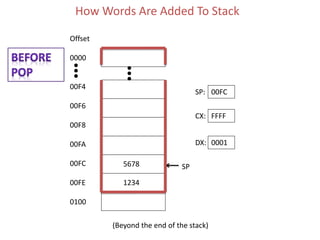
How Words Are Added To Stack
Offset
0000
00F4
00F6
00F8
00FA
00FC
00FE
0100
(Beyond the end of the stack)
SP
FFFFCX:
0001DX:
5678
1234
00FCSP:
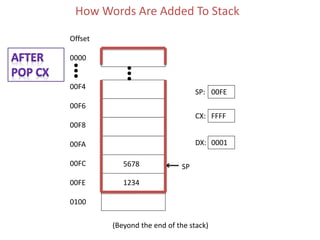
How Words Are Added To Stack
Offset
0000
00F4
00F6
00F8
00FA
00FC
00FE
0100
(Beyond the end of the stack)
SP
FFFFCX:
0001DX:
5678
1234
00FESP:
5678
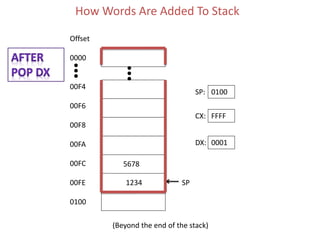
How Words Are Added To Stack
Offset
0000
00F4
00F6
00F8
00FA
00FC
00FE
0100
(Beyond the end of the stack)
SP
FFFFCX:
0001DX:
5678
1234
0100SP:
5678
1234
FLAGS Register and Stack
• PUSHF
– pushes (copies) the contents of the FLAGS register onto
the stack. It has no operands
• POPF
– pops (copies) the contents of the top word in the stack to
the FLAGS register. It has no operands
• NOTES:
– PUSH, POP, and PUSHF do not affect the flags !!
– POPF could theoretically change all the flags because it resets the
FLAGS REGISTER to some original value that you have previously saved
with the PUSHF instruction
Example: Fill up the trace table given below.
Instructions AX
MOV AX,843AH
BX CX SI SP Stack Data Address Data
0100
0101
0102
0103
0104
0105
0106
0107
0108
0109
010A
010B
010C
010D
010E
3F
78
5A
C8
93
59
4F
A3
7E
F4
09
8A
5C
6A
45
INC AX
PUSH AX
MOV BX, 2354H
MOV BL,AL
POP AX
PUSH BX
MOV SI,0104H
PUSH [010A]
POP DX
POP AX
PUSH [SI+4]
INC AL
POP AX
INC AX
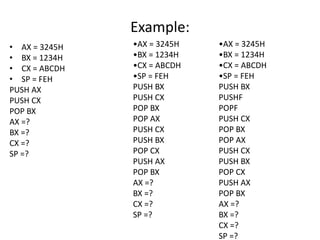
Example:
• AX = 3245H
• BX = 1234H
• CX = ABCDH
• SP = FEH
PUSH AX
PUSH CX
POP BX
AX =?
BX =?
CX =?
SP =?
•AX = 3245H
•BX = 1234H
•CX = ABCDH
•SP = FEH
PUSH BX
PUSH CX
POP BX
POP AX
PUSH CX
PUSH BX
POP CX
PUSH AX
POP BX
AX =?
BX =?
CX =?
SP =?
•AX = 3245H
•BX = 1234H
•CX = ABCDH
•SP = FEH
PUSH BX
PUSHF
POPF
PUSH CX
POP BX
POP AX
PUSH CX
PUSH BX
POP CX
PUSH AX
POP BX
AX =?
BX =?
CX =?
SP =?
Important Notes
• Not only can the programmer use the stack but DOS can
and also does use the stack
• In fact DOS uses the stack every time the user executes an
INT 21h function
• Because of the "last-in first-out" nature of the stack, the
order that items are removed from the stack is the reverse
of the order in which they are placed on the stack
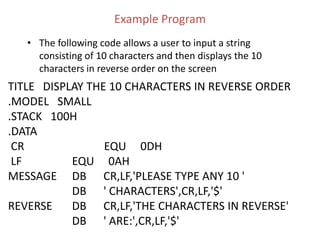
Example Program
• The following code allows a user to input a string
consisting of 10 characters and then displays the 10
characters in reverse order on the screen
TITLE DISPLAY THE 10 CHARACTERS IN REVERSE ORDER
.MODEL SMALL
.STACK 100H
.DATA
CR EQU 0DH
LF EQU 0AH
MESSAGE DB CR,LF,'PLEASE TYPE ANY 10 '
DB ' CHARACTERS',CR,LF,'$'
REVERSE DB CR,LF,'THE CHARACTERS IN REVERSE'
DB ' ARE:',CR,LF,'$'
Example
Program
(cont’d)
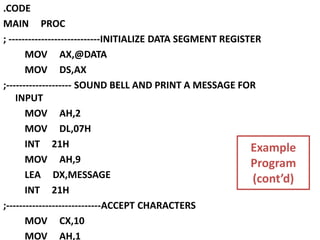
.CODE
MAIN PROC
; ----------------------------INITIALIZE DATA SEGMENT REGISTER
MOV AX,@DATA
MOV DS,AX
;-------------------- SOUND BELL AND PRINT A MESSAGE FOR
INPUT
MOV AH,2
MOV DL,07H
INT 21H
MOV AH,9
LEA DX,MESSAGE
INT 21H
;-----------------------------ACCEPT CHARACTERS
MOV CX,10
MOV AH,1
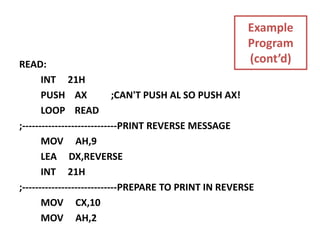
READ:
INT 21H
PUSH AX ;CAN'T PUSH AL SO PUSH AX!
LOOP READ
;-----------------------------PRINT REVERSE MESSAGE
MOV AH,9
LEA DX,REVERSE
INT 21H
;-----------------------------PREPARE TO PRINT IN REVERSE
MOV CX,10
MOV AH,2
Example
Program
(cont’d)
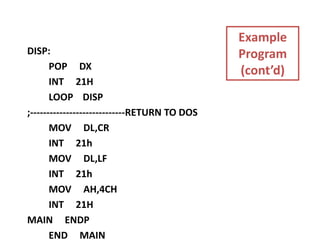
DISP:
POP DX
INT 21H
LOOP DISP
;-----------------------------RETURN TO DOS
MOV DL,CR
INT 21h
MOV DL,LF
INT 21h
MOV AH,4CH
INT 21H
MAIN ENDP
END MAIN
Example
Program
(cont’d)
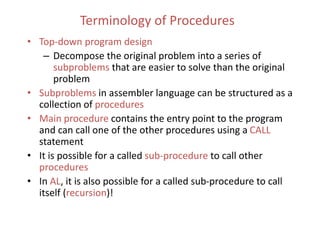
Terminology of Procedures
• Top-down program design
– Decompose the original problem into a series of
subproblems that are easier to solve than the original
problem
• Subproblems in assembler language can be structured as a
collection of procedures
• Main procedure contains the entry point to the program
and can call one of the other procedures using a CALL
statement
• It is possible for a called sub-procedure to call other
procedures
• In AL, it is also possible for a called sub-procedure to call
itself (recursion)!
Terminology of Procedures (cont’d)
• When a procedure calls another procedure,
control transfers to the called procedure
• When the instructions in a called procedure
have been executed, the called procedure
usually returns control to the calling
procedure at the next sequential
instruction after the CALL statement
• In high level languages, mechanism for call
and return are hidden from programmer
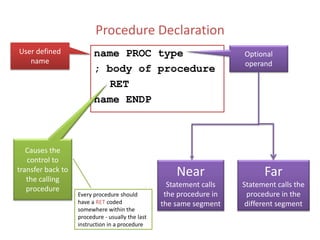
Procedure Declaration
name PROC type
; body of procedure
RET
name ENDP
User defined
name
Optional
operand
Near
Statement calls
the procedure in
the same segment
Far
Statement calls the
procedure in the
different segment
Causes the
control to
transfer back to
the calling
procedure
Every procedure should
have a RET coded
somewhere within the
procedure - usually the last
instruction in a procedure
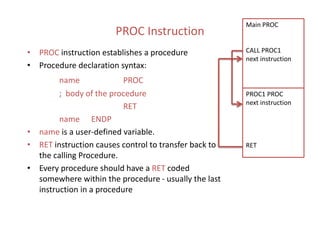
PROC Instruction
• PROC instruction establishes a procedure
• Procedure declaration syntax:
name PROC
; body of the procedure
RET
name ENDP
• name is a user-defined variable.
• RET instruction causes control to transfer back to
the calling Procedure.
• Every procedure should have a RET coded
somewhere within the procedure - usually the last
instruction in a procedure
Main PROC
CALL PROC1
next instruction
PROC1 PROC
next instruction
RET
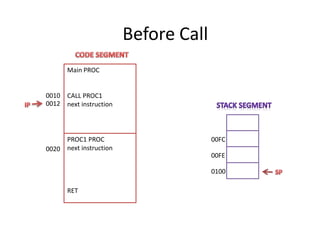
Before Call
Main PROC
CALL PROC1
next instruction
0010
0012
PROC1 PROC
next instruction
RET
0020
00FE
0100
00FC
COMMUNICATION BETWEEN PROCEDURES
• Programmers must devise a way to
communicate between procedures –
• there are no parameter lists !!!
• Typically in assembler language, procedures
often pass data to each other through
registers
Procedures Documentation
• Procedures should be well-documented
– Describe what the procedure does
– Indicate how it receives its input from the calling program
– Indicate how it delivers the results to the calling program
– Indicate the names of any other procedures that this procedure
calls
; Describe what the procedure does
; input: Indicate how it receives its input
from the calling program
; output: Indicate how it delivers the results
to the calling program
; uses: Indicate the names of any other
procedures that this procedure calls
Procedures (cont’d)
• A procedure usually begins by PUSHing (saving) the
current contents of all of the registers on the stack.
• A procedure usually ends by POPing the stack contents
back into the registers before returning to the CALLing
procedure
• When writing a procedure, do NOT PUSH or POP any
registers in which you intend to return output!!
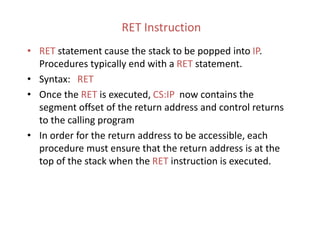
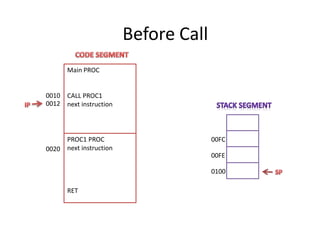
CALL Instruction
• A CALL instruction invokes a procedure
• SYNTAX: CALL name (direct CALL)
where name is the name of a procedure.
• Executing a CALL instruction causes the following to happen:
– The return address of the CALLing program which is in the IP register is
pushed (saved) on the STACK. This saved address is the offset of the
next sequential instruction after the CALL statement (CS:IP)
– The IP then gets the offset address of the first instruction in the
procedure
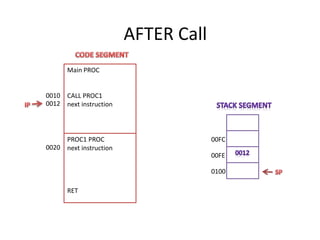
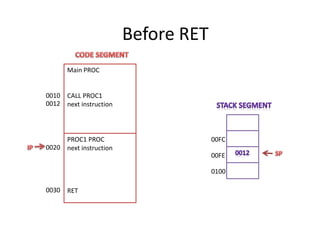
RET Instruction
• RET statement cause the stack to be popped into IP.
Procedures typically end with a RET statement.
• Syntax: RET
• Once the RET is executed, CS:IP now contains the
segment offset of the return address and control returns
to the calling program
• In order for the return address to be accessible, each
procedure must ensure that the return address is at the
top of the stack when the RET instruction is executed.
Before Call
Main PROC
CALL PROC1
next instruction
0010
0012
PROC1 PROC
next instruction
RET
0020
00FE
0100
00FC
AFTER Call
Main PROC
CALL PROC1
next instruction
0010
0012
PROC1 PROC
next instruction
RET
0020
00FE
0100
00FC
Before RET
Main PROC
CALL PROC1
next instruction
0010
0012
PROC1 PROC
next instruction
RET
0020
00FE
0100
00FC
0030
After RET
Main PROC
CALL PROC1
next instruction
0010
0012
PROC1 PROC
next instruction
RET
0020
00FE
0100
00FC
0030
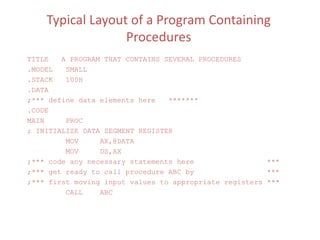
Typical Layout of a Program Containing
Procedures
TITLE A PROGRAM THAT CONTAINS SEVERAL PROCEDURES
.MODEL SMALL
.STACK 100H
.DATA
;*** define data elements here *******
.CODE
MAIN PROC
; INITIALIZE DATA SEGMENT REGISTER
MOV AX,@DATA
MOV DS,AX
;*** code any necessary statements here ***
;*** get ready to call procedure ABC by ***
;*** first moving input values to appropriate registers ***
CALL ABC
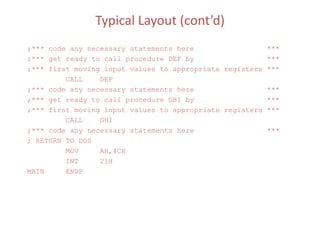
Typical Layout (cont’d)
;*** code any necessary statements here ***
;*** get ready to call procedure DEF by ***
;*** first moving input values to appropriate registers ***
CALL DEF
;*** code any necessary statements here ***
;*** get ready to call procedure GHI by ***
;*** first moving input values to appropriate registers ***
CALL GHI
;*** code any necessary statements here ***
; RETURN TO DOS
MOV AH,4CH
INT 21H
MAIN ENDP
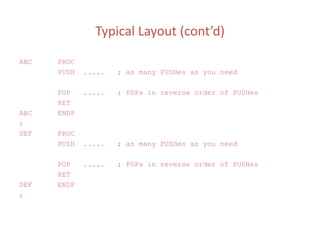
Typical Layout (cont’d)
ABC PROC
PUSH ..... ; as many PUSHes as you need
POP ..... ; POPs in reverse order of PUSHes
RET
ABC ENDP
;
DEF PROC
PUSH ..... ; as many PUSHes as you need
POP ..... ; POPs in reverse order of PUSHes
RET
DEF ENDP
;
Typical Layout (cont’d)
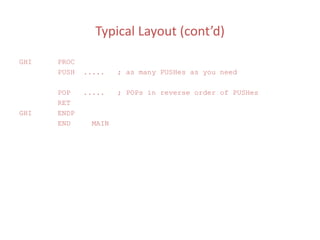
GHI PROC
PUSH ..... ; as many PUSHes as you need
POP ..... ; POPs in reverse order of PUSHes
RET
GHI ENDP
END MAIN
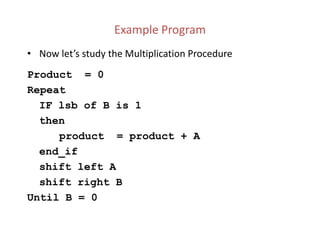
Example Program
• Now let’s study the Multiplication Procedure
Product = 0
Repeat
IF lsb of B is 1
then
product = product + A
end_if
shift left A
shift right B
Until B = 0
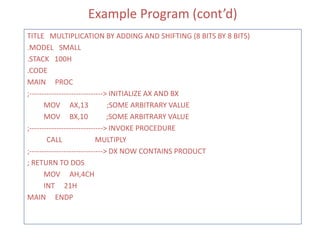
Example Program (cont’d)
TITLE MULTIPLICATION BY ADDING AND SHIFTING (8 BITS BY 8 BITS)
.MODEL SMALL
.STACK 100H
.CODE
MAIN PROC
;------------------------------> INITIALIZE AX AND BX
MOV AX,13 ;SOME ARBITRARY VALUE
MOV BX,10 ;SOME ARBITRARY VALUE
;------------------------------> INVOKE PROCEDURE
CALL MULTIPLY
;------------------------------> DX NOW CONTAINS PRODUCT
; RETURN TO DOS
MOV AH,4CH
INT 21H
MAIN ENDP
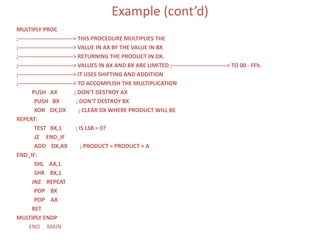
Example (cont’d)
MULTIPLY PROC
;-----------------------------> THIS PROCEDURE MULTIPLIES THE
;-----------------------------> VALUE IN AX BY THE VALUE IN BX
;-----------------------------> RETURNING THE PRODUCT IN DX.
;-----------------------------> VALUES IN AX AND BX ARE LIMITED ;-----------------------------> TO 00 - FFh.
;-----------------------------> IT USES SHIFTING AND ADDITION
;-----------------------------> TO ACCOMPLISH THE MULTIPLICATION
PUSH AX ; DON'T DESTROY AX
PUSH BX ; DON'T DESTROY BX
XOR DX,DX ; CLEAR DX WHERE PRODUCT WILL BE
REPEAT:
TEST BX,1 ; IS LSB = 0?
JZ END_IF
ADD DX,AX ; PRODUCT = PRODUCT + A
END_IF:
SHL AX,1
SHR BX,1
JNZ REPEAT
POP BX
POP AX
RET
MULTIPLY ENDP
END MAIN
Important Notes on Stack
• PUSHES AND POPS are often used to save data temporarily on the
program stack. They are also used implicitly each time a CALL and a
RETurn sequence is executed.
• Remember that the SP is decremented BEFORE placing a word on the
stack at PUSH time but it is incremented AFTER removing a word from
the stack at POP time.
• If, for some reason, you want a copy of the FLAGS register in BX, you
can accomplish this by:
PUSHF
POP BX
• Stack allows you to save the contents of a register, use the register for
something else temporarily, and the restore the register to its original
value.
Notes on Stack (cont’d)
• Pushing and popping the contents of registers is preferable to storing
their contents as variables in the DATA segment
• Reasons:
– Using the stack is more economical. Instead of allocating data space, by
pushing and popping data into the stack, you use space as you need it
and release it when you no longer need it.
– Since the 8088/8086 allows recursion, if a routine called itself and saved
the contents of a register to a data location each time it was invoked, it
would be overwriting the previous contents of that location with each
recursion!
– Using a stack instead of a data location makes code more portable. Once
you have written a good routine, you may choose to incorporate that
routine into several different programs. Or if you are working with a
programming team piecing smaller subroutines into a one larger main
routine, subroutines that do their work without referencing particular
data locations are more easily patched into main programs than
subroutines that do reference particular data locations. Therefore, should
not refer to ANY variable data names in ANY procedure that you write!!!'
Notes on Stack (cont’d)
• Care must be taken not to corrupt the STACK because not only does it
save values for the programmer but it also saves values for the CPU.
These values get interwoven on the stack. If the SP becomes
confused, the CPU could get lost throwing your computer into a
system error!!
• Always check to see that the PUSHES and POPS in a program are
paired --- or --- at least that each of them is balanced by program
code that restores the stack pointer to its proper value.
• If you find yourself in the middle of a system error, more than likely
you look for a problem in the way you implemented the stack.
Example Procedure on Safe Use of Stack
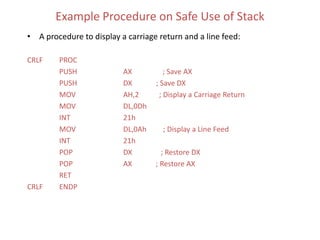
• A procedure to display a carriage return and a line feed:
CRLF PROC
PUSH AX ; Save AX
PUSH DX ; Save DX
MOV AH,2 ; Display a Carriage Return
MOV DL,0Dh
INT 21h
MOV DL,0Ah ; Display a Line Feed
INT 21h
POP DX ; Restore DX
POP AX ; Restore AX
RET
CRLF ENDP
Example (cont’d)
• This procedure can be called by the programmer at any time regardless of
what is in his/her AX or DX registers. As far as the programmer is
concerned, all you know is that this procedure issues the CR/LF sequence
to the console and all of your registers will be unchanged when the
procedure has finished executing!

Assembly Language Programming By Ytha Yu, Charles Marut Chap 8 (The Stack and Introduction to Procedures)

  • 1.
    Microprocessor Based Systems Spring2013 Department of Electrical Engineering University of Gujrat
  • 2.
  • 3.
    The Stack • Thestack segment of a program is used for temporary storage of data and addresses • A stack is a one-dimensional data structure • Items are added to and removed from one end of the structure using a "Last In - First Out" technique (LIFO) • The top of the stack is the last addition to the stack • The statement .STACK 100H in your program sets aside a block of 256 bytes of memory to hold the stack • The SS (Stack Segment Register) contains the segment number of the stack segment
  • 4.
    The Stack (cont’d) •The complete segment:offset address to access the stack is SS:SP • Initially before any data or addresses have been placed on the stack, the SP contains the offset address of the memory location immediately following the stack segment
  • 5.
  • 6.
    PUSH Instruction • PUSHinstruction adds a new word to the stack • SYNTAX: PUSH source where source is a 16-bit register or memory word • PUSH instruction causes – the stack pointer (SP) to be decreased by 2. – Then a copy of the value in the source field is placed in the address specified by SS:SP.
  • 7.
    • Initially SPpoints to a location immediately following the stack. The first push decreases SP by 2, making it point to the last word in the stack • Because each PUSH decreases the SP, the stack is filled a word at a time backwards from the last available word in the stack toward the beginning of the stack.
  • 8.
    How Words AreAdded To Stack Offset 0000 00F4 00F6 00F8 00FA 00FC 00FE 0100 It stack is empty, SP has a value of 100h; otherwise it has a value between 0000-00FEh SP: (Beyond the end of the stack) SP
  • 9.
    How Words AreAdded To Stack Offset 0000 00F4 00F6 00F8 00FA 00FC 00FE 0100 0100SP: (Beyond the end of the stack) SP 1234AX: 5678BX:
  • 10.
    How Words AreAdded To Stack Offset 0000 00F4 00F6 00F8 00FA 00FC 00FE 0100 00FESP: (Beyond the end of the stack) SP 1234AX: 5678BX: 1234
  • 11.
    How Words AreAdded To Stack Offset 0000 00F4 00F6 00F8 00FA 00FC 00FE 0100 (Beyond the end of the stack) SP 1234AX: 5678BX: 5678 1234 00FCSP:
  • 12.
    POP Instruction • POPinstruction removes the last word placed on the stack • SYNTAX: POP destination – where source is a 16-bit register or memory word • POP instruction causes – the contents of SS:SP to be moved to the destination field – It increases the stack pointer (SP) by 2 • Restrictions: 1.PUSH and POP work only with words 2.Byte and immediate data operands are illegal
  • 13.
    How Words AreAdded To Stack Offset 0000 00F4 00F6 00F8 00FA 00FC 00FE 0100 (Beyond the end of the stack) SP FFFFCX: 0001DX: 5678 1234 00FCSP:
  • 14.
    How Words AreAdded To Stack Offset 0000 00F4 00F6 00F8 00FA 00FC 00FE 0100 (Beyond the end of the stack) SP FFFFCX: 0001DX: 5678 1234 00FESP: 5678
  • 15.
    How Words AreAdded To Stack Offset 0000 00F4 00F6 00F8 00FA 00FC 00FE 0100 (Beyond the end of the stack) SP FFFFCX: 0001DX: 5678 1234 0100SP: 5678 1234
  • 16.
    FLAGS Register andStack • PUSHF – pushes (copies) the contents of the FLAGS register onto the stack. It has no operands • POPF – pops (copies) the contents of the top word in the stack to the FLAGS register. It has no operands • NOTES: – PUSH, POP, and PUSHF do not affect the flags !! – POPF could theoretically change all the flags because it resets the FLAGS REGISTER to some original value that you have previously saved with the PUSHF instruction
  • 17.
    Example: Fill upthe trace table given below. Instructions AX MOV AX,843AH BX CX SI SP Stack Data Address Data 0100 0101 0102 0103 0104 0105 0106 0107 0108 0109 010A 010B 010C 010D 010E 3F 78 5A C8 93 59 4F A3 7E F4 09 8A 5C 6A 45 INC AX PUSH AX MOV BX, 2354H MOV BL,AL POP AX PUSH BX MOV SI,0104H PUSH [010A] POP DX POP AX PUSH [SI+4] INC AL POP AX INC AX
  • 18.
    Example: • AX =3245H • BX = 1234H • CX = ABCDH • SP = FEH PUSH AX PUSH CX POP BX AX =? BX =? CX =? SP =? •AX = 3245H •BX = 1234H •CX = ABCDH •SP = FEH PUSH BX PUSH CX POP BX POP AX PUSH CX PUSH BX POP CX PUSH AX POP BX AX =? BX =? CX =? SP =? •AX = 3245H •BX = 1234H •CX = ABCDH •SP = FEH PUSH BX PUSHF POPF PUSH CX POP BX POP AX PUSH CX PUSH BX POP CX PUSH AX POP BX AX =? BX =? CX =? SP =?
  • 19.
    Important Notes • Notonly can the programmer use the stack but DOS can and also does use the stack • In fact DOS uses the stack every time the user executes an INT 21h function • Because of the "last-in first-out" nature of the stack, the order that items are removed from the stack is the reverse of the order in which they are placed on the stack
  • 20.
    Example Program • Thefollowing code allows a user to input a string consisting of 10 characters and then displays the 10 characters in reverse order on the screen TITLE DISPLAY THE 10 CHARACTERS IN REVERSE ORDER .MODEL SMALL .STACK 100H .DATA CR EQU 0DH LF EQU 0AH MESSAGE DB CR,LF,'PLEASE TYPE ANY 10 ' DB ' CHARACTERS',CR,LF,'$' REVERSE DB CR,LF,'THE CHARACTERS IN REVERSE' DB ' ARE:',CR,LF,'$'
  • 21.
    Example Program (cont’d) .CODE MAIN PROC ; ----------------------------INITIALIZEDATA SEGMENT REGISTER MOV AX,@DATA MOV DS,AX ;-------------------- SOUND BELL AND PRINT A MESSAGE FOR INPUT MOV AH,2 MOV DL,07H INT 21H MOV AH,9 LEA DX,MESSAGE INT 21H ;-----------------------------ACCEPT CHARACTERS MOV CX,10 MOV AH,1
  • 22.
    READ: INT 21H PUSH AX;CAN'T PUSH AL SO PUSH AX! LOOP READ ;-----------------------------PRINT REVERSE MESSAGE MOV AH,9 LEA DX,REVERSE INT 21H ;-----------------------------PREPARE TO PRINT IN REVERSE MOV CX,10 MOV AH,2 Example Program (cont’d)
  • 23.
    DISP: POP DX INT 21H LOOPDISP ;-----------------------------RETURN TO DOS MOV DL,CR INT 21h MOV DL,LF INT 21h MOV AH,4CH INT 21H MAIN ENDP END MAIN Example Program (cont’d)
  • 24.
    Terminology of Procedures •Top-down program design – Decompose the original problem into a series of subproblems that are easier to solve than the original problem • Subproblems in assembler language can be structured as a collection of procedures • Main procedure contains the entry point to the program and can call one of the other procedures using a CALL statement • It is possible for a called sub-procedure to call other procedures • In AL, it is also possible for a called sub-procedure to call itself (recursion)!
  • 25.
    Terminology of Procedures(cont’d) • When a procedure calls another procedure, control transfers to the called procedure • When the instructions in a called procedure have been executed, the called procedure usually returns control to the calling procedure at the next sequential instruction after the CALL statement • In high level languages, mechanism for call and return are hidden from programmer
  • 26.
    Procedure Declaration name PROCtype ; body of procedure RET name ENDP User defined name Optional operand Near Statement calls the procedure in the same segment Far Statement calls the procedure in the different segment Causes the control to transfer back to the calling procedure Every procedure should have a RET coded somewhere within the procedure - usually the last instruction in a procedure
  • 27.
    PROC Instruction • PROCinstruction establishes a procedure • Procedure declaration syntax: name PROC ; body of the procedure RET name ENDP • name is a user-defined variable. • RET instruction causes control to transfer back to the calling Procedure. • Every procedure should have a RET coded somewhere within the procedure - usually the last instruction in a procedure Main PROC CALL PROC1 next instruction PROC1 PROC next instruction RET
  • 28.
    Before Call Main PROC CALLPROC1 next instruction 0010 0012 PROC1 PROC next instruction RET 0020 00FE 0100 00FC
  • 29.
    COMMUNICATION BETWEEN PROCEDURES •Programmers must devise a way to communicate between procedures – • there are no parameter lists !!! • Typically in assembler language, procedures often pass data to each other through registers
  • 30.
    Procedures Documentation • Proceduresshould be well-documented – Describe what the procedure does – Indicate how it receives its input from the calling program – Indicate how it delivers the results to the calling program – Indicate the names of any other procedures that this procedure calls ; Describe what the procedure does ; input: Indicate how it receives its input from the calling program ; output: Indicate how it delivers the results to the calling program ; uses: Indicate the names of any other procedures that this procedure calls
  • 31.
    Procedures (cont’d) • Aprocedure usually begins by PUSHing (saving) the current contents of all of the registers on the stack. • A procedure usually ends by POPing the stack contents back into the registers before returning to the CALLing procedure • When writing a procedure, do NOT PUSH or POP any registers in which you intend to return output!!
  • 32.
    CALL Instruction • ACALL instruction invokes a procedure • SYNTAX: CALL name (direct CALL) where name is the name of a procedure. • Executing a CALL instruction causes the following to happen: – The return address of the CALLing program which is in the IP register is pushed (saved) on the STACK. This saved address is the offset of the next sequential instruction after the CALL statement (CS:IP) – The IP then gets the offset address of the first instruction in the procedure
  • 33.
    RET Instruction • RETstatement cause the stack to be popped into IP. Procedures typically end with a RET statement. • Syntax: RET • Once the RET is executed, CS:IP now contains the segment offset of the return address and control returns to the calling program • In order for the return address to be accessible, each procedure must ensure that the return address is at the top of the stack when the RET instruction is executed.
  • 34.
    Before Call Main PROC CALLPROC1 next instruction 0010 0012 PROC1 PROC next instruction RET 0020 00FE 0100 00FC
  • 35.
    AFTER Call Main PROC CALLPROC1 next instruction 0010 0012 PROC1 PROC next instruction RET 0020 00FE 0100 00FC
  • 36.
    Before RET Main PROC CALLPROC1 next instruction 0010 0012 PROC1 PROC next instruction RET 0020 00FE 0100 00FC 0030
  • 37.
    After RET Main PROC CALLPROC1 next instruction 0010 0012 PROC1 PROC next instruction RET 0020 00FE 0100 00FC 0030
  • 38.
    Typical Layout ofa Program Containing Procedures TITLE A PROGRAM THAT CONTAINS SEVERAL PROCEDURES .MODEL SMALL .STACK 100H .DATA ;*** define data elements here ******* .CODE MAIN PROC ; INITIALIZE DATA SEGMENT REGISTER MOV AX,@DATA MOV DS,AX ;*** code any necessary statements here *** ;*** get ready to call procedure ABC by *** ;*** first moving input values to appropriate registers *** CALL ABC
  • 39.
    Typical Layout (cont’d) ;***code any necessary statements here *** ;*** get ready to call procedure DEF by *** ;*** first moving input values to appropriate registers *** CALL DEF ;*** code any necessary statements here *** ;*** get ready to call procedure GHI by *** ;*** first moving input values to appropriate registers *** CALL GHI ;*** code any necessary statements here *** ; RETURN TO DOS MOV AH,4CH INT 21H MAIN ENDP
  • 40.
    Typical Layout (cont’d) ABCPROC PUSH ..... ; as many PUSHes as you need POP ..... ; POPs in reverse order of PUSHes RET ABC ENDP ; DEF PROC PUSH ..... ; as many PUSHes as you need POP ..... ; POPs in reverse order of PUSHes RET DEF ENDP ;
  • 41.
    Typical Layout (cont’d) GHIPROC PUSH ..... ; as many PUSHes as you need POP ..... ; POPs in reverse order of PUSHes RET GHI ENDP END MAIN
  • 42.
    Example Program • Nowlet’s study the Multiplication Procedure Product = 0 Repeat IF lsb of B is 1 then product = product + A end_if shift left A shift right B Until B = 0
  • 43.
    Example Program (cont’d) TITLEMULTIPLICATION BY ADDING AND SHIFTING (8 BITS BY 8 BITS) .MODEL SMALL .STACK 100H .CODE MAIN PROC ;------------------------------> INITIALIZE AX AND BX MOV AX,13 ;SOME ARBITRARY VALUE MOV BX,10 ;SOME ARBITRARY VALUE ;------------------------------> INVOKE PROCEDURE CALL MULTIPLY ;------------------------------> DX NOW CONTAINS PRODUCT ; RETURN TO DOS MOV AH,4CH INT 21H MAIN ENDP
  • 44.
    Example (cont’d) MULTIPLY PROC ;----------------------------->THIS PROCEDURE MULTIPLIES THE ;-----------------------------> VALUE IN AX BY THE VALUE IN BX ;-----------------------------> RETURNING THE PRODUCT IN DX. ;-----------------------------> VALUES IN AX AND BX ARE LIMITED ;-----------------------------> TO 00 - FFh. ;-----------------------------> IT USES SHIFTING AND ADDITION ;-----------------------------> TO ACCOMPLISH THE MULTIPLICATION PUSH AX ; DON'T DESTROY AX PUSH BX ; DON'T DESTROY BX XOR DX,DX ; CLEAR DX WHERE PRODUCT WILL BE REPEAT: TEST BX,1 ; IS LSB = 0? JZ END_IF ADD DX,AX ; PRODUCT = PRODUCT + A END_IF: SHL AX,1 SHR BX,1 JNZ REPEAT POP BX POP AX RET MULTIPLY ENDP END MAIN
  • 45.
    Important Notes onStack • PUSHES AND POPS are often used to save data temporarily on the program stack. They are also used implicitly each time a CALL and a RETurn sequence is executed. • Remember that the SP is decremented BEFORE placing a word on the stack at PUSH time but it is incremented AFTER removing a word from the stack at POP time. • If, for some reason, you want a copy of the FLAGS register in BX, you can accomplish this by: PUSHF POP BX • Stack allows you to save the contents of a register, use the register for something else temporarily, and the restore the register to its original value.
  • 46.
    Notes on Stack(cont’d) • Pushing and popping the contents of registers is preferable to storing their contents as variables in the DATA segment • Reasons: – Using the stack is more economical. Instead of allocating data space, by pushing and popping data into the stack, you use space as you need it and release it when you no longer need it. – Since the 8088/8086 allows recursion, if a routine called itself and saved the contents of a register to a data location each time it was invoked, it would be overwriting the previous contents of that location with each recursion! – Using a stack instead of a data location makes code more portable. Once you have written a good routine, you may choose to incorporate that routine into several different programs. Or if you are working with a programming team piecing smaller subroutines into a one larger main routine, subroutines that do their work without referencing particular data locations are more easily patched into main programs than subroutines that do reference particular data locations. Therefore, should not refer to ANY variable data names in ANY procedure that you write!!!'
  • 47.
    Notes on Stack(cont’d) • Care must be taken not to corrupt the STACK because not only does it save values for the programmer but it also saves values for the CPU. These values get interwoven on the stack. If the SP becomes confused, the CPU could get lost throwing your computer into a system error!! • Always check to see that the PUSHES and POPS in a program are paired --- or --- at least that each of them is balanced by program code that restores the stack pointer to its proper value. • If you find yourself in the middle of a system error, more than likely you look for a problem in the way you implemented the stack.
  • 48.
    Example Procedure onSafe Use of Stack • A procedure to display a carriage return and a line feed: CRLF PROC PUSH AX ; Save AX PUSH DX ; Save DX MOV AH,2 ; Display a Carriage Return MOV DL,0Dh INT 21h MOV DL,0Ah ; Display a Line Feed INT 21h POP DX ; Restore DX POP AX ; Restore AX RET CRLF ENDP
  • 49.
    Example (cont’d) • Thisprocedure can be called by the programmer at any time regardless of what is in his/her AX or DX registers. As far as the programmer is concerned, all you know is that this procedure issues the CR/LF sequence to the console and all of your registers will be unchanged when the procedure has finished executing!