College of Computing & Information Technology
King Abdulaziz University
CPCS-204 – Data Structures I
Data Structure Intro &
Review of Arrays
Data Structure Intro & Review of Arrays page 2
© Dr. Jonathan (Yahya) Cazalas
What is Data?
ïź Data
ïź A collection of facts from which a conclusion
may be drawn
ïź Example:
ïź Temperature is 35 degrees celcius
ïź Conclusion: It is HOT!
ïź Types of data:
ïź Textual: for example, your name (Muhammad)
ïź Numeric: for example, your id (090254)
ïź Audio: for example, your voice
ïź and more
Data Structure Intro & Review of Arrays page 3
© Dr. Jonathan (Yahya) Cazalas
What are Data Structures?
ïź Data Structure:
ïź A particular way of storing and organizing data
in a computer so that it can be used efficiently
ïź It is a group of data elements grouped together
under one name
ïź Example:
ïź An array of integers
int examGrades[30];
Data Structure Intro & Review of Arrays page 4
© Dr. Jonathan (Yahya) Cazalas
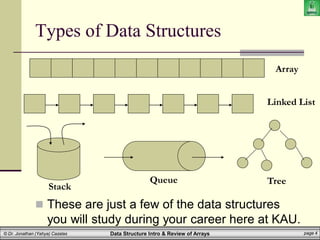
Types of Data Structures
ïź These are just a few of the data structures
you will study during your career here at KAU.
Array
Linked List
Tree
Queue
Stack
Data Structure Intro & Review of Arrays page 5
© Dr. Jonathan (Yahya) Cazalas
Importance of Data Structures
ïź Goal:
ïź We need to organize data
ïź For what purpose?
ïź To facilitate efficient
ïź storage of data
ïź retrieval of data
ïź manipulation of data
ïź Design Issue:
ïź The challenge is to select the most appropriate
data structure for the problem
ïź Such is one of the motivations for this course
Data Structure Intro & Review of Arrays page 6
© Dr. Jonathan (Yahya) Cazalas
Operations Performed on Data
Structures
ïź Traversing
ïź Accessing/visiting each data element exactly once
so that certain items in the data may be
processed
ïź Searching
ïź Finding the location of a given data element (key)
in the structure
ïź Insertion:
ïź Adding a new data element to the structure
Data Structure Intro & Review of Arrays page 7
© Dr. Jonathan (Yahya) Cazalas
Operations Performed on Data
Structures
ïź Deletion
ïź Removing a data element from the structure
ïź Sorting
ïź Arrange the data elements in some logical fashion
ïź ascending or descending
ïź Merging
ïź Combining data elements form two or more data
structures into one
Data Structure Intro & Review of Arrays page 8
© Dr. Jonathan (Yahya) Cazalas
Types of Data Structures
ïź Based on Memory Allocation:
ïź Static (or fixed sized) data structures
ïź Such as arrays
ïź Dynamic data structures (change size as needed)
ïź Such as Linked Lists
 (coming later in the semester)
ïź Based on Representation
ïź Linear representation
ïź Such as arrays and linked lists
ïź Non-linear representation
ïź Such as trees and graphs
Data Structure Intro & Review of Arrays page 9
© Dr. Jonathan (Yahya) Cazalas
Brief Interlude: Human Stupidity
Data Structure Intro & Review of Arrays page 10
© Dr. Jonathan (Yahya) Cazalas
Motivation for Data Structures
ïź All data structures have a PURPOSE
ïź A reason for their creation and motivation
ïź Think about the one data structure you all
know: arrays
ïź What is the purpose of an array?
Data Structure Intro & Review of Arrays page 11
© Dr. Jonathan (Yahya) Cazalas
Array: Motivation
ïź You want to store 5 numbers in a program
ïź No problem. You define five int variables:
int num1, num2, num3, num4, num5;
ïź Easy enough, right?
ïź But what if you want to store 1000 numbers?
ïź Are you really going to make 1000 separate variables?
int num1, num2,..., num998, num999, num1000;
ïź That would be CRAZY!
ïź So what is the solution?
ïź A data structure! Specifically, an array!
ïź An array is one of the most common data structures.
Data Structure Intro & Review of Arrays page 12
© Dr. Jonathan (Yahya) Cazalas
What is an Array?
ïź An array is a data structure
ïź It is a collection of homogeneous data elements
ïź Meaning, all elements are of the same type
ïź Examples:
 An array of student grades
 An array of student names
 An array of objects (OOP perspective!)
ïź Array elements (or their references) are stored in
contiguous/consecutive memory locations
ïź Also, an array is a static data structure
ïź An array cannot grow or shrink during program
execution
the size is fixed
Data Structure Intro & Review of Arrays page 13
© Dr. Jonathan (Yahya) Cazalas
Review of Arrays
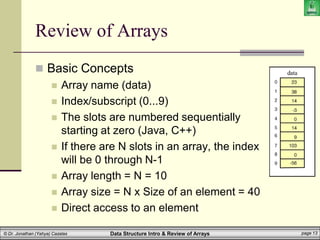
ïź Basic Concepts
ïź Array name (data)
ïź Index/subscript (0...9)
ïź The slots are numbered sequentially
starting at zero (Java, C++)
ïź If there are N slots in an array, the index
will be 0 through N-1
ïź Array length = N = 10
ïź Array size = N x Size of an element = 40
ïź Direct access to an element
Data Structure Intro & Review of Arrays page 14
© Dr. Jonathan (Yahya) Cazalas
Review of Arrays
ïź Homogeneity:
ïź All elements in an array must have the same data
type
ïź Contiguous memory:
ïź Array elements are stored in contiguous memory
locations
ïź So an array of 100 integers (int is 4 bytes) would
be stored in 400 bytes of contiguous memory
ïź Each of the 4 byte locations would come right after the
previous location in memory
Data Structure Intro & Review of Arrays page 15
© Dr. Jonathan (Yahya) Cazalas
Review of Arrays
ïź Using Arrays:
ïź Array_name[index]
ïź For example, in Java
ïź System.out.println(data[4]);
 will display 0
ïź data[3] = 99;
 Will replace -3 with 99
Data Structure Intro & Review of Arrays page 16
© Dr. Jonathan (Yahya) Cazalas
Review of Arrays
ïź More Concepts:
ïź data[ -1 ] always illegal
ïź data[ 10 ] illegal (10 > upper bound)
ïź data[ 1.5 ] always illegal
ïź data[ 0 ] always OK
ïź data[ 9 ] OK
ïź Question: What will be the output of?
ïź 1.data[5] + 10
ïź 2.data[3] = data[3] + 10
Data Structure Intro & Review of Arrays page 17
© Dr. Jonathan (Yahya) Cazalas
Review of Arrays
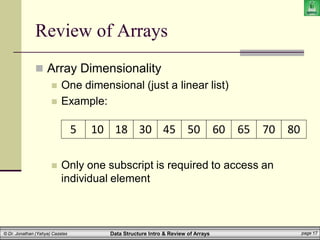
ïź Array Dimensionality
ïź One dimensional (just a linear list)
ïź Example:
ïź Only one subscript is required to access an
individual element
5 10 18 30 45 50 60 65 70 80
Data Structure Intro & Review of Arrays page 18
© Dr. Jonathan (Yahya) Cazalas
Review of Arrays
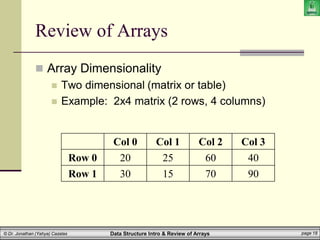
ïź Array Dimensionality
ïź Two dimensional (matrix or table)
ïź Example: 2x4 matrix (2 rows, 4 columns)
Col 0 Col 1 Col 2 Col 3
Row 0 20 25 60 40
Row 1 30 15 70 90
Data Structure Intro & Review of Arrays page 19
© Dr. Jonathan (Yahya) Cazalas
Review of Arrays
ïź 2D Arrays:
ïź Given the following array (whose name is ‘M’)
ïź Two indices/subscripts are now required to
reference a given cell
ïź You must give a row/column
ïź First element is at row 0, column 0
 M[0][0]
ïź What is: M[1][2] ? or M[3][4] ?
20 25 60 40
30 15 70 90
Data Structure Intro & Review of Arrays page 20
© Dr. Jonathan (Yahya) Cazalas
Review of Arrays
ïź Array Operations:
ïź Accessing/indexing an element using its index
ïź Performance is very fast
ïź We can access an index immediately without searching
ïź myArray[1250] = 55;
 we immediately access array spot 1250 of myArray
ïź Insertion: add an element at a certain index
ïź What if we want to add an element at the beginning?
 This would be a very slow operation! Why?
 Because we would have to shift ALL other elements over one
position
ïź What if we add an element at the end?
 It would be FAST. Why? No need to shift.
Data Structure Intro & Review of Arrays page 21
© Dr. Jonathan (Yahya) Cazalas
Review of Arrays
ïź Array Operations:
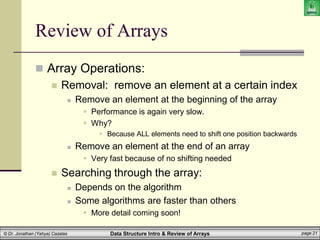
ïź Removal: remove an element at a certain index
ïź Remove an element at the beginning of the array
 Performance is again very slow.
 Why?
 Because ALL elements need to shift one position backwards
ïź Remove an element at the end of an array
 Very fast because of no shifting needed
ïź Searching through the array:
ïź Depends on the algorithm
ïź Some algorithms are faster than others
 More detail coming soon!
Data Structure Intro & Review of Arrays page 22
© Dr. Jonathan (Yahya) Cazalas
Review of Arrays
ïź Array Declaration:
ïź You declare an array as follows:
int[] grades;
ïź This simply makes a an array variable (grades)
ïź But it does NOT specify where that variable refers to
ïź We can also declare the following:
int[] grades = new int[10];
ïź Now the array variable grades refers to an array of ten
integers
 By default, numeric elements are initialized to zero
Data Structure Intro & Review of Arrays page 23
© Dr. Jonathan (Yahya) Cazalas
Review of Arrays
ïź More info on Arrays:
ïź When the array is created, memory is reserved for
its contents
ïź You can also specify the values for the array
instead of using the new operator
ïź Example:
int[] grade = {95, 93, 88}; //array of 3 ints
ïź To find the length of an array, use the length
method
int numGrades = grade.length();
Data Structure Intro & Review of Arrays page 24
© Dr. Jonathan (Yahya) Cazalas
Review of Arrays
ïź Arrays’ Properties in Java
ïź Arrays are objects
ïź Arrays are created dynamically, at run time
ïź An array type variable holds a reference to the
array object
ïź An array’s length is set when the array is created,
and it cannot be changed.
ïź Arrays can be duplicated with the
Object.clone() method
ïź An ArrayIndexOutOfBoundsException is
thrown if index exceeds array length
Data Structure Intro & Review of Arrays page 25
© Dr. Jonathan (Yahya) Cazalas
Review of Arrays
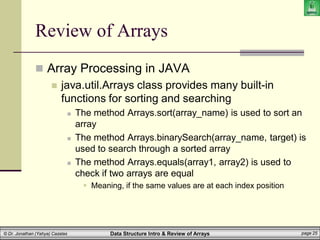
ïź Array Processing in JAVA
ïź java.util.Arrays class provides many built-in
functions for sorting and searching
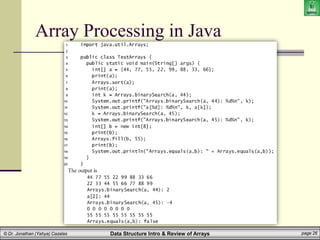
ïź The method Arrays.sort(array_name) is used to sort an
array
ïź The method Arrays.binarySearch(array_name, target) is
used to search through a sorted array
ïź The method Arrays.equals(array1, array2) is used to
check if two arrays are equal
 Meaning, if the same values are at each index position
Data Structure Intro & Review of Arrays page 26
© Dr. Jonathan (Yahya) Cazalas
Array Processing in Java
Data Structure Intro & Review of Arrays page 27
© Dr. Jonathan (Yahya) Cazalas
Review of Arrays
WASN’T
THAT
INCREDIBLE!
Data Structure Intro & Review of Arrays page 28
© Dr. Jonathan (Yahya) Cazalas
Daily Demotivator
College of Computing & Information Technology
King Abdulaziz University
CPCS-204 – Data Structures I
Data Structure Intro &
Review of Arrays

arrays

  • 1.
    College of Computing& Information Technology King Abdulaziz University CPCS-204 – Data Structures I Data Structure Intro & Review of Arrays
  • 2.
    Data Structure Intro& Review of Arrays page 2 © Dr. Jonathan (Yahya) Cazalas What is Data? ïź Data ïź A collection of facts from which a conclusion may be drawn ïź Example: ïź Temperature is 35 degrees celcius ïź Conclusion: It is HOT! ïź Types of data: ïź Textual: for example, your name (Muhammad) ïź Numeric: for example, your id (090254) ïź Audio: for example, your voice ïź and more
  • 3.
    Data Structure Intro& Review of Arrays page 3 © Dr. Jonathan (Yahya) Cazalas What are Data Structures? ïź Data Structure: ïź A particular way of storing and organizing data in a computer so that it can be used efficiently ïź It is a group of data elements grouped together under one name ïź Example: ïź An array of integers int examGrades[30];
  • 4.
    Data Structure Intro& Review of Arrays page 4 © Dr. Jonathan (Yahya) Cazalas Types of Data Structures ïź These are just a few of the data structures you will study during your career here at KAU. Array Linked List Tree Queue Stack
  • 5.
    Data Structure Intro& Review of Arrays page 5 © Dr. Jonathan (Yahya) Cazalas Importance of Data Structures ïź Goal: ïź We need to organize data ïź For what purpose? ïź To facilitate efficient ïź storage of data ïź retrieval of data ïź manipulation of data ïź Design Issue: ïź The challenge is to select the most appropriate data structure for the problem ïź Such is one of the motivations for this course
  • 6.
    Data Structure Intro& Review of Arrays page 6 © Dr. Jonathan (Yahya) Cazalas Operations Performed on Data Structures ïź Traversing ïź Accessing/visiting each data element exactly once so that certain items in the data may be processed ïź Searching ïź Finding the location of a given data element (key) in the structure ïź Insertion: ïź Adding a new data element to the structure
  • 7.
    Data Structure Intro& Review of Arrays page 7 © Dr. Jonathan (Yahya) Cazalas Operations Performed on Data Structures ïź Deletion ïź Removing a data element from the structure ïź Sorting ïź Arrange the data elements in some logical fashion ïź ascending or descending ïź Merging ïź Combining data elements form two or more data structures into one
  • 8.
    Data Structure Intro& Review of Arrays page 8 © Dr. Jonathan (Yahya) Cazalas Types of Data Structures ïź Based on Memory Allocation: ïź Static (or fixed sized) data structures ïź Such as arrays ïź Dynamic data structures (change size as needed) ïź Such as Linked Lists  (coming later in the semester) ïź Based on Representation ïź Linear representation ïź Such as arrays and linked lists ïź Non-linear representation ïź Such as trees and graphs
  • 9.
    Data Structure Intro& Review of Arrays page 9 © Dr. Jonathan (Yahya) Cazalas Brief Interlude: Human Stupidity
  • 10.
    Data Structure Intro& Review of Arrays page 10 © Dr. Jonathan (Yahya) Cazalas Motivation for Data Structures ïź All data structures have a PURPOSE ïź A reason for their creation and motivation ïź Think about the one data structure you all know: arrays ïź What is the purpose of an array?
  • 11.
    Data Structure Intro& Review of Arrays page 11 © Dr. Jonathan (Yahya) Cazalas Array: Motivation ïź You want to store 5 numbers in a program ïź No problem. You define five int variables: int num1, num2, num3, num4, num5; ïź Easy enough, right? ïź But what if you want to store 1000 numbers? ïź Are you really going to make 1000 separate variables? int num1, num2,..., num998, num999, num1000; ïź That would be CRAZY! ïź So what is the solution? ïź A data structure! Specifically, an array! ïź An array is one of the most common data structures.
  • 12.
    Data Structure Intro& Review of Arrays page 12 © Dr. Jonathan (Yahya) Cazalas What is an Array? ïź An array is a data structure ïź It is a collection of homogeneous data elements ïź Meaning, all elements are of the same type ïź Examples:  An array of student grades  An array of student names  An array of objects (OOP perspective!) ïź Array elements (or their references) are stored in contiguous/consecutive memory locations ïź Also, an array is a static data structure ïź An array cannot grow or shrink during program execution
the size is fixed
  • 13.
    Data Structure Intro& Review of Arrays page 13 © Dr. Jonathan (Yahya) Cazalas Review of Arrays ïź Basic Concepts ïź Array name (data) ïź Index/subscript (0...9) ïź The slots are numbered sequentially starting at zero (Java, C++) ïź If there are N slots in an array, the index will be 0 through N-1 ïź Array length = N = 10 ïź Array size = N x Size of an element = 40 ïź Direct access to an element
  • 14.
    Data Structure Intro& Review of Arrays page 14 © Dr. Jonathan (Yahya) Cazalas Review of Arrays ïź Homogeneity: ïź All elements in an array must have the same data type ïź Contiguous memory: ïź Array elements are stored in contiguous memory locations ïź So an array of 100 integers (int is 4 bytes) would be stored in 400 bytes of contiguous memory ïź Each of the 4 byte locations would come right after the previous location in memory
  • 15.
    Data Structure Intro& Review of Arrays page 15 © Dr. Jonathan (Yahya) Cazalas Review of Arrays ïź Using Arrays: ïź Array_name[index] ïź For example, in Java ïź System.out.println(data[4]);  will display 0 ïź data[3] = 99;  Will replace -3 with 99
  • 16.
    Data Structure Intro& Review of Arrays page 16 © Dr. Jonathan (Yahya) Cazalas Review of Arrays ïź More Concepts: ïź data[ -1 ] always illegal ïź data[ 10 ] illegal (10 > upper bound) ïź data[ 1.5 ] always illegal ïź data[ 0 ] always OK ïź data[ 9 ] OK ïź Question: What will be the output of? ïź 1.data[5] + 10 ïź 2.data[3] = data[3] + 10
  • 17.
    Data Structure Intro& Review of Arrays page 17 © Dr. Jonathan (Yahya) Cazalas Review of Arrays ïź Array Dimensionality ïź One dimensional (just a linear list) ïź Example: ïź Only one subscript is required to access an individual element 5 10 18 30 45 50 60 65 70 80
  • 18.
    Data Structure Intro& Review of Arrays page 18 © Dr. Jonathan (Yahya) Cazalas Review of Arrays ïź Array Dimensionality ïź Two dimensional (matrix or table) ïź Example: 2x4 matrix (2 rows, 4 columns) Col 0 Col 1 Col 2 Col 3 Row 0 20 25 60 40 Row 1 30 15 70 90
  • 19.
    Data Structure Intro& Review of Arrays page 19 © Dr. Jonathan (Yahya) Cazalas Review of Arrays ïź 2D Arrays: ïź Given the following array (whose name is ‘M’) ïź Two indices/subscripts are now required to reference a given cell ïź You must give a row/column ïź First element is at row 0, column 0  M[0][0] ïź What is: M[1][2] ? or M[3][4] ? 20 25 60 40 30 15 70 90
  • 20.
    Data Structure Intro& Review of Arrays page 20 © Dr. Jonathan (Yahya) Cazalas Review of Arrays ïź Array Operations: ïź Accessing/indexing an element using its index ïź Performance is very fast ïź We can access an index immediately without searching ïź myArray[1250] = 55;  we immediately access array spot 1250 of myArray ïź Insertion: add an element at a certain index ïź What if we want to add an element at the beginning?  This would be a very slow operation! Why?  Because we would have to shift ALL other elements over one position ïź What if we add an element at the end?  It would be FAST. Why? No need to shift.
  • 21.
    Data Structure Intro& Review of Arrays page 21 © Dr. Jonathan (Yahya) Cazalas Review of Arrays ïź Array Operations: ïź Removal: remove an element at a certain index ïź Remove an element at the beginning of the array  Performance is again very slow.  Why?  Because ALL elements need to shift one position backwards ïź Remove an element at the end of an array  Very fast because of no shifting needed ïź Searching through the array: ïź Depends on the algorithm ïź Some algorithms are faster than others  More detail coming soon!
  • 22.
    Data Structure Intro& Review of Arrays page 22 © Dr. Jonathan (Yahya) Cazalas Review of Arrays ïź Array Declaration: ïź You declare an array as follows: int[] grades; ïź This simply makes a an array variable (grades) ïź But it does NOT specify where that variable refers to ïź We can also declare the following: int[] grades = new int[10]; ïź Now the array variable grades refers to an array of ten integers  By default, numeric elements are initialized to zero
  • 23.
    Data Structure Intro& Review of Arrays page 23 © Dr. Jonathan (Yahya) Cazalas Review of Arrays ïź More info on Arrays: ïź When the array is created, memory is reserved for its contents ïź You can also specify the values for the array instead of using the new operator ïź Example: int[] grade = {95, 93, 88}; //array of 3 ints ïź To find the length of an array, use the length method int numGrades = grade.length();
  • 24.
    Data Structure Intro& Review of Arrays page 24 © Dr. Jonathan (Yahya) Cazalas Review of Arrays ïź Arrays’ Properties in Java ïź Arrays are objects ïź Arrays are created dynamically, at run time ïź An array type variable holds a reference to the array object ïź An array’s length is set when the array is created, and it cannot be changed. ïź Arrays can be duplicated with the Object.clone() method ïź An ArrayIndexOutOfBoundsException is thrown if index exceeds array length
  • 25.
    Data Structure Intro& Review of Arrays page 25 © Dr. Jonathan (Yahya) Cazalas Review of Arrays ïź Array Processing in JAVA ïź java.util.Arrays class provides many built-in functions for sorting and searching ïź The method Arrays.sort(array_name) is used to sort an array ïź The method Arrays.binarySearch(array_name, target) is used to search through a sorted array ïź The method Arrays.equals(array1, array2) is used to check if two arrays are equal  Meaning, if the same values are at each index position
  • 26.
    Data Structure Intro& Review of Arrays page 26 © Dr. Jonathan (Yahya) Cazalas Array Processing in Java
  • 27.
    Data Structure Intro& Review of Arrays page 27 © Dr. Jonathan (Yahya) Cazalas Review of Arrays WASN’T THAT INCREDIBLE!
  • 28.
    Data Structure Intro& Review of Arrays page 28 © Dr. Jonathan (Yahya) Cazalas Daily Demotivator
  • 29.
    College of Computing& Information Technology King Abdulaziz University CPCS-204 – Data Structures I Data Structure Intro & Review of Arrays