College of Computing & Information Technology
King Abdulaziz University
CPCS-204 – Data Structures I
Linked Lists:
Deleting Nodes
Linked Lists: Deleting Nodes page 2
© Dr. Jonathan (Yahya) Cazalas
Linked Lists: Basic Operations
 Operations Performed on Linked Lists
 Several operations can be performed on linked
lists
 Add a new node
 Delete a node
 Search for a node
 Counting nodes
 Modifying nodes
 and more
 We will build methods to perform these
operations
Linked Lists: Deleting Nodes page 3
© Dr. Jonathan (Yahya) Cazalas
Linked Lists: Deleting Nodes
 General Approach:
 You must search for the node that you want to
delete (remember, we are using sorted lists)
 If found, you must delete the node from the list
 This means that you change the various link
pointers
 The predecessor of the deleted node must point to
the deleted nodes successor
Linked Lists: Deleting Nodes page 4
© Dr. Jonathan (Yahya) Cazalas
Linked Lists: Deleting Nodes
 General Approach:
 There are 4 deletion scenarios:
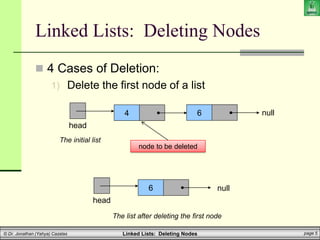
1) Delete the first node of a list
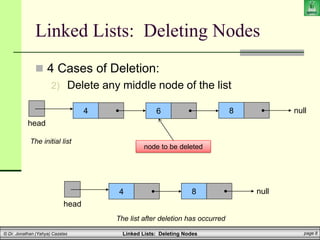
2) Delete any middle node of the list
 Not the first node or the last node
3) Delete the last node of the list
4) A special case when we delete the only node in
the list
 Causes the resulting list to become empty
Linked Lists: Deleting Nodes page 5
© Dr. Jonathan (Yahya) Cazalas
Linked Lists: Deleting Nodes
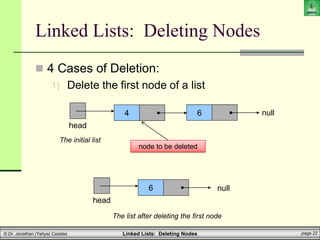
 4 Cases of Deletion:
1) Delete the first node of a list
6
head
null
The list after deleting the first node
4
head
null
The initial list
6
node to be deleted
Linked Lists: Deleting Nodes page 6
© Dr. Jonathan (Yahya) Cazalas
Linked Lists: Deleting Nodes
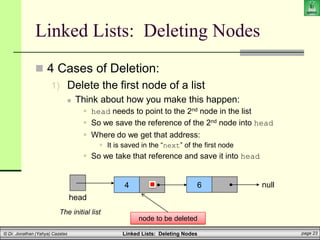
 4 Cases of Deletion:
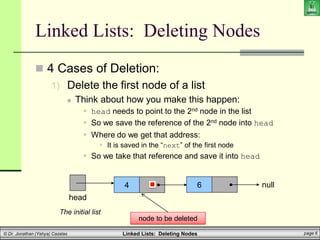
1) Delete the first node of a list
 Think about how you make this happen:
 head needs to point to the 2nd node in the list
 So we save the reference of the 2nd node into head
 Where do we get that address:
 It is saved in the “next” of the first node
 So we take that reference and save it into head
4
head
null
The initial list
6
node to be deleted
Linked Lists: Deleting Nodes page 7
© Dr. Jonathan (Yahya) Cazalas
Linked Lists: Deleting Nodes
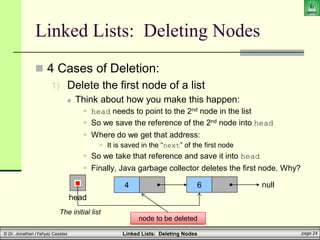
 4 Cases of Deletion:
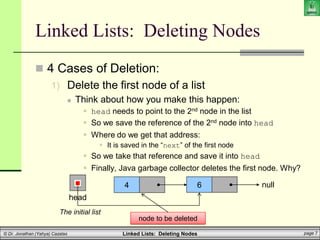
1) Delete the first node of a list
 Think about how you make this happen:
 head needs to point to the 2nd node in the list
 So we save the reference of the 2nd node into head
 Where do we get that address:
 It is saved in the “next” of the first node
 So we take that reference and save it into head
 Finally, Java garbage collector deletes the first node. Why?
4
head
null
The initial list
6
node to be deleted
Linked Lists: Deleting Nodes page 8
© Dr. Jonathan (Yahya) Cazalas
Linked Lists: Deleting Nodes
 4 Cases of Deletion:
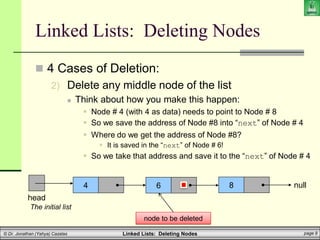
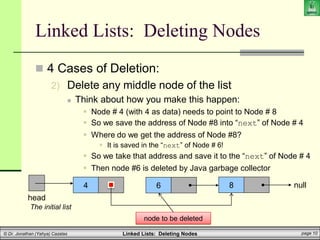
2) Delete any middle node of the list
4
head
null
The initial list
8
6
node to be deleted
4
head
null
The list after deletion has occurred
8
Linked Lists: Deleting Nodes page 9
© Dr. Jonathan (Yahya) Cazalas
Linked Lists: Deleting Nodes
 4 Cases of Deletion:
2) Delete any middle node of the list
 Think about how you make this happen:
 Node # 4 (with 4 as data) needs to point to Node # 8
 So we save the address of Node #8 into “next” of Node # 4
 Where do we get the address of Node #8?
 It is saved in the “next” of Node # 6!
 So we take that address and save it to the “next” of Node # 4
4
head
null
The initial list
8
6
node to be deleted
Linked Lists: Deleting Nodes page 10
© Dr. Jonathan (Yahya) Cazalas
Linked Lists: Deleting Nodes
 4 Cases of Deletion:
2) Delete any middle node of the list
 Think about how you make this happen:
 Node # 4 (with 4 as data) needs to point to Node # 8
 So we save the address of Node #8 into “next” of Node # 4
 Where do we get the address of Node #8?
 It is saved in the “next” of Node # 6!
 So we take that address and save it to the “next” of Node # 4
 Then node #6 is deleted by Java garbage collector
4
head
null
The initial list
8
6
node to be deleted
Linked Lists: Deleting Nodes page 11
© Dr. Jonathan (Yahya) Cazalas
Linked Lists: Deleting Nodes
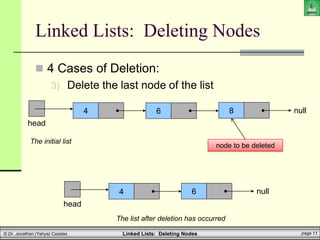
 4 Cases of Deletion:
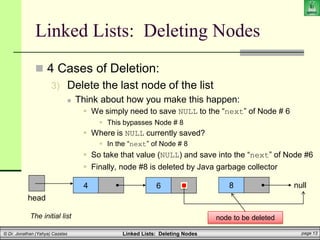
3) Delete the last node of the list
4
head
null
The initial list
8
6
node to be deleted
4
head
null
The list after deletion has occurred
6
Linked Lists: Deleting Nodes page 12
© Dr. Jonathan (Yahya) Cazalas
Linked Lists: Deleting Nodes
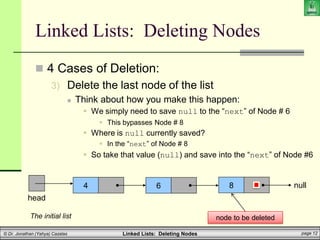
 4 Cases of Deletion:
3) Delete the last node of the list
 Think about how you make this happen:
 We simply need to save null to the “next” of Node # 6
 This bypasses Node # 8
 Where is null currently saved?
 In the “next” of Node # 8
 So take that value (null) and save into the “next” of Node #6
4
head
null
The initial list
8
6
node to be deleted
Linked Lists: Deleting Nodes page 13
© Dr. Jonathan (Yahya) Cazalas
Linked Lists: Deleting Nodes
 4 Cases of Deletion:
3) Delete the last node of the list
 Think about how you make this happen:
 We simply need to save NULL to the “next” of Node # 6
 This bypasses Node # 8
 Where is NULL currently saved?
 In the “next” of Node # 8
 So take that value (NULL) and save into the “next” of Node #6
 Finally, node #8 is deleted by Java garbage collector
4
head
null
The initial list
8
6
node to be deleted
Linked Lists: Deleting Nodes page 14
© Dr. Jonathan (Yahya) Cazalas
Linked Lists: Deleting Nodes
 4 Cases of Deletion:
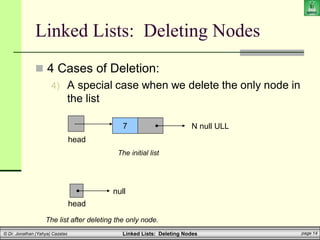
4) A special case when we delete the only node in
the list
head
null
The list after deleting the only node.
7
head
N null ULL
The initial list
Linked Lists: Deleting Nodes page 15
© Dr. Jonathan (Yahya) Cazalas
Linked Lists: Deleting Nodes
 4 Cases of Deletion:
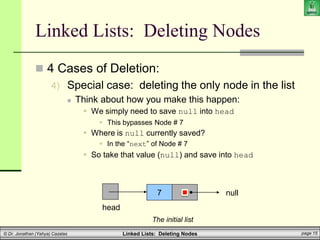
4) Special case: deleting the only node in the list
 Think about how you make this happen:
 We simply need to save null into head
 This bypasses Node # 7
 Where is null currently saved?
 In the “next” of Node # 7
 So take that value (null) and save into head
7
head
null
The initial list
Linked Lists: Deleting Nodes page 16
© Dr. Jonathan (Yahya) Cazalas
Linked Lists: Deleting Nodes
 4 Cases of Deletion:
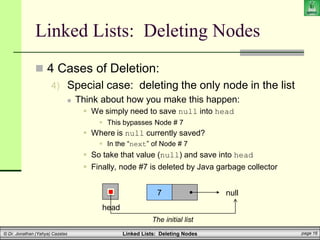
4) Special case: deleting the only node in the list
 Think about how you make this happen:
 We simply need to save null into head
 This bypasses Node # 7
 Where is null currently saved?
 In the “next” of Node # 7
 So take that value (null) and save into head
 Finally, node #7 is deleted by Java garbage collector
7
head
null
The initial list
Linked Lists: Deleting Nodes page 17
© Dr. Jonathan (Yahya) Cazalas
Brief Interlude: Human Stupidity
Linked Lists: Deleting Nodes page 18
© Dr. Jonathan (Yahya) Cazalas
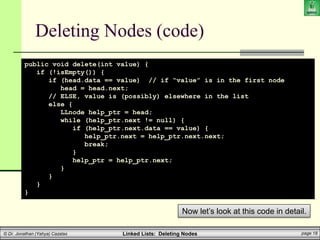
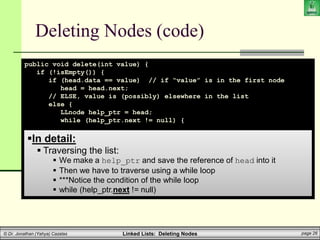
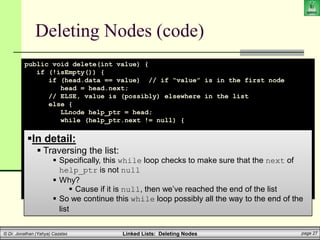
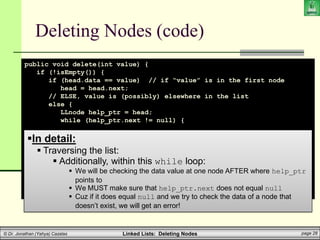
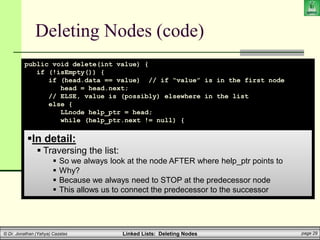
Deleting Nodes (code)
public void delete(int value) {
if (!isEmpty()) {
if (head.data == value) // if “value” is in the first node
head = head.next;
// ELSE, value is (possibly) elsewhere in the list
else {
LLnode help_ptr = head;
while (help_ptr.next != null) {
if (help_ptr.next.data == value) {
help_ptr.next = help_ptr.next.next;
break;
}
help_ptr = help_ptr.next;
}
}
}
}
Now let’s look at this code in detail.
Linked Lists: Deleting Nodes page 19
© Dr. Jonathan (Yahya) Cazalas
Deleting Nodes (code)
public void delete(int value) {
if (!isEmpty()) {
if (head.data == value) // if “value” is in the first node
head = head.next;
// ELSE, value is (possibly) elsewhere in the list
else {
LLnode help_ptr = head;
while (help_ptr.next != null) {
if (help_ptr.next.data == value) {
help_ptr.next = help_ptr.next.next;
break;
}
help_ptr = help_ptr.next;
}
}
}
}
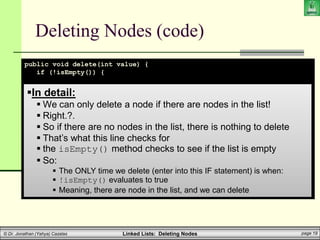
In detail:
 We can only delete a node if there are nodes in the list!
 Right.?.
 So if there are no nodes in the list, there is nothing to delete
 That’s what this line checks for
 the isEmpty() method checks to see if the list is empty
 So:
 The ONLY time we delete (enter into this IF statement) is when:
 !isEmpty() evaluates to true
 Meaning, there are node in the list, and we can delete
Linked Lists: Deleting Nodes page 20
© Dr. Jonathan (Yahya) Cazalas
Deleting Nodes (code)
public void delete(int value) {
if (!isEmpty()) {
if (head.data == value) // if “value” is in the first node
head = head.next;
// ELSE, value is (possibly) elsewhere in the list
else {
LLnode help_ptr = head;
while (help_ptr.next != null) {
if (help_ptr.next.data == value) {
help_ptr.next = help_ptr.next.next;
break;
}
help_ptr = help_ptr.next;
}
}
}
}
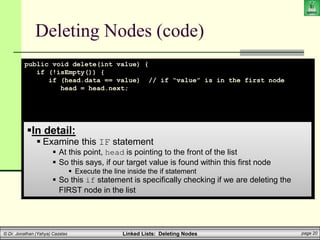
In detail:
 Examine this IF statement
 At this point, head is pointing to the front of the list
 So this says, if our target value is found within this first node
 Execute the line inside the if statement
 So this if statement is specifically checking if we are deleting the
FIRST node in the list
Linked Lists: Deleting Nodes page 21
© Dr. Jonathan (Yahya) Cazalas
Deleting Nodes (code)
public void delete(int value) {
if (!isEmpty()) {
if (head.data == value) // if “value” is in the first node
head = head.next;
// ELSE, value is (possibly) elsewhere in the list
else {
LLnode help_ptr = head;
while (help_ptr.next != null) {
if (help_ptr.next.data == value) {
help_ptr.next = help_ptr.next.next;
break;
}
help_ptr = help_ptr.next;
}
}
}
}
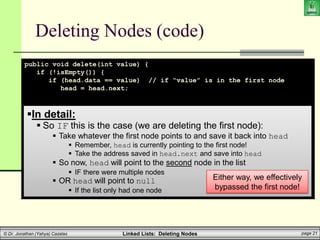
In detail:
 So IF this is the case (we are deleting the first node):
 Take whatever the first node points to and save it back into head
 Remember, head is currently pointing to the first node!
 Take the address saved in head.next and save into head
 So now, head will point to the second node in the list
 IF there were multiple nodes
 OR head will point to null
 If the list only had one node
Either way, we effectively
bypassed the first node!
Linked Lists: Deleting Nodes page 22
© Dr. Jonathan (Yahya) Cazalas
Linked Lists: Deleting Nodes
 4 Cases of Deletion:
1) Delete the first node of a list
6
head
null
The list after deleting the first node
4
head
null
The initial list
6
node to be deleted
Linked Lists: Deleting Nodes page 23
© Dr. Jonathan (Yahya) Cazalas
Linked Lists: Deleting Nodes
 4 Cases of Deletion:
1) Delete the first node of a list
 Think about how you make this happen:
 head needs to point to the 2nd node in the list
 So we save the reference of the 2nd node into head
 Where do we get that address:
 It is saved in the “next” of the first node
 So we take that reference and save it into head
4
head
null
The initial list
6
node to be deleted
Linked Lists: Deleting Nodes page 24
© Dr. Jonathan (Yahya) Cazalas
Linked Lists: Deleting Nodes
 4 Cases of Deletion:
1) Delete the first node of a list
 Think about how you make this happen:
 head needs to point to the 2nd node in the list
 So we save the reference of the 2nd node into head
 Where do we get that address:
 It is saved in the “next” of the first node
 So we take that reference and save it into head
 Finally, Java garbage collector deletes the first node. Why?
4
head
null
The initial list
6
node to be deleted
Linked Lists: Deleting Nodes page 25
© Dr. Jonathan (Yahya) Cazalas
Deleting Nodes (code)
public void delete(int value) {
if (!isEmpty()) {
if (head.data == value) // if “value” is in the first node
head = head.next;
// ELSE, value is (possibly) elsewhere in the list
else {
LLnode help_ptr = head;
while (help_ptr.next != null) {
if (help_ptr.next.data == value) {
help_ptr.next = help_ptr.next.next;
break;
}
help_ptr = help_ptr.next;
}
}
}
}
In detail:
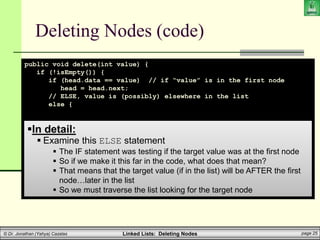
 Examine this ELSE statement
 The IF statement was testing if the target value was at the first node
 So if we make it this far in the code, what does that mean?
 That means that the target value (if in the list) will be AFTER the first
node…later in the list
 So we must traverse the list looking for the target node
Linked Lists: Deleting Nodes page 26
© Dr. Jonathan (Yahya) Cazalas
Deleting Nodes (code)
public void delete(int value) {
if (!isEmpty()) {
if (head.data == value) // if “value” is in the first node
head = head.next;
// ELSE, value is (possibly) elsewhere in the list
else {
LLnode help_ptr = head;
while (help_ptr.next != null) {
if (help_ptr.next.data == value) {
help_ptr.next = help_ptr.next.next;
break;
}
help_ptr = help_ptr.next;
}
}
}
}
In detail:
 Traversing the list:
 We make a help_ptr and save the reference of head into it
 Then we have to traverse using a while loop
 ***Notice the condition of the while loop
 while (help_ptr.next != null)
Linked Lists: Deleting Nodes page 27
© Dr. Jonathan (Yahya) Cazalas
Deleting Nodes (code)
public void delete(int value) {
if (!isEmpty()) {
if (head.data == value) // if “value” is in the first node
head = head.next;
// ELSE, value is (possibly) elsewhere in the list
else {
LLnode help_ptr = head;
while (help_ptr.next != null) {
if (help_ptr.next.data == value) {
help_ptr.next = help_ptr.next.next;
break;
}
help_ptr = help_ptr.next;
}
}
}
}
In detail:
 Traversing the list:
 Specifically, this while loop checks to make sure that the next of
help_ptr is not null
 Why?
 Cause if it is null, then we’ve reached the end of the list
 So we continue this while loop possibly all the way to the end of the
list
Linked Lists: Deleting Nodes page 28
© Dr. Jonathan (Yahya) Cazalas
Deleting Nodes (code)
public void delete(int value) {
if (!isEmpty()) {
if (head.data == value) // if “value” is in the first node
head = head.next;
// ELSE, value is (possibly) elsewhere in the list
else {
LLnode help_ptr = head;
while (help_ptr.next != null) {
if (help_ptr.next.data == value) {
help_ptr.next = help_ptr.next.next;
break;
}
help_ptr = help_ptr.next;
}
}
}
}
In detail:
 Traversing the list:
 Additionally, within this while loop:
 We will be checking the data value at one node AFTER where help_ptr
points to
 We MUST make sure that help_ptr.next does not equal null
 Cuz if it does equal null and we try to check the data of a node that
doesn’t exist, we will get an error!
Linked Lists: Deleting Nodes page 29
© Dr. Jonathan (Yahya) Cazalas
Deleting Nodes (code)
public void delete(int value) {
if (!isEmpty()) {
if (head.data == value) // if “value” is in the first node
head = head.next;
// ELSE, value is (possibly) elsewhere in the list
else {
LLnode help_ptr = head;
while (help_ptr.next != null) {
if (help_ptr.next.data == value) {
help_ptr.next = help_ptr.next.next;
break;
}
help_ptr = help_ptr.next;
}
}
}
}
In detail:
 Traversing the list:
 So we always look at the node AFTER where help_ptr points to
 Why?
 Because we always need to STOP at the predecessor node
 This allows us to connect the predecessor to the successor
Linked Lists: Deleting Nodes page 30
© Dr. Jonathan (Yahya) Cazalas
Deleting Nodes (code)
public void delete(int value) {
if (!isEmpty()) {
if (head.data == value) // if “value” is in the first node
head = head.next;
// ELSE, value is (possibly) elsewhere in the list
else {
LLnode help_ptr = head;
while (help_ptr.next != null) {
if (help_ptr.next.data == value) {
help_ptr.next = help_ptr.next.next;
break;
}
help_ptr = help_ptr.next;
}
}
}
}
In detail:
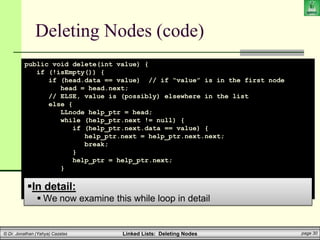
 We now examine this while loop in detail
Linked Lists: Deleting Nodes page 31
© Dr. Jonathan (Yahya) Cazalas
Deleting Nodes (code)
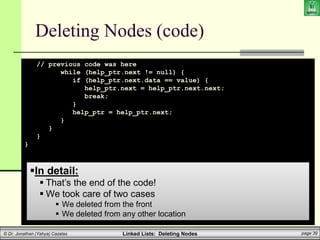
// previous code was here
while (help_ptr.next != null) {
if (help_ptr.next.data == value) {
help_ptr.next = help_ptr.next.next;
break;
}
help_ptr = help_ptr.next;
}
}
}
}
In detail:
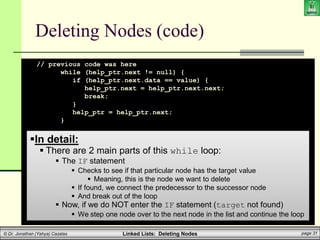
 There are 2 main parts of this while loop:
 The IF statement
 Checks to see if that particular node has the target value
 Meaning, this is the node we want to delete
 If found, we connect the predecessor to the successor node
 And break out of the loop
 Now, if we do NOT enter the IF statement (target not found)
 We step one node over to the next node in the list and continue the loop
Linked Lists: Deleting Nodes page 32
© Dr. Jonathan (Yahya) Cazalas
Deleting Nodes (code)
// previous code was here
while (help_ptr.next != null) {
if (help_ptr.next.data == value) {
help_ptr.next = help_ptr.next.next;
break;
}
help_ptr = help_ptr.next;
}
}
}
}
In detail:
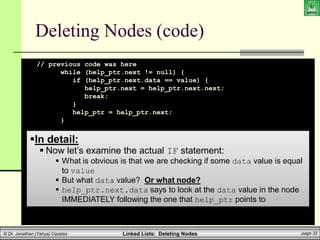
 Now let’s examine the actual IF statement:
 What is obvious is that we are checking if some data value is equal
to value
 But what data value? Or what node?
 help_ptr.next.data says to look at the data value in the node
IMMEDIATELY following the one that help_ptr points to
Linked Lists: Deleting Nodes page 33
© Dr. Jonathan (Yahya) Cazalas
Deleting Nodes (code)
// previous code was here
while (help_ptr.next != null) {
if (help_ptr.next.data == value) {
help_ptr.next = help_ptr.next.next;
break;
}
help_ptr = help_ptr.next;
}
}
}
}
In detail:
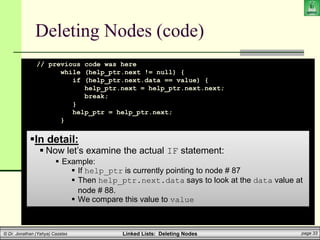
 Now let’s examine the actual IF statement:
 Example:
 If help_ptr is currently pointing to node # 87
 Then help_ptr.next.data says to look at the data value at
node # 88.
 We compare this value to value
Linked Lists: Deleting Nodes page 34
© Dr. Jonathan (Yahya) Cazalas
Deleting Nodes (code)
// previous code was here
while (help_ptr.next != null) {
if (help_ptr.next.data == value) {
help_ptr.next = help_ptr.next.next;
break;
}
help_ptr = help_ptr.next;
}
}
}
}
In detail:
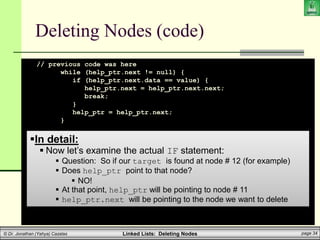
 Now let’s examine the actual IF statement:
 Question: So if our target is found at node # 12 (for example)
 Does help_ptr point to that node?
 NO!
 At that point, help_ptr will be pointing to node # 11
 help_ptr.next will be pointing to the node we want to delete
Linked Lists: Deleting Nodes page 35
© Dr. Jonathan (Yahya) Cazalas
Deleting Nodes (code)
// previous code was here
while (help_ptr.next != null) {
if (help_ptr.next.data == value) {
help_ptr.next = help_ptr.next.next;
break;
}
help_ptr = help_ptr.next;
}
}
}
}
In detail:
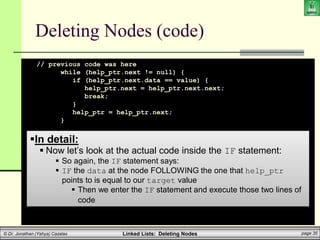
 Now let’s look at the actual code inside the IF statement:
 So again, the IF statement says:
 IF the data at the node FOLLOWING the one that help_ptr
points to is equal to our target value
 Then we enter the IF statement and execute those two lines of
code
Linked Lists: Deleting Nodes page 36
© Dr. Jonathan (Yahya) Cazalas
Deleting Nodes (code)
// previous code was here
while (help_ptr.next != null) {
if (help_ptr.next.data == value) {
help_ptr.next = help_ptr.next.next;
break;
}
help_ptr = help_ptr.next;
}
}
}
}
In detail:
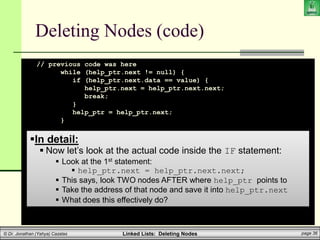
 Now let’s look at the actual code inside the IF statement:
 Look at the 1st statement:
 help_ptr.next = help_ptr.next.next;
 This says, look TWO nodes AFTER where help_ptr points to
 Take the address of that node and save it into help_ptr.next
 What does this effectively do?
Linked Lists: Deleting Nodes page 37
© Dr. Jonathan (Yahya) Cazalas
Deleting Nodes (code)
// previous code was here
while (help_ptr.next != null) {
if (help_ptr.next.data == value) {
help_ptr.next = help_ptr.next.next;
break;
}
help_ptr = help_ptr.next;
}
}
}
}
In detail:
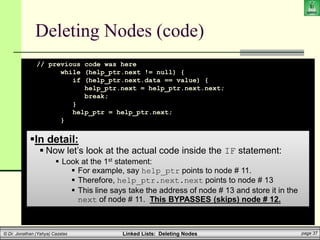
 Now let’s look at the actual code inside the IF statement:
 Look at the 1st statement:
 For example, say help_ptr points to node # 11.
 Therefore, help_ptr.next.next points to node # 13
 This line says take the address of node # 13 and store it in the
next of node # 11. This BYPASSES (skips) node # 12.
Linked Lists: Deleting Nodes page 38
© Dr. Jonathan (Yahya) Cazalas
Deleting Nodes (code)
// previous code was here
while (help_ptr.next != null) {
if (help_ptr.next.data == value) {
help_ptr.next = help_ptr.next.next;
break;
}
help_ptr = help_ptr.next;
}
}
}
}
In detail:
 Now let’s look at the actual code inside the IF statement:
 Look at the 1st statement:
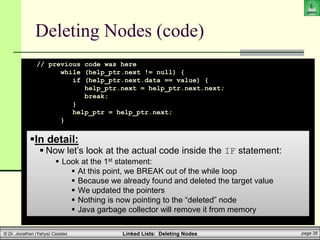
 At this point, we BREAK out of the while loop
 Because we already found and deleted the target value
 We updated the pointers
 Nothing is now pointing to the “deleted” node
 Java garbage collector will remove it from memory
Linked Lists: Deleting Nodes page 39
© Dr. Jonathan (Yahya) Cazalas
Deleting Nodes (code)
// previous code was here
while (help_ptr.next != null) {
if (help_ptr.next.data == value) {
help_ptr.next = help_ptr.next.next;
break;
}
help_ptr = help_ptr.next;
}
}
}
}
In detail:
 That’s the end of the code!
 We took care of two cases
 We deleted from the front
 We deleted from any other location
Linked Lists: Deleting Nodes page 40
© Dr. Jonathan (Yahya) Cazalas
Linked Lists: Basic Operations
 What we’ve covered thus far:
 Adding nodes
 Deleting nodes
 And in the process of both of these:
 Searching a list for nodes
 We did this when we traverse the list searching for our
spot to insert/delete
 Traversing a list
 Printing a list
 Guess what?
 We are finished with basic linked lists
Linked Lists: Deleting Nodes page 41
© Dr. Jonathan (Yahya) Cazalas
Linked Lists: Deleting Nodes
WASN’T
THAT
AMAZING!
Linked Lists: Deleting Nodes page 42
© Dr. Jonathan (Yahya) Cazalas
Daily Demotivator
College of Computing & Information Technology
King Abdulaziz University
CPCS-204 – Data Structures I
Linked Lists:
Deleting Nodes

linked_lists3

  • 1.
    College of Computing& Information Technology King Abdulaziz University CPCS-204 – Data Structures I Linked Lists: Deleting Nodes
  • 2.
    Linked Lists: DeletingNodes page 2 © Dr. Jonathan (Yahya) Cazalas Linked Lists: Basic Operations  Operations Performed on Linked Lists  Several operations can be performed on linked lists  Add a new node  Delete a node  Search for a node  Counting nodes  Modifying nodes  and more  We will build methods to perform these operations
  • 3.
    Linked Lists: DeletingNodes page 3 © Dr. Jonathan (Yahya) Cazalas Linked Lists: Deleting Nodes  General Approach:  You must search for the node that you want to delete (remember, we are using sorted lists)  If found, you must delete the node from the list  This means that you change the various link pointers  The predecessor of the deleted node must point to the deleted nodes successor
  • 4.
    Linked Lists: DeletingNodes page 4 © Dr. Jonathan (Yahya) Cazalas Linked Lists: Deleting Nodes  General Approach:  There are 4 deletion scenarios: 1) Delete the first node of a list 2) Delete any middle node of the list  Not the first node or the last node 3) Delete the last node of the list 4) A special case when we delete the only node in the list  Causes the resulting list to become empty
  • 5.
    Linked Lists: DeletingNodes page 5 © Dr. Jonathan (Yahya) Cazalas Linked Lists: Deleting Nodes  4 Cases of Deletion: 1) Delete the first node of a list 6 head null The list after deleting the first node 4 head null The initial list 6 node to be deleted
  • 6.
    Linked Lists: DeletingNodes page 6 © Dr. Jonathan (Yahya) Cazalas Linked Lists: Deleting Nodes  4 Cases of Deletion: 1) Delete the first node of a list  Think about how you make this happen:  head needs to point to the 2nd node in the list  So we save the reference of the 2nd node into head  Where do we get that address:  It is saved in the “next” of the first node  So we take that reference and save it into head 4 head null The initial list 6 node to be deleted
  • 7.
    Linked Lists: DeletingNodes page 7 © Dr. Jonathan (Yahya) Cazalas Linked Lists: Deleting Nodes  4 Cases of Deletion: 1) Delete the first node of a list  Think about how you make this happen:  head needs to point to the 2nd node in the list  So we save the reference of the 2nd node into head  Where do we get that address:  It is saved in the “next” of the first node  So we take that reference and save it into head  Finally, Java garbage collector deletes the first node. Why? 4 head null The initial list 6 node to be deleted
  • 8.
    Linked Lists: DeletingNodes page 8 © Dr. Jonathan (Yahya) Cazalas Linked Lists: Deleting Nodes  4 Cases of Deletion: 2) Delete any middle node of the list 4 head null The initial list 8 6 node to be deleted 4 head null The list after deletion has occurred 8
  • 9.
    Linked Lists: DeletingNodes page 9 © Dr. Jonathan (Yahya) Cazalas Linked Lists: Deleting Nodes  4 Cases of Deletion: 2) Delete any middle node of the list  Think about how you make this happen:  Node # 4 (with 4 as data) needs to point to Node # 8  So we save the address of Node #8 into “next” of Node # 4  Where do we get the address of Node #8?  It is saved in the “next” of Node # 6!  So we take that address and save it to the “next” of Node # 4 4 head null The initial list 8 6 node to be deleted
  • 10.
    Linked Lists: DeletingNodes page 10 © Dr. Jonathan (Yahya) Cazalas Linked Lists: Deleting Nodes  4 Cases of Deletion: 2) Delete any middle node of the list  Think about how you make this happen:  Node # 4 (with 4 as data) needs to point to Node # 8  So we save the address of Node #8 into “next” of Node # 4  Where do we get the address of Node #8?  It is saved in the “next” of Node # 6!  So we take that address and save it to the “next” of Node # 4  Then node #6 is deleted by Java garbage collector 4 head null The initial list 8 6 node to be deleted
  • 11.
    Linked Lists: DeletingNodes page 11 © Dr. Jonathan (Yahya) Cazalas Linked Lists: Deleting Nodes  4 Cases of Deletion: 3) Delete the last node of the list 4 head null The initial list 8 6 node to be deleted 4 head null The list after deletion has occurred 6
  • 12.
    Linked Lists: DeletingNodes page 12 © Dr. Jonathan (Yahya) Cazalas Linked Lists: Deleting Nodes  4 Cases of Deletion: 3) Delete the last node of the list  Think about how you make this happen:  We simply need to save null to the “next” of Node # 6  This bypasses Node # 8  Where is null currently saved?  In the “next” of Node # 8  So take that value (null) and save into the “next” of Node #6 4 head null The initial list 8 6 node to be deleted
  • 13.
    Linked Lists: DeletingNodes page 13 © Dr. Jonathan (Yahya) Cazalas Linked Lists: Deleting Nodes  4 Cases of Deletion: 3) Delete the last node of the list  Think about how you make this happen:  We simply need to save NULL to the “next” of Node # 6  This bypasses Node # 8  Where is NULL currently saved?  In the “next” of Node # 8  So take that value (NULL) and save into the “next” of Node #6  Finally, node #8 is deleted by Java garbage collector 4 head null The initial list 8 6 node to be deleted
  • 14.
    Linked Lists: DeletingNodes page 14 © Dr. Jonathan (Yahya) Cazalas Linked Lists: Deleting Nodes  4 Cases of Deletion: 4) A special case when we delete the only node in the list head null The list after deleting the only node. 7 head N null ULL The initial list
  • 15.
    Linked Lists: DeletingNodes page 15 © Dr. Jonathan (Yahya) Cazalas Linked Lists: Deleting Nodes  4 Cases of Deletion: 4) Special case: deleting the only node in the list  Think about how you make this happen:  We simply need to save null into head  This bypasses Node # 7  Where is null currently saved?  In the “next” of Node # 7  So take that value (null) and save into head 7 head null The initial list
  • 16.
    Linked Lists: DeletingNodes page 16 © Dr. Jonathan (Yahya) Cazalas Linked Lists: Deleting Nodes  4 Cases of Deletion: 4) Special case: deleting the only node in the list  Think about how you make this happen:  We simply need to save null into head  This bypasses Node # 7  Where is null currently saved?  In the “next” of Node # 7  So take that value (null) and save into head  Finally, node #7 is deleted by Java garbage collector 7 head null The initial list
  • 17.
    Linked Lists: DeletingNodes page 17 © Dr. Jonathan (Yahya) Cazalas Brief Interlude: Human Stupidity
  • 18.
    Linked Lists: DeletingNodes page 18 © Dr. Jonathan (Yahya) Cazalas Deleting Nodes (code) public void delete(int value) { if (!isEmpty()) { if (head.data == value) // if “value” is in the first node head = head.next; // ELSE, value is (possibly) elsewhere in the list else { LLnode help_ptr = head; while (help_ptr.next != null) { if (help_ptr.next.data == value) { help_ptr.next = help_ptr.next.next; break; } help_ptr = help_ptr.next; } } } } Now let’s look at this code in detail.
  • 19.
    Linked Lists: DeletingNodes page 19 © Dr. Jonathan (Yahya) Cazalas Deleting Nodes (code) public void delete(int value) { if (!isEmpty()) { if (head.data == value) // if “value” is in the first node head = head.next; // ELSE, value is (possibly) elsewhere in the list else { LLnode help_ptr = head; while (help_ptr.next != null) { if (help_ptr.next.data == value) { help_ptr.next = help_ptr.next.next; break; } help_ptr = help_ptr.next; } } } } In detail:  We can only delete a node if there are nodes in the list!  Right.?.  So if there are no nodes in the list, there is nothing to delete  That’s what this line checks for  the isEmpty() method checks to see if the list is empty  So:  The ONLY time we delete (enter into this IF statement) is when:  !isEmpty() evaluates to true  Meaning, there are node in the list, and we can delete
  • 20.
    Linked Lists: DeletingNodes page 20 © Dr. Jonathan (Yahya) Cazalas Deleting Nodes (code) public void delete(int value) { if (!isEmpty()) { if (head.data == value) // if “value” is in the first node head = head.next; // ELSE, value is (possibly) elsewhere in the list else { LLnode help_ptr = head; while (help_ptr.next != null) { if (help_ptr.next.data == value) { help_ptr.next = help_ptr.next.next; break; } help_ptr = help_ptr.next; } } } } In detail:  Examine this IF statement  At this point, head is pointing to the front of the list  So this says, if our target value is found within this first node  Execute the line inside the if statement  So this if statement is specifically checking if we are deleting the FIRST node in the list
  • 21.
    Linked Lists: DeletingNodes page 21 © Dr. Jonathan (Yahya) Cazalas Deleting Nodes (code) public void delete(int value) { if (!isEmpty()) { if (head.data == value) // if “value” is in the first node head = head.next; // ELSE, value is (possibly) elsewhere in the list else { LLnode help_ptr = head; while (help_ptr.next != null) { if (help_ptr.next.data == value) { help_ptr.next = help_ptr.next.next; break; } help_ptr = help_ptr.next; } } } } In detail:  So IF this is the case (we are deleting the first node):  Take whatever the first node points to and save it back into head  Remember, head is currently pointing to the first node!  Take the address saved in head.next and save into head  So now, head will point to the second node in the list  IF there were multiple nodes  OR head will point to null  If the list only had one node Either way, we effectively bypassed the first node!
  • 22.
    Linked Lists: DeletingNodes page 22 © Dr. Jonathan (Yahya) Cazalas Linked Lists: Deleting Nodes  4 Cases of Deletion: 1) Delete the first node of a list 6 head null The list after deleting the first node 4 head null The initial list 6 node to be deleted
  • 23.
    Linked Lists: DeletingNodes page 23 © Dr. Jonathan (Yahya) Cazalas Linked Lists: Deleting Nodes  4 Cases of Deletion: 1) Delete the first node of a list  Think about how you make this happen:  head needs to point to the 2nd node in the list  So we save the reference of the 2nd node into head  Where do we get that address:  It is saved in the “next” of the first node  So we take that reference and save it into head 4 head null The initial list 6 node to be deleted
  • 24.
    Linked Lists: DeletingNodes page 24 © Dr. Jonathan (Yahya) Cazalas Linked Lists: Deleting Nodes  4 Cases of Deletion: 1) Delete the first node of a list  Think about how you make this happen:  head needs to point to the 2nd node in the list  So we save the reference of the 2nd node into head  Where do we get that address:  It is saved in the “next” of the first node  So we take that reference and save it into head  Finally, Java garbage collector deletes the first node. Why? 4 head null The initial list 6 node to be deleted
  • 25.
    Linked Lists: DeletingNodes page 25 © Dr. Jonathan (Yahya) Cazalas Deleting Nodes (code) public void delete(int value) { if (!isEmpty()) { if (head.data == value) // if “value” is in the first node head = head.next; // ELSE, value is (possibly) elsewhere in the list else { LLnode help_ptr = head; while (help_ptr.next != null) { if (help_ptr.next.data == value) { help_ptr.next = help_ptr.next.next; break; } help_ptr = help_ptr.next; } } } } In detail:  Examine this ELSE statement  The IF statement was testing if the target value was at the first node  So if we make it this far in the code, what does that mean?  That means that the target value (if in the list) will be AFTER the first node…later in the list  So we must traverse the list looking for the target node
  • 26.
    Linked Lists: DeletingNodes page 26 © Dr. Jonathan (Yahya) Cazalas Deleting Nodes (code) public void delete(int value) { if (!isEmpty()) { if (head.data == value) // if “value” is in the first node head = head.next; // ELSE, value is (possibly) elsewhere in the list else { LLnode help_ptr = head; while (help_ptr.next != null) { if (help_ptr.next.data == value) { help_ptr.next = help_ptr.next.next; break; } help_ptr = help_ptr.next; } } } } In detail:  Traversing the list:  We make a help_ptr and save the reference of head into it  Then we have to traverse using a while loop  ***Notice the condition of the while loop  while (help_ptr.next != null)
  • 27.
    Linked Lists: DeletingNodes page 27 © Dr. Jonathan (Yahya) Cazalas Deleting Nodes (code) public void delete(int value) { if (!isEmpty()) { if (head.data == value) // if “value” is in the first node head = head.next; // ELSE, value is (possibly) elsewhere in the list else { LLnode help_ptr = head; while (help_ptr.next != null) { if (help_ptr.next.data == value) { help_ptr.next = help_ptr.next.next; break; } help_ptr = help_ptr.next; } } } } In detail:  Traversing the list:  Specifically, this while loop checks to make sure that the next of help_ptr is not null  Why?  Cause if it is null, then we’ve reached the end of the list  So we continue this while loop possibly all the way to the end of the list
  • 28.
    Linked Lists: DeletingNodes page 28 © Dr. Jonathan (Yahya) Cazalas Deleting Nodes (code) public void delete(int value) { if (!isEmpty()) { if (head.data == value) // if “value” is in the first node head = head.next; // ELSE, value is (possibly) elsewhere in the list else { LLnode help_ptr = head; while (help_ptr.next != null) { if (help_ptr.next.data == value) { help_ptr.next = help_ptr.next.next; break; } help_ptr = help_ptr.next; } } } } In detail:  Traversing the list:  Additionally, within this while loop:  We will be checking the data value at one node AFTER where help_ptr points to  We MUST make sure that help_ptr.next does not equal null  Cuz if it does equal null and we try to check the data of a node that doesn’t exist, we will get an error!
  • 29.
    Linked Lists: DeletingNodes page 29 © Dr. Jonathan (Yahya) Cazalas Deleting Nodes (code) public void delete(int value) { if (!isEmpty()) { if (head.data == value) // if “value” is in the first node head = head.next; // ELSE, value is (possibly) elsewhere in the list else { LLnode help_ptr = head; while (help_ptr.next != null) { if (help_ptr.next.data == value) { help_ptr.next = help_ptr.next.next; break; } help_ptr = help_ptr.next; } } } } In detail:  Traversing the list:  So we always look at the node AFTER where help_ptr points to  Why?  Because we always need to STOP at the predecessor node  This allows us to connect the predecessor to the successor
  • 30.
    Linked Lists: DeletingNodes page 30 © Dr. Jonathan (Yahya) Cazalas Deleting Nodes (code) public void delete(int value) { if (!isEmpty()) { if (head.data == value) // if “value” is in the first node head = head.next; // ELSE, value is (possibly) elsewhere in the list else { LLnode help_ptr = head; while (help_ptr.next != null) { if (help_ptr.next.data == value) { help_ptr.next = help_ptr.next.next; break; } help_ptr = help_ptr.next; } } } } In detail:  We now examine this while loop in detail
  • 31.
    Linked Lists: DeletingNodes page 31 © Dr. Jonathan (Yahya) Cazalas Deleting Nodes (code) // previous code was here while (help_ptr.next != null) { if (help_ptr.next.data == value) { help_ptr.next = help_ptr.next.next; break; } help_ptr = help_ptr.next; } } } } In detail:  There are 2 main parts of this while loop:  The IF statement  Checks to see if that particular node has the target value  Meaning, this is the node we want to delete  If found, we connect the predecessor to the successor node  And break out of the loop  Now, if we do NOT enter the IF statement (target not found)  We step one node over to the next node in the list and continue the loop
  • 32.
    Linked Lists: DeletingNodes page 32 © Dr. Jonathan (Yahya) Cazalas Deleting Nodes (code) // previous code was here while (help_ptr.next != null) { if (help_ptr.next.data == value) { help_ptr.next = help_ptr.next.next; break; } help_ptr = help_ptr.next; } } } } In detail:  Now let’s examine the actual IF statement:  What is obvious is that we are checking if some data value is equal to value  But what data value? Or what node?  help_ptr.next.data says to look at the data value in the node IMMEDIATELY following the one that help_ptr points to
  • 33.
    Linked Lists: DeletingNodes page 33 © Dr. Jonathan (Yahya) Cazalas Deleting Nodes (code) // previous code was here while (help_ptr.next != null) { if (help_ptr.next.data == value) { help_ptr.next = help_ptr.next.next; break; } help_ptr = help_ptr.next; } } } } In detail:  Now let’s examine the actual IF statement:  Example:  If help_ptr is currently pointing to node # 87  Then help_ptr.next.data says to look at the data value at node # 88.  We compare this value to value
  • 34.
    Linked Lists: DeletingNodes page 34 © Dr. Jonathan (Yahya) Cazalas Deleting Nodes (code) // previous code was here while (help_ptr.next != null) { if (help_ptr.next.data == value) { help_ptr.next = help_ptr.next.next; break; } help_ptr = help_ptr.next; } } } } In detail:  Now let’s examine the actual IF statement:  Question: So if our target is found at node # 12 (for example)  Does help_ptr point to that node?  NO!  At that point, help_ptr will be pointing to node # 11  help_ptr.next will be pointing to the node we want to delete
  • 35.
    Linked Lists: DeletingNodes page 35 © Dr. Jonathan (Yahya) Cazalas Deleting Nodes (code) // previous code was here while (help_ptr.next != null) { if (help_ptr.next.data == value) { help_ptr.next = help_ptr.next.next; break; } help_ptr = help_ptr.next; } } } } In detail:  Now let’s look at the actual code inside the IF statement:  So again, the IF statement says:  IF the data at the node FOLLOWING the one that help_ptr points to is equal to our target value  Then we enter the IF statement and execute those two lines of code
  • 36.
    Linked Lists: DeletingNodes page 36 © Dr. Jonathan (Yahya) Cazalas Deleting Nodes (code) // previous code was here while (help_ptr.next != null) { if (help_ptr.next.data == value) { help_ptr.next = help_ptr.next.next; break; } help_ptr = help_ptr.next; } } } } In detail:  Now let’s look at the actual code inside the IF statement:  Look at the 1st statement:  help_ptr.next = help_ptr.next.next;  This says, look TWO nodes AFTER where help_ptr points to  Take the address of that node and save it into help_ptr.next  What does this effectively do?
  • 37.
    Linked Lists: DeletingNodes page 37 © Dr. Jonathan (Yahya) Cazalas Deleting Nodes (code) // previous code was here while (help_ptr.next != null) { if (help_ptr.next.data == value) { help_ptr.next = help_ptr.next.next; break; } help_ptr = help_ptr.next; } } } } In detail:  Now let’s look at the actual code inside the IF statement:  Look at the 1st statement:  For example, say help_ptr points to node # 11.  Therefore, help_ptr.next.next points to node # 13  This line says take the address of node # 13 and store it in the next of node # 11. This BYPASSES (skips) node # 12.
  • 38.
    Linked Lists: DeletingNodes page 38 © Dr. Jonathan (Yahya) Cazalas Deleting Nodes (code) // previous code was here while (help_ptr.next != null) { if (help_ptr.next.data == value) { help_ptr.next = help_ptr.next.next; break; } help_ptr = help_ptr.next; } } } } In detail:  Now let’s look at the actual code inside the IF statement:  Look at the 1st statement:  At this point, we BREAK out of the while loop  Because we already found and deleted the target value  We updated the pointers  Nothing is now pointing to the “deleted” node  Java garbage collector will remove it from memory
  • 39.
    Linked Lists: DeletingNodes page 39 © Dr. Jonathan (Yahya) Cazalas Deleting Nodes (code) // previous code was here while (help_ptr.next != null) { if (help_ptr.next.data == value) { help_ptr.next = help_ptr.next.next; break; } help_ptr = help_ptr.next; } } } } In detail:  That’s the end of the code!  We took care of two cases  We deleted from the front  We deleted from any other location
  • 40.
    Linked Lists: DeletingNodes page 40 © Dr. Jonathan (Yahya) Cazalas Linked Lists: Basic Operations  What we’ve covered thus far:  Adding nodes  Deleting nodes  And in the process of both of these:  Searching a list for nodes  We did this when we traverse the list searching for our spot to insert/delete  Traversing a list  Printing a list  Guess what?  We are finished with basic linked lists
  • 41.
    Linked Lists: DeletingNodes page 41 © Dr. Jonathan (Yahya) Cazalas Linked Lists: Deleting Nodes WASN’T THAT AMAZING!
  • 42.
    Linked Lists: DeletingNodes page 42 © Dr. Jonathan (Yahya) Cazalas Daily Demotivator
  • 43.
    College of Computing& Information Technology King Abdulaziz University CPCS-204 – Data Structures I Linked Lists: Deleting Nodes