AUTO METRO TRAIN
TO SHUTTLE
BETWEEN STATIONS
GEETHANJALI COLLEGE OF ENGINEERING & TECHNOLOGY
BATCH NO. 2
CH.MADHAV REDDY - 14R11A0474
A.MADHU VIVEKA - 14R11A0462
B.DIVYA - 14R11A0465
GUIDE-M. LAXMI
ABSTRACT
This project is designed to demonstrate the technology used in metro train
movement which are used in most of the developed countries. This train is
equipped with a arduino, that enables the automatic running of the train from
one station to another. This proposed system is an autonomous train and it
eliminates the need of any driver.
In this project arduino has been used as CPU. Whenever the train arrives at the
station it stops automatically, as sensed by an IR sensor. Then the door is opens
automatically so that the passengers can go inside the train. The door then
closes after a prescribed time set in the arduino by the program. It is also
equipped with a passenger counting section, which counts the number of
passengers leaving and entering the train.
 The door closes when it reaches maximum occupancy level
irrespective of time allotted for the door to remain open. The
passenger counts are displayed on a LCD module interfaced to the
arduino. The movement of the train is controlled by a motor driver
IC interfaced to the arduino. The train incorporates a buzzer to alert
the passengers before closing the door and also warn them before
starting.
 Further the project can be enhanced by making this system more
advanced by displaying the status of the train over an LCD screen.
The status of the train consists of the parameters like, expected
arrival and departure time etc. The voice module IC is used for the
audio announcement of departure and arrival of stations.
HARDWARE COMPONENTS
• Arduino Uno
• IR sensors
• MOTOR Drivers L293D
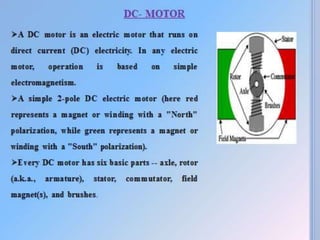
• DC Motors
• Buzzer
• LCD display module
• APR33A3 Voice module
• Speaker
BLOCK DIAGRAM
ARDUINO UNO
 Arduino is a prototype platform open source based on an easy-to-use
hardware and software. It consists of a circuit board and a ready-made
software called Arduino IDE.
Specifications:
1. MICROCONTROLLER BASED ON ATMEGA 328
2. 5V VOLTAGE
4. 14 DIGITAL I/O PINS
5. 6 ANALOG I/O PINS
5. 32KB FLASH MEMORY
6. 1KB EEPROM
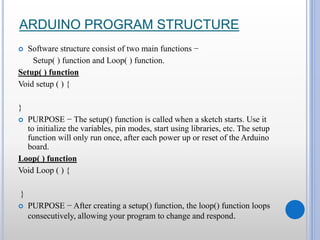
ARDUINO PROGRAM STRUCTURE
 Software structure consist of two main functions −
Setup( ) function and Loop( ) function.
Setup( ) function
Void setup ( ) {
}
 PURPOSE − The setup() function is called when a sketch starts. Use it
to initialize the variables, pin modes, start using libraries, etc. The setup
function will only run once, after each power up or reset of the Arduino
board.
Loop( ) function
Void Loop ( ) {
}
 PURPOSE − After creating a setup() function, the loop() function loops
consecutively, allowing your program to change and respond.
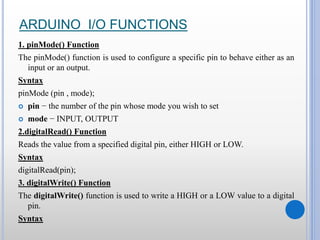
ARDUINO I/O FUNCTIONS
1. pinMode() Function
The pinMode() function is used to configure a specific pin to behave either as an
input or an output.
Syntax
pinMode (pin , mode);
 pin − the number of the pin whose mode you wish to set
 mode − INPUT, OUTPUT
2.digitalRead() Function
Reads the value from a specified digital pin, either HIGH or LOW.
Syntax
digitalRead(pin);
3. digitalWrite() Function
The digitalWrite() function is used to write a HIGH or a LOW value to a digital
pin.
Syntax
digitalWrite (pin ,value);
 pin − the number of the pin whose mode you wish to set
 value − HIGH, or LOW.
4. analogRead( ) function
By using the analogRead() function, we can read the voltage applied to
one of the pins.
Syntax
analogRead(pin);
 pin − the number of the analog input pin to read.
5. analogWrite() Function
The analogWrite() function writes an analog value to a pin.
Syntax
anlogWrite (pin ,value ) ;
 value − between 0 (always off) and 255 (always on).
IR SENSOR
 An infrared sensor emits and/or detects infrared radiation to sense its
surroundings.
 IR Transmitter: Infrared transmitter is a light emitting diode (LED)
which emits infrared radiations. Hence, they are called IR LED’s.
 Receiver: Infrared receivers detect the radiation from an IR transmitter.
 Working principle: Reflection by an object.
SIMPLE PROGRAM
int LED = 13;
int obstaclePin = 7;
int hasObstacle = HIGH;
void setup() {
pinMode(LED, OUTPUT);
pinMode(obstaclePin, INPUT);
Serial.begin(9600);
}
void loop() {
hasObstacle = digitalRead(obstaclePin);
if (hasObstacle == LOW)
{ Serial.println("Stop something is ahead!!");
digitalWrite(LED, HIGH);
}
else
{
Serial.println("Path is clear");
digitalWrite(LED, LOW); }
delay(200);
}
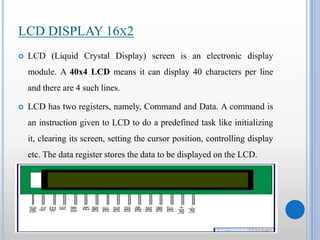
LCD DISPLAY 16X2
 LCD (Liquid Crystal Display) screen is an electronic display
module. A 40x4 LCD means it can display 40 characters per line
and there are 4 such lines.
 LCD has two registers, namely, Command and Data. A command is
an instruction given to LCD to do a predefined task like initializing
it, clearing its screen, setting the cursor position, controlling display
etc. The data register stores the data to be displayed on the LCD.
DESCRIPTION
SIMPLE PROGRAM
#include <LiquidCrystal.h>
LiquidCrystal lcd(12, 11, 5, 4, 3, 2);
void setup() {
lcd.begin(16, 2);
}
void loop() {
lcd.setCursor(0, 1);
lcd.print(“Hello World");
}
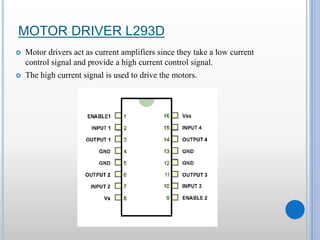
MOTOR DRIVER L293D
 Motor drivers act as current amplifiers since they take a low current
control signal and provide a high current control signal.
 The high current signal is used to drive the motors.
SIMPLE PROGRAM
const int motorPin1 = 2;
const int motorPin2 = 3;
void setup(){
pinMode(motorPin1, OUTPUT);
pinMode(motorPin2, OUTPUT);
}
void loop(){
digitalWrite(motorPin1,LOW);
digitalWrite(motorPin2,HIGH);
}
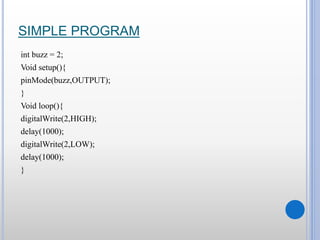
SIMPLE PROGRAM
int buzz = 2;
Void setup(){
pinMode(buzz,OUTPUT);
}
Void loop(){
digitalWrite(2,HIGH);
delay(1000);
digitalWrite(2,LOW);
delay(1000);
}
VOICE MODULE –APR33A3
 Operating Voltage Range: 3V ~ 6.5V
 Single Chip, High Quality Audio/Voice Recording & Playback Solution
 Powerful 16-Bits Digital Audio Processor. Non volatile Flash Memory
Technology No Battery Backup Required
 Powerful Power Management Unit Very Low Standby Current: 1uA
 Low Power-Down Current: 15uA
 Supports Power-Down Mode for Power Saving Built-in Audio-Recording
Microphone Amplifier
 No External OPAMP or BJT Required Easy to PCB layout
 Resolution up to 16-bits
SOFTWARE REQUIREMENTS
 ARDUINO IDE
ADVANTAGES
 The Metro Rail System has proven to be most efficient in terms of energy
consumption, space occupancy and numbers transported.
 High-capacity carriers – very high volumes of peak hour peak direction
trips.
 Eco-friendly – causes no air pollution, much less sound pollution.
 Low energy consumption – 20% per passenger km in comparison to road-
based systems.
 Greater traffic capacity – carries as much traffic as 7 lanes of bus traffic or
24 lanes of car traffic (either way).
 Very low ground space occupation – 2 meter width only for elevated rail.
 Faster – reduces journey time by 50% to 75%.
DISADVANTAGES
 Discomfort and Unfortunate: Metros can become heavily overloaded at
peak times. If the Electricity in a Metro rail goes down (even for a moment)
then a lot of people will be stuck.
 Electricity: The Metro network is power hungry. One network easily
surpasses the power requirements of many small cities and towns (This is
because the metro rail doesn’t rely on locomotive technology to create thrust
but runs using electricity hungry motors)
 Ticket Pricing: Depending on government attitudes -- they can be heavily
subsidised and thus cheap (advantage) or (as in the UK) the government
may decide to make passengers pay for the service in which case they can
get expensive (passengers will tell you that's a disadvantage).
 Loss of control: Before laying metro line, Citizen drivers always
have control over their journeys. After metro, People will have to
adjust to allowing others to control their journey. (This may not be
problem for many, but is for some).
CONCLUSION
 These days the mishaps of trains are expanding step by step. Of these
real mischances are happening because of human issues. A man can do a
misstep yet a customized processor doesn't have a shot of doing blunder.
This is the primary explanation for this venture.
 This is an exceedingly propelled innovation which is as of now utilized
as a part of created countries, for example, Japan, Germany, France and
so forth. By utilizing this auto metro prepare the timings of the prepare
will be correct and it keeps away from a great deal of burden to the
travellers.
 This venture will incredibly lessen the human mediation in the control
of trains and subsequently spares a great deal of time and cash. In this
manner the venture "AUTO METRO TRAIN TO SHUTTLE
BETWEEN STATIONS" is enormously valuable in all angles.
Arduino Based Collision Prevention Warning System

Arduino Based Collision Prevention Warning System

  • 1.
    AUTO METRO TRAIN TOSHUTTLE BETWEEN STATIONS GEETHANJALI COLLEGE OF ENGINEERING & TECHNOLOGY BATCH NO. 2 CH.MADHAV REDDY - 14R11A0474 A.MADHU VIVEKA - 14R11A0462 B.DIVYA - 14R11A0465 GUIDE-M. LAXMI
  • 2.
    ABSTRACT This project isdesigned to demonstrate the technology used in metro train movement which are used in most of the developed countries. This train is equipped with a arduino, that enables the automatic running of the train from one station to another. This proposed system is an autonomous train and it eliminates the need of any driver. In this project arduino has been used as CPU. Whenever the train arrives at the station it stops automatically, as sensed by an IR sensor. Then the door is opens automatically so that the passengers can go inside the train. The door then closes after a prescribed time set in the arduino by the program. It is also equipped with a passenger counting section, which counts the number of passengers leaving and entering the train.
  • 3.
     The doorcloses when it reaches maximum occupancy level irrespective of time allotted for the door to remain open. The passenger counts are displayed on a LCD module interfaced to the arduino. The movement of the train is controlled by a motor driver IC interfaced to the arduino. The train incorporates a buzzer to alert the passengers before closing the door and also warn them before starting.  Further the project can be enhanced by making this system more advanced by displaying the status of the train over an LCD screen. The status of the train consists of the parameters like, expected arrival and departure time etc. The voice module IC is used for the audio announcement of departure and arrival of stations.
  • 4.
    HARDWARE COMPONENTS • ArduinoUno • IR sensors • MOTOR Drivers L293D • DC Motors • Buzzer • LCD display module • APR33A3 Voice module • Speaker
  • 5.
  • 6.
    ARDUINO UNO  Arduinois a prototype platform open source based on an easy-to-use hardware and software. It consists of a circuit board and a ready-made software called Arduino IDE. Specifications: 1. MICROCONTROLLER BASED ON ATMEGA 328 2. 5V VOLTAGE 4. 14 DIGITAL I/O PINS 5. 6 ANALOG I/O PINS 5. 32KB FLASH MEMORY 6. 1KB EEPROM
  • 8.
    ARDUINO PROGRAM STRUCTURE Software structure consist of two main functions − Setup( ) function and Loop( ) function. Setup( ) function Void setup ( ) { }  PURPOSE − The setup() function is called when a sketch starts. Use it to initialize the variables, pin modes, start using libraries, etc. The setup function will only run once, after each power up or reset of the Arduino board. Loop( ) function Void Loop ( ) { }  PURPOSE − After creating a setup() function, the loop() function loops consecutively, allowing your program to change and respond.
  • 9.
    ARDUINO I/O FUNCTIONS 1.pinMode() Function The pinMode() function is used to configure a specific pin to behave either as an input or an output. Syntax pinMode (pin , mode);  pin − the number of the pin whose mode you wish to set  mode − INPUT, OUTPUT 2.digitalRead() Function Reads the value from a specified digital pin, either HIGH or LOW. Syntax digitalRead(pin); 3. digitalWrite() Function The digitalWrite() function is used to write a HIGH or a LOW value to a digital pin. Syntax
  • 10.
    digitalWrite (pin ,value); pin − the number of the pin whose mode you wish to set  value − HIGH, or LOW. 4. analogRead( ) function By using the analogRead() function, we can read the voltage applied to one of the pins. Syntax analogRead(pin);  pin − the number of the analog input pin to read. 5. analogWrite() Function The analogWrite() function writes an analog value to a pin. Syntax anlogWrite (pin ,value ) ;  value − between 0 (always off) and 255 (always on).
  • 11.
    IR SENSOR  Aninfrared sensor emits and/or detects infrared radiation to sense its surroundings.  IR Transmitter: Infrared transmitter is a light emitting diode (LED) which emits infrared radiations. Hence, they are called IR LED’s.  Receiver: Infrared receivers detect the radiation from an IR transmitter.  Working principle: Reflection by an object.
  • 13.
    SIMPLE PROGRAM int LED= 13; int obstaclePin = 7; int hasObstacle = HIGH; void setup() { pinMode(LED, OUTPUT); pinMode(obstaclePin, INPUT); Serial.begin(9600); } void loop() { hasObstacle = digitalRead(obstaclePin); if (hasObstacle == LOW) { Serial.println("Stop something is ahead!!"); digitalWrite(LED, HIGH); } else { Serial.println("Path is clear"); digitalWrite(LED, LOW); } delay(200); }
  • 14.
    LCD DISPLAY 16X2 LCD (Liquid Crystal Display) screen is an electronic display module. A 40x4 LCD means it can display 40 characters per line and there are 4 such lines.  LCD has two registers, namely, Command and Data. A command is an instruction given to LCD to do a predefined task like initializing it, clearing its screen, setting the cursor position, controlling display etc. The data register stores the data to be displayed on the LCD.
  • 15.
  • 16.
    SIMPLE PROGRAM #include <LiquidCrystal.h> LiquidCrystallcd(12, 11, 5, 4, 3, 2); void setup() { lcd.begin(16, 2); } void loop() { lcd.setCursor(0, 1); lcd.print(“Hello World"); }
  • 18.
    MOTOR DRIVER L293D Motor drivers act as current amplifiers since they take a low current control signal and provide a high current control signal.  The high current signal is used to drive the motors.
  • 19.
    SIMPLE PROGRAM const intmotorPin1 = 2; const int motorPin2 = 3; void setup(){ pinMode(motorPin1, OUTPUT); pinMode(motorPin2, OUTPUT); } void loop(){ digitalWrite(motorPin1,LOW); digitalWrite(motorPin2,HIGH); }
  • 21.
    SIMPLE PROGRAM int buzz= 2; Void setup(){ pinMode(buzz,OUTPUT); } Void loop(){ digitalWrite(2,HIGH); delay(1000); digitalWrite(2,LOW); delay(1000); }
  • 22.
    VOICE MODULE –APR33A3 Operating Voltage Range: 3V ~ 6.5V  Single Chip, High Quality Audio/Voice Recording & Playback Solution  Powerful 16-Bits Digital Audio Processor. Non volatile Flash Memory Technology No Battery Backup Required  Powerful Power Management Unit Very Low Standby Current: 1uA  Low Power-Down Current: 15uA  Supports Power-Down Mode for Power Saving Built-in Audio-Recording Microphone Amplifier  No External OPAMP or BJT Required Easy to PCB layout  Resolution up to 16-bits
  • 23.
  • 24.
    ADVANTAGES  The MetroRail System has proven to be most efficient in terms of energy consumption, space occupancy and numbers transported.  High-capacity carriers – very high volumes of peak hour peak direction trips.  Eco-friendly – causes no air pollution, much less sound pollution.  Low energy consumption – 20% per passenger km in comparison to road- based systems.  Greater traffic capacity – carries as much traffic as 7 lanes of bus traffic or 24 lanes of car traffic (either way).  Very low ground space occupation – 2 meter width only for elevated rail.  Faster – reduces journey time by 50% to 75%.
  • 25.
    DISADVANTAGES  Discomfort andUnfortunate: Metros can become heavily overloaded at peak times. If the Electricity in a Metro rail goes down (even for a moment) then a lot of people will be stuck.  Electricity: The Metro network is power hungry. One network easily surpasses the power requirements of many small cities and towns (This is because the metro rail doesn’t rely on locomotive technology to create thrust but runs using electricity hungry motors)  Ticket Pricing: Depending on government attitudes -- they can be heavily subsidised and thus cheap (advantage) or (as in the UK) the government may decide to make passengers pay for the service in which case they can get expensive (passengers will tell you that's a disadvantage).
  • 26.
     Loss ofcontrol: Before laying metro line, Citizen drivers always have control over their journeys. After metro, People will have to adjust to allowing others to control their journey. (This may not be problem for many, but is for some).
  • 27.
    CONCLUSION  These daysthe mishaps of trains are expanding step by step. Of these real mischances are happening because of human issues. A man can do a misstep yet a customized processor doesn't have a shot of doing blunder. This is the primary explanation for this venture.  This is an exceedingly propelled innovation which is as of now utilized as a part of created countries, for example, Japan, Germany, France and so forth. By utilizing this auto metro prepare the timings of the prepare will be correct and it keeps away from a great deal of burden to the travellers.  This venture will incredibly lessen the human mediation in the control of trains and subsequently spares a great deal of time and cash. In this manner the venture "AUTO METRO TRAIN TO SHUTTLE BETWEEN STATIONS" is enormously valuable in all angles.