What Is Apache Ranger ?
● For data security across the Hadoop platform
● A framework to enable, monitor and manage security
● Supports security in
– A multi tenant data lake
– Hadoop eco system
● Open source / Apache 2.0 license
● Administration of security policies
● Monitoring of user access
● Offers central UI and REST API's
What Is Apache Ranger ?
● Manage policies for resource access
– File, folder, database, table, column
● Policies for users and groups
● Has audit tracking
● Enables policy analytics
● Offers decentralizing data ownership
Ranger Projects
● Which projects does Ranger support ?
– Apache Hadoop
– Apache Hive
– Apache HBase
– Apache Storm
– Apache Knox
– Apache Solr
– Apache Kafka
– YARN
– ATLAS
● No additional OS level process to manage
Ranger Enforcement
● Ranger enforces policy with Java plugins
● Which run as part of the same process i.e.
– Namenode (HDFS)
– Hive2Server(Hive)
– HBase server (Hbase)
– Nimbus server (Storm)
– Knox server (Knox)
Ranger User Interface
● Ranger has a central user interface
● This interface has tabs for
– Access
– Admin
– Log Sessions
– Plugins
– Plugin Status
– User Sync
Ranger UI Access Tab
● Provides service activity details
● For policies that have Audit enabled - see
– Policy id, time, user, service, resource, access, result,
– ACL, ip, cluster
● Search on
– User, cluster, time, service, result, ip, access, acl
● Filter audit data as required to monitor activity
Ranger UI Admin Tab
● Provides service administration details
● Shows administration details like
– Operation, audit type, user, date, action, session id
● Search on
– Audit type, user, start date, end date, action, session id
● Filter administration data to monitor
– Actions like create, update, delete, password change
Ranger UI Login Sessions Tab
● Provides service login details
● Shows login details like
– Session id, login id, result, login type, ip, user agent, time
● Search on
– Login id, session id, start date, end date, login type, ip,
– User agent, result
● Filter login data to monitor sessions
● Login type is
– The mode through which the user tries to login
Ranger UI Plugin Tab
● Provides plugin security agent details
● Shows plugin details like
– Date, service name, plugin id, ip, http response code,
– Status
● Search on
– Plugin ip, plugin id, http response code, start / end date
– Service name, cluster name
● The service name is the Hadoop component i.e.
– HDFS, Hive, HBase
Ranger UI Plugin Status Tab
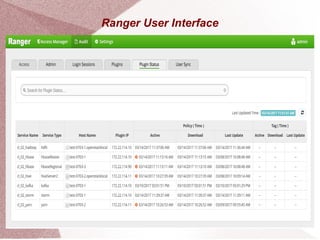
● Provides plugin security agent status details
● Shows plugin status details like
– Service name, service type, hostname, plugin ip, active date
– Download date, update date, tags
● Search on
– Hostname, plugin ip, service name, service type
● The service name is the Hadoop component i.e.
– HDFS, Hive, HBase
Ranger UI User Sync Tab
● Provides user synchronisation activity details
● Provides a compliance audit trail
● Data from File, LDAP/AD or OS
● Filter on
– User name, start / end date, sync source
Ranger Install OS / RDBMS
● The install guide shows OS support for
– RHEL / CentOS
– Ubuntu
– SUSE
– Debian
● Ranger supports the following RDBMS
– MySQL
– Oracle
– PostgreSQL
– MS SQL
● For storing policy, user, group, audit log information
Ranger Pre Requisites
● What does Ranger need prior to install ?
– JDK
– LDAP/AD for user / AD group synchronisation
– RDBMS – see previous page
– Kerberos
● Ranger install creates the components
– Admin, UserSync, Key Management Service
● Plugins for Ranger services can then be enabled from UI
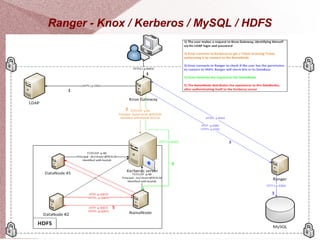
Ranger - Knox / Kerberos / MySQL / HDFS
Available Books
● See “Big Data Made Easy”
– Apress Jan 2015
●
See “Mastering Apache Spark”
– Packt Oct 2015
●
See “Complete Guide to Open Source Big Data Stack
– “Apress Jan 2018”
● Find the author on Amazon
– www.amazon.com/Michael-Frampton/e/B00NIQDOOM/
●
Connect on LinkedIn
– www.linkedin.com/in/mike-frampton-38563020
Connect
● Feel free to connect on LinkedIn
– www.linkedin.com/in/mike-frampton-38563020
● See my open source blog at
– open-source-systems.blogspot.com/
● I am always interested in
– New technology
– Opportunities
– Technology based issues
– Big data integration

Apache Ranger

  • 1.
    What Is ApacheRanger ? ● For data security across the Hadoop platform ● A framework to enable, monitor and manage security ● Supports security in – A multi tenant data lake – Hadoop eco system ● Open source / Apache 2.0 license ● Administration of security policies ● Monitoring of user access ● Offers central UI and REST API's
  • 2.
    What Is ApacheRanger ? ● Manage policies for resource access – File, folder, database, table, column ● Policies for users and groups ● Has audit tracking ● Enables policy analytics ● Offers decentralizing data ownership
  • 3.
    Ranger Projects ● Whichprojects does Ranger support ? – Apache Hadoop – Apache Hive – Apache HBase – Apache Storm – Apache Knox – Apache Solr – Apache Kafka – YARN – ATLAS ● No additional OS level process to manage
  • 4.
    Ranger Enforcement ● Rangerenforces policy with Java plugins ● Which run as part of the same process i.e. – Namenode (HDFS) – Hive2Server(Hive) – HBase server (Hbase) – Nimbus server (Storm) – Knox server (Knox)
  • 5.
  • 6.
    Ranger User Interface ●Ranger has a central user interface ● This interface has tabs for – Access – Admin – Log Sessions – Plugins – Plugin Status – User Sync
  • 7.
    Ranger UI AccessTab ● Provides service activity details ● For policies that have Audit enabled - see – Policy id, time, user, service, resource, access, result, – ACL, ip, cluster ● Search on – User, cluster, time, service, result, ip, access, acl ● Filter audit data as required to monitor activity
  • 8.
    Ranger UI AdminTab ● Provides service administration details ● Shows administration details like – Operation, audit type, user, date, action, session id ● Search on – Audit type, user, start date, end date, action, session id ● Filter administration data to monitor – Actions like create, update, delete, password change
  • 9.
    Ranger UI LoginSessions Tab ● Provides service login details ● Shows login details like – Session id, login id, result, login type, ip, user agent, time ● Search on – Login id, session id, start date, end date, login type, ip, – User agent, result ● Filter login data to monitor sessions ● Login type is – The mode through which the user tries to login
  • 10.
    Ranger UI PluginTab ● Provides plugin security agent details ● Shows plugin details like – Date, service name, plugin id, ip, http response code, – Status ● Search on – Plugin ip, plugin id, http response code, start / end date – Service name, cluster name ● The service name is the Hadoop component i.e. – HDFS, Hive, HBase
  • 11.
    Ranger UI PluginStatus Tab ● Provides plugin security agent status details ● Shows plugin status details like – Service name, service type, hostname, plugin ip, active date – Download date, update date, tags ● Search on – Hostname, plugin ip, service name, service type ● The service name is the Hadoop component i.e. – HDFS, Hive, HBase
  • 12.
    Ranger UI UserSync Tab ● Provides user synchronisation activity details ● Provides a compliance audit trail ● Data from File, LDAP/AD or OS ● Filter on – User name, start / end date, sync source
  • 13.
    Ranger Install OS/ RDBMS ● The install guide shows OS support for – RHEL / CentOS – Ubuntu – SUSE – Debian ● Ranger supports the following RDBMS – MySQL – Oracle – PostgreSQL – MS SQL ● For storing policy, user, group, audit log information
  • 14.
    Ranger Pre Requisites ●What does Ranger need prior to install ? – JDK – LDAP/AD for user / AD group synchronisation – RDBMS – see previous page – Kerberos ● Ranger install creates the components – Admin, UserSync, Key Management Service ● Plugins for Ranger services can then be enabled from UI
  • 15.
    Ranger - Knox/ Kerberos / MySQL / HDFS
  • 16.
    Available Books ● See“Big Data Made Easy” – Apress Jan 2015 ● See “Mastering Apache Spark” – Packt Oct 2015 ● See “Complete Guide to Open Source Big Data Stack – “Apress Jan 2018” ● Find the author on Amazon – www.amazon.com/Michael-Frampton/e/B00NIQDOOM/ ● Connect on LinkedIn – www.linkedin.com/in/mike-frampton-38563020
  • 17.
    Connect ● Feel freeto connect on LinkedIn – www.linkedin.com/in/mike-frampton-38563020 ● See my open source blog at – open-source-systems.blogspot.com/ ● I am always interested in – New technology – Opportunities – Technology based issues – Big data integration