End-to-End Security and Auditing in a
Big-Data-as-a-Service (BDaaS) Deployment
Nanda Vijaydev - BlueData
Abhiraj Butala - BlueData
“A mechanism for the delivery of statistical analysis tools and
information that helps organizations understand and use insights
gained from large information sets in order to gain a competitive
advantage.”
On-Demand, Self-Service, Elastic
Big Data Infrastructure, Applications,
Analytics
Source: www.semantikoz.com/blog/big-data-as-a-service-definition-classification
Big-Data-as-a-Service (BDaaS)
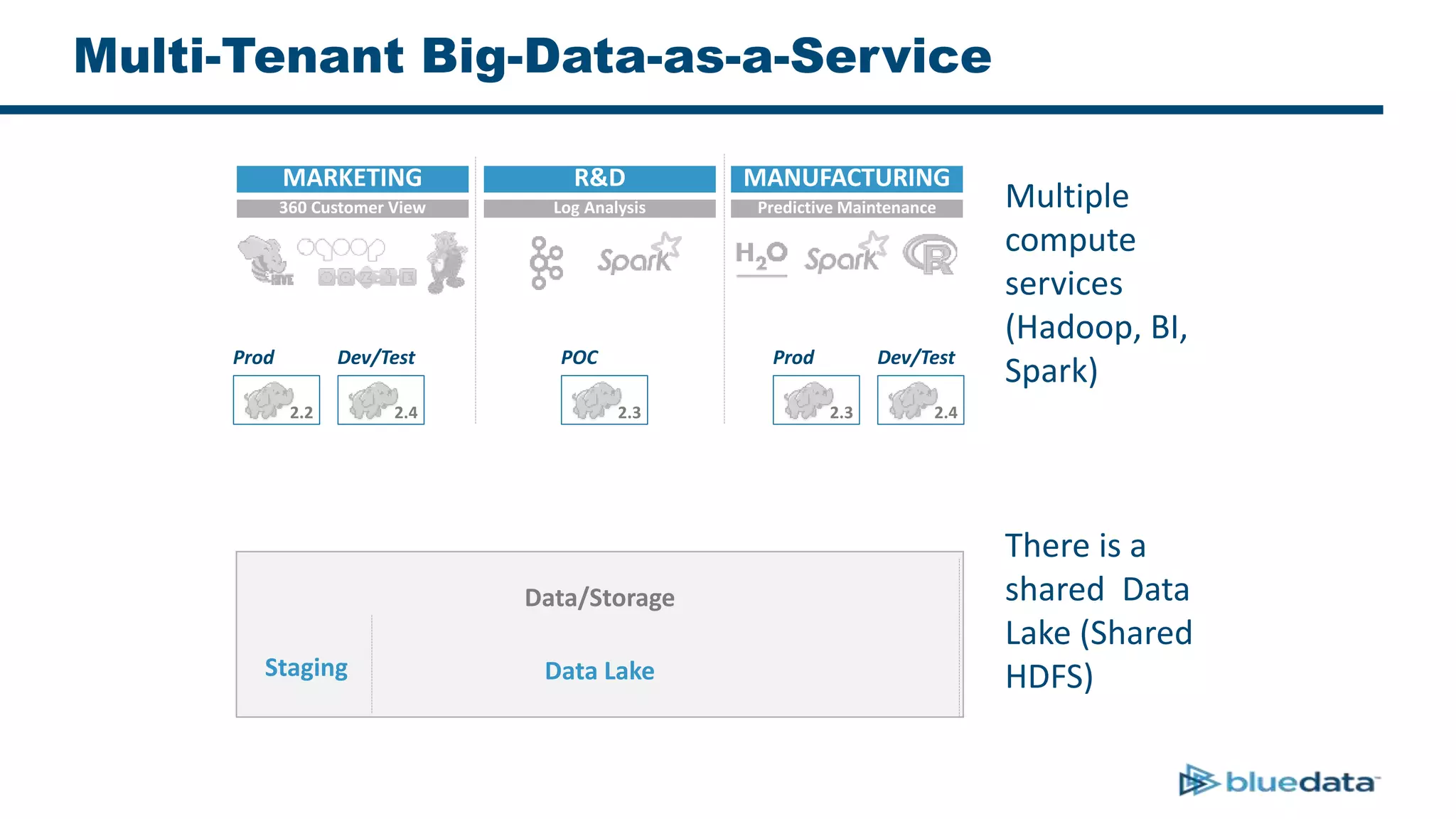
Multi-Tenant Big-Data-as-a-Service
Data/Storage
Prod
2.2
Dev/Test
2.4
POC
2.3
Prod
2.3
Dev/Test
2.4
MARKETING R&D MANUFACTURING
360 Customer View Log Analysis Predictive Maintenance
Data LakeStaging
Multiple
compute
services
(Hadoop, BI,
Spark)
There is a
shared Data
Lake (Shared
HDFS)
Why BDaaS? – Compute Side Of The Story
• Set of applications that interact with
Hadoop keeps growing
• Various versions of the same app/distro
run in parallel
• Enterprises have need to scale compute
up and down based on usage
• A model similar to Amazon AWS with S3
as storage and applications on EC2
Why BDaaS? – Data Side Of The Story
• Production cluster access takes time and
is generally restricted
• Staging clusters may not have all the data
• Data exists on other storage systems such
as NFS Isilon is common
• Users also want to upload arbitrary files
for analysis
Hadoop – A Collection Of Services
Hadoop is a collection of storage and compute services such as HDFS, HBase,
Hive, Yarn, Solr, Kafka
Security In Hadoop
• Authenticate user into Hadoop ecosystem
– Each service has its own integration with LDAP/AD for
authentication
• Authorize and limit their actions to selected services.
Authorization is granted separately for each service.
Example:
– Folder “/user/customer” in HDFS has ‘r-x’ to user ‘alice’, and ‘-
wx’ to user ‘bob’
– Enable column level access to a Hive Table. “Customer.Name”
& “Customer.PhoneNumber” is only accessible by some users
and groups
Ranger – A Pluggable Security Framework
• Ranger works with a common user DB (LDAP/AD) for authentication
• Provides a plug-in for individual Hadoop services to enable
authorization
• Allows users to define policies in a central location, using WEB UI or
APIs
• Users can define their own plug-in for a custom service and manage
them centrally via Ranger Admin
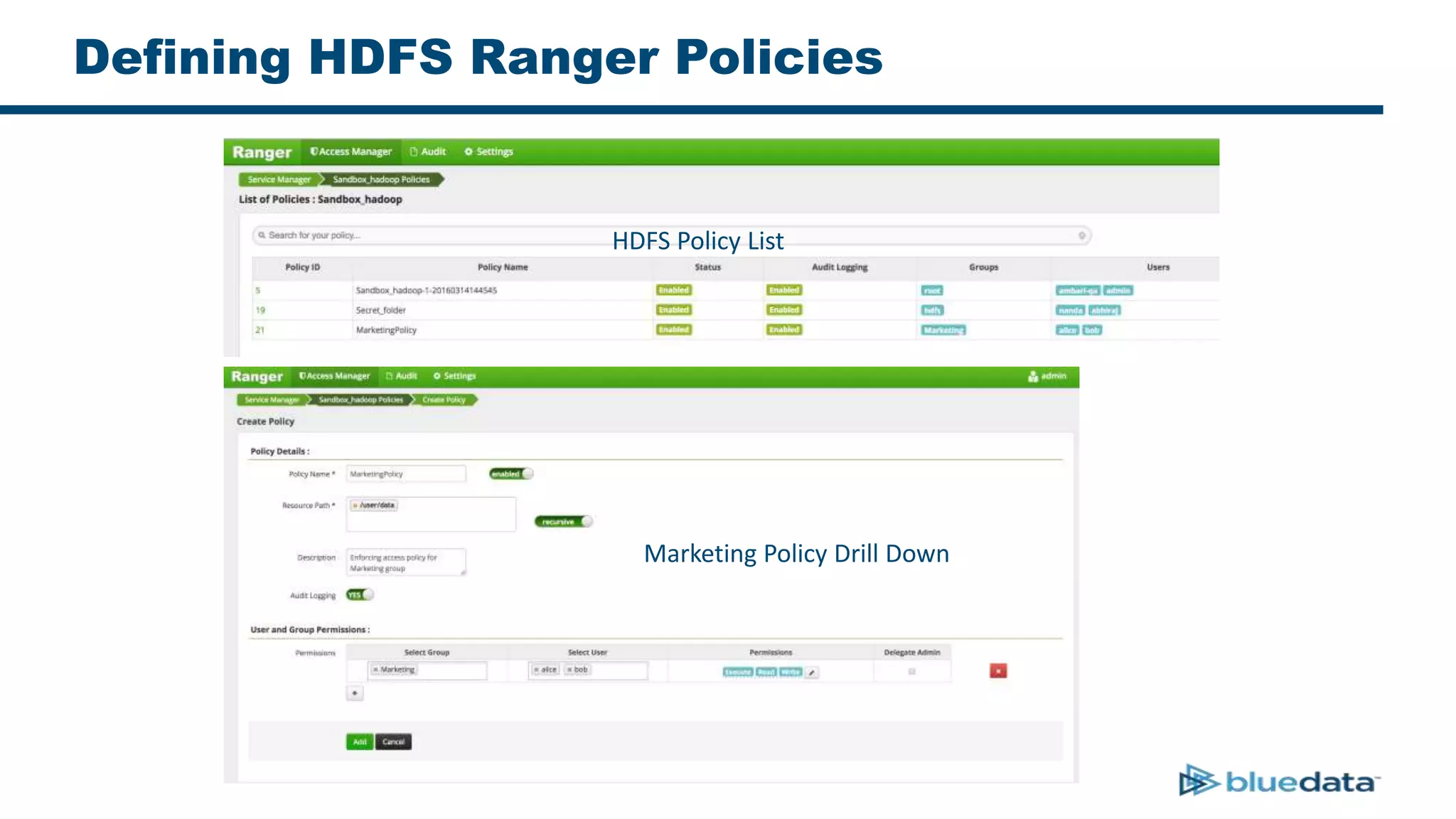
Defining HDFS Ranger Policies
HDFS Policy List
Marketing Policy Drill Down
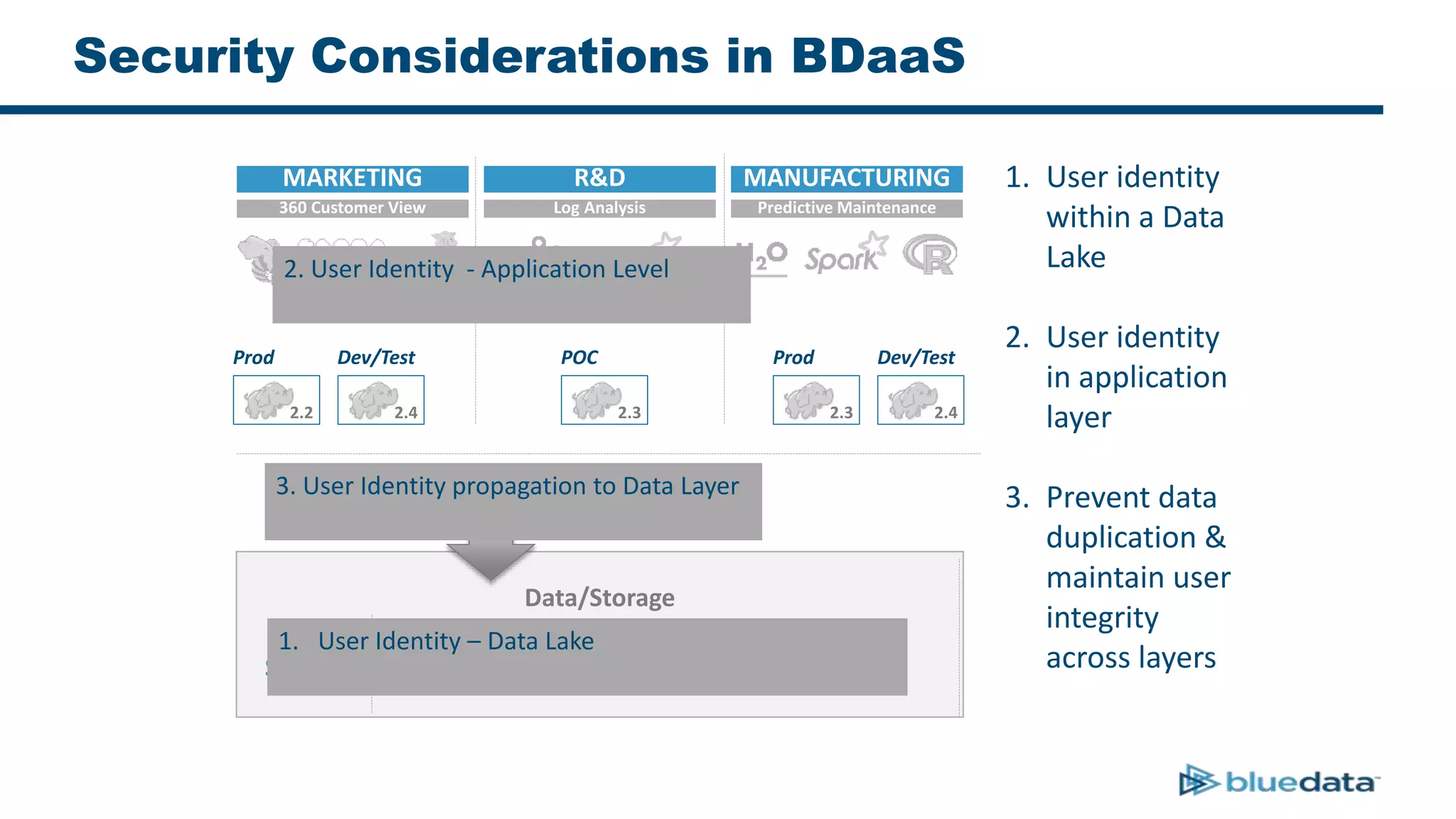
Security Considerations in BDaaS
Data/Storage
Prod
2.2
Dev/Test
2.4
POC
2.3
Prod
2.3
Dev/Test
2.4
MARKETING R&D MANUFACTURING
360 Customer View Log Analysis Predictive Maintenance
Data LakeStaging
1. User Identity – Data Lake
2. User Identity - Application Level
3. User Identity propagation to Data Layer
1. User identity
within a Data
Lake
2. User identity
in application
layer
3. Prevent data
duplication &
maintain user
integrity
across layers
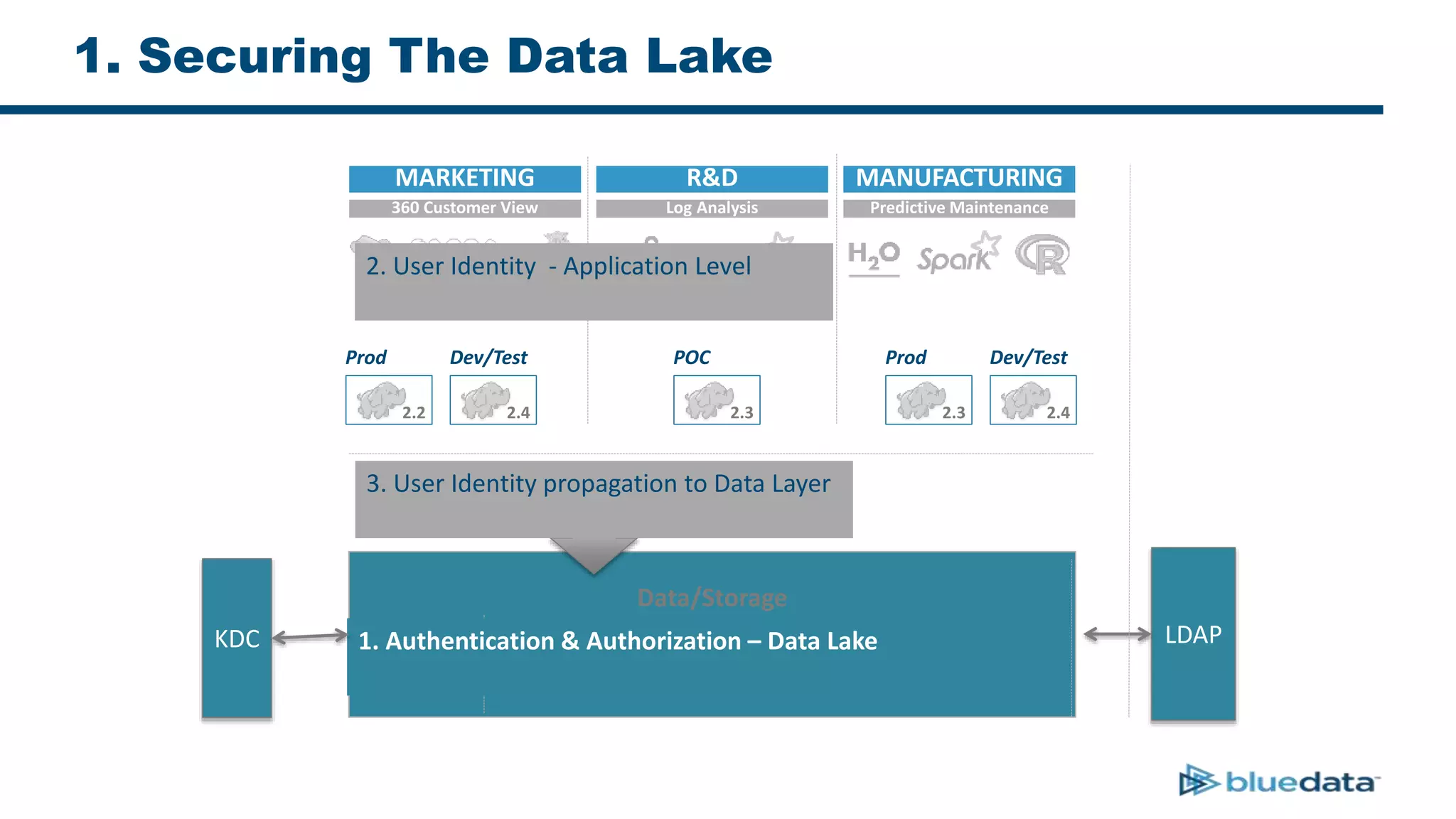
1. Securing The Data Lake
LDAPKDC
Data/Storage
Prod
2.2
Dev/Test
2.4
POC
2.3
Prod
2.3
Dev/Test
2.4
MARKETING R&D MANUFACTURING
360 Customer View Log Analysis Predictive Maintenance
Data LakeStaging
1. Authentication & Authorization – Data Lake
2. User Identity - Application Level
3. User Identity propagation to Data Layer
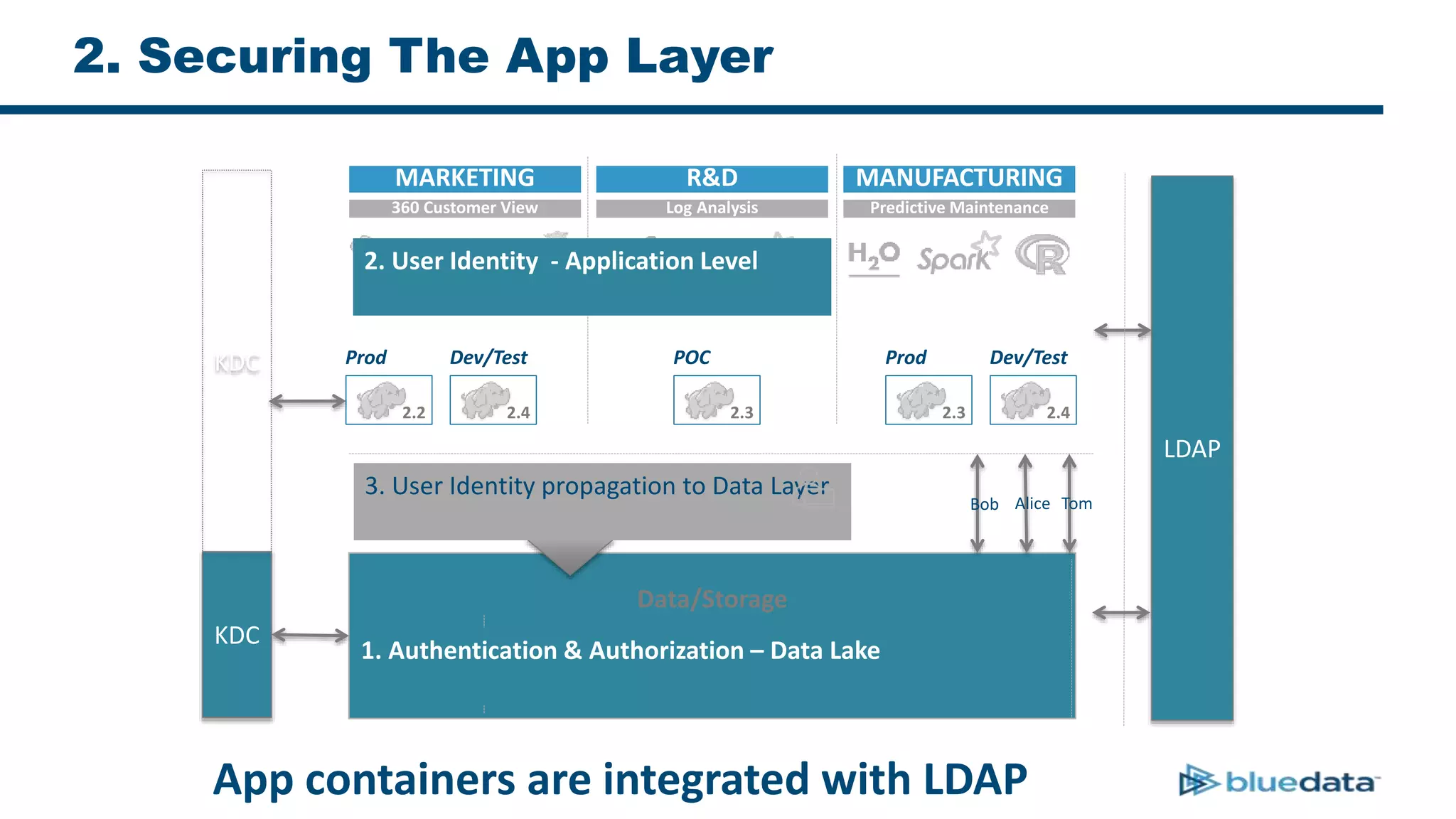
2. Securing The App Layer
LDAP
KDC
Data/Storage
Prod
2.2
Dev/Test
2.4
POC
2.3
Prod
2.3
Dev/Test
2.4
MARKETING R&D MANUFACTURING
360 Customer View Log Analysis Predictive Maintenance
Data LakeStaging
1. Authentication & Authorization – Data Lake
2. User Identity - Application Level
3. User Identity propagation to Data Layer
App containers are integrated with LDAP
KDC
AliceBob Tom
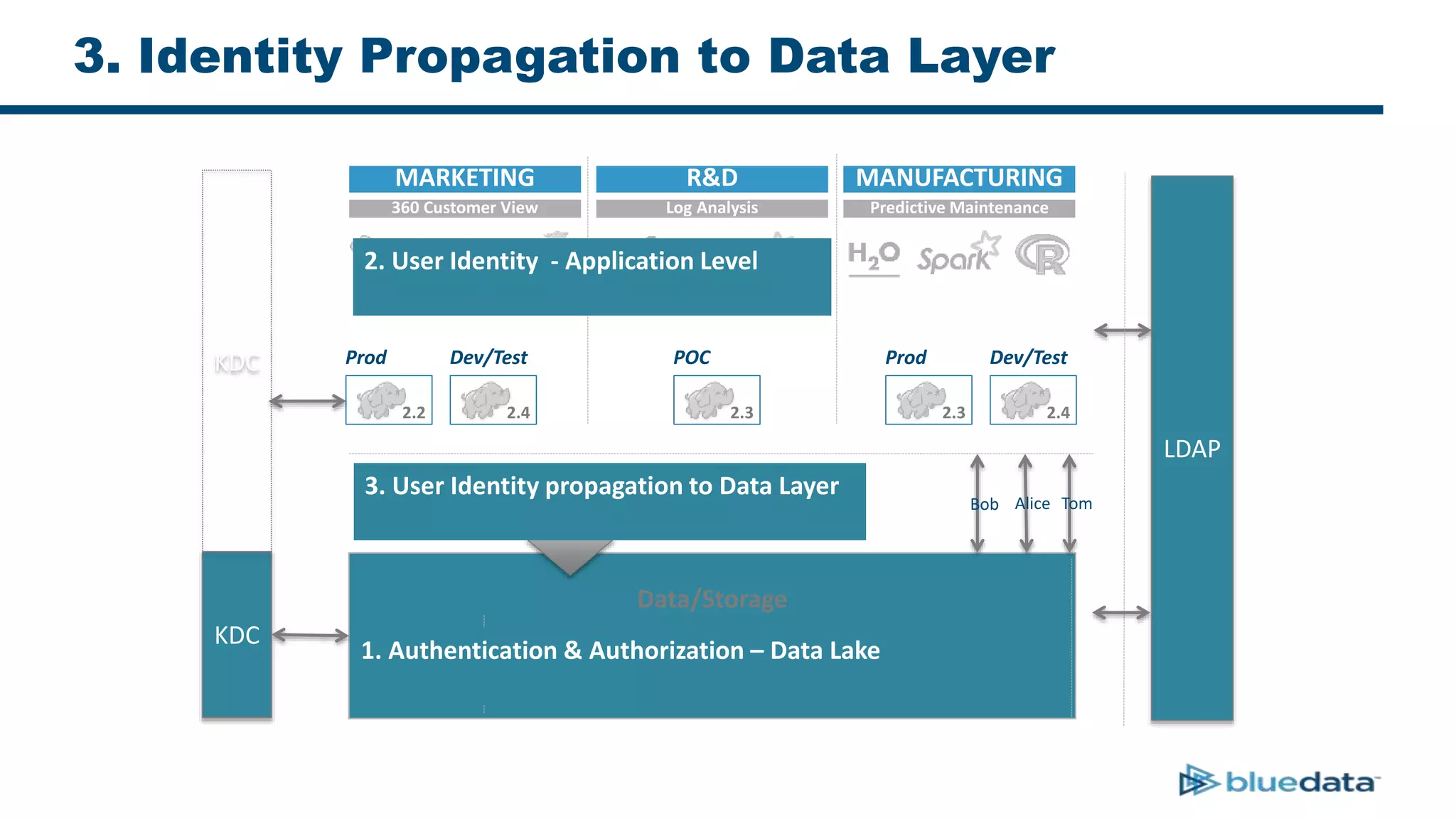
3. Identity Propagation to Data Layer
LDAP
KDC
Data/Storage
Prod
2.2
Dev/Test
2.4
POC
2.3
Prod
2.3
Dev/Test
2.4
MARKETING R&D MANUFACTURING
360 Customer View Log Analysis Predictive Maintenance
Data LakeStaging
1. Authentication & Authorization – Data Lake
2. User Identity - Application Level
3. User Identity propagation to Data Layer
KDC
AliceBob Tom
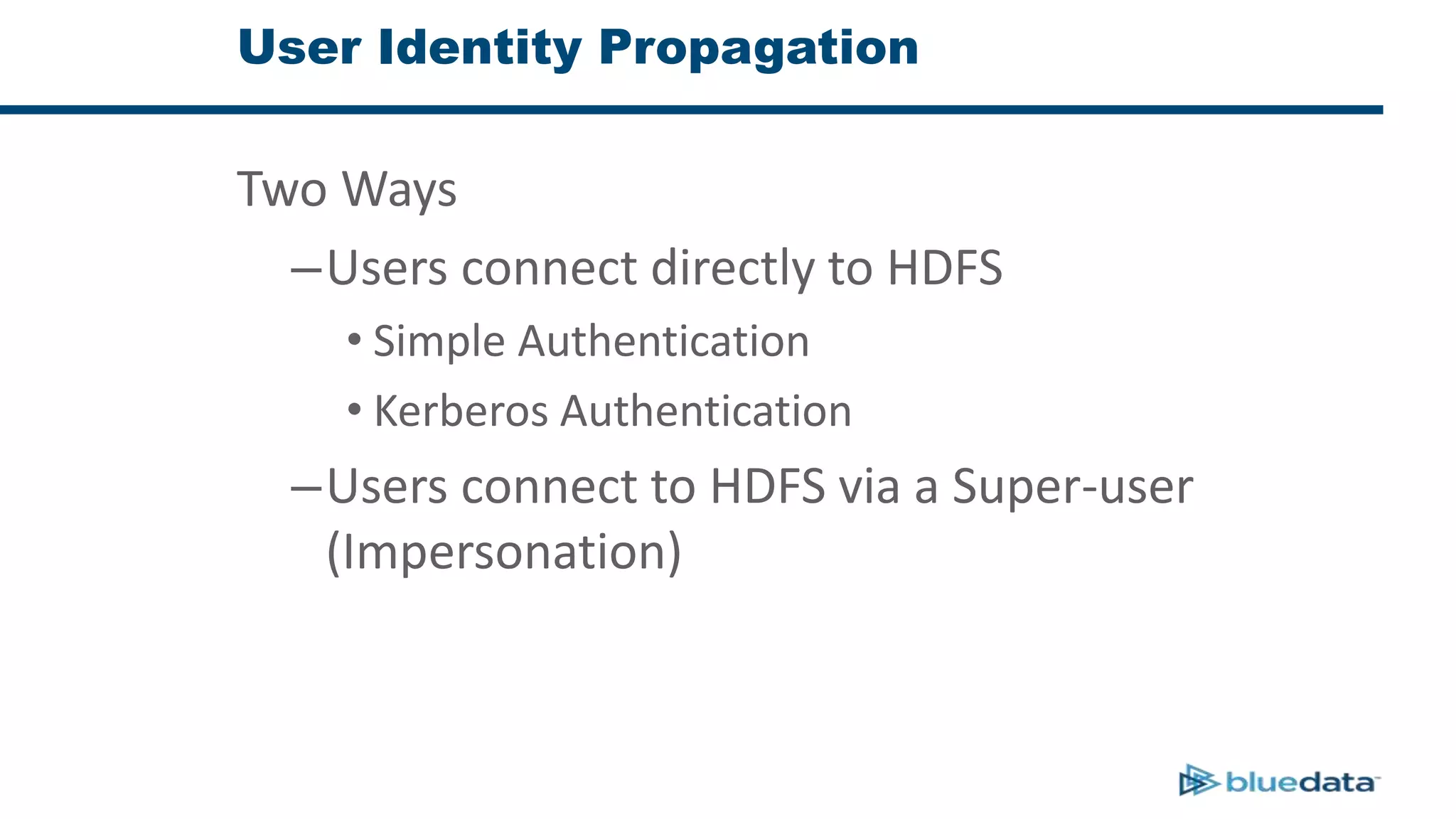
User Identity Propagation
Two Ways
–Users connect directly to HDFS
• Simple Authentication
• Kerberos Authentication
–Users connect to HDFS via a Super-user
(Impersonation)
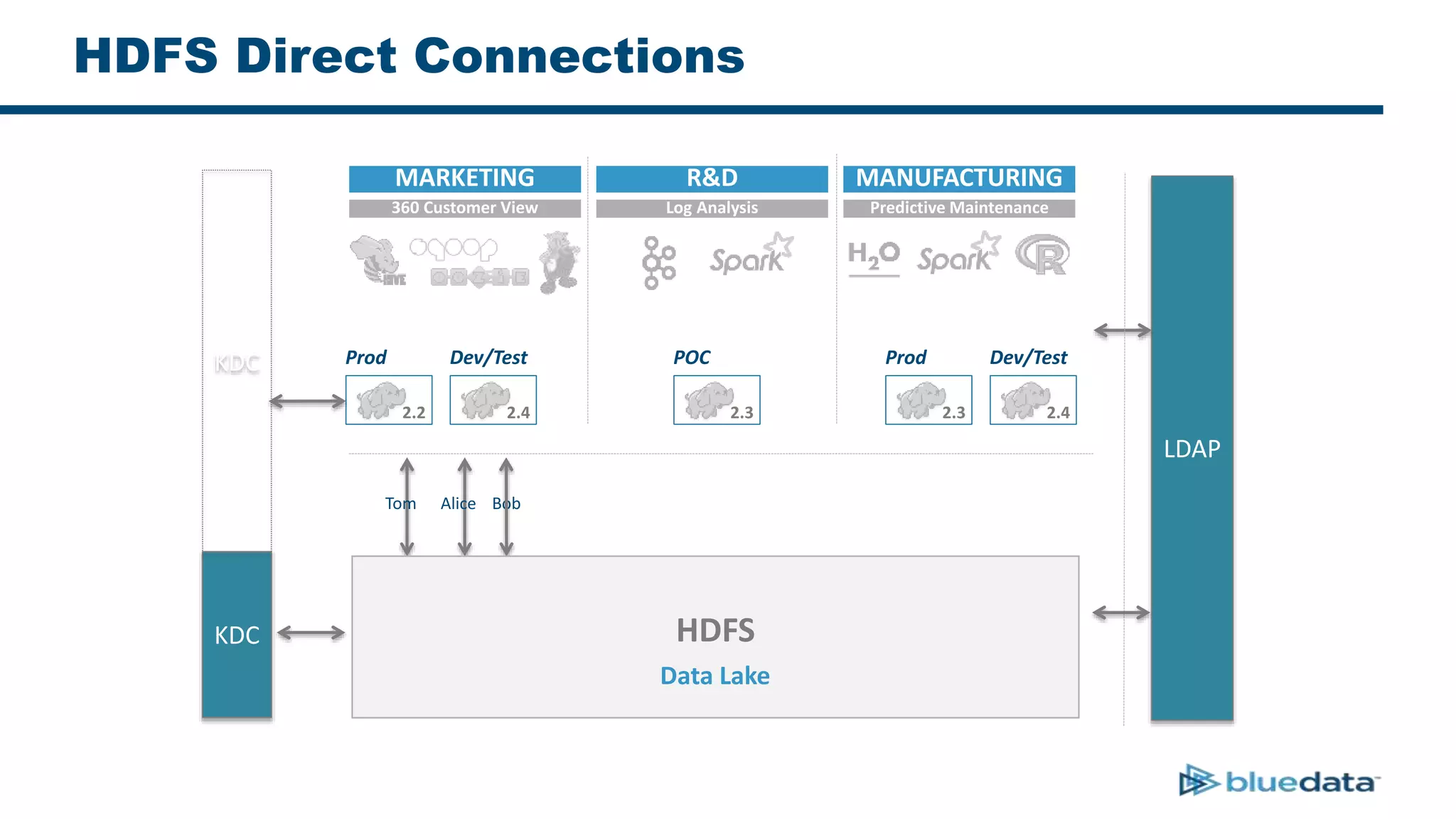
HDFS Direct Connections
LDAP
KDC
Prod
2.2
Dev/Test
2.4
POC
2.3
Prod
2.3
Dev/Test
2.4
MARKETING R&D MANUFACTURING
360 Customer View Log Analysis Predictive Maintenance
KDC
Alice BobTom
HDFS
Data Lake
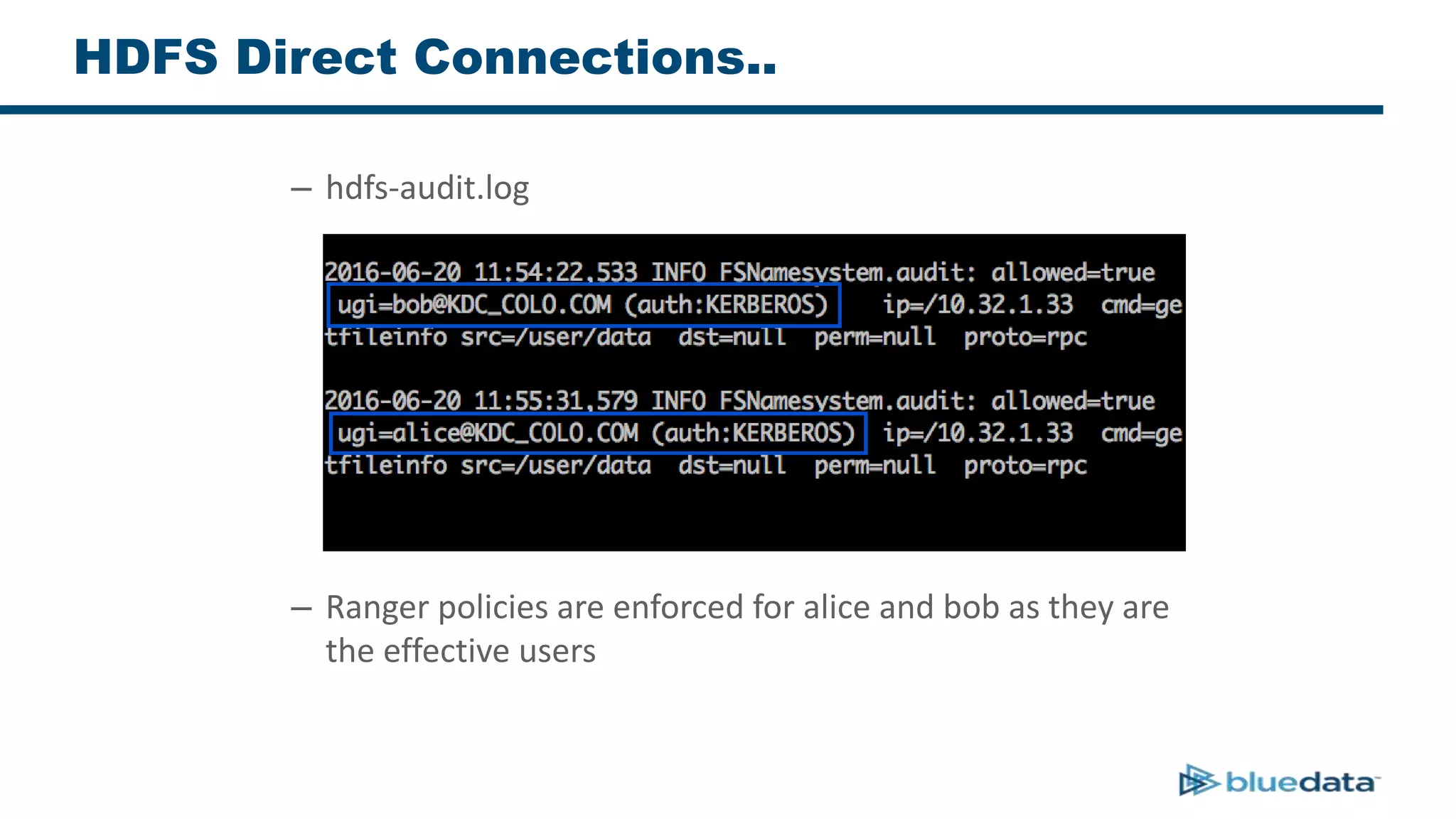
HDFS Direct Connections..
– hdfs-audit.log
– Ranger policies are enforced for alice and bob as they are
the effective users
HDFS Direct Connections..
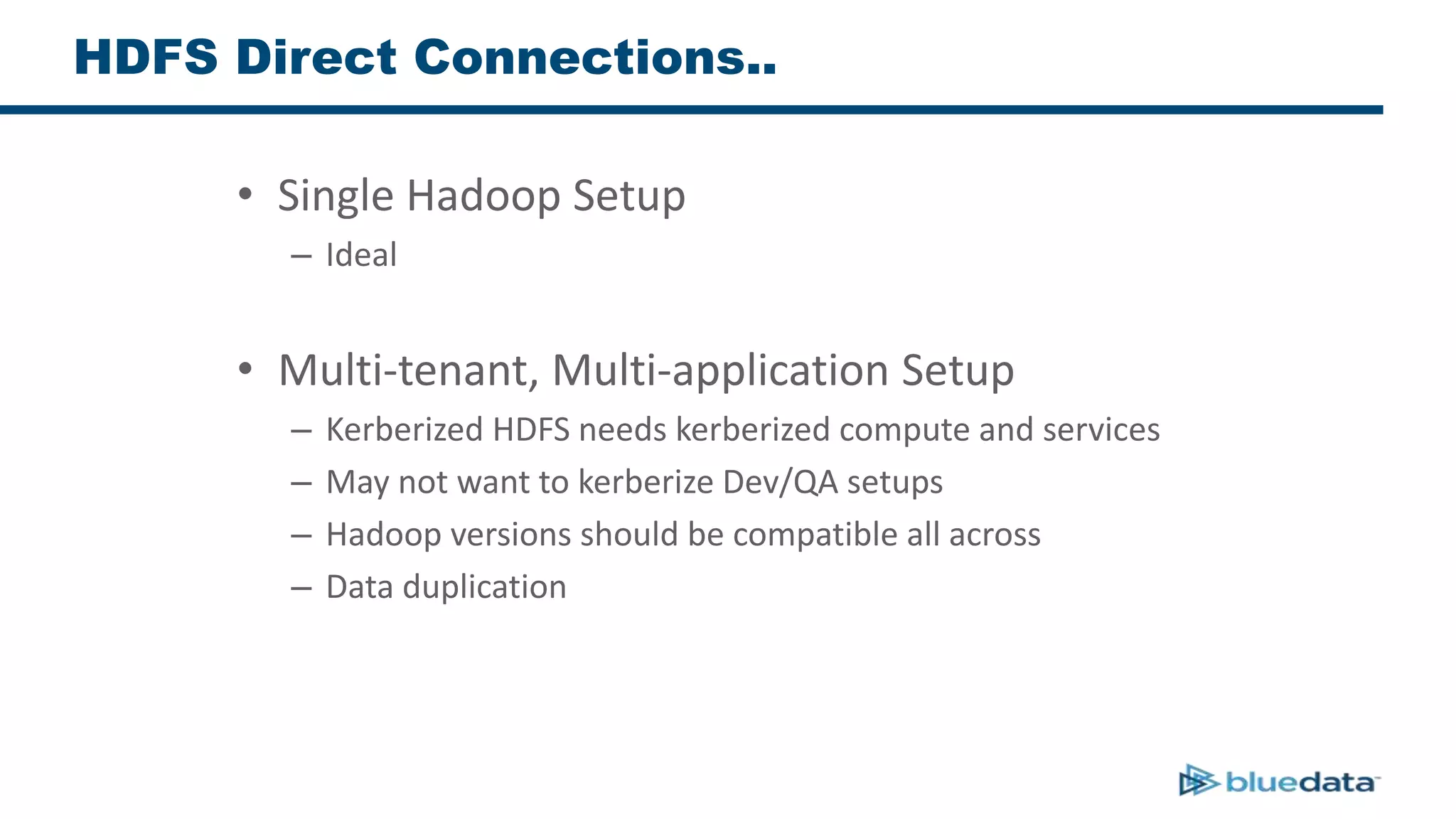
• Single Hadoop Setup
– Ideal
• Multi-tenant, Multi-application Setup
– Kerberized HDFS needs kerberized compute and services
– May not want to kerberize Dev/QA setups
– Hadoop versions should be compatible all across
– Data duplication
HDFS Super-user Connections
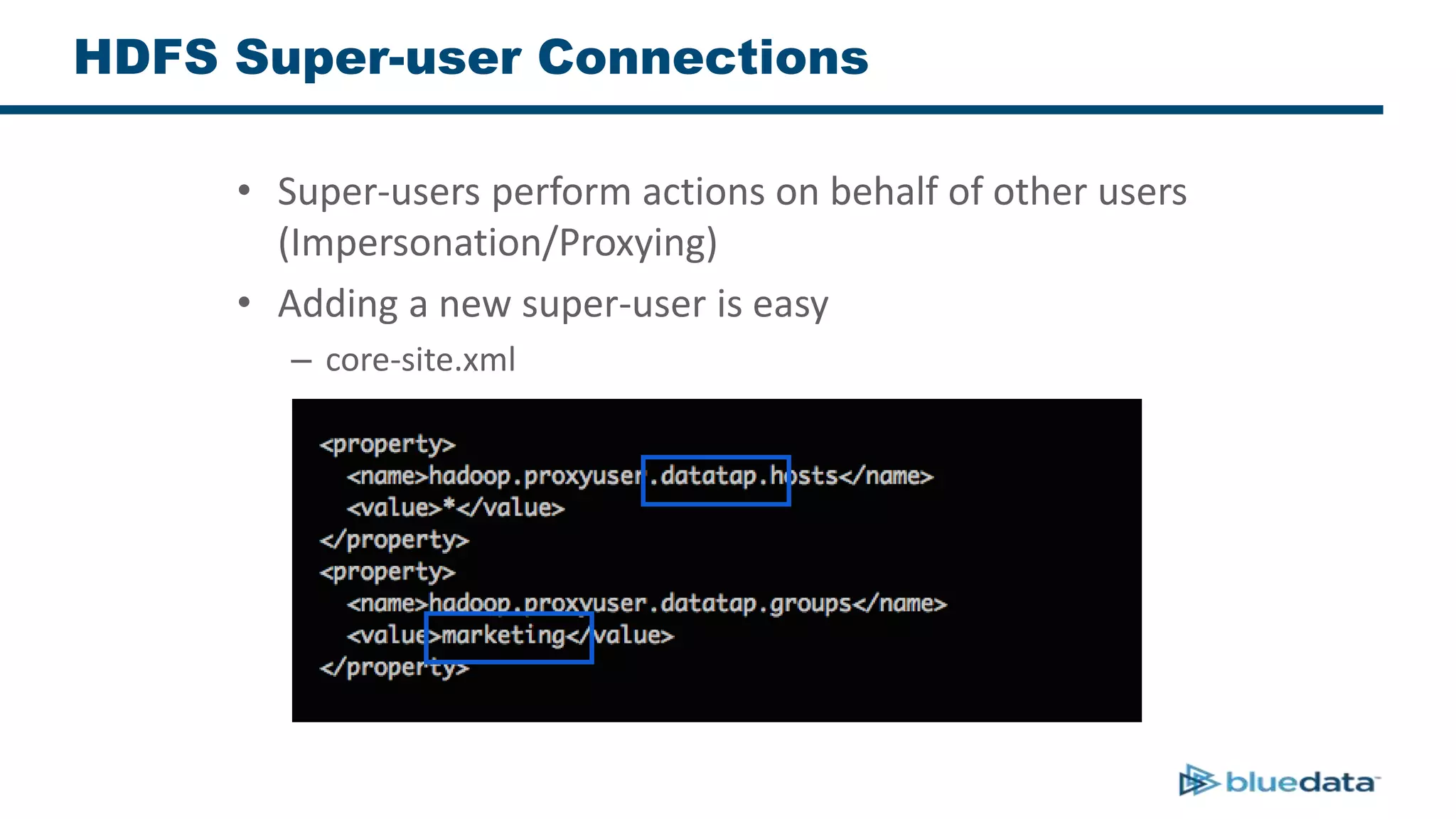
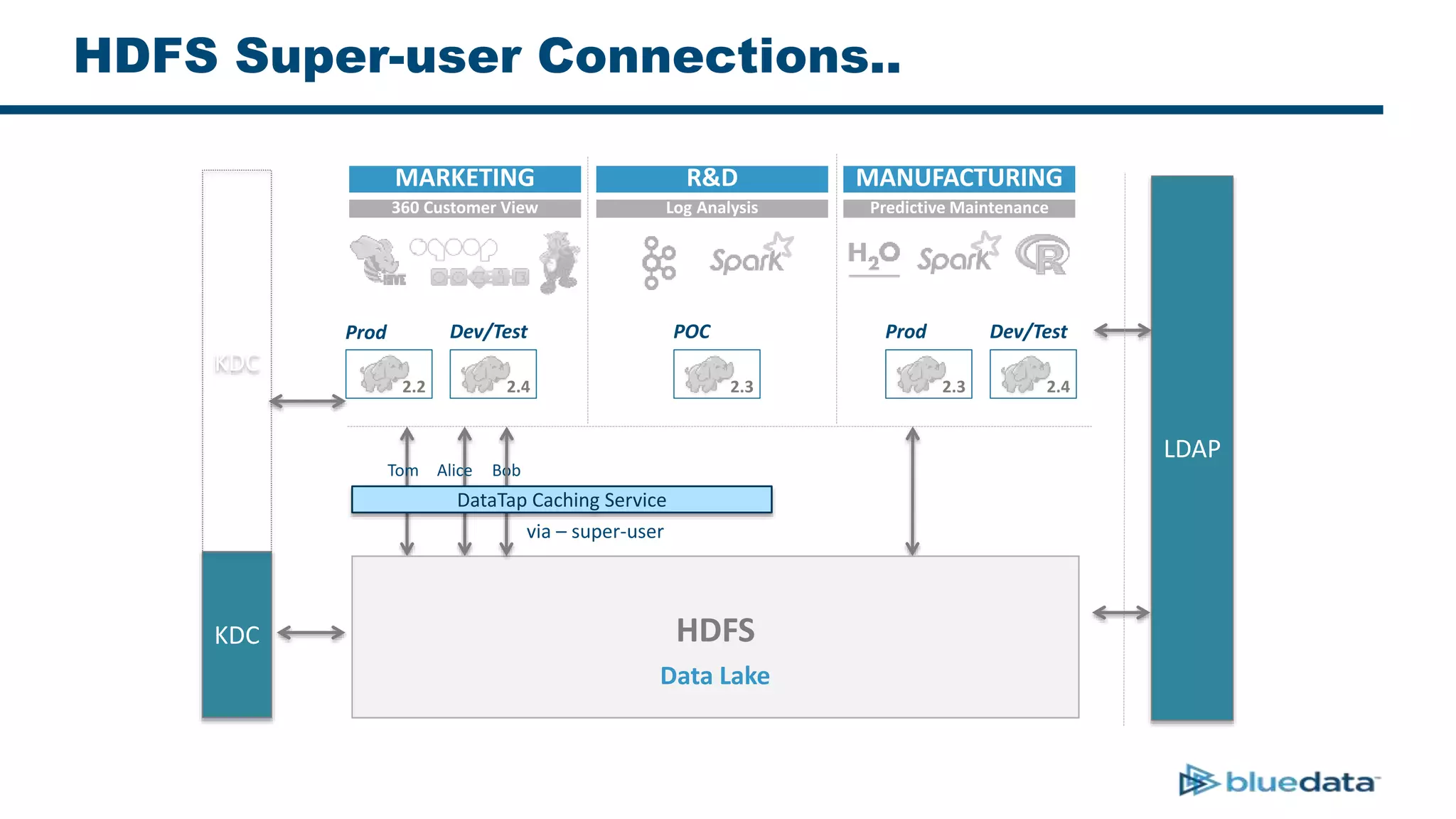
• Super-users perform actions on behalf of other users
(Impersonation/Proxying)
• Adding a new super-user is easy
– core-site.xml
HDFS Super-user Connections..
LDAP
KDC
Prod
2.2
Dev/Test
2.4
POC
2.3
Prod
2.3
Dev/Test
2.4
MARKETING R&D MANUFACTURING
360 Customer View Log Analysis Predictive Maintenance
KDC
Alice BobTom
HDFS
Data Lake
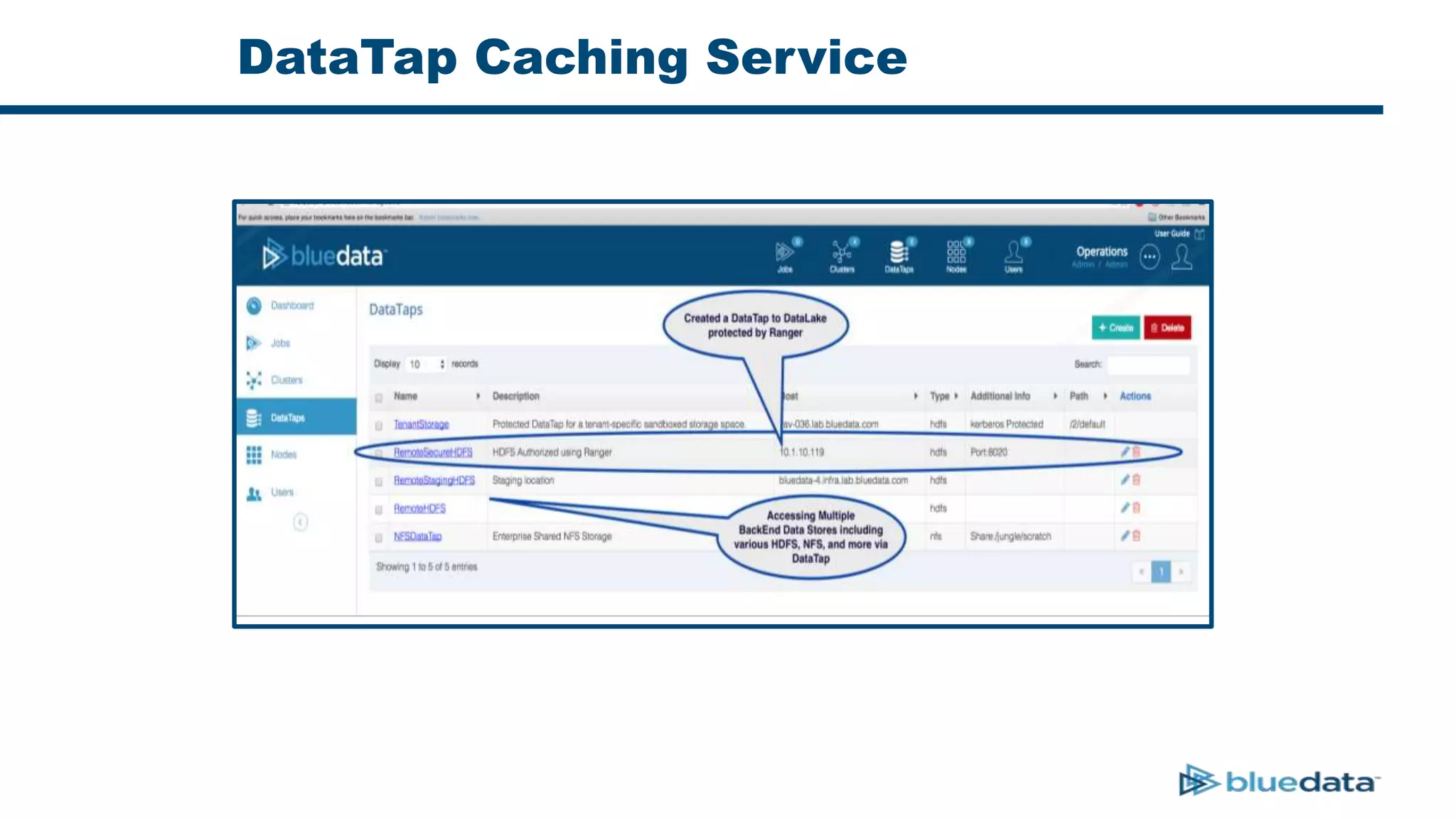
DataTap Caching Service
via – super-user
HDFS Super-user Connections..
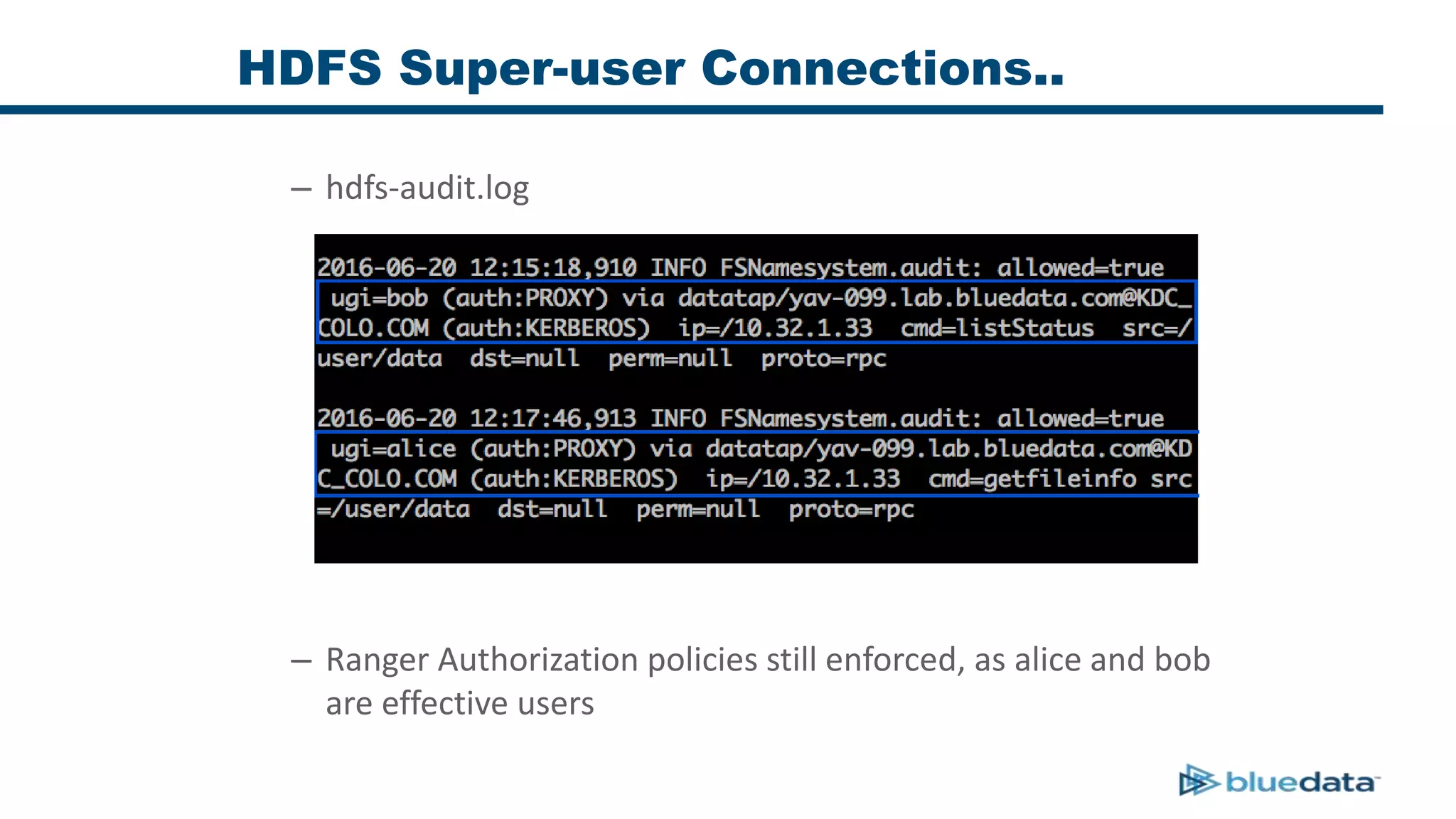
– hdfs-audit.log
– Ranger Authorization policies still enforced, as alice and bob
are effective users
HDFS Super-user Connections..
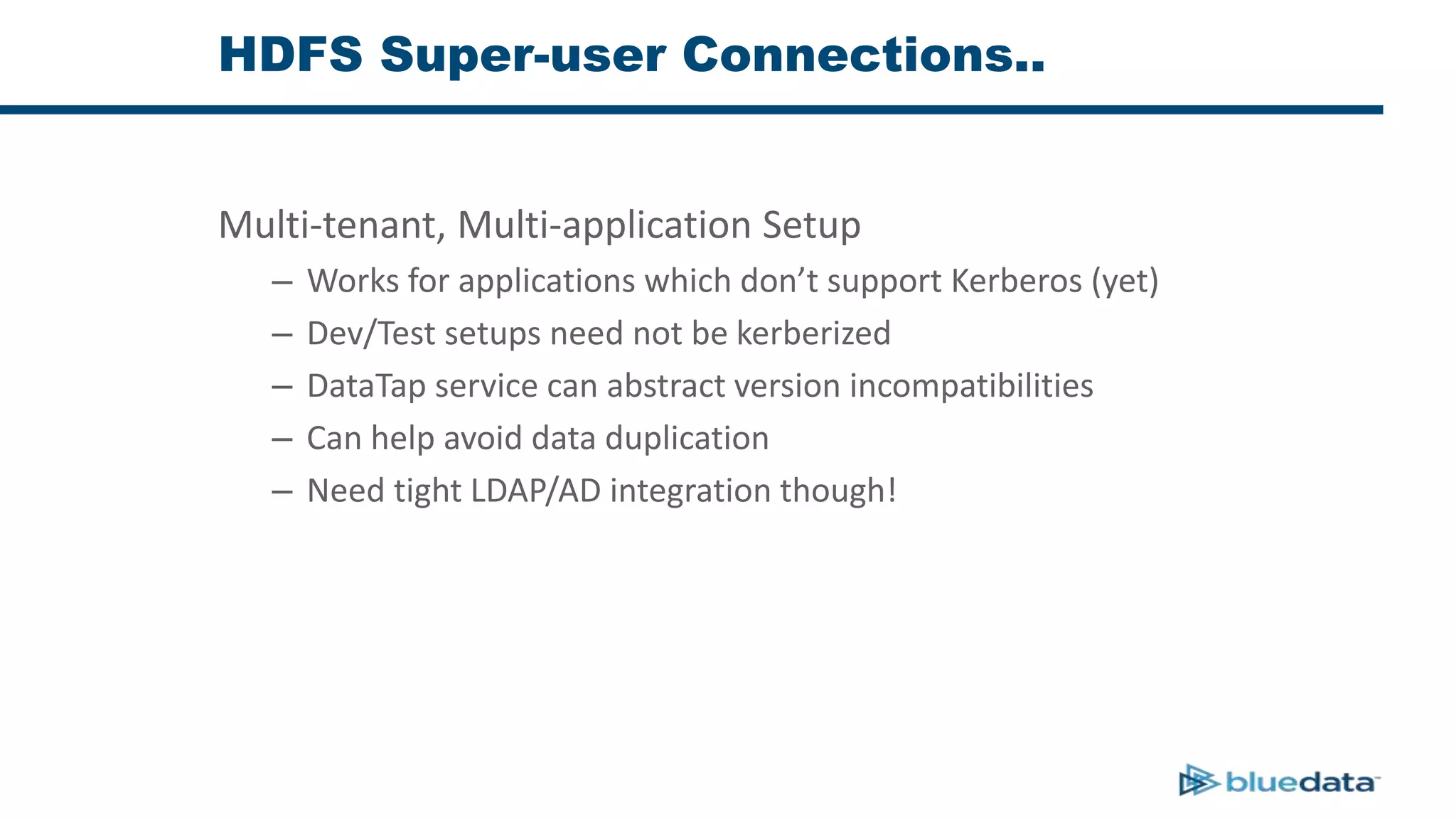
Multi-tenant, Multi-application Setup
– Works for applications which don’t support Kerberos (yet)
– Dev/Test setups need not be kerberized
– DataTap service can abstract version incompatibilities
– Can help avoid data duplication
– Need tight LDAP/AD integration though!
Ranger in Action
Hue Example
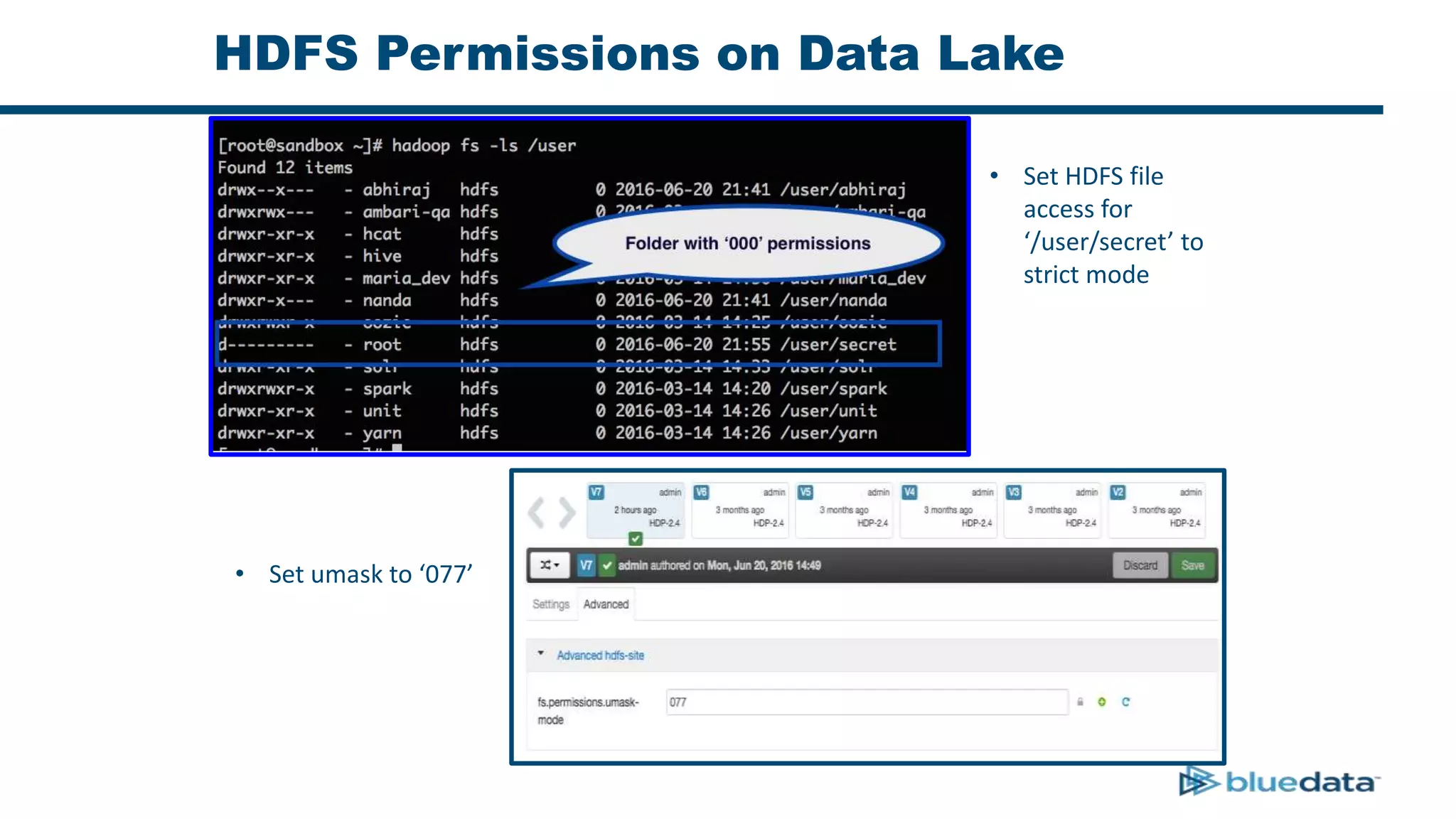
HDFS Permissions on Data Lake
• Set HDFS file
access for
‘/user/secret’ to
strict mode
• Set umask to ‘077’
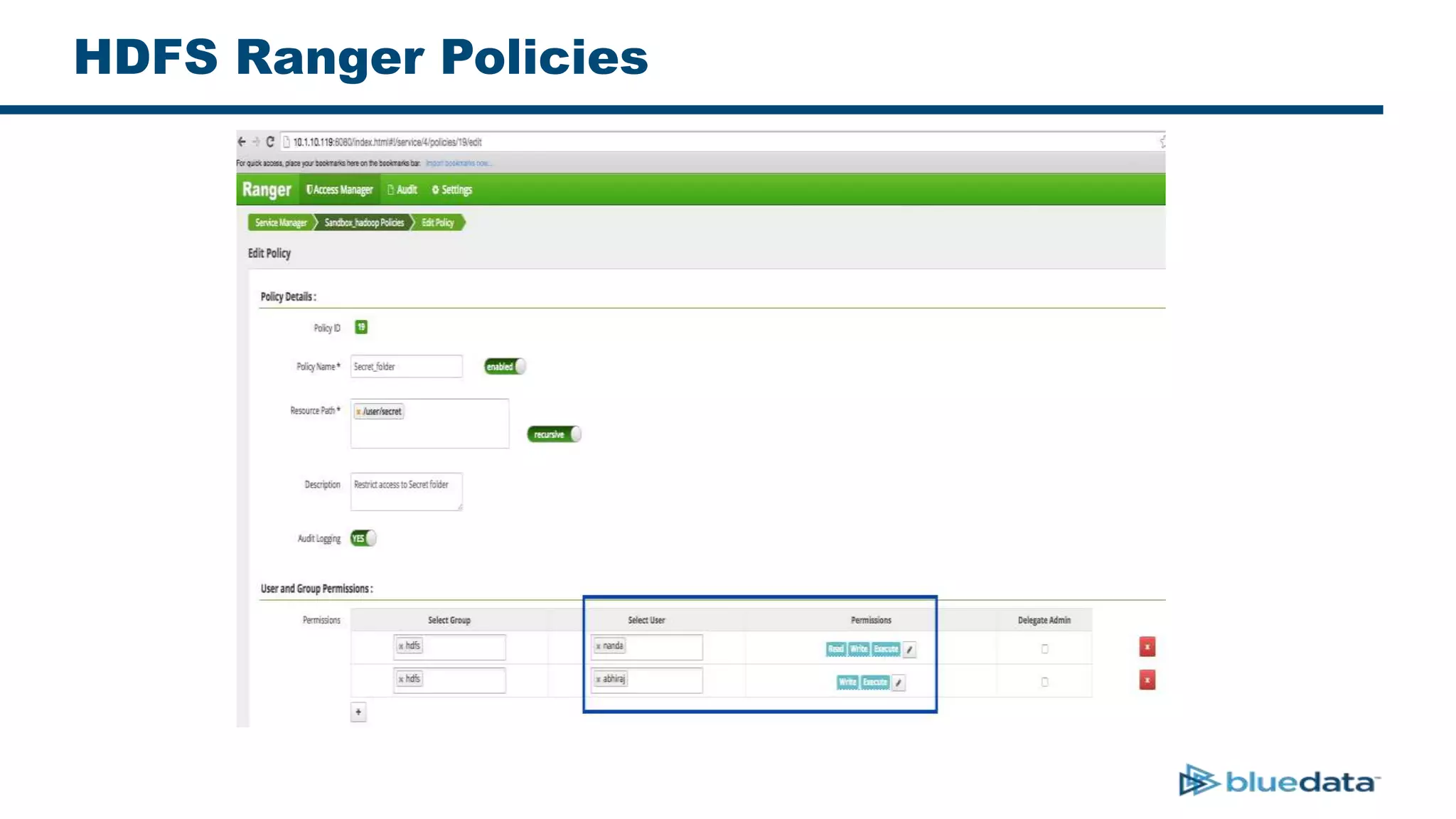
HDFS Ranger Policies
DataTap Caching Service
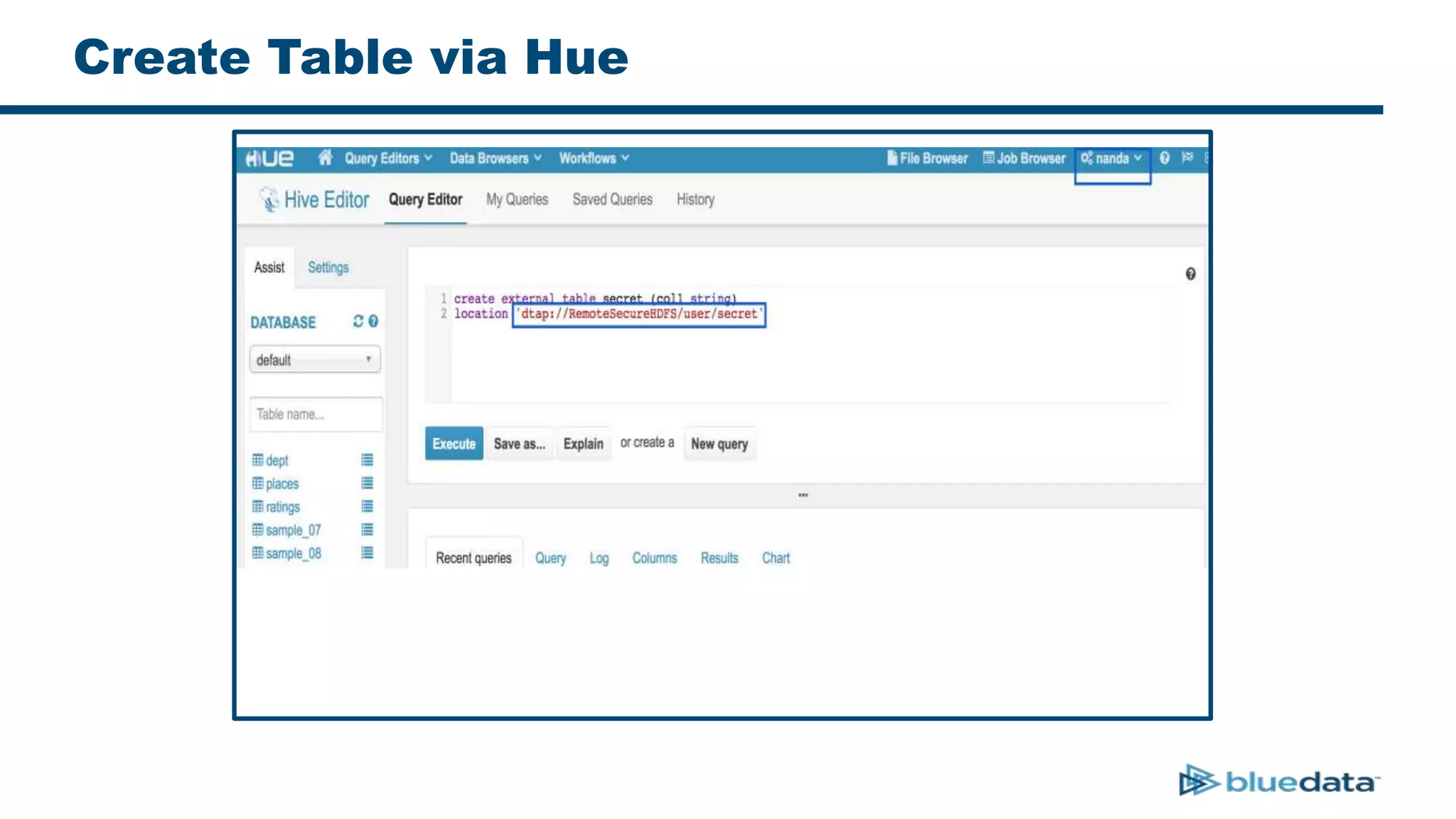
Create Table via Hue
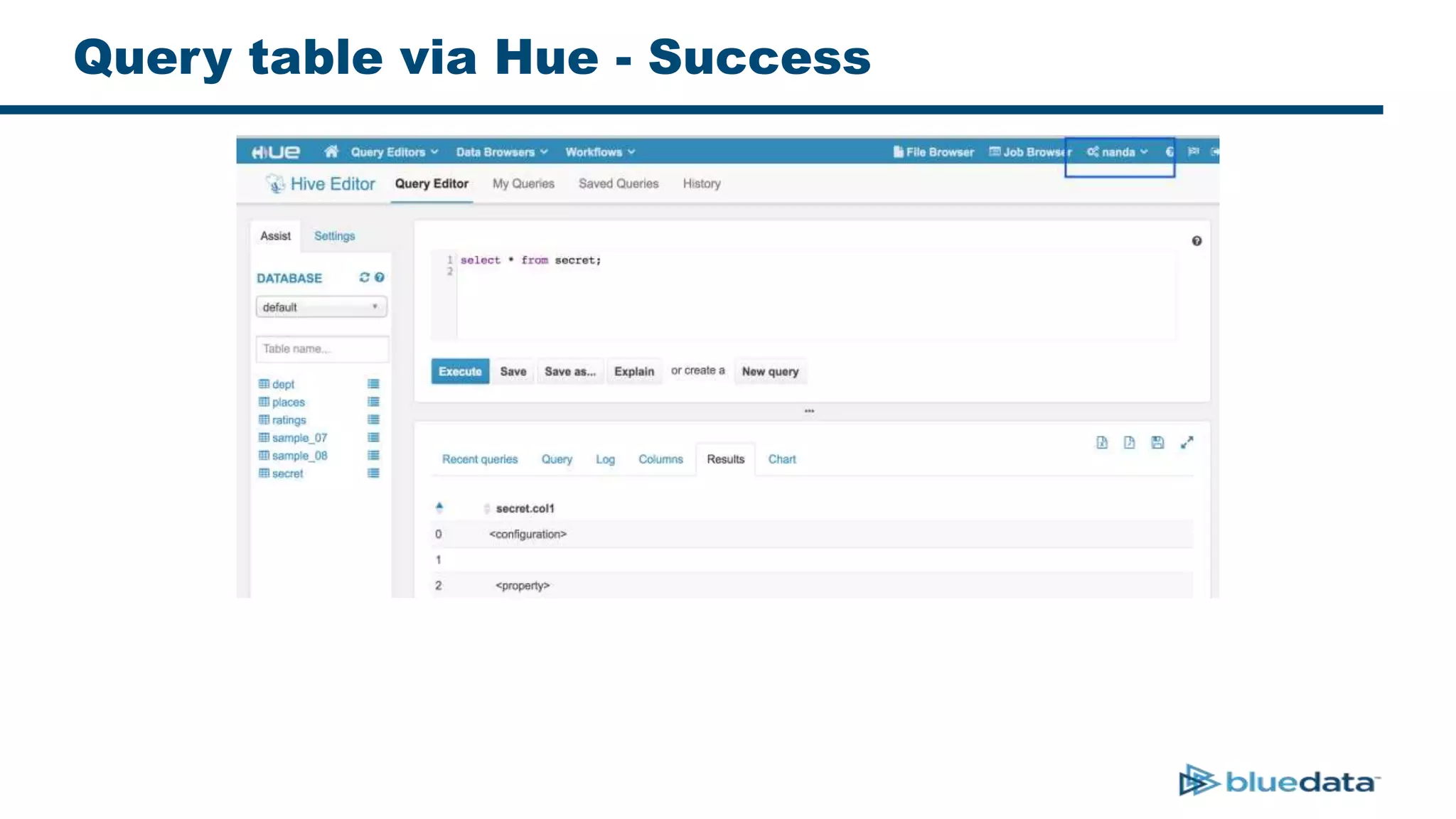
Query table via Hue - Success
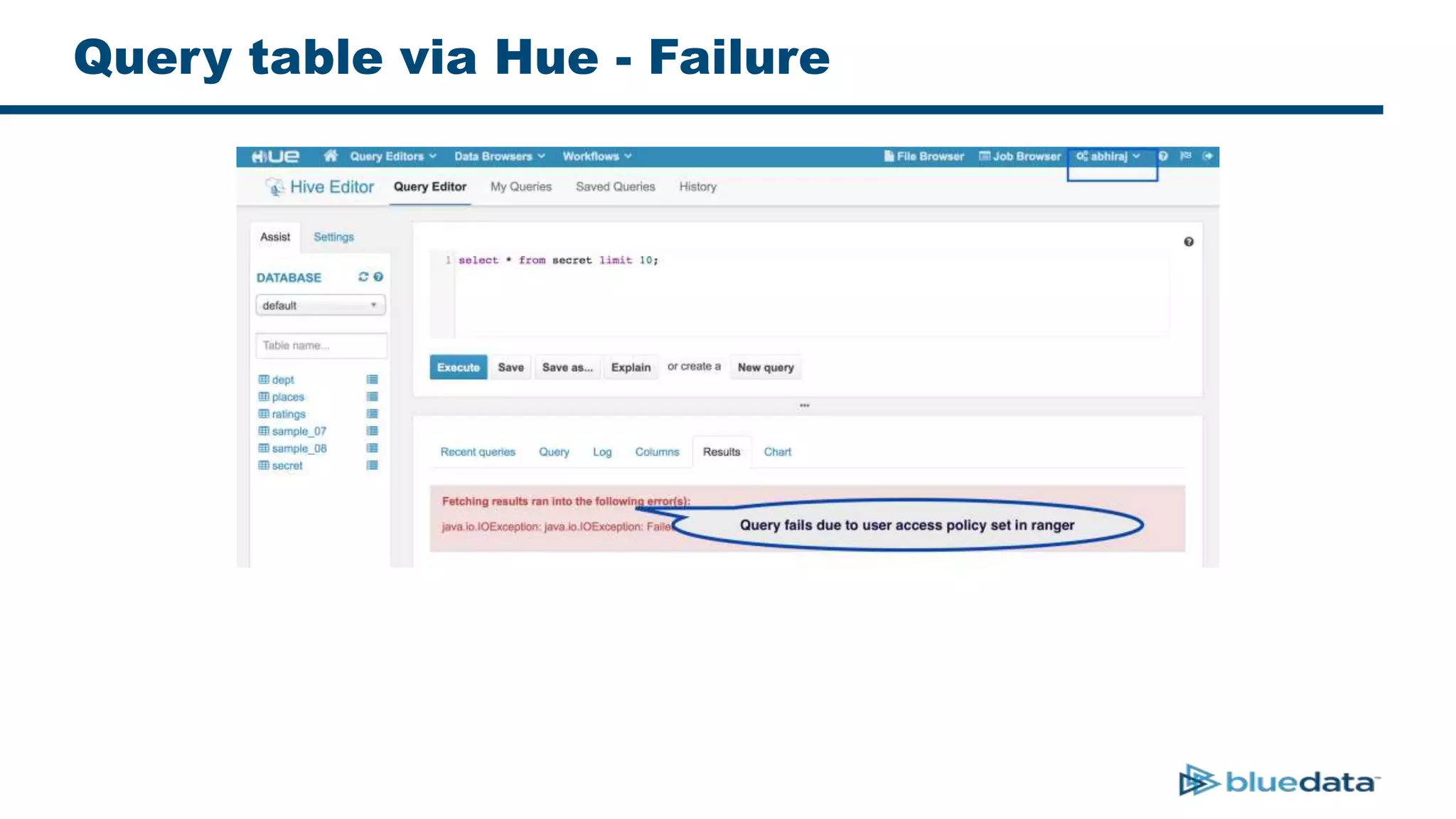
Query table via Hue - Failure
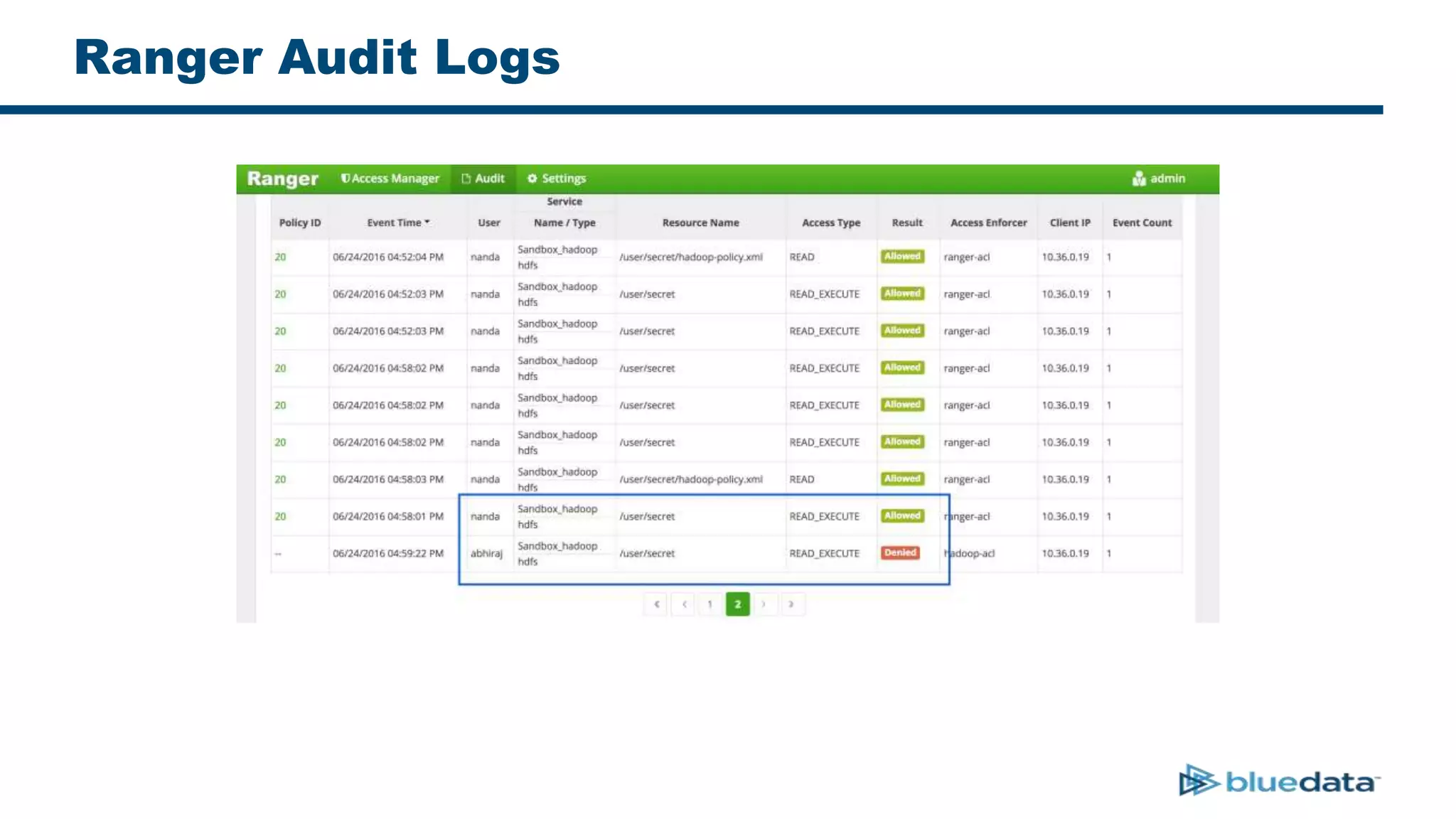
Ranger Audit Logs
Key Takeaways
• BDaaS is more than Hadoop-as-a-Service
– Includes BI / ETL / Analytics + Data Science tools
• Security is an important consideration in BDaaS
• Data duplication is not an option
• Global user authentication using a centralized DB like LDAP/AD is a must
• Apache Ranger helps in enforcing global policies, provided user identities
are propagated correctly
Q & A
www.bluedata.com
Nanda Vijaydev
@nandavijaydev
Abhiraj Butala
@abhirajbutala

End-to-End Security and Auditing in a Big Data as a Service Deployment

  • 1.
    End-to-End Security andAuditing in a Big-Data-as-a-Service (BDaaS) Deployment Nanda Vijaydev - BlueData Abhiraj Butala - BlueData
  • 2.
    “A mechanism forthe delivery of statistical analysis tools and information that helps organizations understand and use insights gained from large information sets in order to gain a competitive advantage.” On-Demand, Self-Service, Elastic Big Data Infrastructure, Applications, Analytics Source: www.semantikoz.com/blog/big-data-as-a-service-definition-classification Big-Data-as-a-Service (BDaaS)
  • 3.
    Multi-Tenant Big-Data-as-a-Service Data/Storage Prod 2.2 Dev/Test 2.4 POC 2.3 Prod 2.3 Dev/Test 2.4 MARKETING R&DMANUFACTURING 360 Customer View Log Analysis Predictive Maintenance Data LakeStaging Multiple compute services (Hadoop, BI, Spark) There is a shared Data Lake (Shared HDFS)
  • 4.
    Why BDaaS? –Compute Side Of The Story • Set of applications that interact with Hadoop keeps growing • Various versions of the same app/distro run in parallel • Enterprises have need to scale compute up and down based on usage • A model similar to Amazon AWS with S3 as storage and applications on EC2
  • 5.
    Why BDaaS? –Data Side Of The Story • Production cluster access takes time and is generally restricted • Staging clusters may not have all the data • Data exists on other storage systems such as NFS Isilon is common • Users also want to upload arbitrary files for analysis
  • 6.
    Hadoop – ACollection Of Services Hadoop is a collection of storage and compute services such as HDFS, HBase, Hive, Yarn, Solr, Kafka
  • 7.
    Security In Hadoop •Authenticate user into Hadoop ecosystem – Each service has its own integration with LDAP/AD for authentication • Authorize and limit their actions to selected services. Authorization is granted separately for each service. Example: – Folder “/user/customer” in HDFS has ‘r-x’ to user ‘alice’, and ‘- wx’ to user ‘bob’ – Enable column level access to a Hive Table. “Customer.Name” & “Customer.PhoneNumber” is only accessible by some users and groups
  • 8.
    Ranger – APluggable Security Framework • Ranger works with a common user DB (LDAP/AD) for authentication • Provides a plug-in for individual Hadoop services to enable authorization • Allows users to define policies in a central location, using WEB UI or APIs • Users can define their own plug-in for a custom service and manage them centrally via Ranger Admin
  • 9.
    Defining HDFS RangerPolicies HDFS Policy List Marketing Policy Drill Down
  • 10.
    Security Considerations inBDaaS Data/Storage Prod 2.2 Dev/Test 2.4 POC 2.3 Prod 2.3 Dev/Test 2.4 MARKETING R&D MANUFACTURING 360 Customer View Log Analysis Predictive Maintenance Data LakeStaging 1. User Identity – Data Lake 2. User Identity - Application Level 3. User Identity propagation to Data Layer 1. User identity within a Data Lake 2. User identity in application layer 3. Prevent data duplication & maintain user integrity across layers
  • 11.
    1. Securing TheData Lake LDAPKDC Data/Storage Prod 2.2 Dev/Test 2.4 POC 2.3 Prod 2.3 Dev/Test 2.4 MARKETING R&D MANUFACTURING 360 Customer View Log Analysis Predictive Maintenance Data LakeStaging 1. Authentication & Authorization – Data Lake 2. User Identity - Application Level 3. User Identity propagation to Data Layer
  • 12.
    2. Securing TheApp Layer LDAP KDC Data/Storage Prod 2.2 Dev/Test 2.4 POC 2.3 Prod 2.3 Dev/Test 2.4 MARKETING R&D MANUFACTURING 360 Customer View Log Analysis Predictive Maintenance Data LakeStaging 1. Authentication & Authorization – Data Lake 2. User Identity - Application Level 3. User Identity propagation to Data Layer App containers are integrated with LDAP KDC AliceBob Tom
  • 13.
    3. Identity Propagationto Data Layer LDAP KDC Data/Storage Prod 2.2 Dev/Test 2.4 POC 2.3 Prod 2.3 Dev/Test 2.4 MARKETING R&D MANUFACTURING 360 Customer View Log Analysis Predictive Maintenance Data LakeStaging 1. Authentication & Authorization – Data Lake 2. User Identity - Application Level 3. User Identity propagation to Data Layer KDC AliceBob Tom
  • 14.
    User Identity Propagation TwoWays –Users connect directly to HDFS • Simple Authentication • Kerberos Authentication –Users connect to HDFS via a Super-user (Impersonation)
  • 15.
    HDFS Direct Connections LDAP KDC Prod 2.2 Dev/Test 2.4 POC 2.3 Prod 2.3 Dev/Test 2.4 MARKETINGR&D MANUFACTURING 360 Customer View Log Analysis Predictive Maintenance KDC Alice BobTom HDFS Data Lake
  • 16.
    HDFS Direct Connections.. –hdfs-audit.log – Ranger policies are enforced for alice and bob as they are the effective users
  • 17.
    HDFS Direct Connections.. •Single Hadoop Setup – Ideal • Multi-tenant, Multi-application Setup – Kerberized HDFS needs kerberized compute and services – May not want to kerberize Dev/QA setups – Hadoop versions should be compatible all across – Data duplication
  • 18.
    HDFS Super-user Connections •Super-users perform actions on behalf of other users (Impersonation/Proxying) • Adding a new super-user is easy – core-site.xml
  • 19.
    HDFS Super-user Connections.. LDAP KDC Prod 2.2 Dev/Test 2.4 POC 2.3 Prod 2.3 Dev/Test 2.4 MARKETINGR&D MANUFACTURING 360 Customer View Log Analysis Predictive Maintenance KDC Alice BobTom HDFS Data Lake DataTap Caching Service via – super-user
  • 20.
    HDFS Super-user Connections.. –hdfs-audit.log – Ranger Authorization policies still enforced, as alice and bob are effective users
  • 21.
    HDFS Super-user Connections.. Multi-tenant,Multi-application Setup – Works for applications which don’t support Kerberos (yet) – Dev/Test setups need not be kerberized – DataTap service can abstract version incompatibilities – Can help avoid data duplication – Need tight LDAP/AD integration though!
  • 22.
  • 23.
    HDFS Permissions onData Lake • Set HDFS file access for ‘/user/secret’ to strict mode • Set umask to ‘077’
  • 24.
  • 25.
  • 26.
  • 27.
    Query table viaHue - Success
  • 28.
    Query table viaHue - Failure
  • 29.
  • 30.
    Key Takeaways • BDaaSis more than Hadoop-as-a-Service – Includes BI / ETL / Analytics + Data Science tools • Security is an important consideration in BDaaS • Data duplication is not an option • Global user authentication using a centralized DB like LDAP/AD is a must • Apache Ranger helps in enforcing global policies, provided user identities are propagated correctly
  • 31.
    Q & A www.bluedata.com NandaVijaydev @nandavijaydev Abhiraj Butala @abhirajbutala

Editor's Notes

  • #3 Tom There are many definitions of BDaaS. Some say it is the combo of s/w & data- that can be hard to grasp. We say it is functionality stack:
  • #17 This is how the audit logs for direct connections will look like. Bob and alice will have entry as highlighted above. Ranger Authorization policies are enforced.
  • #18 Finally, to summarize the use of direct HDFS connections. Works best in a Single Hadoop Setup. Single Hadoop distro, kerberos everywhere, tight coupling. May not want to kerberize Dev/QA setups. May not be practical.
  • #19 Standard feature supported by Hadoop eco-system components to access HDFS data A super user performs operations on behalf of other users. Also known as impersonation. Typical configuration.
  • #21 This is how the audit logs for connections via super-users will look like. Bob and alice will have entries as highlighted above. Please note that, Ranger policies are still enforced for Bob and Alice, as they are the effective users!
  • #22 Finally, lets see what are the pros and cons of using supers-users.
  • #23 Finally, lets demonstrate all this by taking an example of Hue. Here, Hue is running in one of the compute nodes in a multi-tenant environment. It is trying to access data from HDFS, for which Ranger policies are enforced. Also, note that, Hue is LDAP integrated.
  • #24 Here, HDFS path /user/secret has restricted access Also, HDFS umask is set to 077, so it only allows the owner to access the data.
  • #25 This is how Ranger policies are defined for HDFS. We are defining who can access /user/secret path. Describe users nanda, abhiraj
  • #26 In our product, the HDFS caching service (DataTap), also supports impersonation. We won’t go into its details for the purpose of this talk. Typically, it is used to load remote HDFS backends as DataTaps, as shown in this picture.
  • #27 Using Hive Editor in Hue, we create a table using the path provided. Explain dtap:// path. User here is nanda, who was read/write permissions. This will succeed as Ranger policies will allow it.
  • #28 Now, the same user nanda queries the table and it succeeds. Note that, even though the permissions are 000, Ranger allows access to nanda. So it goes through.
  • #29 Next, the same operation is performed by user abhiraj. Here, it fails, because Ranger does not allow abhiraj to read. Thus, ranger policies are enforced.
  • #30 Finally, this is how the audit logs would look like. As you can see, nanda is allowed read access. Abhiraj is denied access. So, this shows that even though we use impersonation from remote clusters, the policies are still enforced. This is because, effective users are still ‘nanda’ and ‘abhiraj’.