Log Analysis – Logstash, Elastic Search, Kibana
Avinash Ramineni
Shantanu Mirajkar
• Logging
• Pains of Log Management
• Introducing Logstash
• Elasticsearch
• Kibana
• Demo
• Installing Logstash, Elasticsearch Kibana
• Questions
Agenda
• Why do we need Logging ?
– Troubleshoot Issues
– Security
• Analyze logs to detect patterns
• Detect Malware Activity - Intrusion Detection, Denial of Service
• Unauthorized Resource Usage
– Monitoring
• Monitor Resource Usage
• Developers and Logging
– Logging Aids in Development ?
– Forget about Production !!!!!
Logging
• “Capture-it-all” Approach
• What to Log? Everything 
• DevOps Movement
• Logs are archived for years
• Big Data
• Application Usage Statistics
Logging
• Searching the logs
– Command line, cat, tail, sed, grep, awk
– Regular Expressions
• Multiple Servers behind the load balancer
• Multi-Tier Architecture
– Web Application
– Service Layer
– Correlation between various components in a System
• Geographically distributed
– Timestamps
Log management
• Centralize all the Logs
– Too much information to go through
– Increasingly hard to correlate the contextual Data
• Add Searching and Indexing Technology
– grep
– Custom logging frameworks , custom integration of logging, searching
technologies
• Monitor the Logs
Log management
• Logstash to the Rescue
–Integration Framework
• Log Collection
• Centralization
• Parsing
• Storage and Search
Logstash
• JRuby
– Run on Java Virtual Machine (JVM)
– Simple Message Based Architecture
– Single Agent that can be configured for multiple things
– OPEN SOURCE
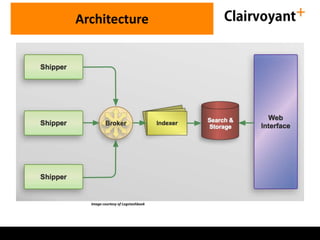
• Four Components
– Shipper
– Broker and Indexer
– Search and Storage
– Web Interface
Logstash
Architecture
Image courtesy of Logstashbook
Architecture - Broker
• Acts as Temp Buffer between Logstash Agents
and the Central server
– Enhance Performance by providing caching buffer
for log events
– Adds Resiliency
• Incase the Indexing fails, the events are held in a queue
instead of getting lost
• AMQP,0MQ, Redis
• Indexing and Searching Tool
– Built on Lucene
• Search and Index data available Restfully as JSON over HTTP
• Comes bundled with Logstash – embedded
• Text indexing Search Engine
– Searches on the Index rather than on the content
• Creates Indexes of the incoming content
– Uses Apache Lucene to create Indexes
• ElasticSearch can have a schema – Fields on which Indexes are
created
ElasticSearch
• Indexes are stored in Lucene Instances called
“Shards”
• ElasticSearch can have multiple nodes
• Two Types of Shards
– Primary
– Replica
• Replicas of Primary Shards
– Protect the data
– Make Searches Faster
ElasticSearch
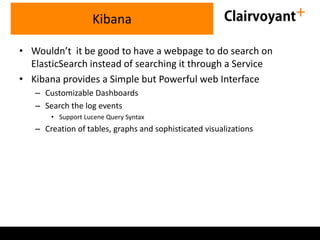
• Wouldn’t it be good to have a webpage to do search on
ElasticSearch instead of searching it through a Service
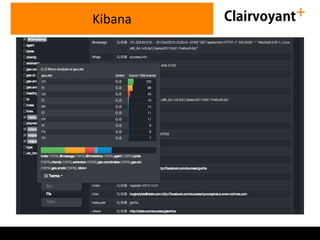
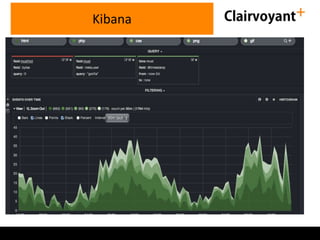
• Kibana provides a Simple but Powerful web Interface
– Customizable Dashboards
– Search the log events
• Support Lucene Query Syntax
– Creation of tables, graphs and sophisticated visualizations
Kibana
Kibana
Kibana
Demo
• Send Alerts
– Emails
– Instant Messaging
– Other Monitoring System
• Collect and Deliver Metrics to metric engine
Alerts / Monitoring Support
• Small VMs with limited memory
• Outsourced managed servers
• Java not installed
• Alternatives
– Syslog
• Rsyslog
• Syslogd
• Syslog-NG
– Logstash Forwarder (Lumber Jack)
Shipping Logs with Logstash Agent
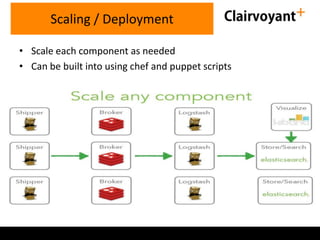
• Scale each component as needed
• Can be built into using chef and puppet scripts
Scaling / Deployment
Industry ExperienceQuestions ?
avinash@clairvoyantsoft.com
Twitter:@avinashramineni
shantanu@clairvoyantsoft.com

Log analysis using Logstash,ElasticSearch and Kibana

  • 1.
    Log Analysis –Logstash, Elastic Search, Kibana Avinash Ramineni Shantanu Mirajkar
  • 2.
    • Logging • Painsof Log Management • Introducing Logstash • Elasticsearch • Kibana • Demo • Installing Logstash, Elasticsearch Kibana • Questions Agenda
  • 3.
    • Why dowe need Logging ? – Troubleshoot Issues – Security • Analyze logs to detect patterns • Detect Malware Activity - Intrusion Detection, Denial of Service • Unauthorized Resource Usage – Monitoring • Monitor Resource Usage • Developers and Logging – Logging Aids in Development ? – Forget about Production !!!!! Logging
  • 4.
    • “Capture-it-all” Approach •What to Log? Everything  • DevOps Movement • Logs are archived for years • Big Data • Application Usage Statistics Logging
  • 5.
    • Searching thelogs – Command line, cat, tail, sed, grep, awk – Regular Expressions • Multiple Servers behind the load balancer • Multi-Tier Architecture – Web Application – Service Layer – Correlation between various components in a System • Geographically distributed – Timestamps Log management
  • 6.
    • Centralize allthe Logs – Too much information to go through – Increasingly hard to correlate the contextual Data • Add Searching and Indexing Technology – grep – Custom logging frameworks , custom integration of logging, searching technologies • Monitor the Logs Log management
  • 7.
    • Logstash tothe Rescue –Integration Framework • Log Collection • Centralization • Parsing • Storage and Search Logstash
  • 8.
    • JRuby – Runon Java Virtual Machine (JVM) – Simple Message Based Architecture – Single Agent that can be configured for multiple things – OPEN SOURCE • Four Components – Shipper – Broker and Indexer – Search and Storage – Web Interface Logstash
  • 9.
  • 10.
    Architecture - Broker •Acts as Temp Buffer between Logstash Agents and the Central server – Enhance Performance by providing caching buffer for log events – Adds Resiliency • Incase the Indexing fails, the events are held in a queue instead of getting lost • AMQP,0MQ, Redis
  • 11.
    • Indexing andSearching Tool – Built on Lucene • Search and Index data available Restfully as JSON over HTTP • Comes bundled with Logstash – embedded • Text indexing Search Engine – Searches on the Index rather than on the content • Creates Indexes of the incoming content – Uses Apache Lucene to create Indexes • ElasticSearch can have a schema – Fields on which Indexes are created ElasticSearch
  • 12.
    • Indexes arestored in Lucene Instances called “Shards” • ElasticSearch can have multiple nodes • Two Types of Shards – Primary – Replica • Replicas of Primary Shards – Protect the data – Make Searches Faster ElasticSearch
  • 13.
    • Wouldn’t itbe good to have a webpage to do search on ElasticSearch instead of searching it through a Service • Kibana provides a Simple but Powerful web Interface – Customizable Dashboards – Search the log events • Support Lucene Query Syntax – Creation of tables, graphs and sophisticated visualizations Kibana
  • 14.
  • 15.
  • 16.
  • 17.
    • Send Alerts –Emails – Instant Messaging – Other Monitoring System • Collect and Deliver Metrics to metric engine Alerts / Monitoring Support
  • 18.
    • Small VMswith limited memory • Outsourced managed servers • Java not installed • Alternatives – Syslog • Rsyslog • Syslogd • Syslog-NG – Logstash Forwarder (Lumber Jack) Shipping Logs with Logstash Agent
  • 19.
    • Scale eachcomponent as needed • Can be built into using chef and puppet scripts Scaling / Deployment
  • 20.

Editor's Notes

  • #4 DevOps -- the kind of guys who have both a developer and an operator hat making sure that custom developed applications are running smoothly