<Insert Picture Here>
Fusion Applications Positioning: Financials AP/AR
Khalil Rehman
Director, NHS Shared Services
<Insert UI Picture Here>
Invoice to Payment Flow
Overview
© 2011 Oracle Corporation – Proprietary and Confidential
The Payables Work Area will totally increase our
productivity as it relates to the AP specialists and what
they have to do.
What Customers Are Saying
Populating all the header fields directly from the
invoice onto the header, including supplier information,
invoice number, really eliminates the concern of
duplicate invoicing.
© 2011 Oracle Corporation – Proprietary and Confidential
Out-of-box
Imaging Integration
Information Driven
Dashboards and Work Areas
Embedded
Intelligence
Fusion Differentiators
User Productivity
Tools and Reports
Payables Dashboard
• Obtain visibility of processes waiting for intervention
• Resolve exceptions and garner approvals
• Collaborate directly with participants
What I need
to do
What I need
to know
Who can help
me
Obtain a count of issues to understand work volume
Payables Dashboard
Payables Dashboard
• Count based watchlist items to understand work volume
• Secure Google like search across the enterprise
• Quickly retrieve tagged documents for further action
Invoice Work Area
• Create invoices from routed scanned images
• View recently entered invoices
• Resolve invoice exceptions
• Launch tasks, reports and perform quick search
Out-of-box
Imaging Integration
Information Driven
Dashboards and Work Areas
Embedded
Intelligence
Fusion Differentiators
User Productivity
Tools and Reports
Invoice Image Processing Architecture
BPEL Web
Service
Invoice Image Routing
Process
Input Agent
Image
Processing
Server
Create Invoice Page
Document
Repository
Invoice Work Area
Data Entry Clerk
Network File
System
Document Capture &
Recognition
Mailroom Clerk
Invoice Entry
• Create Invoice page mirrors a physical invoice
Ease of data entry
Ease of auditing
Header
Lines
Totals
Integrated Imaging Solution
• Create invoice and view image using dual monitors
• Header information defaults from scanned image for fast data entry
• Image is attached to the invoice throughout the invoice’s lifecycle
Invoice Entry
• Automatic search results based on Identifying PO on header
Invoice Entry
• Available prepayments alert during invoice entry
• Out of balance amount indicator
• Invoice status and hold indicators
Invoice Entry
• Scrolling column groups on lines
• Review tax summary and drill to tax details
• Review and add notes anytime
Invoice Entry
• Match to purchase order and receipts in same window
• Personalize and create your own search
• Excel like ability to freeze columns
• Export to Excel or Detach to view in full screen
Invoice Entry
• Review quantity ordered, received, billed etc.
• Review more information about item
Manage Invoices
• Seeded and Personalized Search
• Ability for Extensive Search
Manage Invoices
• Simultaneous comparison of several invoices
– Facilitates quick comparison
– Answering questions on several invoices to supplier
– Fewer clicks as there is no need to go back and search for another
invoice
Manage Invoices
• Multi-select and Validate, Resolve Holds etc.
• Perform action right from search results
• Drilldown to view details
Manage Invoices
Manage Invoices
Out-of-box
Imaging Integration
Information Driven
Dashboards and Work Areas
Embedded
Intelligence
Fusion Differentiators
User Productivity
Tools and Reports
Spreadsheet for Invoice Entry
• Quickly enter high volume of data
• Native excel data entry shortcuts like copy/paste, dragging cells, etc.
• Avoid data entry errors with online validation using LOVs
• Launch import invoices program right from spreadsheet
Hide Rows or
columns
Spreadsheet for Import Error Correction
• View invoice header and lines in the same view
• View error indicator for all records that failed to import
• Identify errors with clear messages
• Correct errors and re-import invoices directly from the spreadsheet
Reporting & Analysis Tools
Information Access
• Real-time access to live data
for all users
• Guaranteed consistency of
information across the
enterprise
• Flexible reporting for greater
insight
Instantly view live query results
• Quickly build queries by selecting
columns across any transaction table
• No programming knowledge is required
• Create ad-hoc reports against real-
time data using easy to use business
views
• Share queries and reports securely
using the
Report Catalog
• Drill down to live transactions
All drilldowns to live data ensure
up-to-the-minute information
Real-Time Ad Hoc Analysis
Payment
Payments Work Area
Payment Creation
Payment
Processing
Payment Process
Request
Group invoices automatically for
batch payment processing
Single Payments
Record one-off payments,
manual payments, or refunds
Increase flexibility and control with multiple ways to make payments
Payment Process Request
Review installments
Payment Process Request
Review installments
Single Payment
– Accommodate last minute supplier requests by quickly creating
off-cycle payments
• Have more flexibility and control over payment creation outside of
scheduled pay runs with the ability to select multiple invoices for
payment regardless of their payment attributes
• Account and post to GL immediately
– Record refunds from suppliers against credit memos
– Ensure accurate reporting and accounting by recording payments
made outside of the application
Single Payment
<Insert UI Picture Here>
Value Propositions and
Differentiators
© 2011 Oracle Corporation – Proprietary and Confidential
Business Solutions and Value Propositions
Invoicing
FEATURE BENEFIT
Complete end-to-end
imaging solution with Oracle
Document Capture and
Forms Recognition
Dashboard and Invoice
Work Area
Re-designed invoice entry
and matching window
• The only vendor to provide out-of-the-box
imaging integration, thus eliminating costly 3rd
party integrations
• Proactively monitors processes and alerts you
to exceptions so you can take immediate
action.
• Reduces data entry errors, pushes up-to-date
information within the context of the
transaction, and provides visual cues to help
guide users’ actions.
© 2011 Oracle Corporation – Proprietary and Confidential
© 2009 Oracle Corporation – Proprietary and Confidential
Business Solutions and Value Propositions
Payment
FEATURE BENEFIT
Payments Work Area
Payment Process Request
• Improves payment processing efficiency with
an at-a-glance view of payment statuses where
users can take actions from a central place
• Streamlines end-to-end payment processing
that limits user intervention with flexible
selection criteria to meet an organizations
payment processing needs
© 2011 Oracle Corporation – Proprietary and Confidential
<Insert UI Picture Here>
Bill to Receipts Flow
© 2011 Oracle Corporation – Proprietary and Confidential
Financial Management
Customer and Partner Validation Testing
What Are They Saying?
© 2011 Oracle Corporation – Proprietary and Confidential
Receivables
Checks and Balances of Upstream Processes
…Order Fulfillment, Projects etc
Increase Productivity
• Accurate/Timely Revenue
Recognition
• Accurate/Timely Customer
Balances
– Accurate Invoicing
– Accurate Receipt Applications
Benefits
• Increase Receipt
Application Turnover
• Increase Customer
Satisfaction
• Increase Working
Capital/Cash Flow
• Decrease DSO
• Increase ROI
• etc.
© 2011 Oracle Corporation – Proprietary and Confidential
Manage Revenue Manage Accounts
Receivable Balances
• Process Receipts
• Apply Customer Payments
• Process Bank Deposits
• Clear Accounts Receivables
Transactions
• Process Refunds
• Manage Inquiries
• Process Late Charges
• Process Statements
• Adjust Customer
Balances
Process Customer Bill
Fusion Receivables - Order Fulfillment
With End-to-End Automation
• Process Revenue
• Process Revenue
Adjustments
Process Customer
Payments
• Create and Process Bill
• Present Bill
• Process Billing
Adjustments
• Automated flow with minimal manual intervention
• Easy, intuitive manual alternatives
SLA Accounting, GL Reconciliation and Period Close Activity
Business Intelligence Analytics (OBIA) and Transactional Business Intelligence (OTBI)
© 2011 Oracle Corporation – Proprietary and Confidential
Billing Workarea
Role Based - Information Driven
Task Pane
provides
links to
perform
specific
tasks
Incomplete
Transactions
Adjustments
AutoInvoice
Errors
Watchlist, Tagging, Secured
Enterprise Search, Personalization
Contextual Actions, Notes, Attachments, Embedded Help
© 2011 Oracle Corporation – Proprietary and Confidential
Centralized Customer Data Management
Sites
stored by
Set (Setid)
44
Fusion TCA Model
Customer Account
Customer Account
captures financial
relationship of a party
with the deploying
company to buy
products or Services
Customer Account
is Global Entity
Customer Account
Site and
Relationships are
Set Enabled
(enabled for
reference data
sharing)
• Accounting Rules
• Aging Buckets
• Auto Cash Rules
• Collectors
• Customer Site (TCA)
• Customer Account
Relationship (TCA)
• Lockbox
• Payment Terms
• Remit to Address
• Revenue Contingencies
• Sales Person (TCA)
• Standard Memo Lines
• Transaction Source
• Transaction Type
© 2011 Oracle Corporation – Proprietary and Confidential
Receivables Set Enabled Setup (Setid)
Reference Data Sets
Revenue Workarea
Role Based - Information Driven
• Requiring Manual Scheduling
• Pending Contingency Removal
Task Pane
provides
links to
perform
specific
tasks
Link to
display line
revenue
contingency
details
© 2011 Oracle Corporation – Proprietary and Confidential
Mass Revenue Adjustments
• Several search attributes giving user maximum flexibility to perform precise searches.
• Add additional search attributes from the seeded list.
• Ability to save searches using saved searches feature to save time for repeated
searches using same search attributes.
Expanded search
criteria
Additional
search
attributes
Saved Search
© 2011 Oracle Corporation – Proprietary and Confidential
Receivables Balances Workarea
Role Based - Information Driven
Overview Regions
pushes the
actionable items for
your review
Search
for
Receipts
Quickly
Task
Pane
provides
links to
drill
down to
specific
tasks
© 2011 Oracle Corporation – Proprietary and Confidential
SmartReceipts
© 2011 Oracle Corporation – Proprietary and Confidential
SmartReceipts
Differentiator Detail
• Available for all Receipts
• Persistent Remittance Reference information
• Over/Under Payment Rules
• String Manipulation
• Scored Recommendations
– Customer
– Transaction
– Exceptions
• Weights + Match Score <,=,> Match Threshold
• Receipt Processing Centric Approach
• System Driven Setup Updates
© 2011 Oracle Corporation – Proprietary and Confidential
SmartReceipts
Automatic Account/Site Maintenance
© 2011 Oracle Corporation – Proprietary and Confidential
Receipt Assignment
Integration with Oracle Work Management’s Assignment Manager and
CDM’s TCA
• Setup rules that can be executed to match receivables specialist to receipts that
require manual application.
• Rules can also be used to derive priority based on attributes of the receipt.
• For example, rules can be setup to assign priority to receipts based on attributes
like creation date, bank account etc.
© 2011 Oracle Corporation – Proprietary and Confidential
Excel Based Receipt Entry
Receipts creation via Excel upload
Access the Receipt
Excel upload workbook
from the Task Pane
“Create Receipt via
Spreadsheet”
Entering Controls on the
batch give you quick
indication on the
completeness of receipt
batch entry task
Conveniently load the
Receipt Batch directly from
Excel Workbook
© 2011 Oracle Corporation – Proprietary and Confidential
Excel Based Receipt Entry
Load Receipt Remittance Reference Information
Conveniently Search
existing receipts in
system to load
Remittance information
Directly load the
entered information
from Excel Workbook
© 2011 Oracle Corporation – Proprietary and Confidential
<Insert UI Picture Here>
Value Propositions and
Differentiators
© 2011 Oracle Corporation – Proprietary and Confidential
Business Solutions and Value Propositions
FEATURE BENEFIT
 Billing Workarea
 Revenue Management
Workarea
 Receivables Balances
Workarea
• Delivers work requiring attention to users
when, where and how they need it, so they can
take immediate action.
• Quickly and Easily access related tasks via the
Task Pane
 Centralized Customer
Data Management
• Fusion Receivables delivers the flexibility to
maintain a single customer master and the
ability to share customer information across
the organization as needed.
 Mass Revenue
Adjustments
• Fusion Receivables provides the ability for the
Revenue Analyst to find all revenue
transactions that require adjustment and then
to immediately take appropriate action
including contingency removal and
scheduling/unscheduling of all applicable
revenue lines.
© 2011 Oracle Corporation – Proprietary and Confidential
Business Solutions and Value Propositions
FEATURE BENEFIT
 SmartReceipts • Fusion Receivables couples an extremely
robust automatic receipt application engine
with a preeminent cash application user
interface.
 Automatic Receipt
Assignment
• Fusion Receivables delivers a robust and
flexible process to automatically assign receipt
application tasks to the right people at the right
time.
 Excel Based Receipt
Entry and Update
• Fusion Receivables delivers Excel integration
for receipt creation utilizing FDI (Fusion
Desktop Integration) to enhance user
productivity.
© 2011 Oracle Corporation – Proprietary and Confidential
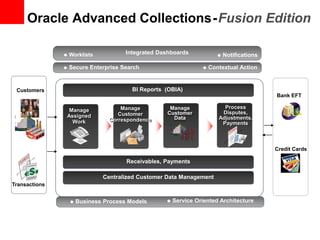
Oracle Advanced Collections-Fusion Edition
 Business Process Models  Service Oriented Architecture
 Secure Enterprise Search  Contextual Action
Receivables, Payments
Centralized Customer Data Management
BI Reports (OBIA)
Manage
Assigned
Work
Customers
Integrated Dashboards  Notifications Worklists
Transactions
Credit Cards
Process
Disputes,
Adjustments,
Payments
Manage
Customer
Data
Manage
Customer
Correspondence
Bank EFT
© 2011 Oracle Corporation – Proprietary and Confidential
Proactive Management of Delinquent Customers
Information-Driven Dashboards for Collectors
Search/save lists of delinquent customers
Review, sort, query, update
assigned work, export, detach
delinquent customer list
View, search/save, prioritize,
manage assigned activities
Search by
customer,
account, bill
to site
© 2011 Oracle Corporation – Proprietary and Confidential
Proactive Management of Delinquent Customers
Information-Driven Dashboards for Managers
© 2011 Oracle Corporation – Proprietary and Confidential
Proactive Management of Delinquent Customers
Information-Driven Work Areas for Collectors
Customer,
Account,
Bill to
Search
View
customer
hierarchy,
Change
focus of
work area
Tabs of data for
displayed
customer
Notes displayed
chronologically
View trx by BU, status, date range
and class, sort, query, export,
detach, and pay, dispute, or adjust
Header detail and activity for selected trx
Lines detail for selected trx
Business Solutions and Value Propositions
Customer and Transactional Information for Collections Professionals
FEATURE BENEFIT
Automated Delinquency
Identification and Work
Assignment
Collector Dashboard and
Interactive Work
Prioritization
Customer Work Area
• Proactively pushes actionable work to the
right collector at the right time. Eliminates the
need for age trial balance reports or
spreadsheets.
• Organizes assigned customers and actions on
the Dashboard. Prioritize each customer’s
delinquency situation and change the status to
ensure that nothing is forgotten.
• Provides all the information needed to collect
effectively from each customer
© 2011 Oracle Corporation – Proprietary and Confidential
Q&A

AP and AR Positioning

  • 1.
    <Insert Picture Here> FusionApplications Positioning: Financials AP/AR Khalil Rehman Director, NHS Shared Services
  • 2.
    <Insert UI PictureHere> Invoice to Payment Flow Overview © 2011 Oracle Corporation – Proprietary and Confidential
  • 3.
    The Payables WorkArea will totally increase our productivity as it relates to the AP specialists and what they have to do. What Customers Are Saying Populating all the header fields directly from the invoice onto the header, including supplier information, invoice number, really eliminates the concern of duplicate invoicing. © 2011 Oracle Corporation – Proprietary and Confidential
  • 4.
    Out-of-box Imaging Integration Information Driven Dashboardsand Work Areas Embedded Intelligence Fusion Differentiators User Productivity Tools and Reports
  • 5.
    Payables Dashboard • Obtainvisibility of processes waiting for intervention • Resolve exceptions and garner approvals • Collaborate directly with participants What I need to do What I need to know Who can help me Obtain a count of issues to understand work volume
  • 6.
  • 7.
    Payables Dashboard • Countbased watchlist items to understand work volume • Secure Google like search across the enterprise • Quickly retrieve tagged documents for further action
  • 8.
    Invoice Work Area •Create invoices from routed scanned images • View recently entered invoices • Resolve invoice exceptions • Launch tasks, reports and perform quick search
  • 9.
    Out-of-box Imaging Integration Information Driven Dashboardsand Work Areas Embedded Intelligence Fusion Differentiators User Productivity Tools and Reports
  • 10.
    Invoice Image ProcessingArchitecture BPEL Web Service Invoice Image Routing Process Input Agent Image Processing Server Create Invoice Page Document Repository Invoice Work Area Data Entry Clerk Network File System Document Capture & Recognition Mailroom Clerk
  • 11.
    Invoice Entry • CreateInvoice page mirrors a physical invoice Ease of data entry Ease of auditing Header Lines Totals
  • 12.
    Integrated Imaging Solution •Create invoice and view image using dual monitors • Header information defaults from scanned image for fast data entry • Image is attached to the invoice throughout the invoice’s lifecycle
  • 13.
    Invoice Entry • Automaticsearch results based on Identifying PO on header
  • 14.
    Invoice Entry • Availableprepayments alert during invoice entry • Out of balance amount indicator • Invoice status and hold indicators
  • 15.
    Invoice Entry • Scrollingcolumn groups on lines • Review tax summary and drill to tax details • Review and add notes anytime
  • 16.
    Invoice Entry • Matchto purchase order and receipts in same window • Personalize and create your own search • Excel like ability to freeze columns • Export to Excel or Detach to view in full screen
  • 17.
    Invoice Entry • Reviewquantity ordered, received, billed etc. • Review more information about item
  • 18.
    Manage Invoices • Seededand Personalized Search • Ability for Extensive Search
  • 19.
    Manage Invoices • Simultaneouscomparison of several invoices – Facilitates quick comparison – Answering questions on several invoices to supplier – Fewer clicks as there is no need to go back and search for another invoice
  • 20.
    Manage Invoices • Multi-selectand Validate, Resolve Holds etc. • Perform action right from search results • Drilldown to view details
  • 21.
  • 22.
  • 23.
    Out-of-box Imaging Integration Information Driven Dashboardsand Work Areas Embedded Intelligence Fusion Differentiators User Productivity Tools and Reports
  • 24.
    Spreadsheet for InvoiceEntry • Quickly enter high volume of data • Native excel data entry shortcuts like copy/paste, dragging cells, etc. • Avoid data entry errors with online validation using LOVs • Launch import invoices program right from spreadsheet Hide Rows or columns
  • 25.
    Spreadsheet for ImportError Correction • View invoice header and lines in the same view • View error indicator for all records that failed to import • Identify errors with clear messages • Correct errors and re-import invoices directly from the spreadsheet
  • 26.
    Reporting & AnalysisTools Information Access • Real-time access to live data for all users • Guaranteed consistency of information across the enterprise • Flexible reporting for greater insight
  • 27.
    Instantly view livequery results • Quickly build queries by selecting columns across any transaction table • No programming knowledge is required • Create ad-hoc reports against real- time data using easy to use business views • Share queries and reports securely using the Report Catalog • Drill down to live transactions All drilldowns to live data ensure up-to-the-minute information Real-Time Ad Hoc Analysis
  • 28.
  • 29.
  • 30.
    Payment Creation Payment Processing Payment Process Request Groupinvoices automatically for batch payment processing Single Payments Record one-off payments, manual payments, or refunds Increase flexibility and control with multiple ways to make payments
  • 31.
  • 32.
  • 33.
    Single Payment – Accommodatelast minute supplier requests by quickly creating off-cycle payments • Have more flexibility and control over payment creation outside of scheduled pay runs with the ability to select multiple invoices for payment regardless of their payment attributes • Account and post to GL immediately – Record refunds from suppliers against credit memos – Ensure accurate reporting and accounting by recording payments made outside of the application
  • 34.
  • 35.
    <Insert UI PictureHere> Value Propositions and Differentiators © 2011 Oracle Corporation – Proprietary and Confidential
  • 36.
    Business Solutions andValue Propositions Invoicing FEATURE BENEFIT Complete end-to-end imaging solution with Oracle Document Capture and Forms Recognition Dashboard and Invoice Work Area Re-designed invoice entry and matching window • The only vendor to provide out-of-the-box imaging integration, thus eliminating costly 3rd party integrations • Proactively monitors processes and alerts you to exceptions so you can take immediate action. • Reduces data entry errors, pushes up-to-date information within the context of the transaction, and provides visual cues to help guide users’ actions. © 2011 Oracle Corporation – Proprietary and Confidential
  • 37.
    © 2009 OracleCorporation – Proprietary and Confidential Business Solutions and Value Propositions Payment FEATURE BENEFIT Payments Work Area Payment Process Request • Improves payment processing efficiency with an at-a-glance view of payment statuses where users can take actions from a central place • Streamlines end-to-end payment processing that limits user intervention with flexible selection criteria to meet an organizations payment processing needs © 2011 Oracle Corporation – Proprietary and Confidential
  • 38.
    <Insert UI PictureHere> Bill to Receipts Flow © 2011 Oracle Corporation – Proprietary and Confidential
  • 39.
    Financial Management Customer andPartner Validation Testing What Are They Saying? © 2011 Oracle Corporation – Proprietary and Confidential
  • 40.
    Receivables Checks and Balancesof Upstream Processes …Order Fulfillment, Projects etc Increase Productivity • Accurate/Timely Revenue Recognition • Accurate/Timely Customer Balances – Accurate Invoicing – Accurate Receipt Applications Benefits • Increase Receipt Application Turnover • Increase Customer Satisfaction • Increase Working Capital/Cash Flow • Decrease DSO • Increase ROI • etc. © 2011 Oracle Corporation – Proprietary and Confidential
  • 41.
    Manage Revenue ManageAccounts Receivable Balances • Process Receipts • Apply Customer Payments • Process Bank Deposits • Clear Accounts Receivables Transactions • Process Refunds • Manage Inquiries • Process Late Charges • Process Statements • Adjust Customer Balances Process Customer Bill Fusion Receivables - Order Fulfillment With End-to-End Automation • Process Revenue • Process Revenue Adjustments Process Customer Payments • Create and Process Bill • Present Bill • Process Billing Adjustments • Automated flow with minimal manual intervention • Easy, intuitive manual alternatives SLA Accounting, GL Reconciliation and Period Close Activity Business Intelligence Analytics (OBIA) and Transactional Business Intelligence (OTBI) © 2011 Oracle Corporation – Proprietary and Confidential
  • 42.
    © 2011 OracleCorporation – Proprietary and Confidential Billing Workarea Role Based - Information Driven Task Pane provides links to perform specific tasks Incomplete Transactions Adjustments AutoInvoice Errors Watchlist, Tagging, Secured Enterprise Search, Personalization Contextual Actions, Notes, Attachments, Embedded Help
  • 43.
    © 2011 OracleCorporation – Proprietary and Confidential Centralized Customer Data Management Sites stored by Set (Setid)
  • 44.
    44 Fusion TCA Model CustomerAccount Customer Account captures financial relationship of a party with the deploying company to buy products or Services Customer Account is Global Entity Customer Account Site and Relationships are Set Enabled (enabled for reference data sharing)
  • 45.
    • Accounting Rules •Aging Buckets • Auto Cash Rules • Collectors • Customer Site (TCA) • Customer Account Relationship (TCA) • Lockbox • Payment Terms • Remit to Address • Revenue Contingencies • Sales Person (TCA) • Standard Memo Lines • Transaction Source • Transaction Type © 2011 Oracle Corporation – Proprietary and Confidential Receivables Set Enabled Setup (Setid) Reference Data Sets
  • 46.
    Revenue Workarea Role Based- Information Driven • Requiring Manual Scheduling • Pending Contingency Removal Task Pane provides links to perform specific tasks Link to display line revenue contingency details © 2011 Oracle Corporation – Proprietary and Confidential
  • 47.
    Mass Revenue Adjustments •Several search attributes giving user maximum flexibility to perform precise searches. • Add additional search attributes from the seeded list. • Ability to save searches using saved searches feature to save time for repeated searches using same search attributes. Expanded search criteria Additional search attributes Saved Search © 2011 Oracle Corporation – Proprietary and Confidential
  • 48.
    Receivables Balances Workarea RoleBased - Information Driven Overview Regions pushes the actionable items for your review Search for Receipts Quickly Task Pane provides links to drill down to specific tasks © 2011 Oracle Corporation – Proprietary and Confidential
  • 49.
    SmartReceipts © 2011 OracleCorporation – Proprietary and Confidential
  • 50.
    SmartReceipts Differentiator Detail • Availablefor all Receipts • Persistent Remittance Reference information • Over/Under Payment Rules • String Manipulation • Scored Recommendations – Customer – Transaction – Exceptions • Weights + Match Score <,=,> Match Threshold • Receipt Processing Centric Approach • System Driven Setup Updates © 2011 Oracle Corporation – Proprietary and Confidential
  • 51.
    SmartReceipts Automatic Account/Site Maintenance ©2011 Oracle Corporation – Proprietary and Confidential
  • 52.
    Receipt Assignment Integration withOracle Work Management’s Assignment Manager and CDM’s TCA • Setup rules that can be executed to match receivables specialist to receipts that require manual application. • Rules can also be used to derive priority based on attributes of the receipt. • For example, rules can be setup to assign priority to receipts based on attributes like creation date, bank account etc. © 2011 Oracle Corporation – Proprietary and Confidential
  • 53.
    Excel Based ReceiptEntry Receipts creation via Excel upload Access the Receipt Excel upload workbook from the Task Pane “Create Receipt via Spreadsheet” Entering Controls on the batch give you quick indication on the completeness of receipt batch entry task Conveniently load the Receipt Batch directly from Excel Workbook © 2011 Oracle Corporation – Proprietary and Confidential
  • 54.
    Excel Based ReceiptEntry Load Receipt Remittance Reference Information Conveniently Search existing receipts in system to load Remittance information Directly load the entered information from Excel Workbook © 2011 Oracle Corporation – Proprietary and Confidential
  • 55.
    <Insert UI PictureHere> Value Propositions and Differentiators © 2011 Oracle Corporation – Proprietary and Confidential
  • 56.
    Business Solutions andValue Propositions FEATURE BENEFIT  Billing Workarea  Revenue Management Workarea  Receivables Balances Workarea • Delivers work requiring attention to users when, where and how they need it, so they can take immediate action. • Quickly and Easily access related tasks via the Task Pane  Centralized Customer Data Management • Fusion Receivables delivers the flexibility to maintain a single customer master and the ability to share customer information across the organization as needed.  Mass Revenue Adjustments • Fusion Receivables provides the ability for the Revenue Analyst to find all revenue transactions that require adjustment and then to immediately take appropriate action including contingency removal and scheduling/unscheduling of all applicable revenue lines. © 2011 Oracle Corporation – Proprietary and Confidential
  • 57.
    Business Solutions andValue Propositions FEATURE BENEFIT  SmartReceipts • Fusion Receivables couples an extremely robust automatic receipt application engine with a preeminent cash application user interface.  Automatic Receipt Assignment • Fusion Receivables delivers a robust and flexible process to automatically assign receipt application tasks to the right people at the right time.  Excel Based Receipt Entry and Update • Fusion Receivables delivers Excel integration for receipt creation utilizing FDI (Fusion Desktop Integration) to enhance user productivity. © 2011 Oracle Corporation – Proprietary and Confidential
  • 58.
    Oracle Advanced Collections-FusionEdition  Business Process Models  Service Oriented Architecture  Secure Enterprise Search  Contextual Action Receivables, Payments Centralized Customer Data Management BI Reports (OBIA) Manage Assigned Work Customers Integrated Dashboards  Notifications Worklists Transactions Credit Cards Process Disputes, Adjustments, Payments Manage Customer Data Manage Customer Correspondence Bank EFT
  • 59.
    © 2011 OracleCorporation – Proprietary and Confidential Proactive Management of Delinquent Customers Information-Driven Dashboards for Collectors Search/save lists of delinquent customers Review, sort, query, update assigned work, export, detach delinquent customer list View, search/save, prioritize, manage assigned activities Search by customer, account, bill to site
  • 60.
    © 2011 OracleCorporation – Proprietary and Confidential Proactive Management of Delinquent Customers Information-Driven Dashboards for Managers
  • 61.
    © 2011 OracleCorporation – Proprietary and Confidential Proactive Management of Delinquent Customers Information-Driven Work Areas for Collectors Customer, Account, Bill to Search View customer hierarchy, Change focus of work area Tabs of data for displayed customer Notes displayed chronologically View trx by BU, status, date range and class, sort, query, export, detach, and pay, dispute, or adjust Header detail and activity for selected trx Lines detail for selected trx
  • 62.
    Business Solutions andValue Propositions Customer and Transactional Information for Collections Professionals FEATURE BENEFIT Automated Delinquency Identification and Work Assignment Collector Dashboard and Interactive Work Prioritization Customer Work Area • Proactively pushes actionable work to the right collector at the right time. Eliminates the need for age trial balance reports or spreadsheets. • Organizes assigned customers and actions on the Dashboard. Prioritize each customer’s delinquency situation and change the status to ensure that nothing is forgotten. • Provides all the information needed to collect effectively from each customer © 2011 Oracle Corporation – Proprietary and Confidential
  • 63.