Fewer Clients, More Attention
Basic Accounts Payables
Business Flow
Venkatesh T
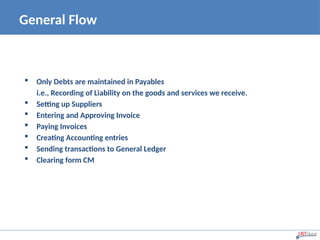
 Only Debts are maintained in Payables
i.e., Recording of Liability on the goods and services we receive.
 Setting up Suppliers
 Entering and Approving Invoice
 Paying Invoices
 Creating Accounting entries
 Sending transactions to General Ledger
 Clearing form CM
General Flow
Basic Accounting
Slide 3 Confidential and Proprietary
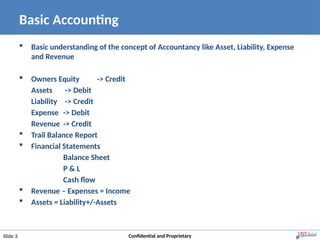
 Basic understanding of the concept of Accountancy like Asset, Liability, Expense
and Revenue
 Owners Equity -> Credit
Assets -> Debit
Liability -> Credit
Expense -> Debit
Revenue -> Credit
 Trail Balance Report
 Financial Statements
Balance Sheet
P & L
Cash flow
 Revenue – Expenses = Income
 Assets = Liability+/-Assets
A Small Game
Slide 4 Confidential and Proprietary
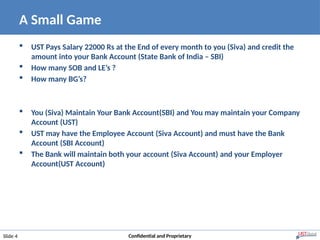
 UST Pays Salary 22000 Rs at the End of every month to you (Siva) and credit the
amount into your Bank Account (State Bank of India – SBI)
 How many SOB and LE’s ?
 How many BG’s?
 You (Siva) Maintain Your Bank Account(SBI) and You may maintain your Company
Account (UST)
 UST may have the Employee Account (Siva Account) and must have the Bank
Account (SBI Account)
 The Bank will maintain both your account (Siva Account) and your Employer
Account(UST Account)
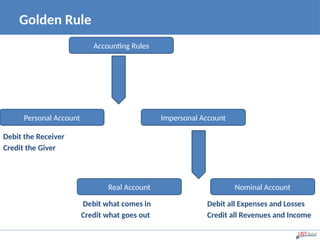
Golden Rule
Debit the Receiver
Credit the Giver
Debit what comes in Debit all Expenses and Losses
Credit what goes out Credit all Revenues and Income
Accounting Rules
Nominal Account
Real Account
Personal Account Impersonal Account
Fewer Clients, More Attention
Introduction to Oracle Accounts
Payables
Key Features
• Create and Manage Suppliers
• General Bank, Invoice and Payment Workbench Setups
• Enter, Review and Approve invoices
• Pay invoices and reconcile to the bank records
• Reporting and Accounting
• Payments
• Create journals and posting to General Ledger
• Tax Management
• Integrating with other modules
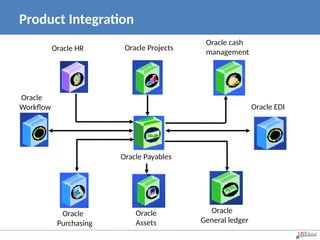
Product Integration
Oracle HR Oracle Projects
Oracle cash
management
Oracle EDI
Oracle
Workflow
Oracle Payables
Oracle
Assets
Oracle
General ledger
Oracle
Purchasing
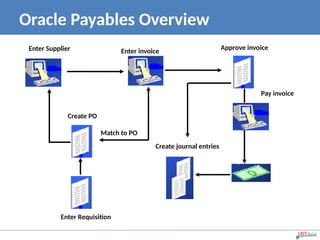
Oracle Payables Overview
Enter Supplier Enter invoice Approve invoice
Create PO
Match to PO
Pay invoice
Create journal entries
Enter Requisition
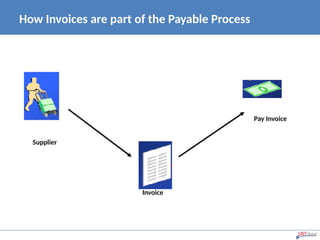
How Invoices are part of the Payable Process
Pay Invoice
Invoice
Supplier
The Key Features in Invoice Process
• Create an invoice batch
• Enter basic Invoice information
• Enter invoice distributions and create distribution sets
• Match invoices to purchase order
• Invoice matching to Receipts
• Enter credit and debit invoices
• Approve Invoices
• Schedule Payments
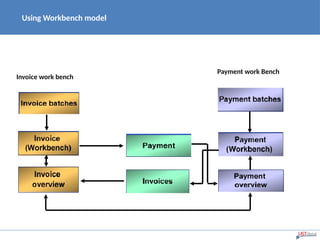
Using Workbench model
Invoice work bench
Payment work Bench
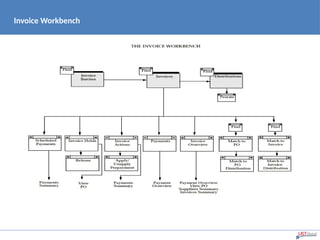
Invoice Workbench
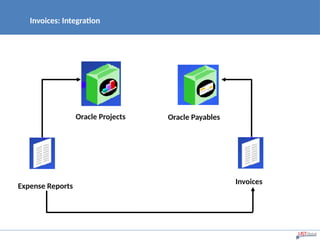
Invoices: Integration
Oracle Projects Oracle Payables
Expense Reports
Invoices
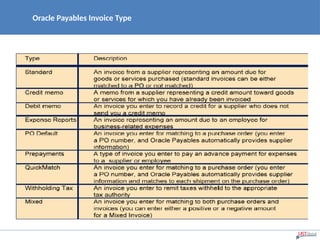
Oracle Payables Invoice Type
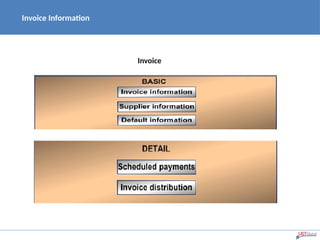
Invoice Information
Invoice
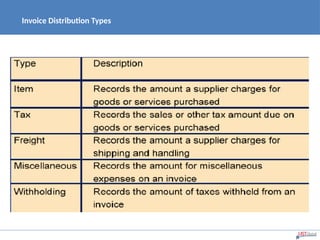
Invoice Distribution Types
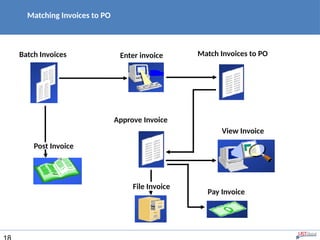
Matching Invoices to PO
Batch Invoices Enter invoice Match Invoices to PO
Approve Invoice
View Invoice
Post Invoice
File Invoice
Pay Invoice
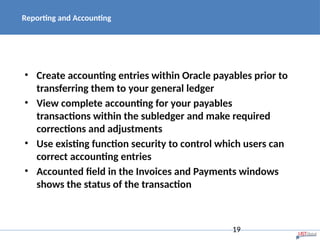
Reporting and Accounting
• Create accounting entries within Oracle payables prior to
transferring them to your general ledger
• View complete accounting for your payables
transactions within the subledger and make required
corrections and adjustments
• Use existing function security to control which users can
correct accounting entries
• Accounted field in the Invoices and Payments windows
shows the status of the transaction
19
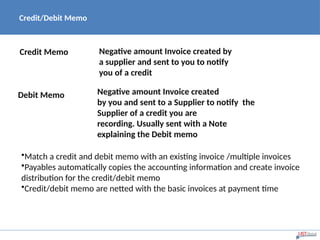
Credit/Debit Memo
Credit Memo Negative amount Invoice created by
a supplier and sent to you to notify
you of a credit
Debit Memo Negative amount Invoice created
by you and sent to a Supplier to notify the
Supplier of a credit you are
recording. Usually sent with a Note
explaining the Debit memo
•Match a credit and debit memo with an existing invoice /multiple invoices
•Payables automatically copies the accounting information and create invoice
distribution for the credit/debit memo
•Credit/debit memo are netted with the basic invoices at payment time
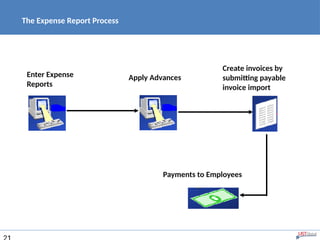
The Expense Report Process
Enter Expense
Reports
Apply Advances
Create invoices by
submitting payable
invoice import
Payments to Employees
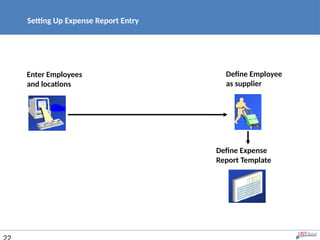
Setting Up Expense Report Entry
Enter Employees
and locations
Define Employee
as supplier
Define Expense
Report Template
Recurring Invoices
• Define Special Calendar names
• Define Recurring Invoices Template
• Enter Recurring Invoice information
• Create Recurring Invoices
• Review Recurring Invoices
23
Recurring Invoices
With Recurring Invoice template you can:
• Specify the interval for which invoices will be
created
• Create up to two special one-time invoice amounts
of a nonstandard amount, such as a deposit or
balloon payment
• Define recurring invoices to increase or decrease by
a fixed percentage from period to period
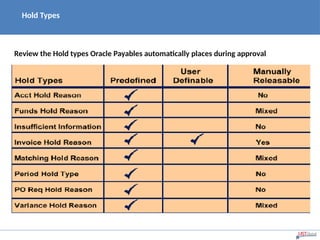
Hold Types
Review the Hold types Oracle Payables automatically places during approval
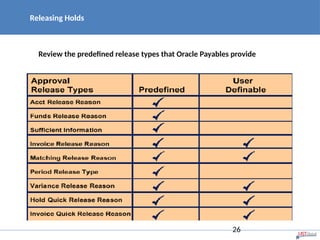
Releasing Holds
Review the predefined release types that Oracle Payables provide
26
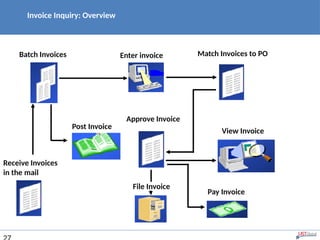
Invoice Inquiry: Overview
Batch Invoices Enter invoice Match Invoices to PO
Approve Invoice
View Invoice
Post Invoice
File Invoice
Pay Invoice
Receive Invoices
in the mail
How Payments are part of the Payable Process
•Oracle Payables Payment Method
•Oracle Payables Payment Disbursement Types
•Payment Batches : Overview
•Payment Workbench
•Cancelling and reversing payments
•Payment Inquiry
•Accounting
•Transfer to GL
•Journal Import
•Posting
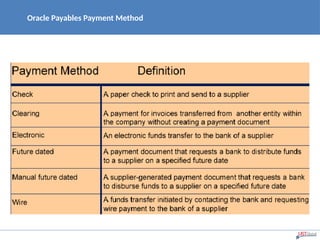
Oracle Payables Payment Method
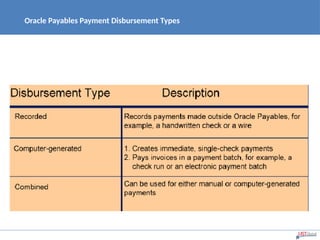
Oracle Payables Payment Disbursement Types
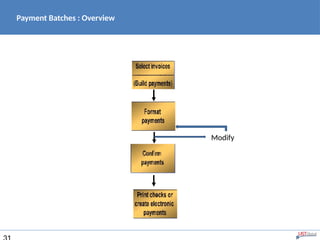
Payment Batches : Overview
Modify
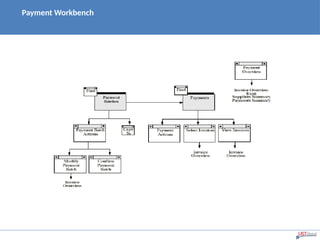
Payment Workbench
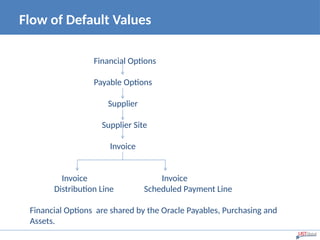
Flow of Default Values
Financial Options
Payable Options
Supplier
Supplier Site
Invoice
Invoice Invoice
Distribution Line Scheduled Payment Line
Financial Options are shared by the Oracle Payables, Purchasing and
Assets.
Financials & Payables
Options
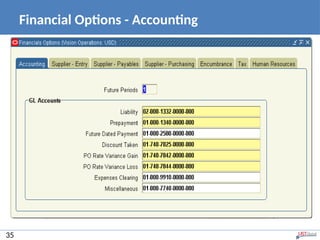
Financial Options - Accounting
35
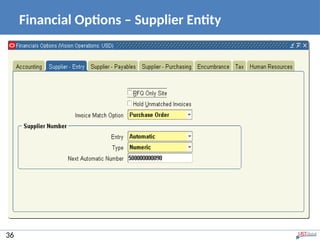
Financial Options – Supplier Entity
36
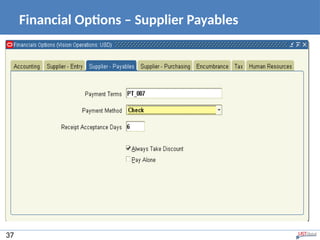
Financial Options – Supplier Payables
37
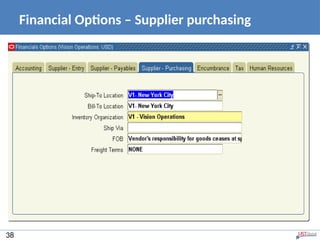
Financial Options – Supplier purchasing
38
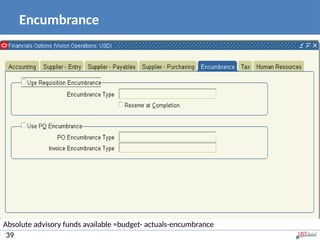
Encumbrance
39
Absolute advisory funds available =budget- actuals-encumbrance
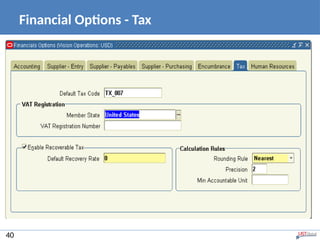
Financial Options - Tax
40
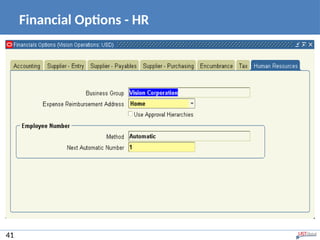
Financial Options - HR
41
Fewer Clients, More Attention
Thank you!

Oracle E Business SUite Presentation_on_AP.ppt

  • 1.
    Fewer Clients, MoreAttention Basic Accounts Payables Business Flow Venkatesh T
  • 2.
     Only Debtsare maintained in Payables i.e., Recording of Liability on the goods and services we receive.  Setting up Suppliers  Entering and Approving Invoice  Paying Invoices  Creating Accounting entries  Sending transactions to General Ledger  Clearing form CM General Flow
  • 3.
    Basic Accounting Slide 3Confidential and Proprietary  Basic understanding of the concept of Accountancy like Asset, Liability, Expense and Revenue  Owners Equity -> Credit Assets -> Debit Liability -> Credit Expense -> Debit Revenue -> Credit  Trail Balance Report  Financial Statements Balance Sheet P & L Cash flow  Revenue – Expenses = Income  Assets = Liability+/-Assets
  • 4.
    A Small Game Slide4 Confidential and Proprietary  UST Pays Salary 22000 Rs at the End of every month to you (Siva) and credit the amount into your Bank Account (State Bank of India – SBI)  How many SOB and LE’s ?  How many BG’s?  You (Siva) Maintain Your Bank Account(SBI) and You may maintain your Company Account (UST)  UST may have the Employee Account (Siva Account) and must have the Bank Account (SBI Account)  The Bank will maintain both your account (Siva Account) and your Employer Account(UST Account)
  • 5.
    Golden Rule Debit theReceiver Credit the Giver Debit what comes in Debit all Expenses and Losses Credit what goes out Credit all Revenues and Income Accounting Rules Nominal Account Real Account Personal Account Impersonal Account
  • 6.
    Fewer Clients, MoreAttention Introduction to Oracle Accounts Payables
  • 7.
    Key Features • Createand Manage Suppliers • General Bank, Invoice and Payment Workbench Setups • Enter, Review and Approve invoices • Pay invoices and reconcile to the bank records • Reporting and Accounting • Payments • Create journals and posting to General Ledger • Tax Management • Integrating with other modules
  • 8.
    Product Integration Oracle HROracle Projects Oracle cash management Oracle EDI Oracle Workflow Oracle Payables Oracle Assets Oracle General ledger Oracle Purchasing
  • 9.
    Oracle Payables Overview EnterSupplier Enter invoice Approve invoice Create PO Match to PO Pay invoice Create journal entries Enter Requisition
  • 10.
    How Invoices arepart of the Payable Process Pay Invoice Invoice Supplier
  • 11.
    The Key Featuresin Invoice Process • Create an invoice batch • Enter basic Invoice information • Enter invoice distributions and create distribution sets • Match invoices to purchase order • Invoice matching to Receipts • Enter credit and debit invoices • Approve Invoices • Schedule Payments
  • 12.
    Using Workbench model Invoicework bench Payment work Bench
  • 13.
  • 14.
    Invoices: Integration Oracle ProjectsOracle Payables Expense Reports Invoices
  • 15.
  • 16.
  • 17.
  • 18.
    Matching Invoices toPO Batch Invoices Enter invoice Match Invoices to PO Approve Invoice View Invoice Post Invoice File Invoice Pay Invoice
  • 19.
    Reporting and Accounting •Create accounting entries within Oracle payables prior to transferring them to your general ledger • View complete accounting for your payables transactions within the subledger and make required corrections and adjustments • Use existing function security to control which users can correct accounting entries • Accounted field in the Invoices and Payments windows shows the status of the transaction 19
  • 20.
    Credit/Debit Memo Credit MemoNegative amount Invoice created by a supplier and sent to you to notify you of a credit Debit Memo Negative amount Invoice created by you and sent to a Supplier to notify the Supplier of a credit you are recording. Usually sent with a Note explaining the Debit memo •Match a credit and debit memo with an existing invoice /multiple invoices •Payables automatically copies the accounting information and create invoice distribution for the credit/debit memo •Credit/debit memo are netted with the basic invoices at payment time
  • 21.
    The Expense ReportProcess Enter Expense Reports Apply Advances Create invoices by submitting payable invoice import Payments to Employees
  • 22.
    Setting Up ExpenseReport Entry Enter Employees and locations Define Employee as supplier Define Expense Report Template
  • 23.
    Recurring Invoices • DefineSpecial Calendar names • Define Recurring Invoices Template • Enter Recurring Invoice information • Create Recurring Invoices • Review Recurring Invoices 23
  • 24.
    Recurring Invoices With RecurringInvoice template you can: • Specify the interval for which invoices will be created • Create up to two special one-time invoice amounts of a nonstandard amount, such as a deposit or balloon payment • Define recurring invoices to increase or decrease by a fixed percentage from period to period
  • 25.
    Hold Types Review theHold types Oracle Payables automatically places during approval
  • 26.
    Releasing Holds Review thepredefined release types that Oracle Payables provide 26
  • 27.
    Invoice Inquiry: Overview BatchInvoices Enter invoice Match Invoices to PO Approve Invoice View Invoice Post Invoice File Invoice Pay Invoice Receive Invoices in the mail
  • 28.
    How Payments arepart of the Payable Process •Oracle Payables Payment Method •Oracle Payables Payment Disbursement Types •Payment Batches : Overview •Payment Workbench •Cancelling and reversing payments •Payment Inquiry •Accounting •Transfer to GL •Journal Import •Posting
  • 29.
  • 30.
    Oracle Payables PaymentDisbursement Types
  • 31.
    Payment Batches :Overview Modify
  • 32.
  • 33.
    Flow of DefaultValues Financial Options Payable Options Supplier Supplier Site Invoice Invoice Invoice Distribution Line Scheduled Payment Line Financial Options are shared by the Oracle Payables, Purchasing and Assets.
  • 34.
  • 35.
    Financial Options -Accounting 35
  • 36.
    Financial Options –Supplier Entity 36
  • 37.
    Financial Options –Supplier Payables 37
  • 38.
    Financial Options –Supplier purchasing 38
  • 39.
    Encumbrance 39 Absolute advisory fundsavailable =budget- actuals-encumbrance
  • 40.
  • 41.
  • 42.
    Fewer Clients, MoreAttention Thank you!

Editor's Notes

  • #35 Accounting: Future Period is defaulted from the Calendar creation and you cannot change the Future Period. GL Accounts: We have different types of accounts to define for the tracking of the transactions.   Liability is the account where we store the details for which we are liable to pay the supplier.   Prepayment is the account to take the track of the invoices of Supplier site. Financials options defaults to new suppliers, and the supplier value is defaulted to new supplier sites   Future dated payment account has the details of the future dated payments. Suppose if you relieve the liability payment time, i.e.; if supplier given you 30 days for payment and you paid on the first day then for 29 days this is your asset account and if you relieve liability at future dated payment maturity, then this should be a liability account for example you given the check for the date in the upcoming month then the account acts as liability account till that date in the next month.   Discount Taken is on payments is recorded in this account.   PO Rate Variance Gain/Loss is the purchase order rate variance gain/loss for your inventory items. The variance is calculated between the invoice and either the PO or Invoice on the way you match.  These accounts are not used to record the variances in the expense items.  Any exchange rate variance for the expense items is recorded to the charge account of the purchase order.  Payables calculate these amounts during the Invoice Validation.   Expenses Clearing Account is used when you use the Company Payment option of Oracle Internet Expenses  Payable uses this account as a temporary account to record the credit card transaction activity  Payable credits this account with offsets to the debit entries account when you submit expense Report Import for an expense report entered in the I expenses.   Miscellaneous is used when invoices submitted via I supplier and XML gate way.
  • #39 Absolute advisory funds available-=budget-actuals-encumbrance