TOPIC :-
 Insert Video to Presentation
 Embed Video from a File
 Action Button
 Insert To Slides
 Edit
 Import Word Document
 Quick Review
 Assignment
Insert video into PowerPoint
There is a huge opportunity to spark interest in
your presentation by embedding a video in your
slides. Whether you are selling an idea, product,
or strategy, you will capture the attention of
your audience much more effectively with a
video.
The process for adding a video to PowerPoint
will vary slightly depending on what version of
PowerPoint you are working with.
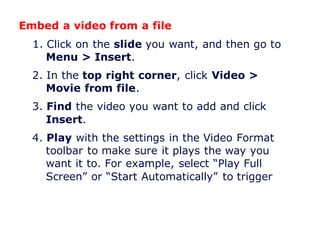
Embed a video from a file
1. Click on the slide you want, and then go to
Menu > Insert.
2. In the top right corner, click Video >
Movie from file.
3. Find the video you want to add and click
Insert.
4. Play with the settings in the Video Format
toolbar to make sure it plays the way you
want it to. For example, select “Play Full
Screen” or “Start Automatically” to trigger
your video to take centre stage when you
play that slide.
5. Preview your presentation to check your
video plays the way you want it to!
Action Button
Another tool you can use to connect to a
webpage, file, email address, or slide is called
an action button. Action buttons are built-in
shapes you can add to a presentation and set
to link to another slide, play a sound, or perform
a similar action. When someone clicks or hovers
over the button, the selected action will occur.
Action buttons can do many of the same things
as hyperlinks. You can insert action buttons on
one slide at a time, or you can insert an action
button that will show up on every slide.
Inserting Action Buttons
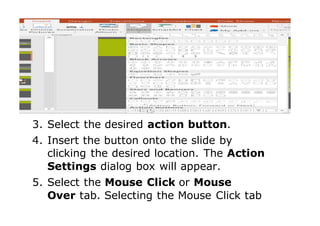
1. Click the Insert tab.
2. Click the Shapes command in the
Illustrations group. A drop-down menu will
appear with the action buttons located at
the very bottom.
3. Select the desired action button.
4. Insert the button onto the slide by
clicking the desired location. The Action
Settings dialog box will appear.
5. Select the Mouse Click or Mouse
Over tab. Selecting the Mouse Click tab
means the action button will perform its
action only when clicked. Selecting
the Mouse Over tab will make the
action button perform its action when
you move the mouse over it.
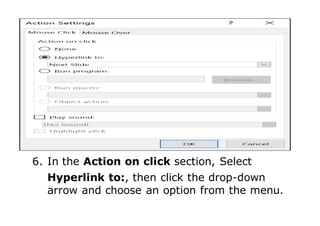
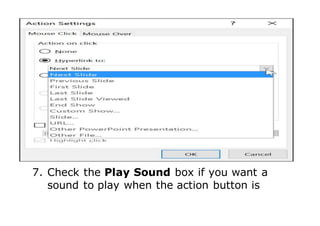
6. In the Action on click section, Select
Hyperlink to:, then click the drop-down
arrow and choose an option from the menu.
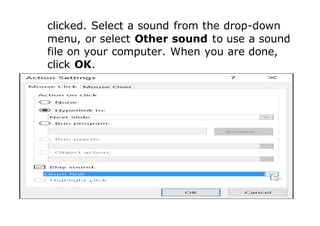
7. Check the Play Sound box if you want a
sound to play when the action button is
clicked. Select a sound from the drop-down
menu, or select Other sound to use a sound
file on your computer. When you are done,
click OK.
To insert an action button on all slides
If you would like to add an action button to
every slide, you can do this with a feature
called Slide Master View.
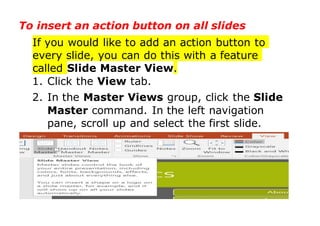
1. Click the View tab.
2. In the Master Views group, click the Slide
Master command. In the left navigation
pane, scroll up and select the first slide.
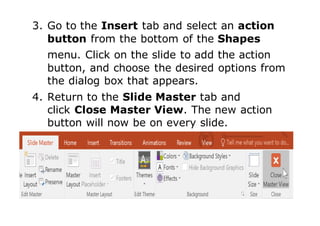
3. Go to the Insert tab and select an action
button from the bottom of the Shapes
menu. Click on the slide to add the action
button, and choose the desired options from
the dialog box that appears.
4. Return to the Slide Master tab and
click Close Master View. The new action
button will now be on every slide.
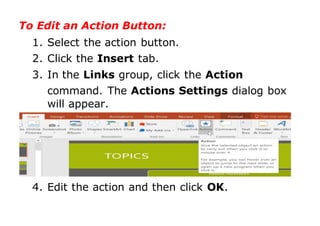
To Edit an Action Button:
1. Select the action button.
2. Click the Insert tab.
3. In the Links group, click the Action
command. The Actions Settings dialog box
will appear.
4. Edit the action and then click OK.
Import a Word document
Embed Word content directly into your
PowerPoint presentation. You can import a Word
document as an object, which inserts a static
snapshot of the document. This is useful when
the Word document is a single page and has
pictures. Another option is to use a Word outline
as the foundation for a presentation.
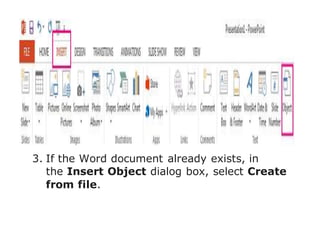
Insert a Word document as an object
1. Select the slide in which you want to place
the Word document.
2. Click Insert > Object.
3. If the Word document already exists, in
the Insert Object dialog box, select Create
from file.
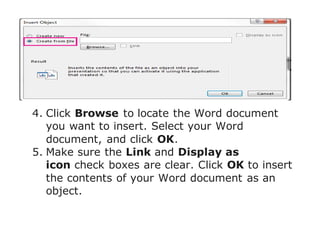
4. Click Browse to locate the Word document
you want to insert. Select your Word
document, and click OK.
5. Make sure the Link and Display as
icon check boxes are clear. Click OK to insert
the contents of your Word document as an
object.
Quick Review:
 There is a huge opportunity to spark interest
in your presentation by embedding a video in
your slides for selling an idea, product, or
strategy; you will capture the attention of
your audience more effectively with a video.
 Action buttons are built-in shapes you can
add to a presentation and set to link to
another slide, play a sound, or perform a
similar action.
 You can import a Word document as an
object, which inserts a static snapshot of the
document.
ASSIGNMENT:-
1. What do you understand by Animation?
2. What is meant by Transition?
3. How Animation is helpful in presentation?
4. Name some different types of Transition
effects.
5. Write about types of Animation.
6. Write the steps of Animation.
Animation in powerpoint part 2

Animation in powerpoint part 2

  • 2.
    TOPIC :-  InsertVideo to Presentation  Embed Video from a File  Action Button  Insert To Slides  Edit  Import Word Document  Quick Review  Assignment
  • 3.
    Insert video intoPowerPoint There is a huge opportunity to spark interest in your presentation by embedding a video in your slides. Whether you are selling an idea, product, or strategy, you will capture the attention of your audience much more effectively with a video. The process for adding a video to PowerPoint will vary slightly depending on what version of PowerPoint you are working with.
  • 4.
    Embed a videofrom a file 1. Click on the slide you want, and then go to Menu > Insert. 2. In the top right corner, click Video > Movie from file. 3. Find the video you want to add and click Insert. 4. Play with the settings in the Video Format toolbar to make sure it plays the way you want it to. For example, select “Play Full Screen” or “Start Automatically” to trigger
  • 5.
    your video totake centre stage when you play that slide. 5. Preview your presentation to check your video plays the way you want it to! Action Button Another tool you can use to connect to a webpage, file, email address, or slide is called an action button. Action buttons are built-in shapes you can add to a presentation and set to link to another slide, play a sound, or perform a similar action. When someone clicks or hovers over the button, the selected action will occur.
  • 6.
    Action buttons cando many of the same things as hyperlinks. You can insert action buttons on one slide at a time, or you can insert an action button that will show up on every slide. Inserting Action Buttons 1. Click the Insert tab. 2. Click the Shapes command in the Illustrations group. A drop-down menu will appear with the action buttons located at the very bottom.
  • 7.
    3. Select thedesired action button. 4. Insert the button onto the slide by clicking the desired location. The Action Settings dialog box will appear. 5. Select the Mouse Click or Mouse Over tab. Selecting the Mouse Click tab
  • 8.
    means the actionbutton will perform its action only when clicked. Selecting the Mouse Over tab will make the action button perform its action when you move the mouse over it.
  • 9.
    6. In theAction on click section, Select Hyperlink to:, then click the drop-down arrow and choose an option from the menu.
  • 10.
    7. Check thePlay Sound box if you want a sound to play when the action button is
  • 11.
    clicked. Select asound from the drop-down menu, or select Other sound to use a sound file on your computer. When you are done, click OK.
  • 12.
    To insert anaction button on all slides If you would like to add an action button to every slide, you can do this with a feature called Slide Master View. 1. Click the View tab. 2. In the Master Views group, click the Slide Master command. In the left navigation pane, scroll up and select the first slide.
  • 13.
    3. Go tothe Insert tab and select an action button from the bottom of the Shapes menu. Click on the slide to add the action button, and choose the desired options from the dialog box that appears. 4. Return to the Slide Master tab and click Close Master View. The new action button will now be on every slide.
  • 14.
    To Edit anAction Button: 1. Select the action button. 2. Click the Insert tab. 3. In the Links group, click the Action command. The Actions Settings dialog box will appear. 4. Edit the action and then click OK.
  • 15.
    Import a Worddocument Embed Word content directly into your PowerPoint presentation. You can import a Word document as an object, which inserts a static snapshot of the document. This is useful when the Word document is a single page and has pictures. Another option is to use a Word outline as the foundation for a presentation. Insert a Word document as an object 1. Select the slide in which you want to place the Word document. 2. Click Insert > Object.
  • 16.
    3. If theWord document already exists, in the Insert Object dialog box, select Create from file.
  • 17.
    4. Click Browseto locate the Word document you want to insert. Select your Word document, and click OK. 5. Make sure the Link and Display as icon check boxes are clear. Click OK to insert the contents of your Word document as an object.
  • 18.
    Quick Review:  Thereis a huge opportunity to spark interest in your presentation by embedding a video in your slides for selling an idea, product, or strategy; you will capture the attention of your audience more effectively with a video.  Action buttons are built-in shapes you can add to a presentation and set to link to another slide, play a sound, or perform a similar action.  You can import a Word document as an object, which inserts a static snapshot of the document.
  • 19.
    ASSIGNMENT:- 1. What doyou understand by Animation? 2. What is meant by Transition? 3. How Animation is helpful in presentation? 4. Name some different types of Transition effects. 5. Write about types of Animation. 6. Write the steps of Animation.