

Animation and Coding
for Digital Storytelling
101
Karen Bonanno
National Director
© EDUWEBINAR PTY LTD | ALL RIGHTS RESERVED
®
© EDUWEBINAR PTY LTD | ALL RIGHTS RESERVED
®
Introductions
Teacher, Teacher Librarian,
Educator
Over 35 years’ in K-12
education
Professional learning
provider
Youth coach & mentor
@eduwebinar
@kbonanno
Karen Bonanno
© EDUWEBINAR PTY LTD | ALL RIGHTS RESERVED
®
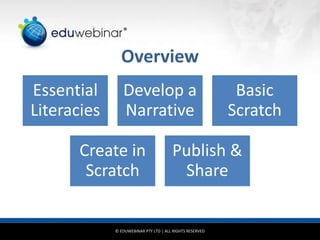
Overview
Essential
Literacies
Develop a
Narrative
Basic
Scratch
Create in
Scratch
Publish &
Share
© EDUWEBINAR PTY LTD | ALL RIGHTS RESERVED
®
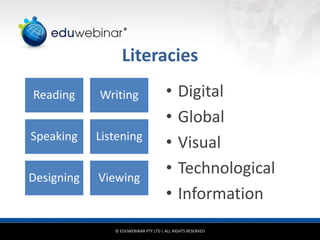
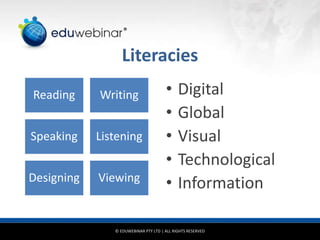
Literacies
Reading Writing
Speaking Listening
Designing Viewing
• Digital
• Global
• Visual
• Technological
• Information
© EDUWEBINAR PTY LTD | ALL RIGHTS RESERVED
®
Essential Skills
• Digital literacy – ability to communicate with an ever-expanding
community to discuss issues, gather information and seek help
• Global literacy – capacity to read, interpret, respond and
contextualise message from a global perspective
• Visual literacy – ability to understand, produce and communicate
through visual images
• Technology literacy – ability to use computers and other technology
to improve learning, productivity and performance
• Information literacy – ability to find, evaluation and synthesize
information
http://digitalstorytelling.coe.uh.edu/page.cfm?id=27&cid=27&sublinkid=32
© EDUWEBINAR PTY LTD | ALL RIGHTS RESERVED
®
Digital Storytelling
…is a form of digital media production that allows
anyone to tell their story. It can be compelling,
emotionally engaging and/or interactive.
(Normally, movies, videos and podcasts)
…is the practice of using computer-based tools to tell
stories
..combine computer-based images, text, recorded
audio narration, music (usually 2 to 10 minutes)
© EDUWEBINAR PTY LTD | ALL RIGHTS RESERVED
®
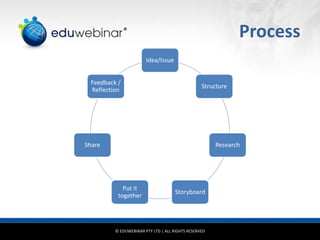
Process
Idea/Issue
Structure
Research
Storyboard
Put it
together
Share
Feedback /
Reflection
© EDUWEBINAR PTY LTD | ALL RIGHTS RESERVED
®
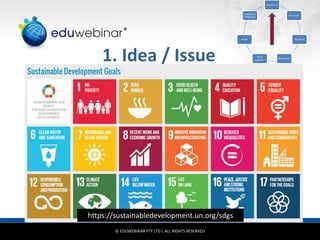
1. Idea / Issue
https://sustainabledevelopment.un.org/sdgs
Idea/Issue
Structure
Research
Storyboard
Put it
together
Share
Feedback /
Reflection
© EDUWEBINAR PTY LTD | ALL RIGHTS RESERVED
®
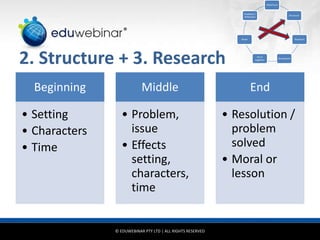
2. Structure + 3. Research
Beginning
• Setting
• Characters
• Time
Middle
• Problem,
issue
• Effects
setting,
characters,
time
End
• Resolution /
problem
solved
• Moral or
lesson
Idea/Issue
Structure
Research
Storyboard
Put it
together
Share
Feedback /
Reflection
© EDUWEBINAR PTY LTD | ALL RIGHTS RESERVED
®
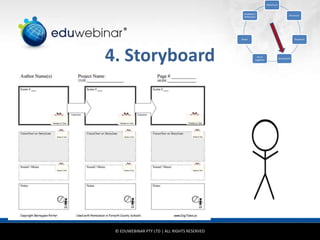
4. Storyboard
Idea/Issue
Structure
Research
Storyboard
Put it
together
Share
Feedback /
Reflection
© EDUWEBINAR PTY LTD | ALL RIGHTS RESERVED
®
Create Your
Animation
Idea/Issue
Structure
Research
Storyboard
Put it
together
Share
Feedback /
Reflection
© EDUWEBINAR PTY LTD | ALL RIGHTS RESERVED
®
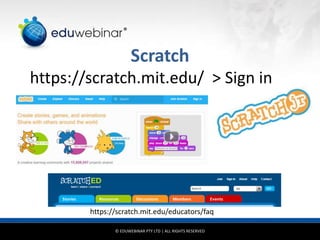
Scratch
https://scratch.mit.edu/ > Sign in
https://scratch.mit.edu/educators/faq
© EDUWEBINAR PTY LTD | ALL RIGHTS RESERVED
®
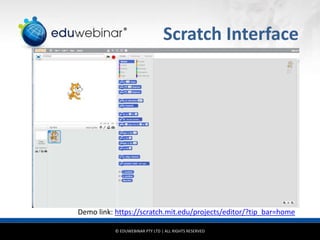
Scratch Interface
Demo link: https://scratch.mit.edu/projects/editor/?tip_bar=home
© EDUWEBINAR PTY LTD | ALL RIGHTS RESERVED
®
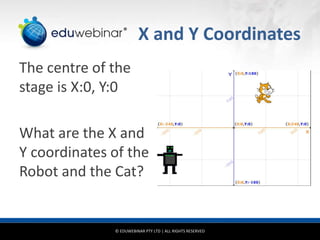
X and Y Coordinates
The centre of the
stage is X:0, Y:0
What are the X and
Y coordinates of the
Robot and the Cat?
© EDUWEBINAR PTY LTD | ALL RIGHTS RESERVED
®
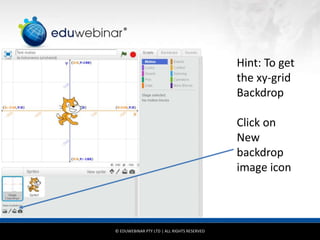
Hint: To get
the xy-grid
Backdrop
Click on
New
backdrop
image icon
© EDUWEBINAR PTY LTD | ALL RIGHTS RESERVED
®
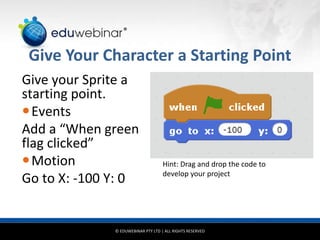
Give Your Character a Starting Point
Give your Sprite a
starting point.
Events
Add a “When green
flag clicked”
Motion
Go to X: -100 Y: 0
Hint: Drag and drop the code to
develop your project
© EDUWEBINAR PTY LTD | ALL RIGHTS RESERVED
®
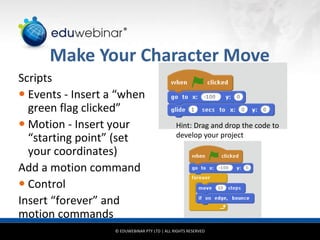
Make Your Character Move
Scripts
 Events - Insert a “when
green flag clicked”
 Motion - Insert your
“starting point” (set
your coordinates)
Add a motion command
 Control
Insert “forever” and
motion commands
Hint: Drag and drop the code to
develop your project
© EDUWEBINAR PTY LTD | ALL RIGHTS RESERVED
®
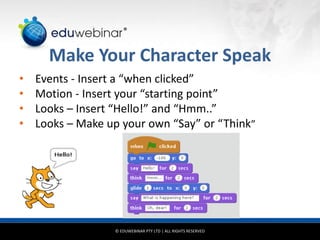
Make Your Character Speak
• Events - Insert a “when clicked”
• Motion - Insert your “starting point”
• Looks – Insert “Hello!” and “Hmm..”
• Looks – Make up your own “Say” or “Think”
© EDUWEBINAR PTY LTD | ALL RIGHTS RESERVED
®
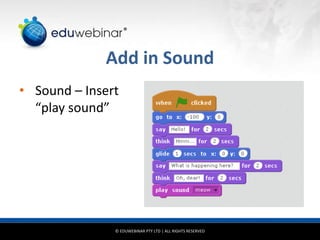
Add in Sound
• Sound – Insert
“play sound”
© EDUWEBINAR PTY LTD | ALL RIGHTS RESERVED
®
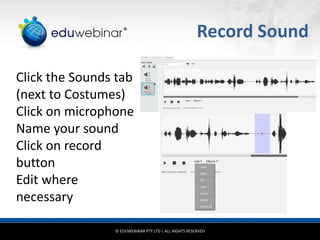
Record Sound
Click the Sounds tab
(next to Costumes)
Click on microphone
Name your sound
Click on record
button
Edit where
necessary
© EDUWEBINAR PTY LTD | ALL RIGHTS RESERVED
®
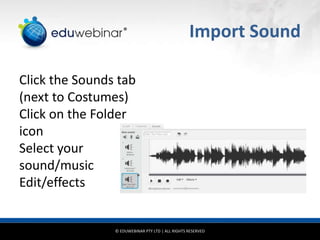
Import Sound
Click the Sounds tab
(next to Costumes)
Click on the Folder
icon
Select your
sound/music
Edit/effects
© EDUWEBINAR PTY LTD | ALL RIGHTS RESERVED
®
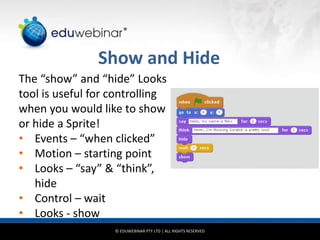
Show and Hide
The “show” and “hide” Looks
tool is useful for controlling
when you would like to show
or hide a Sprite!
• Events – “when clicked”
• Motion – starting point
• Looks – “say” & “think”,
hide
• Control – wait
• Looks - show
© EDUWEBINAR PTY LTD | ALL RIGHTS RESERVED
®
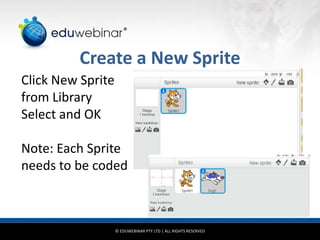
Create a New Sprite
Click New Sprite
from Library
Select and OK
Note: Each Sprite
needs to be coded
© EDUWEBINAR PTY LTD | ALL RIGHTS RESERVED
®
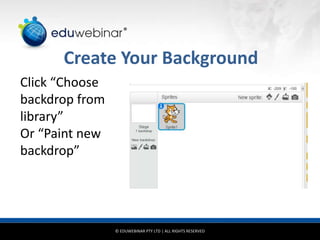
Create Your Background
Click “Choose
backdrop from
library”
Or “Paint new
backdrop”
© EDUWEBINAR PTY LTD | ALL RIGHTS RESERVED
®
Save It!
© EDUWEBINAR PTY LTD | ALL RIGHTS RESERVED
®
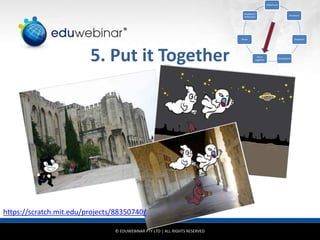
5. Put it Together
Idea/Issue
Structure
Research
Storyboard
Put it
together
Share
Feedback /
Reflection
https://scratch.mit.edu/projects/88350740/
© EDUWEBINAR PTY LTD | ALL RIGHTS RESERVED
®
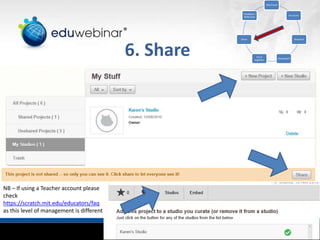
6. Share
Idea/Issue
Structure
Research
Storyboard
Put it
together
Share
Feedback /
Reflection
NB – If using a Teacher account please
check
https://scratch.mit.edu/educators/faq
as this level of management is different
© EDUWEBINAR PTY LTD | ALL RIGHTS RESERVED
®
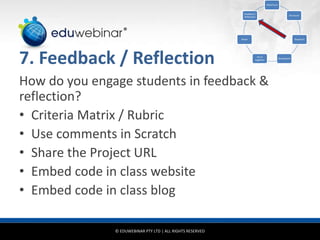
7. Feedback / Reflection
How do you engage students in feedback &
reflection?
• Criteria Matrix / Rubric
• Use comments in Scratch
• Share the Project URL
• Embed code in class website
• Embed code in class blog
Idea/Issue
Structure
Research
Storyboard
Put it
together
Share
Feedback /
Reflection
© EDUWEBINAR PTY LTD | ALL RIGHTS RESERVED
®
Literacies
Reading Writing
Speaking Listening
Designing Viewing
• Digital
• Global
• Visual
• Technological
• Information
© EDUWEBINAR PTY LTD | ALL RIGHTS RESERVED
®
Helpful Links
https://scratch.mit.edu/tips
https://www.youtube.com/
(Search query = how to use scratch for
beginners)
https://scratch.mit.edu/discuss/ (Scratch
forum)
https://wiki.scratch.mit.edu/wiki/Scratch_Wiki_Home
© EDUWEBINAR PTY LTD | ALL RIGHTS RESERVED
®
Learning Outcomes
• What learning outcomes
do you see possible for
your students?
• What new skills or
knowledge do you believe
your students will gain?
• What new skills or
knowledge will you gain?
© EDUWEBINAR PTY LTD | ALL RIGHTS RESERVED
®
Top Tips …
• Be organised
• Keep it visual
• Teach yourself the basics
• Let the students teach you
• Have a plan B
• Reflect at the end and seek feedback
© EDUWEBINAR PTY LTD | ALL RIGHTS RESERVED
®
Resources
Scratch
https://scratch.mit.edu/
ScratchJr for young children (ages 5 – 7)
http://www.scratchjr.org/
ScratchED – online community for Scratch educators
http://scratched.gse.harvard.edu/
Code Club Australia
https://codeclubau.org/
Hour of code
https://code.org/learn
High Noon - 20 global issues for ideas
http://www.theglobalist.com/twenty-global-issues-twenty-years-to-solve-them/
UNESCO sustainable goals
https://sustainabledevelopment.un.org/sdgs
© EDUWEBINAR PTY LTD | ALL RIGHTS RESERVED
®
In Closing
PowerPoint slides
Weblink will be provided
Edumakerspace
http://www.scoop.it/t/edumakerspace
Eduwebinar on Facebook
https://www.facebook.com/eduwebinar
Future events
http://eduwebinar.com.au/webinars
© EDUWEBINAR PTY LTD | ALL RIGHTS RESERVED
®
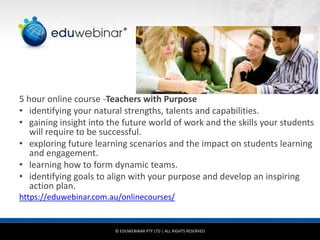
5 hour online course -Teachers with Purpose
• identifying your natural strengths, talents and capabilities.
• gaining insight into the future world of work and the skills your students
will require to be successful.
• exploring future learning scenarios and the impact on students learning
and engagement.
• learning how to form dynamic teams.
• identifying goals to align with your purpose and develop an inspiring
action plan.
https://eduwebinar.com.au/onlinecourses/
© EDUWEBINAR PTY LTD | ALL RIGHTS RESERVED
®
Boosting your professional competence
36
®

Animation and Coding for Digital Storytelling 101

  • 1.
    Animation and Coding forDigital Storytelling 101 Karen Bonanno National Director © EDUWEBINAR PTY LTD | ALL RIGHTS RESERVED ®
  • 2.
    © EDUWEBINAR PTYLTD | ALL RIGHTS RESERVED ® Introductions Teacher, Teacher Librarian, Educator Over 35 years’ in K-12 education Professional learning provider Youth coach & mentor @eduwebinar @kbonanno Karen Bonanno
  • 3.
    © EDUWEBINAR PTYLTD | ALL RIGHTS RESERVED ® Overview Essential Literacies Develop a Narrative Basic Scratch Create in Scratch Publish & Share
  • 4.
    © EDUWEBINAR PTYLTD | ALL RIGHTS RESERVED ® Literacies Reading Writing Speaking Listening Designing Viewing • Digital • Global • Visual • Technological • Information
  • 5.
    © EDUWEBINAR PTYLTD | ALL RIGHTS RESERVED ® Essential Skills • Digital literacy – ability to communicate with an ever-expanding community to discuss issues, gather information and seek help • Global literacy – capacity to read, interpret, respond and contextualise message from a global perspective • Visual literacy – ability to understand, produce and communicate through visual images • Technology literacy – ability to use computers and other technology to improve learning, productivity and performance • Information literacy – ability to find, evaluation and synthesize information http://digitalstorytelling.coe.uh.edu/page.cfm?id=27&cid=27&sublinkid=32
  • 6.
    © EDUWEBINAR PTYLTD | ALL RIGHTS RESERVED ® Digital Storytelling …is a form of digital media production that allows anyone to tell their story. It can be compelling, emotionally engaging and/or interactive. (Normally, movies, videos and podcasts) …is the practice of using computer-based tools to tell stories ..combine computer-based images, text, recorded audio narration, music (usually 2 to 10 minutes)
  • 7.
    © EDUWEBINAR PTYLTD | ALL RIGHTS RESERVED ® Process Idea/Issue Structure Research Storyboard Put it together Share Feedback / Reflection
  • 8.
    © EDUWEBINAR PTYLTD | ALL RIGHTS RESERVED ® 1. Idea / Issue https://sustainabledevelopment.un.org/sdgs Idea/Issue Structure Research Storyboard Put it together Share Feedback / Reflection
  • 9.
    © EDUWEBINAR PTYLTD | ALL RIGHTS RESERVED ® 2. Structure + 3. Research Beginning • Setting • Characters • Time Middle • Problem, issue • Effects setting, characters, time End • Resolution / problem solved • Moral or lesson Idea/Issue Structure Research Storyboard Put it together Share Feedback / Reflection
  • 10.
    © EDUWEBINAR PTYLTD | ALL RIGHTS RESERVED ® 4. Storyboard Idea/Issue Structure Research Storyboard Put it together Share Feedback / Reflection
  • 11.
    © EDUWEBINAR PTYLTD | ALL RIGHTS RESERVED ® Create Your Animation Idea/Issue Structure Research Storyboard Put it together Share Feedback / Reflection
  • 12.
    © EDUWEBINAR PTYLTD | ALL RIGHTS RESERVED ® Scratch https://scratch.mit.edu/ > Sign in https://scratch.mit.edu/educators/faq
  • 13.
    © EDUWEBINAR PTYLTD | ALL RIGHTS RESERVED ® Scratch Interface Demo link: https://scratch.mit.edu/projects/editor/?tip_bar=home
  • 14.
    © EDUWEBINAR PTYLTD | ALL RIGHTS RESERVED ® X and Y Coordinates The centre of the stage is X:0, Y:0 What are the X and Y coordinates of the Robot and the Cat?
  • 15.
    © EDUWEBINAR PTYLTD | ALL RIGHTS RESERVED ® Hint: To get the xy-grid Backdrop Click on New backdrop image icon
  • 16.
    © EDUWEBINAR PTYLTD | ALL RIGHTS RESERVED ® Give Your Character a Starting Point Give your Sprite a starting point. Events Add a “When green flag clicked” Motion Go to X: -100 Y: 0 Hint: Drag and drop the code to develop your project
  • 17.
    © EDUWEBINAR PTYLTD | ALL RIGHTS RESERVED ® Make Your Character Move Scripts  Events - Insert a “when green flag clicked”  Motion - Insert your “starting point” (set your coordinates) Add a motion command  Control Insert “forever” and motion commands Hint: Drag and drop the code to develop your project
  • 18.
    © EDUWEBINAR PTYLTD | ALL RIGHTS RESERVED ® Make Your Character Speak • Events - Insert a “when clicked” • Motion - Insert your “starting point” • Looks – Insert “Hello!” and “Hmm..” • Looks – Make up your own “Say” or “Think”
  • 19.
    © EDUWEBINAR PTYLTD | ALL RIGHTS RESERVED ® Add in Sound • Sound – Insert “play sound”
  • 20.
    © EDUWEBINAR PTYLTD | ALL RIGHTS RESERVED ® Record Sound Click the Sounds tab (next to Costumes) Click on microphone Name your sound Click on record button Edit where necessary
  • 21.
    © EDUWEBINAR PTYLTD | ALL RIGHTS RESERVED ® Import Sound Click the Sounds tab (next to Costumes) Click on the Folder icon Select your sound/music Edit/effects
  • 22.
    © EDUWEBINAR PTYLTD | ALL RIGHTS RESERVED ® Show and Hide The “show” and “hide” Looks tool is useful for controlling when you would like to show or hide a Sprite! • Events – “when clicked” • Motion – starting point • Looks – “say” & “think”, hide • Control – wait • Looks - show
  • 23.
    © EDUWEBINAR PTYLTD | ALL RIGHTS RESERVED ® Create a New Sprite Click New Sprite from Library Select and OK Note: Each Sprite needs to be coded
  • 24.
    © EDUWEBINAR PTYLTD | ALL RIGHTS RESERVED ® Create Your Background Click “Choose backdrop from library” Or “Paint new backdrop”
  • 25.
    © EDUWEBINAR PTYLTD | ALL RIGHTS RESERVED ® Save It!
  • 26.
    © EDUWEBINAR PTYLTD | ALL RIGHTS RESERVED ® 5. Put it Together Idea/Issue Structure Research Storyboard Put it together Share Feedback / Reflection https://scratch.mit.edu/projects/88350740/
  • 27.
    © EDUWEBINAR PTYLTD | ALL RIGHTS RESERVED ® 6. Share Idea/Issue Structure Research Storyboard Put it together Share Feedback / Reflection NB – If using a Teacher account please check https://scratch.mit.edu/educators/faq as this level of management is different
  • 28.
    © EDUWEBINAR PTYLTD | ALL RIGHTS RESERVED ® 7. Feedback / Reflection How do you engage students in feedback & reflection? • Criteria Matrix / Rubric • Use comments in Scratch • Share the Project URL • Embed code in class website • Embed code in class blog Idea/Issue Structure Research Storyboard Put it together Share Feedback / Reflection
  • 29.
    © EDUWEBINAR PTYLTD | ALL RIGHTS RESERVED ® Literacies Reading Writing Speaking Listening Designing Viewing • Digital • Global • Visual • Technological • Information
  • 30.
    © EDUWEBINAR PTYLTD | ALL RIGHTS RESERVED ® Helpful Links https://scratch.mit.edu/tips https://www.youtube.com/ (Search query = how to use scratch for beginners) https://scratch.mit.edu/discuss/ (Scratch forum) https://wiki.scratch.mit.edu/wiki/Scratch_Wiki_Home
  • 31.
    © EDUWEBINAR PTYLTD | ALL RIGHTS RESERVED ® Learning Outcomes • What learning outcomes do you see possible for your students? • What new skills or knowledge do you believe your students will gain? • What new skills or knowledge will you gain?
  • 32.
    © EDUWEBINAR PTYLTD | ALL RIGHTS RESERVED ® Top Tips … • Be organised • Keep it visual • Teach yourself the basics • Let the students teach you • Have a plan B • Reflect at the end and seek feedback
  • 33.
    © EDUWEBINAR PTYLTD | ALL RIGHTS RESERVED ® Resources Scratch https://scratch.mit.edu/ ScratchJr for young children (ages 5 – 7) http://www.scratchjr.org/ ScratchED – online community for Scratch educators http://scratched.gse.harvard.edu/ Code Club Australia https://codeclubau.org/ Hour of code https://code.org/learn High Noon - 20 global issues for ideas http://www.theglobalist.com/twenty-global-issues-twenty-years-to-solve-them/ UNESCO sustainable goals https://sustainabledevelopment.un.org/sdgs
  • 34.
    © EDUWEBINAR PTYLTD | ALL RIGHTS RESERVED ® In Closing PowerPoint slides Weblink will be provided Edumakerspace http://www.scoop.it/t/edumakerspace Eduwebinar on Facebook https://www.facebook.com/eduwebinar Future events http://eduwebinar.com.au/webinars
  • 35.
    © EDUWEBINAR PTYLTD | ALL RIGHTS RESERVED ® 5 hour online course -Teachers with Purpose • identifying your natural strengths, talents and capabilities. • gaining insight into the future world of work and the skills your students will require to be successful. • exploring future learning scenarios and the impact on students learning and engagement. • learning how to form dynamic teams. • identifying goals to align with your purpose and develop an inspiring action plan. https://eduwebinar.com.au/onlinecourses/
  • 36.
    © EDUWEBINAR PTYLTD | ALL RIGHTS RESERVED ® Boosting your professional competence 36 ®