Permissions and data stores
Android
Agenda
Unix process creation
Android process creation
Android permission model
Permission security model
SQLite
Unix processes
F S UID PID PPID C PRI NIADDR SZ WCHAN TTY TIME CMD
4 S 0 1 0 0 68 0 - 373 select ? 0:02 init [2]
Unix processes
Linux is unix like operating system
Unix starts each process as a user
With user’s permissions
For each user permissions defined are defined
Each resource on a Linux system has three sets of permissions:
owner, group, and world
Root user has all the permissions over the system
It is not recommanded to run programs as root
Security reasons
Android processes
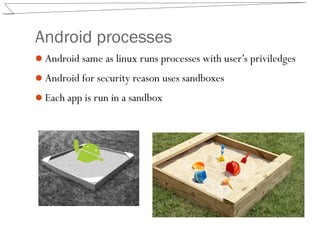
Android same as linux runs processes with user’s priviledges
Android for security reason uses sandboxes
Each app is run in a sandbox
Android processes
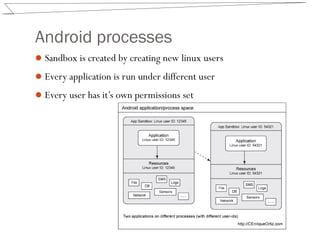
Sandbox is created by creating new linux users
Every application is run under different user
Every user has it’s own permissions set
Android processes
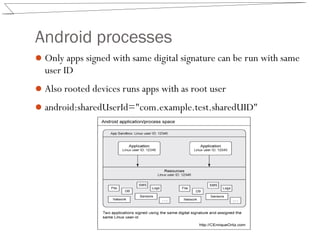
Only apps signed with same digital signature can be run with same
user ID
Also rooted devices runs apps with as root user
android:sharedUserId="com.example.test.sharedUID"
Digital signature
Android apps are digitally signed
Cryptographic construct
First, a digital certificate identifies each developer
The other part to this process is your private key
Permissions
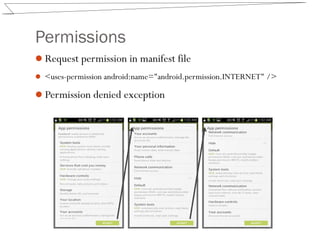
Request permission in manifest file
 <uses-permission android:name="android.permission.INTERNET" />
Permission denied exception
Declaring a Permission
<permission
android:name="com.example.testapps.test1.perm.READ_INCOMING_EMAIL"
android:label= "Read incoming email"
android:description="Allows the app to access the email retrieved
from your email server using the test1 app.Any app you
grant this permission to will be able to read all email
processed by the test1 app."
android:protectionLevel="dangerous"
android:permissionGroup="android.permission-group.PERSONAL_INFO"
/>
Declaring a permission
int canProcess =
checkCallingOrSelfPermission( ("com.example.testapps.test1.perm.
READ_INCOMING_EMAIL");
if (canProcess != PERMISSION_GRANTED)
throw new SecurityException();
Protection Levels:
Normal
Dangerous
Signature
SignatureOrSystem
Android Filesystem Isolation
Android does a good job of isolating apps from one another
Only apps that are created by the same developer and signed
with the same digital certificates can weaken this isolation
The standard way thatAndroid lays out the file system on a
device is to create an appspecific directory under the path
/data/data/app_package_name
This directory is configured such that the associated app’s UID
is the owner and only the owner permissions are set
Within this directory is /files,where all files created by the app are
installed and created
Android filesystem isolation
Because file isolation is based on UIDs, apps that are
configured to run with the same UIDs can access each other’s
files
A user who accesses the Linux kernel using the root UID will
be able to bypass any permissions on any file, allowing access
to any data stored by any app.
Any data written to external storage, such as SD cards, lacks
Linux permission based access control.
As the developer, you can specify different permissions on
files.
Android filesystem isolation
To change permissions over created file you can supply
openFileOutput() with flags:
MODE_PRIVATE
This is the default, granting full control to the app’s UID and nothing else.
MODE_WORLD_WRITABLE
Allows all apps on the device to write to this file.
MODE_WORLD_READABLE
Allows all apps on the device to read this file.
 OutputStreamWriter out = new OutputStreamWriter(openFileOutput("scores",
MODE_WORLD_READABLE | MODE_WORLD_WRITEABLE));
Android Preferences and Database
Isolation
Data can be stored in:
Files
DB
SharedPreference
SharedPreferences is a basic framework that allows your app
to store name/value pairs (primitive data types only) for easy
access
Android also includes a SQLite implementation that allows
apps to create and manage databases
Android Preferences and Database
Isolation
SharedPreferences are accessed using SharedPreferences objects
within a running app and as XML files on the filesystem.
They are written to the filesystem under a
/data/data/app_package_name /shared_prefs
SharedPreferences are created using the getSharedPreferences()
method, which takes the same flags as openFileOutput() does
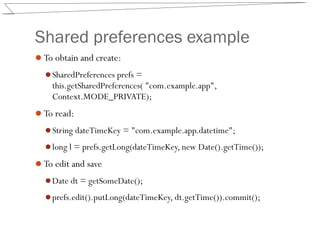
Shared preferences example
To obtain and create:
SharedPreferences prefs =
this.getSharedPreferences( "com.example.app",
Context.MODE_PRIVATE);
To read:
String dateTimeKey = "com.example.app.datetime";
long l = prefs.getLong(dateTimeKey, new Date().getTime());
To edit and save
Date dt = getSomeDate();
prefs.edit().putLong(dateTimeKey, dt.getTime()).commit();
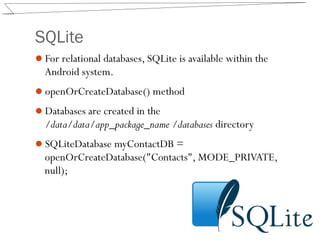
SQLite
For relational databases, SQLite is available within the
Android system.
openOrCreateDatabase() method
Databases are created in the
/data/data/app_package_name /databases directory
SQLiteDatabase myContactDB =
openOrCreateDatabase("Contacts", MODE_PRIVATE,
null);
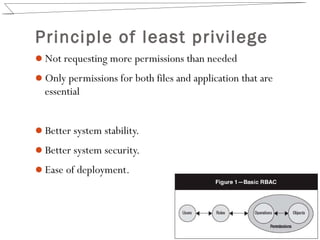
Principle of least privilege
Not requesting more permissions than needed
Only permissions for both files and application that are
essential
Better system stability.
Better system security.
Ease of deployment.

Android(1)

  • 1.
    Permissions and datastores Android
  • 2.
    Agenda Unix process creation Androidprocess creation Android permission model Permission security model SQLite
  • 3.
    Unix processes F SUID PID PPID C PRI NIADDR SZ WCHAN TTY TIME CMD 4 S 0 1 0 0 68 0 - 373 select ? 0:02 init [2]
  • 4.
    Unix processes Linux isunix like operating system Unix starts each process as a user With user’s permissions For each user permissions defined are defined Each resource on a Linux system has three sets of permissions: owner, group, and world Root user has all the permissions over the system It is not recommanded to run programs as root Security reasons
  • 5.
    Android processes Android sameas linux runs processes with user’s priviledges Android for security reason uses sandboxes Each app is run in a sandbox
  • 6.
    Android processes Sandbox iscreated by creating new linux users Every application is run under different user Every user has it’s own permissions set
  • 7.
    Android processes Only appssigned with same digital signature can be run with same user ID Also rooted devices runs apps with as root user android:sharedUserId="com.example.test.sharedUID"
  • 8.
    Digital signature Android appsare digitally signed Cryptographic construct First, a digital certificate identifies each developer The other part to this process is your private key
  • 9.
    Permissions Request permission inmanifest file  <uses-permission android:name="android.permission.INTERNET" /> Permission denied exception
  • 10.
    Declaring a Permission <permission android:name="com.example.testapps.test1.perm.READ_INCOMING_EMAIL" android:label="Read incoming email" android:description="Allows the app to access the email retrieved from your email server using the test1 app.Any app you grant this permission to will be able to read all email processed by the test1 app." android:protectionLevel="dangerous" android:permissionGroup="android.permission-group.PERSONAL_INFO" />
  • 11.
    Declaring a permission intcanProcess = checkCallingOrSelfPermission( ("com.example.testapps.test1.perm. READ_INCOMING_EMAIL"); if (canProcess != PERMISSION_GRANTED) throw new SecurityException(); Protection Levels: Normal Dangerous Signature SignatureOrSystem
  • 12.
    Android Filesystem Isolation Androiddoes a good job of isolating apps from one another Only apps that are created by the same developer and signed with the same digital certificates can weaken this isolation The standard way thatAndroid lays out the file system on a device is to create an appspecific directory under the path /data/data/app_package_name This directory is configured such that the associated app’s UID is the owner and only the owner permissions are set Within this directory is /files,where all files created by the app are installed and created
  • 13.
    Android filesystem isolation Becausefile isolation is based on UIDs, apps that are configured to run with the same UIDs can access each other’s files A user who accesses the Linux kernel using the root UID will be able to bypass any permissions on any file, allowing access to any data stored by any app. Any data written to external storage, such as SD cards, lacks Linux permission based access control. As the developer, you can specify different permissions on files.
  • 14.
    Android filesystem isolation Tochange permissions over created file you can supply openFileOutput() with flags: MODE_PRIVATE This is the default, granting full control to the app’s UID and nothing else. MODE_WORLD_WRITABLE Allows all apps on the device to write to this file. MODE_WORLD_READABLE Allows all apps on the device to read this file.  OutputStreamWriter out = new OutputStreamWriter(openFileOutput("scores", MODE_WORLD_READABLE | MODE_WORLD_WRITEABLE));
  • 15.
    Android Preferences andDatabase Isolation Data can be stored in: Files DB SharedPreference SharedPreferences is a basic framework that allows your app to store name/value pairs (primitive data types only) for easy access Android also includes a SQLite implementation that allows apps to create and manage databases
  • 16.
    Android Preferences andDatabase Isolation SharedPreferences are accessed using SharedPreferences objects within a running app and as XML files on the filesystem. They are written to the filesystem under a /data/data/app_package_name /shared_prefs SharedPreferences are created using the getSharedPreferences() method, which takes the same flags as openFileOutput() does
  • 17.
    Shared preferences example Toobtain and create: SharedPreferences prefs = this.getSharedPreferences( "com.example.app", Context.MODE_PRIVATE); To read: String dateTimeKey = "com.example.app.datetime"; long l = prefs.getLong(dateTimeKey, new Date().getTime()); To edit and save Date dt = getSomeDate(); prefs.edit().putLong(dateTimeKey, dt.getTime()).commit();
  • 18.
    SQLite For relational databases,SQLite is available within the Android system. openOrCreateDatabase() method Databases are created in the /data/data/app_package_name /databases directory SQLiteDatabase myContactDB = openOrCreateDatabase("Contacts", MODE_PRIVATE, null);
  • 19.
    Principle of leastprivilege Not requesting more permissions than needed Only permissions for both files and application that are essential Better system stability. Better system security. Ease of deployment.