Android Development
http://dycode.co.id | office@dycode.com | @dycode
Beginner Level Training
DyPlex, March 31, 2015
Andri Yadi
CEO, DyCode
Lead Trainer
Bayu WY
Mobile Team Lead, DyCode
About DyCode
8 years company
End-to-end mobile app solutions
developer company
Award-winning companies
100+ mid-to-large projects, 3
products, including a well-know
app: Movreak, Jepret Story
Intro to Android
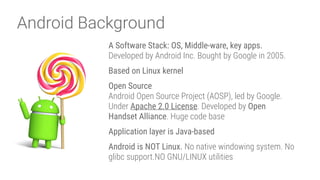
Android Background
A Software Stack: OS, Middle-ware, key apps.

Developed by Android Inc. Bought by Google in 2005.
Based on Linux kernel
Open Source

Android Open Source Project (AOSP), led by Google.

Under Apache 2.0 License. Developed by Open
Handset Alliance. Huge code base
Application layer is Java-based
Android is NOT Linux. No native windowing system. No
glibc support.NO GNU/LINUX utilities
Android Background
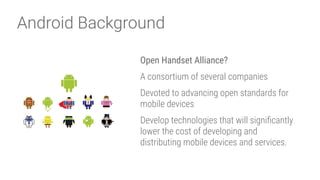
Open Handset Alliance?
A consortium of several companies
Devoted to advancing open standards for
mobile devices
Develop technologies that will significantly
lower the cost of developing and
distributing mobile devices and services.
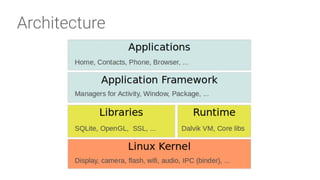
Architecture
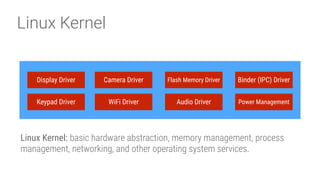
Linux Kernel
Linux Kernel: basic hardware abstraction, memory management, process
management, networking, and other operating system services.
Display Driver Camera Driver Flash Memory Driver Binder (IPC) Driver
Keypad Driver WiFi Driver Audio Driver Power Management
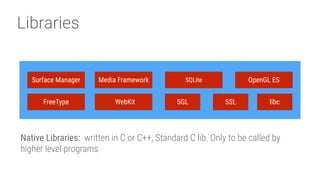
Libraries
Native Libraries:  written in C or C++, Standard C lib. Only to be called by
higher level programs
Surface Manager Media Framework SQLite OpenGL ES
FreeType WebKit SGL SSL libc
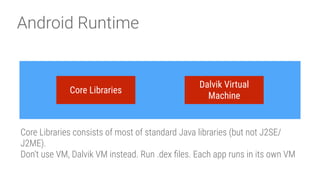
Android Runtime
Core Libraries consists of most of standard Java libraries (but not J2SE/
J2ME). 

Don’t use VM, Dalvik VM instead. Run .dex files. Each app runs in its own VM
Core Libraries
Dalvik Virtual
Machine
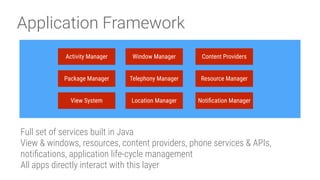
Application Framework
Full set of services built in Java

View & windows, resources, content providers, phone services & APIs,
notifications, application life-cycle management

All apps directly interact with this layer
Activity Manager Window Manager Content Providers
View System
Package Manager Telephony Manager Resource Manager
Location Manager Notification Manager
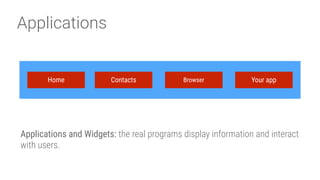
Applications
Applications and Widgets: the real programs display information and interact
with users.
Home Contacts Browser Your app
Android Applications
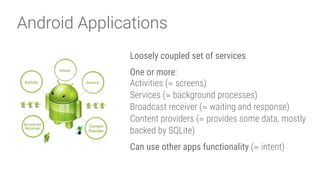
Loosely coupled set of services
One or more:

Activities (≃ screens)

Services (≃ background processes)

Broadcast receiver (≃ waiting and response)

Content providers (≃ provides some data, mostly
backed by SQLite)
Can use other apps functionality (≃ intent)
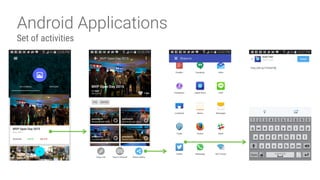
Android Applications
Set of activities
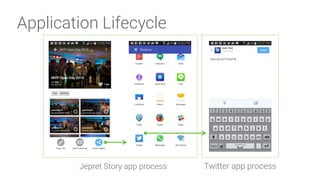
Application Lifecycle
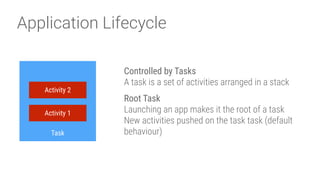
Controlled by Tasks

A task is a set of activities arranged in a stack
Root Task

Launching an app makes it the root of a task

New activities pushed on the task task (default
behaviour)
Activity 2
Activity 1
Task
Application Lifecycle
App Process

All apps are run in their own process
Priority

Android manages memory by prioritising
processes and killing least important ones
Application Lifecycle
Jepret Story app process Twitter app process
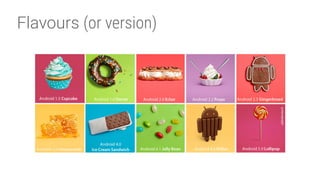
Flavours (or version)
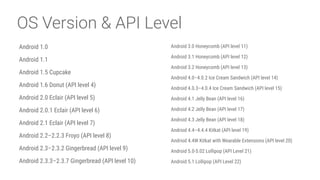
OS Version & API Level
Android 1.0
Android 1.1
Android 1.5 Cupcake
Android 1.6 Donut (API level 4)
Android 2.0 Eclair (API level 5)
Android 2.0.1 Eclair (API level 6)
Android 2.1 Eclair (API level 7)
Android 2.2–2.2.3 Froyo (API level 8)
Android 2.3–2.3.2 Gingerbread (API level 9)
Android 2.3.3–2.3.7 Gingerbread (API level 10)
Android 3.0 Honeycomb (API level 11)
Android 3.1 Honeycomb (API level 12)
Android 3.2 Honeycomb (API level 13)
Android 4.0–4.0.2 Ice Cream Sandwich (API level 14)
Android 4.0.3–4.0.4 Ice Cream Sandwich (API level 15)
Android 4.1 Jelly Bean (API level 16)
Android 4.2 Jelly Bean (API level 17)
Android 4.3 Jelly Bean (API level 18)
Andriod 4.4–4.4.4 Kitkat (API level 19)
Andriod 4.4W Kitkat with Wearable Extensions (API level 20)
Android 5.0-5.02 Lollipop (API Level 21)
Android 5.1 Lollipop (API Level 22)
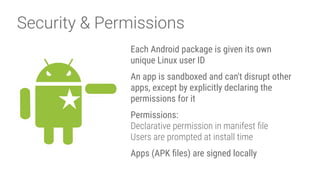
Security & Permissions
Each Android package is given its own
unique Linux user ID
An app is sandboxed and can't disrupt other
apps, except by explicitly declaring the
permissions for it
Permissions:

Declarative permission in manifest file

Users are prompted at install time
Apps (APK files) are signed locally
Android 5.0Some updates on…
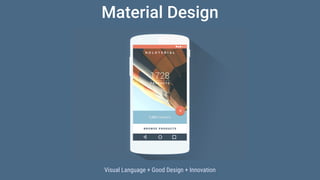
Material Design
Visual Language + Good Design + Innovation
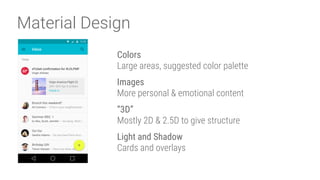
Material Design
Colors

Large areas, suggested color palette
Images

More personal & emotional content
“3D”

Mostly 2D & 2.5D to give structure
Light and Shadow 

Cards and overlays
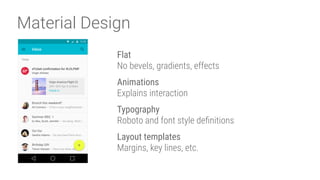
Material Design
Flat

No bevels, gradients, effects
Animations

Explains interaction
Typography

Roboto and font style definitions
Layout templates 

Margins, key lines, etc.
Material Design
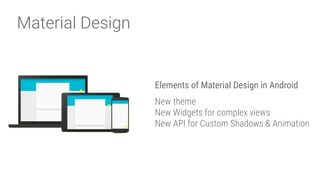
Elements of Material Design in Android
New theme

New Widgets for complex views 

New API for Custom Shadows & Animation
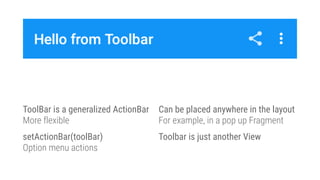
ToolBar is a generalized ActionBar 

More flexible
setActionBar(toolBar) 

Option menu actions
Can be placed anywhere in the layout 

For example, in a pop up Fragment
Toolbar is just another View

Android RunTime (ART)
Good bye Dalvik

ART runtime replaces Dalvik as the platform default
Features

Ahead of time compilation (AOT)

Better Garbage Collection (GC)

64 bit support

Better Profiling and Debugging
First appearance in Android 4.4 (experimental)
ART - AOT
Compilation during installation

Installation takes longer

More storage required (DEX + Compiled)
Better startup time
No compilation lags during execution
Compiled ART code is faster

than compiled Dalvik code
In general, better battery life, less memory
consumption
WebView
Chromium 37
Includes:

WebGL

WebAudio

WebRTC
Updateable from Google Play
Permissions for camera, microphone, ...
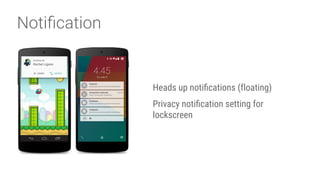
Notification
Heads up notifications (floating)
Privacy notification setting for
lockscreen
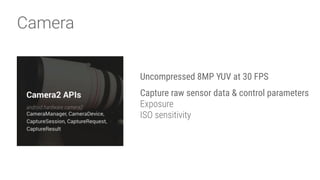
Camera
Uncompressed 8MP YUV at 30 FPS
Capture raw sensor data & control parameters

Exposure

ISO sensitivity

Connectivity
Bluetooth LE Peripheral Mode

Broadcast presence to nearby devices
Scan and connect to specific network

Dev Tool
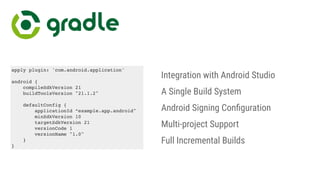
Integration with Android Studio
A Single Build System
Android Signing Configuration
Multi-project Support
Full Incremental Builds
apply plugin: 'com.android.application'
android {
compileSdkVersion 21
buildToolsVersion "21.1.2"
defaultConfig {
applicationId “example.app.android"
minSdkVersion 10
targetSdkVersion 21
versionCode 1
versionName "1.0"
}
}
Genymotion
Faster Android Emulator
Free for personal use only

Only provides emulation on GPS, Camera
EUR24.99 per month, per user
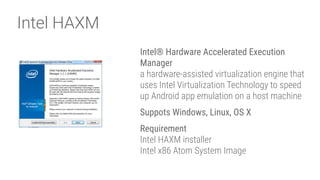
Intel HAXM
Intel® Hardware Accelerated Execution
Manager

a hardware-assisted virtualization engine that
uses Intel Virtualization Technology to speed
up Android app emulation on a host machine
Suppots Windows, Linux, OS X
Requirement

Intel HAXM installer

Intel x86 Atom System Image
Google Play
Google Play
Distribute and find Android apps
Get started

Sign up for Developer Account

Accept Developer Distribution Agreement

Pay $25 one-time registration fee

Complete details
https://play.google.com/apps/publish
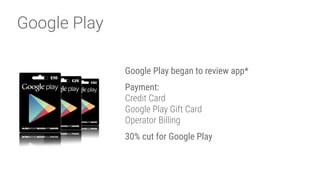
Google Play
Google Play began to review app*
Payment:

Credit Card

Google Play Gift Card

Operator Billing
30% cut for Google Play
DyCode Edu
http://edu.dycode.co.id 

edu@dycode.com 

@dycode
More pro training?

Introduction to Android App Development

  • 1.
    Android Development http://dycode.co.id |office@dycode.com | @dycode Beginner Level Training DyPlex, March 31, 2015
  • 2.
  • 3.
    Bayu WY Mobile TeamLead, DyCode
  • 4.
    About DyCode 8 yearscompany End-to-end mobile app solutions developer company Award-winning companies 100+ mid-to-large projects, 3 products, including a well-know app: Movreak, Jepret Story
  • 5.
  • 6.
    Android Background A SoftwareStack: OS, Middle-ware, key apps.
 Developed by Android Inc. Bought by Google in 2005. Based on Linux kernel Open Source
 Android Open Source Project (AOSP), led by Google.
 Under Apache 2.0 License. Developed by Open Handset Alliance. Huge code base Application layer is Java-based Android is NOT Linux. No native windowing system. No glibc support.NO GNU/LINUX utilities
  • 7.
    Android Background Open HandsetAlliance? A consortium of several companies Devoted to advancing open standards for mobile devices Develop technologies that will significantly lower the cost of developing and distributing mobile devices and services.
  • 8.
  • 9.
    Linux Kernel Linux Kernel:basic hardware abstraction, memory management, process management, networking, and other operating system services. Display Driver Camera Driver Flash Memory Driver Binder (IPC) Driver Keypad Driver WiFi Driver Audio Driver Power Management
  • 10.
    Libraries Native Libraries:  writtenin C or C++, Standard C lib. Only to be called by higher level programs Surface Manager Media Framework SQLite OpenGL ES FreeType WebKit SGL SSL libc
  • 11.
    Android Runtime Core Librariesconsists of most of standard Java libraries (but not J2SE/ J2ME). 
 Don’t use VM, Dalvik VM instead. Run .dex files. Each app runs in its own VM Core Libraries Dalvik Virtual Machine
  • 12.
    Application Framework Full setof services built in Java
 View & windows, resources, content providers, phone services & APIs, notifications, application life-cycle management
 All apps directly interact with this layer Activity Manager Window Manager Content Providers View System Package Manager Telephony Manager Resource Manager Location Manager Notification Manager
  • 13.
    Applications Applications and Widgets:the real programs display information and interact with users. Home Contacts Browser Your app
  • 14.
    Android Applications Loosely coupledset of services One or more:
 Activities (≃ screens)
 Services (≃ background processes)
 Broadcast receiver (≃ waiting and response)
 Content providers (≃ provides some data, mostly backed by SQLite) Can use other apps functionality (≃ intent)
  • 15.
  • 16.
    Application Lifecycle Controlled byTasks
 A task is a set of activities arranged in a stack Root Task
 Launching an app makes it the root of a task
 New activities pushed on the task task (default behaviour) Activity 2 Activity 1 Task
  • 17.
    Application Lifecycle App Process
 Allapps are run in their own process Priority
 Android manages memory by prioritising processes and killing least important ones
  • 18.
    Application Lifecycle Jepret Storyapp process Twitter app process
  • 19.
  • 20.
    OS Version &API Level Android 1.0 Android 1.1 Android 1.5 Cupcake Android 1.6 Donut (API level 4) Android 2.0 Eclair (API level 5) Android 2.0.1 Eclair (API level 6) Android 2.1 Eclair (API level 7) Android 2.2–2.2.3 Froyo (API level 8) Android 2.3–2.3.2 Gingerbread (API level 9) Android 2.3.3–2.3.7 Gingerbread (API level 10) Android 3.0 Honeycomb (API level 11) Android 3.1 Honeycomb (API level 12) Android 3.2 Honeycomb (API level 13) Android 4.0–4.0.2 Ice Cream Sandwich (API level 14) Android 4.0.3–4.0.4 Ice Cream Sandwich (API level 15) Android 4.1 Jelly Bean (API level 16) Android 4.2 Jelly Bean (API level 17) Android 4.3 Jelly Bean (API level 18) Andriod 4.4–4.4.4 Kitkat (API level 19) Andriod 4.4W Kitkat with Wearable Extensions (API level 20) Android 5.0-5.02 Lollipop (API Level 21) Android 5.1 Lollipop (API Level 22)
  • 21.
    Security & Permissions EachAndroid package is given its own unique Linux user ID An app is sandboxed and can't disrupt other apps, except by explicitly declaring the permissions for it Permissions:
 Declarative permission in manifest file
 Users are prompted at install time Apps (APK files) are signed locally
  • 22.
  • 23.
    Material Design Visual Language+ Good Design + Innovation
  • 24.
    Material Design Colors
 Large areas,suggested color palette Images
 More personal & emotional content “3D”
 Mostly 2D & 2.5D to give structure Light and Shadow 
 Cards and overlays
  • 25.
    Material Design Flat
 No bevels,gradients, effects Animations
 Explains interaction Typography
 Roboto and font style definitions Layout templates 
 Margins, key lines, etc.
  • 26.
    Material Design Elements ofMaterial Design in Android New theme
 New Widgets for complex views 
 New API for Custom Shadows & Animation
  • 27.
    ToolBar is ageneralized ActionBar 
 More flexible setActionBar(toolBar) 
 Option menu actions Can be placed anywhere in the layout 
 For example, in a pop up Fragment Toolbar is just another View

  • 28.
    Android RunTime (ART) Goodbye Dalvik
 ART runtime replaces Dalvik as the platform default Features
 Ahead of time compilation (AOT)
 Better Garbage Collection (GC)
 64 bit support
 Better Profiling and Debugging First appearance in Android 4.4 (experimental)
  • 29.
    ART - AOT Compilationduring installation
 Installation takes longer
 More storage required (DEX + Compiled) Better startup time No compilation lags during execution Compiled ART code is faster
 than compiled Dalvik code In general, better battery life, less memory consumption
  • 30.
    WebView Chromium 37 Includes:
 WebGL
 WebAudio
 WebRTC Updateable fromGoogle Play Permissions for camera, microphone, ...
  • 31.
    Notification Heads up notifications(floating) Privacy notification setting for lockscreen
  • 32.
    Camera Uncompressed 8MP YUVat 30 FPS Capture raw sensor data & control parameters
 Exposure
 ISO sensitivity

  • 33.
    Connectivity Bluetooth LE PeripheralMode
 Broadcast presence to nearby devices Scan and connect to specific network

  • 34.
  • 36.
    Integration with AndroidStudio A Single Build System Android Signing Configuration Multi-project Support Full Incremental Builds apply plugin: 'com.android.application' android { compileSdkVersion 21 buildToolsVersion "21.1.2" defaultConfig { applicationId “example.app.android" minSdkVersion 10 targetSdkVersion 21 versionCode 1 versionName "1.0" } }
  • 37.
    Genymotion Faster Android Emulator Freefor personal use only
 Only provides emulation on GPS, Camera EUR24.99 per month, per user
  • 38.
    Intel HAXM Intel® HardwareAccelerated Execution Manager
 a hardware-assisted virtualization engine that uses Intel Virtualization Technology to speed up Android app emulation on a host machine Suppots Windows, Linux, OS X Requirement
 Intel HAXM installer
 Intel x86 Atom System Image
  • 39.
  • 40.
    Google Play Distribute andfind Android apps Get started
 Sign up for Developer Account
 Accept Developer Distribution Agreement
 Pay $25 one-time registration fee
 Complete details https://play.google.com/apps/publish
  • 41.
    Google Play Google Playbegan to review app* Payment:
 Credit Card
 Google Play Gift Card
 Operator Billing 30% cut for Google Play
  • 42.