
Analytics For Local SearchHow and What To Track For Local Searchpresented by Mike Belasco@belasco
Who Is seOverflow?seOverflow is a search engine optimization and pay per click marketing company in Denver, CO.We specialize in offering solutions that enable web design companies, marketing consultants, and other SEO companies to offer high end SEO services to their clients.The only company with 2 Local Search Ranking Factors participants. We know Local!
Today’s TopicsStatus Of Tracking Local SearchTrack Traffic From The 7 PackPimp Google Analytics For LocalOther Local Search Tracking Techniques Roll Your Own Call Tracking ServiceThe Future Of Tracking Local
The Google 7 Pack
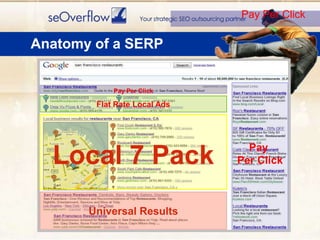
Pay Per ClickAnatomy of a SERP	Pay Per ClickPay Per ClickFlat Rate Local AdsLocal 7 PackUniversal Results
State Of Analytics For Local SearchWhat Sucks And What Doesn’t Suck …. Ok it mostly sucks
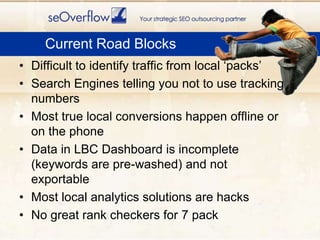
Difficult to identify traffic from local ‘packs’Search Engines telling you not to use tracking numbersMost true local conversions happen offline or on the phoneData in LBC Dashboard is incomplete (keywords are pre-washed) and not exportableMost local analytics solutions are hacksNo great rank checkers for 7 packCurrent Road Blocks
Track Local ‘Pack’ Traffic
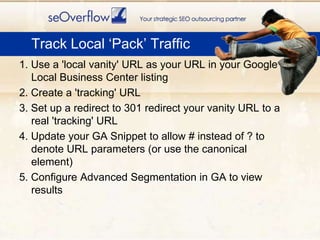
1. Use a 'local vanity' URL as your URL in your Google Local Business Center listing2. Create a 'tracking' URL3. Set up a redirect to 301 redirect your vanity URL to a real 'tracking' URL4. Update your GA Snippet to allow # instead of ? to denote URL parameters (or use the canonical element)5. Configure Advanced Segmentation in GA to view resultsTrack Local ‘Pack’ Traffic
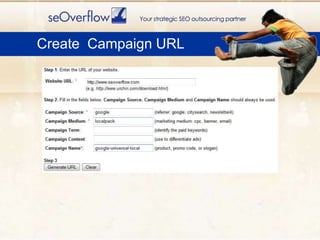
Create  Campaign URL
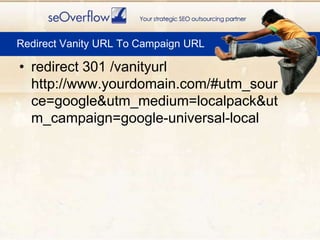
redirect 301 /vanityurl http://www.yourdomain.com/#utm_source=google&utm_medium=localpack&utm_campaign=google-universal-localRedirect Vanity URL To Campaign URL
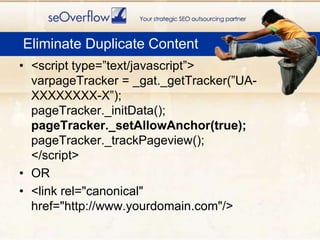
<script type=”text/javascript”>varpageTracker = _gat._getTracker(”UA-XXXXXXXX-X”);pageTracker._initData();pageTracker._setAllowAnchor(true); pageTracker._trackPageview();</script>OR<link rel="canonical" href="http://www.yourdomain.com"/>Eliminate Duplicate Content
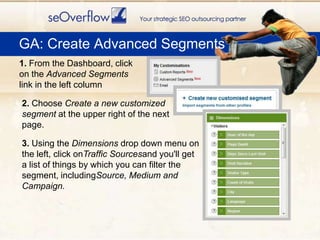
    GA: Create Advanced Segments1. From the Dashboard, click on the Advanced Segments link in the left column2. Choose Create a new customized segment at the upper right of the next page.3. Using the Dimensions drop down menu on the left, click onTraffic Sourcesand you'll get a list of things by which you can filter the segment, includingSource, Medium and Campaign.
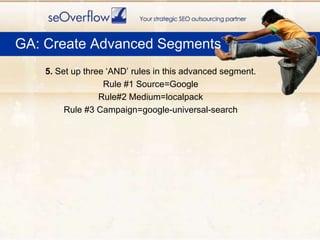
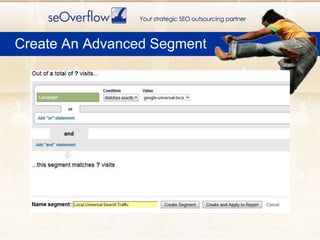
 GA: Create Advanced Segments5. Set up three ‘AND’ rules in this advanced segment.Rule #1 Source=GoogleRule#2 Medium=localpackRule #3 Campaign=google-universal-search
Create An Advanced Segment
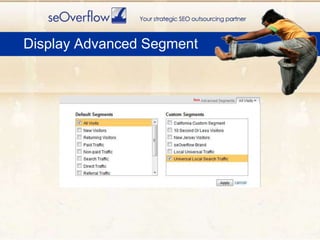
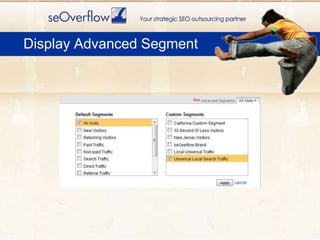
Display Advanced Segment
Pimp Google Analytics For Local Search
Google Analytics for Local SearchYou can configure Google Analytics to quickly access and analyze important data regarding Local Search and to create reports about it.Then, use this data to refine your marketing to good prospects.
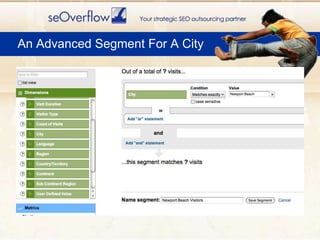
Tracking Local VisitorsCreate an advanced segment to quickly identify and analyze traffic coming from your target “location”
An Advanced Segment For A City
Display Advanced Segment
A Local Custom ReportCreate a custom report to quickly identify which cities/states your conversions are coming from
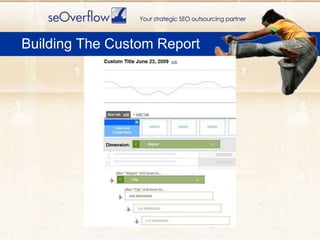
Our Custom Report will show conversions broken down by state/city.Custom Report For Conversions
Building The Custom Report
Pimp Your Local GA Dashboard
Add Your Reports And Other Data To Your DashboardPimp Your Dashboard
Other Ways To Track Local Search
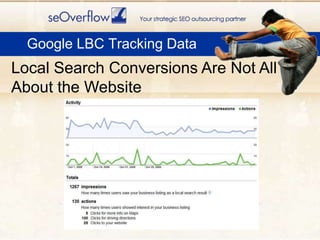
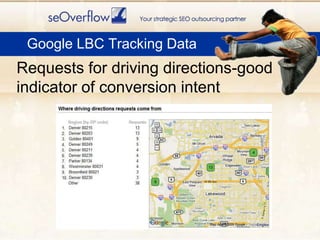
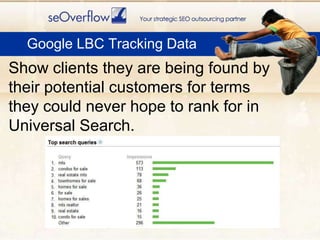
    Google LBC ReportsWhat Google LBC reports: Impressions.Visits to website. Requests for more info on Local Listing pageRequests for driving directions and where those requests originated.Keyword terms used by searchers who saw your listing (pre-washed).
    Google LBC Tracking DataLocal Search Conversions Are Not All About the Website
    Google LBC Tracking DataRequests for driving directions-good indicator of conversion intent
    Google LBC Tracking DataShow clients they are being found by their potential customers for terms they could never hope to rank for in Universal Search.
    Google LBC Tracking DataKeep an eye on changes in what and how Google is reporting in the Maps Dashboard. These are clues to what is important to Google and what it thinks is important to Local searchers.
If you are selling a product add a ‘Buy In Store’ option. (use discount code)Add a ‘In Store Pick-up’ optionCouponsIn-store survey (simple as asking)Simple assumptions based on sales volume/local website traffic volumeIdeas For Tracking Offline Conversions
THIS JUST IN:Decals for business windows with decals, which upon scanning lead directly to Google Place PagesIdeas For Tracking Offline Conversions
No great tools for local ‘pack’ rank checking (seen any?)Advanced Web Rankings tool will rank check on Google MapsYou can kind of spoof location with Google Global Firefox extension and manually check rankingsRank Checking
Call TrackingWhat You Need To Know and How To Roll Your Own
Call Tracking for Local SearchMany call tracking solutions available, but watch out…
Some don’t display ‘default’ number in code decreasing search engine trust
Google has warned not to use tracking numbers in profiles as ph. numbers can be used as ‘primary key’
Rumors that Google Voice will eventually allow call tracking (it does for flat rate ads now)We had many issues with phone call tracking solutions on the market.Our needs included:affordable for most clientsability to port numbers in and outintegration with Google Analytics for conversion trackingcall recordingemail alerts a call was madeshowing the 'real' phone number in the code to help with local searcheasy to implementability to track only non-branded organic search trafficRoll Your Own Call Tracking
Build the ‘back-end’ in  7 stepsBuild the ‘front-end’ in 3 steps.Only basic knowledge of web development is needed (eg how to edit file, basic HTML, and FTP).Roll Your Own Call Tracking
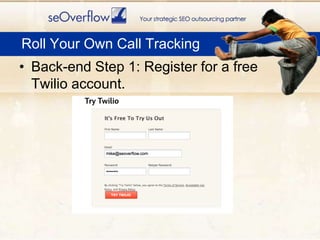
Back-end Step 1: Register for a free Twilio account. Roll Your Own Call Tracking
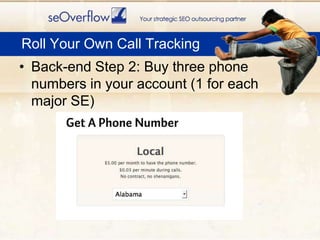
Back-end Step 2: Buy three phone numbers in your account (1 for each major SE)Roll Your Own Call Tracking
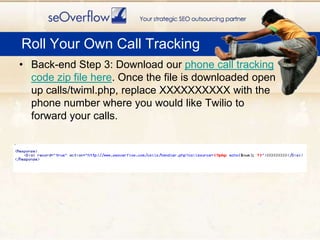
Back-end Step 3: Download our phone call tracking code zip file here. Once the file is downloaded open up calls/twiml.php, replace XXXXXXXXXX with the phone number where you would like Twilio to forward your calls.Roll Your Own Call Tracking
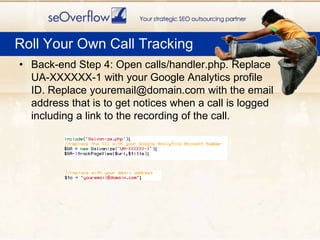
Back-end Step 4: Open calls/handler.php. Replace UA-XXXXXX-1 with your Google Analytics profile ID. Replace youremail@domain.com with the email address that is to get notices when a call is logged including a link to the recording of the call. Roll Your Own Call Tracking
Back-end Step 5: Upload twiml.php, handler.php, and Galavanize.php to a directory named ‘/calls’ on your website.Roll Your Own Call Tracking
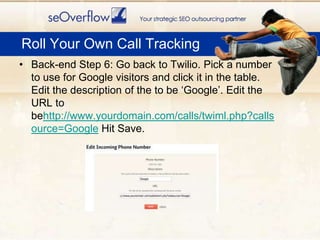
Back-end Step 6: Go back to Twilio. Pick a number to use for Google visitors and click it in the table. Edit the description of the to be ‘Google’. Edit the URL to behttp://www.yourdomain.com/calls/twiml.php?callsource=Google Hit Save.Roll Your Own Call Tracking
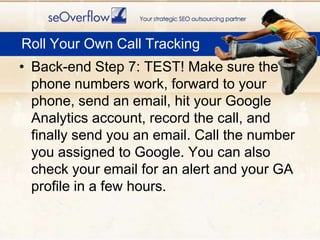
Back-end Step 7: TEST! Make sure the phone numbers work, forward to your phone, send an email, hit your Google Analytics account, record the call, and finally send you an email. Call the number you assigned to Google. You can also check your email for an alert and your GA profile in a few hours.Roll Your Own Call Tracking
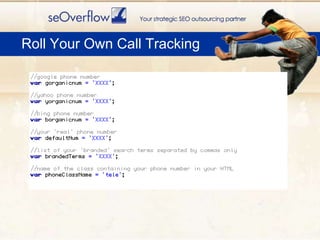
Front-end Step 1: Open displaynumbers.js. Enter your phone numbers as values for the appropriate variables Enter your ‘real’ or default phone number in the value for defaultNum. Enter a list of comma separated branded search terms for which you are not interested in tracking phone calls as the value for brandedTerms. Enter the name of the class used for the span or div containing your phone number on your HTML page. Roll Your Own Call Tracking
Roll Your Own Call Tracking
Front-end Step 2: Paste this JS code at the footer of your HTML page, and underneath the Google Analytics tracking code snippet. Make sure and update the path to where this file will be stored.<script type="text/javascript" src="your/path/to/displaynumbers.js"></script><script language="javascript">displayTextNumber();</script>Roll Your Own Call Tracking
Step 3: Upload displaynumbers.js to your server. Also upload the HTML file you just edited to include the JS as well.THAT IS IT, CONGRATS! You now can track phone calls from your SEO efforts!Roll Your Own Call Tracking
The Future Of Tracking Local Search

Analytics For Local Search

  • 1.
    Analytics For LocalSearchHow and What To Track For Local Searchpresented by Mike Belasco@belasco
  • 2.
    Who Is seOverflow?seOverflowis a search engine optimization and pay per click marketing company in Denver, CO.We specialize in offering solutions that enable web design companies, marketing consultants, and other SEO companies to offer high end SEO services to their clients.The only company with 2 Local Search Ranking Factors participants. We know Local!
  • 3.
    Today’s TopicsStatus OfTracking Local SearchTrack Traffic From The 7 PackPimp Google Analytics For LocalOther Local Search Tracking Techniques Roll Your Own Call Tracking ServiceThe Future Of Tracking Local
  • 4.
  • 5.
    Pay Per ClickAnatomyof a SERP Pay Per ClickPay Per ClickFlat Rate Local AdsLocal 7 PackUniversal Results
  • 6.
    State Of AnalyticsFor Local SearchWhat Sucks And What Doesn’t Suck …. Ok it mostly sucks
  • 7.
    Difficult to identifytraffic from local ‘packs’Search Engines telling you not to use tracking numbersMost true local conversions happen offline or on the phoneData in LBC Dashboard is incomplete (keywords are pre-washed) and not exportableMost local analytics solutions are hacksNo great rank checkers for 7 packCurrent Road Blocks
  • 8.
  • 9.
    1. Use a'local vanity' URL as your URL in your Google Local Business Center listing2. Create a 'tracking' URL3. Set up a redirect to 301 redirect your vanity URL to a real 'tracking' URL4. Update your GA Snippet to allow # instead of ? to denote URL parameters (or use the canonical element)5. Configure Advanced Segmentation in GA to view resultsTrack Local ‘Pack’ Traffic
  • 10.
  • 11.
    redirect 301 /vanityurlhttp://www.yourdomain.com/#utm_source=google&utm_medium=localpack&utm_campaign=google-universal-localRedirect Vanity URL To Campaign URL
  • 12.
    <script type=”text/javascript”>varpageTracker =_gat._getTracker(”UA-XXXXXXXX-X”);pageTracker._initData();pageTracker._setAllowAnchor(true); pageTracker._trackPageview();</script>OR<link rel="canonical" href="http://www.yourdomain.com"/>Eliminate Duplicate Content
  • 13.
    GA: Create Advanced Segments1. From the Dashboard, click on the Advanced Segments link in the left column2. Choose Create a new customized segment at the upper right of the next page.3. Using the Dimensions drop down menu on the left, click onTraffic Sourcesand you'll get a list of things by which you can filter the segment, includingSource, Medium and Campaign.
  • 14.
    GA: CreateAdvanced Segments5. Set up three ‘AND’ rules in this advanced segment.Rule #1 Source=GoogleRule#2 Medium=localpackRule #3 Campaign=google-universal-search
  • 15.
  • 16.
  • 17.
    Pimp Google AnalyticsFor Local Search
  • 18.
    Google Analytics forLocal SearchYou can configure Google Analytics to quickly access and analyze important data regarding Local Search and to create reports about it.Then, use this data to refine your marketing to good prospects.
  • 19.
    Tracking Local VisitorsCreatean advanced segment to quickly identify and analyze traffic coming from your target “location”
  • 20.
  • 21.
  • 22.
    A Local CustomReportCreate a custom report to quickly identify which cities/states your conversions are coming from
  • 23.
    Our Custom Reportwill show conversions broken down by state/city.Custom Report For Conversions
  • 24.
  • 25.
    Pimp Your LocalGA Dashboard
  • 26.
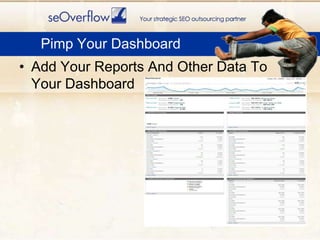
    Add Your ReportsAnd Other Data To Your DashboardPimp Your Dashboard
  • 27.
    Other Ways ToTrack Local Search
  • 28.
    Google LBC ReportsWhat Google LBC reports: Impressions.Visits to website. Requests for more info on Local Listing pageRequests for driving directions and where those requests originated.Keyword terms used by searchers who saw your listing (pre-washed).
  • 29.
    Google LBC Tracking DataLocal Search Conversions Are Not All About the Website
  • 30.
    Google LBC Tracking DataRequests for driving directions-good indicator of conversion intent
  • 31.
    Google LBC Tracking DataShow clients they are being found by their potential customers for terms they could never hope to rank for in Universal Search.
  • 32.
    Google LBC Tracking DataKeep an eye on changes in what and how Google is reporting in the Maps Dashboard. These are clues to what is important to Google and what it thinks is important to Local searchers.
  • 33.
    If you areselling a product add a ‘Buy In Store’ option. (use discount code)Add a ‘In Store Pick-up’ optionCouponsIn-store survey (simple as asking)Simple assumptions based on sales volume/local website traffic volumeIdeas For Tracking Offline Conversions
  • 34.
    THIS JUST IN:Decalsfor business windows with decals, which upon scanning lead directly to Google Place PagesIdeas For Tracking Offline Conversions
  • 35.
    No great toolsfor local ‘pack’ rank checking (seen any?)Advanced Web Rankings tool will rank check on Google MapsYou can kind of spoof location with Google Global Firefox extension and manually check rankingsRank Checking
  • 36.
    Call TrackingWhat YouNeed To Know and How To Roll Your Own
  • 37.
    Call Tracking forLocal SearchMany call tracking solutions available, but watch out…
  • 38.
    Some don’t display‘default’ number in code decreasing search engine trust
  • 39.
    Google has warnednot to use tracking numbers in profiles as ph. numbers can be used as ‘primary key’
  • 40.
    Rumors that GoogleVoice will eventually allow call tracking (it does for flat rate ads now)We had many issues with phone call tracking solutions on the market.Our needs included:affordable for most clientsability to port numbers in and outintegration with Google Analytics for conversion trackingcall recordingemail alerts a call was madeshowing the 'real' phone number in the code to help with local searcheasy to implementability to track only non-branded organic search trafficRoll Your Own Call Tracking
  • 41.
    Build the ‘back-end’in 7 stepsBuild the ‘front-end’ in 3 steps.Only basic knowledge of web development is needed (eg how to edit file, basic HTML, and FTP).Roll Your Own Call Tracking
  • 42.
    Back-end Step 1:Register for a free Twilio account. Roll Your Own Call Tracking
  • 43.
    Back-end Step 2:Buy three phone numbers in your account (1 for each major SE)Roll Your Own Call Tracking
  • 44.
    Back-end Step 3:Download our phone call tracking code zip file here. Once the file is downloaded open up calls/twiml.php, replace XXXXXXXXXX with the phone number where you would like Twilio to forward your calls.Roll Your Own Call Tracking
  • 45.
    Back-end Step 4:Open calls/handler.php. Replace UA-XXXXXX-1 with your Google Analytics profile ID. Replace youremail@domain.com with the email address that is to get notices when a call is logged including a link to the recording of the call. Roll Your Own Call Tracking
  • 46.
    Back-end Step 5:Upload twiml.php, handler.php, and Galavanize.php to a directory named ‘/calls’ on your website.Roll Your Own Call Tracking
  • 47.
    Back-end Step 6:Go back to Twilio. Pick a number to use for Google visitors and click it in the table. Edit the description of the to be ‘Google’. Edit the URL to behttp://www.yourdomain.com/calls/twiml.php?callsource=Google Hit Save.Roll Your Own Call Tracking
  • 48.
    Back-end Step 7:TEST! Make sure the phone numbers work, forward to your phone, send an email, hit your Google Analytics account, record the call, and finally send you an email. Call the number you assigned to Google. You can also check your email for an alert and your GA profile in a few hours.Roll Your Own Call Tracking
  • 49.
    Front-end Step 1:Open displaynumbers.js. Enter your phone numbers as values for the appropriate variables Enter your ‘real’ or default phone number in the value for defaultNum. Enter a list of comma separated branded search terms for which you are not interested in tracking phone calls as the value for brandedTerms. Enter the name of the class used for the span or div containing your phone number on your HTML page. Roll Your Own Call Tracking
  • 50.
    Roll Your OwnCall Tracking
  • 51.
    Front-end Step 2:Paste this JS code at the footer of your HTML page, and underneath the Google Analytics tracking code snippet. Make sure and update the path to where this file will be stored.<script type="text/javascript" src="your/path/to/displaynumbers.js"></script><script language="javascript">displayTextNumber();</script>Roll Your Own Call Tracking
  • 52.
    Step 3: Uploaddisplaynumbers.js to your server. Also upload the HTML file you just edited to include the JS as well.THAT IS IT, CONGRATS! You now can track phone calls from your SEO efforts!Roll Your Own Call Tracking
  • 53.
    The Future OfTracking Local Search

Editor's Notes

  • #4 Track traffic from the seven pack