Project
“CompHard”
Let’s dive in!!
History of Computers
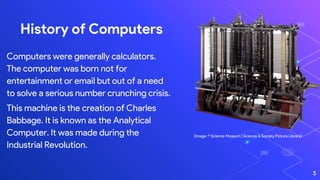
Computers were generally calculators.
The computer was born not for
entertainment or email but out of a need
to solve a serious number crunching crisis.
This machine is the creation of Charles
Babbage. It is known as the Analytical
Computer. It was made during the
Industrial Revolution.
(Image: © Science Museum | Science & Society Picture Library)
3
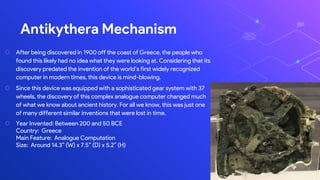
⬡ After being discovered in 1900 off the coast of Greece, the people who
found this likely had no idea what they were looking at. Considering that its
discovery predated the invention of the world’s first widely recognized
computer in modern times, this device is mind-blowing.
⬡ Since this device was equipped with a sophisticated gear system with 37
wheels, the discovery of this complex analogue computer changed much
of what we know about ancient history. For all we know, this was just one
of many different similar inventions that were lost in time.
⬡ Year Invented: Between 200 and 50 BCE
Country: Greece
Main Feature: Analogue Computation
Size: Around 14.3” (W) x 7.5” (D) x 5.2” (H)
Antikythera Mechanism
4
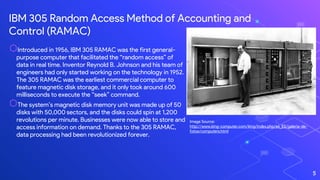
IBM 305 Random Access Method of Accounting and
Control (RAMAC)
5
Image Source:
http://www.king-computer.com/king/index.php/es_ES/galeria-de-
fotos/computers.html
⬡Introduced in 1956, IBM 305 RAMAC was the first general-
purpose computer that facilitated the “random access” of
data in real time. Inventor Reynold B. Johnson and his team of
engineers had only started working on the technology in 1952.
The 305 RAMAC was the earliest commercial computer to
feature magnetic disk storage, and it only took around 600
milliseconds to execute the “seek” command.
⬡The system’s magnetic disk memory unit was made up of 50
disks with 50,000 sectors, and the disks could spin at 1,200
revolutions per minute. Businesses were now able to store and
access information on demand. Thanks to the 305 RAMAC,
data processing had been revolutionized forever.
Now, Let us talk about
The Recent Advances in
Computer Hardware…
6
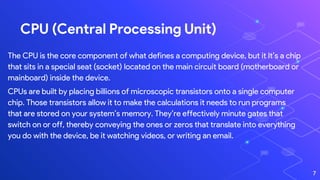
CPU (Central Processing Unit)
The CPU is the core component of what defines a computing device, but it It’s a chip
that sits in a special seat (socket) located on the main circuit board (motherboard or
mainboard) inside the device.
CPUs are built by placing billions of microscopic transistors onto a single computer
chip. Those transistors allow it to make the calculations it needs to run programs
that are stored on your system’s memory. They’re effectively minute gates that
switch on or off, thereby conveying the ones or zeros that translate into everything
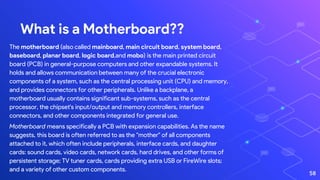
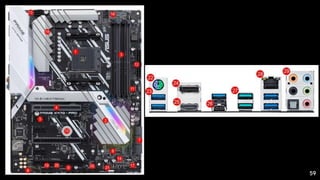
you do with the device, be it watching videos, or writing an email.
7
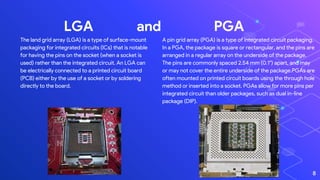
LGA and PGA
A pin grid array (PGA) is a type of integrated circuit packaging.
In a PGA, the package is square or rectangular, and the pins are
arranged in a regular array on the underside of the package.
The pins are commonly spaced 2.54 mm (0.1") apart, and may
or may not cover the entire underside of the package.PGAs are
often mounted on printed circuit boards using the through hole
method or inserted into a socket. PGAs allow for more pins per
integrated circuit than older packages, such as dual in-line
package (DIP).
8
The land grid array (LGA) is a type of surface-mount
packaging for integrated circuits (ICs) that is notable
for having the pins on the socket (when a socket is
used) rather than the integrated circuit. An LGA can
be electrically connected to a printed circuit board
(PCB) either by the use of a socket or by soldering
directly to the board.
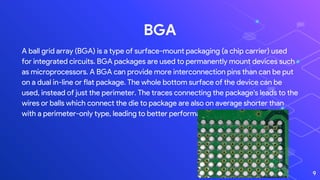
BGA
A ball grid array (BGA) is a type of surface-mount packaging (a chip carrier) used
for integrated circuits. BGA packages are used to permanently mount devices such
as microprocessors. A BGA can provide more interconnection pins than can be put
on a dual in-line or flat package. The whole bottom surface of the device can be
used, instead of just the perimeter. The traces connecting the package's leads to the
wires or balls which connect the die to package are also on average shorter than
with a perimeter-only type, leading to better performance at high speeds.
9
10
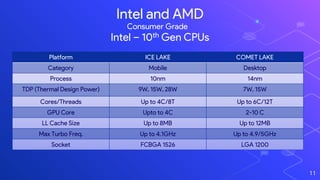
Intel and AMD
11
Intel – 10th Gen CPUs
Platform ICE LAKE COMET LAKE
Category Mobile Desktop
Process 10nm 14nm
TDP (Thermal Design Power) 9W, 15W, 28W 7W, 15W
Cores/Threads Up to 4C/8T Up to 6C/12T
GPU Core Upto to 4C 2-10 C
LL Cache Size Up to 8MB Up to 12MB
Max Turbo Freq. Up to 4.1GHz Up to 4.9/5GHz
Socket FCBGA 1526 LGA 1200
Consumer Grade
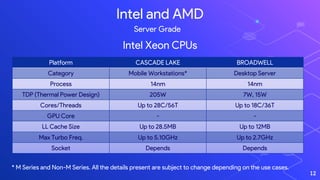
Platform CASCADE LAKE BROADWELL
Category Mobile Workstations* Desktop Server
Process 14nm 14nm
TDP (Thermal Power Design) 205W 7W, 15W
Cores/Threads Up to 28C/56T Up to 18C/36T
GPU Core - -
LL Cache Size Up to 28.5MB Up to 12MB
Max Turbo Freq. Up to 5.10GHz Up to 2.7GHz
Socket Depends Depends
12
Intel and AMD
Intel Xeon CPUs
Server Grade
* M Series and Non-M Series. All the details present are subject to change depending on the use cases.
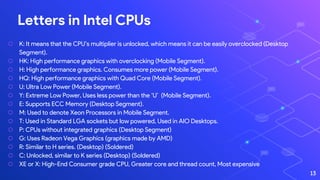
⬡ K: It means that the CPU’s multiplier is unlocked, which means it can be easily overclocked (Desktop
Segment).
⬡ HK: High performance graphics with overclocking (Mobile Segment).
⬡ H: High performance graphics. Consumes more power (Mobile Segment).
⬡ HQ: High performance graphics with Quad Core (Mobile Segment).
⬡ U: Ultra Low Power (Mobile Segment).
⬡ Y: Extreme Low Power, Uses less power than the ‘U’ (Mobile Segment).
⬡ E: Supports ECC Memory (Desktop Segment).
⬡ M: Used to denote Xeon Processors in Mobile Segment.
⬡ T: Used in Standard LGA sockets but low powered, Used in AIO Desktops.
⬡ P: CPUs without integrated graphics (Desktop Segment)
⬡ G: Uses Radeon Vega Graphics (graphics made by AMD)
⬡ R: Similar to H series. (Desktop) (Soldered)
⬡ C: Unlocked, similar to K series (Desktop) (Soldered)
⬡ XE or X: High-End Consumer grade CPU, Greater core and thread count, Most expensive
Letters in Intel CPUs
13
14
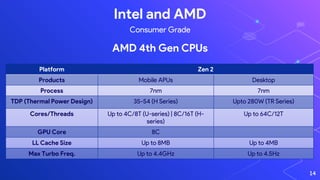
Intel and AMD
AMD 4th Gen CPUs
Consumer Grade
Platform Zen 2
Products Mobile APUs Desktop
Process 7nm 7nm
TDP (Thermal Power Design) 35-54 (H Series) Upto 280W (TR Series)
Cores/Threads Up to 4C/8T (U-series) | 8C/16T (H-
series)
Up to 64C/12T
GPU Core 8C
LL Cache Size Up to 8MB Up to 4MB
Max Turbo Freq. Up to 4.4GHz Up to 4.5Hz
15
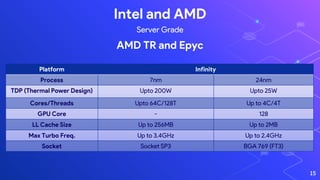
Intel and AMD
AMD TR and Epyc
Server Grade
Platform Infinity
Process 7nm 24nm
TDP (Thermal Power Design) Upto 200W Upto 25W
Cores/Threads Upto 64C/128T Up to 4C/4T
GPU Core - 128
LL Cache Size Up to 256MB Up to 2MB
Max Turbo Freq. Up to 3.4GHz Up to 2.4GHz
Socket Socket SP3 BGA 769 (FT3)
GPU (Graphics Processing Unit)
16
What is it ??
Computer hardware includes the physical parts of a computer, such as the
case,central processing unit (CPU), monitor, mouse, keyboard, computer
data storage, graphics card, sound card, speakers and motherboard.
By contrast, software is the set of instructions that can be stored and run by
hardware. Hardware is so-termed because it is "hard" or rigid with respect to
changes, whereas software is "soft" because it is easy to change.
Hardware is typically directed by the software to execute any command or
instruction. A combination of hardware and software forms a usable
computing system, although other systems exist with only hardware.
17
Nvidia
Nvidia is an American multinational technology company
incorporated in Delaware and based in Santa Clara, California. It
designs graphics processing units (GPUs) for the gaming and
professional markets, as well as system on a chip units (SoCs) for
the mobile computing and automotive market. Its primary GPU
product line, labeled "GeForce", is in direct competition with
Advanced Micro Devices' (AMD) "Radeon" products. Nvidia
expanded its presence in the gaming industry with its handheld
Shield Portable, Shield Tablet, and Shield Android TV.
In addition to GPU manufacturing, Nvidia provides parallel
processing capabilities to researchers and scientists that allow
them to efficiently run high-performance applications. They are
deployed in supercomputing sites around the world. More recently,
it has moved into the mobile computing market, where it produces
The biggest manufacturers of GPUs
18
Radeon
Radeon is a brand of computer products, including graphics
processing units, random-access memory, RAM disk software,
and solid-state drives, produced by Radeon Technologies
Group, a division of Advanced Micro Devices. The brand was
launched in 2000 by ATI Technologies, which was acquired by
AMD in 2006 for US$5.4 billion.
AMD does not distribute Radeon cards directly to consumers
(though some exceptions can be found). Instead, it sells
Radeon GPUs to third-party manufacturers, who build and sell
the Radeon-based video cards to the OEM and retail channels.
Manufacturers of the Radeon cards—some of whom also make
motherboards—include Sapphire, XFX, Asus, Gigabyte, MSI,
Biostar, Gainward, Diamond, HIS, PowerColor, Club 3D,
VisionTek, ASRock and Force3D.
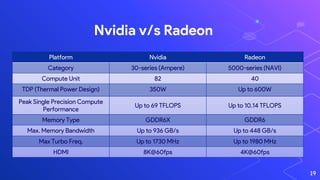
Nvidia v/s Radeon
19
Platform Nvidia Radeon
Category 30-series (Ampere) 5000-series (NAVI)
Compute Unit 82 40
TDP (Thermal Power Design) 350W Up to 600W
Peak Single Precision Compute
Performance
Up to 69 TFLOPS Up to 10.14 TFLOPS
Memory Type GDDR6X GDDR6
Max. Memory Bandwidth Up to 936 GB/s Up to 448 GB/s
Max Turbo Freq. Up to 1730 MHz Up to 1980 MHz
HDMI 8K@60fps 4K@60fps
Different Type of CPU Cooling
20
Fan Cooling
21
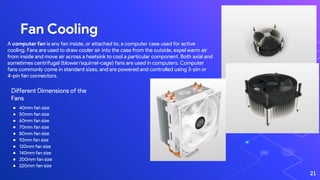
A computer fan is any fan inside, or attached to, a computer case used for active
cooling. Fans are used to draw cooler air into the case from the outside, expel warm air
from inside and move air across a heatsink to cool a particular component. Both axial and
sometimes centrifugal (blower/squirrel-cage) fans are used in computers. Computer
fans commonly come in standard sizes, and are powered and controlled using 3-pin or
4-pin fan connectors.
Different Dimensions of the
Fans
● 40mm fan size
● 50mm fan size
● 60mm fan size
● 70mm fan size
● 80mm fan size
● 92mm fan size
● 120mm fan size
● 140mm fan size
● 200mm fan size
● 220mm fan size
Positive and Negative Pressure
22
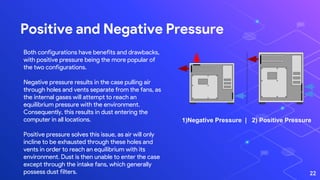
Both configurations have benefits and drawbacks,
with positive pressure being the more popular of
the two configurations.
Negative pressure results in the case pulling air
through holes and vents separate from the fans, as
the internal gases will attempt to reach an
equilibrium pressure with the environment.
Consequently, this results in dust entering the
computer in all locations.
Positive pressure solves this issue, as air will only
incline to be exhausted through these holes and

vents in order to reach an equilibrium with its
environment. Dust is then unable to enter the case
except through the intake fans, which generally
possess dust filters.
1)Negative Pressure | 2) Positive Pressure
AIO (All-in-one Cooling)
23
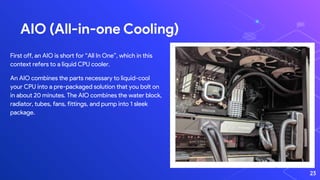
First off, an AIO is short for “All In One”, which in this
context refers to a liquid CPU cooler.
An AIO combines the parts necessary to liquid-cool
your CPU into a pre-packaged solution that you bolt on
in about 20 minutes. The AIO combines the water block,
radiator, tubes, fans, fittings, and pump into 1 sleek
package.
Water/Liquid Cooling
24
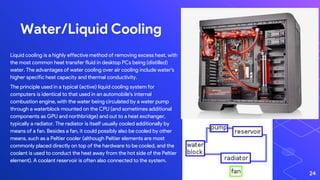
Liquid cooling is a highly effective method of removing excess heat, with
the most common heat transfer fluid in desktop PCs being (distilled)
water. The advantages of water cooling over air cooling include water's
higher specific heat capacity and thermal conductivity.
The principle used in a typical (active) liquid cooling system for
computers is identical to that used in an automobile's internal
combustion engine, with the water being circulated by a water pump
through a waterblock mounted on the CPU (and sometimes additional
components as GPU and northbridge) and out to a heat exchanger,
typically a radiator. The radiator is itself usually cooled additionally by
means of a fan. Besides a fan, it could possibly also be cooled by other
means, such as a Peltier cooler (although Peltier elements are most
commonly placed directly on top of the hardware to be cooled, and the
coolant is used to conduct the heat away from the hot side of the Peltier
element). A coolant reservoir is often also connected to the system.
Liquid Nitrogen/Liquid Helium Cooling
25
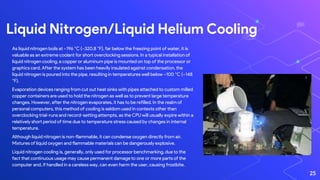
As liquid nitrogen boils at −196 °C (−320.8 °F), far below the freezing point of water, it is
valuable as an extreme coolant for short overclocking sessions. In a typical installation of
liquid nitrogen cooling, a copper or aluminum pipe is mounted on top of the processor or
graphics card. After the system has been heavily insulated against condensation, the
liquid nitrogen is poured into the pipe, resulting in temperatures well below −100 °C (−148
°F).
Evaporation devices ranging from cut out heat sinks with pipes attached to custom milled
copper containers are used to hold the nitrogen as well as to prevent large temperature
changes. However, after the nitrogen evaporates, it has to be refilled. In the realm of
personal computers, this method of cooling is seldom used in contexts other than
overclocking trial-runs and record-setting attempts, as the CPU will usually expire within a
relatively short period of time due to temperature stress caused by changes in internal
temperature.
Although liquid nitrogen is non-flammable, it can condense oxygen directly from air.
Mixtures of liquid oxygen and flammable materials can be dangerously explosive.
Liquid nitrogen cooling is, generally, only used for processor benchmarking, due to the
fact that continuous usage may cause permanent damage to one or more parts of the
computer and, if handled in a careless way, can even harm the user, causing frostbite.
Thermal Conductivity
26
Formula
Every substance has its own capacity to conduct heat.
The thermal conductivity of a material is described by
the following formula:
K = (QL)/(AΔT)
Where,
● K is the thermal conductivity in W/m.K
● Q is the amount of heat transferred through the
material in Joules/second or Watts
● L is the distance between the two isothermal planes
● A is the area of the surface in square meters
● ΔT is the difference in temperature in Kelvin
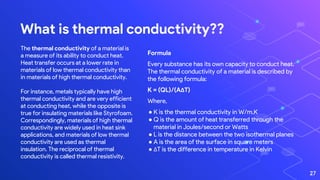
The thermal conductivity of a material is
a measure of its ability to conduct heat.
Heat transfer occurs at a lower rate in
materials of low thermal conductivity than
in materials of high thermal conductivity.
For instance, metals typically have high
thermal conductivity and are very efficient
at conducting heat, while the opposite is
true for insulating materials like Styrofoam.
Correspondingly, materials of high thermal
conductivity are widely used in heat sink
applications, and materials of low thermal
conductivity are used as thermal
insulation. The reciprocal of thermal
conductivity is called thermal resistivity.
What is thermal conductivity??
27
Thermal Paste
28
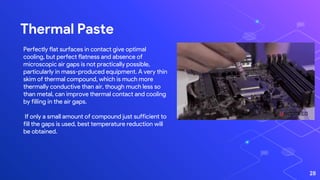
Perfectly flat surfaces in contact give optimal
cooling, but perfect flatness and absence of
microscopic air gaps is not practically possible,
particularly in mass-produced equipment. A very thin
skim of thermal compound, which is much more
thermally conductive than air, though much less so
than metal, can improve thermal contact and cooling
by filling in the air gaps.
If only a small amount of compound just sufficient to
fill the gaps is used, best temperature reduction will
be obtained.
Thermal Pad
29
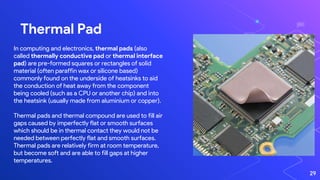
In computing and electronics, thermal pads (also
called thermally conductive pad or thermal interface
pad) are pre-formed squares or rectangles of solid
material (often paraffin wax or silicone based)
commonly found on the underside of heatsinks to aid
the conduction of heat away from the component
being cooled (such as a CPU or another chip) and into
the heatsink (usually made from aluminium or copper).
Thermal pads and thermal compound are used to fill air
gaps caused by imperfectly flat or smooth surfaces
which should be in thermal contact they would not be
needed between perfectly flat and smooth surfaces.
Thermal pads are relatively firm at room temperature,
but become soft and are able to fill gaps at higher
temperatures.
Liquid Metal Cooling
30
Liquid cooling is a highly effective method of
removing excess heat, with the most common
heat transfer fluid in desktop PCs being
(distilled) water. The advantages of water
cooling over air cooling include water's higher
specific heat capacity and thermal conductivity.
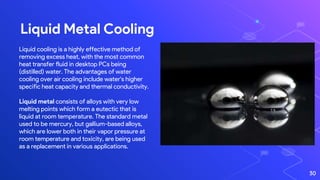
Liquid metal consists of alloys with very low
melting points which form a eutectic that is
liquid at room temperature. The standard metal
used to be mercury, but gallium-based alloys,
which are lower both in their vapor pressure at
room temperature and toxicity, are being used
as a replacement in various applications.
RAM (Random Access Memory)
31
What is it??
Random-access memory, or RAM, is one of the most
important components in all devices, from PCs to
smartphones to game consoles. Without RAM, doing just
about anything on any system would be much, much slower.
On the flip side, not having enough for the application or game
you’re trying to run can bring things to a crawl or even prevent
them from running at all.
32
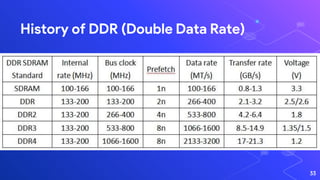
History of DDR (Double Data Rate)
33
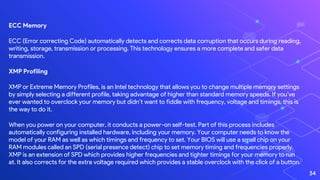
ECC Memory
ECC (Error correcting Code) automatically detects and corrects data corruption that occurs during reading,
writing, storage, transmission or processing. This technology ensures a more complete and safer data
transmission.
XMP Profiling
XMP or Extreme Memory Profiles, is an Intel technology that allows you to change multiple memory settings
by simply selecting a different profile, taking advantage of higher than standard memory speeds. If you’ve
ever wanted to overclock your memory but didn’t want to fiddle with frequency, voltage and timings, this is
the way to do it.
When you power on your computer, it conducts a power-on self-test. Part of this process includes
automatically configuring installed hardware, including your memory. Your computer needs to know the
model of your RAM as well as which timings and frequency to set. Your BIOS will use a small chip on your
RAM modules called an SPD (serial presence detect) chip to set memory timing and frequencies properly.
XMP is an extension of SPD which provides higher frequencies and tighter timings for your memory to run
at. It also corrects for the extra voltage required which provides a stable overclock with the click of a button.
34
SIMM (Single Inline Memory Module)
35
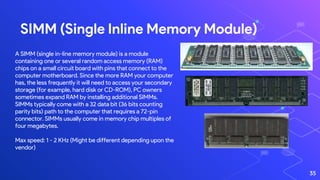
A SIMM (single in-line memory module) is a module
containing one or several random access memory (RAM)
chips on a small circuit board with pins that connect to the
computer motherboard. Since the more RAM your computer
has, the less frequently it will need to access your secondary
storage (for example, hard disk or CD-ROM), PC owners
sometimes expand RAM by installing additional SIMMs.
SIMMs typically come with a 32 data bit (36 bits counting
parity bits) path to the computer that requires a 72-pin
connector. SIMMs usually come in memory chip multiples of
four megabytes.
Max speed: 1 - 2 KHz (Might be different depending upon the
vendor)
RIMM (Rambus Inline Memory Module)
36
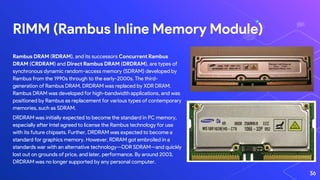
Rambus DRAM (RDRAM), and its successors Concurrent Rambus
DRAM (CRDRAM) and Direct Rambus DRAM (DRDRAM), are types of
synchronous dynamic random-access memory (SDRAM) developed by
Rambus from the 1990s through to the early-2000s. The third-
generation of Rambus DRAM, DRDRAM was replaced by XDR DRAM.
Rambus DRAM was developed for high-bandwidth applications, and was
positioned by Rambus as replacement for various types of contemporary
memories, such as SDRAM.
DRDRAM was initially expected to become the standard in PC memory,
especially after Intel agreed to license the Rambus technology for use
with its future chipsets. Further, DRDRAM was expected to become a
standard for graphics memory. However, RDRAM got embroiled in a
standards war with an alternative technology—DDR SDRAM—and quickly
lost out on grounds of price, and later, performance. By around 2003,
DRDRAM was no longer supported by any personal computer.
DIMM (Dual Inline Memory Module)
37
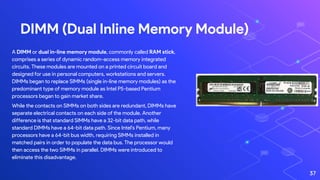
A DIMM or dual in-line memory module, commonly called RAM stick,
comprises a series of dynamic random-access memory integrated
circuits. These modules are mounted on a printed circuit board and
designed for use in personal computers, workstations and servers.
DIMMs began to replace SIMMs (single in-line memory modules) as the
predominant type of memory module as Intel P5-based Pentium
processors began to gain market share.
While the contacts on SIMMs on both sides are redundant, DIMMs have
separate electrical contacts on each side of the module. Another
difference is that standard SIMMs have a 32-bit data path, while
standard DIMMs have a 64-bit data path. Since Intel's Pentium, many
processors have a 64-bit bus width, requiring SIMMs installed in
matched pairs in order to populate the data bus. The processor would
then access the two SIMMs in parallel. DIMMs were introduced to
eliminate this disadvantage.
Computer Storage
What is Computer Storage???
Storage allows you to access and store your applications,
operating system and files for an indefinite period of time.
While the desk represents the computer's memory, the filing
cabinet represents the storage of your computer. Items that must
be kept yet won't necessarily be accessed soon are stored in the
filing cabinet. Due to the size of the filing cabinet, many things can
be stored.
39
40
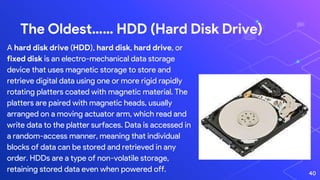
The Oldest…… HDD (Hard Disk Drive)
A hard disk drive (HDD), hard disk, hard drive, or
fixed disk is an electro-mechanical data storage
device that uses magnetic storage to store and
retrieve digital data using one or more rigid rapidly
rotating platters coated with magnetic material. The
platters are paired with magnetic heads, usually
arranged on a moving actuator arm, which read and
write data to the platter surfaces. Data is accessed in
a random-access manner, meaning that individual
blocks of data can be stored and retrieved in any
order. HDDs are a type of non-volatile storage,
retaining stored data even when powered off.
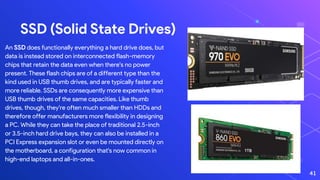
SSD (Solid State Drives)
An SSD does functionally everything a hard drive does, but
data is instead stored on interconnected flash-memory
chips that retain the data even when there's no power
present. These flash chips are of a different type than the
kind used in USB thumb drives, and are typically faster and
more reliable. SSDs are consequently more expensive than
USB thumb drives of the same capacities. Like thumb
drives, though, they're often much smaller than HDDs and
therefore offer manufacturers more flexibility in designing
a PC. While they can take the place of traditional 2.5-inch
or 3.5-inch hard drive bays, they can also be installed in a
PCI Express expansion slot or even be mounted directly on
the motherboard, a configuration that's now common in
high-end laptops and all-in-ones.
41
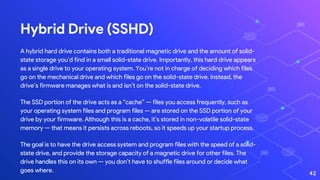
Hybrid Drive (SSHD)
A hybrid hard drive contains both a traditional magnetic drive and the amount of solid-
state storage you’d find in a small solid-state drive. Importantly, this hard drive appears
as a single drive to your operating system. You’re not in charge of deciding which files
go on the mechanical drive and which files go on the solid-state drive. Instead, the
drive’s firmware manages what is and isn’t on the solid-state drive.
The SSD portion of the drive acts as a “cache” — files you access frequently, such as
your operating system files and program files — are stored on the SSD portion of your
drive by your firmware. Although this is a cache, it’s stored in non-volatile solid-state
memory — that means it persists across reboots, so it speeds up your startup process.
The goal is to have the drive access system and program files with the speed of a solid-
state drive, and provide the storage capacity of a magnetic drive for other files. The
drive handles this on its own — you don’t have to shuffle files around or decide what
goes where. 42
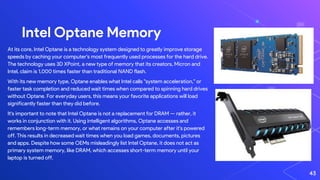
Intel Optane Memory
At its core, Intel Optane is a technology system designed to greatly improve storage
speeds by caching your computer's most frequently used processes for the hard drive.
The technology uses 3D XPoint, a new type of memory that its creators, Micron and
Intel, claim is 1,000 times faster than traditional NAND flash.
With its new memory type, Optane enables what Intel calls "system acceleration," or
faster task completion and reduced wait times when compared to spinning hard drives
without Optane. For everyday users, this means your favorite applications will load
significantly faster than they did before.
It's important to note that Intel Optane is not a replacement for DRAM — rather, it
works in conjunction with it. Using intelligent algorithms, Optane accesses and
remembers long-term memory, or what remains on your computer after it's powered
off. This results in decreased wait times when you load games, documents, pictures
and apps. Despite how some OEMs misleadingly list Intel Optane, it does not act as
primary system memory, like DRAM, which accesses short-term memory until your
laptop is turned off.
43
Connecting Interfaces and I/Os
44
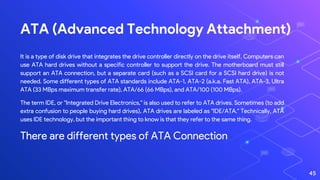
ATA (Advanced Technology Attachment)
It is a type of disk drive that integrates the drive controller directly on the drive itself. Computers can
use ATA hard drives without a specific controller to support the drive. The motherboard must still
support an ATA connection, but a separate card (such as a SCSI card for a SCSI hard drive) is not
needed. Some different types of ATA standards include ATA-1, ATA-2 (a.k.a. Fast ATA), ATA-3, Ultra
ATA (33 MBps maximum transfer rate), ATA/66 (66 MBps), and ATA/100 (100 MBps).
The term IDE, or "Integrated Drive Electronics," is also used to refer to ATA drives. Sometimes (to add
extra confusion to people buying hard drives), ATA drives are labeled as "IDE/ATA." Technically, ATA
uses IDE technology, but the important thing to know is that they refer to the same thing.
There are different types of ATA Connection
45
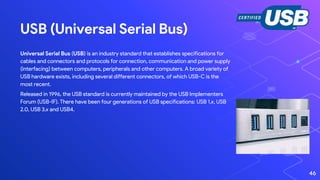
USB (Universal Serial Bus)
Universal Serial Bus (USB) is an industry standard that establishes specifications for
cables and connectors and protocols for connection, communication and power supply
(interfacing) between computers, peripherals and other computers. A broad variety of
USB hardware exists, including several different connectors, of which USB-C is the
most recent.
Released in 1996, the USB standard is currently maintained by the USB Implementers
Forum (USB-IF). There have been four generations of USB specifications: USB 1.x, USB
2.0, USB 3.x and USB4.
46
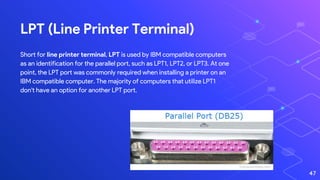
LPT (Line Printer Terminal)
Short for line printer terminal, LPT is used by IBM compatible computers
as an identification for the parallel port, such as LPT1, LPT2, or LPT3. At one
point, the LPT port was commonly required when installing a printer on an
IBM compatible computer. The majority of computers that utilize LPT1
don't have an option for another LPT port.
47
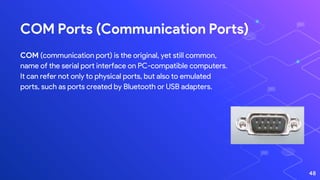
COM Ports (Communication Ports)
COM (communication port) is the original, yet still common,
name of the serial port interface on PC-compatible computers.
It can refer not only to physical ports, but also to emulated
ports, such as ports created by Bluetooth or USB adapters.
48
Boot Firmwire
49
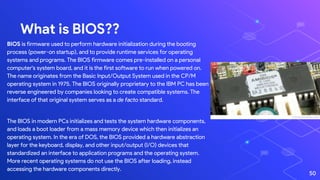
What is BIOS??
BIOS is firmware used to perform hardware initialization during the booting
process (power-on startup), and to provide runtime services for operating
systems and programs. The BIOS firmware comes pre-installed on a personal
computer's system board, and it is the first software to run when powered on.
The name originates from the Basic Input/Output System used in the CP/M
operating system in 1975. The BIOS originally proprietary to the IBM PC has been
reverse engineered by companies looking to create compatible systems. The
interface of that original system serves as a de facto standard.
The BIOS in modern PCs initializes and tests the system hardware components,
and loads a boot loader from a mass memory device which then initializes an
operating system. In the era of DOS, the BIOS provided a hardware abstraction
layer for the keyboard, display, and other input/output (I/O) devices that
standardized an interface to application programs and the operating system.
More recent operating systems do not use the BIOS after loading, instead
accessing the hardware components directly.
50
What is UEFI??
The Unified Extensible Firmware Interface (UEFI) is a specification that
defines a software interface between an operating system and platform
firmware. UEFI replaces the legacy Basic Input/Output System (BIOS)
firmware interface originally present in all IBM PC-compatible personal
computers, with most UEFI firmware implementations providing support for
legacy BIOS services. UEFI can support remote diagnostics and repair of
computers, even with no operating system installed.Intel developed the
original Extensible Firmware Interface (EFI) specifications.
Some of the EFI's practices and data formats mirror those of Microsoft
Windows. In 2005, UEFI deprecated EFI 1.10 (the final release of EFI). The
Unified EFI Forum is the industry body that manages the UEFI specifications
throughout.
51
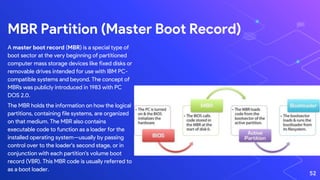
A master boot record (MBR) is a special type of
boot sector at the very beginning of partitioned
computer mass storage devices like fixed disks or
removable drives intended for use with IBM PC-
compatible systems and beyond. The concept of
MBRs was publicly introduced in 1983 with PC
DOS 2.0.
The MBR holds the information on how the logical
partitions, containing file systems, are organized
on that medium. The MBR also contains
executable code to function as a loader for the
installed operating system—usually by passing
control over to the loader's second stage, or in
conjunction with each partition's volume boot
record (VBR). This MBR code is usually referred to
as a boot loader.
MBR Partition (Master Boot Record)
52
GPT Partition (GUID Partition Table)
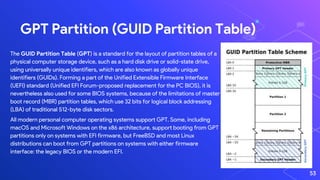
The GUID Partition Table (GPT) is a standard for the layout of partition tables of a
physical computer storage device, such as a hard disk drive or solid-state drive,
using universally unique identifiers, which are also known as globally unique
identifiers (GUIDs). Forming a part of the Unified Extensible Firmware Interface
(UEFI) standard (Unified EFI Forum-proposed replacement for the PC BIOS), it is
nevertheless also used for some BIOS systems, because of the limitations of master
boot record (MBR) partition tables, which use 32 bits for logical block addressing
(LBA) of traditional 512-byte disk sectors.
All modern personal computer operating systems support GPT. Some, including
macOS and Microsoft Windows on the x86 architecture, support booting from GPT
partitions only on systems with EFI firmware, but FreeBSD and most Linux
distributions can boot from GPT partitions on systems with either firmware
interface: the legacy BIOS or the modern EFI.
53
The southbridge is one of the two chips in the core logic
chipset on a personal computer (PC) motherboard, the
other being the northbridge.
The southbridge typically implements the slower
capabilities of the motherboard in a
northbridge/southbridge chipset computer architecture.
In systems with Intel chipsets, the southbridge is named
I/O Controller Hub (ICH), while AMD has named its
southbridge Fusion Controller Hub (FCH) since the
introduction of its Fusion AMD Accelerated Processing
Unit (APU) while moving the functions of the Northbridge
onto the CPU die, hence making it similar in function to
the Platform hub controller.
North Bridge and South Bridge
A northbridge or host bridge is one of the two chips
in the core logic chipset architecture on a PC
motherboard, the other being the southbridge. Unlike
the southbridge, northbridge is connected directly to
the CPU via the front-side bus (FSB) and is thus
responsible for tasks that require the highest
performance.
The northbridge, also known as Memory Controller
Hub, is usually paired with a southbridge. In systems
where they are included, these two chips manage
communications between the CPU and other parts of
the motherboard, and constitute the core logic chipset
of the PC motherboard.
54
PSU (Power Supply Unit)
55
What is it??
A power supply unit converts mains AC to low-voltage regulated
DC power for the internal components of a computer. Modern
personal computers universally use switched-mode power supplies.
Some power supplies have a manual switch for selecting input
voltage, while others automatically adapt to the mains voltage.
Most modern desktop personal computer power supplies conform
to the ATX specification, which includes form factor and voltage
tolerances. While an ATX power supply is connected to the mains
supply, it always provides a 5 Volt standby (5VSB) voltage so that
the standby functions on the computer and certain peripherals are
powered. ATX power supplies are turned on and off by a signal
from the motherboard. They also provide a signal to the
motherboard to indicate when the DC voltages are in spec, so that
the computer is able to safely power up and boot. The most recent
ATX PSU standard is version 2.31 as of mid-2008.
56
Motherboard
57
The motherboard (also called mainboard, main circuit board, system board,
baseboard, planar board, logic board,and mobo) is the main printed circuit
board (PCB) in general-purpose computers and other expandable systems. It
holds and allows communication between many of the crucial electronic
components of a system, such as the central processing unit (CPU) and memory,
and provides connectors for other peripherals. Unlike a backplane, a
motherboard usually contains significant sub-systems, such as the central
processor, the chipset's input/output and memory controllers, interface
connectors, and other components integrated for general use.
Motherboard means specifically a PCB with expansion capabilities. As the name
suggests, this board is often referred to as the "mother" of all components
attached to it, which often include peripherals, interface cards, and daughter
cards: sound cards, video cards, network cards, hard drives, and other forms of
persistent storage; TV tuner cards, cards providing extra USB or FireWire slots;
and a variety of other custom components.
What is a Motherboard??
58
59
Monitors
60
OLED
An organic light-emitting diode is a light-emitting diode (LED) in
which the emissive electroluminescent layer is a film of organic
compound that emits light in response to an electric current. This
organic layer is situated between two electrodes; typically, at least
one of these electrodes is transparent. OLEDs are used to create
digital displays in devices such as television screens, computer
monitors, portable systems such as smartphones, handheld game
consoles and PDAs. A major area of research is the development of
white OLED devices for use in solid-state lighting applications.
61
microLED
microLED, also known as micro-LED, mLED or µLED, is an emerging flat-panel
display technology. microLED displays consist of arrays of microscopic LEDs
forming the individual pixel elements. When compared with widespread LCD
technology, microLED displays offer better contrast, response times, and
energy efficiency.
Along with OLEDs, microLEDs are primarily aimed at small, low-energy
devices such as smartwatches and smartphones. OLED and microLED both
offer greatly reduced energy requirements when compared to conventional
LCD systems while also offering an infinite contrast ratio.
62
Now… A quick video to see it in play
63
64
Thanks!
Any questions?
You can find me at:
@pjoelnelson
pjoelnelson@gmail.com

Introduction to Computer Hardware

  • 1.
  • 2.
  • 3.
    History of Computers Computerswere generally calculators. The computer was born not for entertainment or email but out of a need to solve a serious number crunching crisis. This machine is the creation of Charles Babbage. It is known as the Analytical Computer. It was made during the Industrial Revolution. (Image: © Science Museum | Science & Society Picture Library) 3
  • 4.
    ⬡ After beingdiscovered in 1900 off the coast of Greece, the people who found this likely had no idea what they were looking at. Considering that its discovery predated the invention of the world’s first widely recognized computer in modern times, this device is mind-blowing. ⬡ Since this device was equipped with a sophisticated gear system with 37 wheels, the discovery of this complex analogue computer changed much of what we know about ancient history. For all we know, this was just one of many different similar inventions that were lost in time. ⬡ Year Invented: Between 200 and 50 BCE Country: Greece Main Feature: Analogue Computation Size: Around 14.3” (W) x 7.5” (D) x 5.2” (H) Antikythera Mechanism 4
  • 5.
    IBM 305 RandomAccess Method of Accounting and Control (RAMAC) 5 Image Source: http://www.king-computer.com/king/index.php/es_ES/galeria-de- fotos/computers.html ⬡Introduced in 1956, IBM 305 RAMAC was the first general- purpose computer that facilitated the “random access” of data in real time. Inventor Reynold B. Johnson and his team of engineers had only started working on the technology in 1952. The 305 RAMAC was the earliest commercial computer to feature magnetic disk storage, and it only took around 600 milliseconds to execute the “seek” command. ⬡The system’s magnetic disk memory unit was made up of 50 disks with 50,000 sectors, and the disks could spin at 1,200 revolutions per minute. Businesses were now able to store and access information on demand. Thanks to the 305 RAMAC, data processing had been revolutionized forever.
  • 6.
    Now, Let ustalk about The Recent Advances in Computer Hardware… 6
  • 7.
    CPU (Central ProcessingUnit) The CPU is the core component of what defines a computing device, but it It’s a chip that sits in a special seat (socket) located on the main circuit board (motherboard or mainboard) inside the device. CPUs are built by placing billions of microscopic transistors onto a single computer chip. Those transistors allow it to make the calculations it needs to run programs that are stored on your system’s memory. They’re effectively minute gates that switch on or off, thereby conveying the ones or zeros that translate into everything you do with the device, be it watching videos, or writing an email. 7
  • 8.
    LGA and PGA Apin grid array (PGA) is a type of integrated circuit packaging. In a PGA, the package is square or rectangular, and the pins are arranged in a regular array on the underside of the package. The pins are commonly spaced 2.54 mm (0.1") apart, and may or may not cover the entire underside of the package.PGAs are often mounted on printed circuit boards using the through hole method or inserted into a socket. PGAs allow for more pins per integrated circuit than older packages, such as dual in-line package (DIP). 8 The land grid array (LGA) is a type of surface-mount packaging for integrated circuits (ICs) that is notable for having the pins on the socket (when a socket is used) rather than the integrated circuit. An LGA can be electrically connected to a printed circuit board (PCB) either by the use of a socket or by soldering directly to the board.
  • 9.
    BGA A ball gridarray (BGA) is a type of surface-mount packaging (a chip carrier) used for integrated circuits. BGA packages are used to permanently mount devices such as microprocessors. A BGA can provide more interconnection pins than can be put on a dual in-line or flat package. The whole bottom surface of the device can be used, instead of just the perimeter. The traces connecting the package's leads to the wires or balls which connect the die to package are also on average shorter than with a perimeter-only type, leading to better performance at high speeds. 9
  • 10.
  • 11.
    Intel and AMD 11 Intel– 10th Gen CPUs Platform ICE LAKE COMET LAKE Category Mobile Desktop Process 10nm 14nm TDP (Thermal Design Power) 9W, 15W, 28W 7W, 15W Cores/Threads Up to 4C/8T Up to 6C/12T GPU Core Upto to 4C 2-10 C LL Cache Size Up to 8MB Up to 12MB Max Turbo Freq. Up to 4.1GHz Up to 4.9/5GHz Socket FCBGA 1526 LGA 1200 Consumer Grade
  • 12.
    Platform CASCADE LAKEBROADWELL Category Mobile Workstations* Desktop Server Process 14nm 14nm TDP (Thermal Power Design) 205W 7W, 15W Cores/Threads Up to 28C/56T Up to 18C/36T GPU Core - - LL Cache Size Up to 28.5MB Up to 12MB Max Turbo Freq. Up to 5.10GHz Up to 2.7GHz Socket Depends Depends 12 Intel and AMD Intel Xeon CPUs Server Grade * M Series and Non-M Series. All the details present are subject to change depending on the use cases.
  • 13.
    ⬡ K: Itmeans that the CPU’s multiplier is unlocked, which means it can be easily overclocked (Desktop Segment). ⬡ HK: High performance graphics with overclocking (Mobile Segment). ⬡ H: High performance graphics. Consumes more power (Mobile Segment). ⬡ HQ: High performance graphics with Quad Core (Mobile Segment). ⬡ U: Ultra Low Power (Mobile Segment). ⬡ Y: Extreme Low Power, Uses less power than the ‘U’ (Mobile Segment). ⬡ E: Supports ECC Memory (Desktop Segment). ⬡ M: Used to denote Xeon Processors in Mobile Segment. ⬡ T: Used in Standard LGA sockets but low powered, Used in AIO Desktops. ⬡ P: CPUs without integrated graphics (Desktop Segment) ⬡ G: Uses Radeon Vega Graphics (graphics made by AMD) ⬡ R: Similar to H series. (Desktop) (Soldered) ⬡ C: Unlocked, similar to K series (Desktop) (Soldered) ⬡ XE or X: High-End Consumer grade CPU, Greater core and thread count, Most expensive Letters in Intel CPUs 13
  • 14.
    14 Intel and AMD AMD4th Gen CPUs Consumer Grade Platform Zen 2 Products Mobile APUs Desktop Process 7nm 7nm TDP (Thermal Power Design) 35-54 (H Series) Upto 280W (TR Series) Cores/Threads Up to 4C/8T (U-series) | 8C/16T (H- series) Up to 64C/12T GPU Core 8C LL Cache Size Up to 8MB Up to 4MB Max Turbo Freq. Up to 4.4GHz Up to 4.5Hz
  • 15.
    15 Intel and AMD AMDTR and Epyc Server Grade Platform Infinity Process 7nm 24nm TDP (Thermal Power Design) Upto 200W Upto 25W Cores/Threads Upto 64C/128T Up to 4C/4T GPU Core - 128 LL Cache Size Up to 256MB Up to 2MB Max Turbo Freq. Up to 3.4GHz Up to 2.4GHz Socket Socket SP3 BGA 769 (FT3)
  • 16.
  • 17.
    What is it?? Computer hardware includes the physical parts of a computer, such as the case,central processing unit (CPU), monitor, mouse, keyboard, computer data storage, graphics card, sound card, speakers and motherboard. By contrast, software is the set of instructions that can be stored and run by hardware. Hardware is so-termed because it is "hard" or rigid with respect to changes, whereas software is "soft" because it is easy to change. Hardware is typically directed by the software to execute any command or instruction. A combination of hardware and software forms a usable computing system, although other systems exist with only hardware. 17
  • 18.
    Nvidia Nvidia is anAmerican multinational technology company incorporated in Delaware and based in Santa Clara, California. It designs graphics processing units (GPUs) for the gaming and professional markets, as well as system on a chip units (SoCs) for the mobile computing and automotive market. Its primary GPU product line, labeled "GeForce", is in direct competition with Advanced Micro Devices' (AMD) "Radeon" products. Nvidia expanded its presence in the gaming industry with its handheld Shield Portable, Shield Tablet, and Shield Android TV. In addition to GPU manufacturing, Nvidia provides parallel processing capabilities to researchers and scientists that allow them to efficiently run high-performance applications. They are deployed in supercomputing sites around the world. More recently, it has moved into the mobile computing market, where it produces The biggest manufacturers of GPUs 18 Radeon Radeon is a brand of computer products, including graphics processing units, random-access memory, RAM disk software, and solid-state drives, produced by Radeon Technologies Group, a division of Advanced Micro Devices. The brand was launched in 2000 by ATI Technologies, which was acquired by AMD in 2006 for US$5.4 billion. AMD does not distribute Radeon cards directly to consumers (though some exceptions can be found). Instead, it sells Radeon GPUs to third-party manufacturers, who build and sell the Radeon-based video cards to the OEM and retail channels. Manufacturers of the Radeon cards—some of whom also make motherboards—include Sapphire, XFX, Asus, Gigabyte, MSI, Biostar, Gainward, Diamond, HIS, PowerColor, Club 3D, VisionTek, ASRock and Force3D.
  • 19.
    Nvidia v/s Radeon 19 PlatformNvidia Radeon Category 30-series (Ampere) 5000-series (NAVI) Compute Unit 82 40 TDP (Thermal Power Design) 350W Up to 600W Peak Single Precision Compute Performance Up to 69 TFLOPS Up to 10.14 TFLOPS Memory Type GDDR6X GDDR6 Max. Memory Bandwidth Up to 936 GB/s Up to 448 GB/s Max Turbo Freq. Up to 1730 MHz Up to 1980 MHz HDMI 8K@60fps 4K@60fps
  • 20.
    Different Type ofCPU Cooling 20
  • 21.
    Fan Cooling 21 A computerfan is any fan inside, or attached to, a computer case used for active cooling. Fans are used to draw cooler air into the case from the outside, expel warm air from inside and move air across a heatsink to cool a particular component. Both axial and sometimes centrifugal (blower/squirrel-cage) fans are used in computers. Computer fans commonly come in standard sizes, and are powered and controlled using 3-pin or 4-pin fan connectors. Different Dimensions of the Fans ● 40mm fan size ● 50mm fan size ● 60mm fan size ● 70mm fan size ● 80mm fan size ● 92mm fan size ● 120mm fan size ● 140mm fan size ● 200mm fan size ● 220mm fan size
  • 22.
    Positive and NegativePressure 22 Both configurations have benefits and drawbacks, with positive pressure being the more popular of the two configurations. Negative pressure results in the case pulling air through holes and vents separate from the fans, as the internal gases will attempt to reach an equilibrium pressure with the environment. Consequently, this results in dust entering the computer in all locations. Positive pressure solves this issue, as air will only incline to be exhausted through these holes and vents in order to reach an equilibrium with its environment. Dust is then unable to enter the case except through the intake fans, which generally possess dust filters. 1)Negative Pressure | 2) Positive Pressure
  • 23.
    AIO (All-in-one Cooling) 23 Firstoff, an AIO is short for “All In One”, which in this context refers to a liquid CPU cooler. An AIO combines the parts necessary to liquid-cool your CPU into a pre-packaged solution that you bolt on in about 20 minutes. The AIO combines the water block, radiator, tubes, fans, fittings, and pump into 1 sleek package.
  • 24.
    Water/Liquid Cooling 24 Liquid coolingis a highly effective method of removing excess heat, with the most common heat transfer fluid in desktop PCs being (distilled) water. The advantages of water cooling over air cooling include water's higher specific heat capacity and thermal conductivity. The principle used in a typical (active) liquid cooling system for computers is identical to that used in an automobile's internal combustion engine, with the water being circulated by a water pump through a waterblock mounted on the CPU (and sometimes additional components as GPU and northbridge) and out to a heat exchanger, typically a radiator. The radiator is itself usually cooled additionally by means of a fan. Besides a fan, it could possibly also be cooled by other means, such as a Peltier cooler (although Peltier elements are most commonly placed directly on top of the hardware to be cooled, and the coolant is used to conduct the heat away from the hot side of the Peltier element). A coolant reservoir is often also connected to the system.
  • 25.
    Liquid Nitrogen/Liquid HeliumCooling 25 As liquid nitrogen boils at −196 °C (−320.8 °F), far below the freezing point of water, it is valuable as an extreme coolant for short overclocking sessions. In a typical installation of liquid nitrogen cooling, a copper or aluminum pipe is mounted on top of the processor or graphics card. After the system has been heavily insulated against condensation, the liquid nitrogen is poured into the pipe, resulting in temperatures well below −100 °C (−148 °F). Evaporation devices ranging from cut out heat sinks with pipes attached to custom milled copper containers are used to hold the nitrogen as well as to prevent large temperature changes. However, after the nitrogen evaporates, it has to be refilled. In the realm of personal computers, this method of cooling is seldom used in contexts other than overclocking trial-runs and record-setting attempts, as the CPU will usually expire within a relatively short period of time due to temperature stress caused by changes in internal temperature. Although liquid nitrogen is non-flammable, it can condense oxygen directly from air. Mixtures of liquid oxygen and flammable materials can be dangerously explosive. Liquid nitrogen cooling is, generally, only used for processor benchmarking, due to the fact that continuous usage may cause permanent damage to one or more parts of the computer and, if handled in a careless way, can even harm the user, causing frostbite.
  • 26.
  • 27.
    Formula Every substance hasits own capacity to conduct heat. The thermal conductivity of a material is described by the following formula: K = (QL)/(AΔT) Where, ● K is the thermal conductivity in W/m.K ● Q is the amount of heat transferred through the material in Joules/second or Watts ● L is the distance between the two isothermal planes ● A is the area of the surface in square meters ● ΔT is the difference in temperature in Kelvin The thermal conductivity of a material is a measure of its ability to conduct heat. Heat transfer occurs at a lower rate in materials of low thermal conductivity than in materials of high thermal conductivity. For instance, metals typically have high thermal conductivity and are very efficient at conducting heat, while the opposite is true for insulating materials like Styrofoam. Correspondingly, materials of high thermal conductivity are widely used in heat sink applications, and materials of low thermal conductivity are used as thermal insulation. The reciprocal of thermal conductivity is called thermal resistivity. What is thermal conductivity?? 27
  • 28.
    Thermal Paste 28 Perfectly flatsurfaces in contact give optimal cooling, but perfect flatness and absence of microscopic air gaps is not practically possible, particularly in mass-produced equipment. A very thin skim of thermal compound, which is much more thermally conductive than air, though much less so than metal, can improve thermal contact and cooling by filling in the air gaps. If only a small amount of compound just sufficient to fill the gaps is used, best temperature reduction will be obtained.
  • 29.
    Thermal Pad 29 In computingand electronics, thermal pads (also called thermally conductive pad or thermal interface pad) are pre-formed squares or rectangles of solid material (often paraffin wax or silicone based) commonly found on the underside of heatsinks to aid the conduction of heat away from the component being cooled (such as a CPU or another chip) and into the heatsink (usually made from aluminium or copper). Thermal pads and thermal compound are used to fill air gaps caused by imperfectly flat or smooth surfaces which should be in thermal contact they would not be needed between perfectly flat and smooth surfaces. Thermal pads are relatively firm at room temperature, but become soft and are able to fill gaps at higher temperatures.
  • 30.
    Liquid Metal Cooling 30 Liquidcooling is a highly effective method of removing excess heat, with the most common heat transfer fluid in desktop PCs being (distilled) water. The advantages of water cooling over air cooling include water's higher specific heat capacity and thermal conductivity. Liquid metal consists of alloys with very low melting points which form a eutectic that is liquid at room temperature. The standard metal used to be mercury, but gallium-based alloys, which are lower both in their vapor pressure at room temperature and toxicity, are being used as a replacement in various applications.
  • 31.
  • 32.
    What is it?? Random-accessmemory, or RAM, is one of the most important components in all devices, from PCs to smartphones to game consoles. Without RAM, doing just about anything on any system would be much, much slower. On the flip side, not having enough for the application or game you’re trying to run can bring things to a crawl or even prevent them from running at all. 32
  • 33.
    History of DDR(Double Data Rate) 33
  • 34.
    ECC Memory ECC (Errorcorrecting Code) automatically detects and corrects data corruption that occurs during reading, writing, storage, transmission or processing. This technology ensures a more complete and safer data transmission. XMP Profiling XMP or Extreme Memory Profiles, is an Intel technology that allows you to change multiple memory settings by simply selecting a different profile, taking advantage of higher than standard memory speeds. If you’ve ever wanted to overclock your memory but didn’t want to fiddle with frequency, voltage and timings, this is the way to do it. When you power on your computer, it conducts a power-on self-test. Part of this process includes automatically configuring installed hardware, including your memory. Your computer needs to know the model of your RAM as well as which timings and frequency to set. Your BIOS will use a small chip on your RAM modules called an SPD (serial presence detect) chip to set memory timing and frequencies properly. XMP is an extension of SPD which provides higher frequencies and tighter timings for your memory to run at. It also corrects for the extra voltage required which provides a stable overclock with the click of a button. 34
  • 35.
    SIMM (Single InlineMemory Module) 35 A SIMM (single in-line memory module) is a module containing one or several random access memory (RAM) chips on a small circuit board with pins that connect to the computer motherboard. Since the more RAM your computer has, the less frequently it will need to access your secondary storage (for example, hard disk or CD-ROM), PC owners sometimes expand RAM by installing additional SIMMs. SIMMs typically come with a 32 data bit (36 bits counting parity bits) path to the computer that requires a 72-pin connector. SIMMs usually come in memory chip multiples of four megabytes. Max speed: 1 - 2 KHz (Might be different depending upon the vendor)
  • 36.
    RIMM (Rambus InlineMemory Module) 36 Rambus DRAM (RDRAM), and its successors Concurrent Rambus DRAM (CRDRAM) and Direct Rambus DRAM (DRDRAM), are types of synchronous dynamic random-access memory (SDRAM) developed by Rambus from the 1990s through to the early-2000s. The third- generation of Rambus DRAM, DRDRAM was replaced by XDR DRAM. Rambus DRAM was developed for high-bandwidth applications, and was positioned by Rambus as replacement for various types of contemporary memories, such as SDRAM. DRDRAM was initially expected to become the standard in PC memory, especially after Intel agreed to license the Rambus technology for use with its future chipsets. Further, DRDRAM was expected to become a standard for graphics memory. However, RDRAM got embroiled in a standards war with an alternative technology—DDR SDRAM—and quickly lost out on grounds of price, and later, performance. By around 2003, DRDRAM was no longer supported by any personal computer.
  • 37.
    DIMM (Dual InlineMemory Module) 37 A DIMM or dual in-line memory module, commonly called RAM stick, comprises a series of dynamic random-access memory integrated circuits. These modules are mounted on a printed circuit board and designed for use in personal computers, workstations and servers. DIMMs began to replace SIMMs (single in-line memory modules) as the predominant type of memory module as Intel P5-based Pentium processors began to gain market share. While the contacts on SIMMs on both sides are redundant, DIMMs have separate electrical contacts on each side of the module. Another difference is that standard SIMMs have a 32-bit data path, while standard DIMMs have a 64-bit data path. Since Intel's Pentium, many processors have a 64-bit bus width, requiring SIMMs installed in matched pairs in order to populate the data bus. The processor would then access the two SIMMs in parallel. DIMMs were introduced to eliminate this disadvantage.
  • 38.
  • 39.
    What is ComputerStorage??? Storage allows you to access and store your applications, operating system and files for an indefinite period of time. While the desk represents the computer's memory, the filing cabinet represents the storage of your computer. Items that must be kept yet won't necessarily be accessed soon are stored in the filing cabinet. Due to the size of the filing cabinet, many things can be stored. 39
  • 40.
    40 The Oldest…… HDD(Hard Disk Drive) A hard disk drive (HDD), hard disk, hard drive, or fixed disk is an electro-mechanical data storage device that uses magnetic storage to store and retrieve digital data using one or more rigid rapidly rotating platters coated with magnetic material. The platters are paired with magnetic heads, usually arranged on a moving actuator arm, which read and write data to the platter surfaces. Data is accessed in a random-access manner, meaning that individual blocks of data can be stored and retrieved in any order. HDDs are a type of non-volatile storage, retaining stored data even when powered off.
  • 41.
    SSD (Solid StateDrives) An SSD does functionally everything a hard drive does, but data is instead stored on interconnected flash-memory chips that retain the data even when there's no power present. These flash chips are of a different type than the kind used in USB thumb drives, and are typically faster and more reliable. SSDs are consequently more expensive than USB thumb drives of the same capacities. Like thumb drives, though, they're often much smaller than HDDs and therefore offer manufacturers more flexibility in designing a PC. While they can take the place of traditional 2.5-inch or 3.5-inch hard drive bays, they can also be installed in a PCI Express expansion slot or even be mounted directly on the motherboard, a configuration that's now common in high-end laptops and all-in-ones. 41
  • 42.
    Hybrid Drive (SSHD) Ahybrid hard drive contains both a traditional magnetic drive and the amount of solid- state storage you’d find in a small solid-state drive. Importantly, this hard drive appears as a single drive to your operating system. You’re not in charge of deciding which files go on the mechanical drive and which files go on the solid-state drive. Instead, the drive’s firmware manages what is and isn’t on the solid-state drive. The SSD portion of the drive acts as a “cache” — files you access frequently, such as your operating system files and program files — are stored on the SSD portion of your drive by your firmware. Although this is a cache, it’s stored in non-volatile solid-state memory — that means it persists across reboots, so it speeds up your startup process. The goal is to have the drive access system and program files with the speed of a solid- state drive, and provide the storage capacity of a magnetic drive for other files. The drive handles this on its own — you don’t have to shuffle files around or decide what goes where. 42
  • 43.
    Intel Optane Memory Atits core, Intel Optane is a technology system designed to greatly improve storage speeds by caching your computer's most frequently used processes for the hard drive. The technology uses 3D XPoint, a new type of memory that its creators, Micron and Intel, claim is 1,000 times faster than traditional NAND flash. With its new memory type, Optane enables what Intel calls "system acceleration," or faster task completion and reduced wait times when compared to spinning hard drives without Optane. For everyday users, this means your favorite applications will load significantly faster than they did before. It's important to note that Intel Optane is not a replacement for DRAM — rather, it works in conjunction with it. Using intelligent algorithms, Optane accesses and remembers long-term memory, or what remains on your computer after it's powered off. This results in decreased wait times when you load games, documents, pictures and apps. Despite how some OEMs misleadingly list Intel Optane, it does not act as primary system memory, like DRAM, which accesses short-term memory until your laptop is turned off. 43
  • 44.
  • 45.
    ATA (Advanced TechnologyAttachment) It is a type of disk drive that integrates the drive controller directly on the drive itself. Computers can use ATA hard drives without a specific controller to support the drive. The motherboard must still support an ATA connection, but a separate card (such as a SCSI card for a SCSI hard drive) is not needed. Some different types of ATA standards include ATA-1, ATA-2 (a.k.a. Fast ATA), ATA-3, Ultra ATA (33 MBps maximum transfer rate), ATA/66 (66 MBps), and ATA/100 (100 MBps). The term IDE, or "Integrated Drive Electronics," is also used to refer to ATA drives. Sometimes (to add extra confusion to people buying hard drives), ATA drives are labeled as "IDE/ATA." Technically, ATA uses IDE technology, but the important thing to know is that they refer to the same thing. There are different types of ATA Connection 45
  • 46.
    USB (Universal SerialBus) Universal Serial Bus (USB) is an industry standard that establishes specifications for cables and connectors and protocols for connection, communication and power supply (interfacing) between computers, peripherals and other computers. A broad variety of USB hardware exists, including several different connectors, of which USB-C is the most recent. Released in 1996, the USB standard is currently maintained by the USB Implementers Forum (USB-IF). There have been four generations of USB specifications: USB 1.x, USB 2.0, USB 3.x and USB4. 46
  • 47.
    LPT (Line PrinterTerminal) Short for line printer terminal, LPT is used by IBM compatible computers as an identification for the parallel port, such as LPT1, LPT2, or LPT3. At one point, the LPT port was commonly required when installing a printer on an IBM compatible computer. The majority of computers that utilize LPT1 don't have an option for another LPT port. 47
  • 48.
    COM Ports (CommunicationPorts) COM (communication port) is the original, yet still common, name of the serial port interface on PC-compatible computers. It can refer not only to physical ports, but also to emulated ports, such as ports created by Bluetooth or USB adapters. 48
  • 49.
  • 50.
    What is BIOS?? BIOSis firmware used to perform hardware initialization during the booting process (power-on startup), and to provide runtime services for operating systems and programs. The BIOS firmware comes pre-installed on a personal computer's system board, and it is the first software to run when powered on. The name originates from the Basic Input/Output System used in the CP/M operating system in 1975. The BIOS originally proprietary to the IBM PC has been reverse engineered by companies looking to create compatible systems. The interface of that original system serves as a de facto standard. The BIOS in modern PCs initializes and tests the system hardware components, and loads a boot loader from a mass memory device which then initializes an operating system. In the era of DOS, the BIOS provided a hardware abstraction layer for the keyboard, display, and other input/output (I/O) devices that standardized an interface to application programs and the operating system. More recent operating systems do not use the BIOS after loading, instead accessing the hardware components directly. 50
  • 51.
    What is UEFI?? TheUnified Extensible Firmware Interface (UEFI) is a specification that defines a software interface between an operating system and platform firmware. UEFI replaces the legacy Basic Input/Output System (BIOS) firmware interface originally present in all IBM PC-compatible personal computers, with most UEFI firmware implementations providing support for legacy BIOS services. UEFI can support remote diagnostics and repair of computers, even with no operating system installed.Intel developed the original Extensible Firmware Interface (EFI) specifications. Some of the EFI's practices and data formats mirror those of Microsoft Windows. In 2005, UEFI deprecated EFI 1.10 (the final release of EFI). The Unified EFI Forum is the industry body that manages the UEFI specifications throughout. 51
  • 52.
    A master bootrecord (MBR) is a special type of boot sector at the very beginning of partitioned computer mass storage devices like fixed disks or removable drives intended for use with IBM PC- compatible systems and beyond. The concept of MBRs was publicly introduced in 1983 with PC DOS 2.0. The MBR holds the information on how the logical partitions, containing file systems, are organized on that medium. The MBR also contains executable code to function as a loader for the installed operating system—usually by passing control over to the loader's second stage, or in conjunction with each partition's volume boot record (VBR). This MBR code is usually referred to as a boot loader. MBR Partition (Master Boot Record) 52
  • 53.
    GPT Partition (GUIDPartition Table) The GUID Partition Table (GPT) is a standard for the layout of partition tables of a physical computer storage device, such as a hard disk drive or solid-state drive, using universally unique identifiers, which are also known as globally unique identifiers (GUIDs). Forming a part of the Unified Extensible Firmware Interface (UEFI) standard (Unified EFI Forum-proposed replacement for the PC BIOS), it is nevertheless also used for some BIOS systems, because of the limitations of master boot record (MBR) partition tables, which use 32 bits for logical block addressing (LBA) of traditional 512-byte disk sectors. All modern personal computer operating systems support GPT. Some, including macOS and Microsoft Windows on the x86 architecture, support booting from GPT partitions only on systems with EFI firmware, but FreeBSD and most Linux distributions can boot from GPT partitions on systems with either firmware interface: the legacy BIOS or the modern EFI. 53
  • 54.
    The southbridge isone of the two chips in the core logic chipset on a personal computer (PC) motherboard, the other being the northbridge. The southbridge typically implements the slower capabilities of the motherboard in a northbridge/southbridge chipset computer architecture. In systems with Intel chipsets, the southbridge is named I/O Controller Hub (ICH), while AMD has named its southbridge Fusion Controller Hub (FCH) since the introduction of its Fusion AMD Accelerated Processing Unit (APU) while moving the functions of the Northbridge onto the CPU die, hence making it similar in function to the Platform hub controller. North Bridge and South Bridge A northbridge or host bridge is one of the two chips in the core logic chipset architecture on a PC motherboard, the other being the southbridge. Unlike the southbridge, northbridge is connected directly to the CPU via the front-side bus (FSB) and is thus responsible for tasks that require the highest performance. The northbridge, also known as Memory Controller Hub, is usually paired with a southbridge. In systems where they are included, these two chips manage communications between the CPU and other parts of the motherboard, and constitute the core logic chipset of the PC motherboard. 54
  • 55.
  • 56.
    What is it?? Apower supply unit converts mains AC to low-voltage regulated DC power for the internal components of a computer. Modern personal computers universally use switched-mode power supplies. Some power supplies have a manual switch for selecting input voltage, while others automatically adapt to the mains voltage. Most modern desktop personal computer power supplies conform to the ATX specification, which includes form factor and voltage tolerances. While an ATX power supply is connected to the mains supply, it always provides a 5 Volt standby (5VSB) voltage so that the standby functions on the computer and certain peripherals are powered. ATX power supplies are turned on and off by a signal from the motherboard. They also provide a signal to the motherboard to indicate when the DC voltages are in spec, so that the computer is able to safely power up and boot. The most recent ATX PSU standard is version 2.31 as of mid-2008. 56
  • 57.
  • 58.
    The motherboard (alsocalled mainboard, main circuit board, system board, baseboard, planar board, logic board,and mobo) is the main printed circuit board (PCB) in general-purpose computers and other expandable systems. It holds and allows communication between many of the crucial electronic components of a system, such as the central processing unit (CPU) and memory, and provides connectors for other peripherals. Unlike a backplane, a motherboard usually contains significant sub-systems, such as the central processor, the chipset's input/output and memory controllers, interface connectors, and other components integrated for general use. Motherboard means specifically a PCB with expansion capabilities. As the name suggests, this board is often referred to as the "mother" of all components attached to it, which often include peripherals, interface cards, and daughter cards: sound cards, video cards, network cards, hard drives, and other forms of persistent storage; TV tuner cards, cards providing extra USB or FireWire slots; and a variety of other custom components. What is a Motherboard?? 58
  • 59.
  • 60.
  • 61.
    OLED An organic light-emittingdiode is a light-emitting diode (LED) in which the emissive electroluminescent layer is a film of organic compound that emits light in response to an electric current. This organic layer is situated between two electrodes; typically, at least one of these electrodes is transparent. OLEDs are used to create digital displays in devices such as television screens, computer monitors, portable systems such as smartphones, handheld game consoles and PDAs. A major area of research is the development of white OLED devices for use in solid-state lighting applications. 61
  • 62.
    microLED microLED, also knownas micro-LED, mLED or µLED, is an emerging flat-panel display technology. microLED displays consist of arrays of microscopic LEDs forming the individual pixel elements. When compared with widespread LCD technology, microLED displays offer better contrast, response times, and energy efficiency. Along with OLEDs, microLEDs are primarily aimed at small, low-energy devices such as smartwatches and smartphones. OLED and microLED both offer greatly reduced energy requirements when compared to conventional LCD systems while also offering an infinite contrast ratio. 62
  • 63.
    Now… A quickvideo to see it in play 63
  • 64.
    64 Thanks! Any questions? You canfind me at: @pjoelnelson pjoelnelson@gmail.com