AIN102S
Access Query Design
Samples Module – String Functions
P.O. Box 6142
Laguna Niguel, CA 92607
949-489-1472
http://www.d2associates.com
slides.1@dhdursoassociates.com
Admissions AIN102S Strings Module2
AIN102S Contact Information
P.O. Box 6142
Laguna Niguel, CA 92607
949-489-1472
http://www.d2associates.com
slides.1@dhdursoassociates.com
Copyright 2001-20011 All rights reserved.
AIN102S Notes
 This material was prepared by Mindfire
Solutions for Orange Coast Database
Associates, Inc. Reproduction for commercial
purposes is prohibited.
 Classes covering this material are available
either in San Juan Capistrano, California, or
at your facility.
Admissions AIN102S Strings Module3
AIN102S Resources
 Sample database with all queries can be
downloaded at box.net.
 Manuals can be downloaded from
SlideShare at the link below.
 Slides can be viewed on SlideShare…
http://www.slideshare.net/OCDatabases
Admissions AIN102S Strings Module4
Admissions AIN102S Strings Module5
AIN102 Sequence
 Session 1 – Review of Relational Databases and
Single Table Retrieval, Functions and Operators
 Session 2 – Multi-table retrieval, Sub queries,
Unions, Action Queries, Indexes
Additional Modules – Sample Date
(AIN102D) and String Functions
(AIN102S)
Admissions AIN102S Strings Module6
AIN102S
 Lecture/discussion with demonstrations
– Mostly practical, but a dose of “theory”
 Assumes familiarity with MS Access and
creating basic queries.
 Hands-on
 Exercises (Mostly cumulative)
 3 hours in length
Admissions AIN102S Strings Module7
Microsoft Access Query Design
 Focus of this class will be on the Query
Designer, with SQL used from time-to-time to
explain concepts
 Knowledge of query design is an essential
skill for retrieving and manipulating Microsoft
Access data.
 A foundation skill for eBusiness and almost
all major business applications that use
relational databases
Admissions AIN102S Strings Module8
Access Query Design and SQL
 The SQL engine Access uses is called JET
 It support both MS Access and Visual Basic
 Looking “behind the scenes” at your queries
in SQL can be helpful and we will do this;
however SQL is not necessary except for
UNION queries
Admissions AIN102S Strings Module9
Relational Database Basics
 Storage
 Databases
 Tables
 Rows
 Columns
 Indexes
 Views
 SQL interface
Admissions AIN102S Strings Module10
Storage
 In Access one file with extension accdb
(2007 and 2010 databases) or mdb (2003
and earlier). I.e mydatabase.mdb.
 Database splitter can be used to split it into
two parts – a front end and a back end.
 Interface to physical storage via the “JET”
database engine. This is the behind-the
scenes-workhorse.
Admissions AIN102S Strings Module11
Databases
 In the Access world refers to all objects
stored in the mdb.
– Tables
– Queries
– From
– Reports
– Macros
– Code modules
Admissions AIN102S Strings Module12
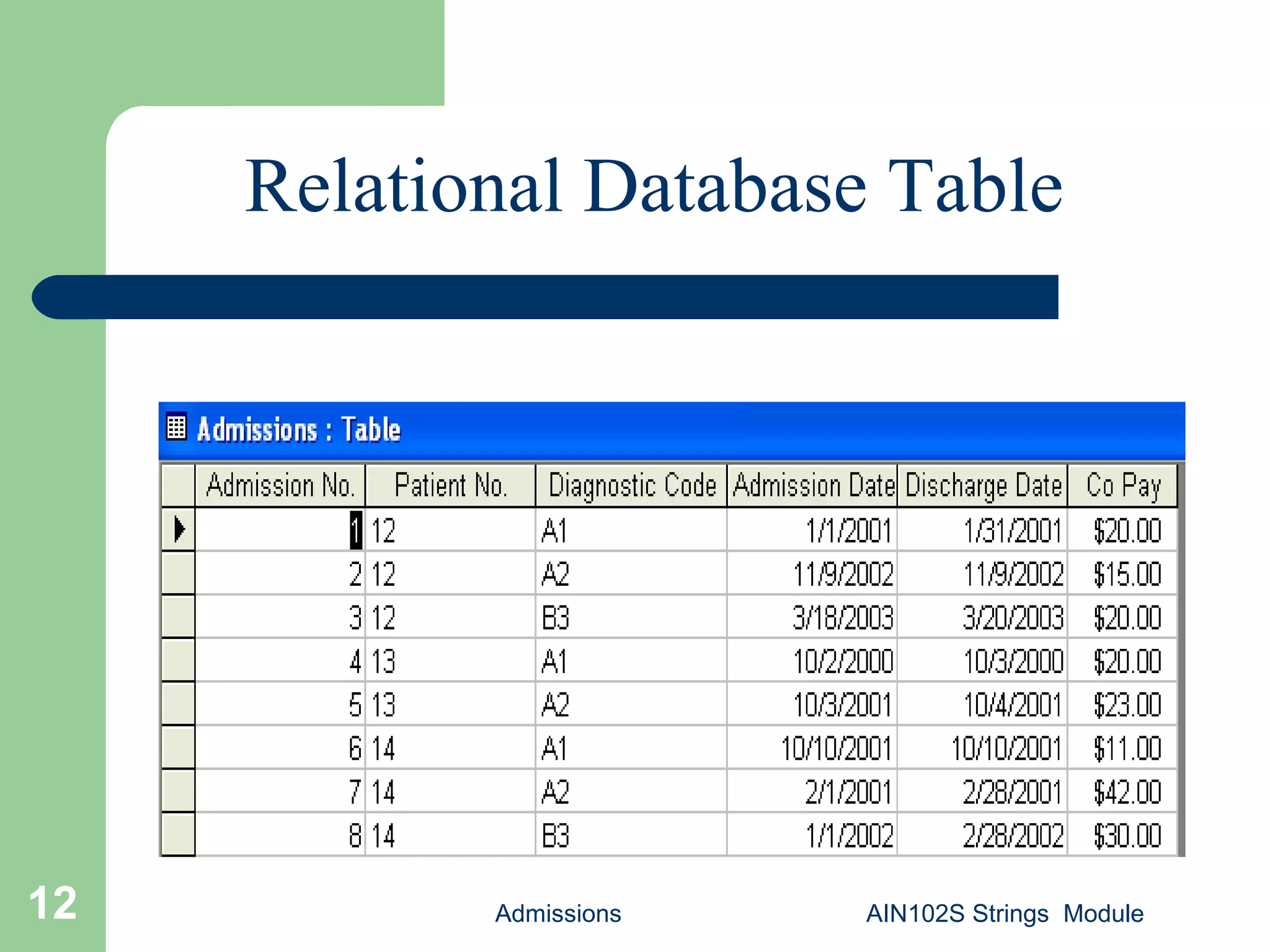
Relational Database Table
Admissions AIN102S Strings Module13
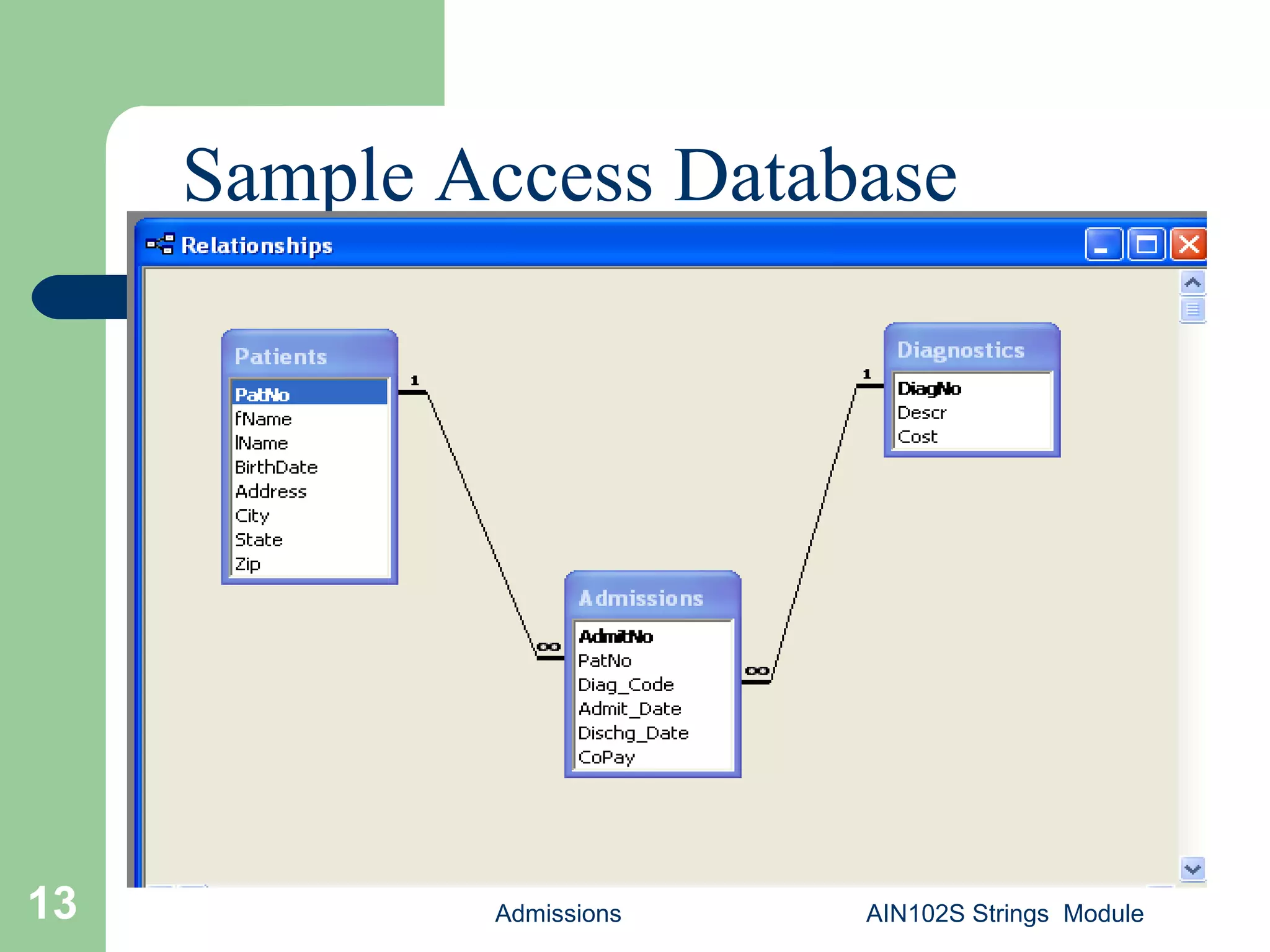
Sample Access Database
Admissions AIN102S Strings Module14
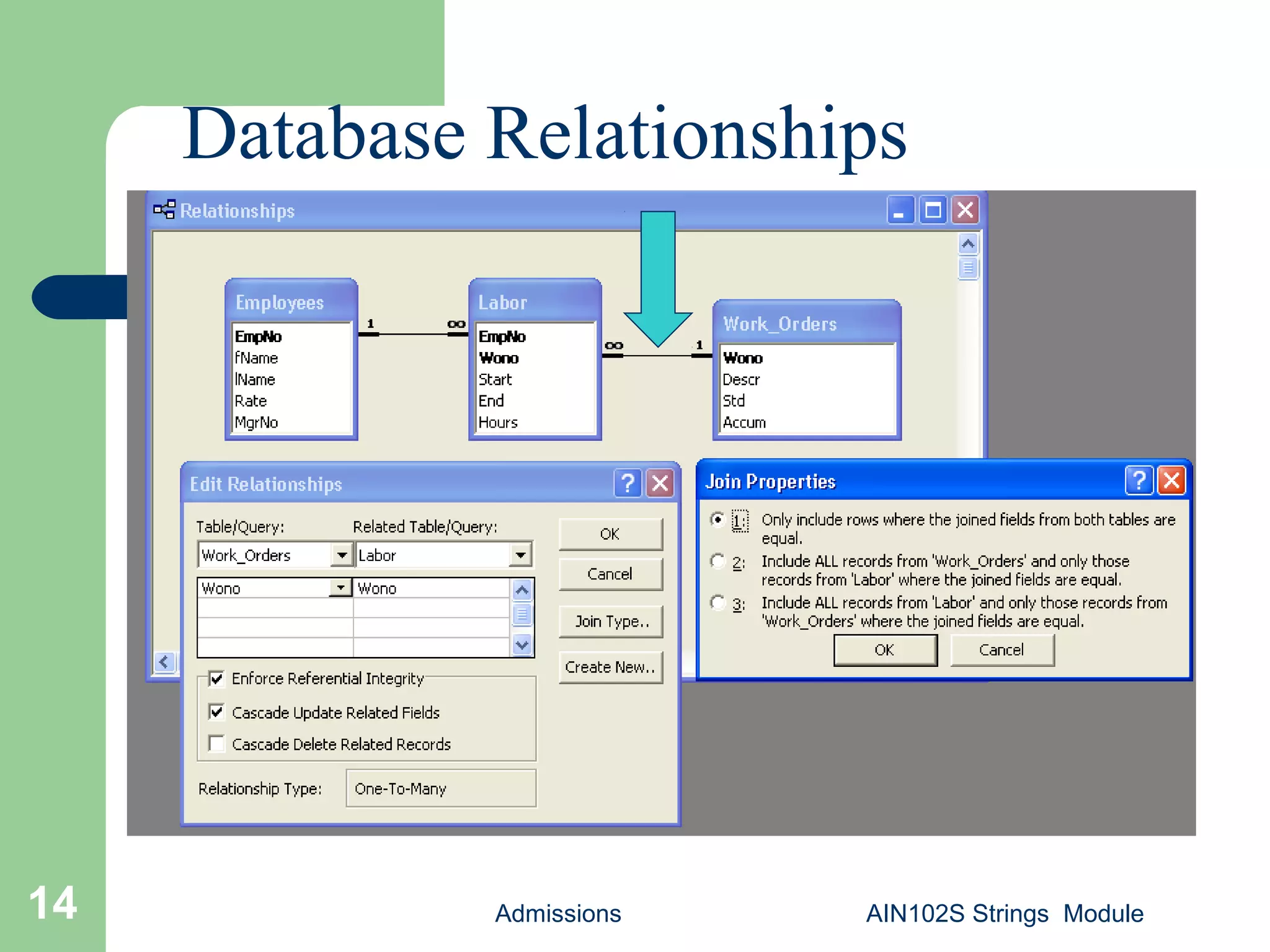
Database Relationships
Admissions AIN102S Strings Module15
Approaching Query Design
 Try to build queries a step at a time
 Save existing queries that are working
as you like; modify them with a new
name when building a modified query
 Try looking at the generated SQL code
from time-to-time
Admissions AIN102S Strings Module16
Sample Database
 Before we continue…
 Load the sample database if you haven’t
already
Admissions AIN102S Strings Module17
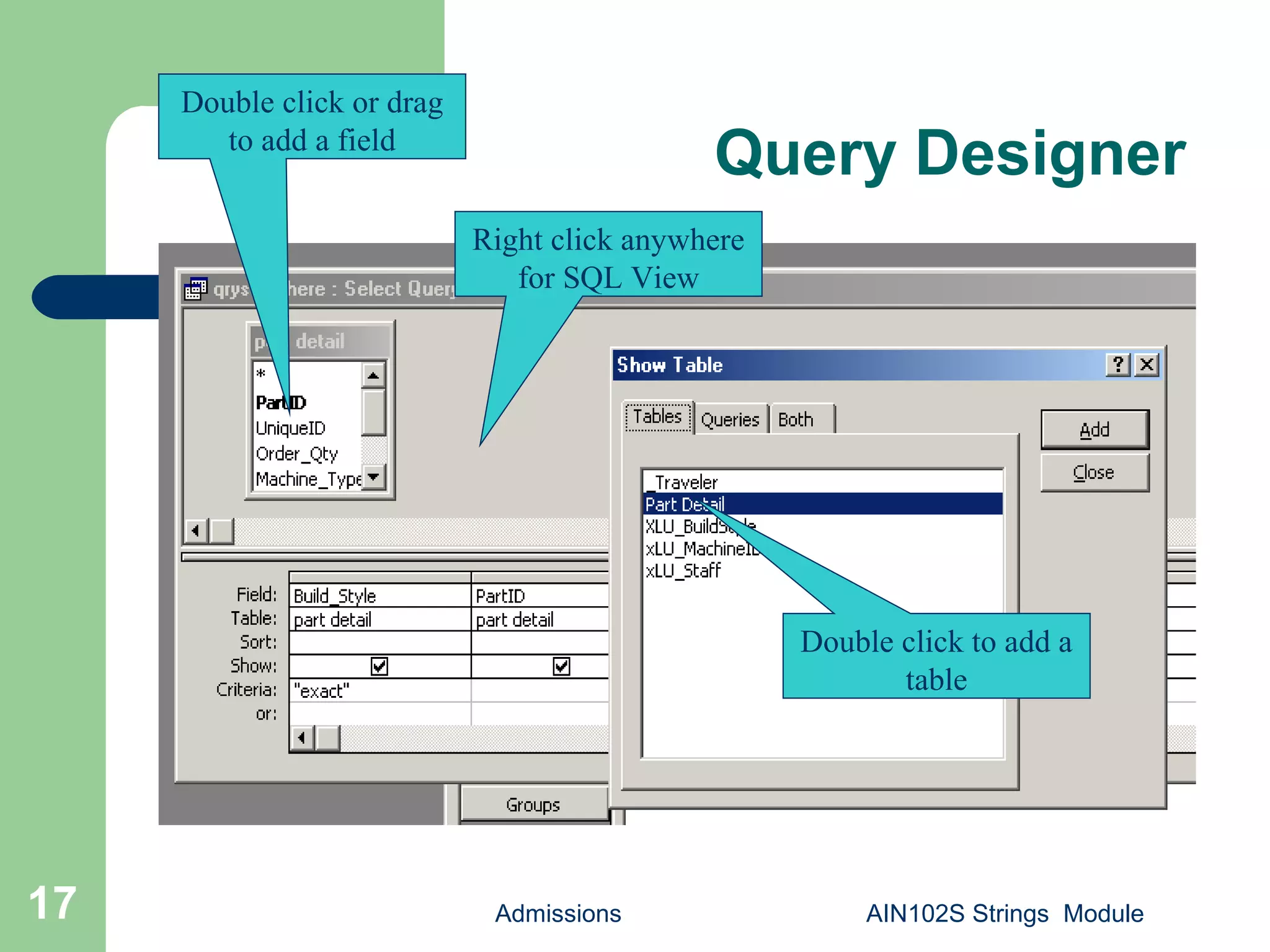
Query Designer
Right click anywhere
for SQL View
Double click or drag
to add a field
Double click to add a
table
Admissions18
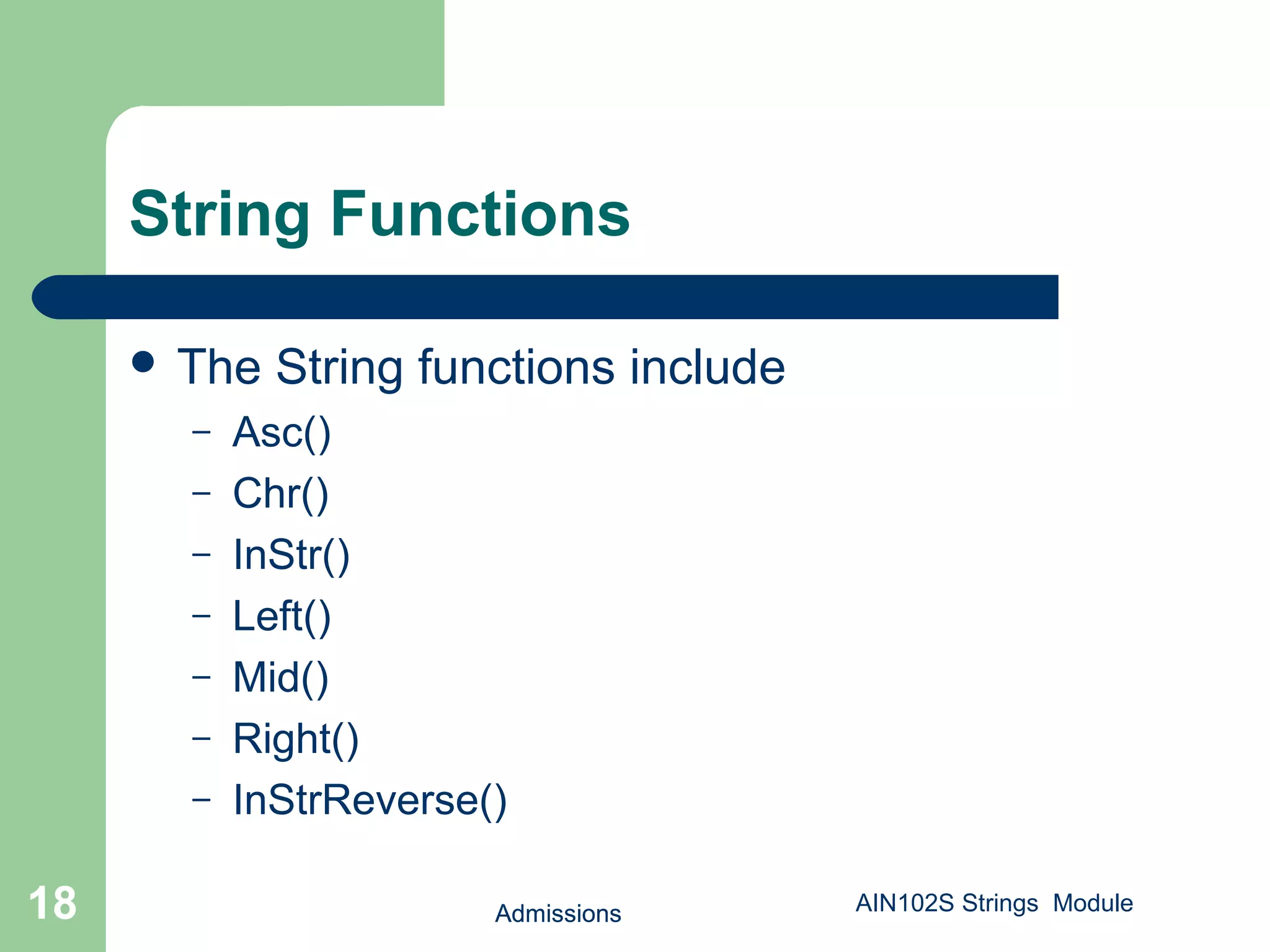
String Functions
 The String functions include
– Asc()
– Chr()
– InStr()
– Left()
– Mid()
– Right()
– InStrReverse()
Admissions18 AIN102S Strings Module
Admissions19
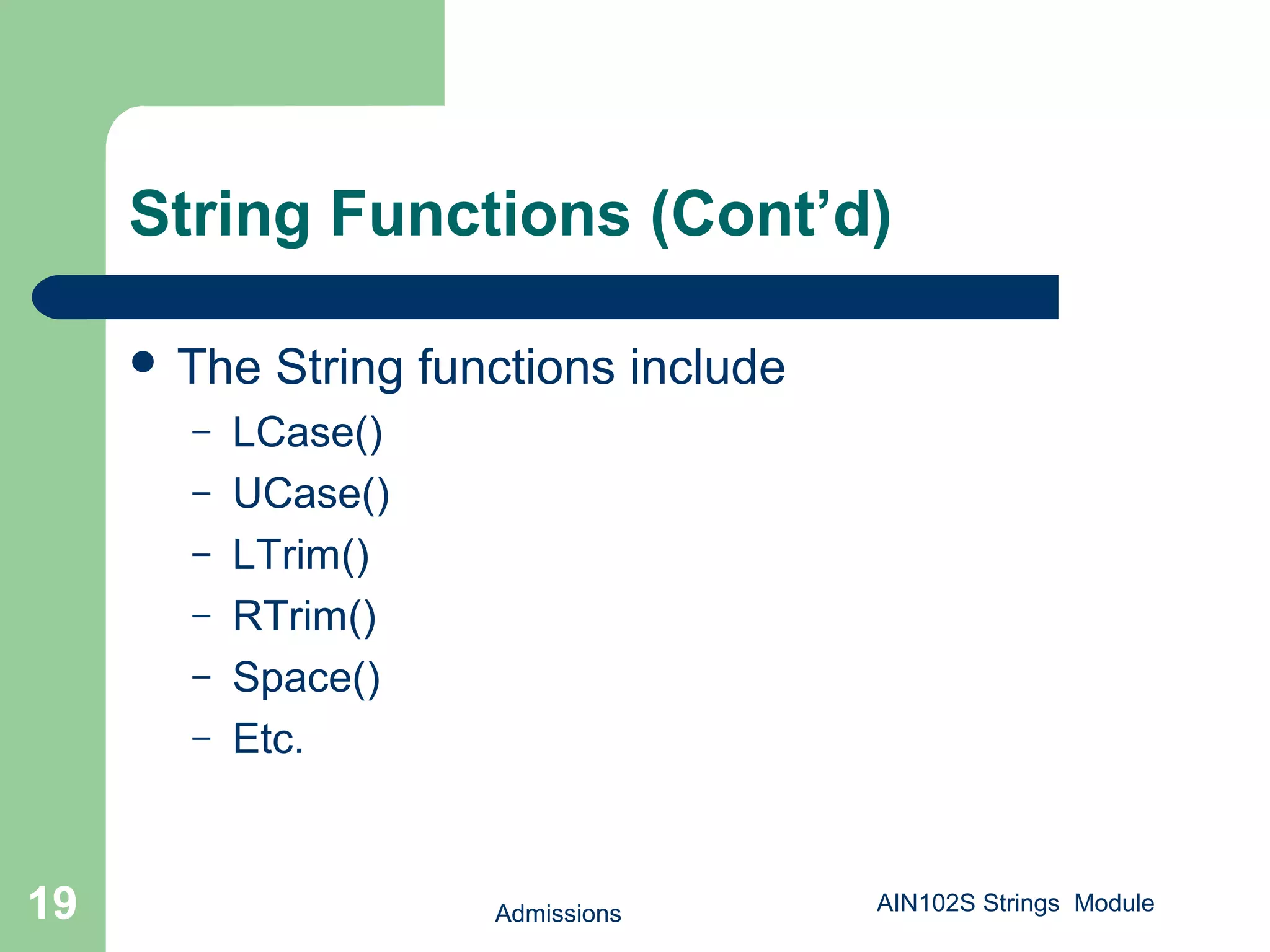
String Functions (Cont’d)
 The String functions include
– LCase()
– UCase()
– LTrim()
– RTrim()
– Space()
– Etc.
Admissions19 AIN102S Strings Module
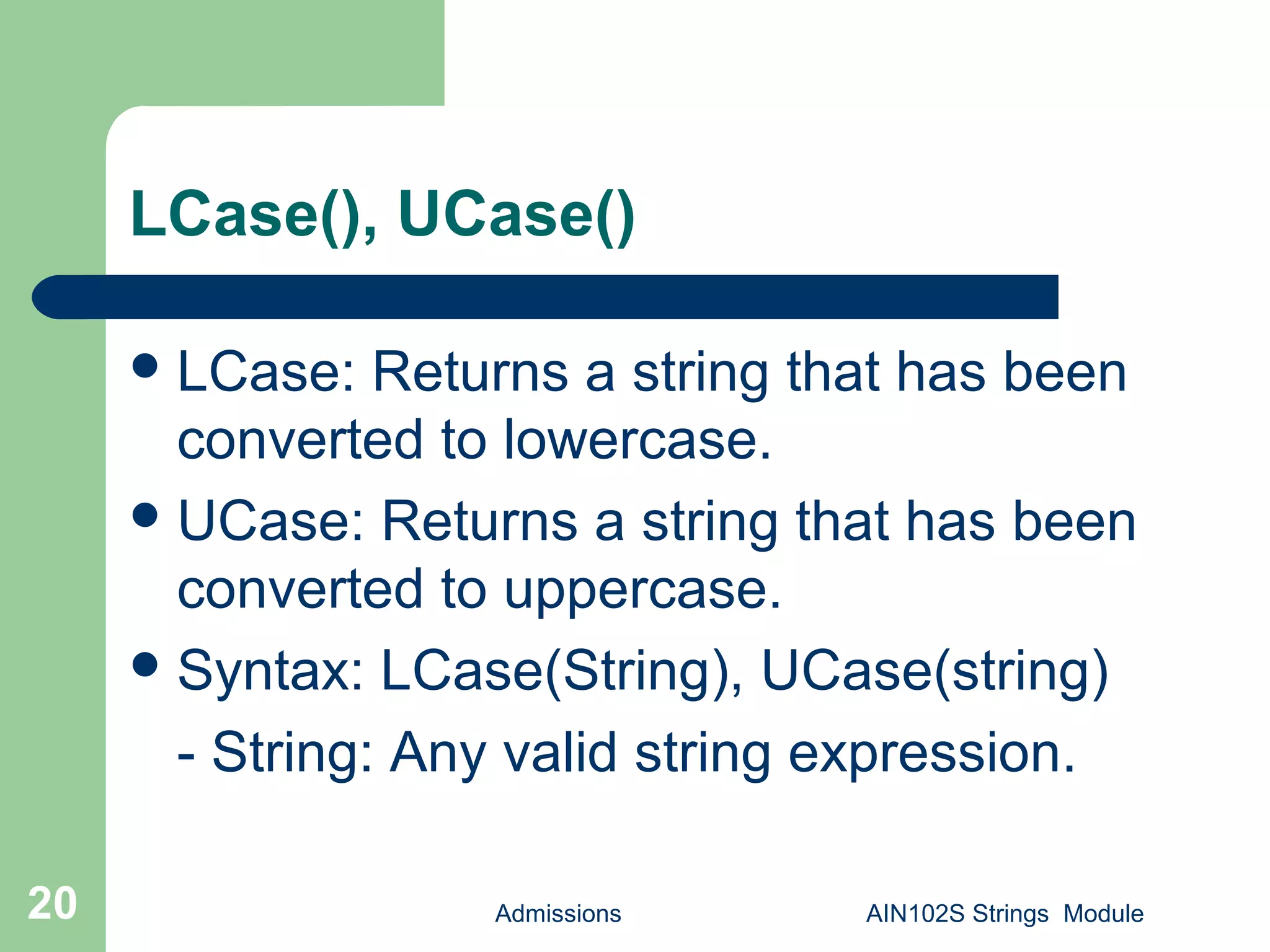
LCase(), UCase()
Admissions AIN102S Strings Module20
LCase: Returns a string that has been
converted to lowercase.
UCase: Returns a string that has been
converted to uppercase.
Syntax: LCase(String), UCase(string)
- String: Any valid string expression.
LCase(), UCase()
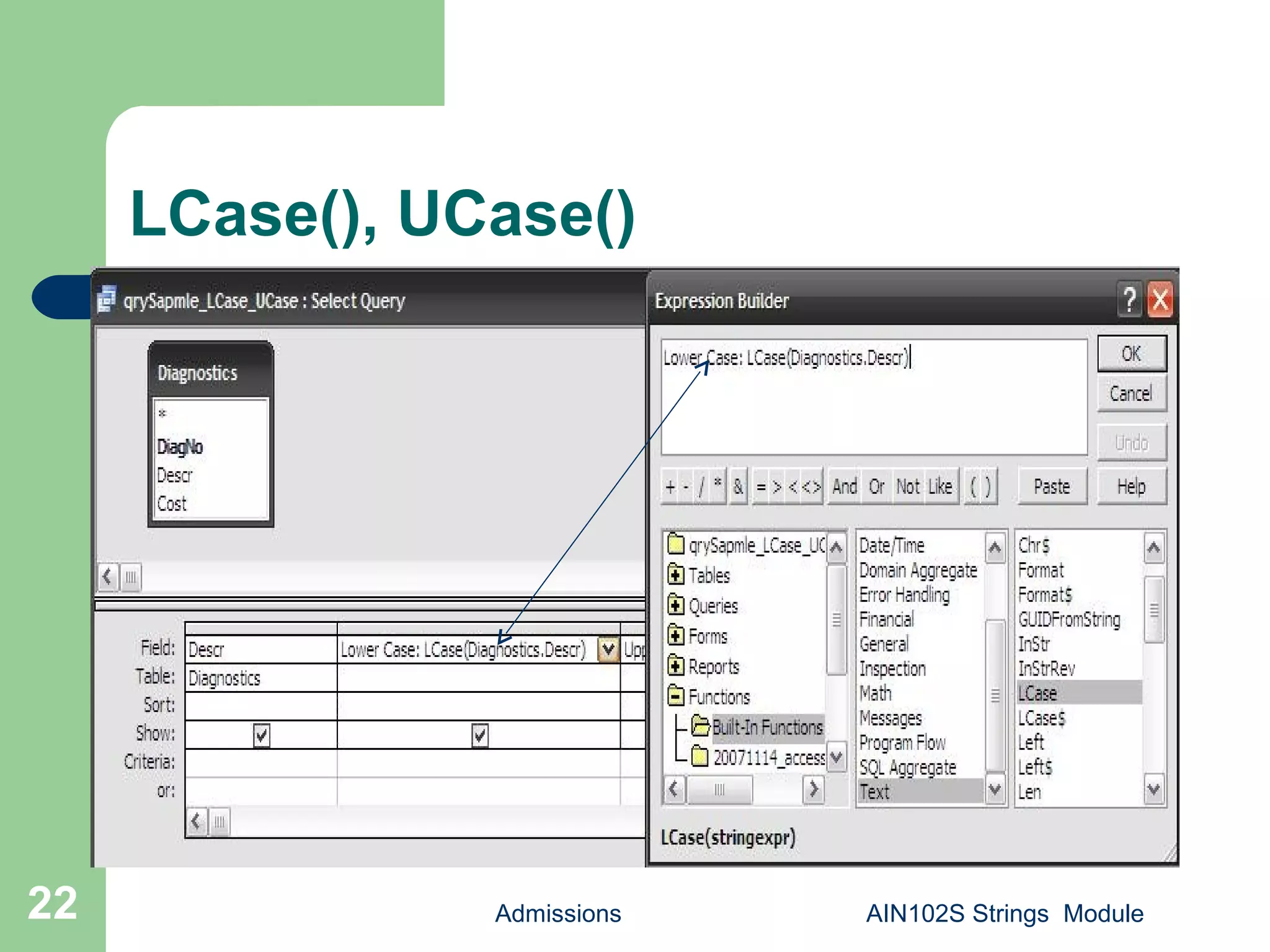
 Create a sample query and save as
qrySapmle_LCase_UCase.
 Add Diagnostics table.
 Select Descr.
 Build: LCase(Diagnostics.Descr) as [Lower
Case], UCase(Diagnostics.Descr) as [Upper
Case] . Save.
Admissions AIN102S Strings Module21
LCase(), UCase()
Admissions AIN102S Strings Module22
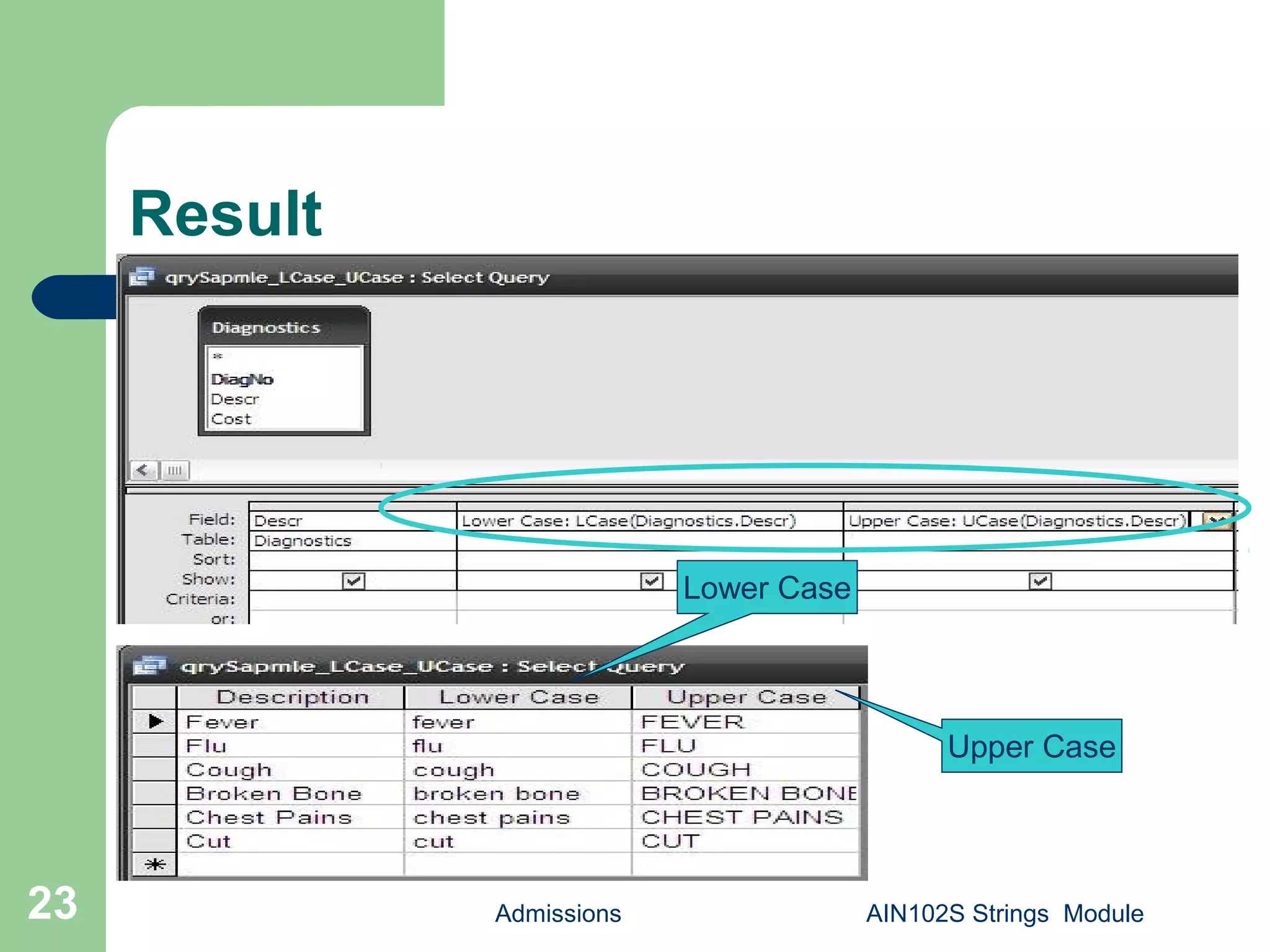
Result
Admissions AIN102S Strings Module23
Upper Case
Lower Case
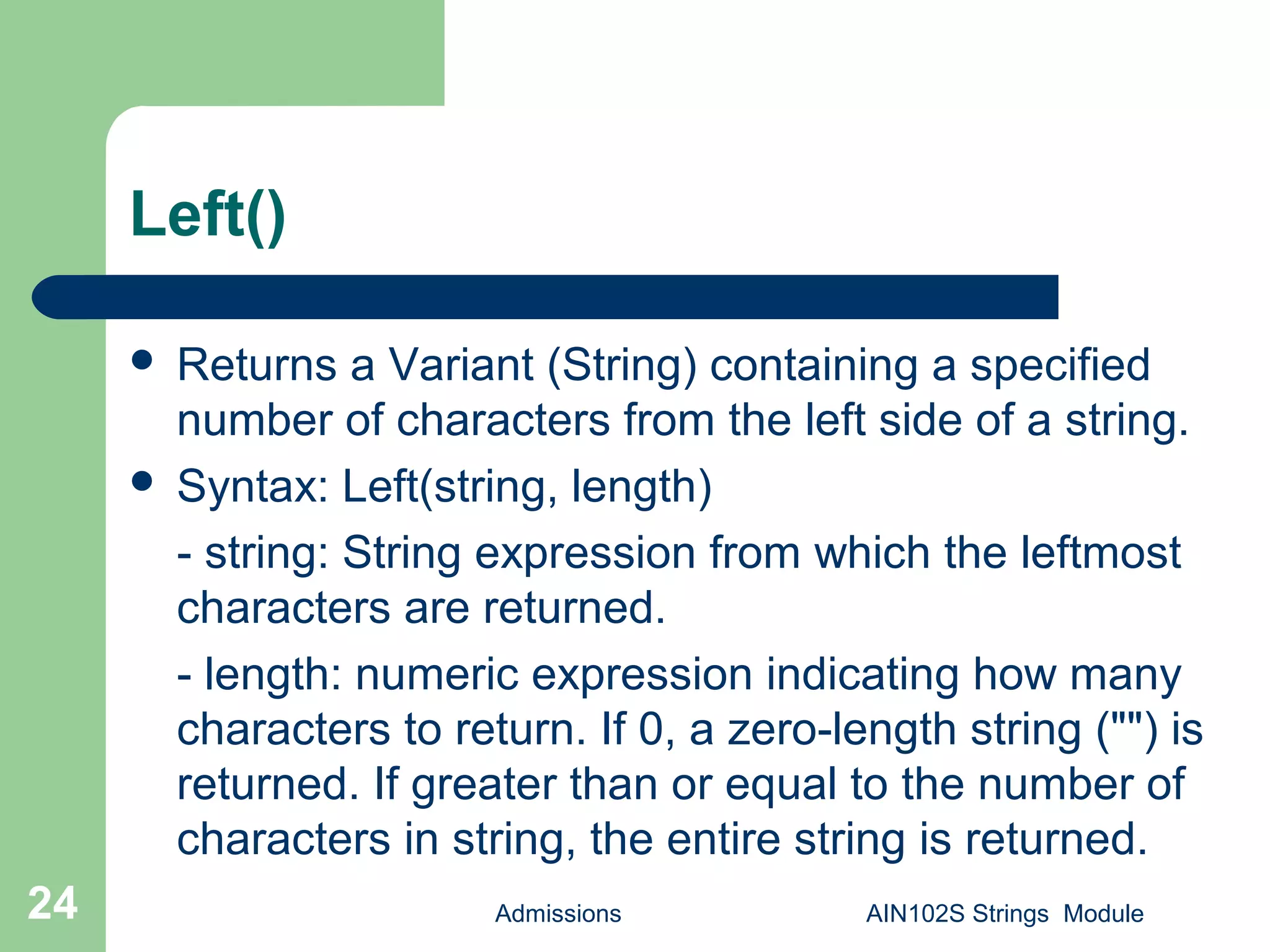
Left()
 Returns a Variant (String) containing a specified
number of characters from the left side of a string.
 Syntax: Left(string, length)
- string: String expression from which the leftmost
characters are returned.
- length: numeric expression indicating how many
characters to return. If 0, a zero-length string ("") is
returned. If greater than or equal to the number of
characters in string, the entire string is returned.
Admissions AIN102S Strings Module24
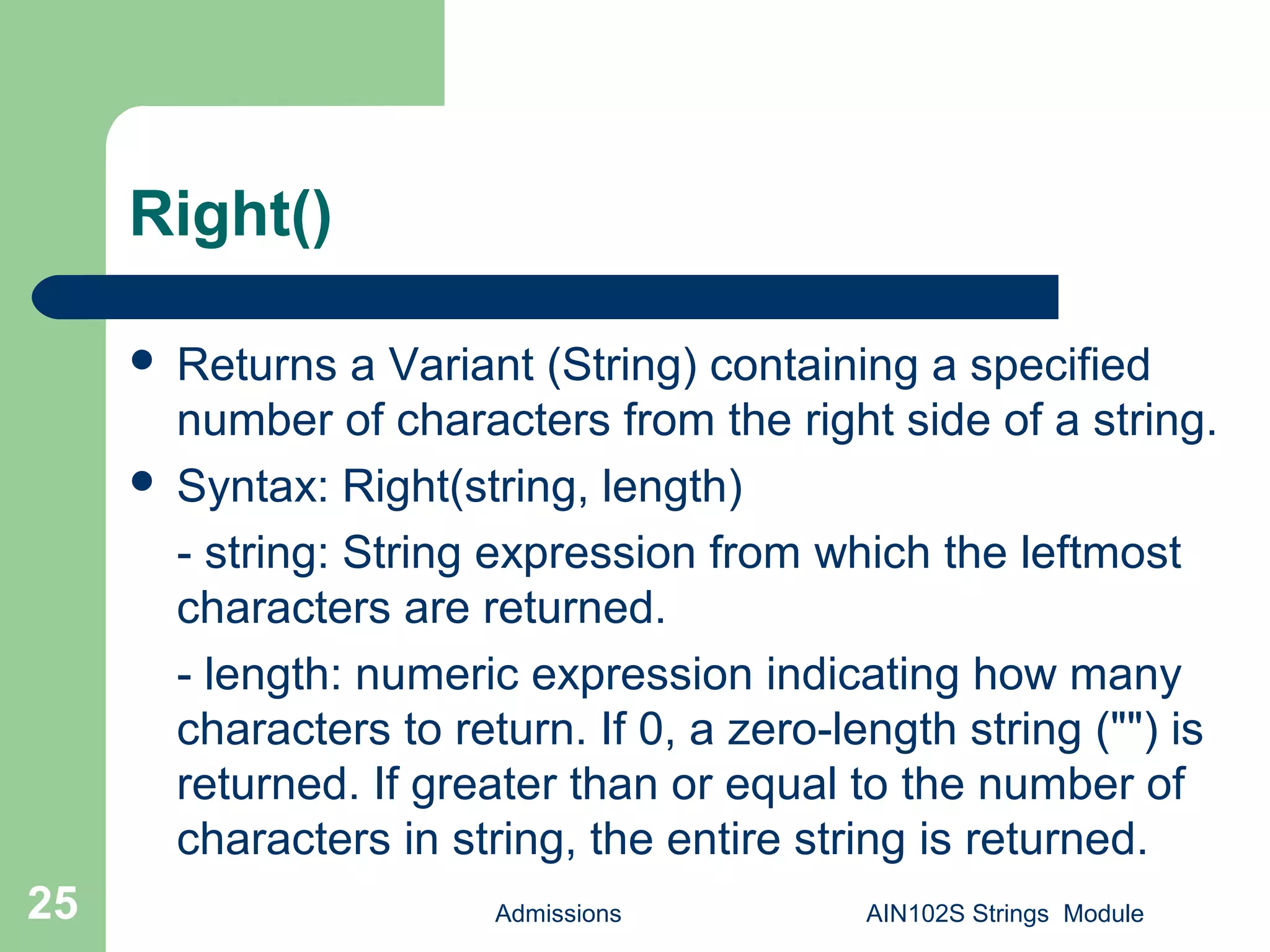
Right()
Admissions AIN102S Strings Module25
 Returns a Variant (String) containing a specified
number of characters from the right side of a string.
 Syntax: Right(string, length)
- string: String expression from which the leftmost
characters are returned.
- length: numeric expression indicating how many
characters to return. If 0, a zero-length string ("") is
returned. If greater than or equal to the number of
characters in string, the entire string is returned.
Mid()
 Returns a Variant (String) containing a specified
number of characters from a string.
 Syntax: Mid(string, start[, length])
- string: String expression from which characters are
returned.
- start: Character position in string at which the part
to be taken begins. If start is greater than the
number of characters in string, Mid returns a zero-
length string ("").
- length(Optional): Number of characters to return.
Admissions AIN102S Strings Module26
Left(), Right() and Mid()
Admissions AIN102S Strings Module27
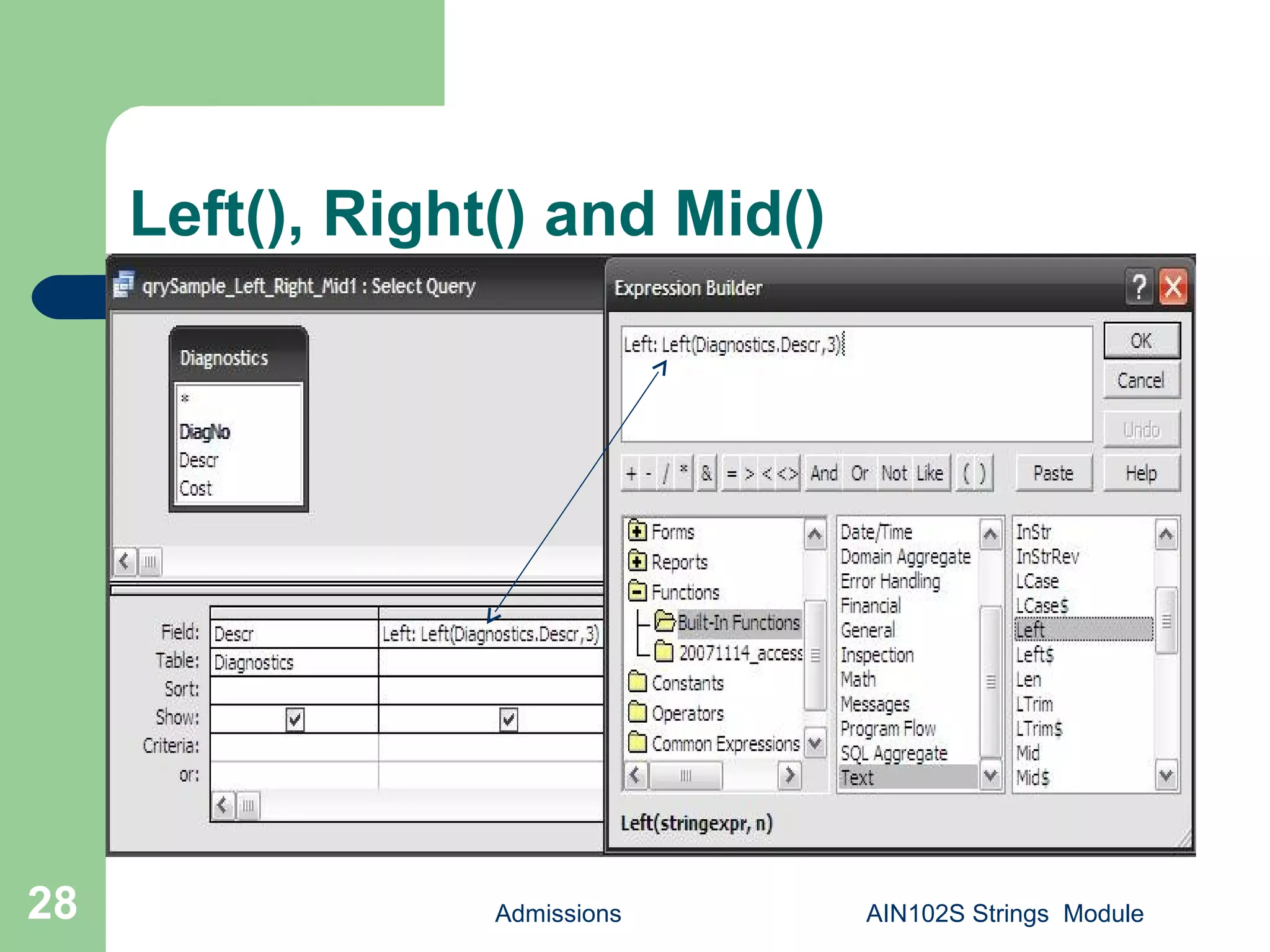
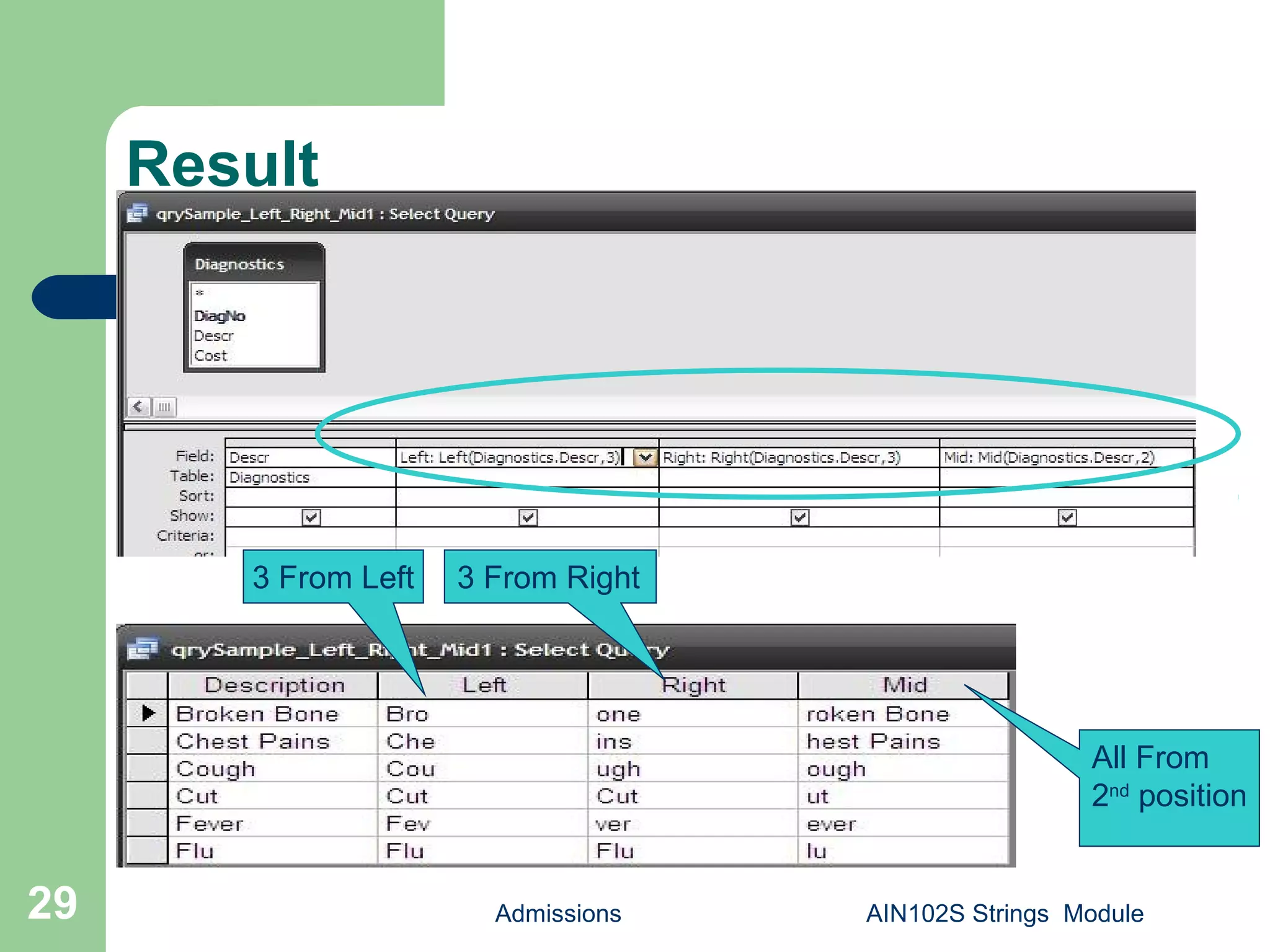
 Create a sample query and save as
qrySample_Left_Right_Mid1.
 Add Diagnostics table.
 Select Descr.
 Build: Left(Diagnostics.Descr,3) as [Left],
Right( Diagnostics.Descr,3) as [Right],
Mid(Diagnostics. Descr,2) as [Mid]. Save.
Left(), Right() and Mid()
Admissions AIN102S Strings Module28
Result
Admissions AIN102S Strings Module29
3 From Left 3 From Right
All From
2nd
position
Admissions AIN102S Strings Module30
Left(), Right() and Mid()
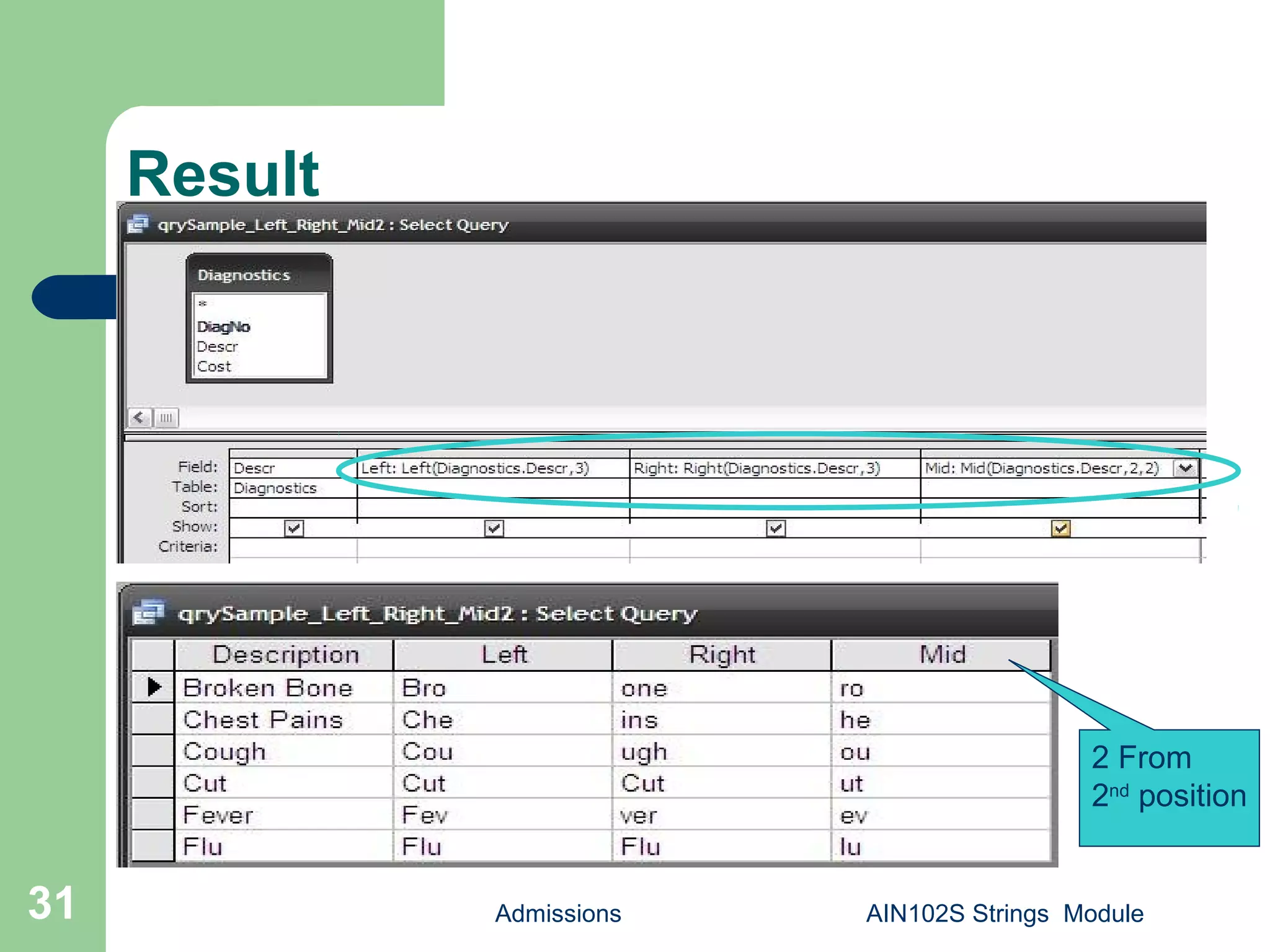
 Create a sample query and save as
qrySample_Left_Right_Mid1.
 Add Diagnostics table.
 Select Descr.
 Build: Left(Diagnostics.Descr,3) as [Left],
Right( Diagnostics.Descr,3) as [Right],
Mid(Diagnostics. Descr,2,2) as [Mid] . Save.
Result
Admissions AIN102S Strings Module31
2 From
2nd
position
Len()
 Returns a Long containing the number of characters
in a string.
 Syntax: Len(string)
- string: Any valid string expression.
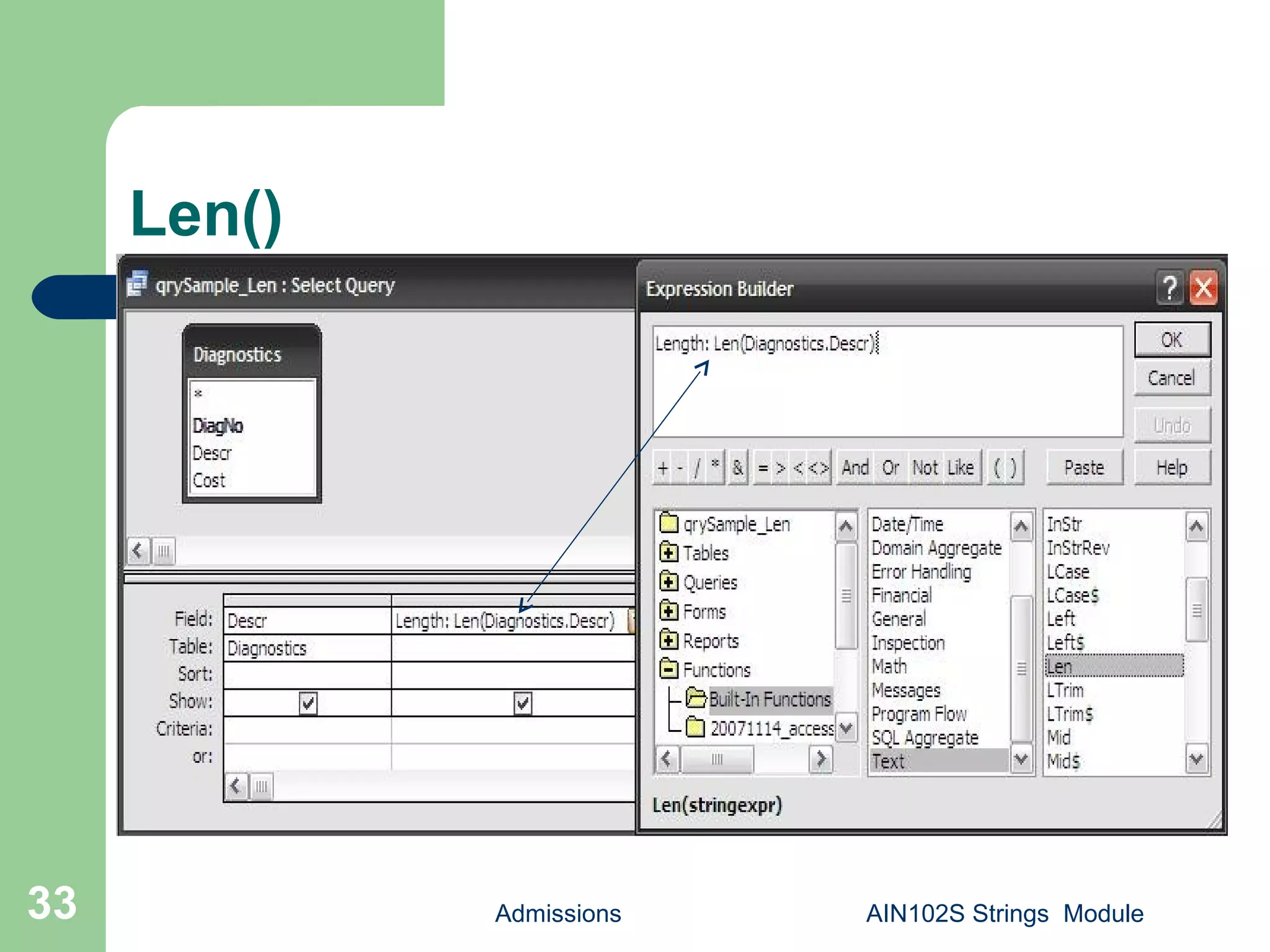
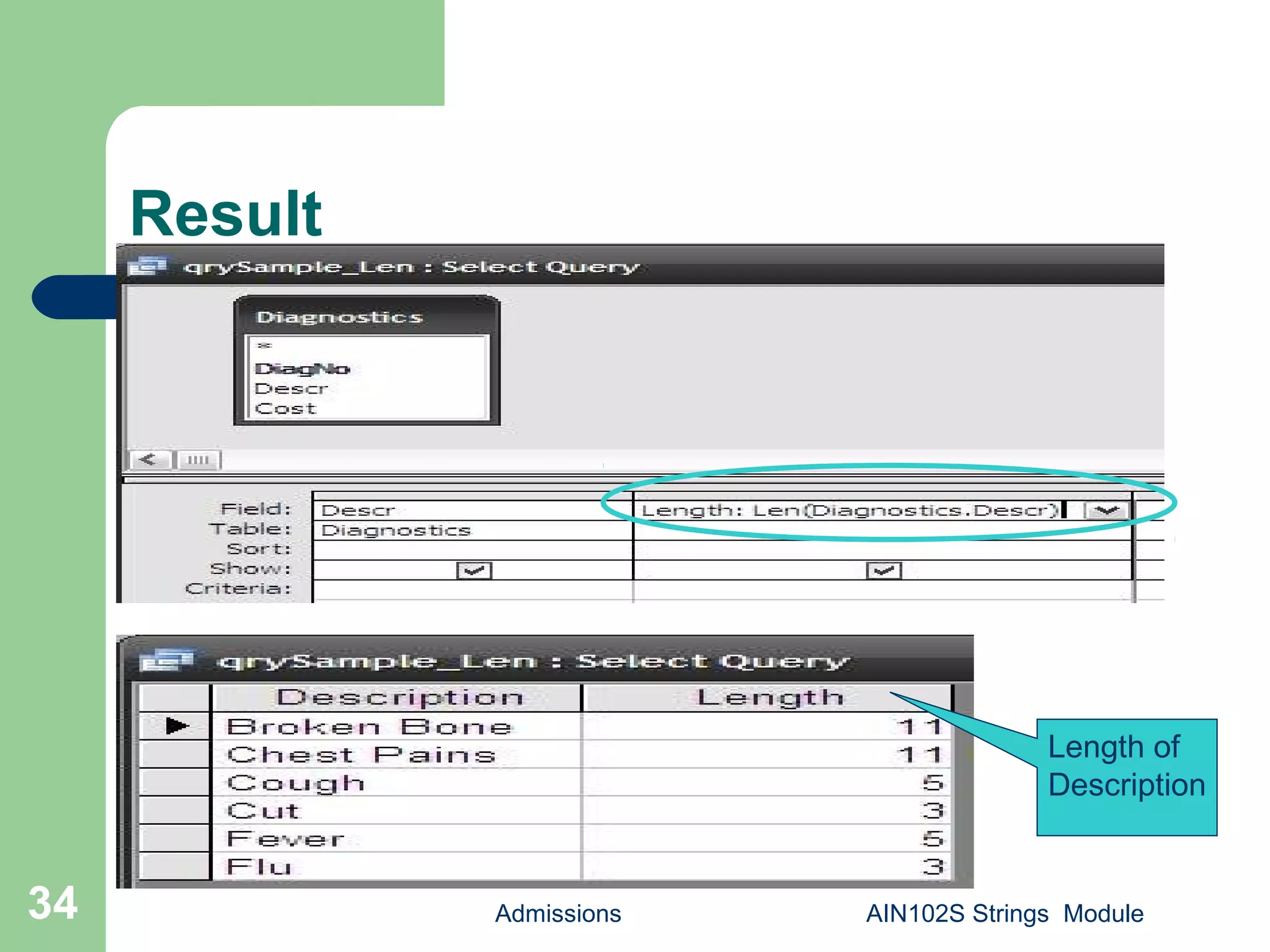
 Create a sample query and save as qrySample_Len.
 Add Diagnostics table.
 Select Descr.
 Build: Descr,Len(Diagnostics.Descr) as [Length] .
Save.
Admissions AIN102S Strings Module32
Len()
Admissions AIN102S Strings Module33
Result
Admissions AIN102S Strings Module34
Length of
Description
LTrim(),RTrim(), Trim()
 Returns a Variant (String) containing a copy of a specified string
without leading spaces (LTrim), trailing spaces (RTrim), or both
leading and trailing spaces (Trim).
 Syntax: LTrim(string), RTrim(string), Trim(string)
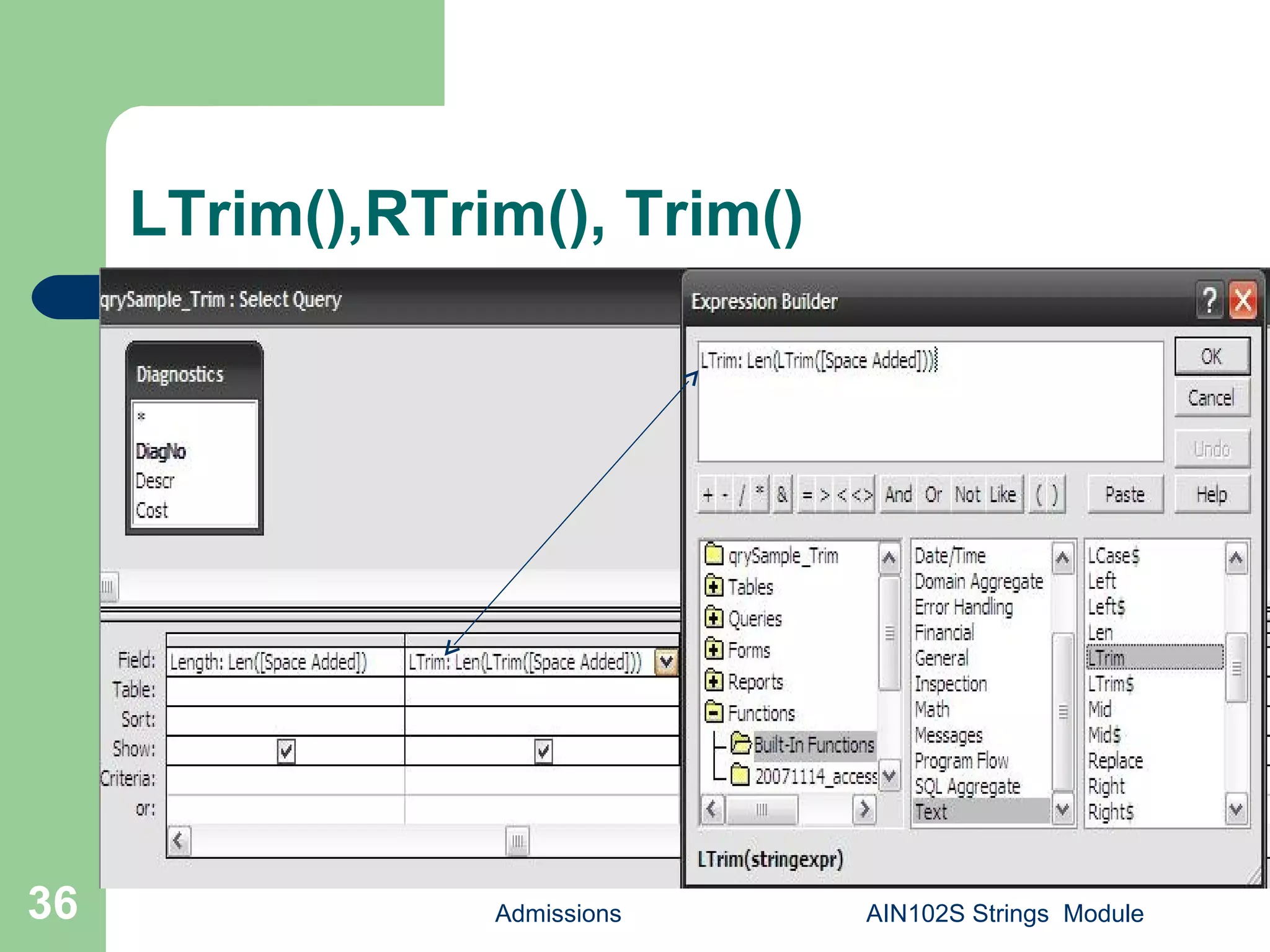
 Create a sample query and save as qrySample_Trim.
 Add Diagnostics table.
 Select Descr, and type DISTINCT " " & Diagnostics.Descr & " "
as [Space Added].
 Build: Len([Space Added]) as [Length],Len( LTrim([Space
Added])) as [LTrim],Len( RTrim([Space Added])) as
[RTrim],Len(Trim([Space Added])) as [Trim]. Save.
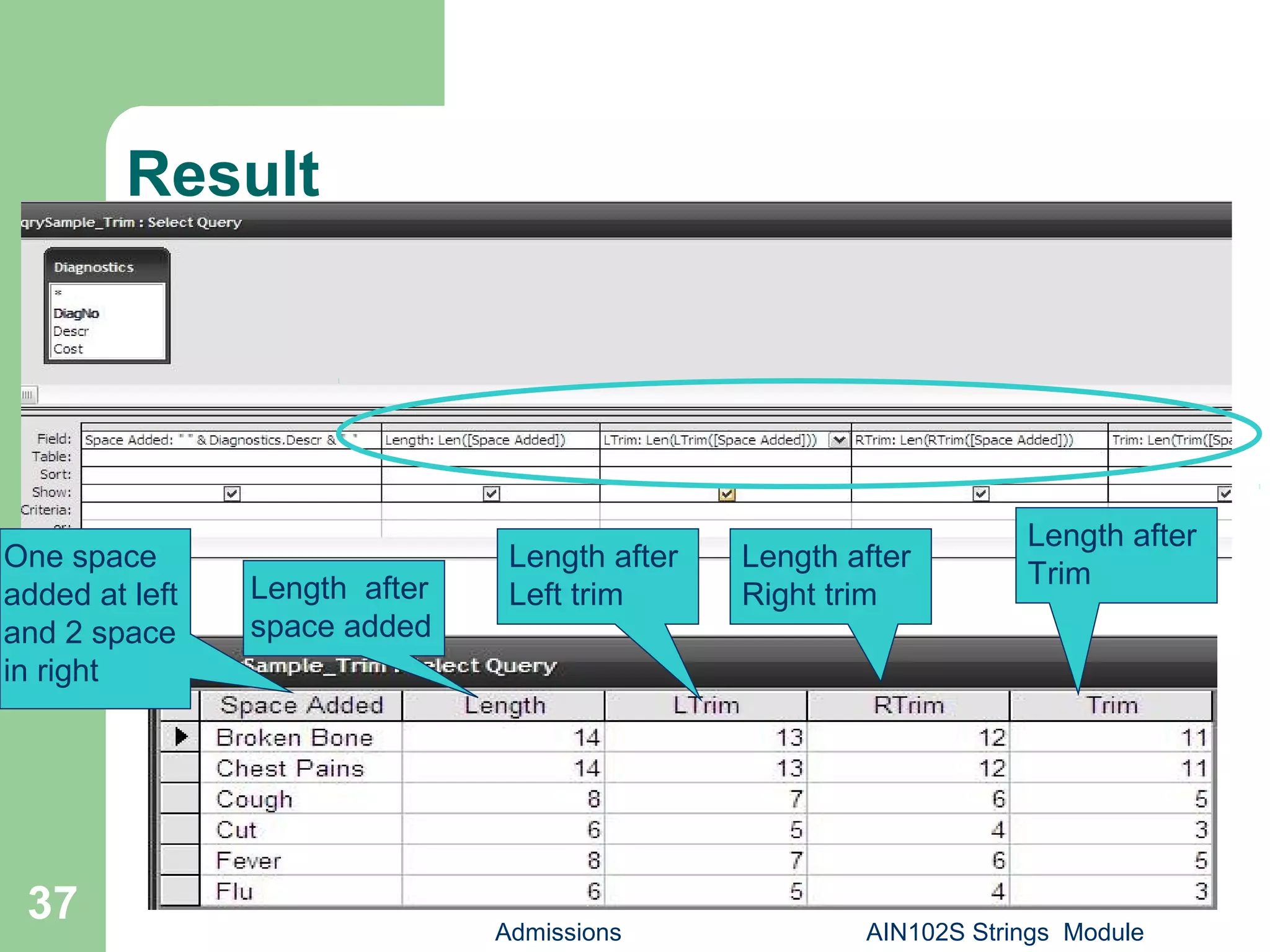
 This will reflect the length after trimming.
Admissions AIN102S Strings Module35
LTrim(),RTrim(), Trim()
Admissions AIN102S Strings Module36
Result
Admissions AIN102S Strings Module
37
One space
added at left
and 2 space
in right
Length after
space added
Length after
Left trim
Length after
Right trim
Length after
Trim
StrReverse()
 Returns a string in which the character order of a
specified string is reversed.
 Syntax: StrReverse(expression)
- expression: The expression argument is the string
whose characters are to be reversed.
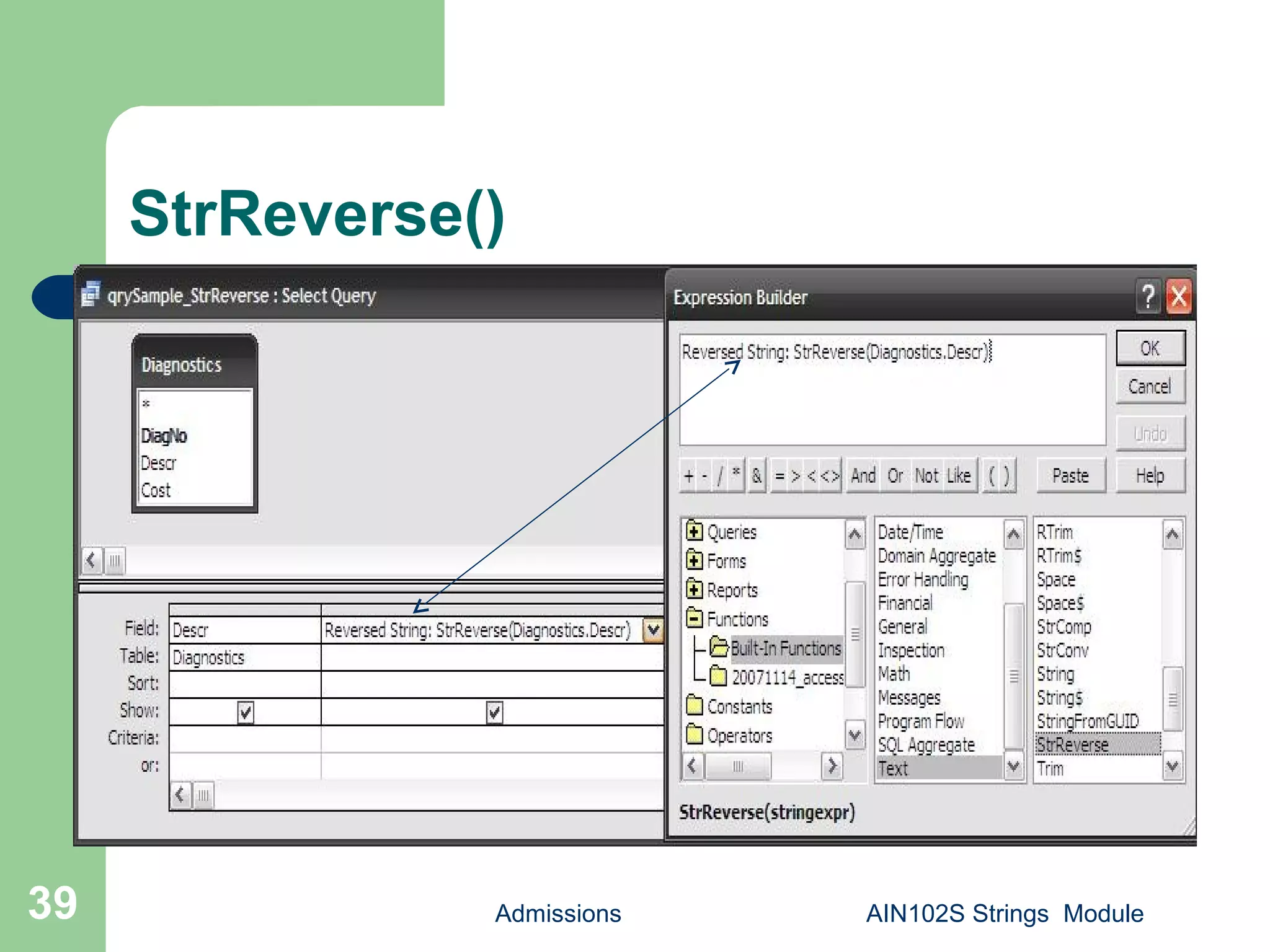
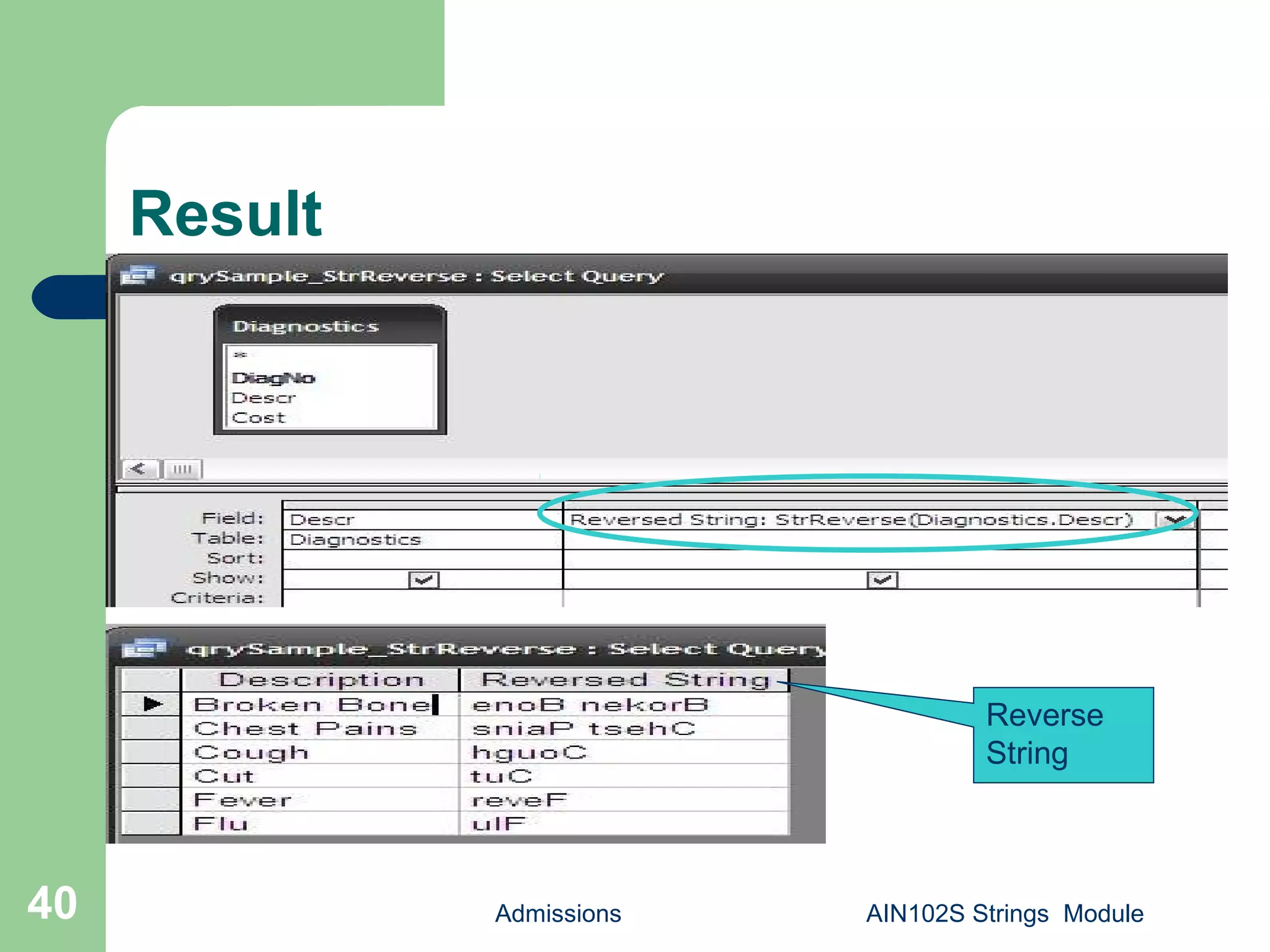
 Create a sample query and save as
qrySample_StrReverse.
 Add Diagnostics table.
 Build: strReverse(Diagnostics.Descr) as [Reversed
String] . Save.
 This will reflect the length after trimming.
Admissions AIN102S Strings Module38
StrReverse()
Admissions AIN102S Strings Module39
Result
Admissions AIN102S Strings Module40
Reverse
String
InStr()
 Returns a Variant (Long) specifying the position of the
first occurrence of one string within another.
 Syntax: InStr([start, ]string1, string2[, compare])
- start(Optional): Numeric expression that sets the
starting position for each search. If omitted, search
begins at the first character position.
- string1: String expression being searched.
- string2: String expression sought.
- compare(Optional): Specifies the type of String
expression .
Admissions AIN102S Strings Module41
InStrRev()
 Returns the position of an occurrence of one string within
another, from the end of string.
 Syntax: InstrRev(stringcheck, stringmatch[, start[,
compare]])
- stringcheck: String expression being searched.
- stringmatch: String expression being searched for.
- start(optional): Numeric expression that sets the starting
position for each search.
- compare(Optional): Numeric value indicating the kind of
comparison to use when evaluating substrings. If omitted,
a binary comparison is performed.
Admissions AIN102S Strings Module42
InStr() and InStrRev()
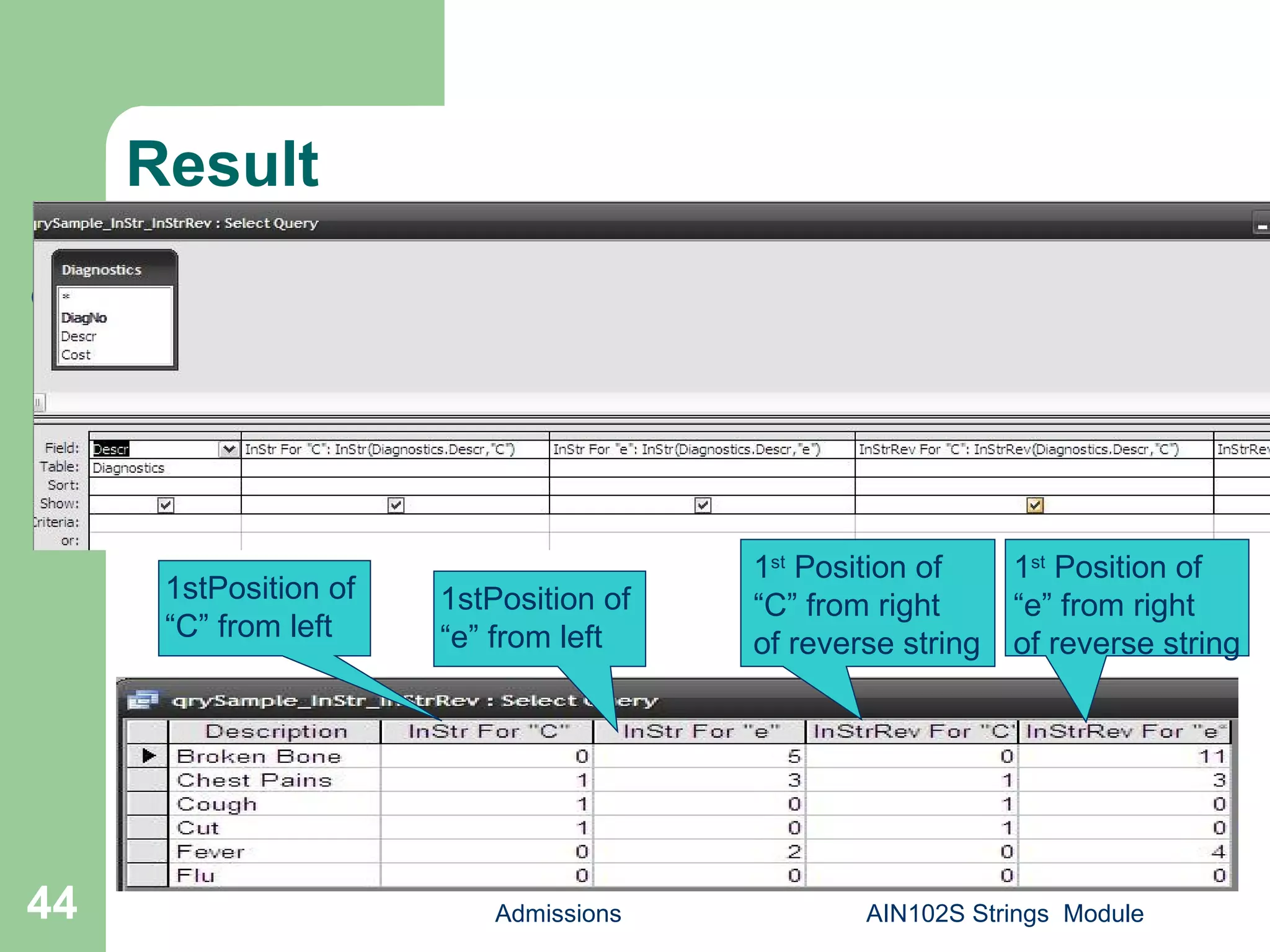
 Create a sample query and save as
qrySample_InStr_InStrRev.
 Add Diagnostics table.
 Build: InStr(Diagnostics.Descr, "C") as [InStr For
"C"], InStr(Diagnostics.Descr, "e") as [InStr For
"e"], InStrRev (Diagnostics.Descr, "C") as
[InStrRev For "C"], InStrRev(Diagnostics.Descr,
"e") as [InStrRev For "e“] . Save.
Admissions AIN102S Strings Module43
Result
Admissions AIN102S Strings Module44
1stPosition of
“C” from left
1st
Position of
“C” from right
of reverse string
1stPosition of
“e” from left
1st
Position of
“e” from right
of reverse string
Replace()
 Returns a string in which a specified substring has been replaced
with another substring a specified number of times.
 Syntax: Replace(expression, find, replace[, start[, count[,
compare]]])
- expression: String expression containing substring to replace.
- find: Substring being searched for.
- replace: Replacement substring.
- start(Optional): Position within expression where substring search
is to begin.
- count(Optional): Number of substring substitutions to perform.
- compare(Optional): Numeric value indicating the kind of
comparison to use when evaluating substrings.
Admissions AIN102S Strings Module45
Replace()
Admissions AIN102S Strings Module46
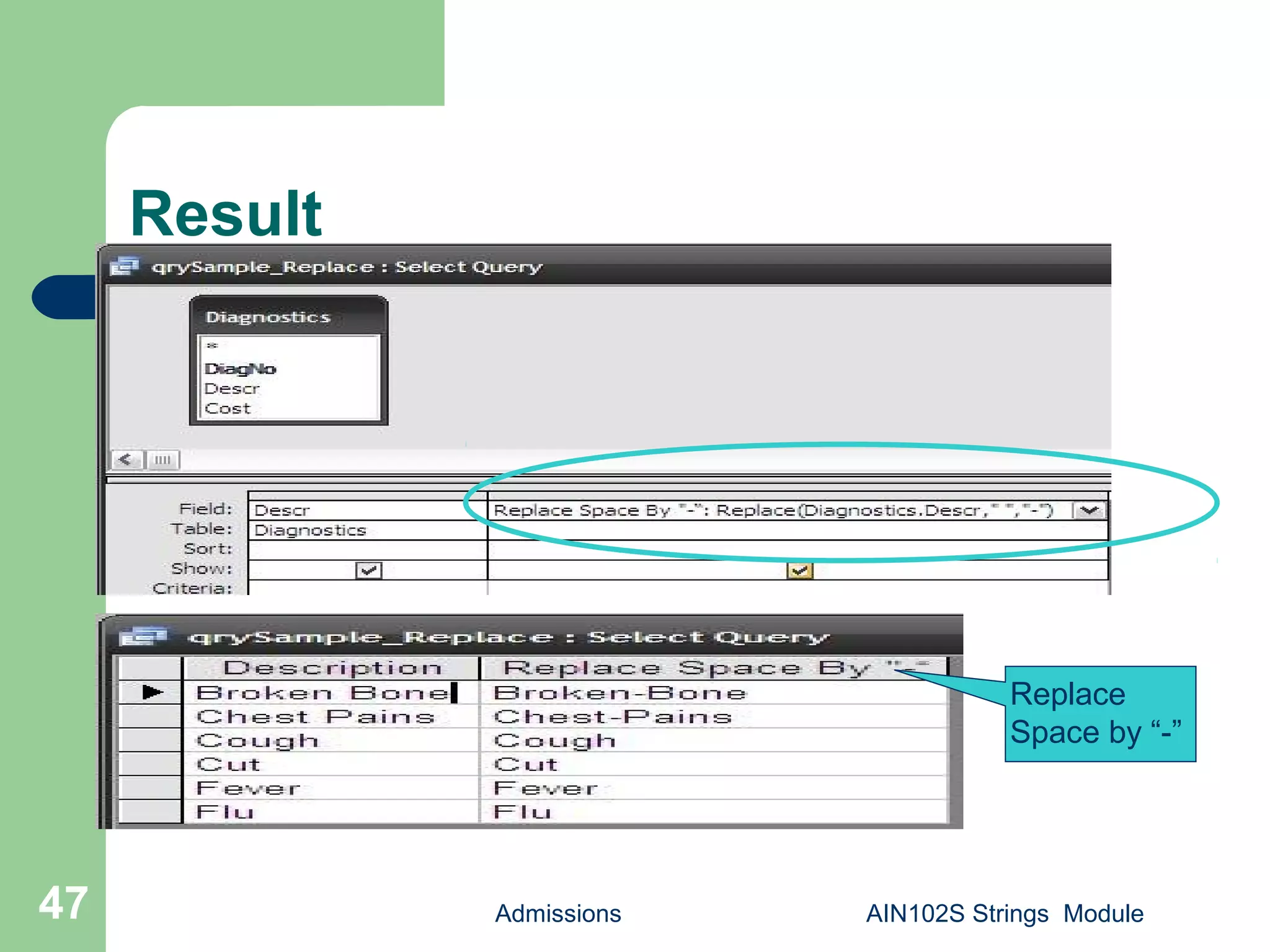
 Create a sample query and save as
qrySample_Replace.
 Add Diagnostics table.
 Build: Replace(Diagnostics.Descr, " ", "-") as
[Replace Space By "-“]. Save.
 This will replace a blank space with “-”.
Result
Admissions AIN102S Strings Module47
Replace
Space by “-”
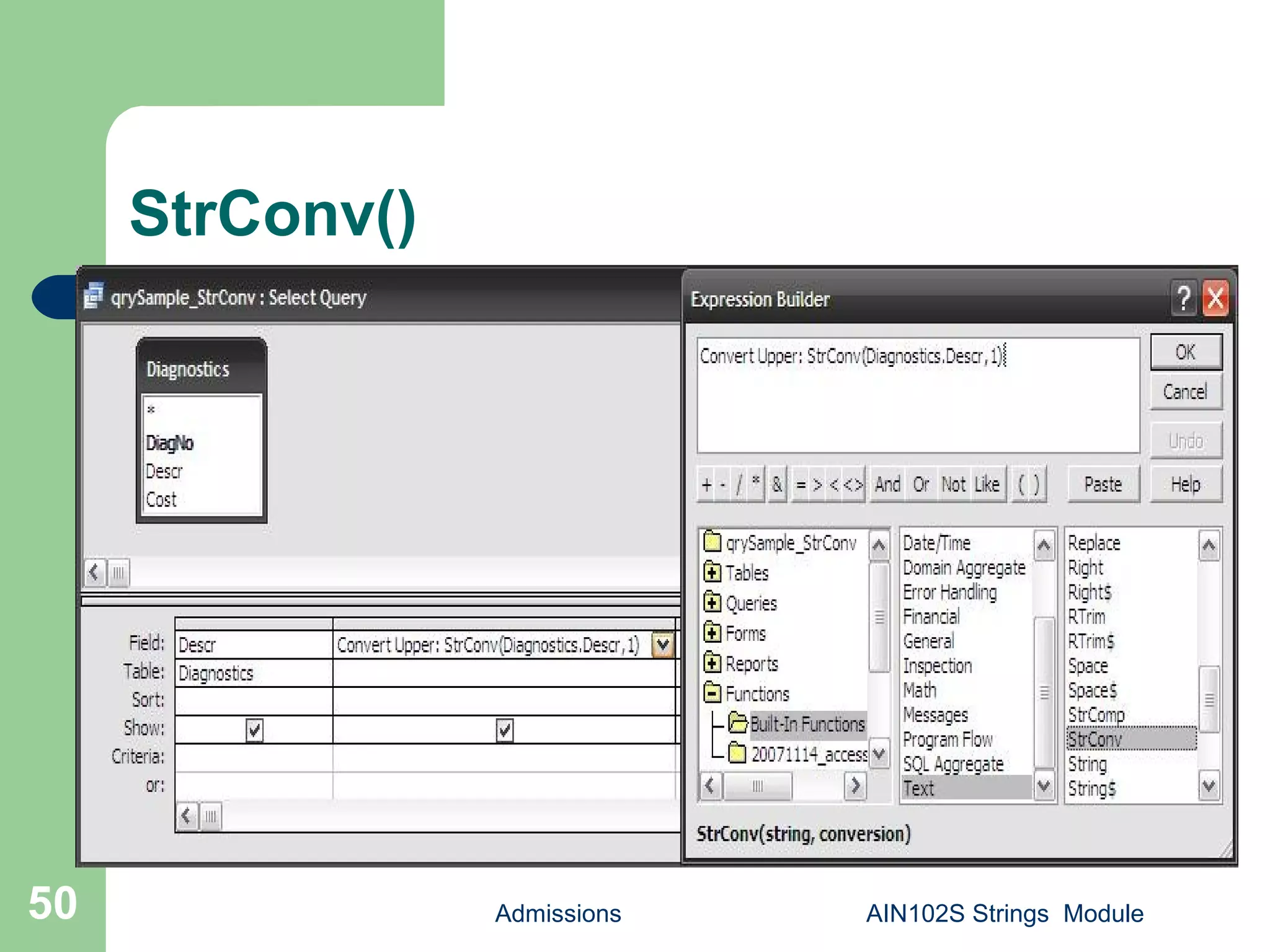
StrConv()
 Returns a Variant (String) converted as specified.
 Syntax: StrConv(string, conversion, LCID)
- string: String expression to be converted
- conversion: The sum of values specifying the type
of conversion to perform.
- LCID: The LocaleID
 The conversion argument settings are: 1-
vbUpperCase, 2- vbLowerCase, 3- vbLowerCase
etc.
Admissions AIN102S Strings Module48
StrConv()
Admissions AIN102S Strings Module49
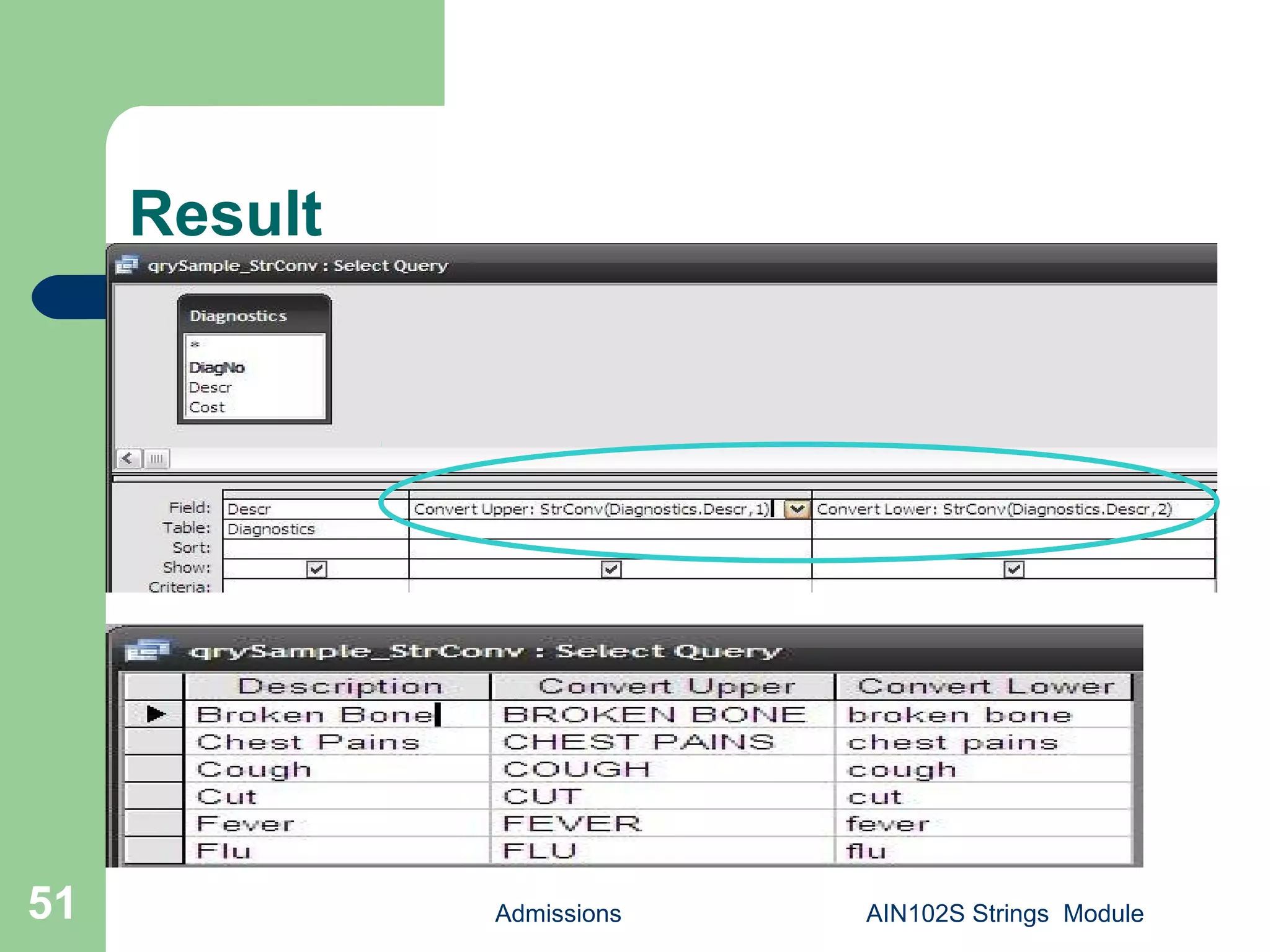
 Create a sample query and save as
qrySample_StrConv.
 Add Diagnostics table.
 Build: StrConv(Diagnostics.Descr, 1) as
[Convert Upper], StrConv(Diagnostics.Descr, 2)
as [Convert Lower] . Save.
StrConv()
Admissions AIN102S Strings Module50
Result
Admissions AIN102S Strings Module51
StrComp()
 Returns a Variant (Integer) indicating the
result of a string expression.
 Syntax: StrComp(string1, string2[, compare])
- string1: Any valid string expression.
- string2: Any valid string expression.
- compare(Optional): Specifies the type of
string comparison.
Admissions AIN102S Strings Module52
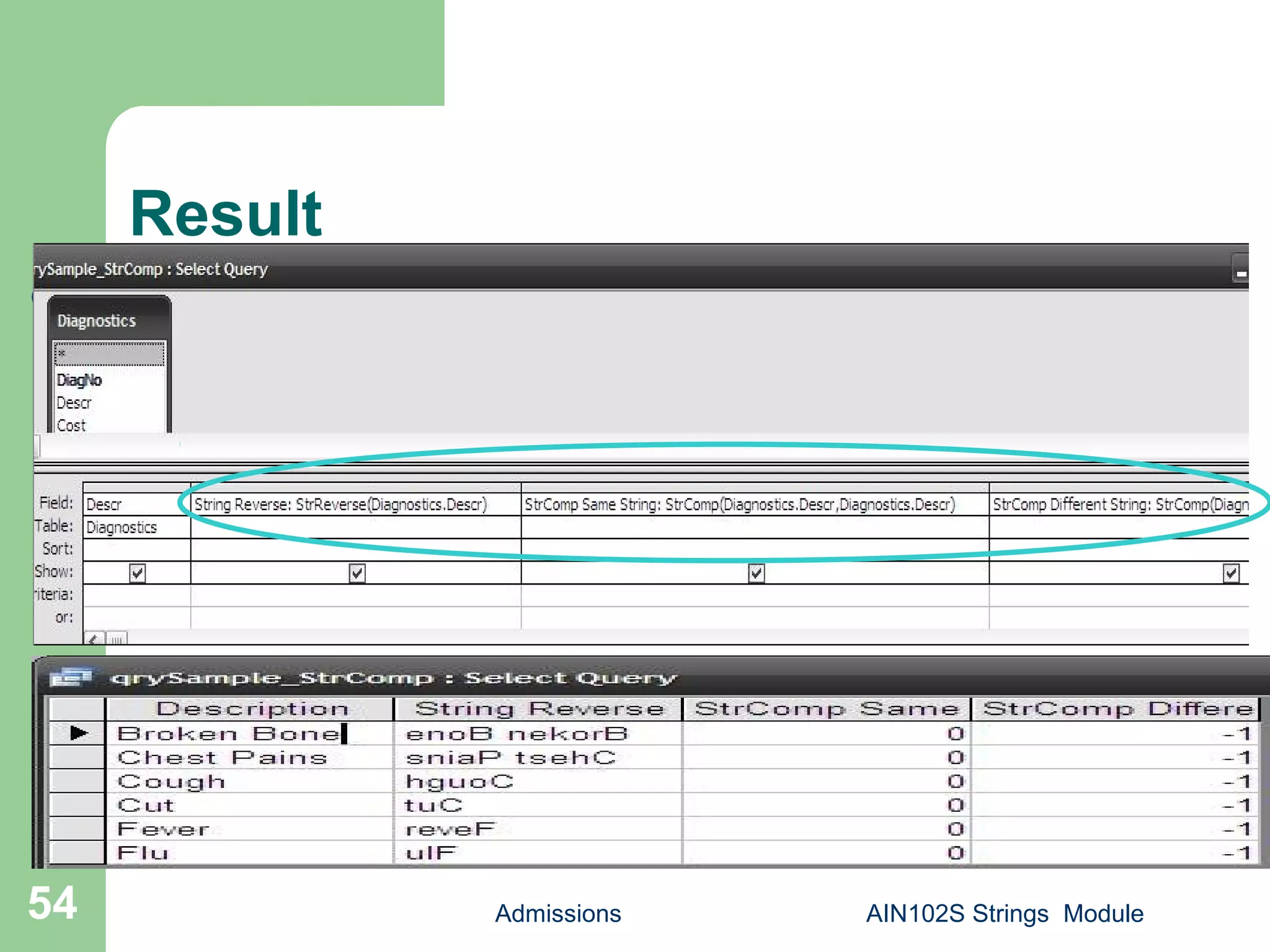
StrComp()
 Create a sample query and save as
qrySample_StrConv.
 Add Diagnostics table.
 Build: StrReverse(Diagnostics.Descr) as [String
Reverse], StrComp(Diagnostics.Descr,
Diagnostics.Descr) as [StrComp Same String],
StrComp(Diagnostics.Descr, [String Reverse]) as
[StrComp Different String] . Save.
Admissions AIN102S Strings Module53
Result
Admissions AIN102S Strings Module54
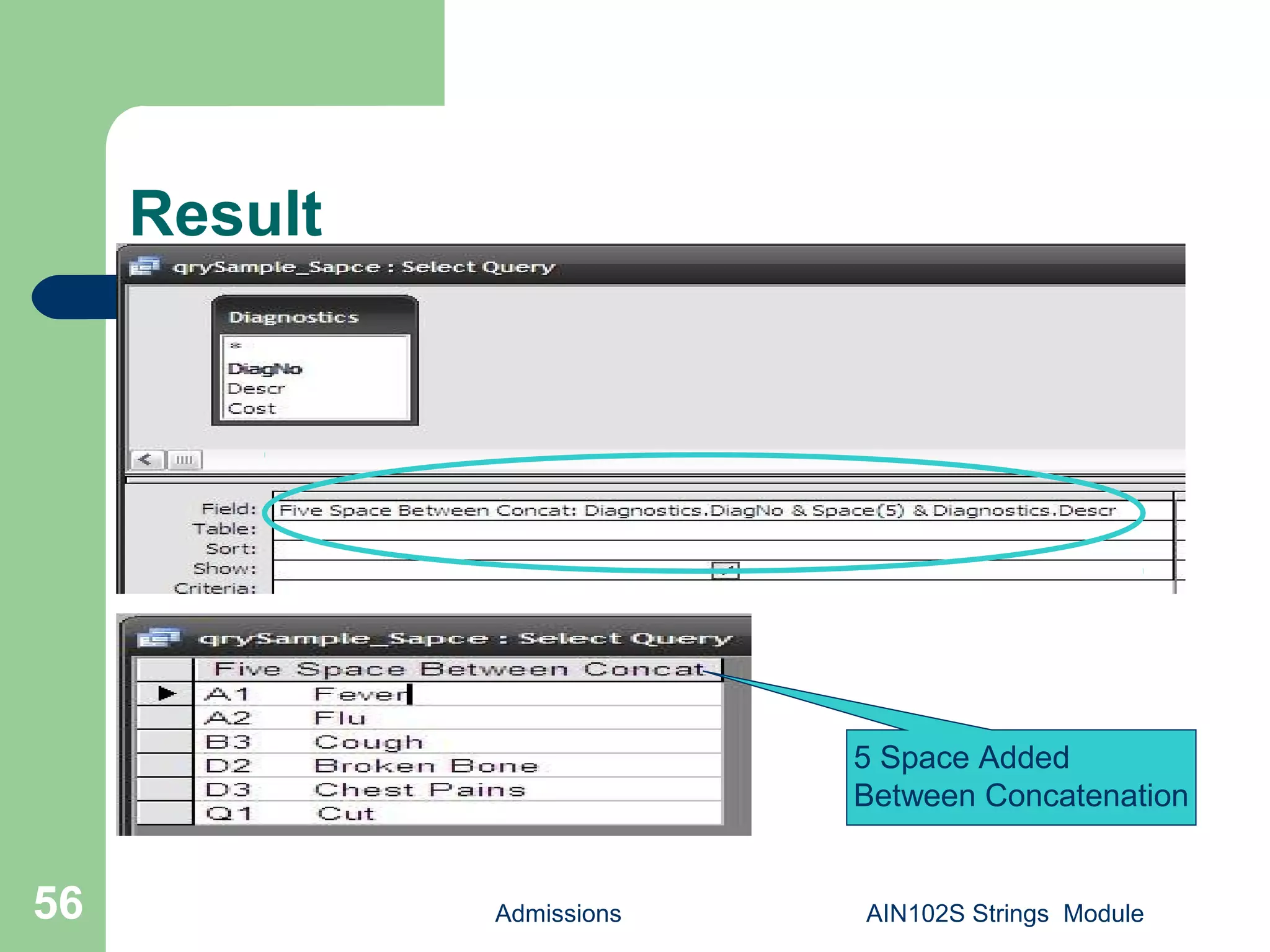
Space()
 Returns a Variant (String) consisting of the
specified number of spaces.
 Syntax: Space(number)
 Create a sample query and save as
qrySample_Space.
 Add Diagnostics table.
 Build: Diagnostics.DiagNo & Space(5) &
Diagnostics.Descr As [Five Space Between
Concat] .Save.
Admissions AIN102S Strings Module55
Result
Admissions AIN102S Strings Module56
5 Space Added
Between Concatenation
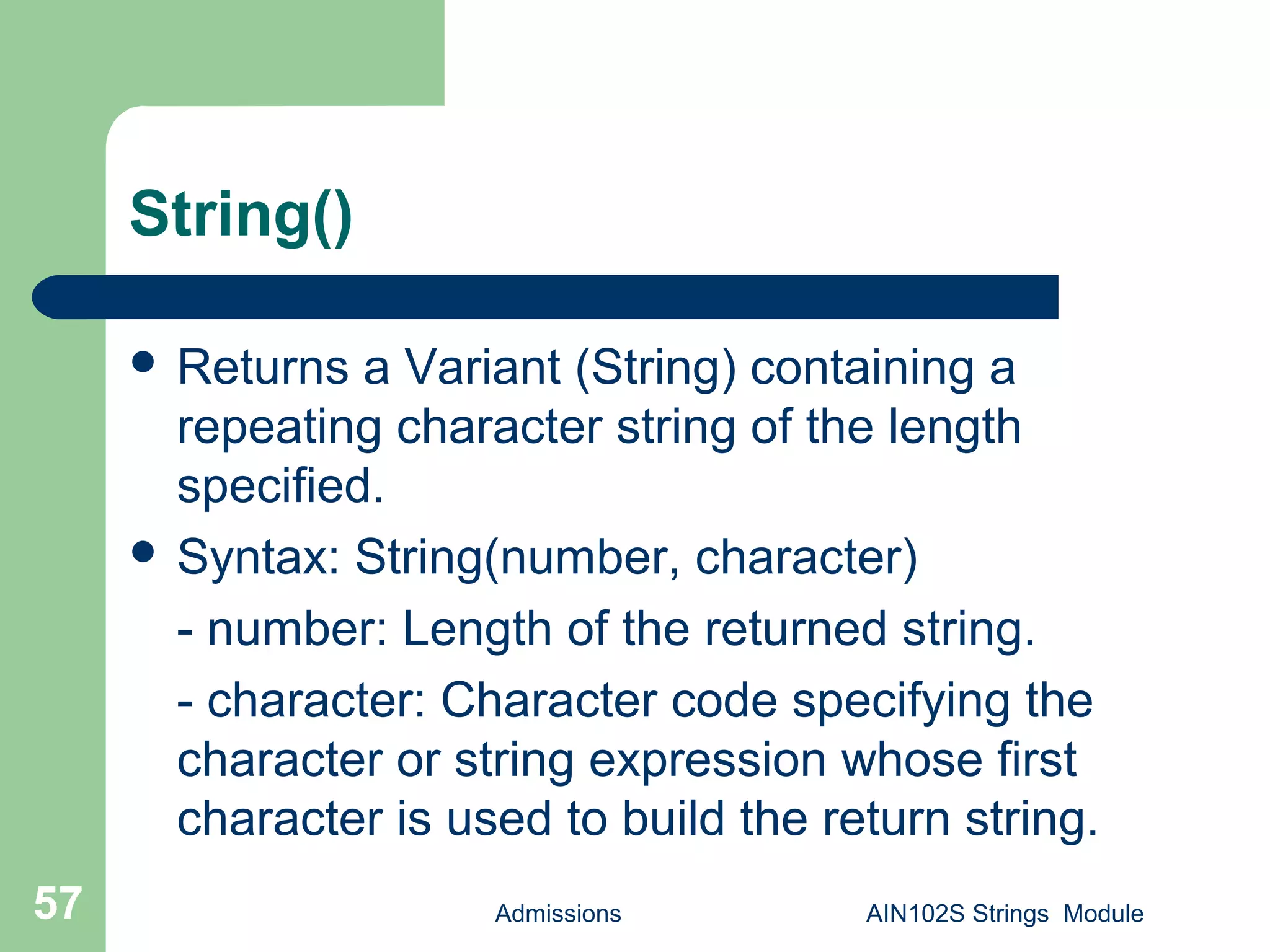
String()
 Returns a Variant (String) containing a
repeating character string of the length
specified.
 Syntax: String(number, character)
- number: Length of the returned string.
- character: Character code specifying the
character or string expression whose first
character is used to build the return string.
Admissions AIN102S Strings Module57
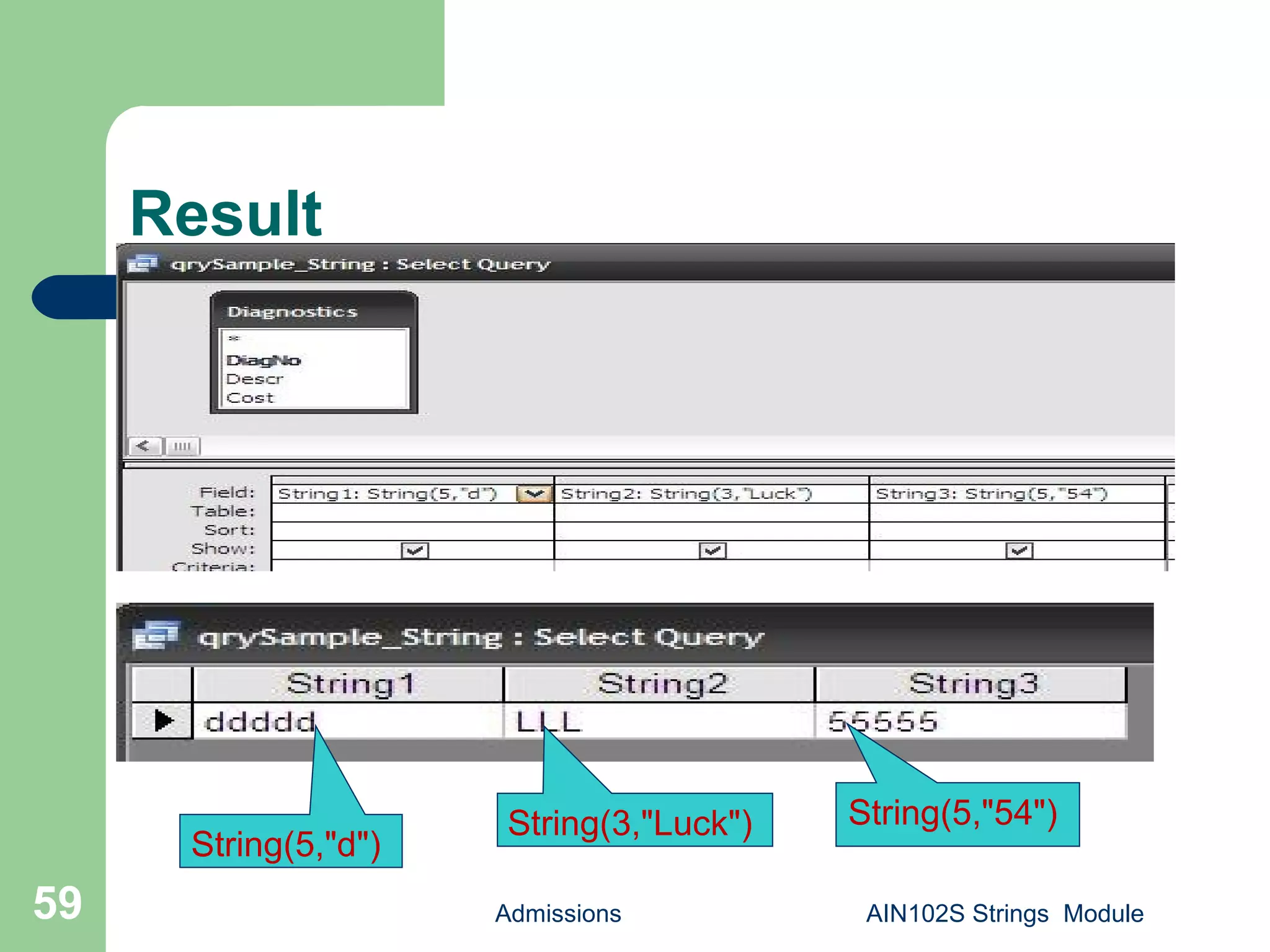
String()
 Create a sample query and save as
qrySample_String.
 Add Diagnostics table.
 Build: String(5,"d") As [String1],
String(3,"Luck") As [String2], String(5,"54")
As [String3] .Save.
Admissions AIN102S Strings Module58
Result
Admissions AIN102S Strings Module59
String(5,"d")
String(3,"Luck") String(5,"54")
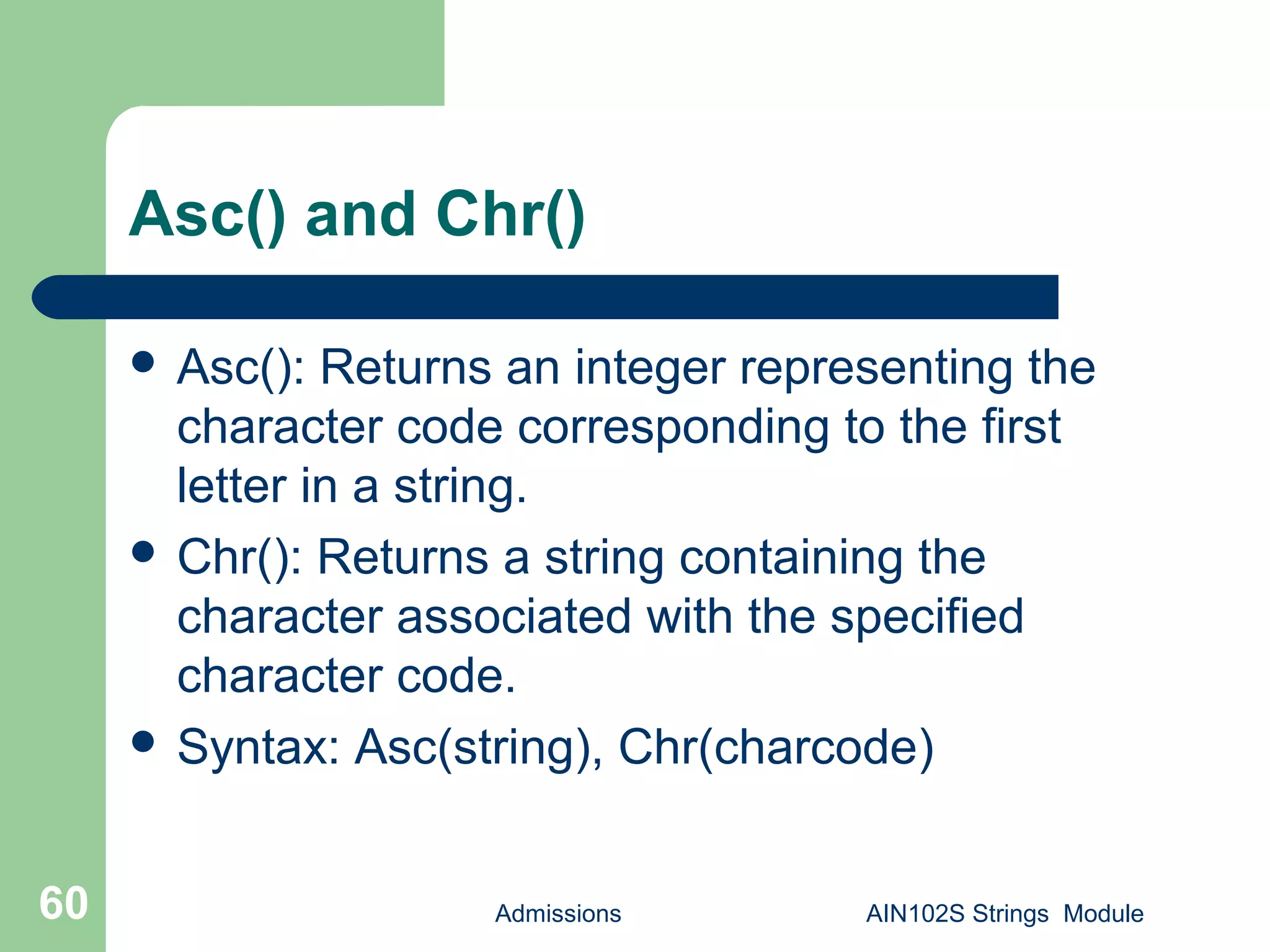
Asc() and Chr()
 Asc(): Returns an integer representing the
character code corresponding to the first
letter in a string.
 Chr(): Returns a string containing the
character associated with the specified
character code.
 Syntax: Asc(string), Chr(charcode)
Admissions AIN102S Strings Module60
Asc() and Chr()
 Create a sample query and save as
qrySample_Asc_Chr.
 Add Diagnostics table.
 Build: Asc("A") As [ASCII of "A"], Asc("book") As
[ASCII of "b"], Chr(65) As [Return "A"], Chr(98)
As [Retrun "b“] .Save.
Admissions AIN102S Strings Module61
Result
Admissions AIN102S Strings Module62
Asc("A") Asc("book") Chr(65) Chr(98)
[end module]
When you want to know more
 ½ day date functions workshop.
 1 day SQL200A Microsoft Access SQL
Class.
Admissions AIN102S Strings Module63
Admissions AIN102S Strings Module64
End Strings Module
End of Class!

AIN102S Access string function sample queries

  • 1.
    AIN102S Access Query Design SamplesModule – String Functions P.O. Box 6142 Laguna Niguel, CA 92607 949-489-1472 http://www.d2associates.com slides.1@dhdursoassociates.com
  • 2.
    Admissions AIN102S StringsModule2 AIN102S Contact Information P.O. Box 6142 Laguna Niguel, CA 92607 949-489-1472 http://www.d2associates.com slides.1@dhdursoassociates.com Copyright 2001-20011 All rights reserved.
  • 3.
    AIN102S Notes  Thismaterial was prepared by Mindfire Solutions for Orange Coast Database Associates, Inc. Reproduction for commercial purposes is prohibited.  Classes covering this material are available either in San Juan Capistrano, California, or at your facility. Admissions AIN102S Strings Module3
  • 4.
    AIN102S Resources  Sampledatabase with all queries can be downloaded at box.net.  Manuals can be downloaded from SlideShare at the link below.  Slides can be viewed on SlideShare… http://www.slideshare.net/OCDatabases Admissions AIN102S Strings Module4
  • 5.
    Admissions AIN102S StringsModule5 AIN102 Sequence  Session 1 – Review of Relational Databases and Single Table Retrieval, Functions and Operators  Session 2 – Multi-table retrieval, Sub queries, Unions, Action Queries, Indexes Additional Modules – Sample Date (AIN102D) and String Functions (AIN102S)
  • 6.
    Admissions AIN102S StringsModule6 AIN102S  Lecture/discussion with demonstrations – Mostly practical, but a dose of “theory”  Assumes familiarity with MS Access and creating basic queries.  Hands-on  Exercises (Mostly cumulative)  3 hours in length
  • 7.
    Admissions AIN102S StringsModule7 Microsoft Access Query Design  Focus of this class will be on the Query Designer, with SQL used from time-to-time to explain concepts  Knowledge of query design is an essential skill for retrieving and manipulating Microsoft Access data.  A foundation skill for eBusiness and almost all major business applications that use relational databases
  • 8.
    Admissions AIN102S StringsModule8 Access Query Design and SQL  The SQL engine Access uses is called JET  It support both MS Access and Visual Basic  Looking “behind the scenes” at your queries in SQL can be helpful and we will do this; however SQL is not necessary except for UNION queries
  • 9.
    Admissions AIN102S StringsModule9 Relational Database Basics  Storage  Databases  Tables  Rows  Columns  Indexes  Views  SQL interface
  • 10.
    Admissions AIN102S StringsModule10 Storage  In Access one file with extension accdb (2007 and 2010 databases) or mdb (2003 and earlier). I.e mydatabase.mdb.  Database splitter can be used to split it into two parts – a front end and a back end.  Interface to physical storage via the “JET” database engine. This is the behind-the scenes-workhorse.
  • 11.
    Admissions AIN102S StringsModule11 Databases  In the Access world refers to all objects stored in the mdb. – Tables – Queries – From – Reports – Macros – Code modules
  • 12.
    Admissions AIN102S StringsModule12 Relational Database Table
  • 13.
    Admissions AIN102S StringsModule13 Sample Access Database
  • 14.
    Admissions AIN102S StringsModule14 Database Relationships
  • 15.
    Admissions AIN102S StringsModule15 Approaching Query Design  Try to build queries a step at a time  Save existing queries that are working as you like; modify them with a new name when building a modified query  Try looking at the generated SQL code from time-to-time
  • 16.
    Admissions AIN102S StringsModule16 Sample Database  Before we continue…  Load the sample database if you haven’t already
  • 17.
    Admissions AIN102S StringsModule17 Query Designer Right click anywhere for SQL View Double click or drag to add a field Double click to add a table
  • 18.
    Admissions18 String Functions  TheString functions include – Asc() – Chr() – InStr() – Left() – Mid() – Right() – InStrReverse() Admissions18 AIN102S Strings Module
  • 19.
    Admissions19 String Functions (Cont’d) The String functions include – LCase() – UCase() – LTrim() – RTrim() – Space() – Etc. Admissions19 AIN102S Strings Module
  • 20.
    LCase(), UCase() Admissions AIN102SStrings Module20 LCase: Returns a string that has been converted to lowercase. UCase: Returns a string that has been converted to uppercase. Syntax: LCase(String), UCase(string) - String: Any valid string expression.
  • 21.
    LCase(), UCase()  Createa sample query and save as qrySapmle_LCase_UCase.  Add Diagnostics table.  Select Descr.  Build: LCase(Diagnostics.Descr) as [Lower Case], UCase(Diagnostics.Descr) as [Upper Case] . Save. Admissions AIN102S Strings Module21
  • 22.
  • 23.
    Result Admissions AIN102S StringsModule23 Upper Case Lower Case
  • 24.
    Left()  Returns aVariant (String) containing a specified number of characters from the left side of a string.  Syntax: Left(string, length) - string: String expression from which the leftmost characters are returned. - length: numeric expression indicating how many characters to return. If 0, a zero-length string ("") is returned. If greater than or equal to the number of characters in string, the entire string is returned. Admissions AIN102S Strings Module24
  • 25.
    Right() Admissions AIN102S StringsModule25  Returns a Variant (String) containing a specified number of characters from the right side of a string.  Syntax: Right(string, length) - string: String expression from which the leftmost characters are returned. - length: numeric expression indicating how many characters to return. If 0, a zero-length string ("") is returned. If greater than or equal to the number of characters in string, the entire string is returned.
  • 26.
    Mid()  Returns aVariant (String) containing a specified number of characters from a string.  Syntax: Mid(string, start[, length]) - string: String expression from which characters are returned. - start: Character position in string at which the part to be taken begins. If start is greater than the number of characters in string, Mid returns a zero- length string (""). - length(Optional): Number of characters to return. Admissions AIN102S Strings Module26
  • 27.
    Left(), Right() andMid() Admissions AIN102S Strings Module27  Create a sample query and save as qrySample_Left_Right_Mid1.  Add Diagnostics table.  Select Descr.  Build: Left(Diagnostics.Descr,3) as [Left], Right( Diagnostics.Descr,3) as [Right], Mid(Diagnostics. Descr,2) as [Mid]. Save.
  • 28.
    Left(), Right() andMid() Admissions AIN102S Strings Module28
  • 29.
    Result Admissions AIN102S StringsModule29 3 From Left 3 From Right All From 2nd position
  • 30.
    Admissions AIN102S StringsModule30 Left(), Right() and Mid()  Create a sample query and save as qrySample_Left_Right_Mid1.  Add Diagnostics table.  Select Descr.  Build: Left(Diagnostics.Descr,3) as [Left], Right( Diagnostics.Descr,3) as [Right], Mid(Diagnostics. Descr,2,2) as [Mid] . Save.
  • 31.
    Result Admissions AIN102S StringsModule31 2 From 2nd position
  • 32.
    Len()  Returns aLong containing the number of characters in a string.  Syntax: Len(string) - string: Any valid string expression.  Create a sample query and save as qrySample_Len.  Add Diagnostics table.  Select Descr.  Build: Descr,Len(Diagnostics.Descr) as [Length] . Save. Admissions AIN102S Strings Module32
  • 33.
  • 34.
    Result Admissions AIN102S StringsModule34 Length of Description
  • 35.
    LTrim(),RTrim(), Trim()  Returnsa Variant (String) containing a copy of a specified string without leading spaces (LTrim), trailing spaces (RTrim), or both leading and trailing spaces (Trim).  Syntax: LTrim(string), RTrim(string), Trim(string)  Create a sample query and save as qrySample_Trim.  Add Diagnostics table.  Select Descr, and type DISTINCT " " & Diagnostics.Descr & " " as [Space Added].  Build: Len([Space Added]) as [Length],Len( LTrim([Space Added])) as [LTrim],Len( RTrim([Space Added])) as [RTrim],Len(Trim([Space Added])) as [Trim]. Save.  This will reflect the length after trimming. Admissions AIN102S Strings Module35
  • 36.
  • 37.
    Result Admissions AIN102S StringsModule 37 One space added at left and 2 space in right Length after space added Length after Left trim Length after Right trim Length after Trim
  • 38.
    StrReverse()  Returns astring in which the character order of a specified string is reversed.  Syntax: StrReverse(expression) - expression: The expression argument is the string whose characters are to be reversed.  Create a sample query and save as qrySample_StrReverse.  Add Diagnostics table.  Build: strReverse(Diagnostics.Descr) as [Reversed String] . Save.  This will reflect the length after trimming. Admissions AIN102S Strings Module38
  • 39.
  • 40.
    Result Admissions AIN102S StringsModule40 Reverse String
  • 41.
    InStr()  Returns aVariant (Long) specifying the position of the first occurrence of one string within another.  Syntax: InStr([start, ]string1, string2[, compare]) - start(Optional): Numeric expression that sets the starting position for each search. If omitted, search begins at the first character position. - string1: String expression being searched. - string2: String expression sought. - compare(Optional): Specifies the type of String expression . Admissions AIN102S Strings Module41
  • 42.
    InStrRev()  Returns theposition of an occurrence of one string within another, from the end of string.  Syntax: InstrRev(stringcheck, stringmatch[, start[, compare]]) - stringcheck: String expression being searched. - stringmatch: String expression being searched for. - start(optional): Numeric expression that sets the starting position for each search. - compare(Optional): Numeric value indicating the kind of comparison to use when evaluating substrings. If omitted, a binary comparison is performed. Admissions AIN102S Strings Module42
  • 43.
    InStr() and InStrRev() Create a sample query and save as qrySample_InStr_InStrRev.  Add Diagnostics table.  Build: InStr(Diagnostics.Descr, "C") as [InStr For "C"], InStr(Diagnostics.Descr, "e") as [InStr For "e"], InStrRev (Diagnostics.Descr, "C") as [InStrRev For "C"], InStrRev(Diagnostics.Descr, "e") as [InStrRev For "e“] . Save. Admissions AIN102S Strings Module43
  • 44.
    Result Admissions AIN102S StringsModule44 1stPosition of “C” from left 1st Position of “C” from right of reverse string 1stPosition of “e” from left 1st Position of “e” from right of reverse string
  • 45.
    Replace()  Returns astring in which a specified substring has been replaced with another substring a specified number of times.  Syntax: Replace(expression, find, replace[, start[, count[, compare]]]) - expression: String expression containing substring to replace. - find: Substring being searched for. - replace: Replacement substring. - start(Optional): Position within expression where substring search is to begin. - count(Optional): Number of substring substitutions to perform. - compare(Optional): Numeric value indicating the kind of comparison to use when evaluating substrings. Admissions AIN102S Strings Module45
  • 46.
    Replace() Admissions AIN102S StringsModule46  Create a sample query and save as qrySample_Replace.  Add Diagnostics table.  Build: Replace(Diagnostics.Descr, " ", "-") as [Replace Space By "-“]. Save.  This will replace a blank space with “-”.
  • 47.
    Result Admissions AIN102S StringsModule47 Replace Space by “-”
  • 48.
    StrConv()  Returns aVariant (String) converted as specified.  Syntax: StrConv(string, conversion, LCID) - string: String expression to be converted - conversion: The sum of values specifying the type of conversion to perform. - LCID: The LocaleID  The conversion argument settings are: 1- vbUpperCase, 2- vbLowerCase, 3- vbLowerCase etc. Admissions AIN102S Strings Module48
  • 49.
    StrConv() Admissions AIN102S StringsModule49  Create a sample query and save as qrySample_StrConv.  Add Diagnostics table.  Build: StrConv(Diagnostics.Descr, 1) as [Convert Upper], StrConv(Diagnostics.Descr, 2) as [Convert Lower] . Save.
  • 50.
  • 51.
  • 52.
    StrComp()  Returns aVariant (Integer) indicating the result of a string expression.  Syntax: StrComp(string1, string2[, compare]) - string1: Any valid string expression. - string2: Any valid string expression. - compare(Optional): Specifies the type of string comparison. Admissions AIN102S Strings Module52
  • 53.
    StrComp()  Create asample query and save as qrySample_StrConv.  Add Diagnostics table.  Build: StrReverse(Diagnostics.Descr) as [String Reverse], StrComp(Diagnostics.Descr, Diagnostics.Descr) as [StrComp Same String], StrComp(Diagnostics.Descr, [String Reverse]) as [StrComp Different String] . Save. Admissions AIN102S Strings Module53
  • 54.
  • 55.
    Space()  Returns aVariant (String) consisting of the specified number of spaces.  Syntax: Space(number)  Create a sample query and save as qrySample_Space.  Add Diagnostics table.  Build: Diagnostics.DiagNo & Space(5) & Diagnostics.Descr As [Five Space Between Concat] .Save. Admissions AIN102S Strings Module55
  • 56.
    Result Admissions AIN102S StringsModule56 5 Space Added Between Concatenation
  • 57.
    String()  Returns aVariant (String) containing a repeating character string of the length specified.  Syntax: String(number, character) - number: Length of the returned string. - character: Character code specifying the character or string expression whose first character is used to build the return string. Admissions AIN102S Strings Module57
  • 58.
    String()  Create asample query and save as qrySample_String.  Add Diagnostics table.  Build: String(5,"d") As [String1], String(3,"Luck") As [String2], String(5,"54") As [String3] .Save. Admissions AIN102S Strings Module58
  • 59.
    Result Admissions AIN102S StringsModule59 String(5,"d") String(3,"Luck") String(5,"54")
  • 60.
    Asc() and Chr() Asc(): Returns an integer representing the character code corresponding to the first letter in a string.  Chr(): Returns a string containing the character associated with the specified character code.  Syntax: Asc(string), Chr(charcode) Admissions AIN102S Strings Module60
  • 61.
    Asc() and Chr() Create a sample query and save as qrySample_Asc_Chr.  Add Diagnostics table.  Build: Asc("A") As [ASCII of "A"], Asc("book") As [ASCII of "b"], Chr(65) As [Return "A"], Chr(98) As [Retrun "b“] .Save. Admissions AIN102S Strings Module61
  • 62.
    Result Admissions AIN102S StringsModule62 Asc("A") Asc("book") Chr(65) Chr(98) [end module]
  • 63.
    When you wantto know more  ½ day date functions workshop.  1 day SQL200A Microsoft Access SQL Class. Admissions AIN102S Strings Module63
  • 64.
    Admissions AIN102S StringsModule64 End Strings Module End of Class!