AIN102 Access Query Design Samples Module – Date Functions P.O. Box 6142 Laguna Niguel, CA 92607 949-489-1472 http://www.d2associates.com [email_address]
AIN102 Session 1 – Review of Relational Databases and Single Table Retrieval, Functions and Operators Session 2 – Multi-table retrieval, Sub queries, Unions, Action Queries, Indexes Bonus Modules – Sample Date and String Functions Admissions AIN102  Module 1
AIN102 Lecture/discussion with demonstrations Mostly practical, but a dose of “theory” Assumes some familiarity with MS Access Hands-on Exercises  (Mostly cumulative) About 3 hours per module Frequent breaks Admissions AIN102  Module 1
Microsoft Access Query Design Focus of this class will be on the Query Designer, with SQL used from time-to-time to explain concepts Queries are widely used for: Database administration Enterprise application development Data driven web sites Retrieving and modifying data in MS Access databases A foundation skill for eBusiness and almost all major business applications that use relational databases Admissions AIN102  Module 1
Access Query Design and SQL The SQL engine Access uses is called JET It support both MS Access and Visual Basic Looking “behind the scenes” at your queries in SQL can be helpful and we will do this; however SQL is not necessary except for UNION queries Admissions AIN102  Module 1
Relational Database Basics Storage Databases Tables Rows Columns Indexes Views SQL interface Admissions AIN102  Module 1
Storage In Access one file with extension mdb. I.e  mydatabase.mdb . Database splitter can be used to split it into two parts – a front end and a back end. Interface to physical storage via the “JET” database engine. This is the behind-the scenes-workhorse.  Admissions AIN102  Module 1
Databases In the Access world refers to all objects stored in the mdb. Tables Queries From Reports Macros Code modules Admissions AIN102  Module 1
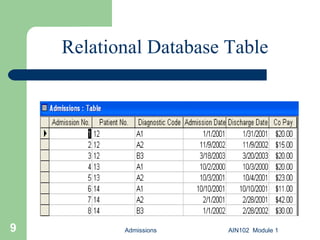
Admissions AIN102  Module 1 Relational Database Table
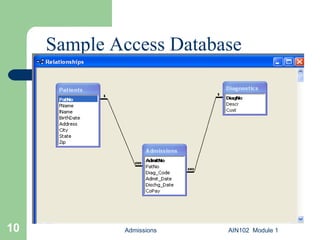
Admissions AIN102  Module 1 Sample Access Database
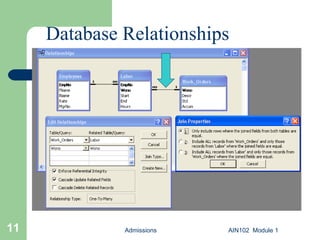
Admissions AIN102  Module 1 Database Relationships
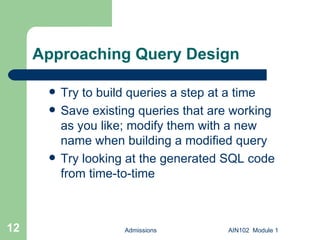
Approaching Query Design Try to build queries a step at a time Save existing queries that are working as you like; modify them with a new name when building a modified query Try looking at the generated SQL code from time-to-time Admissions AIN102  Module 1
Sample Database Before we continue… Load the sample database if you haven’t already Admissions AIN102  Module 1
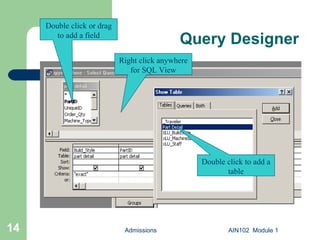
Query Designer Admissions AIN102  Module 1 Right click anywhere for SQL View Double click or drag to add a field Double click to add a table
Date Functions  The Date functions include  - Date() - DateAdd() - DateDiff() - DatePart() - etc. Admissions AIN102  Module 1
Date Functions (Cont’d)  The Date functions include Month() Year() Etc. Admissions AIN102  Module 1
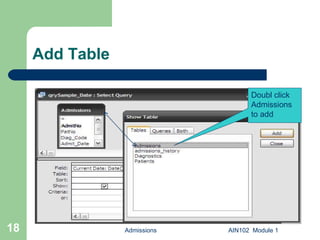
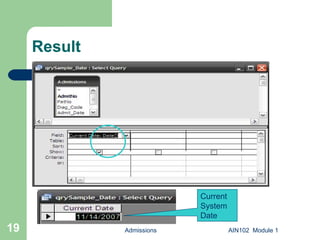
Date() This function returns the current system  date. Create a sample query and save as qrySample_Date. Now add Admissions table. Type  Current Date: Date()  in field. Save. Admissions AIN102  Module 1
Add Table Admissions AIN102  Module 1 Doubl click Admissions  to add
Result Admissions AIN102  Module 1 Current  System  Date
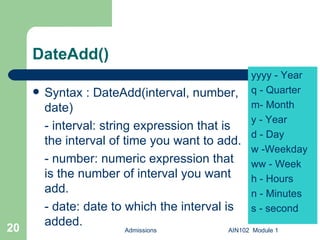
DateAdd() Syntax : DateAdd(interval, number, date)  - interval: string expression that is the interval of time you want to add. - number: numeric expression that is the number of interval you want add. - date: date to which the interval is added. Admissions AIN102  Module 1 yyyy - Year q - Quarter m- Month y - Year d - Day w -Weekday ww - Week h - Hours n - Minutes s - second
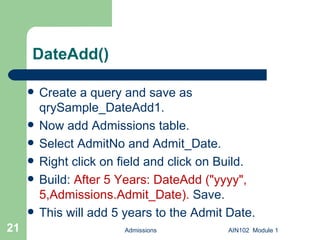
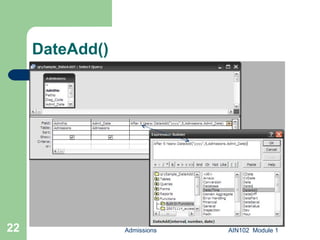
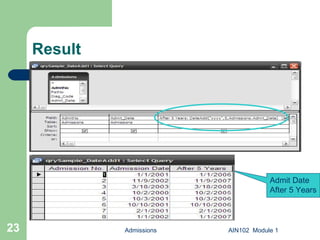
DateAdd() Create a query and save as qrySample_DateAdd1. Now add Admissions table. Select AdmitNo and Admit_Date. Right click on field and click on Build. Build:  After 5 Years: DateAdd ("yyyy", 5,Admissions.Admit_Date).  Save.  This will add 5 years to the Admit Date. Admissions AIN102  Module 1
DateAdd() Admissions AIN102  Module 1
Result Admissions AIN102  Module 1 Admit Date After 5 Years
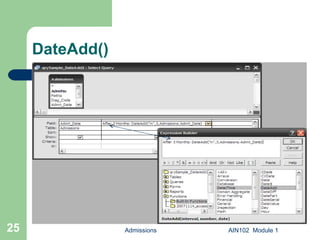
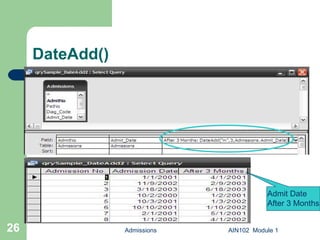
DateAdd() Create a query and save as qrySample_DateAdd2. Now add Admissions table. Select AdmitNo and Admit_Date. Right click on field and click on Build. Build:  DateAdd(“m”,3,Admissions.Admit_Date) as [After 3 Months].  Save.  This will add 3 months to the Admit Date. Admissions AIN102  Module 1
DateAdd() Admissions AIN102  Module 1
DateAdd() Admissions AIN102  Module 1 Admit Date After 3 Months
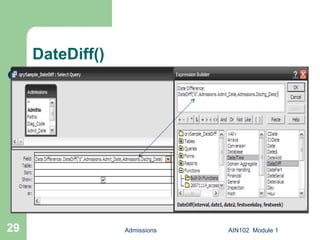
DateDiff() Syntax: DateDiff(interval, date1, date2[, firstdayofweek[, firstweekofyear]]) - interval: string expression that is the interval of time you use to calculate the difference between date1 and date2. - date1, date2: two dates you want to use in the calculation. - firstdayofweek(optional): A constant that specifies the first day if the week. If not specified, Sunday is assumed.  - firstweekofyear(optional): A constant the first week of the year. If not specified, the first week is assumed to be the week in which January 1 occurs. Admissions AIN102  Module 1
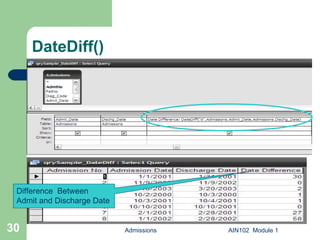
DateDiff() Create a query and save as qrySample_DateDiff. Now add Admissions table. Select AdmitNo and Admit_Date, Dischg_Date. Right click on field and click on Build. Build:  DateDiff("d", Admissions.Admit_Date, Admissions.Dischg_Date) as [Date Difference] . Save.  This will show the difference between Admit Date and Discharge Date. Admissions AIN102  Module 1
DateDiff() Admissions AIN102  Module 1
DateDiff() Admissions AIN102  Module 1 Difference  Between Admit and Discharge Date
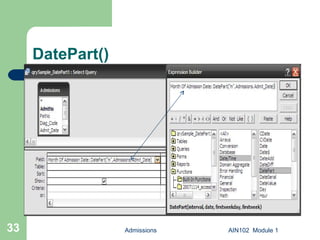
DatePart() Syntax: DatePart(interval, date[, firstdayofweek[,firstweekofyear]])   - interval: string expression  that is the interval of time you want to return. . - date:  Variant (Date) value that you want to evaluate. - firstdayofweek(optional): A constant that specifies the first day if the week. If not specified, Sunday is assumed.  - firstweekofyear(optional): A constant the first week of the year. If not specified, the first week is assumed to be the week in which January 1 occurs. Admissions AIN102  Module 1
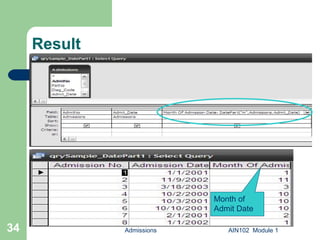
DatePart() Create a query and save as qrySample_DatePart1. Now add Admissions table. Select AdmitNo and Admit_Date. Right click on field and click on Build. Build:  DatePart("m", Admissions.Admit_Date) as [Month Of Admission Date]  . Save.  This will show the month of the Admit Date. Admissions AIN102  Module 1
DatePart() Admissions AIN102  Module 1
Result Admissions AIN102  Module 1 Month of Admit Date
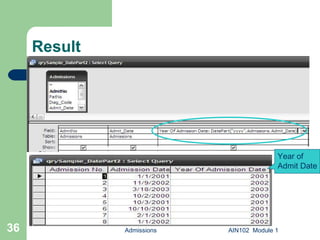
DatePart() Create a query and save as qrySample_DatePart2. Now add Admissions table. Select AdmitNo and Admit_Date. Right click on field and click on Build. Build:  DatePart(“yyyy", Admissions.Admit_Date) as [Year Of Admission Date]  . Save.  This will show the year of the Admit Date. Admissions AIN102  Module 1
Result Admissions AIN102  Module 1 Year of Admit Date
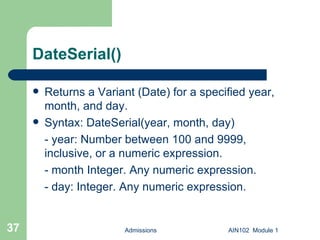
DateSerial() Returns a Variant (Date) for a specified year, month, and day. Syntax: DateSerial(year, month, day) - year: Number between 100 and 9999, inclusive, or a numeric expression. - month Integer. Any numeric expression. - day: Integer. Any numeric expression. Admissions AIN102  Module 1
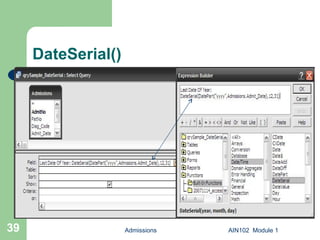
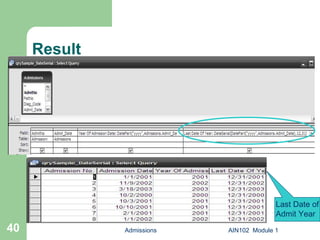
DateSerial() Create a query and save as qrySample_DateSerial. Now add Admissions table. Select AdmitNo and Admit_Date. Right click on field and click on Build. Build:  DatePart("yyyy", Admissions.Admit_Date) as [Year Of Admission Date] . Save.  Right click on field and click on Build. Build:  ], DateSerial( DatePart("yyyy", Admissions.Admit_Date), 12, 31) as [Last Date Of Year]  . Save.  This will show the last date of respective year of the Admit Date. Admissions AIN102  Module 1
DateSerial() Admissions AIN102  Module 1
Result Admissions AIN102  Module 1 Last Date of Admit Year
DateValue() Returns a Variant (Date). Syntax: DateValue(date) - date: Generally it is a string expression representing date and it should be separated by valid date separator. Admissions AIN102  Module 1
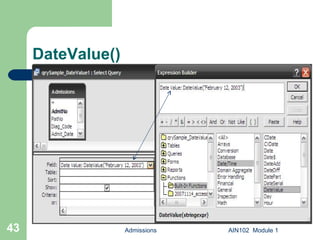
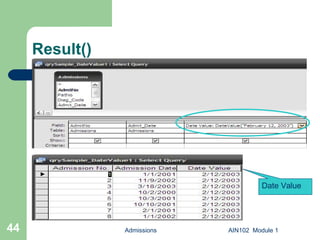
DateValue() Create a query and save as qrySample_DateValue1  Now add Admissions table. Select AdmitNo and Admit_Date. Right click on field and click on Build. Build:  DateValue("February 12, 2003") As [Date Value]  . Save.  This will show “2/12/2003” in the Date Value column.  Admissions AIN102  Module 1
DateValue() Admissions AIN102  Module 1
Result() Admissions AIN102  Module 1 Date Value
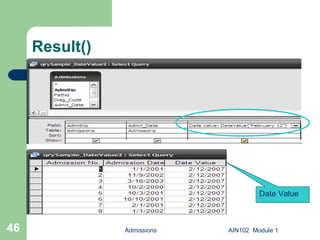
DateValue() Create a query and save as qrySample_DateValue2  Now add Admissions table. Select AdmitNo and Admit_Date. Right click on field and click on Build. Build:  DateValue("February 12") As [Date Value]  . Save.  This will show “2/12/2007” in the Date Value column i.e. it will consider the current system year. Admissions AIN102  Module 1
Result() Admissions AIN102  Module 1 Date Value
Day() Returns a Variant (Integer) specifying a whole number between 1 and 31, inclusive, representing the day of the month. Syntax: Day(date) - date: Generally it is a variant, numeric expression, string expression representing date. Admissions AIN102  Module 1
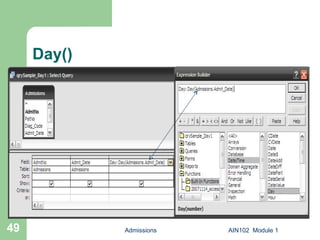
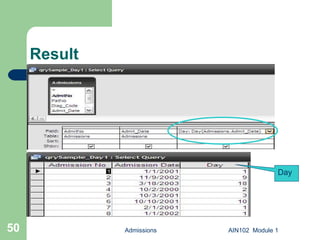
Day() Create a query and save as qrySample_Day1.  Now add Admissions table. Select AdmitNo and Admit_Date. Right click on field and click on Build. Build:  Day(Admissions.Admit_Date) AS [Day]  . Save.  This will show the day of Admit Date. Admissions AIN102  Module 1
Day() Admissions AIN102  Module 1
Result Admissions AIN102  Module 1 Day
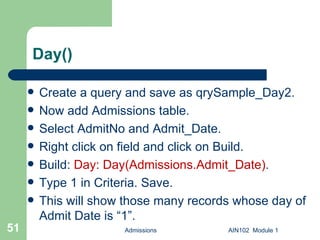
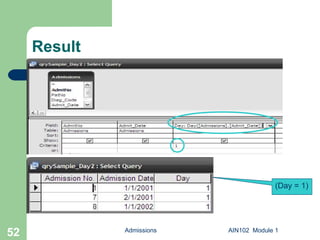
Day() Create a query and save as qrySample_Day2.  Now add Admissions table. Select AdmitNo and Admit_Date. Right click on field and click on Build. Build:  Day: Day(Admissions.Admit_Date) .  Type 1 in Criteria. Save. This will show those many records whose day of Admit Date is “1”. Admissions AIN102  Module 1
Result Admissions AIN102  Module 1 (Day = 1)
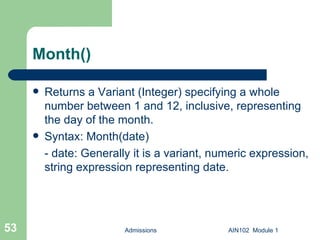
Month() Returns a Variant (Integer) specifying a whole number between 1 and 12, inclusive, representing the day of the month. Syntax: Month(date) - date: Generally it is a variant, numeric expression, string expression representing date. Admissions AIN102  Module 1
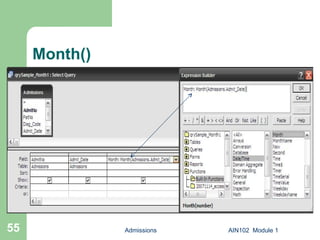
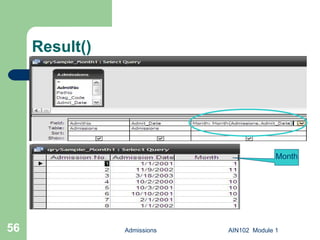
Month() Create a query and save as qrySample_Month1.  Now add Admissions table. Select AdmitNo and Admit_Date. Right click on field and click on Build. Build:  Month(Admissions.Admit_Date) AS [Month] . Save . This will show the month of Admit Date. Admissions AIN102  Module 1
Month() Admissions AIN102  Module 1
Result() Admissions AIN102  Module 1 Month
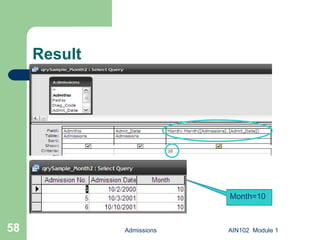
Month() Create a query and save as qrySample_Month1.  Now add Admissions table. Select AdmitNo and Admit_Date. Right click on field and click on Build. Build:  Month(Admissions.Admit_Date) AS [Month] .  Type 10 in Criteria. Save. This will show those many records whose month of Admit Date is “10”. Admissions AIN102  Module 1
Result Admissions AIN102  Module 1 Month=10
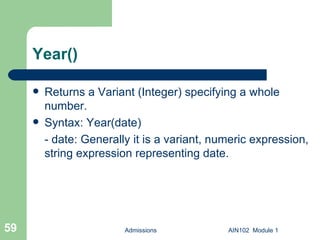
Year() Returns a Variant (Integer) specifying a whole number. Syntax: Year(date) - date: Generally it is a variant, numeric expression, string expression representing date. Admissions AIN102  Module 1
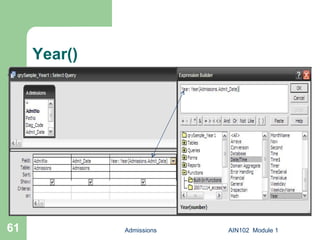
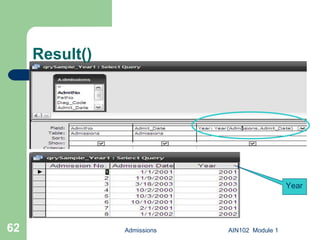
Year() Create a query and save as qrySample_Year1.  Now add Admissions table. Select AdmitNo and Admit_Date. Right click on field and click on Build. Build:  Year(Admissions.Admit_Date) AS [Year]  . Save. This will show the year of Admit Date. Admissions AIN102  Module 1
Year() Admissions AIN102  Module 1
Result() Admissions AIN102  Module 1 Year
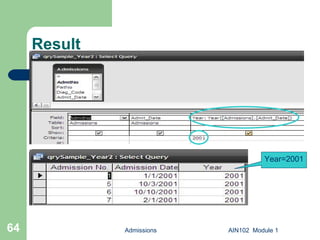
Year() Create a query and save as qrySample_Year2.  Now add Admissions table. Select AdmitNo and Admit_Date. Right click on field and click on Build. Build:  Year(Admissions.Admit_Date) AS [Year]  .  Type 2001 in Criteria. Save. This will show those many records whose year of Admit Date is “2001”. Admissions AIN102  Module 1
Result Admissions AIN102  Module 1 Year=2001
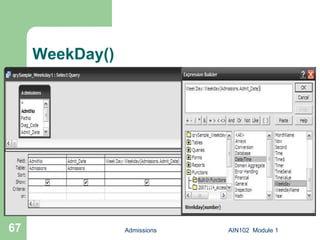
WeekDay() Returns a Variant(Integer) containing a whole number representing the day of the week. Syntax: WeekDay(date[, firstdayofweek])   - date:  Variant, numeric expression, string expression, or any combination, that can represent a date.   -  firstdayofweek (optional): A constant that specifies the first day if the week. If not specified, Sunday is assumed.  Admissions AIN102  Module 1 firstdayofweek: 0 - API setting 1 - Sunday 2 - Monday 3 - Tuesday 4 - Wednesday 5 - Thursday 6 - Friday  7 - Saturday
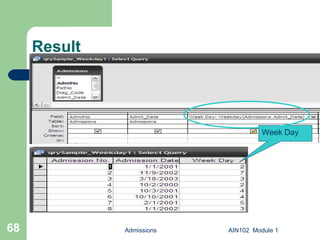
WeekDay() Create a query and save as qrySample_WeekDay1.  Now add Admissions table. Select AdmitNo and Admit_Date. Right click on field and click on Build. Build:  WeekDay(Admissions.Admit_Date) AS [Week Day] . Save.  This will show the week day of Admit Date. Admissions AIN102  Module 1
WeekDay() Admissions AIN102  Module 1
Result Admissions AIN102  Module 1 Week Day
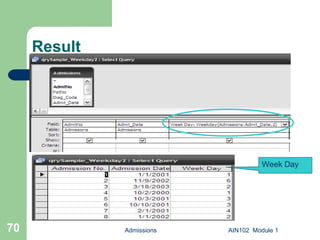
WeekDay() Create a query and save as qrySample_WeekDay2.  Now add Admissions table. Select AdmitNo and Admit_Date. Right click on field and click on Build. Build:  WeekDay(Admissions.Admit_Date, 2) AS [Week Day]  . Save.  This will set the first day of the week to Monday(2) and show the week day of Admit Date. Admissions AIN102  Module 1
Result Admissions AIN102  Module 1 Week Day
WeekDayName() Returns a string indicating the specified day of the week. Syntax: WeekDayName(weekday[, abbreviate[, firstdayofweek]])   - weekday: The numeric designation for the day of the week. Numeric value of each day depends on setting of the firstdayofweek setting. - abbreviate(optional): Boolean value that indicates if the weekday name is to be abbreviated. Default False( Not abbreviated).   - firstdayofweek(optional): A constant that specifies the first day if the week. If not specified, Sunday is assumed.  Admissions AIN102  Module 1
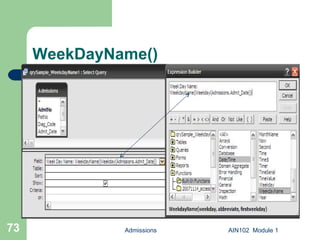
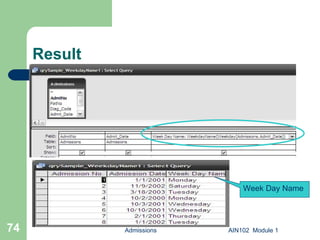
WeekDayName() Create a query and save as qrySample_WeekDayName1.  Now add Admissions table. Select AdmitNo and Admit_Date. Right click on field and click on Build. Build:  WeekDayName (WeekDay(Admissions. Admit_Date)) AS [Week Day Name]  . Save.  This will show the week day name of Admit Date. Admissions AIN102  Module 1
WeekDayName() Admissions AIN102  Module 1
Result Admissions AIN102  Module 1 Week Day Name
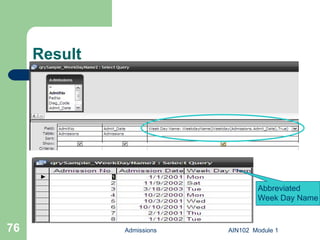
WeekDayName() Create a query and save as qrySample_WeekDayName2.  Now add Admissions table. Select AdmitNo and Admit_Date. Right click on field and click on Build. Build:  WeekDayName (WeekDay(Admissions. Admit_Date),True) AS [Week Day Name]  . Save.  This will show the abbreviated week day name of Admit Date. Admissions AIN102  Module 1
Result  Admissions AIN102  Module 1 Abbreviated Week Day Name
MonthName() Returns a string indicating the specified month. Syntax: MonthName( month [,  abbreviate ])   - month: The numeric designation of the month. For example, January is 1, February is 2, and so on. - abbreviate(optional): Boolean value that indicates if the weekday name is to be abbreviated. Default False( Not abbreviated).  Admissions AIN102  Module 1
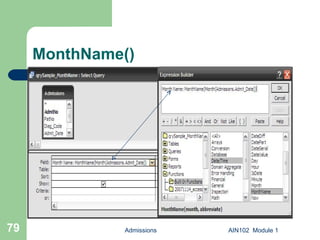
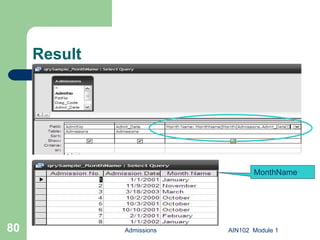
MonthName() Create a query and save as qrySample_MonthName.  Now add Admissions table. Select AdmitNo and Admit_Date. Right click on field and click on Build. Build:  Monthname (Month(Admissions. Admit_Date)) as [Month Name]  . Save.  This will show the month name of Admit Date. Admissions AIN102  Module 1
MonthName() Admissions AIN102  Module 1
Result Admissions AIN102  Module 1 MonthName
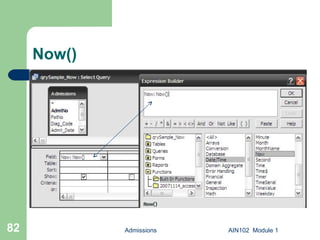
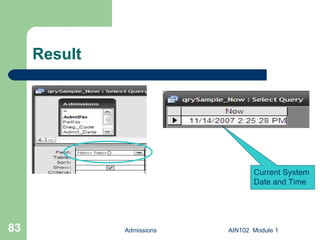
Now() Returns a Variant (Date) specifying the current date and time according your computer's system date and time. Syntax: Now Create a sample query and save as qrySample_Now. Now add Admissions table. Build  [Now]: Now()  in field. Save. This will show the current system date and time. Admissions AIN102  Module 1
Now() Admissions AIN102  Module 1
Result Admissions AIN102  Module 1 Current System Date and Time
Hour() Returns a Variant (Integer) specifying a whole number between 0 and 23, inclusive, representing the hour of the day. Syntax: Hour(time) - time: Time is any Variant, numeric expression, string expression, or any combination, that can represent a time.  Admissions AIN102  Module 1
Minute() Returns a Variant (Integer) specifying a whole number between 0 and 59, inclusive, representing the minute of the hour. Syntax: Minute(time) - time: Time is any Variant, numeric expression, string expression, or any combination, that can represent a time.  Admissions AIN102  Module 1
Second() Returns a  Variant  ( Integer ) specifying a whole number between 0 and 59, inclusive, representing the second of the minute. Syntax: Second(time) - time: Time is any Variant, numeric expression, string expression, or any combination, that can represent a time.  Admissions AIN102  Module 1
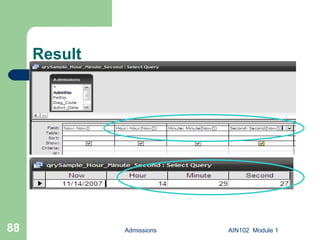
Hour(), Minute() and Second() Create a query and save as qrySample_Hour_Minute_Second.  Now add Admissions table. Select AdmitNo and Admit_Date. Right click on field and click on Build. Build:  Now as [Now], Hour(now) as [Hour], Minute(Now) as [Minute], Second(Now) As [Second]  . Save.  This will show the hour, minute and second of current system date and time. Admissions AIN102  Module 1
Result Admissions AIN102  Module 1
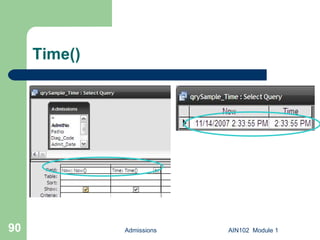
Time() Returns a Variant (Date) indicating the current system time. Syntax: Time Create a sample query and save as qrySample_Time. Now add Admissions table. Build:  [Now] as [Now], Time() as [Time]  in field. Save. This will show the current system time. Admissions AIN102  Module 1
Time() Admissions AIN102  Module 1
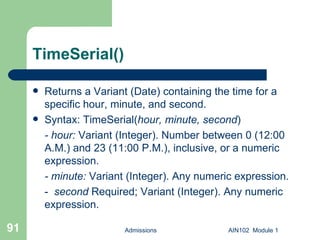
TimeSerial() Returns a Variant (Date) containing the time for a specific hour, minute, and second. Syntax: TimeSerial( hour,   minute,   second ) - hour:  Variant (Integer). Number between 0 (12:00 A.M.) and 23 (11:00 P.M.), inclusive, or a numeric expression.  - minute:  Variant (Integer). Any numeric expression. -  second  Required; Variant (Integer). Any numeric expression. Admissions AIN102  Module 1
TimeSerial() Create a sample query and save as qrySample_TimeSerial. Now add Admissions table. Build:  TimeSerial (5,15,12) as [Time Serial]  in field. Save. This will show 5:15:12 AM. Admissions AIN102  Module 1
Result Admissions AIN102  Module 1 [end module]

AIN102D Access date functions sample queries

  • 1.
    AIN102 Access QueryDesign Samples Module – Date Functions P.O. Box 6142 Laguna Niguel, CA 92607 949-489-1472 http://www.d2associates.com [email_address]
  • 2.
    AIN102 Session 1– Review of Relational Databases and Single Table Retrieval, Functions and Operators Session 2 – Multi-table retrieval, Sub queries, Unions, Action Queries, Indexes Bonus Modules – Sample Date and String Functions Admissions AIN102 Module 1
  • 3.
    AIN102 Lecture/discussion withdemonstrations Mostly practical, but a dose of “theory” Assumes some familiarity with MS Access Hands-on Exercises (Mostly cumulative) About 3 hours per module Frequent breaks Admissions AIN102 Module 1
  • 4.
    Microsoft Access QueryDesign Focus of this class will be on the Query Designer, with SQL used from time-to-time to explain concepts Queries are widely used for: Database administration Enterprise application development Data driven web sites Retrieving and modifying data in MS Access databases A foundation skill for eBusiness and almost all major business applications that use relational databases Admissions AIN102 Module 1
  • 5.
    Access Query Designand SQL The SQL engine Access uses is called JET It support both MS Access and Visual Basic Looking “behind the scenes” at your queries in SQL can be helpful and we will do this; however SQL is not necessary except for UNION queries Admissions AIN102 Module 1
  • 6.
    Relational Database BasicsStorage Databases Tables Rows Columns Indexes Views SQL interface Admissions AIN102 Module 1
  • 7.
    Storage In Accessone file with extension mdb. I.e mydatabase.mdb . Database splitter can be used to split it into two parts – a front end and a back end. Interface to physical storage via the “JET” database engine. This is the behind-the scenes-workhorse. Admissions AIN102 Module 1
  • 8.
    Databases In theAccess world refers to all objects stored in the mdb. Tables Queries From Reports Macros Code modules Admissions AIN102 Module 1
  • 9.
    Admissions AIN102 Module 1 Relational Database Table
  • 10.
    Admissions AIN102 Module 1 Sample Access Database
  • 11.
    Admissions AIN102 Module 1 Database Relationships
  • 12.
    Approaching Query DesignTry to build queries a step at a time Save existing queries that are working as you like; modify them with a new name when building a modified query Try looking at the generated SQL code from time-to-time Admissions AIN102 Module 1
  • 13.
    Sample Database Beforewe continue… Load the sample database if you haven’t already Admissions AIN102 Module 1
  • 14.
    Query Designer AdmissionsAIN102 Module 1 Right click anywhere for SQL View Double click or drag to add a field Double click to add a table
  • 15.
    Date Functions The Date functions include - Date() - DateAdd() - DateDiff() - DatePart() - etc. Admissions AIN102 Module 1
  • 16.
    Date Functions (Cont’d) The Date functions include Month() Year() Etc. Admissions AIN102 Module 1
  • 17.
    Date() This functionreturns the current system date. Create a sample query and save as qrySample_Date. Now add Admissions table. Type Current Date: Date() in field. Save. Admissions AIN102 Module 1
  • 18.
    Add Table AdmissionsAIN102 Module 1 Doubl click Admissions to add
  • 19.
    Result Admissions AIN102 Module 1 Current System Date
  • 20.
    DateAdd() Syntax :DateAdd(interval, number, date) - interval: string expression that is the interval of time you want to add. - number: numeric expression that is the number of interval you want add. - date: date to which the interval is added. Admissions AIN102 Module 1 yyyy - Year q - Quarter m- Month y - Year d - Day w -Weekday ww - Week h - Hours n - Minutes s - second
  • 21.
    DateAdd() Create aquery and save as qrySample_DateAdd1. Now add Admissions table. Select AdmitNo and Admit_Date. Right click on field and click on Build. Build: After 5 Years: DateAdd ("yyyy", 5,Admissions.Admit_Date). Save. This will add 5 years to the Admit Date. Admissions AIN102 Module 1
  • 22.
  • 23.
    Result Admissions AIN102 Module 1 Admit Date After 5 Years
  • 24.
    DateAdd() Create aquery and save as qrySample_DateAdd2. Now add Admissions table. Select AdmitNo and Admit_Date. Right click on field and click on Build. Build: DateAdd(“m”,3,Admissions.Admit_Date) as [After 3 Months]. Save. This will add 3 months to the Admit Date. Admissions AIN102 Module 1
  • 25.
  • 26.
    DateAdd() Admissions AIN102 Module 1 Admit Date After 3 Months
  • 27.
    DateDiff() Syntax: DateDiff(interval,date1, date2[, firstdayofweek[, firstweekofyear]]) - interval: string expression that is the interval of time you use to calculate the difference between date1 and date2. - date1, date2: two dates you want to use in the calculation. - firstdayofweek(optional): A constant that specifies the first day if the week. If not specified, Sunday is assumed. - firstweekofyear(optional): A constant the first week of the year. If not specified, the first week is assumed to be the week in which January 1 occurs. Admissions AIN102 Module 1
  • 28.
    DateDiff() Create aquery and save as qrySample_DateDiff. Now add Admissions table. Select AdmitNo and Admit_Date, Dischg_Date. Right click on field and click on Build. Build: DateDiff("d", Admissions.Admit_Date, Admissions.Dischg_Date) as [Date Difference] . Save. This will show the difference between Admit Date and Discharge Date. Admissions AIN102 Module 1
  • 29.
  • 30.
    DateDiff() Admissions AIN102 Module 1 Difference Between Admit and Discharge Date
  • 31.
    DatePart() Syntax: DatePart(interval,date[, firstdayofweek[,firstweekofyear]]) - interval: string expression that is the interval of time you want to return. . - date: Variant (Date) value that you want to evaluate. - firstdayofweek(optional): A constant that specifies the first day if the week. If not specified, Sunday is assumed. - firstweekofyear(optional): A constant the first week of the year. If not specified, the first week is assumed to be the week in which January 1 occurs. Admissions AIN102 Module 1
  • 32.
    DatePart() Create aquery and save as qrySample_DatePart1. Now add Admissions table. Select AdmitNo and Admit_Date. Right click on field and click on Build. Build: DatePart("m", Admissions.Admit_Date) as [Month Of Admission Date] . Save. This will show the month of the Admit Date. Admissions AIN102 Module 1
  • 33.
  • 34.
    Result Admissions AIN102 Module 1 Month of Admit Date
  • 35.
    DatePart() Create aquery and save as qrySample_DatePart2. Now add Admissions table. Select AdmitNo and Admit_Date. Right click on field and click on Build. Build: DatePart(“yyyy", Admissions.Admit_Date) as [Year Of Admission Date] . Save. This will show the year of the Admit Date. Admissions AIN102 Module 1
  • 36.
    Result Admissions AIN102 Module 1 Year of Admit Date
  • 37.
    DateSerial() Returns aVariant (Date) for a specified year, month, and day. Syntax: DateSerial(year, month, day) - year: Number between 100 and 9999, inclusive, or a numeric expression. - month Integer. Any numeric expression. - day: Integer. Any numeric expression. Admissions AIN102 Module 1
  • 38.
    DateSerial() Create aquery and save as qrySample_DateSerial. Now add Admissions table. Select AdmitNo and Admit_Date. Right click on field and click on Build. Build: DatePart("yyyy", Admissions.Admit_Date) as [Year Of Admission Date] . Save. Right click on field and click on Build. Build: ], DateSerial( DatePart("yyyy", Admissions.Admit_Date), 12, 31) as [Last Date Of Year] . Save. This will show the last date of respective year of the Admit Date. Admissions AIN102 Module 1
  • 39.
  • 40.
    Result Admissions AIN102 Module 1 Last Date of Admit Year
  • 41.
    DateValue() Returns aVariant (Date). Syntax: DateValue(date) - date: Generally it is a string expression representing date and it should be separated by valid date separator. Admissions AIN102 Module 1
  • 42.
    DateValue() Create aquery and save as qrySample_DateValue1 Now add Admissions table. Select AdmitNo and Admit_Date. Right click on field and click on Build. Build: DateValue("February 12, 2003") As [Date Value] . Save. This will show “2/12/2003” in the Date Value column. Admissions AIN102 Module 1
  • 43.
  • 44.
    Result() Admissions AIN102 Module 1 Date Value
  • 45.
    DateValue() Create aquery and save as qrySample_DateValue2 Now add Admissions table. Select AdmitNo and Admit_Date. Right click on field and click on Build. Build: DateValue("February 12") As [Date Value] . Save. This will show “2/12/2007” in the Date Value column i.e. it will consider the current system year. Admissions AIN102 Module 1
  • 46.
    Result() Admissions AIN102 Module 1 Date Value
  • 47.
    Day() Returns aVariant (Integer) specifying a whole number between 1 and 31, inclusive, representing the day of the month. Syntax: Day(date) - date: Generally it is a variant, numeric expression, string expression representing date. Admissions AIN102 Module 1
  • 48.
    Day() Create aquery and save as qrySample_Day1. Now add Admissions table. Select AdmitNo and Admit_Date. Right click on field and click on Build. Build: Day(Admissions.Admit_Date) AS [Day] . Save. This will show the day of Admit Date. Admissions AIN102 Module 1
  • 49.
  • 50.
  • 51.
    Day() Create aquery and save as qrySample_Day2. Now add Admissions table. Select AdmitNo and Admit_Date. Right click on field and click on Build. Build: Day: Day(Admissions.Admit_Date) . Type 1 in Criteria. Save. This will show those many records whose day of Admit Date is “1”. Admissions AIN102 Module 1
  • 52.
    Result Admissions AIN102 Module 1 (Day = 1)
  • 53.
    Month() Returns aVariant (Integer) specifying a whole number between 1 and 12, inclusive, representing the day of the month. Syntax: Month(date) - date: Generally it is a variant, numeric expression, string expression representing date. Admissions AIN102 Module 1
  • 54.
    Month() Create aquery and save as qrySample_Month1. Now add Admissions table. Select AdmitNo and Admit_Date. Right click on field and click on Build. Build: Month(Admissions.Admit_Date) AS [Month] . Save . This will show the month of Admit Date. Admissions AIN102 Module 1
  • 55.
  • 56.
  • 57.
    Month() Create aquery and save as qrySample_Month1. Now add Admissions table. Select AdmitNo and Admit_Date. Right click on field and click on Build. Build: Month(Admissions.Admit_Date) AS [Month] . Type 10 in Criteria. Save. This will show those many records whose month of Admit Date is “10”. Admissions AIN102 Module 1
  • 58.
    Result Admissions AIN102 Module 1 Month=10
  • 59.
    Year() Returns aVariant (Integer) specifying a whole number. Syntax: Year(date) - date: Generally it is a variant, numeric expression, string expression representing date. Admissions AIN102 Module 1
  • 60.
    Year() Create aquery and save as qrySample_Year1. Now add Admissions table. Select AdmitNo and Admit_Date. Right click on field and click on Build. Build: Year(Admissions.Admit_Date) AS [Year] . Save. This will show the year of Admit Date. Admissions AIN102 Module 1
  • 61.
  • 62.
  • 63.
    Year() Create aquery and save as qrySample_Year2. Now add Admissions table. Select AdmitNo and Admit_Date. Right click on field and click on Build. Build: Year(Admissions.Admit_Date) AS [Year] . Type 2001 in Criteria. Save. This will show those many records whose year of Admit Date is “2001”. Admissions AIN102 Module 1
  • 64.
    Result Admissions AIN102 Module 1 Year=2001
  • 65.
    WeekDay() Returns aVariant(Integer) containing a whole number representing the day of the week. Syntax: WeekDay(date[, firstdayofweek]) - date: Variant, numeric expression, string expression, or any combination, that can represent a date. - firstdayofweek (optional): A constant that specifies the first day if the week. If not specified, Sunday is assumed. Admissions AIN102 Module 1 firstdayofweek: 0 - API setting 1 - Sunday 2 - Monday 3 - Tuesday 4 - Wednesday 5 - Thursday 6 - Friday 7 - Saturday
  • 66.
    WeekDay() Create aquery and save as qrySample_WeekDay1. Now add Admissions table. Select AdmitNo and Admit_Date. Right click on field and click on Build. Build: WeekDay(Admissions.Admit_Date) AS [Week Day] . Save. This will show the week day of Admit Date. Admissions AIN102 Module 1
  • 67.
  • 68.
    Result Admissions AIN102 Module 1 Week Day
  • 69.
    WeekDay() Create aquery and save as qrySample_WeekDay2. Now add Admissions table. Select AdmitNo and Admit_Date. Right click on field and click on Build. Build: WeekDay(Admissions.Admit_Date, 2) AS [Week Day] . Save. This will set the first day of the week to Monday(2) and show the week day of Admit Date. Admissions AIN102 Module 1
  • 70.
    Result Admissions AIN102 Module 1 Week Day
  • 71.
    WeekDayName() Returns astring indicating the specified day of the week. Syntax: WeekDayName(weekday[, abbreviate[, firstdayofweek]]) - weekday: The numeric designation for the day of the week. Numeric value of each day depends on setting of the firstdayofweek setting. - abbreviate(optional): Boolean value that indicates if the weekday name is to be abbreviated. Default False( Not abbreviated). - firstdayofweek(optional): A constant that specifies the first day if the week. If not specified, Sunday is assumed. Admissions AIN102 Module 1
  • 72.
    WeekDayName() Create aquery and save as qrySample_WeekDayName1. Now add Admissions table. Select AdmitNo and Admit_Date. Right click on field and click on Build. Build: WeekDayName (WeekDay(Admissions. Admit_Date)) AS [Week Day Name] . Save. This will show the week day name of Admit Date. Admissions AIN102 Module 1
  • 73.
  • 74.
    Result Admissions AIN102 Module 1 Week Day Name
  • 75.
    WeekDayName() Create aquery and save as qrySample_WeekDayName2. Now add Admissions table. Select AdmitNo and Admit_Date. Right click on field and click on Build. Build: WeekDayName (WeekDay(Admissions. Admit_Date),True) AS [Week Day Name] . Save. This will show the abbreviated week day name of Admit Date. Admissions AIN102 Module 1
  • 76.
    Result AdmissionsAIN102 Module 1 Abbreviated Week Day Name
  • 77.
    MonthName() Returns astring indicating the specified month. Syntax: MonthName( month [, abbreviate ]) - month: The numeric designation of the month. For example, January is 1, February is 2, and so on. - abbreviate(optional): Boolean value that indicates if the weekday name is to be abbreviated. Default False( Not abbreviated). Admissions AIN102 Module 1
  • 78.
    MonthName() Create aquery and save as qrySample_MonthName. Now add Admissions table. Select AdmitNo and Admit_Date. Right click on field and click on Build. Build: Monthname (Month(Admissions. Admit_Date)) as [Month Name] . Save. This will show the month name of Admit Date. Admissions AIN102 Module 1
  • 79.
  • 80.
    Result Admissions AIN102 Module 1 MonthName
  • 81.
    Now() Returns aVariant (Date) specifying the current date and time according your computer's system date and time. Syntax: Now Create a sample query and save as qrySample_Now. Now add Admissions table. Build [Now]: Now() in field. Save. This will show the current system date and time. Admissions AIN102 Module 1
  • 82.
  • 83.
    Result Admissions AIN102 Module 1 Current System Date and Time
  • 84.
    Hour() Returns aVariant (Integer) specifying a whole number between 0 and 23, inclusive, representing the hour of the day. Syntax: Hour(time) - time: Time is any Variant, numeric expression, string expression, or any combination, that can represent a time. Admissions AIN102 Module 1
  • 85.
    Minute() Returns aVariant (Integer) specifying a whole number between 0 and 59, inclusive, representing the minute of the hour. Syntax: Minute(time) - time: Time is any Variant, numeric expression, string expression, or any combination, that can represent a time. Admissions AIN102 Module 1
  • 86.
    Second() Returns a Variant ( Integer ) specifying a whole number between 0 and 59, inclusive, representing the second of the minute. Syntax: Second(time) - time: Time is any Variant, numeric expression, string expression, or any combination, that can represent a time. Admissions AIN102 Module 1
  • 87.
    Hour(), Minute() andSecond() Create a query and save as qrySample_Hour_Minute_Second. Now add Admissions table. Select AdmitNo and Admit_Date. Right click on field and click on Build. Build: Now as [Now], Hour(now) as [Hour], Minute(Now) as [Minute], Second(Now) As [Second] . Save. This will show the hour, minute and second of current system date and time. Admissions AIN102 Module 1
  • 88.
  • 89.
    Time() Returns aVariant (Date) indicating the current system time. Syntax: Time Create a sample query and save as qrySample_Time. Now add Admissions table. Build: [Now] as [Now], Time() as [Time] in field. Save. This will show the current system time. Admissions AIN102 Module 1
  • 90.
  • 91.
    TimeSerial() Returns aVariant (Date) containing the time for a specific hour, minute, and second. Syntax: TimeSerial( hour, minute, second ) - hour: Variant (Integer). Number between 0 (12:00 A.M.) and 23 (11:00 P.M.), inclusive, or a numeric expression. - minute: Variant (Integer). Any numeric expression. - second Required; Variant (Integer). Any numeric expression. Admissions AIN102 Module 1
  • 92.
    TimeSerial() Create asample query and save as qrySample_TimeSerial. Now add Admissions table. Build: TimeSerial (5,15,12) as [Time Serial] in field. Save. This will show 5:15:12 AM. Admissions AIN102 Module 1
  • 93.
    Result Admissions AIN102 Module 1 [end module]