26 Januari 2012                                        EXIT

INTERFAC
                  ROUTING   PROXY   DHCP   DNS       MAIL
    E


                  KONFIGURASI DEBIAN 5      Debian Lenny
INTERFACE
      Konfigurasi Debian 5 (Lenny)
                                                        Konfigurasi NIC

                                                                                     # nano /etc/network/interfaces

      # The loopback network interface
      auto lo
      iface lo inet loopback
      # The primary network interface
      auto eth0
      iface eth0 inet static
           address 192.168.4.118
           netmask 255.255.255.0
           network 192.168.4.0
           broadcast 192.168.4.255
           gateway 192.168.4.1
           # dns-* options are implemented by the resolvconf package, if installed
           dns-nameservers 192.168.18.81
           dns-search syaif.edu
      auto eth1
      iface eth1 inet static
           address 192.168.18.81
           netmask 255.255.255.0
           network 192.168.18.0
           broadcast 192.168.18.255


     N    Tambahkan settingan seperti contoh di atas pada konfigurasi NIC anda.


KKTKJ Smk Kelas XII                                                                                       Ahmad Syaifudin
ROUTING
      Konfigurasi Debian 5 (Lenny)
                                                   Konfigurasi Router

                                                                                             # nano /etc/rc.local
      ========                                                                               # nano /etc/sysctl.conf
      • rc.local                                                                             # nano /etc/resolv.conf
      ========
      iptables -t nat -A POSTROUTING -o eth0 -j MASQUERADE
      iptables -t nat -A PREROUTING -s 192.168.18.0/24 -p tcp --dport 80 -j REDIRECT --to-ports 3128
      echo "1" > /proc/sys/net/ipv4/ip_forward
      ==========
      • sysctl.conf
      ==========
      net.ipv4.ip_forward = 1 (hilangkan tanda pagarnya)
      ==========
      • resolv.conf
      ==========
      search syaif.edu
      nameserver 192.168.18.81
      nameserver 192.168.4.1


     N    Tambahkan settingan seperti contoh di atas pada konfigurasi PC-Router anda.


KKTKJ Smk Kelas XII                                                                                              Ahmad Syaifudin
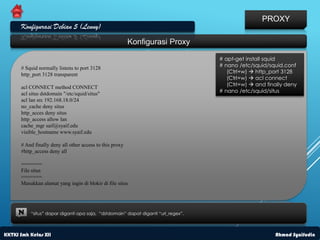
PROXY
      Konfigurasi Debian 5 (Lenny)
                                                          Konfigurasi Proxy

                                                                                   # apt-get install squid
      # Squid normally listens to port 3128                                        # nano /etc/squid/squid.conf
                                                                                      (Ctrl+w)  http_port 3128
      http_port 3128 transparent
                                                                                      (Ctrl+w)  acl connect
                                                                                      (Ctrl+w)  and finally deny
      acl CONNECT method CONNECT
      acl situs dstdomain "/etc/squid/situs"                                       # nano /etc/squid/situs
      acl lan src 192.168.18.0/24
      no_cache deny situs
      http_acces deny situs
      http_access allow lan
      cache_mgr saif@syaif.edu
      visible_hostname www.syaif.edu

      # And finally deny all other access to this proxy
      #http_access deny all

      =======
      File situs
      =======
      Masukkan alamat yang ingin di blokir di file situs


     N    “situs” dapar diganti apa saja, “dstdomain” dapat diganti “url_regex”.


KKTKJ Smk Kelas XII                                                                                     Ahmad Syaifudin
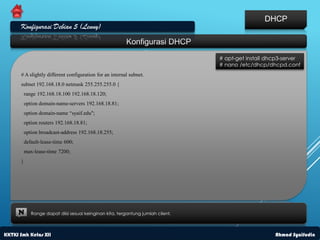
DHCP
      Konfigurasi Debian 5 (Lenny)
                                                         Konfigurasi DHCP
                                                                                  # apt-get install dhcp3-server
                                                                                  # nano /etc/dhcp/dhcpd.conf
      # A slightly different configuration for an internal subnet.
      subnet 192.168.18.0 netmask 255.255.255.0 {
          range 192.168.18.100 192.168.18.120;
          option domain-name-servers 192.168.18.81;
          option domain-name “syaif.edu";
          option routers 192.168.18.81;
          option broadcast-address 192.168.18.255;
          default-lease-time 600;
          max-lease-time 7200;
      }


     N       Range dapat diisi sesuai keinginan kita, tergantung jumlah client.


KKTKJ Smk Kelas XII                                                                                   Ahmad Syaifudin
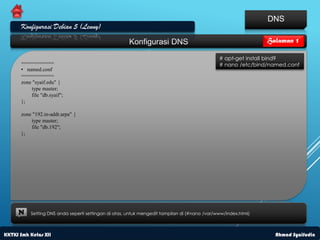
DNS
      Konfigurasi Debian 5 (Lenny)
                                                      Konfigurasi DNS                                          Halaman 1

                                                                                              # apt-get install bind9
      ===========                                                                             # nano /etc/bind/named.conf
      • named.conf
      ===========
      zone "syaif.edu" {
          type master;
          file "db.syaif";
      };

      zone "192.in-addr.arpa" {
          type master;
          file "db.192";
      };


     N    Setting DNS anda seperti settingan di atas, untuk mengedit tampilan di (#nano /var/www/index.html)


KKTKJ Smk Kelas XII                                                                                              Ahmad Syaifudin
DNS
      Konfigurasi Debian 5 (Lenny)
                                                       Konfigurasi DNS                                      Halaman 2

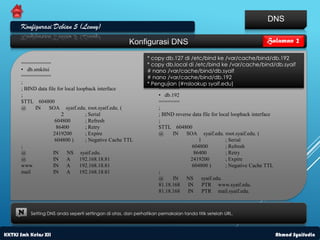
                                                               * copy db.127 di /etc/bind ke /var/cache/bind/db.192
      ==========                                               * copy db.local di /etc/bind ke /var/cache/bind/db.syaif
      • db.smkitsi                                             # nano /var/cache/bind/db.syaif
      ==========                                               # nano /var/cache/bind/db.192
      ;                                                        * Pengujian (#nslookup syaif.edu)
      ; BIND data file for local loopback interface                =======
      ;                                                            • db.192
      $TTL 604800                                                  =======
      @     IN    SOA syaif.edu. root.syaif.edu. (                 ;
                         2           ; Serial                      ; BIND reverse data file for local loopback interface
                      604800         ; Refresh                     ;
                       86400         ; Retry                       $TTL 604800
                     2419200         ; Expire                      @     IN    SOA syaif.edu. root.syaif.edu. (
                      604800 )       ; Negative Cache TTL                            1             ; Serial
      ;                                                                           604800           ; Refresh
      @              IN     NS syaif.edu.                                          86400           ; Retry
      @              IN A          192.168.18.81                                 2419200           ; Expire
      www            IN A          192.168.18.81                                  604800 )         ; Negative Cache TTL
      mail           IN A          192.168.18.81                   ;
                                                                   @     IN    NS syaif.edu.
                                                                   81.18.168 IN        PTR www.syaif.edu.
                                                                   81.18.168 IN        PTR mail.syaif.edu.


     N    Setting DNS anda seperti settingan di atas, dan perhatikan pemakaian tanda titik setelah URL.


KKTKJ Smk Kelas XII                                                                                             Ahmad Syaifudin
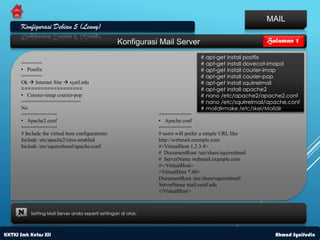
MAIL
      Konfigurasi Debian 5 (Lenny)
                                                   Konfigurasi Mail Server                                Halaman 1

                                                                                  # apt-get install postfix
      =======                                                                     # apt-get install dovecot-imapd
      • Postfix                                                                   # apt-get install courier-imap
      =======                                                                     # apt-get install courier-pop
      Ok  Internet Site  syaif.edu                                              # apt-get install squirrelmail
      ===================                                                         # apt-get install apache2
      • Courier-imap courier-pop                                                  # nano /etc/apache2/apache2.conf
      ====================                                                        # nano /etc/squirrelmail/apache.conf
      No                                                                          # maildirmake /etc/skel/Maildir
      ============                                              ===========
      • Apache2.conf                                            • Apache.conf
      ============                                              ===========
      # Include the virtual host configurations:                # users will prefer a simple URL like
      Include /etc/apache2/sites-enabled                        http://webmail.example.com
      Include /etc/squirrelmail/apache.conf                     #<VirtualHost 1.2.3.4>
                                                                # DocumentRoot /usr/share/squirrelmail
                                                                # ServerName webmail.example.com
                                                                #</VirtualHost>
                                                                <VirtualHost *:80>
                                                                DocumentRoot /usr/share/squirrelmail
                                                                ServerName mail.syaif.edu
                                                                </VirtualHost>


     N    Setting Mail Server anda seperti settingan di atas.


KKTKJ Smk Kelas XII                                                                                          Ahmad Syaifudin
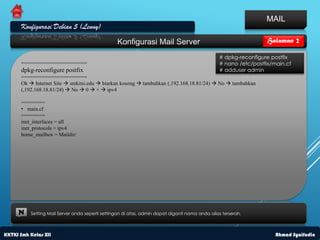
MAIL
      Konfigurasi Debian 5 (Lenny)
                                                 Konfigurasi Mail Server                                         Halaman 2

                                                                                                # dpkg-reconfigure postfix
      ======================                                                                    # nano /etc/postfix/main.cf
      dpkg-reconfigure postfix                                                                  # adduser admin
      ======================
      Ok  Internet Site  smkitsi.edu  biarkan kosong  tambahkan (,192.168.18.81/24)  No  tambahkan
      (,192.168.18.81/24)  No  0  +  ipv4

      ========
      • main.cf
      ========
      inet_interfaces = all
      inet_protocols = ipv4
      home_mailbox = Maildir/


     N    Setting Mail Server anda seperti settingan di atas, admin dapat diganti nama anda alias terserah.


KKTKJ Smk Kelas XII                                                                                                  Ahmad Syaifudin

Ahmad-debian

  • 1.
    26 Januari 2012 EXIT INTERFAC ROUTING PROXY DHCP DNS MAIL E KONFIGURASI DEBIAN 5 Debian Lenny
  • 2.
    INTERFACE Konfigurasi Debian 5 (Lenny) Konfigurasi NIC # nano /etc/network/interfaces # The loopback network interface auto lo iface lo inet loopback # The primary network interface auto eth0 iface eth0 inet static address 192.168.4.118 netmask 255.255.255.0 network 192.168.4.0 broadcast 192.168.4.255 gateway 192.168.4.1 # dns-* options are implemented by the resolvconf package, if installed dns-nameservers 192.168.18.81 dns-search syaif.edu auto eth1 iface eth1 inet static address 192.168.18.81 netmask 255.255.255.0 network 192.168.18.0 broadcast 192.168.18.255 N Tambahkan settingan seperti contoh di atas pada konfigurasi NIC anda. KKTKJ Smk Kelas XII Ahmad Syaifudin
  • 3.
    ROUTING Konfigurasi Debian 5 (Lenny) Konfigurasi Router # nano /etc/rc.local ======== # nano /etc/sysctl.conf • rc.local # nano /etc/resolv.conf ======== iptables -t nat -A POSTROUTING -o eth0 -j MASQUERADE iptables -t nat -A PREROUTING -s 192.168.18.0/24 -p tcp --dport 80 -j REDIRECT --to-ports 3128 echo "1" > /proc/sys/net/ipv4/ip_forward ========== • sysctl.conf ========== net.ipv4.ip_forward = 1 (hilangkan tanda pagarnya) ========== • resolv.conf ========== search syaif.edu nameserver 192.168.18.81 nameserver 192.168.4.1 N Tambahkan settingan seperti contoh di atas pada konfigurasi PC-Router anda. KKTKJ Smk Kelas XII Ahmad Syaifudin
  • 4.
    PROXY Konfigurasi Debian 5 (Lenny) Konfigurasi Proxy # apt-get install squid # Squid normally listens to port 3128 # nano /etc/squid/squid.conf (Ctrl+w)  http_port 3128 http_port 3128 transparent (Ctrl+w)  acl connect (Ctrl+w)  and finally deny acl CONNECT method CONNECT acl situs dstdomain "/etc/squid/situs" # nano /etc/squid/situs acl lan src 192.168.18.0/24 no_cache deny situs http_acces deny situs http_access allow lan cache_mgr saif@syaif.edu visible_hostname www.syaif.edu # And finally deny all other access to this proxy #http_access deny all ======= File situs ======= Masukkan alamat yang ingin di blokir di file situs N “situs” dapar diganti apa saja, “dstdomain” dapat diganti “url_regex”. KKTKJ Smk Kelas XII Ahmad Syaifudin
  • 5.
    DHCP Konfigurasi Debian 5 (Lenny) Konfigurasi DHCP # apt-get install dhcp3-server # nano /etc/dhcp/dhcpd.conf # A slightly different configuration for an internal subnet. subnet 192.168.18.0 netmask 255.255.255.0 { range 192.168.18.100 192.168.18.120; option domain-name-servers 192.168.18.81; option domain-name “syaif.edu"; option routers 192.168.18.81; option broadcast-address 192.168.18.255; default-lease-time 600; max-lease-time 7200; } N Range dapat diisi sesuai keinginan kita, tergantung jumlah client. KKTKJ Smk Kelas XII Ahmad Syaifudin
  • 6.
    DNS Konfigurasi Debian 5 (Lenny) Konfigurasi DNS Halaman 1 # apt-get install bind9 =========== # nano /etc/bind/named.conf • named.conf =========== zone "syaif.edu" { type master; file "db.syaif"; }; zone "192.in-addr.arpa" { type master; file "db.192"; }; N Setting DNS anda seperti settingan di atas, untuk mengedit tampilan di (#nano /var/www/index.html) KKTKJ Smk Kelas XII Ahmad Syaifudin
  • 7.
    DNS Konfigurasi Debian 5 (Lenny) Konfigurasi DNS Halaman 2 * copy db.127 di /etc/bind ke /var/cache/bind/db.192 ========== * copy db.local di /etc/bind ke /var/cache/bind/db.syaif • db.smkitsi # nano /var/cache/bind/db.syaif ========== # nano /var/cache/bind/db.192 ; * Pengujian (#nslookup syaif.edu) ; BIND data file for local loopback interface ======= ; • db.192 $TTL 604800 ======= @ IN SOA syaif.edu. root.syaif.edu. ( ; 2 ; Serial ; BIND reverse data file for local loopback interface 604800 ; Refresh ; 86400 ; Retry $TTL 604800 2419200 ; Expire @ IN SOA syaif.edu. root.syaif.edu. ( 604800 ) ; Negative Cache TTL 1 ; Serial ; 604800 ; Refresh @ IN NS syaif.edu. 86400 ; Retry @ IN A 192.168.18.81 2419200 ; Expire www IN A 192.168.18.81 604800 ) ; Negative Cache TTL mail IN A 192.168.18.81 ; @ IN NS syaif.edu. 81.18.168 IN PTR www.syaif.edu. 81.18.168 IN PTR mail.syaif.edu. N Setting DNS anda seperti settingan di atas, dan perhatikan pemakaian tanda titik setelah URL. KKTKJ Smk Kelas XII Ahmad Syaifudin
  • 8.
    MAIL Konfigurasi Debian 5 (Lenny) Konfigurasi Mail Server Halaman 1 # apt-get install postfix ======= # apt-get install dovecot-imapd • Postfix # apt-get install courier-imap ======= # apt-get install courier-pop Ok  Internet Site  syaif.edu # apt-get install squirrelmail =================== # apt-get install apache2 • Courier-imap courier-pop # nano /etc/apache2/apache2.conf ==================== # nano /etc/squirrelmail/apache.conf No # maildirmake /etc/skel/Maildir ============ =========== • Apache2.conf • Apache.conf ============ =========== # Include the virtual host configurations: # users will prefer a simple URL like Include /etc/apache2/sites-enabled http://webmail.example.com Include /etc/squirrelmail/apache.conf #<VirtualHost 1.2.3.4> # DocumentRoot /usr/share/squirrelmail # ServerName webmail.example.com #</VirtualHost> <VirtualHost *:80> DocumentRoot /usr/share/squirrelmail ServerName mail.syaif.edu </VirtualHost> N Setting Mail Server anda seperti settingan di atas. KKTKJ Smk Kelas XII Ahmad Syaifudin
  • 9.
    MAIL Konfigurasi Debian 5 (Lenny) Konfigurasi Mail Server Halaman 2 # dpkg-reconfigure postfix ====================== # nano /etc/postfix/main.cf dpkg-reconfigure postfix # adduser admin ====================== Ok  Internet Site  smkitsi.edu  biarkan kosong  tambahkan (,192.168.18.81/24)  No  tambahkan (,192.168.18.81/24)  No  0  +  ipv4 ======== • main.cf ======== inet_interfaces = all inet_protocols = ipv4 home_mailbox = Maildir/ N Setting Mail Server anda seperti settingan di atas, admin dapat diganti nama anda alias terserah. KKTKJ Smk Kelas XII Ahmad Syaifudin