NFS Tuning for Oracle

                                                           Kyle Hailey
http://dboptimizer.com                                      Aug 2011


          COPYRIGHT © 2011 DELPHIX CORP. ALL RIGHTS RESERVED. STRICTLY CONFIDENTIAL.
Intro
 Who am I
    why NFS interests me
 DAS / NAS / SAN
    Throughput
    Latency
 NFS configuration issues*
    Network topology
    TCP config
    NFS Mount Options


* for non-RAC, non-dNFS
                     http://dboptimizer.com
Who is Kyle Hailey

 1990 Oracle
      90 support
      92 Ported v6
      93 France
      95 Benchmarking
      98 ST Real World Performance

 2000 Dot.Com
 2001 Quest
 2002 Oracle OEM 10g                 Success!
                                      First successful OEM design
Who is Kyle Hailey

 1990 Oracle
       90 support
       92 Ported v6
       93 France
       95 Benchmarking
       98 ST Real World Performance

   2000 Dot.Com
   2001 Quest
   2002 Oracle OEM 10g
   2005 Embarcadero
     DB Optimizer
 Delphix

When not being a Geek
  - Have a little 2 year old boy who takes up all my time
  - and wonder how I missed the dot.com millions
Fast, Non-disruptive Deployment


Production            Development      Q/A               Reporting                 UAT


           Sync via
          standard
              APIs
        1 TB
                            1 TB             1 TB                 1 TB                   1 TB
                                                      Provision and refresh
                                                NFS
                                                      from any time or SCN


                                    300MB


5                            http://dboptimizer.com                           >> Strictly Confidential
Combine Prod Support and DR
                            R/3 ERP    BW         CRM       GTS    T&E   Sales CRM


                                              Production SAP Landscape


                              PRIMARY DATACENTER

R/3 ERP   BW       CRM        GTS       T&E   Sales CRM


               Standby via DataGuard


                 Dev: Prod Support


                 QA: Prod Support


                    Dev: Project


                    QA: Project


  6                                         http://dboptimizer.com                   >> Strictly Confidential
Which to use?


                http://dboptimizer.com
DAS is out of the picture


                    http://dboptimizer.com
Fibre Channel


                http://dboptimizer.com
http://dboptimizer.com
NFS - available everywhere


                  http://dboptimizer.com
NFS is attractive but is it fast enough?


                    http://dboptimizer.com
DAS vs NAS vs SAN


     attach   Agile expensiv maintenanc spee
                    e        e          d
DAS SCSI      no        no               difficult   fast

NAS NFS -    yes        no               easy        ??
    Ethernet
SAN Fibre   yes         yes              difficult   fast
    Channel


                     http://dboptimizer.com
speed

Ethernet
• 100Mb 1994
• 1GbE - 1998
• 10GbE – 2003
• 40GbE – est. 2012
• 100GE –est. 2013

Fibre Channel
• 1G 1998
• 2G 2003
• 4G – 2005
• 8G – 2008
• 16G – 2011


                      http://dboptimizer.com
Ethernet vs Fibre Channel


                   http://dboptimizer.com
Throughput vs Latency


                  http://dboptimizer.com
Throughput : netio
8b = 1Bytes

 100MbE  ~= 10MB/sec
 1GbE     ~= 100MB/sec (125MB/sec max)
    30-60MB/sec typical, single threaded, mtu 1500
    90-115MB clean topology                                        Throughput
                                                                    like Size of
 10GbE       ~= 1GB/sec                                            pipe

 Server machine
  netio -s -b 32k -t -p 1234
  Target
  netio -b 32k -t -p 1234 delphix_machine
  Receiving from client, packet size 32k ... 104.37 MByte/s
  Sending to client, packet size 32k ... 109.27 MByte/s
  Done.


 ./netperf  -4  -H 172.16.101.234 --l 60 -- -s 1024K -S 1024K -m 1024K
Wire Speed – where is the hold up?


                    ms       us        ns
            0.000 000 000
                                                  Wire 5ns/m
                                                  RAM
                                        Physical 8K random disk read 6-8ms
  Light travels at 0.3m/ns              Physical small write 1-2ms sequential
  If wire speed is 0.2m/ns

  Data Center 10m = 50ns

  LA to London is 30ms
  LA to SF is 3ms
  (5us/km)

                         http://dboptimizer.com
4G FC vs 10GbE


Why would FC be faster?
8K block transfer times

        8GB FC = 10us

        10G Ethernet= 8us


                      http://dboptimizer.com
More stack more latency


                                           dNFS

                                           NFS only
                                           Not on FC


                  http://dboptimizer.com
Oracle and SUN benchmark


          200us overhead more for NFS


* I see 350us without Jumbo frames, and up to 1ms because of network topology


               8K blocks 1GbE with Jumbo Frames , Solaris 9, Oracle 9.2
               Database Performance with NAS: Optimizing Oracle on NFS
               Revised May 2009 | TR-3322
               http://media.netapp.com/documents/tr-3322.pdf
                                http://dboptimizer.com
8K block NFS latency overhead

1GbE/sec = 8K in 80us

 1GbE -> 80us
 4GbE -> 20us
 10GbE -> 8us

 80-8 = 72 us difference
 200 -72 = 128us
 200us on 1GbE => 128us on 10GbE


  (0.128ms/6ms) * 100 = 2% latency increase over
  DAS*
                    http://dboptimizer.com
NFS why the bad reputation?
 Given 2 % overhead why the reputation?
 Historically slower
 Setup can make a big difference
   1. Network topology and load
   2. NFS mount options
   3. TCP configuration
 Compounding issues
    Oracle configuration
    I/O subsystem response


                     http://dboptimizer.com
Network Topology


 Hubs
 Routers
 Switches

 Hardware mismatch
 Network Load


                   http://dboptimizer.com
HUBs

  Laye Name
  r
   7        Application
   6        Presentation
   5        Session
   4        Transport
   3        Network      Routers IP addr
   2        Datalink     Switches mac addr
• Broadcast, repeaters Hubs
   1        Physical              Wire
• Risk collisions
• Bandwidth contention
                  http://dboptimizer.com
Routers
 Routers can add 300-500us latency
 If NFS latency is 350us (typical non-tuned) system
 Then each router multiplies latency 2x, 3x, 4x etc


          Layer Name
          3     Network            Routers    IP addr
          2     Datalink           Switches   mac addr
          1     Physical           Hubs       Wire


                           http://dboptimizer.com
Routers: traceroute
$$ traceroute 101.88.123.95
    traceroute 101.88.123.195
 1 101.88.229.181 (101.88.229.181) 0.7610.579
  1 101.88.229.181 (101.88.229.181) 0.761 ms ms   0.579 ms
                                                  ms 0.493    0.493
                                                             ms       ms
 2 101.88.255.169 (101.88.255.169) 0.3100.286
  2 101.88.255.169 (101.88.255.169) 0.310 ms ms   0.286 ms
                                                  ms 0.279    0.279
                                                             ms       ms
 3 101.88.218.166 (101.88.218.166) 0.3470.300
  3 101.88.218.166 (101.88.218.166) 0.347 ms ms   0.300 ms
                                                  ms 0.986    0.986
                                                             ms       ms
 4 101.88.123.195 (101.88.123.195) 1.7041.972
  4 101.88.123.195 (101.88.123.195) 1.704 ms ms   1.972 ms
                                                  ms 1.263    1.263
                                                             ms       ms


$ traceroute 172.16.100.144
 1 172.16.100.144 (172.16.100.144)   0.226 ms     0.171 ms    0.123 ms


    3.0 ms NFS on slow network
    0.2 ms NFS good network

    6.0 ms Typical physical read
Multiple Switches
 Two types of Switches
    Store and Forward
         1GbE 50-70us
         10GbE 5-35us
    Cut through
         10GbE 300-500ns


    Layer Name
    3      Network       Routers     IP addr
    2      Datalink      Switches    mac addr
    1      Physical      Hubs        Wire

                         http://dboptimizer.com
NICs
 10GbE
 1GbE
    Intel (problems?)
    Broadcomm (ok?)


                     http://dboptimizer.com
Hardware mismatch
 Speeds and duplex are often negotiated
Example Linux: $ ethtool eth0
               Settings for eth0:
                       Advertised auto-negotiation: Yes
                       Speed: 100Mb/s
                       Duplex: Half

 Check that values are as expected


                     http://dboptimizer.com
Busy Network
 Traffic can congest network
    Caused drop packets
    Out of order packets
    Collisions on hubs, probably not with switches


                      http://dboptimizer.com
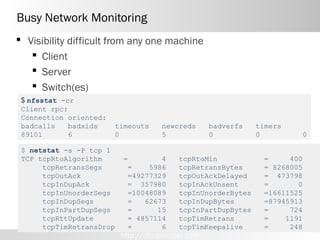
Busy Network Monitoring
 Visibility difficult from any one machine
    Client
    Server
    Switch(es)
 $ nfsstat -cr
 Client rpc:
 Connection oriented:
 badcalls    badxids    timeouts     newcreds      badverfs   timers
 89101       6          0            5             0          0            0

 $ netstat -s -P tcp 1
 TCP tcpRtoAlgorithm      =        4      tcpRtoMin            =     400
      tcpRetransSegs       =    5986      tcpRetransBytes      = 8268005
      tcpOutAck            =49277329      tcpOutAckDelayed     = 473798
      tcpInDupAck          = 357980       tcpInAckUnsent       =       0
      tcpInUnorderSegs     =10048089      tcpInUnorderBytes    =16611525
      tcpInDupSegs         =   62673      tcpInDupBytes        =87945913
      tcpInPartDupSegs     =      15      tcpInPartDupBytes    =     724
      tcpRttUpdate         = 4857114      tcpTimRetrans        =    1191
      tcpTimRetransDrop    =       6      tcpTimKeepalive      =     248
                          http://dboptimizer.com
Busy Network Testing

Netio is available here:
http://www.ars.de/ars/ars.nsf/docs/netio
On Server box
netio -s -b 32k -t -p 1234

On Target box:
 netio -b 32k -t -p 1234 delphix_machine
 NETIO - Network Throughput Benchmark, Version 1.31
 (C) 1997-2010 Kai Uwe Rommel
 TCP server listening.
 TCP connection established ...
 Receiving from client, packet size 32k ... 104.37 MByte/s
 Sending to client, packet size 32k ... 109.27  MByte/s
 Done.


                              http://dboptimizer.com
TCP Configuration


1.MTU (Jumbo Frames)
2.TCP window
3.TCP congestion window


                    http://dboptimizer.com
MTU 9000 : Jumbo Frames
 MTU – maximum Transfer Unit
   Typically 1500
   Can be set 9000
   All components have to support
       If not error and/or hangs


       Delayed
       Acknowledgement

                         http://dboptimizer.com
Jumbo Frames : MTU 9000

 8K block transfer
  Test 1                              Test 2
                                      Change MTU
                                      # ifconfig eth1 mtu 9000 up

 Default MTU 1500                      Now with MTU 900

    delta       send       recd        delta       send        recd
                       <-- 164                               <-- 164

       152       132 -->                     273      8324 -->

           40   1448 -->                Warning: MTU 9000 can hang if
                                        any of the hardware in the
           67   1448 -->                connection is configured only
                                        for MTU 1500
           66   1448 -->

           53   1448 -->http://dboptimizer.com
TCP Sockets
 Set max
    Socket
    TCP Window
 If maximum is reached, packets are dropped.


                     LINUX
                         Socket buffer sizes
                            sysctl -w net.core.wmem_max=8388608
                            sysctl -w net.core.rmem_max=8388608
                         TCP Window sizes
                            sysctl -w net.ipv4.tcp_rmem="4096 87380 8388608"
                            sysctl -w net.ipv4.tcp_wmem="4096 87380 8388608"


                      Excellent book
                     http://dboptimizer.com
Solaris
   ndd -set /dev/tcp  tcp_max_buf    8388608
    ndd -set /dev/tcp  tcp_recv_hiwat 4194304
    ndd -set /dev/tcp  tcp_xmit_hiwat 4194304
    ndd -set /dev/tcp  tcp_cwnd_max   8388608

    mdb -kw
    > nfs3_bsize/D
      nfs3_bsize:     32768
    > nfs3_bsize/W 100000
      nfs3_bsize:     0xd             =       0x100000
    >

    add it to /etc/system for use on reboot 

       set nfs:nfs3_bsize= 0x100000


                                 http://dboptimizer.com
TCP window sizes
 max data send/receive
    Subset of the TCP socket sizes

 Calculating

     = 2 * latency * throughput

 Ex, 1ms latency, 1Gb NIC

     = 2 * 1Gb/sec * 0.001s = 100Mb/sec * 1Byte/8bits= 250KB


                             http://dboptimizer.com
Congestion window

delta   bytes   bytes   unack   cong       send
us      sent    recvd   bytes   window     window

 31     1448           139760 144800     195200
 33     1448           139760 144800     195200
 29     1448           144104 146248     195200
 31          / 0        145552 144800     195200
 41     1448           145552< 147696    195200
 30          / 0        147000 > 144800   195200
 22     1448           147000    76744   195200


                                                         congestion window size is
                                                         drastically lowered


   Data collected with
     Dtrace
   But could get similar data from
     snoop (load data into wireshark)


                                http://dboptimizer.com
NFS mount options
       Forcedirectio
       Rsize / wsize
       Actimeo=0, noac


Sun Solaris   rw,bg,hard,rsize=32768,wsize=32768,vers=3,[forcedirectio or llock],nointr,proto=tcp,suid

AIX           rw,bg,hard,rsize=32768,wsize=32768,vers=3,cio,intr,timeo=600,proto=tcp

HPUX          rw,bg,hard,rsize=32768,wsize=32768,vers=3,nointr,timeo=600,proto=tcp, suid, forcedirectio

Linux         rw,bg,hard,rsize=32768,wsize=32768,vers=3,nointr,timeo=600,tcp,actimeo=0


                                        http://dboptimizer.com
Forcedirectio
 Skip UNIX cache
 read directly into SGA
 Controlled by init.ora
    Filesystemio_options=SETALL (or directio)
    Except HPUX

     Sun       Forcedirectio – sets forces directio but not required
     Solaris
               Fielsystemio_options will set directio without mount option
     AIX


     HPUX      Forcedirectio – only way to set directio

               Filesystemio_options has no affect
     Linux


                                http://dboptimizer.com
Direct I/O

Example query

   77951 physical reads , 2nd execution
   (ie when data should already be cached)


 60 secs => direct I/O
 5 secs => no direct I/O
 2 secs => SGA

 Why use direct I/O?


                         http://dboptimizer.com
Direct I/O
 Advantages
    Faster reads from disk
    Reduce CPU
    Reduce memory contention
    Faster access to data already in memory, in SGA
 Disadvantages
    Less Flexible
    More work
    Risk of paging , memory pressure
    Impossible to share memory between multiple databases
           Cache                 Rows/sec             Usr      sys
      Unix File Cache                  287,114              71    28
      SGA w/ DIO                       695,700              94     5
   http://blogs.oracle.com/glennf/entry/where_do_you_cache_oracle
                            http://dboptimizer.com
UNIX Cache
               Hits                     SGA Buffer Cache
   < 0.2 ms
                                             Hits      Miss

= UNIX Cache                                File System Cache
                                            Hits      Miss
= NAS/SAN
                 SAN Cache
                 Hits
= Disk Reads

    < 0.5 ms                                         SAN/NAS
                                         Storage Cache
                                                Hits          Miss
                  Disk Reads
                                                      Disk Reads
 Disk Read
   ~ 6ms
                                                   Hits


               http://dboptimizer.com
Direct I/O Challenges


Database Cache usage over 24 hours


            DB1                 DB2                 DB3
            Europe              US                  Asia


                           http://dboptimizer.com
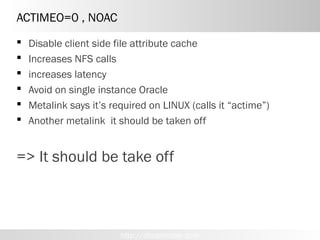
ACTIMEO=0 , NOAC
   Disable client side file attribute cache
   Increases NFS calls
   increases latency
   Avoid on single instance Oracle
   Metalink says it’s required on LINUX (calls it “actime”)
   Another metalink it should be taken off


=> It should be take off


                         http://dboptimizer.com
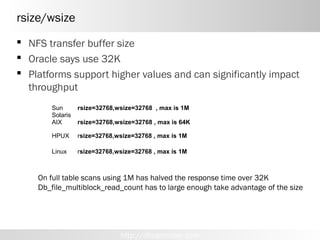
rsize/wsize
 NFS transfer buffer size
 Oracle says use 32K
 Platforms support higher values and can significantly impact
  throughput
       Sun       rsize=32768,wsize=32768 , max is 1M
       Solaris
       AIX       rsize=32768,wsize=32768 , max is 64K

       HPUX      rsize=32768,wsize=32768 , max is 1M

       Linux     rsize=32768,wsize=32768 , max is 1M


    On full table scans using 1M has halved the response time over 32K
    Db_file_multiblock_read_count has to large enough take advantage of the size


                              http://dboptimizer.com
NFS Overhead Physical vs Cached IO
                 100us extra over 6ms spindle read is small
                 100us extra over 100us cache read is 2x as slow
                 SAN cache is expensive – use it for write cache
                 Target cache is cheaper – put more on if need be
Storage
(SAN)


 Cache


     Physical


           Takeaway: Move cache to client boxes
           where it’s cheaper and quicker, save SAN cache for writeback
Conclusions
 NFS close to FC , if
    Network topology clean
    Mount
       Rsize/wsize at maximum,
       Avoid actimeo=0 and noac
       Use noactime
    Jumbo Frames
 Drawbacks
    Requires clean toplogy
    NFS failover can take 10s of seconds
    With Oracle 11g dNFS the client mount issues handled
     transparently

Conclusion: Give NFS some more love
NFS


gigabit switch can be anywhere from
10 to 50 times cheaper than an FC switch

            http://dboptimizer.com
dtrace

List the names of traceable probes:

dtrace –ln provider:module:function:name

• -l = list instead of enable probes
• -n = Specify probe name to trace or  list
• -v = Set verbose mode
                                         Example
                                         dtrace –ln tcp:::send
                                         $ dtrace -lvn tcp:::receive
                                          5473 tcp ip tcp_output send

                                           Argument Types
                                               args[0]: pktinfo_t *
                                               args[1]: csinfo_t *
                                               args[2]: ipinfo_t *
                                               args[3]: tcpsinfo_t *
                                               args[4]: tcpinfo_t *


                               http://dboptimizer.com
http://cvs.opensolaris.org/source/


                http://dboptimizer.com
http://dboptimizer.com
Dtrace
tcp:::send, tcp:::receive
{   delta= timestamp-walltime;
    walltime=timestamp;
    printf("%6d %6d %6d %8d  %8s %8d %8d %8d %8d %d n",
        args[3]->tcps_snxt - args[3]->tcps_suna ,
        args[3]->tcps_rnxt - args[3]->tcps_rack,
        delta/1000,
        args[2]->ip_plength - args[4]->tcp_offset,
        "",
        args[3]->tcps_swnd,
        args[3]->tcps_rwnd,
        args[3]->tcps_cwnd,
        args[3]->tcps_retransmit
      );
}
tcp:::receive
{     delta=timestamp-walltime;
      walltime=timestamp;
      printf("%6d %6d %6d %8s / %-8d %8d %8d %8d %8d %d n",
        args[3]->tcps_snxt - args[3]->tcps_suna ,
        args[3]->tcps_rnxt - args[3]->tcps_rack,
        delta/1000,
        "",
        args[2]->ip_plength - args[4]->tcp_offset,
        args[3]->tcps_swnd,
        args[3]->tcps_rwnd,
        args[3]->tcps_cwnd,
        args[3]->tcps_retransmit
      );
}

                            http://dboptimizer.com

NFS and Oracle

  • 1.
    NFS Tuning forOracle Kyle Hailey http://dboptimizer.com Aug 2011 COPYRIGHT © 2011 DELPHIX CORP. ALL RIGHTS RESERVED. STRICTLY CONFIDENTIAL.
  • 2.
    Intro  Who amI  why NFS interests me  DAS / NAS / SAN  Throughput  Latency  NFS configuration issues*  Network topology  TCP config  NFS Mount Options * for non-RAC, non-dNFS http://dboptimizer.com
  • 3.
    Who is KyleHailey  1990 Oracle  90 support  92 Ported v6  93 France  95 Benchmarking  98 ST Real World Performance  2000 Dot.Com  2001 Quest  2002 Oracle OEM 10g Success! First successful OEM design
  • 4.
    Who is KyleHailey  1990 Oracle  90 support  92 Ported v6  93 France  95 Benchmarking  98 ST Real World Performance  2000 Dot.Com  2001 Quest  2002 Oracle OEM 10g  2005 Embarcadero  DB Optimizer  Delphix When not being a Geek - Have a little 2 year old boy who takes up all my time - and wonder how I missed the dot.com millions
  • 5.
    Fast, Non-disruptive Deployment Production Development Q/A Reporting UAT Sync via standard APIs 1 TB 1 TB 1 TB 1 TB 1 TB Provision and refresh NFS from any time or SCN 300MB 5 http://dboptimizer.com >> Strictly Confidential
  • 6.
    Combine Prod Supportand DR R/3 ERP BW CRM GTS T&E Sales CRM Production SAP Landscape PRIMARY DATACENTER R/3 ERP BW CRM GTS T&E Sales CRM Standby via DataGuard Dev: Prod Support QA: Prod Support Dev: Project QA: Project 6 http://dboptimizer.com >> Strictly Confidential
  • 7.
    Which to use? http://dboptimizer.com
  • 8.
    DAS is outof the picture http://dboptimizer.com
  • 9.
    Fibre Channel http://dboptimizer.com
  • 10.
  • 11.
    NFS - availableeverywhere http://dboptimizer.com
  • 12.
    NFS is attractivebut is it fast enough? http://dboptimizer.com
  • 13.
    DAS vs NASvs SAN attach Agile expensiv maintenanc spee e e d DAS SCSI no no difficult fast NAS NFS - yes no easy ?? Ethernet SAN Fibre yes yes difficult fast Channel http://dboptimizer.com
  • 14.
    speed Ethernet • 100Mb 1994 •1GbE - 1998 • 10GbE – 2003 • 40GbE – est. 2012 • 100GE –est. 2013 Fibre Channel • 1G 1998 • 2G 2003 • 4G – 2005 • 8G – 2008 • 16G – 2011 http://dboptimizer.com
  • 15.
    Ethernet vs FibreChannel http://dboptimizer.com
  • 16.
    Throughput vs Latency http://dboptimizer.com
  • 17.
    Throughput : netio 8b= 1Bytes  100MbE  ~= 10MB/sec  1GbE ~= 100MB/sec (125MB/sec max)  30-60MB/sec typical, single threaded, mtu 1500  90-115MB clean topology Throughput like Size of  10GbE ~= 1GB/sec pipe Server machine netio -s -b 32k -t -p 1234 Target netio -b 32k -t -p 1234 delphix_machine Receiving from client, packet size 32k ... 104.37 MByte/s Sending to client, packet size 32k ... 109.27 MByte/s Done. ./netperf  -4  -H 172.16.101.234 --l 60 -- -s 1024K -S 1024K -m 1024K
  • 18.
    Wire Speed –where is the hold up? ms us ns 0.000 000 000 Wire 5ns/m RAM Physical 8K random disk read 6-8ms Light travels at 0.3m/ns Physical small write 1-2ms sequential If wire speed is 0.2m/ns Data Center 10m = 50ns LA to London is 30ms LA to SF is 3ms (5us/km) http://dboptimizer.com
  • 19.
    4G FC vs10GbE Why would FC be faster? 8K block transfer times  8GB FC = 10us  10G Ethernet= 8us http://dboptimizer.com
  • 20.
    More stack morelatency dNFS NFS only Not on FC http://dboptimizer.com
  • 21.
    Oracle and SUNbenchmark 200us overhead more for NFS * I see 350us without Jumbo frames, and up to 1ms because of network topology 8K blocks 1GbE with Jumbo Frames , Solaris 9, Oracle 9.2 Database Performance with NAS: Optimizing Oracle on NFS Revised May 2009 | TR-3322 http://media.netapp.com/documents/tr-3322.pdf http://dboptimizer.com
  • 22.
    8K block NFSlatency overhead 1GbE/sec = 8K in 80us  1GbE -> 80us  4GbE -> 20us  10GbE -> 8us  80-8 = 72 us difference  200 -72 = 128us  200us on 1GbE => 128us on 10GbE (0.128ms/6ms) * 100 = 2% latency increase over DAS* http://dboptimizer.com
  • 23.
    NFS why thebad reputation?  Given 2 % overhead why the reputation?  Historically slower  Setup can make a big difference 1. Network topology and load 2. NFS mount options 3. TCP configuration  Compounding issues  Oracle configuration  I/O subsystem response http://dboptimizer.com
  • 24.
    Network Topology  Hubs Routers  Switches  Hardware mismatch  Network Load http://dboptimizer.com
  • 25.
    HUBs LayeName r 7 Application 6 Presentation 5 Session 4 Transport 3 Network Routers IP addr 2 Datalink Switches mac addr • Broadcast, repeaters Hubs 1 Physical Wire • Risk collisions • Bandwidth contention http://dboptimizer.com
  • 26.
    Routers  Routers canadd 300-500us latency  If NFS latency is 350us (typical non-tuned) system  Then each router multiplies latency 2x, 3x, 4x etc Layer Name 3 Network Routers IP addr 2 Datalink Switches mac addr 1 Physical Hubs Wire http://dboptimizer.com
  • 27.
    Routers: traceroute $$ traceroute101.88.123.95 traceroute 101.88.123.195 1 101.88.229.181 (101.88.229.181) 0.7610.579 1 101.88.229.181 (101.88.229.181) 0.761 ms ms 0.579 ms ms 0.493 0.493 ms ms 2 101.88.255.169 (101.88.255.169) 0.3100.286 2 101.88.255.169 (101.88.255.169) 0.310 ms ms 0.286 ms ms 0.279 0.279 ms ms 3 101.88.218.166 (101.88.218.166) 0.3470.300 3 101.88.218.166 (101.88.218.166) 0.347 ms ms 0.300 ms ms 0.986 0.986 ms ms 4 101.88.123.195 (101.88.123.195) 1.7041.972 4 101.88.123.195 (101.88.123.195) 1.704 ms ms 1.972 ms ms 1.263 1.263 ms ms $ traceroute 172.16.100.144 1 172.16.100.144 (172.16.100.144) 0.226 ms 0.171 ms 0.123 ms 3.0 ms NFS on slow network 0.2 ms NFS good network 6.0 ms Typical physical read
  • 28.
    Multiple Switches  Twotypes of Switches  Store and Forward  1GbE 50-70us  10GbE 5-35us  Cut through  10GbE 300-500ns Layer Name 3 Network Routers IP addr 2 Datalink Switches mac addr 1 Physical Hubs Wire http://dboptimizer.com
  • 29.
    NICs  10GbE  1GbE  Intel (problems?)  Broadcomm (ok?) http://dboptimizer.com
  • 30.
    Hardware mismatch  Speedsand duplex are often negotiated Example Linux: $ ethtool eth0 Settings for eth0: Advertised auto-negotiation: Yes Speed: 100Mb/s Duplex: Half  Check that values are as expected http://dboptimizer.com
  • 31.
    Busy Network  Trafficcan congest network  Caused drop packets  Out of order packets  Collisions on hubs, probably not with switches http://dboptimizer.com
  • 32.
    Busy Network Monitoring Visibility difficult from any one machine  Client  Server  Switch(es) $ nfsstat -cr Client rpc: Connection oriented: badcalls badxids timeouts newcreds badverfs timers 89101 6 0 5 0 0 0 $ netstat -s -P tcp 1 TCP tcpRtoAlgorithm = 4 tcpRtoMin = 400 tcpRetransSegs = 5986 tcpRetransBytes = 8268005 tcpOutAck =49277329 tcpOutAckDelayed = 473798 tcpInDupAck = 357980 tcpInAckUnsent = 0 tcpInUnorderSegs =10048089 tcpInUnorderBytes =16611525 tcpInDupSegs = 62673 tcpInDupBytes =87945913 tcpInPartDupSegs = 15 tcpInPartDupBytes = 724 tcpRttUpdate = 4857114 tcpTimRetrans = 1191 tcpTimRetransDrop = 6 tcpTimKeepalive = 248 http://dboptimizer.com
  • 33.
    Busy Network Testing Netiois available here: http://www.ars.de/ars/ars.nsf/docs/netio On Server box netio -s -b 32k -t -p 1234 On Target box: netio -b 32k -t -p 1234 delphix_machine NETIO - Network Throughput Benchmark, Version 1.31 (C) 1997-2010 Kai Uwe Rommel TCP server listening. TCP connection established ... Receiving from client, packet size 32k ... 104.37 MByte/s Sending to client, packet size 32k ... 109.27  MByte/s Done. http://dboptimizer.com
  • 34.
    TCP Configuration 1.MTU (JumboFrames) 2.TCP window 3.TCP congestion window http://dboptimizer.com
  • 35.
    MTU 9000 :Jumbo Frames  MTU – maximum Transfer Unit  Typically 1500  Can be set 9000  All components have to support  If not error and/or hangs Delayed Acknowledgement http://dboptimizer.com
  • 36.
    Jumbo Frames :MTU 9000 8K block transfer Test 1 Test 2 Change MTU # ifconfig eth1 mtu 9000 up Default MTU 1500 Now with MTU 900 delta send recd delta send recd <-- 164 <-- 164 152 132 --> 273 8324 --> 40 1448 --> Warning: MTU 9000 can hang if any of the hardware in the 67 1448 --> connection is configured only for MTU 1500 66 1448 --> 53 1448 -->http://dboptimizer.com
  • 37.
    TCP Sockets  Setmax  Socket  TCP Window  If maximum is reached, packets are dropped.  LINUX  Socket buffer sizes  sysctl -w net.core.wmem_max=8388608  sysctl -w net.core.rmem_max=8388608  TCP Window sizes  sysctl -w net.ipv4.tcp_rmem="4096 87380 8388608"  sysctl -w net.ipv4.tcp_wmem="4096 87380 8388608" Excellent book http://dboptimizer.com
  • 38.
    Solaris  ndd -set /dev/tcp  tcp_max_buf    8388608   ndd -set /dev/tcp  tcp_recv_hiwat 4194304   ndd -set /dev/tcp  tcp_xmit_hiwat 4194304   ndd -set /dev/tcp  tcp_cwnd_max   8388608 mdb -kw > nfs3_bsize/D nfs3_bsize:     32768 > nfs3_bsize/W 100000 nfs3_bsize:     0xd             =       0x100000 > add it to /etc/system for use on reboot     set nfs:nfs3_bsize= 0x100000 http://dboptimizer.com
  • 39.
    TCP window sizes max data send/receive  Subset of the TCP socket sizes Calculating = 2 * latency * throughput Ex, 1ms latency, 1Gb NIC = 2 * 1Gb/sec * 0.001s = 100Mb/sec * 1Byte/8bits= 250KB http://dboptimizer.com
  • 40.
    Congestion window delta bytes bytes unack cong send us sent recvd bytes window window 31 1448 139760 144800 195200 33 1448 139760 144800 195200 29 1448 144104 146248 195200 31 / 0 145552 144800 195200 41 1448 145552< 147696 195200 30 / 0 147000 > 144800 195200 22 1448 147000 76744 195200 congestion window size is drastically lowered Data collected with Dtrace But could get similar data from snoop (load data into wireshark) http://dboptimizer.com
  • 41.
    NFS mount options  Forcedirectio  Rsize / wsize  Actimeo=0, noac Sun Solaris rw,bg,hard,rsize=32768,wsize=32768,vers=3,[forcedirectio or llock],nointr,proto=tcp,suid AIX rw,bg,hard,rsize=32768,wsize=32768,vers=3,cio,intr,timeo=600,proto=tcp HPUX rw,bg,hard,rsize=32768,wsize=32768,vers=3,nointr,timeo=600,proto=tcp, suid, forcedirectio Linux rw,bg,hard,rsize=32768,wsize=32768,vers=3,nointr,timeo=600,tcp,actimeo=0 http://dboptimizer.com
  • 42.
    Forcedirectio  Skip UNIXcache  read directly into SGA  Controlled by init.ora  Filesystemio_options=SETALL (or directio)  Except HPUX Sun Forcedirectio – sets forces directio but not required Solaris Fielsystemio_options will set directio without mount option AIX HPUX Forcedirectio – only way to set directio Filesystemio_options has no affect Linux http://dboptimizer.com
  • 43.
    Direct I/O Example query 77951 physical reads , 2nd execution (ie when data should already be cached)  60 secs => direct I/O  5 secs => no direct I/O  2 secs => SGA  Why use direct I/O? http://dboptimizer.com
  • 44.
    Direct I/O  Advantages  Faster reads from disk  Reduce CPU  Reduce memory contention  Faster access to data already in memory, in SGA  Disadvantages  Less Flexible  More work  Risk of paging , memory pressure  Impossible to share memory between multiple databases Cache Rows/sec Usr sys Unix File Cache 287,114 71 28 SGA w/ DIO 695,700 94 5 http://blogs.oracle.com/glennf/entry/where_do_you_cache_oracle http://dboptimizer.com
  • 45.
    UNIX Cache Hits SGA Buffer Cache < 0.2 ms Hits Miss = UNIX Cache File System Cache Hits Miss = NAS/SAN SAN Cache Hits = Disk Reads < 0.5 ms SAN/NAS Storage Cache Hits Miss Disk Reads Disk Reads Disk Read ~ 6ms Hits http://dboptimizer.com
  • 46.
    Direct I/O Challenges DatabaseCache usage over 24 hours DB1 DB2 DB3 Europe US Asia http://dboptimizer.com
  • 47.
    ACTIMEO=0 , NOAC  Disable client side file attribute cache  Increases NFS calls  increases latency  Avoid on single instance Oracle  Metalink says it’s required on LINUX (calls it “actime”)  Another metalink it should be taken off => It should be take off http://dboptimizer.com
  • 48.
    rsize/wsize  NFS transferbuffer size  Oracle says use 32K  Platforms support higher values and can significantly impact throughput Sun rsize=32768,wsize=32768 , max is 1M Solaris AIX rsize=32768,wsize=32768 , max is 64K HPUX rsize=32768,wsize=32768 , max is 1M Linux rsize=32768,wsize=32768 , max is 1M On full table scans using 1M has halved the response time over 32K Db_file_multiblock_read_count has to large enough take advantage of the size http://dboptimizer.com
  • 49.
    NFS Overhead Physicalvs Cached IO 100us extra over 6ms spindle read is small 100us extra over 100us cache read is 2x as slow SAN cache is expensive – use it for write cache Target cache is cheaper – put more on if need be Storage (SAN) Cache Physical Takeaway: Move cache to client boxes where it’s cheaper and quicker, save SAN cache for writeback
  • 50.
    Conclusions  NFS closeto FC , if  Network topology clean  Mount  Rsize/wsize at maximum,  Avoid actimeo=0 and noac  Use noactime  Jumbo Frames  Drawbacks  Requires clean toplogy  NFS failover can take 10s of seconds  With Oracle 11g dNFS the client mount issues handled transparently Conclusion: Give NFS some more love
  • 51.
    NFS gigabit switch canbe anywhere from 10 to 50 times cheaper than an FC switch http://dboptimizer.com
  • 52.
    dtrace List the namesof traceable probes: dtrace –ln provider:module:function:name • -l = list instead of enable probes • -n = Specify probe name to trace or  list • -v = Set verbose mode Example dtrace –ln tcp:::send $ dtrace -lvn tcp:::receive 5473 tcp ip tcp_output send Argument Types args[0]: pktinfo_t * args[1]: csinfo_t * args[2]: ipinfo_t * args[3]: tcpsinfo_t * args[4]: tcpinfo_t * http://dboptimizer.com
  • 53.
  • 54.
  • 55.
    Dtrace tcp:::send, tcp:::receive { delta= timestamp-walltime; walltime=timestamp; printf("%6d %6d %6d %8d %8s %8d %8d %8d %8d %d n", args[3]->tcps_snxt - args[3]->tcps_suna , args[3]->tcps_rnxt - args[3]->tcps_rack, delta/1000, args[2]->ip_plength - args[4]->tcp_offset, "", args[3]->tcps_swnd, args[3]->tcps_rwnd, args[3]->tcps_cwnd, args[3]->tcps_retransmit ); } tcp:::receive { delta=timestamp-walltime; walltime=timestamp; printf("%6d %6d %6d %8s / %-8d %8d %8d %8d %8d %d n", args[3]->tcps_snxt - args[3]->tcps_suna , args[3]->tcps_rnxt - args[3]->tcps_rack, delta/1000, "", args[2]->ip_plength - args[4]->tcp_offset, args[3]->tcps_swnd, args[3]->tcps_rwnd, args[3]->tcps_cwnd, args[3]->tcps_retransmit ); } http://dboptimizer.com

Editor's Notes

  • #3 asdf
  • #4 In Oracle Support I learned more faster than I think I could have anywhere. Porting gave me my first appreciation for the shareable nature of Oracle code and also a bit of disbelief that it worked as well as it did. Oracle France gave me an opportunity to concentrate on the Oracle kernel. At Oracle France I had 3 amazing experiences. First was being sent to the Europecar site where I first met a couple of the people who would later become the founding members of the Oaktable, James Morle and Anjo Kolk. The Europecar site introduced me to a fellow name Roger Sanders who first showed me the wait interface before anyone knew what it was. Roger not only used it but read it directly from shared memory without using SQL. Soon after Europecar I began to be sent often to benchmarks at Digital Europe. These benchmarks were some of my favorite work at Oracle. The benchmarks usually consisted of installing some unknown Oracle customer application and then having a few days to make it run as fast as possible. I first started using TCL/TK and direct shared memory access (DMA) at Digital Europe and got solid hands on tuning experience testing things like striping redo and proving it was faster long before people gave up arguing that this was bad from a theoretical point of view. Finally in France, my boss, Jean Yves Caleca was by far the best boss I ever had, but on top of that he was wonderful at exploring the depths of Oracle and explaining it to others, teaching me much about the internals of block structure, UNDO, REDO and Freelsits. I came back from France wanting to do performance work and especially graphical monitoring. The kernel performance group had limited scope in that domain, so I left for a dot com where I had my first run as the sole DBA for everything, backup, recovery, performance, installation and administration. I was called away by Quest who had my favorite performance tool Spotlight. It turns out thought that scope for expanding Spotlight was limited so I jumped at the chance in 2002 to restructure Oracle OEM. The work at OEM I’m proud of but still want to do much more to make performance tuning faster, easier and more graphical.
  • #5 In Oracle Support I learned more faster than I think I could have anywhere. Porting gave me my first appreciation for the shareable nature of Oracle code and also a bit of disbelief that it worked as well as it did. Oracle France gave me an opportunity to concentrate on the Oracle kernel. At Oracle France I had 3 amazing experiences. First was being sent to the Europecar site where I first met a couple of the people who would later become the founding members of the Oaktable, James Morle and Anjo Kolk. The Europecar site introduced me to a fellow name Roger Sanders who first showed me the wait interface before anyone knew what it was. Roger not only used it but read it directly from shared memory without using SQL. Soon after Europecar I began to be sent often to benchmarks at Digital Europe. These benchmarks were some of my favorite work at Oracle. The benchmarks usually consisted of installing some unknown Oracle customer application and then having a few days to make it run as fast as possible. I first started using TCL/TK and direct shared memory access (DMA) at Digital Europe and got solid hands on tuning experience testing things like striping redo and proving it was faster long before people gave up arguing that this was bad from a theoretical point of view. Finally in France, my boss, Jean Yves Caleca was by far the best boss I ever had, but on top of that he was wonderful at exploring the depths of Oracle and explaining it to others, teaching me much about the internals of block structure, UNDO, REDO and Freelsits. I came back from France wanting to do performance work and especially graphical monitoring. The kernel performance group had limited scope in that domain, so I left for a dot com where I had my first run as the sole DBA for everything, backup, recovery, performance, installation and administration. I was called away by Quest who had my favorite performance tool Spotlight. It turns out thought that scope for expanding Spotlight was limited so I jumped at the chance in 2002 to restructure Oracle OEM. The work at OEM I’m proud of but still want to do much more to make performance tuning faster, easier and more graphical.
  • #6 Let’s take a look at how Delphix works Our software installs on bare-metal x86 servers or in a VM in as little as half an hour And you can get the entire system up and running with virtual databases in as little as an hour or two with a small database [or schedule the loading overnight for a large database] Today Delphix supports Oracle 10 and 11g on Linux, Solaris, AIX, and HP-UX [If asked about other DBs, say Delphix will support MS SQL later this year] [If asked about OS, Delphix is a wholly contained operating environment; customers manage only the Delphix application] [Others storage types, like DAS or NAS may be supported when running in a VM]
  • #7 Let’s take a closer look at the architecture They use SAP, which requires multiple databases to be federated or in sync at the same point in time They used to create entire copies of these federated “landscapes” manually, which took several days each time They also had a DR site where they performed DR testing on a metro campus [Click] With our software, they replaced all those redundant copies with a Delphix Server With LogSync, we can easily provision multiple databases at the same point in time to “federate” the VDBs So now they can provide virtual landscapes on demand They also use Delphix to perform DR testing [Performance isn’t a problem because they have low latency and high bandwidth in their metro campus, which allows them to do all of this from one site]
  • #9 http://www.strypertech.com/index.php?option=com_content&amp;view=article&amp;id=101&amp;Itemid=172
  • #10 http://www.srbconsulting.com/fibre-channel-technology.htm
  • #12 http://www.faqs.org/photo-dict/phrase/1981/ethernet.html
  • #13 http://gizmodo.com/5190874/ethernet-cable-fashion-show-looks-like-a-data-center-disaster
  • #14 http://www.zdnetasia.com/an-introduction-to-enterprise-data-storage-62010137.htm A 16-port gigabit switch can be anywhere from 10 to 50 times cheaper than an FC switch and is far more familiar to a network engineer. Another benefit to iSCSI is that because it uses TCP/IP, it can be routed over different subnets, which means it can be used over a wide area network for data mirroring and disaster recovery.
  • #15 http://www.freewebs.com/skater4life38291/Lamborghini-I-Love-Speed.jpg
  • #20 4Gbs /8b = 500MB/s = 500 KB/ms, 50 KB/100us, 10K/20us 8K datablock, say 10K, = 20us 10Gs /8b = 1250MB/s = 1250 KB/ms , 125 KB/100us 10K/8us 8K block, say 10K = 8us http://www.unifiedcomputingblog.com/?p=108 1, 2, 4, and 8 Gb Fibre Channel all use 8b/10b encoding.   Meaning, 8 bits of data gets encoded into 10 bits of transmitted information – the two bits are used for data integrity.   Well, if the link is 8Gb, how much do we actually get to use for data – given that 2 out of every 10 bits aren’t “user” data?   FC link speeds are somewhat of an anomaly, given that they’re actually faster than the stated link speed would suggest.   Original 1Gb FC is actually 1.0625Gb/s, and each generation has kept this standard and multiplied it.  8Gb FC would be 8×1.0625, or actual bandwidth of 8.5Gb/s.   8.5*.80 = 6.8.   6.8Gb of usable bandwidth on an 8Gb FC link. So 8Gb FC = 6.8Gb usable, while 10Gb Ethernet = 9.7Gb usable.  FC=850MB/s, 10gE= 1212MB/s With FCoE, you’re adding about 4.3% overhead over a typical FC frame. A full FC frame is 2148 bytes, a maximum sized FCoE frame is 2240 bytes. So in other words, the overhead hit you take for FCoE is significantly less than the encoding mechanism used in 1/2/4/8G FC. FCoE/Ethernet headers, which takes a 2148 byte full FC frame and encapsulates it into a 2188 byte Ethernet frame – a little less than 2% overhead. So if we take 10Gb/s, knock down for the 64/66b encoding (10*.9696 = 9.69Gb/s), then take off another 2% for Ethernet headers (9.69 * .98), we’re at 9.49 Gb/s usable. 
  • #21 http://virtualgeek.typepad.com/virtual_geek/2009/06/why-fcoe-why-not-just-nas-and-iscsi.html NFS is great and iSCSI are great, but there’s no getting away from the fact that they depend on TCP retransmission mechanics (and in the case of NFS, potentially even higher in the protocol stack if you use it over UDP - though this is not supported in VMware environments today). because of the intrinsic model of the protocol stack, the higher you go, the longer the latencies in various operations. One example (and it’s only one) - this means always seconds, and normally many tens of seconds for state/loss of connection (assuming that the target fails over instantly, which is not the case of most NAS devices). Doing it in shorter timeframes would be BAD, as in this case the target is an IP, and for an IP address to be non-reachable for seconds - is NORMAL.
  • #26 http://www.cisco.com/en/US/tech/tk389/tk689/technologies_tech_note09186a00800a7af3.shtml
  • #52 http://www.flickr.com/photos/annann/3886344843/in/set-72157621298804450