Advanced Link Training
Sponsored by Majestic
State of Search
November 2016
2016 State of Search - Advanced Link Training
About Me
• Senior VP, Agency Services, Advice Interactive
• Brand Ambassador, Majestic
• Personal Blog: www.BillHartzer.com
• Practicing Organic/Natural SEO since 1996
• Co-Founder, DFWSEM Association
2016 State of Search - Advanced Link Training - Overview
Overview
• Linking Basics
• Using Majestic for Link Analysis
• Analyzing Your Links
• Google Manual Penalties & Cleaning Up Links
• Advanced Linking Tips
2016 State of Search - Advanced Link Training - Linking Basics
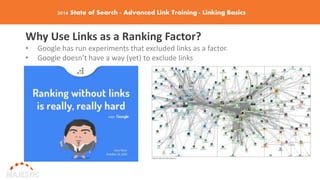
Why Use Links as a Ranking Factor?
• Google has run experiments that excluded links as a factor.
• Google doesn’t have a way (yet) to exclude links
2016 State of Search - Advanced Link Training– Linking Basics
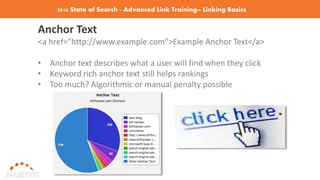
Anchor Text
<a href="http://www.example.com">Example Anchor Text</a>
• Anchor text describes what a user will find when they click
• Keyword rich anchor text still helps rankings
• Too much? Algorithmic or manual penalty possible
2016 State of Search - Advanced Link Training– Linking Basics
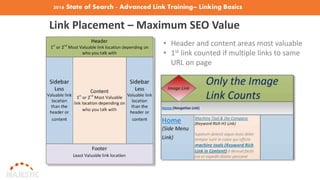
Link Placement – Maximum SEO Value
• Header and content areas most valuable
• 1st link counted if multiple links to same
URL on page
2016 State of Search - Advanced Link Training– Linking Basics
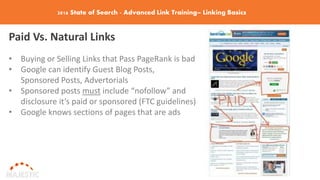
Paid Vs. Natural Links
• Buying or Selling Links that Pass PageRank is bad
• Google can identify Guest Blog Posts,
Sponsored Posts, Advertorials
• Sponsored posts must include “nofollow” and
disclosure it’s paid or sponsored (FTC guidelines)
• Google knows sections of pages that are ads
2016 State of Search - Advanced Link Training– Linking Basics
Link Schemes Are Bad
Google’s Guidelines: http://bit.ly/google-link-schemes
• No Paid links that pass PageRank
• No Excessive link exchanges (define excessive?)
• No Large-scale article marketing or guest posting
• No Using auto programs or services to create links
• No Optimized anchor text in articles or press releases
• No Low-quality directory or bookmark links (Web 2.0)
• No Forum comments with optimized links
• No Keyword-rich, hidden or low-quality links in widgets
• No Widely distributed links in the footers or templates
2016 State of Search - Advanced Link Training– Linking Basics
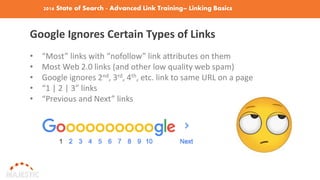
Google Ignores Certain Types of Links
• “Most” links with “nofollow” link attributes on them
• Most Web 2.0 links (and other low quality web spam)
• Google ignores 2nd, 3rd, 4th, etc. link to same URL on a page
• “1 | 2 | 3” links
• “Previous and Next” links
2016 State of Search - Advanced Link Training– Linking Basics
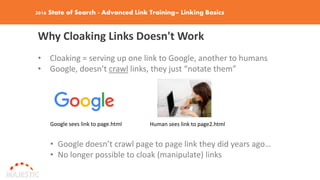
Why Cloaking Links Doesn't Work
• Cloaking = serving up one link to Google, another to humans
• Google, doesn’t crawl links, they just “notate them”
Google sees link to page.html Human sees link to page2.html
• Google doesn’t crawl page to page link they did years ago…
• No longer possible to cloak (manipulate) links
2016 State of Search - Advanced Link Training – Majestic
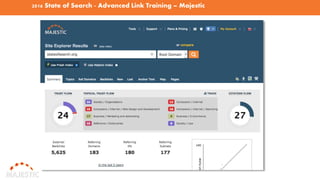
What is Majestic? www.Majestic.com
• Formerly known as Majestic SEO (majesticseo.com)
• Marketing Search Engine
• SEO Backlink Checker
• Provides Link Intelligence Tools
• Site Explorer shows inbound link & website summary data.
• One of the world’s largest link crawlers
• Link data provided back as far as 2004.
2016 State of Search - Advanced Link Training – Majestic
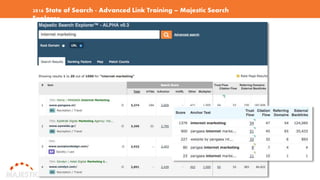
2016 State of Search - Advanced Link Training – Majestic Search
Explorer
2016 State of Search - Advanced Link Training – Majestic
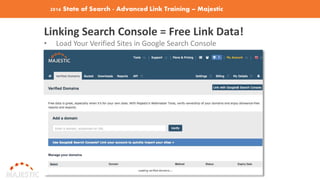
Linking Search Console = Free Link Data!
• Load Your Verified Sites in Google Search Console
2016 State of Search – Adv. Link Training – Majestic Trust & Citation
Flow
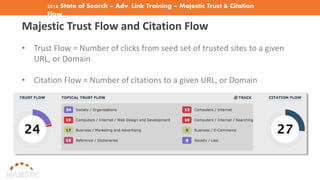
Majestic Trust Flow and Citation Flow
• Trust Flow = Number of clicks from seed set of trusted sites to a given
URL, or Domain
• Citation Flow = Number of citations to a given URL, or Domain
2016 State of Search – Adv. Link Training – Majestic – Low Quality
Links
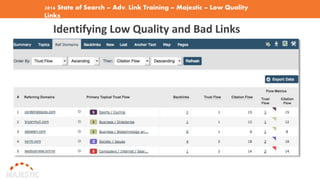
Identifying Low Quality and Bad Links
2016 State of Search – Adv. Link Training – Majestic – New and Lost Links
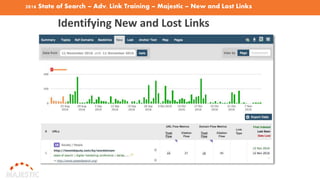
Identifying New and Lost Links
2016 State of Search – Advanced Link Training – Majestic Link Map
Tools
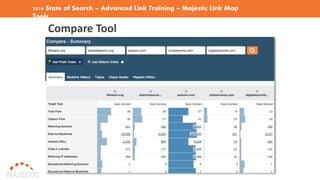
Compare Tool
2016 State of Search – Advanced Link Training – Majestic Link
Map Tools
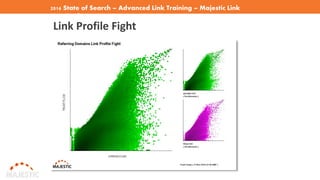
Link Profile Fight
2016 State of Search – Advanced Link Training – Majestic Tools
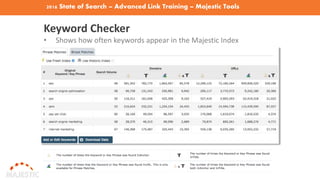
Keyword Checker
• Shows how often keywords appear in the Majestic Index
2016 State of Search – Adv. Link Training – Majestic Link Tools
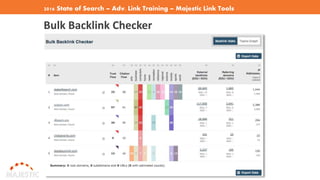
Bulk Backlink Checker
2016 State of Search – Advanced Link Training – Majestic Link
Tools
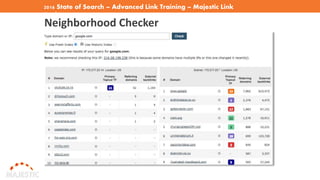
Neighborhood Checker
2016 State of Search – Advanced Link Training – Majestic Link
Tools
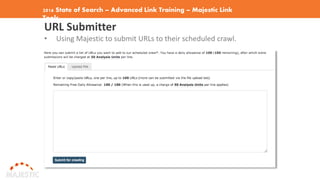
URL Submitter
• Using Majestic to submit URLs to their scheduled crawl.
2016 State of Search – Advanced Link Training – Analyzing Your
Links
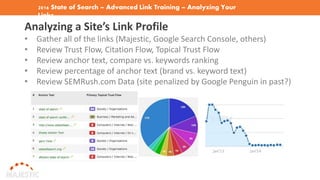
Analyzing a Site’s Link Profile
• Gather all of the links (Majestic, Google Search Console, others)
• Review Trust Flow, Citation Flow, Topical Trust Flow
• Review anchor text, compare vs. keywords ranking
• Review percentage of anchor text (brand vs. keyword text)
• Review SEMRush.com Data (site penalized by Google Penguin in past?)
2016 State of Search – Advandced Link Training – Google Manual Actions
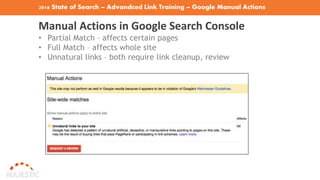
Manual Actions in Google Search Console
• Partial Match – affects certain pages
• Full Match – affects whole site
• Unnatural links – both require link cleanup, review
2016 State of Search – Adv. Link Training – Google Manual Actions
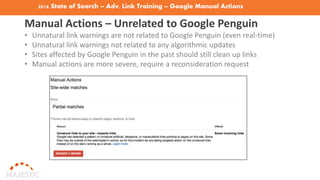
Manual Actions – Unrelated to Google Penguin
• Unnatural link warnings are not related to Google Penguin (even real-time)
• Unnatural link warnings not related to any algorithmic updates
• Sites affected by Google Penguin in the past should still clean up links
• Manual actions are more severe, require a reconsideration request
2016 State of Search – Adv. Link Training – Google Manual Actions
Getting Manual Actions Revoked
Unnatural Links? Clean up links, document everything.
• Identify all links to site
• Combine GSC, Majestic, Ahrefs, OSE links
• Manually review links (Link Research Tools can help)
• Identify links to remove
• Contact site owners, document emails, contact dates, etc.
• At least 3 attempts to contact site owners (rmoov.com can help!
• Disavow links not removed
Request Review: include letter, spreadsheet with data proof (link to
Google Sheets spreadsheet)
2016 State of Search – Advanced Link Training – Link Cleanups
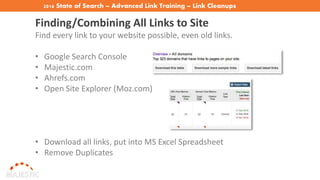
Finding/Combining All Links to Site
Find every link to your website possible, even old links.
• Google Search Console
• Majestic.com
• Ahrefs.com
• Open Site Explorer (Moz.com)
• Download all links, put into MS Excel Spreadsheet
• Remove Duplicates
2016 State of Search – Advanced Link Training – Link Cleanups
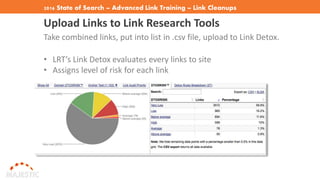
Upload Links to Link Research Tools
Take combined links, put into list in .csv file, upload to Link Detox.
• LRT’s Link Detox evaluates every links to site
• Assigns level of risk for each link
2016 State of Search – Adv. Link Training – Link Cleanups
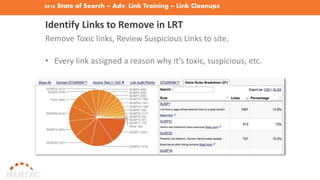
Identify Links to Remove in LRT
Remove Toxic links, Review Suspicious Links to site.
• Every link assigned a reason why it’s toxic, suspicious, etc.
2016 State of Search – Adv. Link Training – Link Cleanups
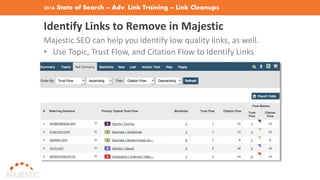
Identify Links to Remove in Majestic
Majestic SEO can help you identify low quality links, as well.
• Use Topic, Trust Flow, and Citation Flow to Identify Links
2016 State of Search – Advanced Link Training – Google Manual Actions
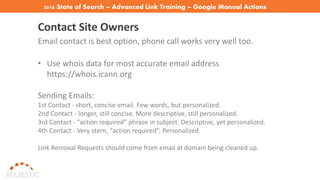
Contact Site Owners
Email contact is best option, phone call works very well too.
• Use whois data for most accurate email address
https://whois.icann.org
Sending Emails:
1st Contact - short, concise email. Few words, but personalized.
2nd Contact - longer, still concise. More descriptive, still personalized.
3rd Contact - “action required” phrase in subject. Descriptive, yet personalized.
4th Contact - Very stern, “action required”. Personalized.
Link Removal Requests should come from email at domain being cleaned up.
2016 State of Search – Advanced Link Training – Google Manual
Actions
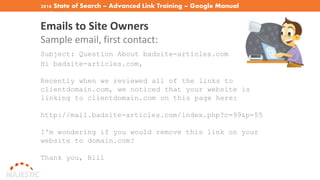
Emails to Site Owners
Sample email, first contact:
Subject: Question About badsite-articles.com
Hi badsite-articles.com,
Recently when we reviewed all of the links to
clientdomain.com, we noticed that your website is
linking to clientdomain.com on this page here:
http://mail.badsite-articles.com/index.php?c=99&p=55
I'm wondering if you would remove this link on your
website to domain.com?
Thank you, Bill
2016 State of Search – Advanced Link Training – Disavowing Links
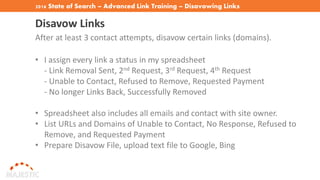
Disavow Links
After at least 3 contact attempts, disavow certain links (domains).
• I assign every link a status in my spreadsheet
- Link Removal Sent, 2nd Request, 3rd Request, 4th Request
- Unable to Contact, Refused to Remove, Requested Payment
- No longer Links Back, Successfully Removed
• Spreadsheet also includes all emails and contact with site owner.
• List URLs and Domains of Unable to Contact, No Response, Refused to
Remove, and Requested Payment
• Prepare Disavow File, upload text file to Google, Bing
2016 State of Search – Advanced Link Training – Reconsideration
Requests
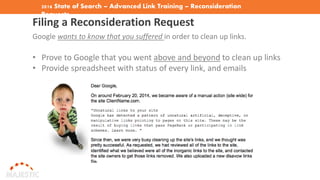
Filing a Reconsideration Request
Google wants to know that you suffered in order to clean up links.
• Prove to Google that you went above and beyond to clean up links
• Provide spreadsheet with status of every link, and emails
2016 State of Search – Advanced Link Training – Reconsideration Requests
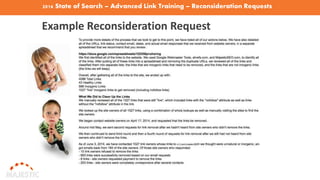
Example Reconsideration Request
2016 State of Search – Advanced Link Training – Reconsideration Requests
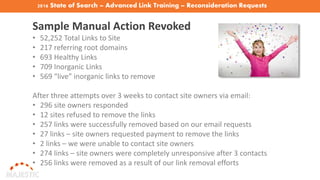
Sample Manual Action Revoked
• 52,252 Total Links to Site
• 217 referring root domains
• 693 Healthy Links
• 709 Inorganic Links
• 569 “live” inorganic links to remove
After three attempts over 3 weeks to contact site owners via email:
• 296 site owners responded
• 12 sites refused to remove the links
• 257 links were successfully removed based on our email requests
• 27 links – site owners requested payment to remove the links
• 2 links – we were unable to contact site owners
• 274 links – site owners were completely unresponsive after 3 contacts
• 256 links were removed as a result of our link removal efforts
2016 State of Search – Advanced Link Training – Reconsideration Requests
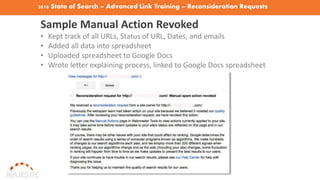
Sample Manual Action Revoked
• Kept track of all URLs, Status of URL, Dates, and emails
• Added all data into spreadsheet
• Uploaded spreadsheet to Google Docs
• Wrote letter explaining process, linked to Google Docs spreadsheet
2016 State of Search – Advanced Link Training– Getting Google
Trust
Getting Google to Trust Your Site
• Majestic’s TrustFlow highly correlates to rankings
• Trust bulletproofs site from Google slaps and Algo Updates
• On-Page Trust Optimization
• Trustworthy Domain Info
• Trusted Links
2016 State of Search – Adv.anced Link Training – Getting Google Trust
On-Page Trust Optimization
• Link out to Authority Sites when appropriate
• Privacy Policy, Terms of Service, Disclosure pages on site
• Bounce Rate, prevent pogosticking
• Blocked Sites (users can block your site via Chrome browser)
• References and Sources (at end of articles)
• Schema Markup (local sites’ contact matches local citations)
2016 State of Search – Adv. Link Training – Getting Google Trust
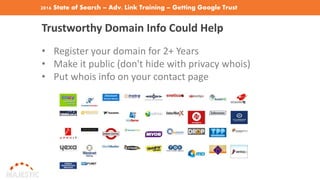
Trustworthy Domain Info Could Help
• Register your domain for 2+ Years
• Make it public (don't hide with privacy whois)
• Put whois info on your contact page
2016 State of Search – Adv. Link Training – Getting Google Trust
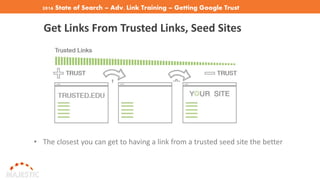
Get Links From Trusted Links, Seed Sites
• The closest you can get to having a link from a trusted seed site the better
2016 State of Search – Advanced Linking Tips
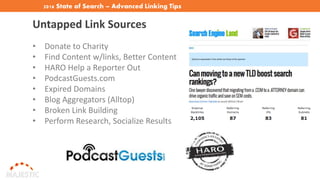
Untapped Link Sources
• Donate to Charity
• Find Content w/links, Better Content
• HARO Help a Reporter Out
• PodcastGuests.com
• Expired Domains
• Blog Aggregators (Alltop)
• Broken Link Building
• Perform Research, Socialize Results
2016 State of Search – Advanced Linking Tips
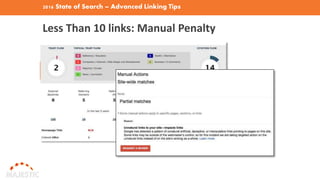
Less Than 10 links: Manual Penalty
2016 State of Search – Advanced Linking Training - Contact
THANK YOU Contact Me
Bill Hartzer
Senior VP, Agency Service, Advice Interactive
Email: bhartzer@adviceinteractive.com
Mobile: +1 (214) 236-4378
Web: adviceinteractive.com
Blog: billhartzer.com
Twitter: @bhartzer
Facebook: facebook.com/bhartzer

Advanced Link Training

  • 1.
    Advanced Link Training Sponsoredby Majestic State of Search November 2016
  • 2.
    2016 State ofSearch - Advanced Link Training About Me • Senior VP, Agency Services, Advice Interactive • Brand Ambassador, Majestic • Personal Blog: www.BillHartzer.com • Practicing Organic/Natural SEO since 1996 • Co-Founder, DFWSEM Association
  • 3.
    2016 State ofSearch - Advanced Link Training - Overview Overview • Linking Basics • Using Majestic for Link Analysis • Analyzing Your Links • Google Manual Penalties & Cleaning Up Links • Advanced Linking Tips
  • 4.
    2016 State ofSearch - Advanced Link Training - Linking Basics Why Use Links as a Ranking Factor? • Google has run experiments that excluded links as a factor. • Google doesn’t have a way (yet) to exclude links
  • 5.
    2016 State ofSearch - Advanced Link Training– Linking Basics Anchor Text <a href="http://www.example.com">Example Anchor Text</a> • Anchor text describes what a user will find when they click • Keyword rich anchor text still helps rankings • Too much? Algorithmic or manual penalty possible
  • 6.
    2016 State ofSearch - Advanced Link Training– Linking Basics Link Placement – Maximum SEO Value • Header and content areas most valuable • 1st link counted if multiple links to same URL on page
  • 7.
    2016 State ofSearch - Advanced Link Training– Linking Basics Paid Vs. Natural Links • Buying or Selling Links that Pass PageRank is bad • Google can identify Guest Blog Posts, Sponsored Posts, Advertorials • Sponsored posts must include “nofollow” and disclosure it’s paid or sponsored (FTC guidelines) • Google knows sections of pages that are ads
  • 8.
    2016 State ofSearch - Advanced Link Training– Linking Basics Link Schemes Are Bad Google’s Guidelines: http://bit.ly/google-link-schemes • No Paid links that pass PageRank • No Excessive link exchanges (define excessive?) • No Large-scale article marketing or guest posting • No Using auto programs or services to create links • No Optimized anchor text in articles or press releases • No Low-quality directory or bookmark links (Web 2.0) • No Forum comments with optimized links • No Keyword-rich, hidden or low-quality links in widgets • No Widely distributed links in the footers or templates
  • 9.
    2016 State ofSearch - Advanced Link Training– Linking Basics Google Ignores Certain Types of Links • “Most” links with “nofollow” link attributes on them • Most Web 2.0 links (and other low quality web spam) • Google ignores 2nd, 3rd, 4th, etc. link to same URL on a page • “1 | 2 | 3” links • “Previous and Next” links
  • 10.
    2016 State ofSearch - Advanced Link Training– Linking Basics Why Cloaking Links Doesn't Work • Cloaking = serving up one link to Google, another to humans • Google, doesn’t crawl links, they just “notate them” Google sees link to page.html Human sees link to page2.html • Google doesn’t crawl page to page link they did years ago… • No longer possible to cloak (manipulate) links
  • 11.
    2016 State ofSearch - Advanced Link Training – Majestic What is Majestic? www.Majestic.com • Formerly known as Majestic SEO (majesticseo.com) • Marketing Search Engine • SEO Backlink Checker • Provides Link Intelligence Tools • Site Explorer shows inbound link & website summary data. • One of the world’s largest link crawlers • Link data provided back as far as 2004.
  • 12.
    2016 State ofSearch - Advanced Link Training – Majestic
  • 13.
    2016 State ofSearch - Advanced Link Training – Majestic Search Explorer
  • 14.
    2016 State ofSearch - Advanced Link Training – Majestic Linking Search Console = Free Link Data! • Load Your Verified Sites in Google Search Console
  • 15.
    2016 State ofSearch – Adv. Link Training – Majestic Trust & Citation Flow Majestic Trust Flow and Citation Flow • Trust Flow = Number of clicks from seed set of trusted sites to a given URL, or Domain • Citation Flow = Number of citations to a given URL, or Domain
  • 16.
    2016 State ofSearch – Adv. Link Training – Majestic – Low Quality Links Identifying Low Quality and Bad Links
  • 17.
    2016 State ofSearch – Adv. Link Training – Majestic – New and Lost Links Identifying New and Lost Links
  • 18.
    2016 State ofSearch – Advanced Link Training – Majestic Link Map Tools Compare Tool
  • 19.
    2016 State ofSearch – Advanced Link Training – Majestic Link Map Tools Link Profile Fight
  • 20.
    2016 State ofSearch – Advanced Link Training – Majestic Tools Keyword Checker • Shows how often keywords appear in the Majestic Index
  • 21.
    2016 State ofSearch – Adv. Link Training – Majestic Link Tools Bulk Backlink Checker
  • 22.
    2016 State ofSearch – Advanced Link Training – Majestic Link Tools Neighborhood Checker
  • 23.
    2016 State ofSearch – Advanced Link Training – Majestic Link Tools URL Submitter • Using Majestic to submit URLs to their scheduled crawl.
  • 24.
    2016 State ofSearch – Advanced Link Training – Analyzing Your Links Analyzing a Site’s Link Profile • Gather all of the links (Majestic, Google Search Console, others) • Review Trust Flow, Citation Flow, Topical Trust Flow • Review anchor text, compare vs. keywords ranking • Review percentage of anchor text (brand vs. keyword text) • Review SEMRush.com Data (site penalized by Google Penguin in past?)
  • 25.
    2016 State ofSearch – Advandced Link Training – Google Manual Actions Manual Actions in Google Search Console • Partial Match – affects certain pages • Full Match – affects whole site • Unnatural links – both require link cleanup, review
  • 26.
    2016 State ofSearch – Adv. Link Training – Google Manual Actions Manual Actions – Unrelated to Google Penguin • Unnatural link warnings are not related to Google Penguin (even real-time) • Unnatural link warnings not related to any algorithmic updates • Sites affected by Google Penguin in the past should still clean up links • Manual actions are more severe, require a reconsideration request
  • 27.
    2016 State ofSearch – Adv. Link Training – Google Manual Actions Getting Manual Actions Revoked Unnatural Links? Clean up links, document everything. • Identify all links to site • Combine GSC, Majestic, Ahrefs, OSE links • Manually review links (Link Research Tools can help) • Identify links to remove • Contact site owners, document emails, contact dates, etc. • At least 3 attempts to contact site owners (rmoov.com can help! • Disavow links not removed Request Review: include letter, spreadsheet with data proof (link to Google Sheets spreadsheet)
  • 28.
    2016 State ofSearch – Advanced Link Training – Link Cleanups Finding/Combining All Links to Site Find every link to your website possible, even old links. • Google Search Console • Majestic.com • Ahrefs.com • Open Site Explorer (Moz.com) • Download all links, put into MS Excel Spreadsheet • Remove Duplicates
  • 29.
    2016 State ofSearch – Advanced Link Training – Link Cleanups Upload Links to Link Research Tools Take combined links, put into list in .csv file, upload to Link Detox. • LRT’s Link Detox evaluates every links to site • Assigns level of risk for each link
  • 30.
    2016 State ofSearch – Adv. Link Training – Link Cleanups Identify Links to Remove in LRT Remove Toxic links, Review Suspicious Links to site. • Every link assigned a reason why it’s toxic, suspicious, etc.
  • 31.
    2016 State ofSearch – Adv. Link Training – Link Cleanups Identify Links to Remove in Majestic Majestic SEO can help you identify low quality links, as well. • Use Topic, Trust Flow, and Citation Flow to Identify Links
  • 32.
    2016 State ofSearch – Advanced Link Training – Google Manual Actions Contact Site Owners Email contact is best option, phone call works very well too. • Use whois data for most accurate email address https://whois.icann.org Sending Emails: 1st Contact - short, concise email. Few words, but personalized. 2nd Contact - longer, still concise. More descriptive, still personalized. 3rd Contact - “action required” phrase in subject. Descriptive, yet personalized. 4th Contact - Very stern, “action required”. Personalized. Link Removal Requests should come from email at domain being cleaned up.
  • 33.
    2016 State ofSearch – Advanced Link Training – Google Manual Actions Emails to Site Owners Sample email, first contact: Subject: Question About badsite-articles.com Hi badsite-articles.com, Recently when we reviewed all of the links to clientdomain.com, we noticed that your website is linking to clientdomain.com on this page here: http://mail.badsite-articles.com/index.php?c=99&p=55 I'm wondering if you would remove this link on your website to domain.com? Thank you, Bill
  • 34.
    2016 State ofSearch – Advanced Link Training – Disavowing Links Disavow Links After at least 3 contact attempts, disavow certain links (domains). • I assign every link a status in my spreadsheet - Link Removal Sent, 2nd Request, 3rd Request, 4th Request - Unable to Contact, Refused to Remove, Requested Payment - No longer Links Back, Successfully Removed • Spreadsheet also includes all emails and contact with site owner. • List URLs and Domains of Unable to Contact, No Response, Refused to Remove, and Requested Payment • Prepare Disavow File, upload text file to Google, Bing
  • 35.
    2016 State ofSearch – Advanced Link Training – Reconsideration Requests Filing a Reconsideration Request Google wants to know that you suffered in order to clean up links. • Prove to Google that you went above and beyond to clean up links • Provide spreadsheet with status of every link, and emails
  • 36.
    2016 State ofSearch – Advanced Link Training – Reconsideration Requests Example Reconsideration Request
  • 37.
    2016 State ofSearch – Advanced Link Training – Reconsideration Requests Sample Manual Action Revoked • 52,252 Total Links to Site • 217 referring root domains • 693 Healthy Links • 709 Inorganic Links • 569 “live” inorganic links to remove After three attempts over 3 weeks to contact site owners via email: • 296 site owners responded • 12 sites refused to remove the links • 257 links were successfully removed based on our email requests • 27 links – site owners requested payment to remove the links • 2 links – we were unable to contact site owners • 274 links – site owners were completely unresponsive after 3 contacts • 256 links were removed as a result of our link removal efforts
  • 38.
    2016 State ofSearch – Advanced Link Training – Reconsideration Requests Sample Manual Action Revoked • Kept track of all URLs, Status of URL, Dates, and emails • Added all data into spreadsheet • Uploaded spreadsheet to Google Docs • Wrote letter explaining process, linked to Google Docs spreadsheet
  • 39.
    2016 State ofSearch – Advanced Link Training– Getting Google Trust Getting Google to Trust Your Site • Majestic’s TrustFlow highly correlates to rankings • Trust bulletproofs site from Google slaps and Algo Updates • On-Page Trust Optimization • Trustworthy Domain Info • Trusted Links
  • 40.
    2016 State ofSearch – Adv.anced Link Training – Getting Google Trust On-Page Trust Optimization • Link out to Authority Sites when appropriate • Privacy Policy, Terms of Service, Disclosure pages on site • Bounce Rate, prevent pogosticking • Blocked Sites (users can block your site via Chrome browser) • References and Sources (at end of articles) • Schema Markup (local sites’ contact matches local citations)
  • 41.
    2016 State ofSearch – Adv. Link Training – Getting Google Trust Trustworthy Domain Info Could Help • Register your domain for 2+ Years • Make it public (don't hide with privacy whois) • Put whois info on your contact page
  • 42.
    2016 State ofSearch – Adv. Link Training – Getting Google Trust Get Links From Trusted Links, Seed Sites • The closest you can get to having a link from a trusted seed site the better
  • 43.
    2016 State ofSearch – Advanced Linking Tips Untapped Link Sources • Donate to Charity • Find Content w/links, Better Content • HARO Help a Reporter Out • PodcastGuests.com • Expired Domains • Blog Aggregators (Alltop) • Broken Link Building • Perform Research, Socialize Results
  • 44.
    2016 State ofSearch – Advanced Linking Tips Less Than 10 links: Manual Penalty
  • 45.
    2016 State ofSearch – Advanced Linking Training - Contact THANK YOU Contact Me Bill Hartzer Senior VP, Agency Service, Advice Interactive Email: bhartzer@adviceinteractive.com Mobile: +1 (214) 236-4378 Web: adviceinteractive.com Blog: billhartzer.com Twitter: @bhartzer Facebook: facebook.com/bhartzer