Adding more visuals to the game
without affecting performance
by Dmytro Vovk
PERFORMANCE
Performance
• Why it matters?!
Performance
• Is a shared responsibility of both artists and
programmers.
Good Enough
• Don’t do more that it’s needed
TECHNICAL TIPS FOR ART
Technical Artist
• Is a bridge between you and a programmers.
• They are usually responsible for technical side
of art and a performance.
• Availability of TA in your team doesn’t mean,
that you don’t have to understand tech.
Performance Killers
• Draw calls
• Alpha blending
• Huge textures
Draw Call
• A command to GPU to render a set of vertices
(mesh) with specified state – i.e. textures,
shader, blend mode
Draw Call
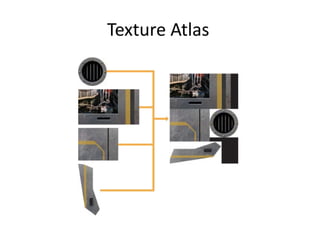
• Employ texture atlases – a set of small
textures combined into big one
• Merge static meshes into one
Texture Atlas
Alpha Blending
• Is the process of combining an image with a
background to create the appearance of
partial or full transparency.
• Most common blend mode in 2D games.
• Most common source of performance
problems also 
Alpha Blending
• Alpha blending makes impossible to utilize
some hardware optimizations, so it requires
both visible and invisible pixels to be
processed.
• In extreme cases this can be an order of
magnitude slower
Alpha Blending
• The majority of 2D games do not use
translucent geometry i.e. alpha value of every
pixel in textures is either 0 or 255.
Alpha Blending
• So the pixels with alpha equal to 0 will not
contribute to resulting image at all, but they
still have to be processed
• And the pixels with alpha equal to 255 will
replace any pixel that existed in the
background image before, but it still requires
those replaced pixels to be processed.
Alpha Blending
• So sprites with huge transparent areas will
affect performance a lot.
• This can be solved with a “proper” art
Alpha Blending
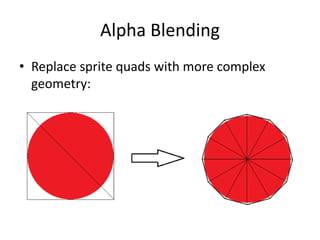
• Replace sprite quads with more complex
geometry:
Alpha Blending
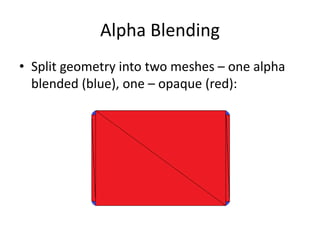
• Split geometry into two meshes – one alpha
blended (blue), one – opaque (red):
Textures
• Textures are the biggest resources in the
games.
• Apps are bound by 50 Mb app size limit.
• The amount of available GPU memory can be
even lower on a low end device
Textures
• RGB8 texture will occupy the same amount of
memory as RGBA8 on most devices.
• Try to lower textures precision – RGB565
instead of RGB888, RGBA5551 instead of
RGBA8888, etc.
• Compressed textures are more preferred
though.
Compressed Textures
• A texture compressed with a special lossy
algorithm optimized for GPU.
• PNG is a lossless compressed image format.
Why do you have to use something else?
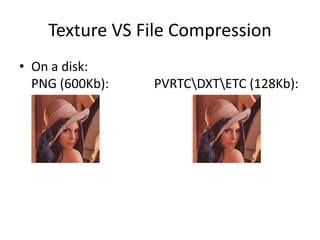
Texture VS File Compression
• On a disk:
PNG (600Kb): PVRTCDXTETC (128Kb):
Texture VS File Compression
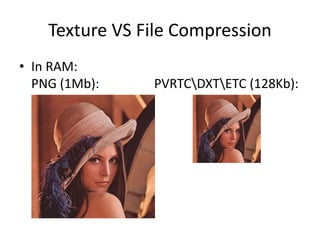
• In RAM:
PNG (1Mb): PVRTCDXTETC (128Kb):
Texture VS File Compression
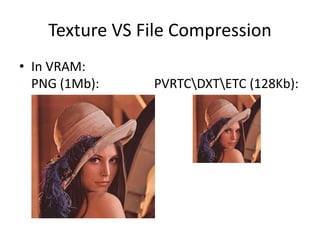
• In VRAM:
PNG (1Mb): PVRTCDXTETC (128Kb):
Compressed Textures
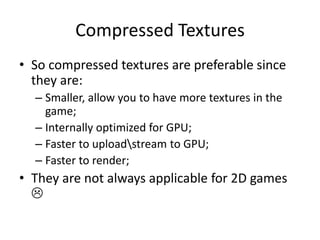
• So compressed textures are preferable since
they are:
– Smaller, allow you to have more textures in the
game;
– Internally optimized for GPU;
– Faster to uploadstream to GPU;
– Faster to render;
• They are not always applicable for 2D games

Key Action Points
• Reduce the number of draw calls
• Avoid alpha blended geometry as much as
possible
• Try to compress your textures
Best practices
• Employ engineering best practices:
– Introduce Definition of Done. DoD is a checklist of
valuable activities;
– Introduce a Sign Off process;
– Talk to your TA, talk to other TA’s;
– Talk to your programmers;
– Self educate.
BONUS
Alpha test
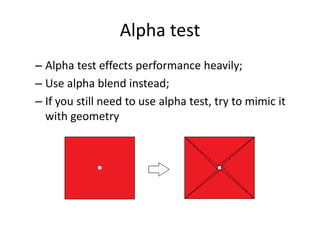
– Alpha test effects performance heavily;
– Use alpha blend instead;
– If you still need to use alpha test, try to mimic it
with geometry
Alpha test
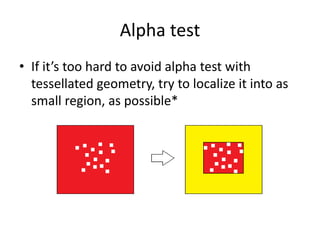
• If it’s too hard to avoid alpha test with
tessellated geometry, try to localize it into as
small region, as possible*
Alpha test
• All engines allow you to control the draw
order of your geometry. To get the best
performance possible, try do draw you
geometry in this order:
– Opaque geometry;
– Alpha tested geometry;
– Alpha blended geometry;

Adding more visuals without affecting performance

  • 1.
    Adding more visualsto the game without affecting performance by Dmytro Vovk
  • 2.
  • 3.
  • 6.
    Performance • Is ashared responsibility of both artists and programmers.
  • 7.
    Good Enough • Don’tdo more that it’s needed
  • 8.
  • 9.
    Technical Artist • Isa bridge between you and a programmers. • They are usually responsible for technical side of art and a performance. • Availability of TA in your team doesn’t mean, that you don’t have to understand tech.
  • 10.
    Performance Killers • Drawcalls • Alpha blending • Huge textures
  • 11.
    Draw Call • Acommand to GPU to render a set of vertices (mesh) with specified state – i.e. textures, shader, blend mode
  • 12.
    Draw Call • Employtexture atlases – a set of small textures combined into big one • Merge static meshes into one
  • 13.
  • 15.
    Alpha Blending • Isthe process of combining an image with a background to create the appearance of partial or full transparency. • Most common blend mode in 2D games. • Most common source of performance problems also 
  • 16.
    Alpha Blending • Alphablending makes impossible to utilize some hardware optimizations, so it requires both visible and invisible pixels to be processed. • In extreme cases this can be an order of magnitude slower
  • 17.
    Alpha Blending • Themajority of 2D games do not use translucent geometry i.e. alpha value of every pixel in textures is either 0 or 255.
  • 18.
    Alpha Blending • Sothe pixels with alpha equal to 0 will not contribute to resulting image at all, but they still have to be processed • And the pixels with alpha equal to 255 will replace any pixel that existed in the background image before, but it still requires those replaced pixels to be processed.
  • 19.
    Alpha Blending • Sosprites with huge transparent areas will affect performance a lot. • This can be solved with a “proper” art
  • 20.
    Alpha Blending • Replacesprite quads with more complex geometry:
  • 21.
    Alpha Blending • Splitgeometry into two meshes – one alpha blended (blue), one – opaque (red):
  • 23.
    Textures • Textures arethe biggest resources in the games. • Apps are bound by 50 Mb app size limit. • The amount of available GPU memory can be even lower on a low end device
  • 24.
    Textures • RGB8 texturewill occupy the same amount of memory as RGBA8 on most devices. • Try to lower textures precision – RGB565 instead of RGB888, RGBA5551 instead of RGBA8888, etc. • Compressed textures are more preferred though.
  • 25.
    Compressed Textures • Atexture compressed with a special lossy algorithm optimized for GPU. • PNG is a lossless compressed image format. Why do you have to use something else?
  • 26.
    Texture VS FileCompression • On a disk: PNG (600Kb): PVRTCDXTETC (128Kb):
  • 27.
    Texture VS FileCompression • In RAM: PNG (1Mb): PVRTCDXTETC (128Kb):
  • 28.
    Texture VS FileCompression • In VRAM: PNG (1Mb): PVRTCDXTETC (128Kb):
  • 29.
    Compressed Textures • Socompressed textures are preferable since they are: – Smaller, allow you to have more textures in the game; – Internally optimized for GPU; – Faster to uploadstream to GPU; – Faster to render; • They are not always applicable for 2D games 
  • 30.
    Key Action Points •Reduce the number of draw calls • Avoid alpha blended geometry as much as possible • Try to compress your textures
  • 31.
    Best practices • Employengineering best practices: – Introduce Definition of Done. DoD is a checklist of valuable activities; – Introduce a Sign Off process; – Talk to your TA, talk to other TA’s; – Talk to your programmers; – Self educate.
  • 32.
  • 33.
    Alpha test – Alphatest effects performance heavily; – Use alpha blend instead; – If you still need to use alpha test, try to mimic it with geometry
  • 34.
    Alpha test • Ifit’s too hard to avoid alpha test with tessellated geometry, try to localize it into as small region, as possible*
  • 35.
    Alpha test • Allengines allow you to control the draw order of your geometry. To get the best performance possible, try do draw you geometry in this order: – Opaque geometry; – Alpha tested geometry; – Alpha blended geometry;

Editor's Notes

  • #2 Why you are here?! This session will show you the biggest and most common performance killers in terms of art. Of course it will also give you an answers on why is that happening and what to do to avoid that. So you can add more visuals to your games without affecting performance 
  • #3 Does anyone here cares about it?
  • #4 Performance is directly related to gameplay experience and it is the second most important characteristics after gameplay itself
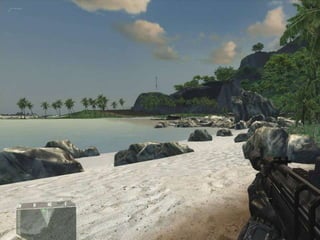
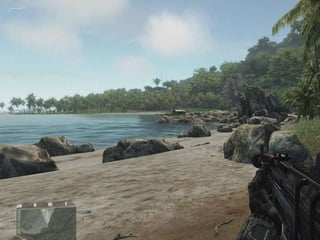
  • #5 Let’s say this is an example of a game with bad performance. The graphics is bad, the lightning is absent, there are no shadows. I will try to give you a set of tips that will help you to make your games to look like this:
  • #6 You can see high quality lightning, shadows, AO, water reflections, higher draw distance and more details. Don’t worry, I am not going to talk about how to make content for AAA games, you are still on a right session and we are going to talk about mobile games
  • #7 One important thing for you to understand is that performance is a shared responsibility between both artists and programmers. Either party can kill performance and you have to work together to ensure that your performance is good enough.
  • #8 This is a key principle – don’t do more, than needed. If you are running at 60 FPS on low end devices than that’s awesome and you don’t have to do anything to optimize your performance even more – it’s quite time consuming. Never thought I’ll tell this to anyone, since I love to optimize my code a lot.
  • #9 Now we are coming to the main topic of this presentation. But before we start, let’s mention another important role in the team – Technical Artist
  • #10 And if you don’t have a TA in your team, you can become one or even make this a shared role between everyone.
  • #11 So why do the games have bad performance? I can distinguish 3 main reasons.
  • #12 Give an example about painter, assistant and a customer. Painter works in a studio
  • #13 What can we do to reduce the amount of draw calls?
  • #14 This is a texture atlas.
  • #15 Is everything clear to you? Good. So you’ve reduced the amount of draw calls but still have a bad performance? I know what is causing this
  • #17 Why is it so bad? What is visible and invisible pixels? I’ll answer this soon
  • #18 0 or 255. … or visible\invisible
  • #19 Looks like a terrible waste of resource to me, right?!
  • #21 The sprite on the left has 22% of it’s pixels wasted – they are blank The sprite on the right has only 3% of blank pixels. The amount of polygons wend up from 2 to 12, that’s nothing. So we did pretty simple job, that saved us a lot of performance. However sprite on the right is still alpha blended, even if 97% of it are non transparent. What can we do to take this even further?! Pop up menus usually consist of a lot of rounded rectangles – for menu itself and for the buttons. In this case we can …
  • #22 Of course this will add yet another draw call (and as we already know they do harm performance), but if you have huge areas covered by transparent sprites (main menu, for example) splitting geometry into two meshes may be beneficial, even with additional draw call. However you have to test this in every case
  • #23 Small break. Any questions before we continue? Good. Now let’s get to a final area – Textures.
  • #24 100 Mb limit for iOS and 50 Mb limit for Android, that’s too little for high res games. Since we want to get every smartphone user to play our games, low end devices still matter to us. So let’s take a look, what we can do with textures. Pause. Mostly 2D games consists of RGBA8 textures, but you may want to store some textures for non transparent geometry in RGB8 textures to save some space.
  • #25 … well, that doesn’t work in runtime! To save runtime space and decrease app size try …
  • #26 But I am pretty sure you are familiar with lossless PNG compression, right? So why do you have to use something else? Let’s take a look on an example
  • #27 This is how much space textures occupy on a disk. PVRTC\DXT\ETC are the texture compression algorithms Than we load it into RAM
  • #28 The PNG texture has to be uncompressed and now it takes 1 Mb instead of 600K. Compressed texture’s size remains the same. And than textures are uploaded to VRAM
  • #29 Compressed texture takes 8 time less space than PNG, so you can add 8 times more textures! And what GPU is doing with textures? It textures polygons with them! Texturing will be faster using compressed textures.
  • #31 So the key actions, that will allow you to add more visuals to the games are: 1 2 3 And to help you to employ this actions I will suggest you to do the following
  • #32 In DoD you will describe what we’ve talked about today
  • #33 Now we are coming to the main topic of this presentation. But before we start, let’s mention another important role in the team – Technical Artist
  • #35 * Splitting alpha tested geometry into two passes cannot guarantee performance improvements