TemplatesIT
https://templatesit.com
Information
Security
Awareness
Session
• Information security – an introduction
• Information classification and handling
• Your responsibilities towards information security
• Company BYOD policy
• Physical security and tailgating policy
• Clear desk and clear screen policy
• Phishing and how to prevent them
• Malwares and how to prevent them
• Security incidents and reporting
• World of cyber criminals
• Ten commandments of information security
v1.0 Last updated on DD-MM-YY
TemplatesIT
https://templatesit.com
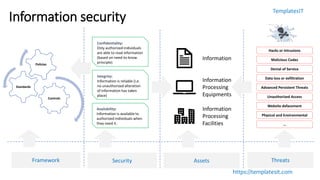
Information security
Confidentiality:
Only authorized individuals
are able to read information
(based on need-to-know
principle)
Integrity:
Information is reliable (i.e.
no unauthorized alteration
of information has taken
place)
Information
Information
Processing
Equipments
Information
Processing
Facilities
Assets
Hacks or Intrusions
Malicious Codes
Denial of Service
Data loss or exfiltration
Advanced Persistent Threats
Unauthorized Access
Website defacement
Physical and Environmental
…
Threats
Availability:
Information is available to
authorized individuals when
they need it.
SecurityFramework
Controls
Standards
Policies
TemplatesIT
https://templatesit.com
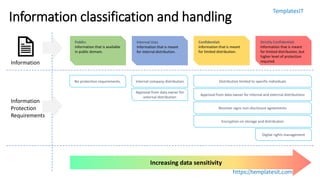
Information classification and handling
Information
Public:
Information that is available
in public domain.
Internal Use:
Information that is meant
for internal distribution.
Confidential:
Information that is meant
for limited distribution.
Strictly Confidential:
Information that is meant
for limited distribution, but
higher level of protection
required.
No protection requirements. Internal company distribution Distribution limited to specific individuals
Approval from data owner for internal and external distributions
Receiver signs non-disclosure agreements
Encryption on storage and distribution
Digital rights management
Information
Protection
Requirements
Approval from data owner for
external distribution
Increasing data sensitivity
TemplatesIT
https://templatesit.com
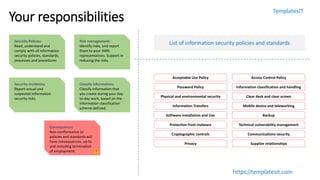
Your responsibilities
Security Polices:
Read, understand and
comply with all information
security policies, standards,
processes and procedures
Risk management:
Identify risks, and report
them to your ISMS
representatives. Support in
reducing the risks.
Security Incidents:
Report actual and
suspected information
security risks.
Acceptable Use Policy Access Control Policy
Password Policy Information classification and handling
Physical and environmental security Clear desk and clear screen
Information Transfers Mobile device and teleworking
Software installation and Use Backup
Protection from malware Technical vulnerability management
Cryptographic controls Communications security
Privacy Supplier relationships
List of information security policies and standards
Classify Information:
Classify information that
you create during your day-
to-day work, based on the
information classification
scheme defined.
Consequence:
Non-conformance to
policies and standards will
have consequences, up to
and including termination
of employment.
TemplatesIT
https://templatesit.com
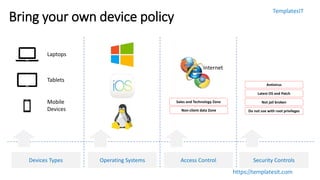
Bring your own device policy
Laptops
Tablets
Mobile
Devices
Devices Types Operating Systems Access Control Security Controls
Internet
Sales and Technology Zone
Non-client data Zone
Antivirus
Latest OS and Patch
Not jail broken
Do not use with root privileges
TemplatesIT
https://templatesit.com
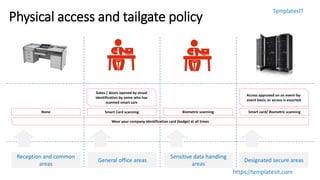
Physical access and tailgate policy
Reception and common
areas
General office areas
Sensitive data handling
areas
Designated secure areas
None Smart Card scanning
Gates / doors opened by visual
identification by some who has
scanned smart cars
Biometric scanning Smart card/ Biometric scanning
Access approved on an event-by-
event basis, or access is escorted
Wear your company identification card (badge) at all times
TemplatesIT
https://templatesit.com
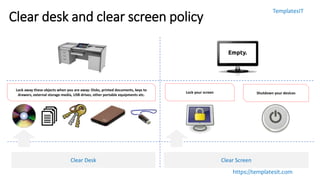
Clear desk and clear screen policy
Clear Desk Clear Screen
Lock away these objects when you are away: Disks, printed documents, keys to
drawers, external storage media, USB drives, other portable equipments etc.
Lock your screen Shutdown your devices
TemplatesIT
https://templatesit.com
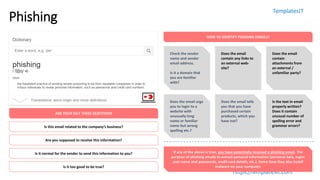
Phishing
Is this email related to the company’s business?
Are you supposed to receive this information?
Is it normal for the sender to send this information to you?
Is it too good to be true?
ASK YOUR SELF THESE QUESTIONS
HOW TO IDENTIFY PHISHING EMAILS?
Check the sender
name and sender
email address.
Is it a domain that
you are familiar
with?
Does the email
contain any links to
an external web-
site?
Does the email
contain
attachments from
an external /
unfamiliar party?
Does the email urge
you to login to a
website with
unusually long
name or familiar
name but wrong
spelling etc.?
Does the email tells
you that you have
purchased certain
products, which you
have not?
Is the text in email
properly written?
Does it contain
unusual number of
spelling error and
grammar errors?
If any of the above is true, you have potentially received a phishing email. The
purpose of phishing emails to extract personal information (personal data, logon
user name and passwords, credit card details, etc.). Some time they also install
malware on your computer.
TemplatesIT
https://templatesit.com
Malware (Viruses, Ransomware, Crypto,…)
Viruses: a piece of
malicious code that
is written to
replicate from
system to systems,
creating some
unintended ill
effects.
HOW DOES IT SPREAD?
Ransomware: A
malware that
encrypts your disk
drive, and demands
for a ransom in
return for a key that
would help
decrypting data.
Crypto-miners:
Hijacks your
computers and
servers to run
crypto-mining
programs. This will
render the
computer systems
unusable.
APT (Advanced Persistent Threats): Advanced persistent threats are designed to
perform a specific tasks. Such as create a blast or power outage, information
stealing, etc., usually be a nation state or a major threat actor.
Lures: The attackers hope to spreads the malware usually through some form of lure,
typically USB sticks, emails or internet sites.
Email: Phishing
emails are one of
the most common
medium through
which malwares are
spread.
The embedded URLs
or attachments will
carry the malware
droppers into the
environment.
Internet: You could
get infected by
merely by visiting
malicious sites
injected with
malicious code.
Sometime, an
attacker could inject
a genuine web-sites
with malicious code
resulting in infecting
all of its visitors.
Removable Media:
USB sticks are one
of the most
common media
through which
ransomware is
spread. Use of the
same media across
many computers is
the most common
reason.
Do not click on URLs or
open attachments from
untrusted sources.
Visit only trusted and
reputed sites
Avoid using USB drives
(especially those given
as a freebee or you
found it somewhere)
TemplatesIT
https://templatesit.com
Security incidents
Any violation of established information security frameworks (including information security policies, standards, processes, procedures & controls)
Use data and IT
assets in accordance
with the acceptable
use policy defined
by the organization.
Any intrusion (hack)
into the computer
systems is a security
incident, which
must be prevented.
Unauthorized access
or use: Performing
activities that are
not authorized.
Data exfiltration or
loss: Stealing data or
causing intentional
or unintentional
destruction of
information.
Computers (servers,
laptops, desktops,
network devices,
etc.) being infected
with malicious code.
Any violation of
information security
policies and
standards is an
information security
incident.
Some examples are:
Read, understand and
comply with policies at all
times.
Comply with Acceptable
Use Policies defined by the
organization.
Adversaries intruding into
the network to cause
unintended ill effects.
Install software on systems
without due change
management process.
Data sent out by people
who are in possession of it,
without authorization.
Computers infected with
virus, ransomware, crypto-
miners etc.
Report: Report any suspected and actual information
security incidents to security.incident@company.com /
[phone]
Objective: Security incident management seeks to minimize
disruptions to the organization due and restores operations as
quickly as possible.
TemplatesIT
https://templatesit.com
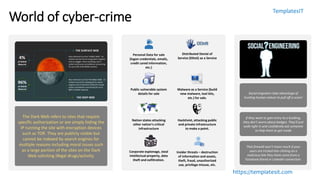
World of cyber-crime
The Dark Web refers to sites that require
specific authorization or are simply hiding the
IP running the site with encryption devices
such as TOR. They are publicly visible but
cannot be indexed by search engines for
multiple reasons including moral issues such
as a large portion of the sites on the Dark
Web soliciting illegal drugs/activity.
Distributed Denial of
Service (DDoS) as a Service
Malware as a Service (build
new malware, tool kits,
etc.) for sale.
Public vulnerable system
details for sale
Nation states attacking
other nation’s critical
infrastructure
Hacktivist, attacking public
and private infrastructure
to make a point.
Social engineers take advantage of
trusting human nature to pull off a scam!
If they want to gain entry to a building,
they don't worry about badges. They'll just
walk right in and confidently ask someone
to help them to get inside
That firewall won't mean much if your
users are tricked into clicking on a
malicious link they think came from a
Facebook friend or LinkedIn connection.
Personal Data for sale
(logon credentials, emails,
credit cared information,
etc.)
Corporate espionage, steal
intellectual property, data
theft and exfiltration.
Insider threats – destruction
of information and assets,
theft, fraud, unauthorized
use, privilege misuse, etc.
TemplatesIT
https://templatesit.com
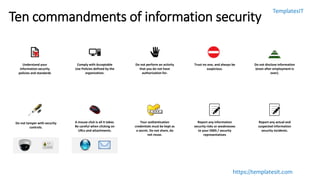
Ten commandments of information security
Understand your
information security
policies and standards
Comply with Acceptable
Use Policies defined by the
organization.
Do not perform an activity
that you do not have
authorization for.
Trust no one, and always be
suspicious.
Do not disclose information
(even after employment is
over).
A mouse click is all it takes.
Be careful when clicking on
URLs and attachments.
Your authentication
credentials must be kept as
a secret. Do not share, do
not reuse.
Do not tamper with security
controls.
Report any information
security risks or weaknesses
to your ISMS / security
representatives
Report any actual and
suspected information
security incidents.
TemplatesIT
https://templatesit.com
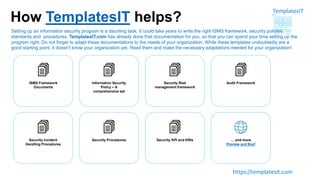
How TemplatesIT helps?
ISMS Framework
Documents
Information Security
Policy – A
comprehensive set
Security Risk
management framework
Audit Framework
Security Incident
Handling Procedures
Security Procedures Security KPI and KRIs … and more
Preview and Buy!
Setting up an information security program is a daunting task. It could take years to write the right ISMS framework, security policies,
standards and procedures. TemplatesIT.com has already done that documentation for you, so that you can spend your time setting up the
program right. Do not forget to adapt these documentations to the needs of your organization. While these templates undoubtedly are a
good starting point, it doesn't know your organization yet. Read them and make the necessary adaptations needed for your organization!

information security awareness course

  • 1.
    TemplatesIT https://templatesit.com Information Security Awareness Session • Information security– an introduction • Information classification and handling • Your responsibilities towards information security • Company BYOD policy • Physical security and tailgating policy • Clear desk and clear screen policy • Phishing and how to prevent them • Malwares and how to prevent them • Security incidents and reporting • World of cyber criminals • Ten commandments of information security v1.0 Last updated on DD-MM-YY
  • 2.
    TemplatesIT https://templatesit.com Information security Confidentiality: Only authorizedindividuals are able to read information (based on need-to-know principle) Integrity: Information is reliable (i.e. no unauthorized alteration of information has taken place) Information Information Processing Equipments Information Processing Facilities Assets Hacks or Intrusions Malicious Codes Denial of Service Data loss or exfiltration Advanced Persistent Threats Unauthorized Access Website defacement Physical and Environmental … Threats Availability: Information is available to authorized individuals when they need it. SecurityFramework Controls Standards Policies
  • 3.
    TemplatesIT https://templatesit.com Information classification andhandling Information Public: Information that is available in public domain. Internal Use: Information that is meant for internal distribution. Confidential: Information that is meant for limited distribution. Strictly Confidential: Information that is meant for limited distribution, but higher level of protection required. No protection requirements. Internal company distribution Distribution limited to specific individuals Approval from data owner for internal and external distributions Receiver signs non-disclosure agreements Encryption on storage and distribution Digital rights management Information Protection Requirements Approval from data owner for external distribution Increasing data sensitivity
  • 4.
    TemplatesIT https://templatesit.com Your responsibilities Security Polices: Read,understand and comply with all information security policies, standards, processes and procedures Risk management: Identify risks, and report them to your ISMS representatives. Support in reducing the risks. Security Incidents: Report actual and suspected information security risks. Acceptable Use Policy Access Control Policy Password Policy Information classification and handling Physical and environmental security Clear desk and clear screen Information Transfers Mobile device and teleworking Software installation and Use Backup Protection from malware Technical vulnerability management Cryptographic controls Communications security Privacy Supplier relationships List of information security policies and standards Classify Information: Classify information that you create during your day- to-day work, based on the information classification scheme defined. Consequence: Non-conformance to policies and standards will have consequences, up to and including termination of employment.
  • 5.
    TemplatesIT https://templatesit.com Bring your owndevice policy Laptops Tablets Mobile Devices Devices Types Operating Systems Access Control Security Controls Internet Sales and Technology Zone Non-client data Zone Antivirus Latest OS and Patch Not jail broken Do not use with root privileges
  • 6.
    TemplatesIT https://templatesit.com Physical access andtailgate policy Reception and common areas General office areas Sensitive data handling areas Designated secure areas None Smart Card scanning Gates / doors opened by visual identification by some who has scanned smart cars Biometric scanning Smart card/ Biometric scanning Access approved on an event-by- event basis, or access is escorted Wear your company identification card (badge) at all times
  • 7.
    TemplatesIT https://templatesit.com Clear desk andclear screen policy Clear Desk Clear Screen Lock away these objects when you are away: Disks, printed documents, keys to drawers, external storage media, USB drives, other portable equipments etc. Lock your screen Shutdown your devices
  • 8.
    TemplatesIT https://templatesit.com Phishing Is this emailrelated to the company’s business? Are you supposed to receive this information? Is it normal for the sender to send this information to you? Is it too good to be true? ASK YOUR SELF THESE QUESTIONS HOW TO IDENTIFY PHISHING EMAILS? Check the sender name and sender email address. Is it a domain that you are familiar with? Does the email contain any links to an external web- site? Does the email contain attachments from an external / unfamiliar party? Does the email urge you to login to a website with unusually long name or familiar name but wrong spelling etc.? Does the email tells you that you have purchased certain products, which you have not? Is the text in email properly written? Does it contain unusual number of spelling error and grammar errors? If any of the above is true, you have potentially received a phishing email. The purpose of phishing emails to extract personal information (personal data, logon user name and passwords, credit card details, etc.). Some time they also install malware on your computer.
  • 9.
    TemplatesIT https://templatesit.com Malware (Viruses, Ransomware,Crypto,…) Viruses: a piece of malicious code that is written to replicate from system to systems, creating some unintended ill effects. HOW DOES IT SPREAD? Ransomware: A malware that encrypts your disk drive, and demands for a ransom in return for a key that would help decrypting data. Crypto-miners: Hijacks your computers and servers to run crypto-mining programs. This will render the computer systems unusable. APT (Advanced Persistent Threats): Advanced persistent threats are designed to perform a specific tasks. Such as create a blast or power outage, information stealing, etc., usually be a nation state or a major threat actor. Lures: The attackers hope to spreads the malware usually through some form of lure, typically USB sticks, emails or internet sites. Email: Phishing emails are one of the most common medium through which malwares are spread. The embedded URLs or attachments will carry the malware droppers into the environment. Internet: You could get infected by merely by visiting malicious sites injected with malicious code. Sometime, an attacker could inject a genuine web-sites with malicious code resulting in infecting all of its visitors. Removable Media: USB sticks are one of the most common media through which ransomware is spread. Use of the same media across many computers is the most common reason. Do not click on URLs or open attachments from untrusted sources. Visit only trusted and reputed sites Avoid using USB drives (especially those given as a freebee or you found it somewhere)
  • 10.
    TemplatesIT https://templatesit.com Security incidents Any violationof established information security frameworks (including information security policies, standards, processes, procedures & controls) Use data and IT assets in accordance with the acceptable use policy defined by the organization. Any intrusion (hack) into the computer systems is a security incident, which must be prevented. Unauthorized access or use: Performing activities that are not authorized. Data exfiltration or loss: Stealing data or causing intentional or unintentional destruction of information. Computers (servers, laptops, desktops, network devices, etc.) being infected with malicious code. Any violation of information security policies and standards is an information security incident. Some examples are: Read, understand and comply with policies at all times. Comply with Acceptable Use Policies defined by the organization. Adversaries intruding into the network to cause unintended ill effects. Install software on systems without due change management process. Data sent out by people who are in possession of it, without authorization. Computers infected with virus, ransomware, crypto- miners etc. Report: Report any suspected and actual information security incidents to security.incident@company.com / [phone] Objective: Security incident management seeks to minimize disruptions to the organization due and restores operations as quickly as possible.
  • 11.
    TemplatesIT https://templatesit.com World of cyber-crime TheDark Web refers to sites that require specific authorization or are simply hiding the IP running the site with encryption devices such as TOR. They are publicly visible but cannot be indexed by search engines for multiple reasons including moral issues such as a large portion of the sites on the Dark Web soliciting illegal drugs/activity. Distributed Denial of Service (DDoS) as a Service Malware as a Service (build new malware, tool kits, etc.) for sale. Public vulnerable system details for sale Nation states attacking other nation’s critical infrastructure Hacktivist, attacking public and private infrastructure to make a point. Social engineers take advantage of trusting human nature to pull off a scam! If they want to gain entry to a building, they don't worry about badges. They'll just walk right in and confidently ask someone to help them to get inside That firewall won't mean much if your users are tricked into clicking on a malicious link they think came from a Facebook friend or LinkedIn connection. Personal Data for sale (logon credentials, emails, credit cared information, etc.) Corporate espionage, steal intellectual property, data theft and exfiltration. Insider threats – destruction of information and assets, theft, fraud, unauthorized use, privilege misuse, etc.
  • 12.
    TemplatesIT https://templatesit.com Ten commandments ofinformation security Understand your information security policies and standards Comply with Acceptable Use Policies defined by the organization. Do not perform an activity that you do not have authorization for. Trust no one, and always be suspicious. Do not disclose information (even after employment is over). A mouse click is all it takes. Be careful when clicking on URLs and attachments. Your authentication credentials must be kept as a secret. Do not share, do not reuse. Do not tamper with security controls. Report any information security risks or weaknesses to your ISMS / security representatives Report any actual and suspected information security incidents.
  • 13.
    TemplatesIT https://templatesit.com How TemplatesIT helps? ISMSFramework Documents Information Security Policy – A comprehensive set Security Risk management framework Audit Framework Security Incident Handling Procedures Security Procedures Security KPI and KRIs … and more Preview and Buy! Setting up an information security program is a daunting task. It could take years to write the right ISMS framework, security policies, standards and procedures. TemplatesIT.com has already done that documentation for you, so that you can spend your time setting up the program right. Do not forget to adapt these documentations to the needs of your organization. While these templates undoubtedly are a good starting point, it doesn't know your organization yet. Read them and make the necessary adaptations needed for your organization!

Editor's Notes

  • #3 Information Security is a discipline that protects the confidentiality, integrity and availability of information, information processing equipments (including endpoint devices, servers, network equipments, storage devices, etc.) and information processing facilities (such as office locations where information is read by or altered by, or data centers where information is hosted or processed).